Overview

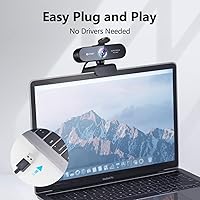
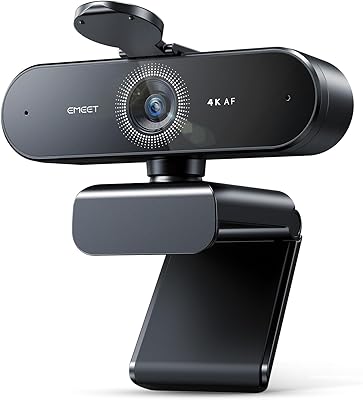
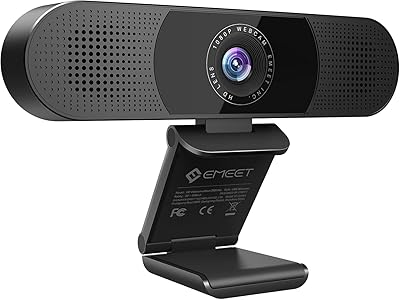
The EMEET Nova 1080p Autofocus Webcam with Microphone entered the market in late 2020 and has quietly built a reputation as a dependable mid-range option for remote workers, educators, and casual streamers. It sits at a price point where you're not paying for a professional broadcast setup, but you're also not settling for a grainy, tinny laptop camera experience. The Nova webcam clips onto any monitor or folds flat for tripod use, and its plug-and-play USB connection works across Windows, macOS, Linux, and even Android TV — no driver downloads required. Nearly 3,000 ratings and a top-20 webcam ranking suggest it has earned its place in a crowded category.
Features & Benefits

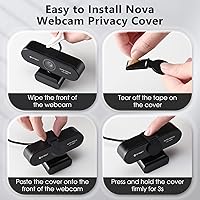
The autofocus lens covers a wide 96° field of view, which means you can shift in your chair or gesture freely without the image hunting awkwardly for focus. That's more useful than it sounds during long calls. The camera also reads your room's lighting automatically and adjusts white balance on the fly — a genuine help if your home office light is inconsistent. The two built-in microphones use noise-canceling technology to cut down background hum and pick up your voice more cleanly than a typical laptop mic. A detachable privacy cover ships in the box, and the base includes a tripod screw thread for anyone who wants a more flexible mounting setup.

Best For

This eMeet camera is a practical fit for people who spend hours on video calls and want something more reliable than a built-in webcam without overspending. Teachers running online lessons benefit most from the wide framing — fitting a whiteboard or an entire small group into the shot without awkward cropping. Streamers upgrading from a laptop camera will notice the image improvement, though anyone expecting broadcast-grade output should look at a higher tier. It's also compact enough to toss in a travel bag, making it a solid pick for professionals who move between offices or work from hotels. Dim home offices are where this camera earns its keep most visibly.

User Feedback

Buyers who leave positive notes tend to highlight two things: how quickly the Nova webcam is up and running after plugging it in, and how responsive the focus is compared to older fixed-focus cameras they have used. The 4.4-star average across nearly 3,000 reviews reflects that most people feel they got solid value. That said, a recurring complaint involves the microphone setup — switching the default audio input to this camera is not automatic, and buyers who skip that step end up frustrated when their computer keeps using the built-in mic instead. A few reviewers also note that the plastic housing feels lightweight to the point of cheap, and that truly dark rooms still challenge the auto-correction enough to show it.

Pros

  • Autofocus keeps the image sharp even when you shift or gesture during calls.
  • The 96° wide-angle view fits more of your space into frame without distortion.
  • Plug-and-play USB setup works immediately across Windows, macOS, Linux, and Android TV.
  • Automatic low-light correction is a real help in dim or unevenly lit home offices.
  • Dual noise-canceling mics pick up voice more cleanly than most built-in laptop microphones.
  • The detachable privacy cover provides physical reassurance when the camera is not in use.
  • Lightweight and compact enough to slip into a laptop bag for travel or commuting.
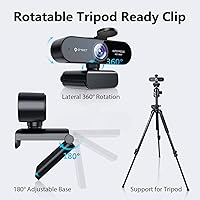
  • The 180° foldable clip fits flat monitors, curved screens, and standard tripod mounts.
  • Nearly 3,000 buyer ratings and a top-20 webcam ranking reflect consistent real-world satisfaction.
  • No driver installation required means setup takes under a minute on most devices.

Cons

  • The microphone does not set itself as the default audio device automatically, which regularly catches buyers off guard.
  • In genuinely dark rooms, the auto low-light correction softens the image noticeably rather than fixing the problem.
  • The plastic housing feels lightweight in a way that reads as fragile rather than portable to some buyers.
  • 30 FPS output is adequate for calls but will disappoint anyone doing fast-motion content or gaming streams.
  • Lens quality hits a visible ceiling compared to glass-lens cameras in its price range.
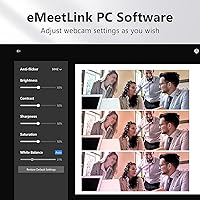
  • No companion software means there are no manual controls for exposure, saturation, or zoom.
  • The clip grip can feel less secure on thicker or unusually shaped monitor bezels.
  • Audio quality, while better than built-in laptop mics, is not a substitute for a dedicated external microphone.

Ratings

The scores below for the EMEET Nova 1080p Autofocus Webcam with Microphone were produced by our AI rating engine after analyzing thousands of verified global buyer reviews, with spam, bot-generated feedback, and incentivized posts actively filtered out. Every category reflects the full picture — what real users praised in daily use and where they ran into genuine frustrations. Nothing is glossed over.
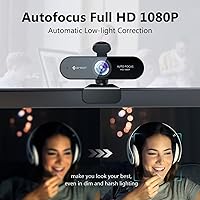
Image Quality
78%
22%
For everyday video calls and online teaching, the Nova webcam delivers a clean, sharp 1080p image that holds up well in normally lit rooms. Buyers regularly note it is a meaningful step up from any built-in laptop camera, with accurate colors and minimal motion blur during natural head movement.
Users doing side-by-side comparisons with glass-lens competitors in the same price range often find the plastic lens construction limits fine detail, especially in high-contrast scenes. It is a capable image, but not a standout one once you look critically.
Autofocus Performance
82%
18%
The continuous autofocus is one of the most consistently praised aspects of this eMeet camera. Buyers who move around during calls — reaching for notes, gesturing, or leaning back — appreciate that the image stays sharp without any hunting or jarring refocus jumps.
In very low light, the autofocus slows noticeably and can momentarily lose its lock before correcting. A small number of users also report occasional softness when the subject moves quickly across the frame, though this rarely comes up in standard desk use.
Low-Light Performance
67%
33%
The automatic low-light correction genuinely helps in typical dim home office conditions — a single desk lamp, cloudy window light, or a poorly lit apartment room. Buyers working evenings or in basement offices report it keeps them presentable on calls without needing a ring light.
In genuinely dark environments the correction reaches its ceiling quickly, producing a soft, slightly grainy image that no amount of automatic adjustment can fully fix. Users expecting it to compensate for near-darkness will be disappointed — it manages dim, not dark.
Microphone Quality
71%
29%
Buyers who previously relied on their laptop's built-in microphone consistently describe the dual-mic pickup as a noticeable upgrade — voices come through cleaner, and background noise like fans or keyboard clatter is softened rather than amplified. For daily calls it performs well above its price.
The microphones are not a replacement for a dedicated external mic, and users doing any kind of recording or podcasting will feel their limits quickly. The bigger frustration, reported repeatedly, is that the camera does not set itself as the default audio input — users must do this manually in system settings or the mics simply do not activate.
Ease of Setup
93%
Plug-and-play truly describes the experience here — connect the USB cable and the camera is recognized and ready within seconds on Windows, macOS, and Linux alike. Buyers who are not technically confident particularly appreciate that no driver downloads, software installations, or restart prompts are involved.
The one recurring setup snag is the microphone default input issue, which is not obvious from the packaging or any included documentation. New users frequently spend time troubleshooting audio before discovering the manual settings change required, which undercuts an otherwise frictionless first experience.
Build Quality
61%
39%
The Nova is compact and light, which most buyers read as a practical design choice for travel and portability. The foldable clip feels solid enough for everyday monitor mounting, and the privacy cover snaps on and off without any wobble or play.
The plastic body is a recurring complaint among buyers who handle it regularly — it feels inexpensive in a way that makes some users uncertain about long-term durability. A few reviews mention the clip losing tension after several months of repeated folding and unfolding.
Field of View
84%
The 96° wide-angle framing is a genuine practical advantage for teachers who want to show a whiteboard or workspace alongside themselves, and for small team huddles where more than one person needs to be in frame. It captures a natural, open view without an overly fisheye look.
For solo users doing standard video calls, the wide field of view can include more background than desired, requiring some thought about room setup or virtual backgrounds. There is no software zoom control included, so narrowing the frame is not straightforward.
Compatibility
88%
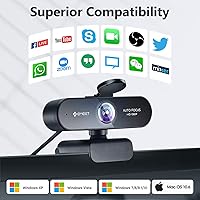
Across the thousands of reviews analyzed, compatibility complaints are rare. The Nova works reliably with Zoom, Google Meet, Teams, Skype, and OBS without any extra configuration, and its support for Android TV and Linux puts it ahead of many competitors in the same category.
A small number of macOS users on older supported versions report occasional recognition delays after waking the computer from sleep, requiring an unplug and replug to restore the feed. This is an edge case rather than a widespread issue, but worth noting.
Mounting Versatility
79%
21%
The combination of a foldable clip and a tripod screw thread gives this eMeet camera more placement options than most webcams at this price. Buyers with standing desks, unusual monitor setups, or a need to position the camera off to the side find the tripod mount especially useful.
The clip grip can feel insecure on very thin ultrabook lids, where the hinge tension is not quite enough to hold the camera firmly without minor wobble. Buyers with thicker or curved monitor bezels occasionally report fit issues as well.
Privacy Features
81%
19%
The included detachable privacy cover is a thoughtful addition that buyers who use the camera in shared spaces or leave it permanently mounted genuinely appreciate. It provides physical assurance that the lens is blocked, which no software setting can match.
The cover is easy to misplace since it is a separate loose piece rather than a sliding integrated shutter. Several buyers report losing it within the first few weeks and wishing the design used an attached mechanism instead.
Value for Money
83%
For the price tier it occupies, the Nova delivers a well-rounded feature set — autofocus, wide-angle lens, dual mics, and automatic low-light correction — that would require separate purchases to replicate otherwise. Buyers upgrading from laptop cameras consistently describe it as money well spent.
Buyers who stretch their budget to buy this camera and then compare it to slightly pricier competitors with glass lenses and better low-light sensors sometimes feel the value proposition is thinner than expected. It is strong value within its tier, but the tier itself has real ceiling limits.
Portability
87%
At just over five ounces and small enough to fit in a laptop bag side pocket, the Nova is one of the easier webcams to carry between locations. Remote workers who move between a home office and co-working spaces mention it as a reason they chose this camera specifically.
The foldable clip adds a small amount of bulk compared to simpler fixed-clip designs, and without a carry pouch or case included, the exposed lens and privacy cover can get scratched or lost in transit without a little extra care.
Software & Controls
44%
56%
The absence of required driver software is a genuine convenience during initial setup, and the camera's automatic adjustments handle most everyday scenarios without any manual intervention needed from the user.
There is no companion app and no manual controls for exposure, saturation, zoom, or white balance, which frustrates users who want to fine-tune the image for their specific environment. Compared to competitors that offer dedicated software, the Nova feels limited for anyone who wants even basic customization.
Audio-Video Sync
76%
24%
Under normal operating conditions on a modern computer, audio and video stay synchronized reliably across the major conferencing platforms. Buyers using it for recorded teaching sessions or streaming report no noticeable drift during typical session lengths.
On older machines or systems with limited USB bandwidth, a handful of users report occasional sync drift during extended sessions, particularly when other USB devices are connected simultaneously. This is not a widespread issue, but it does surface in reviews from users with aging hardware.

Suitable for:

The EMEET Nova 1080p Autofocus Webcam with Microphone is a strong fit for remote professionals who need a reliable, no-fuss upgrade from a built-in laptop camera without spending a lot. Teachers and online tutors will appreciate the wide field of view, which can frame a workspace, whiteboard, or small group without needing to step back or reposition constantly. Home office workers dealing with inconsistent or dim room lighting will find the automatic low-light correction genuinely useful on a day-to-day basis. Casual streamers who want cleaner video and better audio than their laptop provides — but are not ready to invest in a dedicated microphone and high-end camera separately — get reasonable value from this eMeet camera as an all-in-one solution. Frequent travelers will also find it worth keeping in a bag, since the compact form factor and plug-and-play USB setup mean it works just as well from a hotel room or co-working space as it does from home.
Not suitable for:

The EMEET Nova 1080p Autofocus Webcam with Microphone is not the right tool for anyone expecting professional-grade image or audio output. Content creators who stream regularly to an audience, record YouTube videos, or work in environments where image quality is part of their brand will quickly hit the ceiling of what this camera can deliver. The 30 FPS cap and plastic lens construction are workable for calls, but they show their limits in fast-motion or highly detailed shots. Users who need truly clean audio for podcasting or voice recording should invest in a dedicated USB microphone rather than relying on the built-in mics here, which are a practical step up from laptop audio but not a replacement for standalone recording equipment. Anyone working in a very dark room should also be realistic — the auto low-light correction helps in dim conditions, but it cannot compensate for a genuinely unlit space, and the image will soften noticeably as a result.
Specifications

  • Resolution: Captures video at 1080p Full HD, delivering clear and detailed image quality suitable for video calls and casual streaming.
  • Frame Rate: Records and streams at 30 frames per second, which is standard for smooth video conferencing and online teaching.
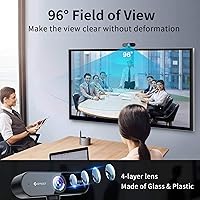
  • Field of View: A 96° wide-angle lens captures a broad scene, fitting more of your space into frame without significant edge distortion.
  • Focus Type: Continuous autofocus adjusts automatically as you move, keeping the subject sharp without any manual intervention.
  • Aperture: The f/1.8 maximum aperture allows more light into the sensor, supporting the camera's automatic low-light correction feature.
  • Sensor: Uses a CMOS image sensor, which is the standard technology in this webcam category for balancing image quality and cost.
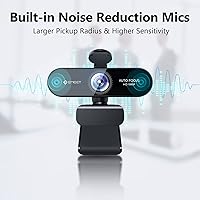
  • Microphones: Two built-in omnidirectional noise-canceling microphones are positioned to capture voice from a wider angle while reducing ambient background noise.
  • Audio Format: Supports PCM and AAC audio formats, ensuring compatibility with the most common video conferencing and recording applications.
  • Video Format: Outputs video in ASF format, which is compatible with Windows-based recording and conferencing software.
  • Connectivity: Connects via USB 2.0 and requires no driver installation, functioning as a plug-and-play device on supported operating systems.
  • OS Compatibility: Works with Windows 7, 10, and 11; macOS 10.14 and above; Android TV 7.0 and above; and most Linux distributions.
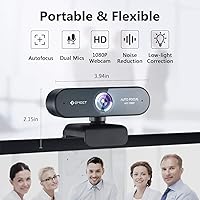
  • Dimensions: Measures 2.56 x 3.94 x 2.2 inches, making it compact enough to sit unobtrusively on top of a monitor or pack into a laptop bag.
  • Weight: Weighs 5.1 oz, which is light enough for travel but may contribute to a sense of lightweight construction in the plastic housing.
  • Mounting Clip: The 180° foldable clip accommodates a wide range of monitor thicknesses and screen types, from standard flat panels to slightly curved displays.
  • Tripod Mount: A standard screw thread on the base allows direct attachment to most consumer and professional tripods for flexible desk or standing setups.
  • Privacy Cover: A detachable physical privacy cover is included in the box, blocking the lens completely when the camera is not in use.
  • Lens Construction: Built with one layer of anti-glare glass and four layers of plastic lens elements to reduce reflections and improve image sharpness.
  • Low-Light Correction: Automatic white balance and low-light correction adjust exposure and color temperature in real time without requiring manual settings changes.

Related Reviews

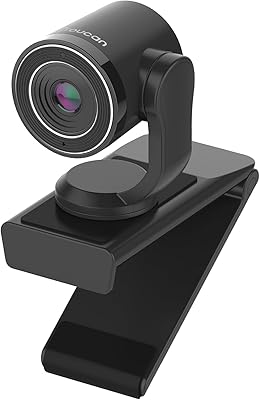
TOUCAN 1080P Webcam with Microphone
88%
89%
Video Quality
91%
Microphone Performance
95%
Ease of Use
88%
Field of View
93%
Privacy Protection
More
Hrayzan WN5 1080p USB Webcam
77%
88%
Value for Money
74%
Image Quality
51%
Low-Light Performance
93%
Ease of Setup
63%
Microphone Quality
More
EMEET Nova 4K Webcam
77%
83%
Video Clarity
78%
Autofocus Performance
69%
Microphone Quality
76%
Low-Light & Auto Exposure
86%
Build Quality & Design
More
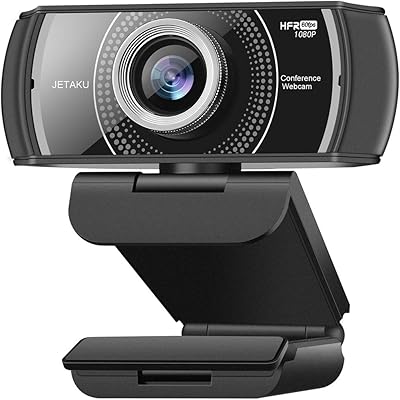
JETAKu XZC-920phro Webcam 1080P 60FPS
71%
83%
Video Smoothness at 60fps
71%
Image Clarity & Resolution
54%
Low-Light Performance
58%
Autofocus Reliability
66%
Microphone Quality
More
Samcorn A36 1080p Webcam
79%
83%
Video Clarity
71%
Autofocus Performance
68%
Low-Light Handling
62%
Microphone Quality
94%
Ease of Setup
More
EMEET C980 PRO
EMEET C980 PRO
83%
84%
Video Clarity (1080p)
89%
Audio Output Quality
78%
Microphone Performance
92%
Build & Physical Security
71%
Low-Light Correction
More
ToLuLu Webcam with Ring Light
76%
88%
Value for Money
83%
Ring Light Performance
72%
Image Quality
93%
Ease of Setup
61%
Microphone Quality
More
Oivom JL02-1080 Webcam
84%
84%
Video Clarity
68%
Audio Output Quality
76%
Microphone Performance
91%
Field of View
94%
Setup Simplicity
More
LITEPRO C70 1080P HD Webcam
75%
78%
Video Quality
71%
Low-Light Performance
58%
Microphone Quality
94%
Ease of Setup
88%
Privacy Cover
More
JIGA S6 1080P Webcam
73%
84%
Built-in Ring Light
69%
Video Clarity
72%
Low-Light Performance
54%
Microphone Quality
91%
Setup & Ease of Use
More

FAQ

No, the Nova webcam is fully plug-and-play. Just connect it to your computer via USB and your operating system will recognize it automatically. You can be on a call in under a minute without downloading anything.

This is the most common setup issue with this eMeet camera. Your computer will not automatically switch its default audio input to the webcam's microphone — you need to go into your system's sound settings and manually select it as the active input device. Once you do that, it works reliably.

Yes, it is compatible with macOS 10.14 (Mojave) and any newer version. The same plug-and-play rule applies — no drivers needed. Just note that you will still need to manually set the microphone as your default input in System Settings if you want to use it for audio.

It handles normal movement well — shifting in your chair, leaning forward, gesturing — without the image hunting or going blurry mid-conversation. It is not instant like a high-end mirrorless camera, but it is fast enough that most people on the other end will not notice any lag.

The EMEET Nova 1080p Autofocus Webcam with Microphone has automatic low-light correction that does genuinely help in dim conditions, like a room lit only by a desk lamp or indirect daylight. That said, it has real limits — if your room is very dark, the image will soften and lose detail. It is not a substitute for decent ambient lighting, but it handles typical home office conditions reasonably well.
Yes, there is a standard screw thread on the bottom of the camera body, so it attaches directly to any consumer or professional tripod. This is handy if you want to position the camera off to the side, at a different height, or in front of a standing desk.

It is fully detachable. You can slide or snap it off when you need to use the camera and put it back when you are done. Some people remove it entirely and keep it in a drawer; others use it every time they step away from their desk.

Yes, the Nova works with all the major video conferencing platforms — Zoom, Google Meet, Microsoft Teams, Skype, and others. Since it is recognized as a standard USB webcam, any application that supports a camera will detect it without any extra configuration.

It is a noticeable step up from most built-in laptop microphones. The dual mics pick up your voice more cleanly and handle ambient noise better than a single integrated mic buried in a keyboard bezel. For everyday calls, most people on the receiving end will hear the difference. That said, if you are recording a podcast or doing voice-over work, you would want a dedicated external microphone instead.

The 180° foldable clip handles most standard and thin monitor edges without issues. Very thin laptop lids — common on ultrabooks — can feel a bit less secure since there is less surface to grip. A few buyers have noted it feels slightly loose on the thinnest displays, though it generally stays in place during normal desk use. If stability is a concern, the tripod mount option is a more reliable alternative.