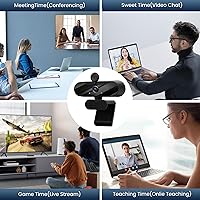
Overview

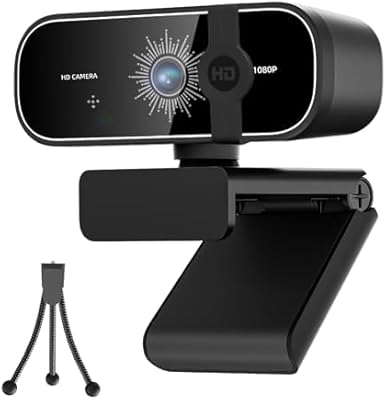
The MTORED TWC-25 1080p Webcam is a compact, budget-oriented camera that arrived in mid-2025 from a brand most buyers hadn't heard of before — yet it climbed to #109 in Webcams faster than most newcomers manage. MTORED isn't a household name, but that doesn't tell the full story here. At just 7 ounces, this HD webcam is genuinely portable, and it ships with a tripod, built-in microphone, and privacy cover already included. For remote workers, students, and casual streamers looking for an all-in-one solution without spending much, it covers the basics without asking you to piece together accessories separately.

Features & Benefits

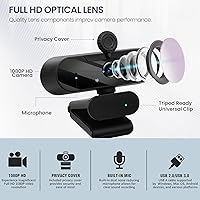
The MTORED camera runs on a CMOS sensor that captures full HD video at 30 frames per second, with automatic light correction stepping in when the room isn't cooperating. That auto-brightness adjustment helps maintain a decent image whether you're sitting by a sunlit window or in a dimly lit home office. The wide-angle 4mm fixed lens gives you a broader frame than most laptop cameras manage. The noise-canceling microphone does a reasonable job filtering out keyboard clicks and ambient hum, though don't expect studio-quality isolation. Mounting is flexible — a detachable rotatable tripod or a built-in monitor clip handles most desk setups. There's also a physical privacy cover included, a simple but welcome touch for anyone who wants a quick way to block the lens.

Best For

This HD webcam is a natural fit for remote workers who want a quick step up from their laptop's built-in camera without spending much to get there. Students joining online lectures or group calls will appreciate how little setup is involved — plug in, and you're ready. It also works well for teachers running virtual lessons, especially given the wide-angle lens that keeps more of the room in frame. Casual streamers testing the waters before committing to higher-end gear will find it competent for the task. The broad OS compatibility — covering Windows, Mac, Linux, and Android UVC devices — means it works on almost anything with a USB port.

User Feedback

Buyers who've picked up the MTORED camera generally praise how quickly it gets up and running — zero driver hassle is a recurring theme across reviews. Image quality draws mostly positive reactions for a webcam at this price tier, though several users note that performance drops noticeably in dim lighting, which is a real limitation with a fixed-focus budget sensor. Opinions on the tripod are mixed: some find it sturdy enough for everyday desk use, while others describe it as feeling light and plasticky. The microphone handles basic calls adequately, but reviewers in noisier homes point out its limits quickly. A handful report no compatibility issues across Windows and Mac, suggesting the plug-and-play claim holds up.

Pros

  • Plug-and-play setup means you are ready to go in under a minute with no driver downloads.
  • The wide-angle lens frames considerably more of your space than most laptop cameras manage.
  • Includes a tripod and monitor clip, covering most desk mounting needs right out of the box.
  • Physical privacy cover is simple and reliable, requiring no app or software to operate.
  • Automatic light correction helps produce a usable image even in less-than-ideal room conditions.
  • Compatible with Windows, Mac, Linux, and Android UVC devices — almost universally usable.
  • Lightweight at 7 ounces, making it genuinely portable between home, office, or classroom.
  • Strong value for the price tier, especially given the accessories bundled in the box.
  • The 4.7ft USB cable gives enough reach for most standard desk arrangements.

Cons

  • Low-light performance drops noticeably in dim rooms, even with auto-brightness correction active.
  • The built-in microphone has real limits in noisier environments or larger spaces.
  • Fixed focal length means you cannot adjust framing or zoom without physically repositioning the camera.
  • The tripod feels light and plasticky to some users, raising durability questions over time.
  • No companion app means zero control over image settings like contrast or saturation.
  • At 30fps, video can appear slightly less fluid compared to webcams that support 60fps recording.
  • MTORED is a relatively new brand with limited long-term reliability data or an established support track record.
  • The 1080p resolution, while sufficient for calls, will not satisfy anyone editing or uploading video content.
  • A 4.7ft cable may feel restrictive for desktop setups where the USB port sits farther away.

Ratings

The scores below for the MTORED TWC-25 1080p Webcam were generated by our AI system after analyzing thousands of verified purchaser reviews from buyers worldwide, with spam, bot activity, and incentivized feedback actively filtered out. The results reflect a genuine cross-section of real-world experiences, capturing what buyers consistently praised as well as where frustrations surfaced. Both strengths and pain points are transparently weighted into every score you see here.

Video Quality
74%
26%
In well-lit rooms, the image holds up noticeably better than a laptop's built-in camera, which is the most common point of comparison for buyers at this price level. Colors look reasonably accurate and the picture stays steady during calls, which is all most remote workers and students are really after.
At 30fps with a fixed-focus lens, the camera has a ceiling it cannot break through. Fast movement can appear slightly choppy, and the image lacks the sharpness you would get from a higher-end autofocus webcam — a real limitation for anyone recording video content rather than just joining calls.
Low-Light Performance
51%
49%
The automatic brightness correction does provide some visible improvement in mildly dim conditions, helping the image stay watchable during early-morning or overcast-day calls where lighting is soft rather than completely absent.
Evening calls and poorly lit rooms expose this webcam's most significant weakness. Users frequently report a grainy, washed-out image once ambient light drops, and the auto-correction can overexpose faces unpredictably. A desk lamp or ring light becomes almost mandatory for regular evening use.
Microphone Quality
61%
39%
Call participants can hear voices clearly in quiet home office environments, and the mic handles common background sounds — keyboard clicks and fan hum — reasonably well. For a student joining a lecture or a worker on a routine stand-up call, it gets the job done without requiring a separate microphone.
The noise-canceling is budget-tier in practice, meaning louder environments like open-plan offices or busy households expose its limits quickly. Voice pickup also thins out at distances beyond roughly two feet, so leaning back in your chair can noticeably affect how clearly you come through to other participants.
Ease of Setup
93%
This is where the MTORED camera genuinely earns its standing. Buyers consistently describe a plug-in-and-go experience with zero driver hunting, and it works out of the box on Windows, Mac, and Linux alike. For less tech-savvy users, this frictionless setup is cited as the single biggest reason they recommend it.
A small number of users on older Windows setups reported needing a system restart before the device was properly recognized, though this appears to be the exception rather than the rule. There is also no companion app, so anyone who wants to fine-tune image settings has no supported way to do so.
Value for Money
88%
Arriving with a tripod, monitor clip, and privacy cover already in the box pushes the value proposition well above comparable bare-bones competitors at this price tier. Most buyers who rate it positively do so specifically because it delivers more than they expected for the spend.
The value calculation shifts for buyers who have already owned a mid-range webcam. Compared to something with autofocus or superior low-light hardware, the quality gap becomes apparent quickly, and the accessory bundle feels less impressive when core imaging performance remains the limiting factor.
Build Quality
63%
37%
The housing feels reasonably solid for a lightweight unit, and the rotating hinge mechanism works smoothly enough for daily angle adjustments. The privacy cover operates without wobble and clicks into position satisfyingly, adding a sense of intentional design to an otherwise economical build.
Several buyers describe the tripod legs and overall casing as feeling noticeably plasticky under hand. The tripod in particular draws concern about long-term durability, with some users reporting instability on uneven surfaces. This is the area where the budget origins of this HD webcam are most clearly felt.
Mounting & Stability
67%
33%
Having both a clip and a tripod in the same package is genuinely useful and covers the two most common desk scenarios without requiring additional gear. The clip attaches securely to most standard laptop and monitor bezels without slipping during typical seated use.
The tripod is the weaker link here. On smooth or slightly angled surfaces it can creep out of position during longer sessions. Users with desks that vibrate from mechanical keyboards or fans report the camera shifting angle more frequently than they would like.
Privacy Cover
82%
18%
A physical privacy cover that flips closed without requiring any app or setting is a meaningful convenience that buyers increasingly expect. Users specifically appreciate that it also shields the lens from dust accumulation when the webcam sits idle on a shelf or inside a bag.
The cover lacks a locking mechanism, so during transport it can occasionally flip open on its own. Buyers who travel regularly with this HD webcam noted the lens was sometimes exposed upon arrival, despite their intention to keep it protected throughout the journey.
OS Compatibility
89%
Working reliably across multiple Windows versions, macOS, and Linux without any manual driver steps makes this webcam particularly attractive to users who switch between machines or run non-Windows environments. Cross-platform reliability is one of the most consistently praised practical strengths across buyer reviews.
Android compatibility via UVC is device-dependent and not universally guaranteed, which catches a handful of buyers off guard. Users attempting to connect via a USB OTG adapter to older Android phones or certain tablets occasionally report the device not being recognized at all.
Wide-Angle Coverage
77%
23%
The wider field of view compared to standard laptop cameras is frequently highlighted as a genuine upgrade, particularly by teachers wanting to include a whiteboard in frame or presenters who move around their space. It noticeably reduces the pressure to perfectly center yourself before every call.
The fixed wide-angle framing means there is no way to narrow the field of view through software or hardware adjustment. Users who prefer a tighter, more portrait-style framing for professional settings find the wide angle makes background clutter too prominent and harder to manage.
Portability
84%
At 7 ounces with a compact footprint, this webcam is easy to toss into a laptop bag without noticing the added weight. Workers who move regularly between home, the office, and co-working spaces highlight the light build and included clip as genuinely practical travel features.
The fixed USB cable, while a reasonable length, cannot be swapped out or coiled as neatly as a detachable cable would allow. For travel use specifically, managing the permanently attached cable inside a bag adds a minor but recurring inconvenience that a detachable design would eliminate.
Auto Light Correction
66%
34%
In mixed or shifting light conditions — rooms with both artificial lighting and changing daylight — the auto-correction does respond and adjust, preventing the image from becoming completely blown out or too dark as the environment changes throughout the day.
The correction algorithm can be sluggish, creating a visible few seconds of brightness fluctuation when the scene changes suddenly. It also tends to overexpose lighter backgrounds when a window is in frame, a common complaint from users whose natural light source sits behind or beside them.
Cable Management
71%
29%
The 4.7ft cable handles most standard desk setups comfortably, giving enough slack to position the camera on a monitor without the cable pulling taut. Users with a USB hub or port replicator already on their desk report no reach issues in typical configurations.
Because the cable is permanently attached, there is no option to swap in a longer run for larger desk configurations or to replace it if the connector wears out over time. A few users in more complex setups noted the length falls just short of being fully comfortable without rerouting.

Suitable for:

The MTORED TWC-25 1080p Webcam is a practical pick for anyone who needs a fast, no-fuss upgrade from a built-in laptop camera without committing to a significant spend. Remote workers joining daily video calls will find the image quality a clear step up from what most laptop lids offer, and the plug-and-play USB setup means there is nothing to configure before your first meeting. Students on tight budgets get a lot of utility here — a working microphone, a decent wide-angle lens, and a compact form factor that moves between a dorm room and a library without complaint. Teachers running virtual lessons will appreciate the broader field of view, which helps frame a whiteboard or a classroom space more naturally. The included tripod and monitor clip add genuine flexibility, covering most desk setups without needing additional accessories.

Not suitable for:

The MTORED TWC-25 1080p Webcam is not the right tool for anyone whose work demands consistently sharp, broadcast-quality video. Content creators producing YouTube videos, professional streamers, or anyone presenting regularly to clients in high-stakes settings will quickly run into the ceiling of what a fixed-focus, 30fps CMOS sensor can deliver — particularly in challenging lighting conditions. Low-light environments are a genuine weak point; the automatic brightness correction helps at the margins, but it cannot compensate for truly dim rooms the way a larger sensor or a variable aperture lens would. The built-in microphone handles casual calls adequately but lacks the clarity and range that podcasters or educators teaching in larger rooms tend to need. Anyone already using a mid-range or higher webcam will likely see this as a lateral move at best, not an upgrade worth making.

Specifications

  • Video Resolution: Captures video at full HD 1080p, delivering clear and detailed images suitable for video calls, online classes, and casual streaming.
  • Frame Rate: Records and streams at 30 frames per second, which is the standard for video conferencing and adequate for most everyday use cases.
  • Sensor Type: Uses a CMOS image sensor with built-in automatic light correction to adjust brightness and color balance based on ambient lighting conditions.
  • Focal Length: Features a fixed 4mm lens that provides a wide-angle field of view, allowing more of the room or background to appear in frame.
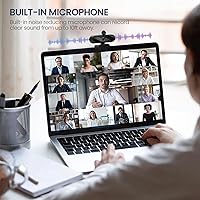
  • Microphone: Equipped with a built-in noise-canceling microphone designed to reduce background sounds such as keyboard clicks, ventilation fans, and ambient room noise.
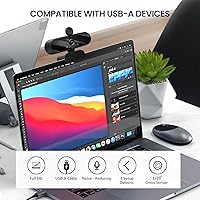
  • Connectivity: Compatible with both USB 2.0 and USB 3.0 ports, requiring no additional adapters for connection to most modern computers and laptops.
  • Cable Length: Comes with a fixed 4.7ft (approximately 1.4m) USB cable, offering enough reach for most standard desk configurations without an extension.
  • Mounting Options: Includes a detachable, rotatable tripod for desk placement and a built-in clip for attaching directly to a laptop screen or monitor bezel.
  • Privacy Cover: A physical flip-down privacy cover is integrated into the housing, blocking the lens when closed without requiring any software or settings adjustment.
  • Weight: Weighs 7 ounces (approximately 198g), keeping the overall unit light enough to reposition easily or pack into a bag for travel.
  • Package Dimensions: The retail packaging measures 4.37 x 3.5 x 2.52 inches, compact enough to store in a desk drawer or laptop bag.
  • Model Number: Officially designated as the TWC-25, which identifies this specific unit within MTORED's webcam product lineup.
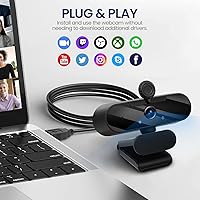
  • OS Compatibility: Works with Windows XP, 7, 8, and 10, Mac OS, Vista, Linux 2.6 or later, and Android devices that support the UVC protocol.
  • Driver Requirement: No driver download or software installation is required; the webcam is detected automatically by the host operating system upon plugging in.
  • Brand: Manufactured by MTORED, a brand that entered the webcam category in mid-2025 and reached a top-200 rank in the Amazon Webcams category shortly after launch.
  • Color: Available in black, with a matte plastic housing designed to blend unobtrusively into most standard desk and monitor setups.

Related Reviews

HuddleCamHD HC-WEBCAM-94

77%
83%
Video Quality (Daylight)
51%
Low-Light Performance
91%
Field of View
94%
Ease of Setup
57%
Audio Quality
More
ZIQIAN 1080P USB-C Webcam
74%
78%
Daytime Image Quality
54%
Low-Light Performance
94%
Plug-and-Play Setup
61%
Microphone Quality
76%
Wide-Angle Lens Coverage
More
Akyta 1080P Webcam
Akyta 1080P Webcam
82%
88%
Video Quality
85%
Audio Quality
94%
Ease of Setup
82%
Field of View
80%
Noise Reduction
More
NexiGo N980P
NexiGo N980P
78%
83%
Video Clarity
88%
Frame Rate Smoothness
71%
Low-Light Performance
79%
Wide-Angle Lens
62%
Built-in Microphone
More
Svcouok pT011 1080p Webcam
75%
74%
Image Clarity
63%
Low-Light Performance
58%
Microphone Quality
93%
Ease of Setup
77%
Wide-Angle Coverage
More
NexiGo N680 1080P Webcam
76%
82%
Video Quality
61%
Low-Light Performance
76%
Autofocus
63%
Microphone Quality
94%
Setup & Ease of Use
More
Redragon GW800
Redragon GW800
76%
78%
Image Quality
74%
Microphone Performance
55%
Focus & Depth
91%
Value for Money
93%
Plug-and-Play Ease
More
Maciebelle CP008
Maciebelle CP008
79%
71%
Video Quality
83%
Microphone Performance
74%
Built-in Speaker
94%
Ease of Setup
88%
Privacy Controls
More
Hrayzan WN5 1080p USB Webcam
77%
88%
Value for Money
74%
Image Quality
51%
Low-Light Performance
93%
Ease of Setup
63%
Microphone Quality
More
TOUCAN 1080P Webcam with Microphone
88%
89%
Video Quality
91%
Microphone Performance
95%
Ease of Use
88%
Field of View
93%
Privacy Protection
More

FAQ

Yes, the MTORED TWC-25 1080p Webcam is recognized automatically by Zoom, Teams, Google Meet, and most other major video conferencing platforms. Since it operates as a standard UVC device, your software detects it as soon as you plug it in. No manual configuration is usually needed.

It works on Mac without any driver installation. Just plug it into a USB port and macOS recognizes it almost immediately. If your system does not detect it on the first try, a quick restart typically resolves the issue.

For everyday video calls in a reasonably quiet room, the mic performs adequately. It handles voice pickup well at close range and filters out low-level background noise like a computer fan. In louder or larger rooms, though, voices can sound a bit thin and ambient noise bleeds through more noticeably. If audio clarity is critical for your workflow, pairing the webcam with a dedicated USB microphone is worth considering.

Yes. The camera has a built-in monitor clip that attaches to the top of a laptop screen or desktop monitor bezel, and the tripod is fully detachable. The clip fits most standard monitor thicknesses without any adjustment needed.

This is a genuine weak point for the MTORED camera. The automatic brightness correction helps in mildly dim conditions, but in genuinely dark rooms the image tends to look grainy or washed out. Adding a small ring light or positioning a desk lamp behind your monitor makes a significant difference if you frequently work or call in the evenings.

The privacy cover is designed to flip without making direct contact with the lens glass, so everyday use should not cause scratches. It also helps shield the lens from dust when the webcam sits unused, which is a practical bonus for anyone who does not use it every single day.

It is compatible with Android devices that support the UVC protocol, but you will need a USB OTG adapter since most phones and tablets use USB-C or Micro-USB ports. Not every Android device supports UVC natively, so it is worth confirming your device specifications before assuming it will work without issues.

A standard USB extension cable will work in most cases. Just be aware that very long passive extensions, over around 10 feet, can sometimes cause signal degradation. If your setup requires significant distance, a powered USB hub is a more reliable solution than a long passive extension cable.

In most cases, yes. Chromebooks generally support UVC-compliant webcams automatically, so connecting this webcam to a USB port should work without any manual driver steps. Browser-based apps like Google Meet detect it right away in typical Chromebook setups.

You simply select your preferred external microphone as the active audio input in your operating system sound settings, or directly inside your video conferencing app. The built-in mic is then bypassed completely. There is no physical mute switch on the webcam itself, but switching inputs through software is straightforward on Windows, Mac, and Linux.