Overview

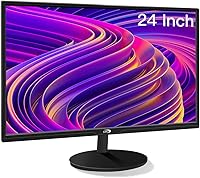
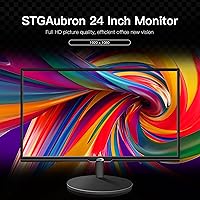
The STGAubron LCD2401 24-Inch Gaming Monitor entered the market in early 2023 as a no-nonsense option for buyers who need a solid screen without overspending. STGAubron isn't exactly a household name, but that's hardly unusual in the budget display space — and it doesn't mean quality was sacrificed. At 24 inches, this budget office monitor sits in a comfortable sweet spot: roomy enough for side-by-side windows, compact enough for tighter desks. Be clear about expectations going in, though. This is a 60Hz FHD panel, built for everyday use and casual gaming, not high-refresh-rate esports.

Features & Benefits

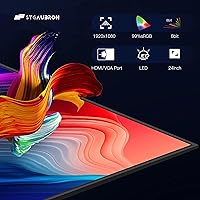
What helps the STGAubron display punch above its weight class is the 99% sRGB color gamut — a coverage level that budget panels rarely advertise, let alone deliver consistently. For hobbyist photographers or design students reviewing their work, that kind of color accuracy makes a real difference day to day. The Full HD LED panel is crisp for standard productivity, and the built-in flicker-free technology does reduce fatigue during long stretches at the desk. A 178-degree viewing angle keeps the image readable even from awkward positions. Dual HDMI and VGA inputs cover both modern and legacy devices, while 75x75mm VESA support opens up wall and arm mounting options.

Best For

This 24-inch monitor is a natural pick for students and remote workers who want a dependable screen without unnecessary complexity. It handles double-duty well — use it as a primary display or a second screen alongside a laptop — and the HDMI/VGA combination means you can connect both newer and older machines without hunting for adapters. Casual gamers who care more about solid image quality than chasing frame rates will find it a reasonable fit. VESA compatibility is worth noting for anyone eyeing an arm mount to free up desk space. One caveat worth stating upfront: the glossy panel surface can catch overhead light badly in bright rooms.

User Feedback

With a 4.2 out of 5 from over 250 buyers, the STGAubron display has earned generally positive marks — more through reliability than any single outstanding feature. Common praise centers on colors that look good right out of the box and a setup process that takes minutes, not an afternoon. The stand draws mixed reactions: functional, but nothing special. The main recurring criticisms are glossy panel glare in well-lit spaces and, predictably, the 60Hz ceiling disappointing anyone expecting smoother motion for fast-paced games. On the plus side, the lifetime tech support and one-year warranty get called out repeatedly as genuine peace of mind at this price point.

Pros

  • The 99% sRGB coverage is a genuine standout at this price tier — hobbyists doing color-sensitive work will notice the difference.
  • Out-of-box color accuracy consistently earns praise from buyers, with little to no manual calibration required.
  • Flicker-free technology makes extended work or study sessions noticeably easier on the eyes over time.
  • Dual HDMI and VGA ports let you connect both modern and older hardware without needing separate adapters.
  • VESA 75x75mm mount support gives arm or wall mount users real flexibility without any added cost.
  • A 178-degree viewing angle keeps the image consistent for shared desks and multi-person viewing situations.
  • Setup is quick and uncomplicated; most buyers report being fully up and running in under ten minutes.
  • Lifetime tech support alongside a one-year warranty adds meaningful peace of mind for a budget-tier purchase.

Cons

  • The 60Hz refresh rate makes this a non-starter for competitive gamers where smooth, high-frame-rate motion matters.
  • The glossy screen surface creates persistent glare in rooms with bright overhead lights or nearby windows.
  • No height adjustment on the stand means ergonomic positioning relies entirely on your desk height or a separate arm.
  • STGAubron is a relatively unknown brand, making long-term parts availability and service reliability harder to gauge.
  • The tilt range is narrow enough that users needing a more dramatic screen angle may find it genuinely limiting.
  • No built-in speakers are included, so external audio is a necessity rather than a convenient option.
  • The 99% sRGB figure is difficult to verify without a colorimeter, leaving some uncertainty around real-world color accuracy.

Ratings

Our scores for the STGAubron LCD2401 24-Inch Gaming Monitor were generated by AI after analyzing verified owner reviews from major global marketplaces, with active filtering applied to remove spam, bot activity, and incentivized submissions — leaving only authentic buyer experiences as the data foundation. Every category rating reflects the honest balance of what real users praised and what genuinely frustrated them, with no score adjusted to favor the product. Both the strengths of this 24-inch monitor and its real-world limitations are represented transparently across each scorecard below.

Value for Money
83%
At a sub-$100 price point, this 24-inch monitor delivers a competitive spec sheet — particularly the 99% sRGB coverage and flicker-free technology, which are not standard inclusions at this tier. Buyers setting up a home office or study space on a tight budget consistently flag it as one of the stronger deals available in the current display market.
The value equation takes a hit when you factor in the missing height adjustment and absence of built-in speakers, both of which add cost downstream if needed. Comparable panels from more established brands occasionally surface at similar prices during sales cycles, making the decision less clear-cut than it first appears.
Image Quality
76%
24%
For everyday tasks — reading documents, browsing, watching video content, and working across spreadsheets — the Full HD LED panel performs well above what the price suggests. The 1920x1080 resolution looks clean and well-defined at normal desk viewing distances, and the out-of-box brightness level works for most indoor environments without extensive manual tweaking.
The glossy coating can make colors appear artificially saturated in certain lighting conditions rather than balanced and accurate. Motion handling is also average at best — not a dealbreaker for productivity, but viewers watching fast-moving film content will occasionally catch trailing artifacts during quick scene transitions.
Color Accuracy
79%
21%
The 99% sRGB gamut is the specification that genuinely sets this display apart from most budget-tier competitors. Hobbyist photographers reviewing vacation shots, design students checking layout colors, and casual creatives working in Lightroom or Canva will find the color representation noticeably more accurate than cheaper alternatives in this price bracket.
The 99% sRGB coverage is difficult to independently verify without calibration hardware, and the glossy screen coating introduces perceptual color shifts depending on ambient lighting conditions. Users in brighter rooms may find that glare subtly distorts their color judgment, undermining one of the display's most compelling advantages.
Gaming Performance
47%
53%
For slow-paced and casual gaming — turn-based strategy, adventure titles, walking simulators, and light indie games — the display handles the workload without noticeable issues. The wide sRGB gamut does give game visuals richer color depth than most budget panels, which adds a genuine visual advantage for immersive single-player experiences.
The 60Hz refresh rate is a hard barrier for any competitive gaming scenario, full stop. Players who regularly engage in first-person shooters, racing games, or fighting titles will find motion noticeably choppy compared to 144Hz panels, and the absence of adaptive sync technology compounds the frustration for anyone expecting a smoother experience.
Screen Glare & Reflections
43%
57%
In well-controlled lighting environments — a dim office, a room where the desk faces the light source directly, or an evening setup — the glossy finish actually enhances perceived contrast and color depth in a way matte panels rarely match. Users who work primarily in darker conditions consistently rate this aspect much more favorably than daytime users.
The glossy panel is a persistent pain point for daytime use near windows or under exposed overhead lighting. Multiple buyers specifically cite reflections in bright environments as intrusive enough to impact both productivity and eye comfort — a problem that no combination of brightness settings or display menu adjustments can fully resolve.
Build Quality
68%
32%
The chassis and stand feel solid enough for daily desk use — there is no obvious creaking, wobble, or flimsy plastic that would raise immediate durability concerns. For a budget monitor, the overall construction is better than many buyers expect, with most reporting the unit holds up well through months of regular use without structural issues.
The stand base lacks the premium feel of more established display brands, and the hinge connection between panel and stand feels less precise than product photos suggest. A handful of buyers have also noted that the plastic casing picks up fingerprints and light surface scuffs more readily than matte-finish competitors in the same category.
Ergonomics & Adjustability
54%
46%
The tilt adjustment — from -10° forward to +13° backward — is sufficient for basic screen angle positioning on a flat desk, and the mechanism is easy to set by hand without tools. Users who work at a standard desk height and do not require a specific screen elevation tend not to feel the gap left by the missing adjustments.
The complete absence of height, swivel, and pivot adjustments is a meaningful ergonomic shortcoming for a display marketed toward office and work use. Taller users, those using the monitor as an elevated secondary screen, or anyone following a structured ergonomic setup will almost certainly need a separate monitor arm, adding to the total ownership cost.
Eye Comfort
74%
26%
The flicker-free backlight technology is a meaningful inclusion for users who spend long hours at a desk — students and remote workers running six-to-eight-hour sessions will notice reduced eye fatigue compared to non-flicker-free panels. Buyers who specifically switched from older monitors seeking eye relief frequently call this out as one of the more noticeable improvements.
The glossy screen surface partially undercuts the flicker-free benefit in brighter rooms, where glare and reflections generate their own category of visual strain that no display setting can address. Users who are particularly sensitive to screen discomfort in sunlit environments may find the combined effect of the reflective coating and moderate brightness ceiling more limiting than expected.
Connectivity
77%
23%
Having both HDMI and VGA inputs is genuinely practical for buyers running mixed hardware setups — connecting a modern laptop via HDMI while keeping an older desktop plugged in through VGA simultaneously, for instance, without swapping cables between sessions. This dual-input flexibility is a real-world advantage that several comparably priced competitors omit entirely.
Beyond the two video inputs, the feature set thins out quickly — there are no USB hub ports, no DisplayPort, and no confirmed audio output jack in the specifications. Buyers who need broader connectivity or plan to route peripheral devices through the monitor itself will find the options noticeably limited compared to mid-range alternatives.
Setup & Installation
88%
Assembly is genuinely quick — attaching the stand requires no tools in most cases, and the monitor is desk-ready within ten minutes of opening the box. Buyers with no prior monitor setup experience consistently describe the process as intuitive, and the VESA mount compatibility means third-party arm installation is equally uncomplicated when needed.
The included documentation is minimal, which can briefly disorient first-time buyers trying to navigate the on-screen display menu without guidance. A handful of users also note that the stand connection point requires a firmer push to seat fully than expected during the initial attachment, which can feel unsettling before it clicks into place.
Viewing Angles
81%
19%
The 178-degree viewing angle performs reliably across wide horizontal and vertical positions, keeping the image readable and largely color-consistent even when viewed from noticeably off-center positions. This makes the STGAubron display a practical option for shared desks or office environments where multiple people might need to view the screen at the same time.
While the wide viewing angle spec is technically accurate, color and brightness shifts become slightly more visible toward the extreme edges of that range compared to dedicated IPS-panel competitors. Users who frequently collaborate in-person and share their screen at very sharp angles may notice minor image degradation despite what the official specification implies.
Brand & Support
66%
34%
The combination of a one-year warranty and lifetime technical support is a genuine commitment for a lesser-known manufacturer, and buyers who have contacted STGAubron directly generally report receiving useful and timely responses. For a brand without decades of market presence, this level of post-purchase backing helps meaningfully close the credibility gap.
STGAubron's relative obscurity means limited independent repair infrastructure outside of the warranty window — if something fails after the coverage period, options are considerably narrower than with a display from a globally established brand. Long-term parts availability and driver support timelines are also harder to forecast with any confidence.
VESA & Mounting
84%
The 75x75mm VESA compatibility is a real asset for buyers wanting to free up desk space or build a cleaner workstation layout — most entry-level and mid-range monitor arms in this price range support this pattern, making the upgrade from the stock stand straightforward and affordable. Students and home office users pursuing a minimal desk aesthetic particularly appreciate this option.
The 75x75mm pattern is on the smaller side of VESA standards and limits compatibility with some heavier-duty or premium monitor arms built around the more prevalent 100x100mm format. Buyers should confirm their preferred arm explicitly supports 75x75mm before purchasing to avoid a frustrating compatibility mismatch after delivery.
Text & Fine Detail
72%
28%
For reading documents, navigating web pages, or working across dense spreadsheets, the 1080p resolution at 24 inches delivers clean, legible text without the blurry or jagged edges that lower-resolution panels often produce at this screen size. Remote workers spending the majority of their day in text-heavy applications will find the sharpness comfortable for sustained daily use.
Pixel density at 1080p on a 24-inch panel is serviceable but not exceptional — users transitioning from higher-resolution displays may notice the relatively modest pixel-per-inch count when examining fine detail or very small font sizes. The glossy coating also catches ambient light in ways that can reduce perceived text contrast depending on how the workspace is lit.

Suitable for:

The STGAubron LCD2401 24-Inch Gaming Monitor is a practical choice for anyone who needs a dependable, everyday screen without a steep price tag or an overwhelming feature set. Students furnishing a first desk, remote workers adding a second monitor beside a laptop, and home office users replacing an aging display will all find it covers the basics without much friction. The 24-inch size hits a comfortable middle ground — spacious enough for side-by-side windows yet compact enough for smaller desks. Hobbyist photographers and design students on tight budgets will particularly appreciate the 99% sRGB coverage, which gives color-sensitive work a more accurate foundation than most panels at this price offer. The dual HDMI and VGA inputs make it especially handy for users bridging older hardware and newer machines on the same desk, and VESA compatibility means it can adapt to arm or wall mount setups without any additional investment.

Not suitable for:

If competitive or fast-paced gaming is the main goal, the STGAubron LCD2401 24-Inch Gaming Monitor will disappoint — the 60Hz refresh rate is well below the 144Hz or higher that serious gamers now treat as a starting point, and no amount of in-game settings will change that hardware ceiling. Buyers with windows directly behind them or strong overhead lighting should also think carefully before committing, since the glossy panel will reflect that light persistently and no brightness adjustment fully resolves the problem. The stand offers only a modest tilt range and no height adjustment at all, which limits ergonomic options for taller users or anyone with specific posture requirements. Professional creatives who rely on calibrated color output for client work should also note that the 99% sRGB claim, while appealing on paper, is difficult to verify independently without measurement tools. Finally, buyers who prioritize long-term brand support and established service infrastructure may feel less confident with a lesser-known manufacturer whose track record is still developing.

Specifications

  • Screen Size: The display measures 24 inches diagonally, offering a practical viewing area suited to single-monitor workstations and dual-screen desk setups alike.
  • Resolution: Native resolution is 1920x1080 (Full HD), delivering pixel density appropriate for everyday productivity, web browsing, and standard media consumption at typical desk distances.
  • Aspect Ratio: The panel uses a 16:9 widescreen aspect ratio, the standard format for HD video content, most productivity applications, and modern web layouts.
  • Refresh Rate: The display operates at 60Hz, covering everyday computing and casual gaming but not the higher frame rates required for competitive or fast-paced gaming.
  • Color Gamut: Color coverage reaches 99% sRGB, a notably wide gamut for a budget-tier panel and a meaningful asset for color-sensitive tasks such as hobbyist photo editing or design coursework.
  • Backlight Type: LED backlighting powers the panel, delivering consistent brightness with lower energy consumption compared to older CCFL-based display technology.
  • Panel Surface: The screen uses a glossy finish, which can enhance perceived contrast and color richness but produces visible reflections in brightly lit or window-facing environments.
  • Viewing Angle: The panel supports a 178-degree viewing angle both horizontally and vertically, maintaining acceptable image quality when viewed from noticeably off-center positions.
  • Flicker-Free: The display incorporates flicker-free backlight technology to reduce screen flicker, which helps minimize eye fatigue during extended work or study sessions.
  • Tilt Range: The stand allows tilt adjustment from -10° (forward) to +13° (backward), providing basic screen angle customization for ergonomic positioning.
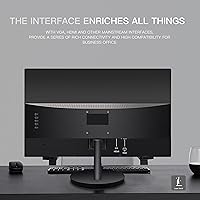
  • Inputs: Connectivity includes one HDMI port and one VGA port, supporting both modern digital sources and older analog devices without requiring additional adapters.
  • VESA Mount: The monitor is compatible with 75x75mm VESA mounting patterns, enabling use with third-party monitor arms or wall mount brackets.
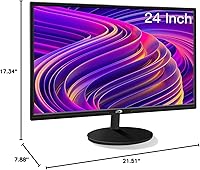
  • Dimensions: With the stand attached, the unit measures approximately 21.51 x 17.34 x 7.88 inches (W x H x D), fitting on most standard-width desks without difficulty.
  • Weight: The fully assembled monitor weighs 9.68 pounds, light enough for one person to reposition or remount without assistance.
  • Power Source: The display is powered via a standard AC wall outlet connection.
  • Model Number: The official model designation is LCD2401, the reference number to use for warranty registration and technical support inquiries.
  • Warranty: STGAubron provides a one-year limited hardware warranty alongside lifetime technical support for the duration of ownership.

Related Reviews
CRUA CR245ZB 24.5″ Gaming Monitor
78%
83%
Gaming Performance
86%
Refresh Rate & Smoothness
74%
Color Accuracy & Vibrancy
91%
Ergonomics & Adjustability
68%
Build Quality & Materials
More
ViewSonic XG2431 24-Inch Gaming Monitor
86%
92%
Gaming Performance
88%
Display Quality
93%
Response Time
85%
Ergonomics and Comfort
89%
Visual Clarity
More
Sealan 24-Inch Curved Gaming Monitor
86%
92%
Gaming Performance
88%
Visual Quality
91%
Refresh Rate Smoothness
85%
Design & Build
87%
Eye Care Features
More
DJiEX Z24B12 24-inch Gaming Monitor
84%
92%
Value for Money
87%
Display Quality
85%
Ergonomics and Comfort
89%
Color Accuracy
80%
Connectivity Options
More
AOC G2490VXS 24″ Gaming Monitor
80%
88%
Gaming Performance
83%
Color Quality
86%
Contrast & Black Levels
91%
Refresh Rate & Smoothness
74%
Build Quality
More
Sceptre E248W-FW100T 24-inch Gaming Monitor
76%
91%
Value for Money
74%
Image Quality
78%
Gaming Performance
82%
Refresh Rate & Sync
67%
Response Time & Motion
More
INFIEVO 24-inch 180Hz FHD Gaming Monitor
74%
91%
Refresh Rate Performance
83%
Response Time & Motion Clarity
74%
Image & Color Quality
47%
HDR Experience
88%
Connectivity & Compatibility
More
INFIEVO 24-inch 165Hz FHD Gaming Monitor
72%
88%
Value for Money
84%
Gaming Performance
82%
Response Time
71%
Color Accuracy
41%
HDR Quality
More
Raywego Q24B16 24-inch Curved Gaming Monitor

73%
88%
Refresh Rate Performance
84%
Contrast & Black Levels
91%
Value for Money
76%
Image Sharpness
47%
HDR Quality
More
AOC 24G4 24-inch Gaming Monitor

76%
93%
Refresh Rate Performance
78%
IPS Color Quality
84%
Motion Clarity
91%
Value for Money
87%
Adaptive-Sync Implementation
More

FAQ

The STGAubron LCD2401 24-Inch Gaming Monitor is a capable screen for casual and light gaming, but the label deserves some honest context. At 60Hz, it handles slower-paced titles, RPGs, and strategy games without trouble, but fast-paced shooters and racing games will feel noticeably less fluid than they would on a 144Hz panel. Think of it as a solid everyday monitor that handles light gaming on the side rather than a display built specifically for competitive play.

The product specifications make no mention of built-in speakers, which typically means they are not included. You will want headphones or a separate set of external speakers for audio, which is standard for monitors in this category and price range.

Yes, as long as your device has an HDMI output it connects without issues. Modern MacBooks no longer include a full-size HDMI port, so you will need a USB-C to HDMI adapter, which is inexpensive and widely available. Chromebooks and Windows laptops with HDMI out plug straight in with no extra hardware.

Yes — both PlayStation and Xbox consoles use HDMI and plug directly into this 24-inch monitor without any adapters. Just keep the 60Hz refresh cap in mind; the screen cannot display frame rates beyond that ceiling even if your console supports higher ones, so fast-paced gameplay will have visual limits.

It depends heavily on your room layout. With your primary light source in front of you, the glare is manageable and easy to live with day to day. The real issue surfaces when there is a window or bright overhead light behind you — reflections become persistent and no brightness adjustment fully eliminates them. If your desk faces a window or sits under strong ambient lighting, a matte-panel monitor would be a more practical choice.

The stand only supports tilt adjustment, ranging from -10° forward to +13° backward — there is no height, swivel, or pivot functionality built in. If you need more ergonomic control, the display does support 75x75mm VESA mounting, so pairing it with a separate monitor arm is a practical and relatively affordable solution.

There is no official mention of FreeSync or G-Sync support in the product specifications, so you should assume neither is available. At 60Hz this is less of a real-world concern than it would be on a high-refresh panel, but buyers who specifically need adaptive sync technology should look at a different display.

The listing does not confirm exact box contents, so it is worth checking when your order arrives. Budget monitors in this tier typically include a power cable but do not always bundle a video cable, so keeping a spare HDMI cable on hand before setup day is a sensible precaution.

Very straightforward. The stand attaches to the panel with minimal hardware and most buyers report being fully set up and connected in under ten minutes. The on-screen display menu for adjusting brightness, contrast, and color is basic but easy to navigate, and the default picture settings are reasonable enough for most people right out of the box.

For hobbyist use — reviewing travel photos, light retouching, or design coursework — the STGAubron display offers a noticeably better color baseline than most panels at this price point. That said, the exact coverage cannot be verified without a colorimeter, and the glossy screen surface can affect color perception depending on your room lighting. Professional photographers or designers producing work for print or client approval should consider a purpose-built color-accurate display that supports hardware calibration.