Overview

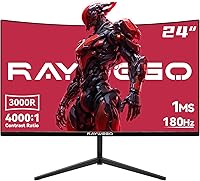
The Raywego Q24B16 24-inch Curved Gaming Monitor is one of those displays that makes you do a double-take at the price tag. Raywego isn't a household name — it's a Chinese brand making a quiet push into gaming peripherals — but that doesn't mean it should be dismissed outright. The 3000R curved VA panel offers a gentle, subtle arc rather than the dramatic wrap some gaming monitors go for, which actually makes it more versatile for everyday desk use. One heads-up before you buy: there are no built-in speakers, so plan accordingly. On the plus side, a DisplayPort cable comes in the box, which is a small but appreciated touch that saves an immediate extra purchase.
Features & Benefits

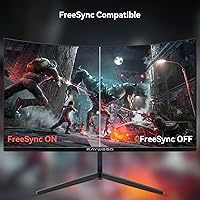
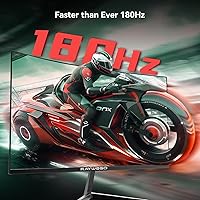
The 180Hz refresh rate is the headline spec here, and it genuinely makes a difference over the 144Hz monitors that dominate this price range — motion in fast shooters feels noticeably cleaner. The 1ms MPRT figure is worth understanding correctly: it refers to motion blur reduction via backlight strobing, not native pixel response, so don't expect it to eliminate all ghosting on a VA panel. The 4000:1 contrast ratio is where this monitor shines; deep blacks and rich shadows make dark in-game scenes look far better than most IPS panels can manage. HDR10 is listed, but at 300 nits peak brightness the effect stays modest. FreeSync support is a welcome addition that works across AMD and most modern Nvidia setups without much fuss.

Best For

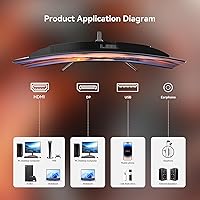
This curved gaming monitor is a strong match for entry-level PC gamers who want a genuinely fast display without paying the premium that established names like ASUS or AOC command. Students building a first gaming desk will appreciate the included DP cable and VESA mounting support, both of which keep startup costs low. It also works well as a secondary display for laptop or console users — HDMI, DisplayPort, USB, and a 3.5mm audio port cover most connection needs without adapters. The 7-pound weight makes wall mounting straightforward. It is less suited for anyone who prioritizes color accuracy or relies on true HDR output; those use cases call for a different panel type altogether.

User Feedback

Early buyers have settled the Raywego 24-inch at a 4.2-star average, a reasonable result for a brand that only reached the market in mid-2025. The most consistent praise focuses on the contrast quality and the smoothness at 180Hz relative to the asking price — people seem genuinely caught off guard by how solid the image looks. On the downside, stand wobble comes up in a handful of reviews, which is understandable given how light the unit is; if you keep it desk-mounted and do a lot of typing, that is worth factoring in. Panel uniformity and underwhelming HDR performance draw occasional criticism as well, both typical of budget VA screens. The 2-year warranty stands out favorably against the one-year coverage that is standard at this price level, adding a real layer of confidence to the purchase.

Pros

  • 180Hz refresh rate delivers visibly smoother gameplay compared to the 144Hz monitors that dominate this price tier.
  • The 4000:1 contrast ratio produces genuinely deep blacks that most IPS panels in this range cannot match.
  • FreeSync support works across AMD and most modern Nvidia setups, reducing screen tearing without GPU restrictions.
  • A DisplayPort cable is included in the box, saving an immediate extra purchase on day one.
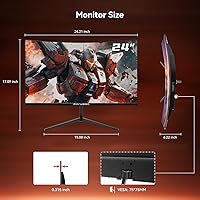
  • VESA 75x75mm compatibility makes wall mounting straightforward for a clean, space-saving desk setup.
  • The 3000R curve is subtle enough for office work but still adds a touch of depth during gaming sessions.
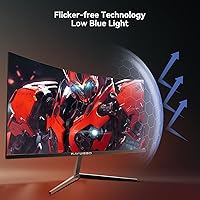
  • Low blue light and flicker-free technology make this budget 180Hz screen more comfortable during long daily sessions.
  • A 2-year warranty stands out at this price point, where most competitors offer only 12 months of coverage.
  • At just 7 pounds, the monitor is easy to reposition, mount, or carry between spaces.
  • Multiple port options — HDMI, DisplayPort, USB, and 3.5mm audio — handle most device combinations without adapters.

Cons

  • No built-in speakers at all, which is a real inconvenience if external audio is not already part of your setup.
  • The stand has been reported as wobbly by several buyers, particularly noticeable during heavy typing or accidental desk bumps.
  • HDR10 support is largely cosmetic at 300 nits brightness; do not expect meaningful high-dynamic-range performance.
  • VA panel ghosting in fast motion can still appear despite the 1ms MPRT spec, which controls motion blur rather than native pixel response.
  • Raywego is a very new brand with limited long-term track record, making multi-year reliability harder to assess.
  • Panel uniformity inconsistencies have appeared in early user reviews, a common risk with budget VA manufacturing.
  • The tilt range of -5° to 20° is functional but basic; there is no height adjustment or swivel built into the stand.
  • 1080p resolution on a 24-inch curved screen is adequate for gaming but feels limiting for productivity tasks that benefit from extra screen real estate.
  • Brand support and parts availability are less predictable than with established monitor manufacturers.
  • The 3000R curvature, while subtle, may still feel slightly off for users accustomed to flat screens in multi-monitor arrangements.

Ratings

The scores below for the Raywego Q24B16 24-inch Curved Gaming Monitor were generated by our AI review engine after analyzing verified global buyer feedback, actively filtering out incentivized, duplicate, and bot-submitted reviews to surface what real users actually experience. Both the strengths and the frustrations are reflected transparently — nothing has been smoothed over to flatter the product. If this curved gaming monitor earns a high score in a category, it genuinely earned it; if it scores low, that pain point is real and worth knowing before you buy.
Refresh Rate Performance
88%
At 180Hz, this budget 180Hz screen delivers noticeably smoother motion than the 144Hz panels that crowd this price range, and gamers playing fast-paced shooters or racing titles are quick to mention the difference. The upgrade feels tangible in daily play, not just on paper.
To actually run games at 180 frames per second, your GPU needs to keep up — and on older or integrated graphics cards, the high refresh rate sits unused. A few buyers felt misled when their hardware bottlenecked the panel's potential.
Contrast & Black Levels
84%
The 4000:1 contrast ratio is where this monitor genuinely surprises people. Dark game environments, night scenes in films, and shadowed desktop wallpapers all look richer and more defined than what most IPS panels at a similar price can produce.
VA panels are known for contrast shift at wider viewing angles, and this one is no exception — blacks can look slightly washed or take on a grey tint when viewed from the side. Users who share screens or sit off-center notice this more than solo players.
Value for Money
91%
Buyers consistently flag the price-to-spec ratio as the strongest argument for this monitor. Getting 180Hz, FreeSync, a VA panel with strong contrast, and a DP cable included in the box at this price point is difficult to replicate with a name-brand alternative.
The value proposition depends heavily on your expectations going in. Buyers who underestimated the trade-offs — particularly around HDR quality and stand rigidity — felt the savings came at a more noticeable cost than they anticipated.
Image Sharpness
76%
24%
At 24 inches with a 1080p resolution, pixel density sits at a comfortable level for gaming and general desktop use. Text is clean, icons are crisp, and for everyday tasks most users report no complaints about visual clarity during normal viewing distances.
Productivity users who spend hours in spreadsheets or coding environments occasionally wish for a higher resolution — 1440p on a 24-inch panel makes text noticeably sharper. For a purely gaming-focused buyer it is fine, but it is not a resolution that impresses in 2025.
HDR Quality
47%
53%
HDR10 content plays without error, and the monitor does apply basic tone-mapping that keeps certified content looking roughly as intended. For casual streaming on platforms that serve HDR streams, the experience is acceptable.
At 300 nits peak brightness, the HDR10 badge is largely a certification tick rather than a meaningful visual feature. The punchy highlights and expanded luminance range that define real HDR simply do not materialize — buyers who prioritized this spec were broadly disappointed.
Motion Clarity
73%
27%
The MPRT backlight strobing does a reasonable job of reducing perceived blur during fast panning shots and rapid in-game movement, and most buyers found the experience a step up from standard 60Hz or non-strobed 144Hz panels they had used previously.
It is worth repeating that 1ms MPRT is not native pixel response — VA panel ghosting in dark transitions remains a real issue, particularly in horror games or night-sky scenes. Some users found the trailing more visible than they expected given the spec sheet language.
Eye Comfort
82%
18%
Low blue light filtering and a flicker-free backlight make extended sessions noticeably more comfortable, and several work-from-home buyers specifically called out reduced eye fatigue compared to older monitors they had replaced. The benefit is genuine over 6-to-8 hour days.
The blue light filter does introduce a very slight warm tint to the default color balance, and users who need accurate color representation for creative work may find themselves toggling settings frequently. It is a minor inconvenience rather than a dealbreaker for most.
Build Quality
63%
37%
The panel itself feels solid and well-assembled, and at 7 pounds the monitor has a lighter-than-expected quality that makes desk repositioning and wall mounting easy. The matte screen finish also resists glare effectively in bright office environments.
The stand is the weakest physical element — several reviewers flagged wobble during typing sessions, and the plastic feels noticeably budget-grade up close. For a monitor that competes primarily on price, it is an acceptable trade-off, but not one to ignore if desk stability matters to you.
Connectivity
79%
21%
The port selection — HDMI, DisplayPort, USB, and 3.5mm audio — covers the most common connection scenarios for PC, laptop, and console users without needing a hub or adapter. Having the DP cable included from day one is a small but genuinely appreciated practical touch.
Only one HDMI port and one DisplayPort means users with multiple active devices will need to unplug and swap cables rather than toggle inputs freely. A second HDMI port or dedicated KVM-style switching would have meaningfully improved multi-device workflows.
Ergonomics
58%
42%
The -5° to 20° tilt range is enough to find a comfortable angle for most desk heights, and the lightweight build means adjusting the monitor position takes almost no effort. VESA support adds real flexibility for buyers who prefer a monitor arm.
Beyond tilt, the stand offers no height adjustment and no swivel, which is a noticeable limitation for taller users or anyone sharing the monitor between seated and standing positions. The ergonomic story only becomes complete if you add an aftermarket arm.
Setup Experience
86%
Most buyers report being up and running within minutes — the stand assembly is straightforward, the included DP cable means one less thing to source, and the on-screen menu is navigable without consulting a manual. First-time monitor buyers specifically appreciated the low friction.
The instruction documentation is minimal, and users who wanted to fine-tune color profiles or enable specific gaming modes had to experiment through the menu independently. A clearer quick-start guide with mode explanations would have helped less technical buyers.
FreeSync Implementation
81%
19%
FreeSync functions as expected across AMD Radeon GPUs and works without drama on compatible Nvidia cards via G-Sync Compatible mode. Tearing and stutter reduction during variable framerate scenarios — common in open-world titles — is a tangible improvement that regular users notice quickly.
Enabling FreeSync on Nvidia requires a manual step in the driver settings that is not documented in the box, and a few buyers were unaware the feature was even available to them. A small issue, but one that tripped up less experienced users.
Color Accuracy
61%
39%
Out of the box, color reproduction is serviceable for gaming and casual media consumption. Saturated game environments and streaming content look punchy and engaging, and for the target audience of entry-level gamers, the default profile is perfectly usable from day one.
Color accuracy on VA panels at this price tier is not calibrated for professional use, and the default gamma and white balance settings skew slightly warm. Photo editing or any work requiring reliable color representation will quickly reveal the limitations of this panel.
Brand Reliability
55%
45%
The 2-year warranty significantly exceeds the 12-month standard from most budget monitor brands, which signals a degree of confidence in the product and provides genuine buyer protection. Early ratings averaging 4.2 stars are a reasonable baseline for a new market entrant.
Raywego only entered the market in mid-2025, which means there is almost no multi-year reliability data available yet. Buyers prioritizing long-term proven durability are taking a calculated risk, and brand support responsiveness remains an open question compared to established monitor manufacturers.
Curvature Comfort
77%
23%
The gentle 3000R arc adds a subtle sense of depth that gamers appreciate without making office documents or browser windows feel distorted. Users coming from flat monitors report a quick adjustment period and generally positive long-term impressions for mixed-use desks.
For anyone running a multi-monitor setup with flat panels on either side, the slight curvature creates a noticeable visual mismatch at the edges. It is a niche issue, but one that bothered dual or triple-monitor users who had not considered it before purchasing.

Suitable for:

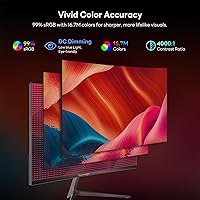
The Raywego Q24B16 24-inch Curved Gaming Monitor is built for buyers who want a genuinely fast display without the price tag that comes with established brands. Students setting up their first gaming or study desk will find the package practical — a DP cable is included, the VESA mounting is ready to go, and the 180Hz panel punches noticeably above what most screens at this price range offer. Casual and competitive gamers who play fast-paced titles will appreciate the smooth motion and the deep contrast that VA panels deliver in dark scenes. It also works well as a secondary monitor for laptop users or console players, since HDMI, DisplayPort, USB, and a 3.5mm audio jack cover most connection scenarios without needing extra adapters. Anyone building a home office that doubles as a gaming station in the evenings will find the subtle 3000R curve comfortable for long hours without feeling overly immersive for spreadsheet work.
Not suitable for:

The Raywego Q24B16 24-inch Curved Gaming Monitor is not the right call for anyone who relies heavily on color accuracy — graphic designers, photo editors, and video creators will find a VA panel at this brightness level limiting compared to a quality IPS or OLED display. The HDR10 badge on the spec sheet sounds appealing, but at 300 nits peak brightness the real-world HDR effect is minimal; buyers expecting a vivid HDR experience will be disappointed. The stand has been flagged for wobble in user reviews, which matters if you type heavily or bump your desk frequently — a monitor arm helps but adds cost. Because the brand only launched in mid-2025, there is no meaningful long-term reliability data yet, so buyers who prioritize proven durability records may prefer a more established name. Finally, anyone who expects built-in speakers should look elsewhere; there are none, and that is a real gap if you do not already have external audio sorted.
Specifications

  • Screen Size: The display measures 24 inches diagonally, offering a practical desktop footprint suited for single-monitor and dual-monitor setups alike.
  • Panel Type: Uses a VA (Vertical Alignment) panel, which delivers stronger contrast and deeper blacks than IPS alternatives at a comparable price.
  • Resolution: Native resolution is 1920x1080 (Full HD), providing a sharp image at 24 inches with a pixel density comfortable for everyday gaming and office work.
  • Refresh Rate: The panel runs at 180Hz, allowing up to 180 frames per second to be displayed, noticeably smoother than the 144Hz standard common in this segment.
  • Response Time: Rated at 1ms MPRT (Moving Picture Response Time), which reduces perceived motion blur through backlight strobing rather than measuring native pixel transition speed.
  • Contrast Ratio: A static contrast ratio of 4000:1 enables noticeably rich shadow detail and deep blacks, a characteristic advantage of VA panel technology.
  • Brightness: Peak brightness is rated at 300 cd/m² (nits), adequate for indoor use but not sufficient to produce a meaningful HDR experience.
  • HDR Support: The monitor carries HDR10 certification, enabling basic tone-mapping on compatible content, though peak brightness limits the visible impact of HDR.
  • Curvature: The screen has a 3000R curvature radius, a subtle bend that adds slight depth perception without the dramatic wrap of more aggressive curved panels.
  • Sync Technology: AMD FreeSync is supported, which dynamically matches the monitor refresh rate to GPU output to reduce screen tearing across compatible AMD and select Nvidia systems.
  • Ports: Connectivity includes one HDMI port, one DisplayPort input, one USB port, and a 3.5mm headphone jack, covering most common PC, laptop, and console connections.
  • VESA Mounting: The rear panel supports VESA 75x75mm mounting, making it compatible with most standard monitor arms and wall mount brackets.
  • Tilt Adjustment: The included stand supports tilt adjustment from -5° forward to 20° backward, providing basic ergonomic positioning without height or swivel options.
  • Eye Care: The display includes low blue light filtering and flicker-free backlight technology to reduce eye fatigue during extended viewing sessions.
  • Speakers: There are no built-in speakers; users requiring audio output will need external speakers or headphones connected via the 3.5mm jack or separate audio device.
  • Dimensions: The monitor measures approximately 21.2″ wide by 16.2″ tall with a depth of 1.45″ at the panel, not including the stand base.
  • Weight: The unit weighs 7 pounds, making it lightweight enough for easy repositioning and straightforward wall or arm mounting.
  • Power Input: The monitor operates at 12 volts DC input, supplied via an external power adapter included in the box.
  • In-Box Contents: The package includes the monitor, stand, a DisplayPort cable, a power adapter, and basic documentation, so no separate DP cable purchase is needed on day one.
  • Warranty: Raywego covers this monitor with a 2-year limited warranty, which is notably longer than the 1-year coverage that is standard among budget monitor brands at this price tier.

Related Reviews

Sealan 24-Inch Curved Gaming Monitor

86%
92%
Gaming Performance
88%
Visual Quality
91%
Refresh Rate Smoothness
85%
Design & Build
87%
Eye Care Features
More
Samsung CRG5 24-Inch Curved Gaming Monitor

78%
88%
Value for Money
83%
Image Quality
81%
Gaming Performance
86%
Curvature & Immersion
84%
FreeSync Performance
More
Raywego Q34DB45-1 34-inch Curved Gaming Monitor
72%
88%
Value for Money
84%
Gaming Performance
74%
Image Quality
51%
HDR Performance
67%
Build Quality
More
KTC 24-inch 1500R Curved Gaming Monitor
86%
94%
Gaming Performance
89%
Display Quality
92%
Value for Money
87%
Build Quality
83%
Ergonomics
More
Samsung CF390 24-inch Curved Gaming Monitor
78%
88%
Value for Money
79%
Image Quality
71%
Gaming Performance
86%
Design & Aesthetics
43%
Ergonomics & Stand
More
Z-Edge UG24 24-inch Curved Gaming Monitor
85%
88%
Gaming Performance
85%
Display Quality
81%
Build Quality
92%
Value for Money
89%
Ease of Setup
More
ViewSonic VX2418C 24-inch 1080p Curved Gaming Monitor
84%
90%
Value for Money
91%
Gaming Performance
87%
Display Quality
85%
Ease of Setup
82%
Build Quality
More
Gawfolk 24.5-inch Gaming Curved Monitor GF245A
84%
86%
Display Quality
88%
Gaming Performance
92%
Value for Money
80%
Build Quality
90%
Ease of Setup
More
SANSUI ES-G24C1 24-inch Curved Gaming Monitor
74%
91%
Value for Money
86%
Gaming Performance
83%
Color & Image Quality
88%
Contrast & Black Levels
47%
Stand & Ergonomics
More
Sceptre C248W-1920RN 24-inch Curved Gaming Monitor
76%
91%
Value for Money
78%
Display Quality
83%
Curvature & Immersion
74%
Refresh Rate & Motion Clarity
67%
Build Quality & Design
More

FAQ

FreeSync is primarily an AMD technology, but most modern Nvidia GPUs from the GTX 10 series onward support FreeSync monitors through Nvidia's G-Sync Compatible mode. You may need to enable it manually in the Nvidia control panel, but in practice it works well for tearing reduction on both platforms.

Not exactly. The 1ms figure refers to MPRT, which is a motion blur reduction technique using backlight strobing, not a measurement of how quickly individual pixels physically change color. VA panels can still show some trailing or ghosting in fast transitions, particularly in dark scenes. It is better than older VA panels, but it is not the same as a true 1ms native pixel response you would find on some IPS gaming displays.

The 3000R curvature is quite subtle — far less dramatic than the 1500R or 1800R curves you see on dedicated gaming monitors. For most desk users it adds a mild sense of depth during gaming without making spreadsheets or documents feel distorted. It is a good middle ground if you split time between productivity and play.

Yes, the back of the panel has a standard VESA 75x75mm pattern built in, so any VESA-compatible wall mount or monitor arm with 75mm spacing will attach directly. The monitor only weighs 7 pounds, which is within the capacity of even entry-level arms.

Honest answer: it is closer to a label than a feature you will actively notice. At 300 nits peak brightness, the display does not have the luminance headroom to produce the punchy highlights HDR is known for. HDR10 content will tone-map and display correctly, but do not expect the vivid contrast boost you would see on a proper HDR600 or HDR1000 panel.

A handful of buyers have flagged it, and it is a reasonable concern given the lightweight build. If you type firmly or accidentally knock your desk, you may notice some movement. It is not severe enough to make the monitor unusable, but if stand stability matters to you, pairing it with an aftermarket monitor arm solves the issue completely and gives you better positioning flexibility anyway.

Most budget monitors cap HDMI bandwidth at 144Hz for 1080p, and it is worth checking the manual or on-screen menu to confirm the maximum rate per input. To be safe and guarantee 180Hz output, use the included DisplayPort cable, which has the bandwidth headroom to run 1080p at 180Hz without compromise.

If your source device — PC, laptop, or console — has a separate audio output, you can plug headphones or a speaker directly into the 3.5mm jack on the monitor, which passes the audio signal through. However, the monitor itself has no internal speakers, so you cannot get sound from the display alone without something connected to that port.

It works as a console monitor. Both consoles output over HDMI and will run at 1080p on this screen without issue. Console players who want to push 120Hz on PS5 or Xbox Series X should note that HDMI 2.1 bandwidth is not confirmed on this panel, so verify the maximum HDMI refresh rate before assuming 120Hz console output will work. For standard 1080p 60Hz gaming it is perfectly capable.

It is a fair concern and worth being upfront about. Raywego is manufactured by Shenzhen Yundacheng Technology and only entered the market in mid-2025, so there is limited long-term data on reliability. The 2-year warranty is a genuine positive — it is longer than most competing budget brands offer and suggests some confidence in the build. Early buyer ratings sit at a solid 4.2 stars, which is a reasonable start. Just go in with realistic expectations about brand support response times compared to established names like AOC or ViewSonic.