
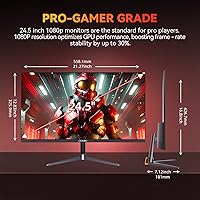
Overview

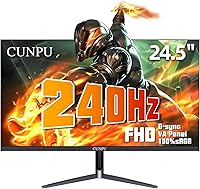
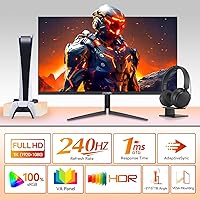
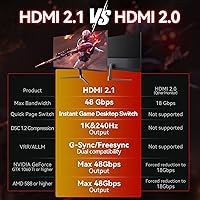
The CUNPU 24-Inch 240Hz VA Gaming Monitor enters a competitive budget segment with a spec sheet that genuinely stands out. Most displays at this price force a compromise — fast refresh rate or decent color quality. This budget 240Hz display sidesteps that trade-off by pairing a fast VA panel with a 240Hz refresh rate, a combination that's harder to find than you'd expect at this price. The slim bezel keeps the aesthetic clean, and having both HDMI 2.1 and DisplayPort 1.4 capable of full 240Hz output is a meaningful hardware decision. CUNPU isn't a household name, so long-term durability remains an open question, but the on-paper value proposition is hard to ignore.

Features & Benefits

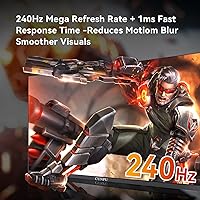
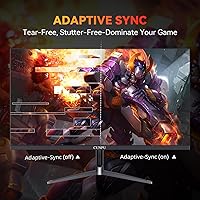
At 240Hz with a 1ms MPRT response time, this CUNPU monitor keeps up with fast-paced competitive titles where every frame counts. The Adaptive Sync support — compatible with both AMD FreeSync and NVIDIA G-SYNC setups — means screen tearing largely disappears regardless of your GPU. Unlike TN panels that sacrifice color depth for speed, the VA panel here covers 100% sRGB with 350 cd/m² brightness, so environments and textures actually look rich rather than washed out. The built-in crosshair overlay is a small but practical touch for FPS players, and the bottom-mounted OSD buttons make switching between presets quick. VESA compatibility and tilt adjustment round out a thoughtfully specified package.

Best For

This budget 240Hz display makes most sense for competitive PC gamers who want a high refresh rate without a significant outlay, and for console players who actually need HDMI 2.1 to hit 240Hz on a PS5 or Xbox Series X — though most current console titles still don't run at 240fps, so real-world benefit there is limited. Esports-focused players running titles like CS2 or Valorant will appreciate the responsiveness most. It also works well as a secondary gaming display or in setups where a slim profile and wall-mount option matter more than resolution or screen real estate.

User Feedback

Given that this 24-inch VA gaming screen only launched in mid-2025, the review pool is still thin — so take early impressions with appropriate caution. Buyers so far tend to praise the smooth gameplay experience and overall value relative to cost. Where concerns arise, they cluster around the stand feeling less sturdy than expected and some units showing minor backlight inconsistency along screen edges. A few buyers have drawn comparisons to similarly priced options from AOC and LG, with reactions generally landing in CUNPU's favor on refresh rate performance but mixed on out-of-box color accuracy. A reasonable pick, with the caveat that you're buying early in its product life.

Pros

  • 240Hz refresh rate delivers noticeably smoother motion in fast-paced competitive games compared to standard 144Hz displays.
  • HDMI 2.1 support at full 240Hz bandwidth is rare at this price and makes it a solid pairing for next-gen consoles.
  • The VA panel produces richer, deeper colors than TN alternatives in the same budget range.
  • FreeSync and G-SYNC compatibility means screen tearing is handled regardless of whether you run AMD or NVIDIA.
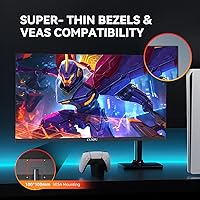
  • Slim bezels and a clean design hold up well in multi-monitor or minimal desk setups.
  • Built-in crosshair overlay is a small but genuinely useful feature for FPS players.
  • VESA 100x100mm mount support gives flexible positioning options including wall and arm mounting.
  • Early buyers consistently highlight strong value relative to cost as a standout quality.
  • Matte screen surface cuts down on glare without noticeably dulling image clarity.

Cons

  • CUNPU is a new, lesser-known brand with limited long-term reliability data to draw from.
  • Stand stability has been flagged by some buyers as less solid than expected at this size.
  • Out-of-box color accuracy may require manual calibration to get the best results.
  • Backlight uniformity issues have appeared in early reports, with some edge inconsistency noted.
  • 1080p resolution may feel limiting for users upgrading from a 1440p or higher-res display.
  • Real-world 240Hz console gaming is still restricted by limited game support, so that headroom often goes unused.
  • Only tilt adjustment is available on the stand — no height or swivel without a third-party arm.
  • Review volume is low given the July 2025 launch date, making it harder to assess long-term durability.
  • HDR10 support at 350 cd/m² brightness offers minimal practical improvement over SDR content.

Ratings

The scores below for the CUNPU 24-Inch 240Hz VA Gaming Monitor were generated by our AI rating engine after analyzing verified global user reviews, with spam, bot-submitted, and incentivized feedback actively filtered out. Given that this monitor launched in mid-2025 and has a still-growing review base, scores reflect both early adopter impressions and expert spec-based assessment. Strengths and shortcomings are weighted equally — nothing is glossed over.

Value for Money
88%
Most buyers agree this budget 240Hz display delivers specs that would cost considerably more from a name-brand manufacturer. The inclusion of HDMI 2.1 at this price tier is a concrete hardware advantage that regularly comes up in positive reviews, especially among console gamers who priced competing options.
The value equation depends on the monitor holding up over time, and with limited long-term ownership data available, buyers are making some assumptions about durability. If any hardware issues emerge in the first year, the brand's lesser-known support infrastructure could complicate resolution.
Refresh Rate Performance
91%
240Hz feels genuinely responsive in fast competitive titles, and buyers running FPS games like Valorant or CS2 specifically praise how smooth target tracking becomes compared to their previous 144Hz panels. The refresh rate is consistent across both HDMI 2.1 and DisplayPort 1.4, which is not a given at this price.
The real-world benefit is heavily dependent on your hardware being able to push high frame rates consistently. On mid-range GPUs or in graphically demanding titles, the 240Hz headroom often goes underutilized, which narrows the practical advantage for some buyers.
Panel Color Quality
76%
24%
The VA panel produces noticeably richer blacks and deeper contrast than TN alternatives in the same price range, which makes a visible difference in darker game environments and cinematic cutscenes. Color coverage at 100% sRGB holds up well for general use and casual content consumption.
Out-of-box calibration has been a sticking point — some users report colors looking either oversaturated or slightly off in default mode, requiring manual OSD adjustments to feel natural. Backlight uniformity along panel edges is an occasional complaint, which can be distracting in dark scenes.
Connectivity
89%
Having both HDMI 2.1 and DisplayPort 1.4 capable of carrying 240Hz without compromise is a genuine differentiator in this segment. Console gamers connecting a PS5 or Xbox Series X appreciate not having to drop to HDMI 2.0 and accept a bandwidth penalty.
The port selection is lean overall — one HDMI and one DisplayPort means users with multiple source devices will need a switch or will be swapping cables manually. The single USB-A port adds minimal utility compared to monitors offering full USB hubs.
Motion Clarity
83%
The 1ms MPRT rating translates to noticeably clean motion in high-action sequences, and buyers coming from 60Hz or 75Hz displays are consistently impressed by how much ghosting is reduced. Adaptive Sync working across both AMD and NVIDIA GPUs removes screen tearing without requiring a matching ecosystem.
It is worth remembering that MPRT measures motion blur reduction rather than actual pixel switching speed, so the number overstates pixel response in strict technical terms. Buyers who have used monitors with verified sub-2ms GTG response may notice the difference in the most demanding scenarios.
Build Quality
67%
33%
The slim bezel design looks clean and holds up reasonably well during everyday use, and the overall chassis feels consistent with what competitors offer at a similar price. For a monitor that will sit stably on a desk and not be frequently moved, the construction is adequate.
The stand has drawn criticism for feeling lightweight and less rigid than expected for a 24-inch panel, with some wobble reported when adjusting tilt or accidentally bumping the desk. CUNPU's manufacturing pedigree is not yet well established, which means buyers have limited historical quality data to reference.
Ergonomics
61%
39%
Tilt adjustment covers the most common use case for single-position desk setups, and the VESA 100x100mm compatibility means buyers who already own a monitor arm can bypass the stand entirely for a cleaner, more flexible arrangement.
Tilt-only adjustment is a real limitation for anyone who needs to raise, lower, or rotate the display, which is increasingly standard even on budget monitors. Users without a monitor arm and specific ergonomic requirements may find the fixed height uncomfortable over long sessions.
Image Brightness
74%
26%
At 350 cd/m², the panel handles moderately lit office or bedroom gaming setups comfortably, and the matte coating reduces glare enough that direct light sources nearby are not a serious problem in most environments.
In brighter rooms or near windows, 350 cd/m² can feel underwhelming compared to monitors pushing 400 cd/m² or above. The HDR10 support also loses practical impact at this brightness ceiling, making HDR mode more of a spec checkmark than a meaningful visual feature.
OSD & Controls
72%
28%
Bottom-mounted physical buttons give direct tactile access to the OSD without requiring software, and the built-in crosshair overlay is a feature competitive FPS players genuinely use across multiple game titles consistently.
Physical OSD navigation buttons remain less intuitive than joystick-based controls found on many competing monitors, and accessing deeper settings menus can feel cumbersome mid-session. The button placement at the bottom edge also makes them harder to locate by touch without looking away from the screen.
Setup & Installation
81%
19%
Assembly is straightforward and takes only a few minutes, with the stand attaching simply and video signal detected reliably on first connection in most reported cases. The VESA mount option adds flexibility for buyers who want to wall-mount or use an arm without any adapter.
The included documentation is minimal, and buyers new to configuring VA panels for gaming may need to research optimal settings independently. Some users noted that default picture mode required immediate adjustment before the image looked as expected.
Console Compatibility
78%
22%
HDMI 2.1 means the monitor is technically prepared for the full bandwidth of current-gen consoles, and buyers using PS5 or Xbox Series X as their primary source have confirmed signal detection works without issues at high refresh settings.
The practical 240Hz console gaming benefit is limited today because very few titles actually render at 240fps on current hardware. Buyers expecting a transformative console experience specifically because of 240Hz may find the real-world difference versus a 120Hz connection to be marginal in everyday play.
Eye Comfort
73%
27%
The built-in blue light reduction mode is useful for late-night gaming sessions, and the matte screen surface contributes to reduced eye fatigue by cutting reflective glare during extended use.
Blue light filter modes on budget monitors often introduce a noticeable warm color cast that some users find distracting for color-sensitive tasks. There is no flicker-free certification mentioned, which is worth noting for buyers with particular sensitivity to display flicker.
Brand Reliability
58%
42%
Early buyers have not reported widespread hardware failures, and the monitor appears to function as advertised for the majority of purchasers so far. The spec accuracy between listing and real-world performance has generally been confirmed.
CUNPU is a relatively new brand without an established support or warranty track record, which introduces risk that more cautious buyers should weigh carefully. Limited user volume means there is insufficient data to draw reliable conclusions about long-term durability or how the brand handles post-purchase issues.

Suitable for:

The CUNPU 24-Inch 240Hz VA Gaming Monitor is a strong fit for budget-conscious gamers who want a genuinely fast display without paying a premium brand markup. Competitive PC players running esports titles like Valorant, CS2, or Apex Legends will get the most out of the 240Hz refresh rate and 1ms response time, where the speed difference over a 144Hz panel is actually perceptible. Console gamers with a PS5 or Xbox Series X will also find real value here — HDMI 2.1 at full 240Hz bandwidth is a spec most monitors at this price skip entirely, making this a forward-compatible choice even if most games don't yet hit those frame rates. It also suits anyone building a clean, space-efficient desk setup, given the slim bezel and VESA mount support for wall or arm installation. As a secondary display for a multi-monitor rig, it punches well above its weight class.

Not suitable for:

Buyers who prioritize image quality over raw speed should look elsewhere — the CUNPU 24-Inch 240Hz VA Gaming Monitor is built around responsiveness, and the 1080p FHD resolution at 24 inches, while sharp enough, won't satisfy anyone accustomed to 1440p or 4K detail. Creative professionals needing accurate, calibrated color output for photo editing or video work will find the out-of-box color accuracy inconsistent and the panel unverified against professional standards. Anyone expecting the build quality and after-sales support of established brands like LG, ASUS, or AOC may be taking a risk — CUNPU is a relatively new name with limited long-term user data behind it. The stand offers only tilt adjustment, so users needing height, swivel, or pivot control will need to budget for a separate monitor arm. Finally, buyers hoping for meaningful HDR performance should note that HDR10 support at this brightness level is largely a checkbox feature rather than a true visual upgrade.

Specifications

  • Screen Size: The display measures 24 inches diagonally with a 16:9 aspect ratio.
  • Panel Type: Uses a Fast VA (Vertical Alignment) panel technology for deep contrast combined with high-speed pixel response.
  • Resolution: Native resolution is 1920x1080 pixels (Full HD), delivering a pixel density suitable for 24-inch viewing distances.
  • Refresh Rate: Runs at a native 240Hz refresh rate, supported across both HDMI 2.1 and DisplayPort 1.4 inputs.
  • Response Time: Rated at 1ms MPRT (Moving Picture Response Time), which measures motion blur reduction rather than pixel transition speed.
  • Brightness: Peak brightness is rated at 350 cd/m², providing adequate visibility in moderately lit environments.
  • Color Coverage: Covers 100% of the sRGB color space and reproduces over 16.7 million colors for consistent, lifelike imagery.
  • Sync Technology: Compatible with both AMD FreeSync and NVIDIA G-SYNC variable refresh rate technologies to reduce screen tearing.
  • HDR Support: Supports HDR10 content, though practical HDR impact is limited by the panel's brightness ceiling.
  • Connectivity: Includes one HDMI 2.1 port and one DisplayPort 1.4, both capable of carrying 240Hz signal without bandwidth compromise.
  • USB Ports: Features one USB-A port for peripheral connectivity or device charging.
  • VESA Mount: Compatible with 100x100mm VESA mounting patterns, supporting wall mounts and third-party monitor arms.
  • Stand Adjustment: Included stand supports tilt adjustment only; height, swivel, and pivot require a separate mounting solution.
  • Screen Surface: Matte anti-glare coating reduces reflections from ambient light sources without significantly affecting color saturation.
  • Crosshair Overlay: Built-in software crosshair overlay can be enabled via OSD, adding a fixed aim point independent of in-game settings.
  • OSD Controls: On-screen display is navigated via physical buttons positioned along the bottom edge of the monitor bezel.
  • Dimensions: Assembled unit measures 24.1″ wide, 20.9″ tall, and 7.5″ deep including the stand base.
  • Weight: Complete unit with stand weighs 8.69 pounds, making it manageable for single-person desk setup.
  • Blue Light Filter: Includes a built-in low blue light mode designed to reduce eye strain during extended use sessions.
  • Model Number: Manufacturer model reference is S027/32/34ES, produced by CUNPU.

Related Reviews
Z-Edge UG25I 24.5-inch 240Hz Gaming Monitor
83%
92%
Value for Money
90%
Gaming Performance
89%
Display Quality
85%
Ergonomics & Design
84%
Connectivity Options
More
Sealan 24-Inch Curved Gaming Monitor
86%
92%
Gaming Performance
88%
Visual Quality
91%
Refresh Rate Smoothness
85%
Design & Build
87%
Eye Care Features
More
Raywego Q24B16 24-inch Curved Gaming Monitor
73%
88%
Refresh Rate Performance
84%
Contrast & Black Levels
91%
Value for Money
76%
Image Sharpness
47%
HDR Quality
More
DJiEX Z24B12 24-inch Gaming Monitor
84%
92%
Value for Money
87%
Display Quality
85%
Ergonomics and Comfort
89%
Color Accuracy
80%
Connectivity Options
More
Sceptre E248W-FW100T 24-inch Gaming Monitor
76%
91%
Value for Money
74%
Image Quality
78%
Gaming Performance
82%
Refresh Rate & Sync
67%
Response Time & Motion
More
STGAubron LCD2401 24-Inch Gaming Monitor

71%
83%
Value for Money
76%
Image Quality
79%
Color Accuracy
47%
Gaming Performance
43%
Screen Glare & Reflections
More
Viewedge CS27FM 27-inch Gaming Monitor
72%
91%
Refresh Rate Performance
76%
Panel & Image Quality
61%
Resolution & Sharpness
74%
Color Accuracy
52%
HDR Experience
More
AOC 24G4 24-inch Gaming Monitor
76%
93%
Refresh Rate Performance
78%
IPS Color Quality
84%
Motion Clarity
91%
Value for Money
87%
Adaptive-Sync Implementation
More
ViewSonic XG2431 24-Inch Gaming Monitor

86%
92%
Gaming Performance
88%
Display Quality
93%
Response Time
85%
Ergonomics and Comfort
89%
Visual Clarity
More
AOC G2490VXS 24″ Gaming Monitor
80%
88%
Gaming Performance
83%
Color Quality
86%
Contrast & Black Levels
91%
Refresh Rate & Smoothness
74%
Build Quality
More

FAQ

Yes, the HDMI 2.1 port supports the full 240Hz bandwidth needed for next-gen consoles. That said, very few current console games actually run at 240 frames per second, so in practice you'll likely benefit more from the smoother 120Hz performance most titles support today. The HDMI 2.1 connection does future-proof you as more titles push higher frame rates.

It's MPRT — Moving Picture Response Time — which is a motion blur reduction metric, not a pixel transition measurement. MPRT figures are generally more optimistic than GTG (gray-to-gray) numbers, so real-world pixel switching may be slightly slower. For most gaming scenarios this is a minor distinction, but it's worth knowing if you're comparing spec sheets closely.

Yes, the monitor is G-SYNC compatible, meaning NVIDIA cards will engage variable refresh rate automatically. You won't get the full certified G-SYNC module experience, but in everyday gaming the difference is minimal and most users won't notice it.

The VA panel does well here compared to TN alternatives — contrast is noticeably better and colors look natural rather than washed out. The matte coating also handles glare comfortably in typical room lighting. It's not a panel you'd choose specifically for cinema viewing, but it handles mixed use without feeling like a compromise.

Feedback on the stand has been mixed. It's adequate for typical desktop use, but a few buyers have noted it feels lighter and less rigid than stands on monitors from more established brands. If stability matters to you, pairing it with a VESA arm is a good call given the 100x100mm mount support.

Based on available product information, a power cable and at least one video cable are typically included, but the exact bundle contents aren't fully detailed in official listings. It's worth confirming with the seller before purchase if you need a specific cable type ready on day one.

For competitive FPS players, it's genuinely practical. The crosshair overlay works at the hardware level, meaning it stays visible regardless of the game — useful in titles that don't offer their own crosshair or where you want consistency across games. It's a small feature but one that experienced esports players tend to appreciate.

Early buyers who mention comparisons generally put this CUNPU monitor on favorable footing for refresh rate performance and port selection, particularly the HDMI 2.1 inclusion. Where established brands tend to have an edge is in color accuracy out of the box and the confidence of knowing the brand's support track record. The trade-off feels fair given the price difference.

Some users have reported that the default color settings run slightly cool or oversaturated, which is common for budget VA panels. A basic manual calibration through the OSD — adjusting brightness, contrast, and color temperature — usually gets things to a more natural state within a few minutes. You won't need hardware calibration tools for gaming use.

Honestly, not much in practice. HDR10 certification requires a minimum brightness that this panel meets on paper, but truly impactful HDR typically needs significantly higher peak brightness than 350 cd/m². The HDR mode may add a slight punch to compatible content, but don't factor it in as a buying reason — treat it as a bonus at best.