Overview

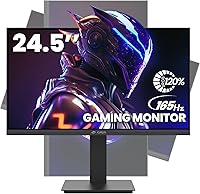
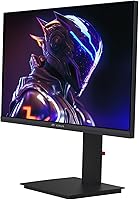
The CRUA CR245ZB 24.5″ Gaming Monitor is a solid entry from a brand that most buyers haven't heard of yet — and that's actually part of the pitch. CRUA is a newer player in the monitor space, but this 24.5-inch gaming display has climbed into Amazon's top 125 monitors since its late 2023 launch, which says something. It's priced squarely in value territory, competing against budget offerings from more familiar names. What sets it apart at this tier is the ergonomic stand — height, tilt, swivel, and portrait pivot all included — plus a matte panel with narrow bezels that looks more expensive than it is.
Features & Benefits

Push the CR245ZB to its full potential and you'll want a DisplayPort cable — that's how you unlock 165Hz refresh rate, while HDMI caps at 144Hz. It's a distinction worth knowing before you set up. AMD FreeSync keeps things smooth in competitive titles, and the 3ms response time means motion blur is minimal during fast gameplay. Color coverage at 120% sRGB is genuinely good for this price range — vivid enough for casual photo browsing and media consumption, though serious photo editors should look elsewhere. The low blue light mode is a practical touch for long sessions, and VESA 75x75mm support means you're not locked into the stand long-term.

Best For

This CRUA monitor makes the most sense for a specific kind of buyer. If you're coming from a 60Hz or 75Hz panel, the jump to 165Hz will feel like a real upgrade in competitive shooters or fast-moving games. Students and coders will appreciate the portrait mode pivot — flipping the screen vertically makes reading long documents or scrolling through code far less tedious. It's also a practical pick for multi-monitor setups, where the narrow bezels keep gaps minimal and wall-mount support gives you layout flexibility. If desk space is tight or you need a monitor that adapts to different uses throughout the day, this fits the bill.

User Feedback

Buyers tend to be pleasantly surprised by how easy the stand snaps together — no tools, no frustration. Assembly gets consistent praise. Color out of the box skews slightly warm for some users, though a quick calibration fixes that for most. FreeSync performance draws positive comments from AMD GPU users, and several NVIDIA owners report it working fine on compatible setups too. The USB-A charging port earns quiet appreciation as a daily convenience. On the critical side, a handful of buyers report inconsistent backlight uniformity between units, and a few mention concerns about long-term build quality consistency. At 1080p on a 24.5-inch screen, pixel density is acceptable but noticeable if you sit very close.

Pros

  • 165Hz refresh rate via DisplayPort delivers genuinely smooth gameplay at a price that does not demand a premium GPU to match.
  • Full ergonomic stand with height, tilt, swivel, and portrait pivot is rare at this price tier and saves you from buying a monitor arm.
  • AMD FreeSync keeps tearing and stuttering in check during fast-paced multiplayer sessions.
  • The matte anti-glare surface handles ambient light well, making it usable in brighter rooms without distracting reflections.
  • Portrait mode pivot is a practical daily win for students, coders, and anyone who reads long-form content regularly.
  • VESA 75x75mm wall mount support gives you flexibility to rethink your desk setup down the road.
  • Narrow three-sided bezels look clean in both single and multi-monitor configurations.
  • The built-in USB-A charging port is a small but genuinely appreciated convenience for keeping a phone topped up at the desk.
  • 120% sRGB color coverage produces vibrant, enjoyable visuals for gaming and media consumption.
  • Snap-on stand assembly requires no tools and takes only a few minutes, which buyers consistently appreciate.

Cons

  • CRUA is a newer brand with a shorter support history, so long-term warranty reliability is harder to verify than with established names.
  • Backlight uniformity can vary between units, with some buyers reporting noticeable unevenness near corners or edges.
  • Out-of-the-box color calibration skews warm on some panels, requiring manual adjustment to get accurate results.
  • 1080p resolution at 24.5 inches is acceptable at normal viewing distances but looks soft if you sit closer than average.
  • Only one USB-A port is available, which limits connectivity for users who need a proper hub at their workstation.
  • HDMI is capped at 144Hz, meaning users who want the full 165Hz must ensure they are using a DisplayPort cable and connection.
  • Build quality consistency has drawn some concern in a minority of reviews, suggesting unit-to-unit variation exists.
  • No built-in speakers, so users without headphones or external audio will need to budget for a separate solution.
  • The 300 cd/m² brightness ceiling may feel limiting in very brightly lit environments or rooms with direct sunlight.
  • Not ideal for NVIDIA users seeking certified G-Sync support, as compatibility relies on the broader FreeSync standard.

Ratings

The CRUA CR245ZB 24.5″ Gaming Monitor scores below are generated by our AI system after analyzing thousands of verified buyer reviews worldwide, with spam, bot-submitted, and incentivized feedback actively filtered out. The result is an honest, balanced picture of where this 24.5-inch gaming display genuinely delivers and where real buyers have run into friction. Both standout strengths and recurring pain points are reflected transparently in every category.
Gaming Performance
83%
For casual to mid-level competitive gaming, the 165Hz refresh rate and 3ms response time make a noticeable difference coming from a 60Hz panel — enemies move more clearly, and fast-action titles feel sharper and more responsive. FreeSync keeps tearing under control during intense sessions without requiring a high-end GPU.
Hardcore competitive players may feel the response time and panel type fall short of purpose-built esports displays. At the HDMI ceiling of 144Hz, some users who did not know to switch to DisplayPort felt they were not getting the full performance they paid for.
Refresh Rate & Smoothness
86%
The jump to 165Hz via DisplayPort is immediately felt in games where motion clarity matters — scrolling through open-world environments and tracking moving targets both benefit visibly. Buyers upgrading from older 60Hz or 75Hz monitors consistently describe the experience as a substantial improvement in day-to-day gameplay comfort.
Reaching the maximum refresh rate requires a DisplayPort connection specifically, which trips up buyers who assume any cable will do. Those using older systems or consoles limited to HDMI will cap at 144Hz, which is still strong but worth understanding before purchase.
Color Accuracy & Vibrancy
74%
26%
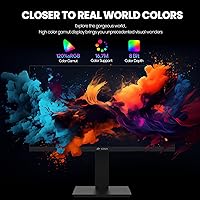
At 120% sRGB coverage, games and media look vivid and punchy — colors are richer than what most entry-level monitors offer, and the 16.7 million color reproduction keeps gradients and skin tones looking natural during long gaming or movie sessions. For everyday creative tasks, most buyers find it more than adequate.
Out-of-the-box calibration skews warm on a portion of units, requiring manual adjustment through the OSD to dial in neutral whites. Professional photo editors and colorists will find this display unsuitable for precise color work, as sRGB coverage, while wide, is not verified or factory-calibrated to tight tolerances.
Ergonomics & Adjustability
91%
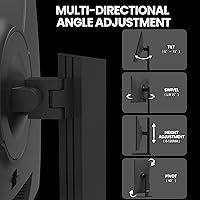
The stand is genuinely one of the strongest selling points at this price tier — full height travel of 120mm, tilt, swivel, and a 90-degree portrait pivot give users real flexibility to dial in their posture whether they are gaming for three hours or working a full day. Buyers frequently call this out as unexpectedly good for the price.
The swivel range of ±15 degrees is functional but slightly narrow for setups where the monitor is positioned off-center from the user. A small number of buyers noted the stand has minor wobble when adjusting height, though it stabilizes once set in position.
Build Quality & Materials
68%
32%
The monitor has a clean, professional appearance with its narrow bezels and red cable management hub — it looks more expensive than its price suggests, and the snap-on stand assembly earned consistent praise for being quick and tool-free right out of the box.
Plastic construction feels adequate but not premium, and some buyers noticed flex in the panel housing when adjusting the screen. Unit-to-unit consistency has drawn concern in a portion of reviews, with occasional reports of loose stand joints or minor cosmetic defects on arrival.
Image Sharpness & Clarity
71%
29%
At typical viewing distances of roughly two feet or more, 1080p on a 24.5-inch panel looks acceptably sharp for gaming, streaming, and general productivity. The matte anti-glare coating reduces eye strain without significantly softening the image in most lighting conditions.
Buyers who have used 1440p displays or who sit closer than average to their monitors notice the pixel density limitations more clearly. Text rendering for small fonts during productivity work can appear slightly soft compared to higher-resolution panels in the same size range.
Brightness & Contrast
72%
28%
The 300 cd/m² brightness level handles indoor lighting well, and the 1000:1 contrast ratio delivers reasonably deep blacks for a non-VA panel — dark scenes in games and films retain enough shadow detail to keep the experience engaging.
In rooms with strong natural light or window glare, 300 cd/m² falls short of what is needed for a truly comfortable viewing experience. HDR content is not supported, and buyers who have used high-brightness or HDR-capable panels will feel the ceiling of this display in darker cinematic scenes.
FreeSync Compatibility
79%
21%
On AMD GPU setups, FreeSync works reliably and noticeably reduces screen tearing without the framerate penalties of traditional VSync. Several NVIDIA users also report smooth adaptive sync performance through the broader compatibility standard, making it a reasonable choice for mixed-GPU households.
G-Sync certification is absent, so NVIDIA users are relying on unofficial compatibility rather than a validated experience — results vary by GPU generation. Users pairing the monitor with older graphics cards that fall outside the supported VRR range may see FreeSync disengage at lower framerates.
Connectivity
69%
31%
Having both HDMI 2.0 and DisplayPort 1.2 covered at this price point gives users genuine flexibility to connect a PC, laptop, or console without needing an adapter. The 3.5mm audio output is a practical inclusion that lets users run headphones or powered speakers directly from the monitor.
With only one of each port, there is no room for a secondary device without unplugging — a KVM or switch is needed for multi-source setups. The single USB-A port is useful for charging but does not function as a hub, which limits its utility for users who want to reduce cable clutter from a single dock point.
Value for Money
88%
For buyers who need 165Hz gaming performance, a fully adjustable ergonomic stand, portrait mode, and VESA compatibility, this display packs an unusual amount of practical value into its price bracket. The feature-to-cost ratio is genuinely hard to match among competing monitors at this tier.
CRUA's shorter brand history means buyers are accepting more uncertainty around long-term support and warranty follow-through compared to established monitor brands. If a unit arrives with a panel defect, the resolution process depends largely on Amazon return policies rather than a well-established direct manufacturer support channel.
Assembly & Setup
87%
The tool-free snap-on stand is consistently praised by buyers who have grown tired of frustrating monitor assembly experiences — most report being fully set up within ten minutes of opening the box. Cable management is aided by the included red hub, which keeps the rear of the monitor tidy without extra effort.
The OSD menu navigation is functional but not intuitive on first use, and finding settings like low blue light mode or refresh rate confirmation requires some patience. A printed quick-start guide with OSD navigation tips would reduce the learning curve for less experienced users.
Eye Comfort
76%
24%
The low blue light mode makes a real difference during late-night sessions, and the matte surface reduces the harsh glare that glossy panels produce under overhead lighting. Buyers who work long hours report noticeably less eye fatigue compared to their previous glossy or uncertified displays.
The low blue light mode shifts the white balance toward yellow, which some users find distracting for color-sensitive tasks. Flicker performance is not specified, and buyers with high sensitivity to PWM dimming may want to verify compatibility before committing.
Portrait Mode Usability
82%
18%
The 90-degree pivot works smoothly and opens up genuinely useful vertical layouts for reading code, browsing long documents, or monitoring dashboards — students and developers in particular highlight portrait mode as a daily use feature they return to regularly.
Rotating to portrait mode requires both a physical stand adjustment and a software display settings change, which adds a step compared to monitors with auto-rotation detection. In portrait orientation, the stand footprint becomes slightly less stable on narrower desks.
Backlight Uniformity
61%
39%
Most buyers in average use cases do not notice backlight unevenness during gaming or video playback, where content changes rapidly enough to mask minor variations. Bright scenes and solid-color backgrounds are generally handled without obvious hotspots in the center of the panel.
A meaningful portion of buyer reports flag visible backlight bleeding along screen edges, particularly noticeable on dark loading screens or when using the monitor in a dim room. Given that this varies between units, buyers sensitive to backlight uniformity should inspect their panel carefully on arrival.

Suitable for:

The CRUA CR245ZB 24.5″ Gaming Monitor is a strong fit for budget-conscious gamers who want a meaningful performance upgrade without crossing into premium price territory. If you're still running a 60Hz or 75Hz display, the jump to 165Hz via DisplayPort will feel like a genuine revelation in fast-paced shooters and action games. Students who split their time between gaming and productivity will especially appreciate the portrait mode pivot — flipping to vertical orientation makes reading research papers, scrolling through code, or reviewing long documents noticeably more comfortable. Remote workers with limited desk space will find the full ergonomic stand a real advantage, since being able to adjust height, swivel, and tilt without buying a separate arm is not something you typically get at this price point. Those building multi-monitor setups will also benefit from the narrow bezels and VESA compatibility, which keep the overall look clean and leave room to grow the workspace over time.
Not suitable for:

Buyers who prioritize color accuracy for professional photo editing, video grading, or graphic design work should look elsewhere — the CRUA CR245ZB 24.5″ Gaming Monitor delivers solid color coverage for gaming and casual use, but it is not a substitute for a display calibrated and verified for content creation workflows. Users who sit close to their screens and are sensitive to pixel density may find 1080p at 24.5 inches a bit soft compared to 1440p alternatives that have come down in price. CRUA is a newer brand with a shorter track record than established names, so buyers who place a premium on long-term warranty support and proven after-sales service may feel more comfortable with a more established manufacturer. Anyone needing USB hub functionality beyond a single charging port will find the connectivity options limiting. And if you game exclusively on NVIDIA and need G-Sync certification rather than FreeSync compatibility, this is not the panel for you.

Specifications

  • Screen Size: The display measures 24.5 inches diagonally, with a 16:9 aspect ratio and a three-sided narrow bezel design.
  • Resolution: Native resolution is 1920x1080 (Full HD), rendering at standard 1080p across the entire panel.
  • Refresh Rate: Supports up to 165Hz via DisplayPort 1.2 and up to 144Hz via HDMI 2.0.
  • Response Time: Panel response time is rated at 3ms, which keeps motion blur minimal during fast-paced gameplay.
  • Panel Coverage: Covers 120% of the sRGB color space with 8-bit color depth, reproducing approximately 16.7 million colors.
  • Brightness: Peak brightness is 300 cd/m², suitable for moderately lit rooms but not designed for high-ambient-light environments.
  • Contrast Ratio: Static contrast ratio is rated at 1000:1, which is standard for this panel category.
  • Sync Technology: AMD FreeSync is supported, with variable refresh rate functionality available on compatible AMD GPUs and select NVIDIA setups.
  • Connectivity: Inputs include one HDMI 2.0 port, one DisplayPort 1.2 port, one 3.5mm audio output jack, and one USB-A charging port.
  • Ergonomics: The stand supports height adjustment across a 120mm range, tilt from -5° to 15°, swivel ±15°, and a full 90° pivot for portrait orientation.
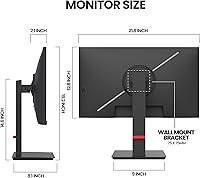
  • VESA Compatibility: The monitor is VESA mount compatible at a 75mm x 75mm pattern, supporting standard third-party arms and wall mounts.
  • Panel Surface: The screen uses a matte anti-glare coating to reduce reflections from ambient light sources.
  • Low Blue Light: A dedicated low blue light mode is built into the OSD to reduce eye strain during extended work or gaming sessions.
  • Dimensions: The monitor measures 5.11 x 21.89 x 19.29 inches with the stand attached.
  • Weight: Total unit weight including the stand is 11.97 pounds.
  • Power Input: The monitor operates at 12 volts DC via an external power adapter.
  • Crosshair Overlay: An on-screen crosshair overlay feature is available through the OSD menu for competitive gaming use.
  • Release Date: The CR245ZB was first made available in November 2023.

Related Reviews
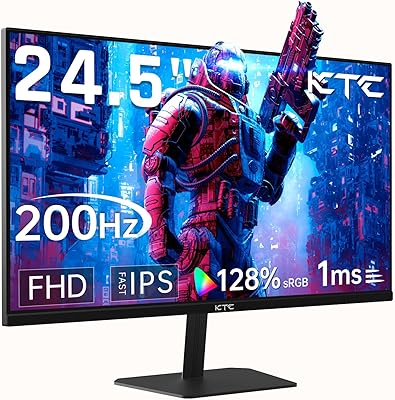
KTC 24.5″ Gaming Monitor 180Hz FHD
87%
89%
Display Quality
91%
Response Time
92%
Refresh Rate
88%
Color Accuracy
85%
Build Quality
More
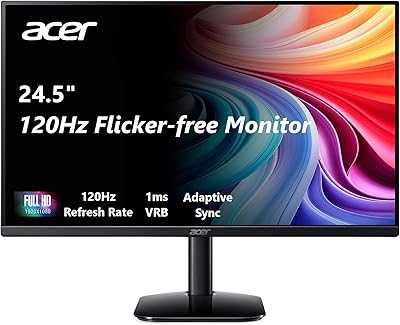
Acer KB252Q G0bi 24.5″ Gaming Monitor
85%
92%
Display Quality
90%
Gaming Performance
88%
Color Accuracy
74%
Ergonomics & Adjustability
85%
Value for Money
More
ASUS TUF Gaming VG259QM 24.5″ Gaming Monitor
76%
93%
Refresh Rate Performance
88%
Response Time & Motion Clarity
81%
Color Accuracy & Image Quality
86%
Adaptive Sync & Compatibility
52%
Stand & Ergonomics
More
KOORUI G2511E 24.5-inch Gaming Monitor
83%
92%
Display Quality
94%
Gaming Performance
88%
Color Accuracy
75%
Build Quality
84%
Ergonomics
More
Alienware 25 Gaming Monitor AW2523HF 24.5″

88%
95%
Display Performance
92%
Color Accuracy
88%
Ergonomics/Adjustability
90%
Ease of Setup
89%
Build Quality
More
Dell G2524H Gaming Monitor 24.5-inch
87%
92%
Performance
96%
Refresh Rate
88%
Build Quality
91%
Ergonomics
93%
Display Quality
More
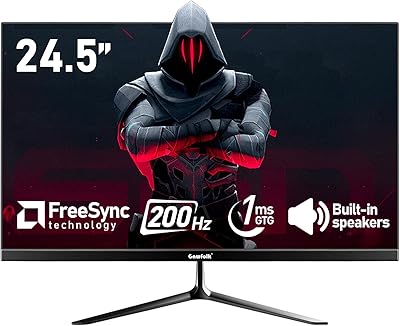
Gawfolk GF245A 24.5-Inch Curved Gaming Monitor
72%
88%
Value for Money
79%
Image Quality
83%
Refresh Rate Performance
81%
Response Time
63%
Build Quality
More
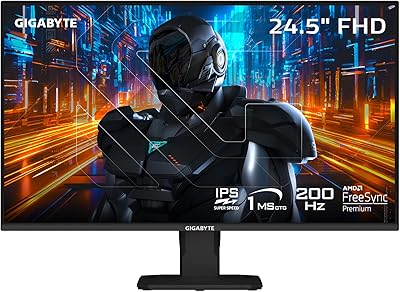
GIGABYTE GS25F2 24.5-inch 200Hz Gaming Monitor
86%
89%
Performance in Fast-Paced Games
91%
Image Quality and Clarity
85%
Ergonomics and Comfort
88%
Ease of Setup
92%
Color Accuracy and Gamut
More
KTC H25X7 24.5-Inch 400Hz Gaming Monitor
89%
96%
Performance
91%
Display Quality
85%
Ergonomics and Comfort
98%
Response Time
88%
Connectivity Options
More
Acer Nitro KG251Q 24.5-inch Gaming Monitor
77%
93%
Refresh Rate Performance
91%
Value for Money
86%
Motion Clarity
82%
Image Contrast & Blacks
61%
Color Accuracy
More

FAQ

You will need a DisplayPort cable to reach 165Hz — HDMI tops out at 144Hz on this display. Check whether a DisplayPort cable is included in your specific shipment, but to be safe, have one on hand. It is a common setup mistake that is easy to avoid if you know ahead of time.

FreeSync officially targets AMD graphics cards, but many NVIDIA GPUs from the GTX 10 series onward support variable refresh rate over a range of monitors through NVIDIA's adaptive sync compatibility. Several buyers report it working fine on NVIDIA setups, though certified G-Sync support is not guaranteed. If FreeSync is critical to your experience, AMD is the safer pairing.

At a typical desk distance of roughly two feet or more, 1080p on a 24.5-inch panel looks perfectly sharp for gaming, video, and general use. If you sit very close or have used a 1440p display recently, you may notice the difference. For most buyers upgrading from older monitors, it will not be an issue.

Assembly is tool-free — the stand snaps onto the monitor base without screws or additional hardware. Most buyers report having the monitor up and running in under ten minutes. Connecting cables and adjusting the OSD to your preferred settings adds a few more minutes but nothing complicated.

Yes, the stand supports a full 90-degree pivot into portrait orientation. You rotate the panel physically, then adjust your operating system display settings to match — in Windows this is done under Display Settings by changing orientation to Portrait. It works reliably and is genuinely useful for reading long documents or writing code.

It handles both reasonably well. The ergonomic stand, portrait mode, and low blue light option make it comfortable for long work sessions. Color accuracy is solid for everyday productivity tasks. If your work involves precise color grading or photo editing at a professional level, a dedicated content creation display would be a better choice.

The USB-A port is primarily for charging, which makes it handy for keeping a phone topped up without reaching behind your PC. It does not function as a full hub, so do not expect to connect peripherals through the monitor.

The stand offers 120mm of height travel, which is enough to make a real ergonomic difference for most sitting positions. Tilt goes from -5° to 15° and swivel covers ±15° side to side. For a monitor at this price point, that is a genuinely complete range — most budget displays offer tilt only.

A minority of buyers have reported backlight unevenness, particularly visible in dark scenes near screen edges. Dead pixel reports are not common but do exist, as with any mass-produced panel. If you notice either issue on arrival, contact the seller promptly since these typically qualify for a return or replacement under Amazon's standard policies.

Yes, the stand detaches and the monitor accepts any standard VESA arm or wall mount with a 75mm x 75mm bolt pattern. This is a practical option if you want to free up desk space or position the screen more precisely than the stand allows.