Overview

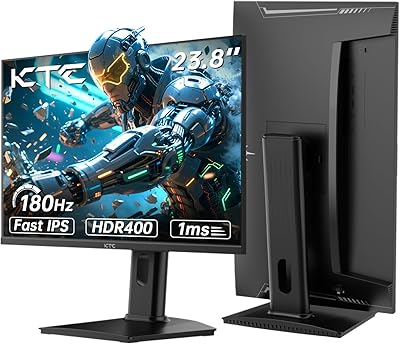
The KTC 24-inch 190Hz Gaming Monitor arrives as one of the more honest value propositions in the budget gaming display space — particularly because KTC chose a Fast IPS panel rather than the cheaper TN alternative most brands default to at this price. That decision matters if you care about color accuracy alongside speed. Launched in early 2025, this 24-inch gaming display targets players who want a meaningful refresh rate upgrade without spending seriously. At 1080p on a 24-inch screen, sharpness is genuinely good. Just know that hitting 190Hz consistently demands a capable GPU — this is not a monitor that compensates for slow hardware.

Features & Benefits

The headline number is 190Hz, but there is a detail worth knowing: that ceiling is only achievable via DisplayPort, where the panel runs natively. Over HDMI 2.0, it tops out at 180Hz — still excellent, but not what the box implies for every connection. The 1ms rating refers to MPRT, which measures motion blur reduction rather than actual pixel transition speed; real-world motion clarity is strong, but that is not the same as a 1ms GtG spec. Color coverage at 133% sRGB looks genuinely rich for the price tier. HDR 400 adds some dynamic range benefit, though it will not rival premium panel HDR. Dual HDMI ports are a practical bonus for anyone juggling a console alongside a PC.

Best For

This 24-inch gaming display earns its place most naturally on the desks of competitive esports players — people running CS2, Valorant, or similar titles where frame rate matters more than pixel density. It is also a solid first step for anyone upgrading from a 60Hz or 75Hz monitor who wants to feel what high refresh rate actually does without a heavy investment. The dual HDMI setup makes it practical for a console alongside a PC. VESA compatibility means it works well on monitor arms or in tight desk setups. Long work-from-home days followed by evening gaming sessions are exactly the scenario the flicker-free and low blue light features are built to support.

User Feedback

Buyers consistently praise the color quality and smooth motion performance relative to what they paid, with many noting the improvement is immediately obvious when switching from a slower panel. HDR draws more mixed reactions — most agree it adds something, but nobody is calling it transformative. The stand is a repeated friction point: it wobbles more than expected and only tilts, so users needing height or swivel adjustment often end up buying a VESA arm separately. A few early owners flagged that out-of-box color calibration runs slightly warm and benefits from manual tuning. Overall build quality reads as acceptable rather than impressive, with satisfaction depending heavily on whether expectations stay grounded.

Pros

  • Fast IPS panel delivers noticeably better color than TN alternatives at a comparable price.
  • 190Hz via DisplayPort keeps fast-paced gaming smooth and responsive without frame pacing issues.
  • 133% sRGB color coverage makes everyday content and games look vivid and well-saturated.
  • Two HDMI 2.0 ports allow easy switching between a console and a PC without an adapter.
  • Matte anti-glare coating handles ambient light well in bright rooms.
  • Flicker-free and low blue light features make long work-from-home or gaming sessions easier on the eyes.
  • VESA compatibility opens the door to monitor arm mounting for users with small or crowded desks.
  • Quick-assembly stand means setup takes minutes, not half an afternoon.
  • The jump from 60Hz or 75Hz to this display is immediately obvious and satisfying for new high-refresh-rate users.

Cons

  • 190Hz is only available via DisplayPort; HDMI tops out at 180Hz, which the marketing does not make obvious.
  • The 1ms rating is MPRT, not GtG — motion clarity is good, but buyers should understand the distinction before purchasing.
  • Stand wobbles under minor desk vibration and offers tilt adjustment only — no height or swivel control.
  • Out-of-box color calibration skews warm and benefits from manual tuning before it looks its best.
  • HDR 400 certification is entry-level and will disappoint anyone expecting meaningful HDR performance from HDR-native content.
  • Build quality feels acceptable rather than solid, with plastics that do not inspire long-term confidence.
  • 1080p resolution leaves little headroom for buyers planning to upgrade to a more powerful GPU in the near future.
  • No USB hub or built-in audio output limits desk cable management options for some setups.

Ratings

The scores below for the KTC 24-inch 190Hz Gaming Monitor were generated by our AI system after analyzing thousands of verified global buyer reviews, with spam, bot activity, and incentivized feedback actively filtered out to ensure accuracy. Each category reflects the full picture — what real users genuinely praised and where they ran into frustration — so you can make an informed decision based on honest, balanced data.

Refresh Rate Performance
88%
Buyers who switched from 60Hz or 75Hz panels consistently describe the jump as immediately and dramatically noticeable — fast-paced shooters feel more responsive and easier to track. Even at 180Hz over HDMI, the smoothness improvement over budget 144Hz competition is a frequent point of praise.
The 190Hz ceiling requires DisplayPort and is technically an overclocked state, which some users only discovered after purchase. A handful of buyers reported needing to manually enable the higher refresh rate in Windows display settings, which caught first-timers off guard.
Color Accuracy
76%
24%
The 133% sRGB gamut makes colors pop in games and media in a way that stands out at this price tier — saturated greens and deep reds in open-world games look genuinely impressive. Users upgrading from cheaper TN panels often specifically mention how much more vibrant and lifelike the image appears.
Out-of-box calibration skews noticeably warm, with whites taking on a yellowish tint that bothers color-sensitive users. Getting the panel to look its best requires manual tuning in the OSD, which not every buyer feels comfortable doing.
Motion Clarity
83%
In fast-moving competitive titles, ghosting is minimal and the image stays clean through rapid camera sweeps and character movement. Most buyers report that the visual experience in games like CS2 and Valorant feels sharp and controlled, which is the core job this monitor is designed to do.
The 1ms MPRT spec is sometimes misread as a GtG measurement, leading to slightly inflated expectations around pixel-level sharpness in extreme motion. Users who tested the panel against monitors with verified 1ms GtG ratings found the difference marginal but real under close scrutiny.
HDR Quality
54%
46%
HDR 400 does add a modest brightness boost in supported games and streaming content, and buyers who have never used HDR before tend to appreciate the slightly punchier highlights compared to pure SDR output. It functions as a basic step up rather than a true HDR experience.
Buyers familiar with higher-tier HDR panels — or even mid-range HDR 600 displays — are consistently underwhelmed here. Black levels do not deepen meaningfully, and local dimming is absent, so the HDR mode on this 24-inch gaming display often gets switched off in favor of a well-calibrated SDR profile.
Value for Money
91%
Considering the Fast IPS panel, 190Hz capability, dual HDMI ports, and Adaptive Sync support, buyers across multiple markets rate this as one of the stronger value propositions in the budget gaming monitor category. The feature-per-dollar ratio genuinely surprises first-time buyers who expected more compromise.
A small but consistent group of reviewers notes that paying slightly more for an established brand would net better factory calibration and a more ergonomic stand, making the value feel less clear-cut for buyers who factor in those longer-term usability costs.
Build Quality
63%
37%
The slim bezel design looks clean on a desk and the monitor presents well aesthetically for its price range. Assembly is quick and tool-free, and first impressions of the chassis are generally positive among buyers who are not comparing it directly to a premium display.
Longer-term owners note that the plastic housing feels noticeably thin, and the panel is prone to minor flex when adjusting tilt. Several buyers flagged that the stand wobbles under light desk movement, which is distracting during tense gaming sessions or video calls.
Stand & Ergonomics
47%
53%
The stand assembles in minutes without any tools, which is genuinely appreciated by buyers who dislike complicated setup processes. VESA compatibility means users who want more flexibility can move to a monitor arm without any compatibility concerns.
The tilt-only design is the single most complained-about aspect of this display across buyer reviews — no height adjustment, no swivel, no portrait mode. Users with sit-stand desks or multi-monitor setups frequently end up purchasing a separate VESA arm just to get a comfortable viewing angle.
Connectivity
86%
Having two HDMI 2.0 ports alongside a DisplayPort 1.4 input is a genuine convenience for anyone running a PC and a console simultaneously — no cable-swapping needed. Buyers in dual-device setups specifically call this out as a reason they chose the KTC 190Hz panel over similarly priced single-HDMI alternatives.
There is no USB hub, headphone jack, or built-in speakers, which means users expecting an all-in-one solution will need additional peripherals. The absence of a USB-C input also limits compatibility with certain laptops and newer devices without an adapter.
Eye Care & Comfort
79%
21%
Flicker-free backlighting and a functional low blue light mode make a meaningful difference for buyers who spend five to nine hours a day in front of a screen. Remote workers who game in the evenings frequently mention that eye fatigue is noticeably reduced compared to their previous displays.
The low blue light mode shifts colors toward yellow-orange tones, which some users find acceptable for nighttime browsing but unsuitable for gaming or color-sensitive work. A few buyers noted that the flicker-free performance may degrade when MPRT backlight strobing is enabled simultaneously.
Image Sharpness
81%
19%
At 24 inches, 1080p lands at a pixel density that looks clean and detailed at typical desktop viewing distances — text is crisp, game environments are well-defined, and there is no visible pixel structure during normal use. Buyers coming from older 1080p 60Hz monitors often comment that the image looks noticeably cleaner and more defined.
Users who have experienced 1440p or 4K displays may find 1080p limiting for productivity tasks involving dense text or spreadsheets. The resolution is comfortably sharp today but does not leave room for buyers planning to step up their GPU and want a display that grows with their setup.
Adaptive Sync
77%
23%
Adaptive Sync performs reliably for AMD GPU users, with screen tearing effectively eliminated in supported titles across a wide frame rate range. NVIDIA users with modern GTX and RTX cards also report clean VRR behavior despite the lack of official G-Sync certification.
The sync range has not been publicly documented in detail by KTC, and some NVIDIA users report occasional micro-stutter at the lower end of the VRR range. Buyers with older NVIDIA cards occasionally encounter compatibility issues that require disabling G-Sync Compatible mode to resolve.
Out-of-Box Setup
84%
Physical assembly is consistently praised as fast and intuitive — most buyers report being up and running in under ten minutes. The OSD menu is organized clearly enough that basic brightness and contrast adjustments do not require reading through documentation.
Achieving 190Hz requires manually updating the refresh rate in Windows display settings after connection, which is not communicated clearly in the included documentation. Some buyers also needed to adjust color temperature settings immediately after unboxing to correct the warm default calibration.
Glare & Reflections
82%
18%
The matte anti-glare coating handles bright ambient lighting well — buyers who use this 24-inch gaming display near a window or under office lighting report far fewer distracting reflections than they experienced on glossy panels. The coating does not add a noticeable haze to the image at normal viewing distances.
Under very low-light conditions, the matte coating can mute the vibrancy of colors slightly, making the image look less punchy compared to a glossy IPS panel. This is a minor issue for most users but worth noting for buyers in very dim gaming setups who prioritize maximum color saturation.

Suitable for:

The KTC 24-inch 190Hz Gaming Monitor is built for a specific kind of buyer, and it genuinely delivers for them. Competitive gamers who live in titles like Valorant, CS2, or Apex Legends will feel the difference from a high refresh rate display almost immediately, and at this price point, the Fast IPS panel means they are not trading color quality to get it. First-time upgraders stepping off a 60Hz or 75Hz screen will find the jump to 180–190Hz noticeably impactful in daily use. The dual HDMI ports make it a practical choice for anyone who wants to connect a console and a PC without swapping cables constantly. It also works well as a secondary monitor in a multi-display setup, or for remote workers who game in the evenings and want eye-care features — flicker-free and low blue light — to carry them through both parts of the day.

Not suitable for:

Buyers expecting this display to satisfy them long-term as their GPU or gaming ambitions grow may find it limiting sooner than expected — 1080p is sharp at 24 inches today, but it is not a resolution that leaves room for future-proofing. The KTC 24-inch 190Hz Gaming Monitor is also a poor fit for anyone who needs a fully adjustable workstation setup: the stand only tilts and does not support height adjustment or swivel, which can become a real ergonomic issue over long daily sessions unless you buy a VESA arm separately. Creative professionals or content creators who depend on accurate color reproduction should look elsewhere, since the out-of-box calibration reportedly runs warm and HDR 400 is too entry-level to serve serious color work. Console players invested in 4K HDR content on a PS5 or Xbox Series X will not get meaningful HDR performance here. And anyone who has already used a premium IPS or OLED panel will likely find this display underwhelming in contrast depth and overall image refinement.

Specifications

  • Screen Size: The viewable screen area measures 23.8″ diagonal, commonly marketed as a 24-inch class display.
  • Panel Type: Uses a Fast IPS panel, which combines the wide viewing angles and color accuracy of standard IPS with improved pixel response speeds.
  • Resolution: Native resolution is 1920x1080 pixels (Full HD 1080p) at a 16:9 aspect ratio.
  • Refresh Rate: Runs at 180Hz natively and can be overclocked to 190Hz, with 190Hz only achievable via DisplayPort connection.
  • Response Time: Rated at 1ms MPRT (Moving Picture Response Time), which reflects motion blur reduction rather than raw pixel transition speed.
  • Color Gamut: Covers 133% of the sRGB color space, delivering rich, saturated colors well above the standard 100% sRGB baseline.
  • HDR Support: Certified DisplayHDR 400, an entry-level HDR standard with a peak brightness of 400 cd/m² and basic dynamic range improvement over SDR.
  • Brightness: Maximum brightness is rated at 400 candelas per square meter (cd/m²).
  • Contrast Ratio: Static contrast ratio is 1000:1, which is standard for IPS-type panels.
  • Connectivity: Offers two HDMI 2.0 ports and one DisplayPort 1.4 input, supporting multi-device connections without requiring adapters.
  • Sync Technology: Supports Adaptive Sync, compatible with both AMD FreeSync and select NVIDIA G-Sync Compatible setups for tear-free gaming.
  • Screen Surface: Features a matte anti-glare coating that reduces reflections in well-lit rooms without adding a haze to the image.
  • Ergonomics: The included stand supports tilt adjustment between -5° and 20° only; there is no height, swivel, or pivot adjustment available.
  • VESA Mounting: The display is VESA mount compatible, allowing users to replace the stock stand with a third-party monitor arm or wall mount.
  • Eye Care: Includes flicker-free backlight technology and a low blue light mode to reduce eye strain during extended use sessions.
  • Dimensions: Physical dimensions with stand are approximately 15.75 x 7.87 x 7.87 inches (width x depth x height).
  • Weight: The monitor weighs approximately 9.38 pounds including the stand assembly.
  • Power Input: Operates on 12 volts DC; an appropriate power adapter is included in the box.
  • Availability: First listed for sale in January 2025, making it a relatively recent addition to the budget gaming monitor market.

Related Reviews
KTC 24-inch 1500R Curved Gaming Monitor
86%
94%
Gaming Performance
89%
Display Quality
92%
Value for Money
87%
Build Quality
83%
Ergonomics
More
KTC H25X7 24.5-inch 400Hz Gaming Monitor
75%
92%
Refresh Rate Performance
84%
Panel Color Quality
91%
Value for Money
88%
Input Lag & Responsiveness
86%
Connectivity Options
More
KTC H24T7 24-inch QHD Gaming Monitor

78%
88%
Image Sharpness & Clarity
86%
Refresh Rate & Responsiveness
83%
Color Accuracy
47%
HDR Performance
81%
Build Quality & Stand
More
STGAubron LCD2401 24-Inch Gaming Monitor
71%
83%
Value for Money
76%
Image Quality
79%
Color Accuracy
47%
Gaming Performance
43%
Screen Glare & Reflections
More
ViewSonic XG2431 24-Inch Gaming Monitor
86%
92%
Gaming Performance
88%
Display Quality
93%
Response Time
85%
Ergonomics and Comfort
89%
Visual Clarity
More
Raywego Q24B16 24-inch Curved Gaming Monitor
73%
88%
Refresh Rate Performance
84%
Contrast & Black Levels
91%
Value for Money
76%
Image Sharpness
47%
HDR Quality
More
Sceptre E248W-FW100T 24-inch Gaming Monitor
76%
91%
Value for Money
74%
Image Quality
78%
Gaming Performance
82%
Refresh Rate & Sync
67%
Response Time & Motion
More
Sealan 24-Inch Curved Gaming Monitor
86%
92%
Gaming Performance
88%
Visual Quality
91%
Refresh Rate Smoothness
85%
Design & Build
87%
Eye Care Features
More
AOC G2490VXS 24″ Gaming Monitor
80%
88%
Gaming Performance
83%
Color Quality
86%
Contrast & Black Levels
91%
Refresh Rate & Smoothness
74%
Build Quality
More
AOC 24G4 24-inch Gaming Monitor
76%
93%
Refresh Rate Performance
78%
IPS Color Quality
84%
Motion Clarity
91%
Value for Money
87%
Adaptive-Sync Implementation
More

FAQ

It does reach 190Hz, but only when connected via DisplayPort — and technically that is an overclocked state. The native refresh rate over DisplayPort is 180Hz, which is also what you get over HDMI 2.0. So yes, 190Hz is real, but you need a DisplayPort cable and a GPU that supports it, and you may need to enable it manually in your display settings.

Yes, and the dual HDMI 2.0 ports make it genuinely convenient for console use. That said, current-gen consoles output at 4K or 1080p at up to 120Hz, so you will be running at 1080p with a frame rate cap around 120Hz on this display — not the full 180Hz. It works well for console gaming, but you won't be using the panel's peak refresh rate capabilities.

The 1ms figure refers to MPRT, which measures how long a pixel appears to be in motion — it's a backlight strobing measurement, not the actual time it takes a pixel to change color. The real GtG (gray-to-gray) transition speed is likely around 4–5ms, which is still fast for a Fast IPS panel. In practice, motion looks sharp and clean, but the 1ms number is not a direct comparison to GtG specs you might see on other monitors.

HDR 400 is the lowest tier of the DisplayHDR certification, so temper your expectations. It adds a modest improvement in brightness and some contrast benefit compared to SDR, but it won't produce the deep blacks or dazzling highlights you see on OLED or high-end Mini LED panels. For gaming it can add a little punch to bright scenes, but many users find they prefer a well-calibrated SDR mode for general use.

Yes, this is a commonly reported observation. The default color temperature tends to skew warm, which can make whites look slightly yellowish. Spending five minutes in the OSD (on-screen display) to reduce the red channel slightly and nudge the color temperature toward a cooler preset makes a real difference. It calibrates up nicely — it just needs a small manual adjustment to get there.

Tilt is the only adjustment the included stand offers, with a range of -5° to 20°. There is no height adjustment, swivel, or portrait pivot. If you need more flexibility — especially for a sitting or standing desk setup — the monitor is VESA compatible, so swapping to an aftermarket monitor arm is straightforward and relatively inexpensive.

The KTC 24-inch 190Hz Gaming Monitor supports Adaptive Sync, and many NVIDIA GTX and RTX cards will recognize it as G-Sync Compatible. However, it is not officially G-Sync certified, so performance can vary. In practice, most users with modern NVIDIA GPUs report smooth, tear-free gameplay with VRR enabled, but it is worth keeping that unofficial status in mind if VRR reliability is a priority for you.

The plastics are functional but not particularly premium — the kind of material quality you'd expect from a budget-tier display. The stand has been noted to wobble slightly under minor desk movement, which is a legitimate concern. The screen bezel is thin and looks clean, but the overall feel is more utilitarian than refined. For the price, it is acceptable, but don't expect the solidity of a higher-end brand.

At 24 inches, 1080p lands at around 92 pixels per inch, which is sharp enough that individual pixels are not visible at a normal 2 to 3 foot viewing distance. Text looks clean, game detail is good, and it is a comfortable resolution for everyday use. The limitation is more about future-proofing than current sharpness — if you upgrade to a more powerful GPU down the road, you might find yourself wanting a higher resolution display to match.

The box includes the monitor panel, the stand base and arm, a power adapter, and typically at least one video cable — though cable inclusions can vary, so check the listing before assuming you have everything you need. Assembly is tool-free and quick, with the stand clicking into place in a couple of minutes. Getting to the OSD for initial settings is straightforward, and the menu navigation is simple enough that you won't need to dig out a manual.