Overview

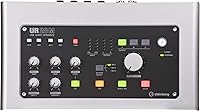
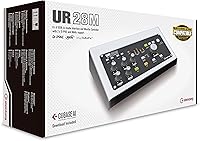
The Steinberg UR28M USB Audio Interface has been on the market since late 2011, and the fact that it still draws genuine interest in a crowded field says something real about its design. This isn't a basic starter box — it's aimed squarely at home studio owners and semi-professional producers who need more than two channels and a headphone output. What genuinely sets it apart from similarly priced competitors is its 3x3 monitoring matrix, which lets you independently route audio to three pairs of speakers — functionality you'd normally need dedicated hardware to achieve. Cubase AI is bundled in as a welcome bonus, though it's a side perk rather than a core reason to buy.

Features & Benefits

Recording at 24-bit/96kHz means you're capturing audio with enough resolution to hold up through mixing and mastering without a noise floor creeping into quiet passages. The D-Pre Class-A discrete preamps are genuinely clean, and the +48V phantom power handles condenser microphones without needing an external preamp in the chain. The S/PDIF coaxial I/O is a practical touch if you're routing in a hardware synth or outboard digital gear. Where this Steinberg interface really earns its place is the DSP-powered monitoring via dspMixFx — singers and instrumentalists can hear themselves through reverb and EQ in real time, with zero latency introduced by the DAW or computer.

Best For

The UR28M makes the most sense for producers who have already outgrown a basic two-channel interface and need multi-monitor routing without purchasing a separate hardware controller. If you run two or three pairs of reference speakers — nearfields, mid-fields, and a small consumer speaker for translation checks, say — the built-in matrix handles that natively. Musicians tracking vocals or live instruments will appreciate monitoring through reverb and compression without any perceived delay. Cubase users get particularly tight software-hardware integration straight out of the box. It's also worth considering for podcasters or content creators who've simply hit the ceiling of their current setup and need more analog outputs.

User Feedback

With a 4.4 out of 5 aggregate rating from over 200 buyers, this USB audio interface sits in firmly positive territory. Recurring praise focuses on build quality and monitor routing flexibility, with long-term owners tending to be the most enthusiastic — a decent indicator that the unit holds up over time. On the other side, driver stability on certain Windows configurations comes up repeatedly, and a handful of users note compatibility concerns as the hardware ages against newer operating systems. The dspMixFx software also has a real learning curve that can catch newcomers off guard. None of these are dealbreakers, but they're worth factoring in before committing.

Pros

  • The 3x3 monitoring matrix lets you route audio to three separate speaker pairs without any extra hardware.
  • Class-A discrete mic preamps produce clean, low-noise recordings that hold up well during mixing.
  • DSP-powered monitoring means singers and players hear themselves in real time with zero perceptible latency.
  • Six analog outputs provide genuine flexibility for complex studio routing scenarios.
  • S/PDIF coaxial I/O makes it easy to integrate digital outboard gear or hardware synths.
  • Onboard REV-X reverb and Channel Strip processing run on the DSP chip, leaving your CPU free for other tasks.
  • The digitally controlled monitor section with DIM, Mono, and Mute functions is practical for professional referencing.
  • Long-term owners consistently rate the UR28M highly, pointing to solid build quality and lasting reliability.
  • Cubase AI is included as a bundled bonus, giving newcomers a capable DAW to start working immediately.
  • The 24-bit/96kHz resolution captures audio with enough headroom to survive heavy post-processing without degradation.

Cons

  • Driver stability on certain Windows configurations has been a recurring complaint among users.
  • The dspMixFx software has a real learning curve that can frustrate buyers expecting a plug-and-play experience.
  • No dedicated MIDI I/O means you will need a separate interface or adapter if MIDI is part of your workflow.
  • The hardware has been on the market since 2011, raising legitimate questions about long-term OS driver support.
  • Users on the latest versions of Windows or macOS should verify compatibility before purchasing.
  • The physical footprint — over 16 inches wide — may be too large for compact or cluttered desk setups.
  • This Steinberg interface offers no bus-power option, requiring a dedicated power source at all times.
  • Buyers who never switch between monitor speakers will find the monitoring matrix adds cost without personal benefit.
  • Community support and firmware updates are limited given the product age, so troubleshooting may require more effort.
  • The interface is heavier and bulkier than many modern competitors at the same price point.

Ratings

Our AI rating engine analyzed verified buyer reviews for the Steinberg UR28M USB Audio Interface from multiple global markets, actively filtering out incentivized, duplicate, and bot-generated feedback to surface what real studio users actually experience. The scores below reflect both the genuine strengths that keep producers loyal to this unit years after purchase and the friction points that have caused frustration — neither side is glossed over.

Audio Quality
91%
Buyers consistently describe recordings made through the UR28M as clean and detailed, with the Class-A preamps adding no audible coloration during vocal takes or instrument tracking. At 24-bit/96kHz, the unit captures enough headroom that mixes retain clarity through heavy compression and EQ in post.
A small number of users with high-end studio reference gear note that the preamps, while excellent for the price tier, stop short of the transparency found in dedicated outboard preamps costing significantly more. At very high gain settings, a faint noise floor becomes noticeable on sensitive condenser microphones.
Monitor Routing
88%
The 3x3 monitoring matrix is the feature most praised by producers who own multiple sets of speakers — being able to switch between nearfields, hi-fi monitors, and a small reference speaker without touching a patchbay or buying a standalone monitor controller is a genuine daily convenience. Long-term owners frequently cite this as the primary reason they have not upgraded.
The routing configuration lives inside the dspMixFx software rather than on hardware buttons, which means if the software misbehaves or the connection drops, your monitor setup can become temporarily inaccessible. Some users find the routing logic non-intuitive until they spend meaningful time with the manual.
DSP Monitoring Latency
87%
Vocalists and guitarists tracking live performances particularly appreciate the genuinely latency-free monitoring — hearing yourself through reverb and EQ in real time without any perceptible delay makes the recording experience feel natural rather than clinical. This DSP path is entirely independent of DAW buffer size, so it stays smooth even on slower computers.
The DSP monitoring only works within the dspMixFx environment, which adds a layer of software complexity some users find annoying to configure alongside their DAW. A few users reported occasional dropouts in the DSP monitoring path on USB-heavy systems, requiring them to unplug and reconnect the unit.
Build Quality
86%
The metal chassis feels substantial and desk-worthy in a way that plastic-bodied competitors in the same price range do not — this is a unit you can put in a permanent studio position and trust to stay put. Multiple long-term owners who have used the UR28M for five or more years report no physical degradation in knobs, ports, or panel finish.
The unit is noticeably heavier and larger than modern equivalents, which becomes a drawback if you ever need to move it or pack it for travel. A few reviewers noted that the silver finish shows fingerprints and dust more readily than darker alternatives.
Driver Stability
61%
39%
On well-configured Windows systems running supported driver versions, the UR28M runs reliably for extended sessions without dropouts or CPU spikes. Users who took time to install the correct driver version and disable conflicting USB power management settings report a stable, predictable experience over years of use.
Driver stability is the most frequently cited complaint across the entire review pool — particularly on recent Windows versions where certain users experienced crashes, audio dropouts, or complete device non-recognition after OS updates. The hardware's age means Steinberg's driver development cadence has slowed, leaving some users in limbo after major OS releases.
Software & Setup
63%
37%
Once properly configured, the dspMixFx software gives you meaningful control over monitoring mixes, DSP effects, and routing in a single interface without needing to open your DAW. Users already familiar with Steinberg products find the layout logical and the integration with Cubase particularly tight.
New users consistently describe the initial setup and dspMixFx learning curve as steeper than expected for a USB plug-and-play device. The software's interface feels dated compared to rivals that have launched more recently, and documentation for edge-case configurations is sparse in the included materials.
Preamp Performance
83%
The D-Pre Class-A discrete design gives the preamps a cleaner noise floor than the integrated preamp designs found in many competing interfaces at this price point, and +48V phantom power works reliably across a wide range of condenser microphones. Producers recording acoustic instruments particularly praised the natural transient response.
With only two mic preamp inputs available simultaneously, users who want to track a full band or multi-mic drum kit will quickly hit the ceiling. Gain range, while adequate for most microphones, can feel borderline tight with particularly low-output dynamic or ribbon mics.
Value for Money
74%
26%
When the UR28M is evaluated against the cost of separately purchasing a monitor controller, a comparable preamp stage, and onboard DSP processing, the all-in-one value proposition is genuinely strong for a home studio owner building out their setup incrementally. Long-term owners especially feel the purchase has aged well given sustained daily use.
Newer competitors have entered the same price bracket with more modern drivers, updated software, and comparable I/O counts, which makes justifying the UR28M harder purely on paper today than it was at launch. Buyers who do not need the monitor routing will find they are paying for features they will never use.
OS Compatibility
57%
43%
On Windows versions explicitly supported by Steinberg's published driver releases, the interface connects and operates without requiring third-party workarounds. Users who verified compatibility before purchasing and stuck with a stable OS version generally report trouble-free long-term operation.
The hardware's 2011 origin means OS compatibility is a genuine gamble on very recent systems — multiple users discovered driver issues only after a major Windows update, with no immediate fix available. Mac users in particular flagged uncertainty around Apple Silicon compatibility, requiring careful verification before purchase.
I/O Flexibility
84%
Six analog outputs plus S/PDIF coaxial I/O gives this Steinberg interface a connectivity breadth that most similarly priced competitors cannot match — you can simultaneously feed three monitor pairs, a headphone mix, and a digital outboard device without running out of outputs. The four analog inputs comfortably handle common multi-source recording scenarios.
The absence of any MIDI I/O is a meaningful omission for producers who use hardware synthesizers or MIDI controllers that lack USB connectivity. Users who expected MIDI ports — a standard feature on several competitors in this class — were notably disappointed to discover they needed an additional adapter.
Onboard DSP Effects
79%
21%
The REV-X reverb is a genuinely good-sounding algorithm for tracking purposes — singers get a natural, warm reverb tail in their headphone mix that makes performances feel inspired rather than sterile. The four Channel Strip instances add compression and EQ to the monitoring chain without the DSP load affecting DAW performance.
The REV-X and Channel Strip settings within dspMixFx are somewhat limited in tweakability compared to full-featured plug-in equivalents, making them best suited for monitoring rather than as a serious mixing tool. A couple of users found the preset variety thin after extended use.
Durability
89%
Physical longevity is one of the UR28M's strongest real-world qualities — a disproportionate number of five-star reviews come from buyers who have owned the unit for three to seven years, with knobs, ports, and circuitry all functioning as originally intended. This track record provides meaningful reassurance given the product age.
While the hardware itself tends to last, the long-term usability depends on driver support continuing — and there is no guarantee Steinberg will maintain updates indefinitely for a product of this vintage. If driver support is discontinued, a perfectly functional unit could become unusable on a future OS.
Ease of Use
66%
34%
Once past the initial configuration, day-to-day operation of the UR28M is relatively straightforward — the front-panel controls are logically arranged and the monitor level knob responds smoothly. Users who invested time learning the dspMixFx software report feeling in full control of their studio routing within a week.
The out-of-box experience is less intuitive than modern rivals designed with first-day usability in mind — getting the routing, DSP monitoring, and DAW all configured simultaneously requires reading documentation that many buyers skip. Beginners in particular described feeling overwhelmed by the number of options at initial setup.
Headphone Output
77%
23%
The dedicated headphone output delivers enough volume to drive most studio headphones at comfortable tracking levels, and the independent level control means you can adjust the headphone mix without affecting the monitor output. Vocalists tracking late at night found it consistently reliable for extended silent sessions.
Users with high-impedance reference headphones noted that the headphone amplifier runs out of headroom before reaching ideal listening levels, which is a real limitation for anyone using 250-ohm or higher impedance cans. There is only one headphone output, which becomes a bottleneck when tracking multiple performers simultaneously.

Suitable for:

The Steinberg UR28M USB Audio Interface is a strong fit for home studio owners and semi-professional producers who have specific, practical needs that go well beyond basic recording. If you regularly switch between two or three pairs of monitor speakers — say, studio nearfields, hi-fi speakers, and a small Bluetooth reference — the built-in 3x3 monitoring matrix handles that routing natively, saving you from buying a dedicated monitor controller. Vocalists and instrumentalists who find DAW-induced monitoring latency distracting will appreciate being able to hear themselves through reverb and compression in real time without any perceptible delay. Producers who work with both analog hardware and digital outboard gear will value the S/PDIF coaxial I/O for keeping those signal chains clean and integrated. Cubase users in particular get a noticeably tight out-of-the-box experience, though the interface works well with other DAWs too.

Not suitable for:

The Steinberg UR28M USB Audio Interface is not the right call for beginners who simply need to get a microphone into a computer quickly and affordably — the feature set and software complexity will outpace their immediate needs, and simpler options exist at lower cost. Producers who work entirely within a single DAW and never switch monitor sources will find the 3x3 matrix largely irrelevant, meaning they'd be paying for capability they won't use. Anyone relying on a very recent version of Windows or macOS should verify driver compatibility before purchasing, since the age of the hardware means firmware updates are no longer guaranteed. If MIDI connectivity is part of your workflow, the UR28M offers no dedicated MIDI I/O, which could be a real limitation depending on your setup. Mac-centric users should also double-check current OS support, as driver stability concerns have been more frequently reported on Windows but the hardware's age introduces uncertainty on both platforms.

Specifications

  • Resolution: Records and plays back audio at up to 24-bit/96kHz, providing sufficient dynamic range and frequency headroom for professional studio work.
  • Connection: Connects to a computer via USB 2.0, which is backward and forward compatible with USB 3.0 ports on modern computers.
  • Analog Inputs: Offers 4 analog inputs, accommodating microphones, line-level instruments, and other analog sources simultaneously.
  • Analog Outputs: Provides 6 analog outputs, enabling connection to multiple sets of monitor speakers or outboard gear without a hardware patchbay.
  • Digital I/O: Includes S/PDIF coaxial input and output for connecting digital outboard equipment, hardware synthesizers, or external converters.
  • Mic Preamps: Equipped with D-Pre Class-A discrete mic preamps that deliver clean, low-noise amplification suitable for condenser and dynamic microphones.
  • Phantom Power: Supplies +48V phantom power to support condenser microphones that require external power to operate.
  • DSP Effects: Includes onboard REV-X reverb and four Channel Strip processing instances, all running on dedicated DSP hardware rather than the host CPU.
  • Monitor Matrix: Features a 3x3 monitoring matrix that allows independent routing of audio to three separate pairs of output speakers from within the dspMixFx software.
  • Monitor Controls: The digitally controlled monitor output includes DIM, Mono, and Mute functions for accurate and flexible speaker referencing.
  • DSP Technology: Uses Steinberg's dspMixFx platform to enable latency-free DSP-powered monitoring entirely independent of the connected DAW.
  • Headphone Output: Includes a dedicated headphone output with its own level control for private monitoring during recording or mixing sessions.
  • Bundled Software: Ships with Cubase AI, a feature-capable entry-level version of Steinberg's professional DAW, available for download after registration.
  • Dimensions: Measures 16.34 x 8.07 x 4.72 inches, making it a full-width desktop unit suited for a permanent studio desk installation rather than mobile use.
  • Weight: Weighs 3.08 pounds, reflecting a solid metal chassis construction rather than lightweight plastic.
  • Color: Available in silver, with a clean front-panel layout that keeps controls logically organized and accessible.
  • OS Compatibility: Officially compatible with Windows; buyers using the latest versions of Windows or macOS should verify current driver availability on Steinberg's support site before purchasing.
  • Power: Requires an external power source via the included AC adapter and is not bus-powered through USB alone.

Related Reviews
Steinberg UR44C
Steinberg UR44C
87%
94%
Build Quality
92%
Audio Resolution
89%
Driver Stability
87%
Microphone Preamps
83%
iOS Integration
More
Steinberg UR12
Steinberg UR12
86%
94%
Build Quality
91%
Preamplifier Transparency
88%
Portability
87%
Value for Money
82%
iPad Integration
More
Steinberg UR242 4-Channel USB Audio Interface
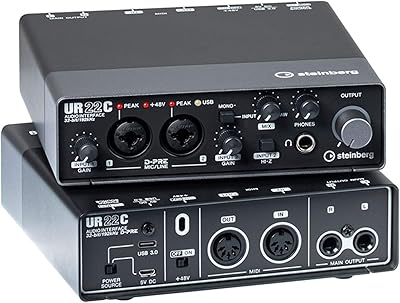
77%
88%
Preamp Quality
68%
Driver Stability
44%
Mac Compatibility
86%
MIDI Connectivity
76%
Value for Money
More
Steinberg UR22C
Steinberg UR22C
87%
96%
Build Quality
93%
Audio Resolution
89%
Preamp Transparency
91%
Monitoring Latency
84%
Driver Stability
More
Steinberg UR816C USB Audio Interface
75%
83%
Preamp Quality
86%
Build Quality
57%
Driver Stability
73%
Value for Money
84%
Zero-Latency Monitoring
More
Steinberg UR22 MkII USB Audio Interface
78%
88%
Preamp Quality
91%
Build Quality
86%
Ease of Setup
83%
Value for Money
87%
Noise Floor
More
Steinberg AXR4U USB Audio Interface

81%
93%
Preamp Quality
89%
Channel Count & Routing
91%
DSP Monitoring
94%
Recording Resolution
88%
Expandability
More
M-Audio M-Track Duo
M-Audio M-Track Duo
83%
88%
Preamp Clarity
93%
Value for Money
62%
Build Quality
91%
Ease of Installation
87%
Portability
More
Black Lion Audio Revolution 2x2 Audio Interface

75%
88%
Preamp Quality
91%
Audio Transparency
86%
Clocking Performance
87%
Build Quality
73%
Value for Money
More
M-Audio M-Track 2X2 USB Audio Interface
76%
84%
Build Quality
76%
Preamp Performance
82%
Ease of Setup
58%
Driver Stability
79%
Value for Money
More

FAQ

Yes, the UR28M works as a standard USB audio interface with any ASIO-compatible DAW on Windows or Core Audio on Mac, including Ableton Live, Pro Tools, Logic Pro, and others. The bundled Cubase AI is a bonus, not a requirement. The dspMixFx monitoring software runs independently alongside whatever DAW you prefer.

The 3x3 matrix means the interface can send audio to three separate pairs of monitor speakers, and you can independently control the level and routing to each pair. If you only have one set of monitors, you will not use this feature at all. But if you regularly check your mixes on multiple speakers — studio nearfields, a hi-fi system, and a small Bluetooth speaker, for instance — this replaces what would otherwise require a dedicated hardware monitor controller.

The monitoring is genuinely latency-free in the practical sense because it bypasses the computer entirely. Your microphone or instrument signal is routed through the onboard DSP chip and fed back to your headphones or monitors before the computer ever processes it. You may still notice a very small amount of analog circuit delay, but it is imperceptible to the human ear during recording.

Yes. The preamps supply +48V phantom power, which is what most condenser microphones require to operate. You just enable phantom power on the relevant input channel and connect your mic with a standard XLR cable.

This is a legitimate concern worth addressing honestly. The Steinberg UR28M USB Audio Interface was released in 2011, and while Steinberg has continued to release driver updates over the years, some users have reported instability on specific Windows configurations. Before purchasing, it is worth checking Steinberg's official support page for the most recent driver version and confirmed OS compatibility, rather than assuming everything will work flawlessly on day one.

No, this USB audio interface does not include dedicated MIDI I/O. If MIDI connectivity is part of your workflow, you will need a separate USB MIDI interface or a keyboard controller with its own USB MIDI connection.

Yes. The UR28M has four analog inputs, so you can track up to four sources simultaneously — useful for recording a drum kit with multiple mics, a full band rehearsal, or a podcast with several guests. Two of those inputs share preamp channels, so check the manual for input configuration details before assuming all four accept XLR microphone cables.

REV-X is Steinberg's own algorithmic reverb engine, built into the onboard DSP chip. During recording, you can apply it to your monitoring mix in real time so singers can hear themselves with reverb without that reverb being printed to the recorded track. You can also use the native VST3 plug-in version of REV-X within your DAW for mixing, though that version does use CPU resources.

The UR28M requires an external AC power adapter and cannot run on USB bus power alone. This is fairly typical for interfaces with multiple outputs and onboard DSP, as the power demands exceed what a USB port can reliably supply. Make sure you have a free outlet near your desk before setting it up.

S/PDIF is a digital audio connection that carries stereo audio over a single coaxial cable. On the UR28M, it acts as an additional stereo input and output pair, separate from the four analog inputs. Common uses include connecting a hardware synthesizer with a digital output, routing audio from an external digital effects processor, or using a standalone analog-to-digital converter as an input expander.

Where to Buy