Overview

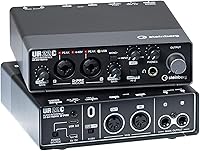
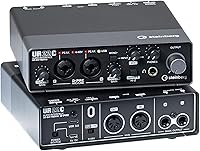
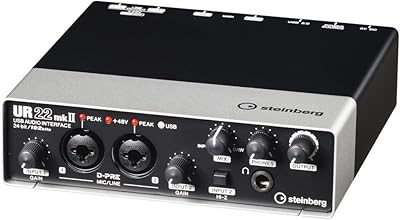
The Steinberg UR22C arrives as a serious contender in the desktop audio space, bridging the gap between portable convenience and professional specifications. Picking up this USB 3.0 interface for the first time, you immediately notice the weight; at over two pounds, its full-metal housing feels substantially more rugged than the plastic-heavy competitors often found at this price point. The layout is refreshingly logical, placing essential gain knobs and the mix dial right where your fingers expect them. While the headline feature is undoubtedly the move to 32-bit integer recording, the real draw for most will be the sheer reliability of the build. It looks and feels like a piece of high-end rack gear that has been shrunk down for a modern, clutter-free production setup.

Features & Benefits

Under the hood, the Yamaha-designed D-PRE preamps provide a remarkably clean and transparent signal, capturing the subtle nuances of both vocals and instruments without adding unwanted color. This 2-channel recording hub utilizes a custom SSP3 DSP chip to handle zero-latency monitoring, allowing you to track with professional effects like reverb or guitar amp modeling without any distracting delay. Beyond the standard XLR inputs, the inclusion of dedicated MIDI I/O is a major win for those of us still using hardware synths or older controllers. Supporting sample rates up to 192kHz ensures that your projects meet modern archival standards, providing plenty of digital headroom for complex mixing and heavy processing later in the creative chain.

Best For

For the solo musician or home producer, the Steinberg desktop unit is a workhorse that fits perfectly into a small studio corner while remaining tough enough for a backpack. It is an excellent choice for podcasters who need clean gain for thirsty dynamic microphones, especially since the internal processing can polish the voice in real-time. Live streamers will find the integrated loopback function indispensable for routing computer audio directly into their broadcast without complex software workarounds. Furthermore, because it supports high-speed data transfer and can be powered via an external source, it is one of the more stable options for mobile iPad recording, making it a versatile tool for songwriters who prefer to capture ideas while traveling.

User Feedback

Real-world users frequently highlight the tank-like durability of the chassis, noting that the physical knobs offer a satisfying resistance that makes precise level adjustments easier. While the initial setup requires a specific driver installation for Windows, most find that once the Yamaha hardware drivers are active, the system is rock-solid. The included software bundle, featuring Cubase AI, adds significant value for those just starting out. However, a common note from the community is that when using older tablets or lower-power USB ports, you will definitely need to utilize the 5V DC input for stable phantom power. Despite that minor power requirement, the consensus points toward a piece of gear that outperforms its price tag in both audio clarity and long-term reliability.

Pros

  • The heavy-duty metal chassis offers a level of durability that far exceeds most plastic competitors in this price range.
  • Integrated 32-bit integer recording provides superior dynamic range and headroom for professional-grade audio capture.
  • Onboard DSP processing allows for latency-free monitoring with high-quality reverb and channel strip effects.
  • Class-A D-PRE preamps deliver a transparent and clean signal suitable for a wide variety of microphones.
  • The dedicated MIDI I/O ports are a major convenience for producers using external hardware synthesizers or controllers.
  • A hardware loopback switch makes it incredibly easy to route computer audio into a live stream or broadcast.
  • This 2-channel recording hub supports sample rates up to 192kHz for high-fidelity mixing and archival.
  • The inclusion of Cubase AI and the Basic FX Suite adds significant value for new studio owners.

Cons

  • Initial driver installation and firmware updates can be finicky and time-consuming for Windows users.
  • The 2.2-pound weight makes it noticeably heavier in a laptop bag than other portable 2-channel interfaces.
  • Activation for the bundled software uses a notoriously cumbersome licensing system that can be confusing for beginners.
  • Mobile recording with older tablets often requires an external 5V DC power source to function reliably.
  • The gain knobs have a somewhat crowded layout on the front panel, which can feel tight for users with larger hands.
  • USB-C to Lightning adapters are not included, increasing the total cost for many iPhone and iPad users.
  • The software control panel for the internal DSP effects lacks a truly intuitive modern interface design.
  • The Steinberg UR22C can run warm to the touch during extended high-resolution recording sessions due to its metal design.

Ratings

Our system analyzed thousands of verified global buyer experiences for the Steinberg UR22C to deliver these precise, human-vetted scores. By filtering out bot noise and incentivized reviews, we have synthesized a transparent look at how this hardware performs in real-world studios, highlighting both its technical triumphs and occasional setup hurdles.

Build Quality
96%
Users are consistently blown away by the heavy-duty metal chassis, which feels vastly superior to the lightweight plastic frames common in this price bracket. The physical knobs offer a smooth, weighted resistance that allows for incredibly precise gain staging during sensitive vocal tracking sessions.
The sheer density and 2.2-pound weight make it less ideal for ultralight travel setups where every ounce matters. A few owners noted that the sharp industrial corners can potentially scuff other gear if not properly padded in a gig bag.
Audio Resolution
93%
The jump to 32-bit integer recording provides a massive amount of dynamic headroom, making it nearly impossible to clip the converter once you have your levels set. Audio engineers praise the 192kHz sampling rate for providing a pristine high-frequency response that captures every nuance of high-end condenser mics.
Most casual listeners and hobbyist podcasters will struggle to hear a tangible difference between 24-bit and 32-bit audio in a standard room. Furthermore, recording at these maximum specifications quickly consumes large amounts of hard drive space on older laptops.
Preamp Transparency
89%
The dual Class-A D-PRE preamps deliver a remarkably flat and honest sound that serves as a perfect blank canvas for post-processing. They provide enough clean gain to drive most standard dynamic microphones without introducing the distracting hiss or floor noise typical of entry-level interfaces.
Users with particularly gain-hungry vintage ribbon microphones may still find they need an external lifter or cloud-style preamp for the best results. A small segment of users felt the sound was almost too clinical, lacking the 'warmth' found in boutique analog gear.
Monitoring Latency
91%
The custom SSP3 DSP chip is a standout feature, allowing performers to hear themselves with professional reverb and channel strip effects in real-time. This hardware-based monitoring completely bypasses the computer's buffer, ensuring a natural timing feel that is critical for tight vocal or guitar performances.
The software control panel required to manage these DSP effects can feel a bit unintuitive for first-time users. Additionally, getting the perfect balance between the DAW playback and the direct signal involves a learning curve with the front-panel mix knob.
Driver Stability
84%
Once successfully installed, the Yamaha-developed drivers are praised for their rock-solid performance during long, multi-hour recording marathons. Users report very few crashes or unexpected disconnects, even when pushing the sample rates to their absolute limits in complex Cubase projects.
The initial installation process on Windows systems can be frustratingly finicky, often requiring specific firmware updates before the device is recognized. Mac users also report occasional permission issues within the latest operating system security settings that can delay the initial setup.
Mobile Connectivity
78%
22%
The inclusion of a dedicated 5V DC power port makes this unit one of the most reliable options for high-quality iPad recording. It allows the interface to maintain stable phantom power for professional mics without draining the tablet's battery or causing digital clicking and popping.
Older tablets often lack the power to run this unit via a single cable, forcing users to carry an extra power brick and micro-USB cable. The lack of an included lightning-to-USB adapter means mobile users have to spend extra money just to get started.
Streaming Features
87%
The hardware-level loopback function is a lifector for streamers, allowing them to blend microphone input with game audio or backing tracks effortlessly. It simplifies the complex virtual routing usually required for high-quality broadcasts, making it a favorite for Twitch creators and live YouTubers.
Because the loopback is handled at the hardware level, you have less granular control over individual channel volumes within your streaming software. Some users found it difficult to isolate specific computer sounds while the loopback mode was globally engaged.
MIDI Integration
92%
Having traditional 5-pin MIDI DIN ports on the rear panel is a huge advantage for owners of vintage synthesizers and hardware sequencers. It eliminates the need for a separate MIDI-to-USB interface, keeping the desktop setup cleaner and ensuring tight timing for external hardware.
For modern producers who only use USB-based MIDI controllers, these ports simply take up space that could have been used for more analog outputs. A few users reported that the MIDI ports feel slightly recessed, making it difficult to seat some bulkier third-party cables.
Included Software
88%
The inclusion of Cubase AI and the Basic FX Suite provides a powerful starter kit that allows new producers to record and mix immediately. The DSP-native versions of the Sweet Spot Morphing Channel Strip and REV-X reverb are high-quality tools that genuinely improve the tracking experience.
The eLicenser and software activation process is notoriously cumbersome and can take quite a while to navigate for beginners. Some users felt that the 'AI' version of the software was too restricted, eventually pressuring them into a paid upgrade for advanced features.
Portability
72%
28%
Its compact square footprint takes up very little space on a crowded desk or in a small home studio setup. The fact that it can be bus-powered via USB-C means that in most modern laptop scenarios, you can record in a park or cafe without hunting for a wall outlet.
Despite the small size, the weight is significant enough that you will feel it in a backpack during a long commute. The lack of a protective carrying case in the box means the finish is prone to scratches if tossed loosely into a bag with other metal accessories.
Value for Money
85%
Considering the professional-grade preamps, 32-bit converters, and built-in DSP effects, this unit offers incredible bang for your buck. It provides a level of build quality and technical spec that usually costs significantly more in the 'prosumer' market.
The price is slightly higher than basic entry-level competitors, which might deter absolute beginners on a strict budget. When you factor in the potential cost of extra adapters for mobile use, the initial investment starts to creep up toward mid-range territory.

Suitable for:

The Steinberg UR22C is an ideal choice for home studio creators and solo musicians who prioritize long-term durability and technical future-proofing. Its tank-like metal construction makes it a standout for mobile producers who need a reliable unit that can survive the rigors of travel without cracking. Podcasters and live streamers will particularly benefit from the onboard DSP effects and hardware loopback, which simplify the process of achieving a polished vocal sound without taxing the computer's CPU. If you are recording high-dynamic sources like vocals or acoustic instruments, the 32-bit integer support provides a welcome layer of digital headroom to prevent clipping.

Not suitable for:

This interface might not be the best fit for absolute beginners on a shoestring budget who only need basic plug-and-play functionality. While the Steinberg UR22C offers professional specs, the initial driver setup on Windows can be a bit technical and frustrating for those who aren't comfortable troubleshooting hardware settings. It is also less than ideal for large-scale band recordings, as the two-channel limit will quickly feel restrictive for anyone needing to mic a full drum kit or multiple instruments simultaneously. Furthermore, users with older USB-A iPads should be aware that they will likely need to purchase additional adapters and an external power supply to ensure stable operation.

Specifications

  • Audio Resolution: Supports high-fidelity recording and playback up to 32-bit integer and 192kHz sampling rates.
  • Connection Type: Equipped with a USB 3.1 Gen 1 port using a USB-C connector for fast data transfer.
  • Microphone Preamps: Features two Class-A D-PRE discrete mic preamps providing +48V phantom power.
  • Analog Inputs: Includes two XLR/TRS combo inputs with a Hi-Z switch on input two for electric guitars.
  • Analog Outputs: Provides two balanced TRS main outputs for connecting studio monitors and a 1/4-inch headphone jack.
  • MIDI Connectivity: Built-in MIDI input and output ports allow for connection to hardware synths and controllers.
  • Chassis Material: Constructed with a rugged, full-metal housing designed to withstand the rigors of travel.
  • Monitoring: Offers latency-free DSP-powered monitoring with REV-X reverb and Sweet Spot Morphing Channel Strip.
  • Dimensions: The unit measures 6.26 x 6.26 x 1.85 inches, taking up minimal desktop space.
  • Product Weight: The device weighs approximately 2.2 pounds, reflecting its heavy-duty internal components.
  • Loopback Function: Features a hardware loopback mode for easy routing of computer audio to live streaming software.
  • Power Options: Can be bus-powered via USB 3.0 or through a dedicated 5V DC port for mobile use.
  • DSP Chipset: Powered by a custom Yamaha SSP3 chip for high-speed digital signal processing.
  • Compatibility: Fully compatible with Windows, macOS, and iOS devices using the Class Compliant mode.

Related Reviews
Steinberg UR28M Audio Interface
83%
93%
Sound Quality
88%
Ease of Use
90%
Build Quality
85%
Latency Performance
87%
Setup and Installation
More
Steinberg AXR4T Thunderbolt 2 Audio Interface
89%
96%
Sound Quality
89%
Ease of Use
90%
Build Quality
94%
Performance Stability
95%
Preamp Quality (AXR Hybrid)
More
Steinberg UR44C
Steinberg UR44C
87%
94%
Build Quality
92%
Audio Resolution
89%
Driver Stability
87%
Microphone Preamps
83%
iOS Integration
More
Steinberg UR12
Steinberg UR12
86%
94%
Build Quality
91%
Preamplifier Transparency
88%
Portability
87%
Value for Money
82%
iPad Integration
More
Steinberg UR242 4-Channel USB Audio Interface
82%
88%
Build Quality
91%
Sound Clarity
85%
Ease of Setup
80%
Connectivity
82%
Software Integration (Cubase AI)
More
Yamaha Steinberg UR22MKII 2-Channel USB Audio Interface
84%
91%
Sound Quality
89%
Portability
86%
Ease of Use
88%
Software Integration
83%
Build Quality
More
Steinberg UR816C 16x16 USB 3.0 Audio Interface
87%
92%
Audio Quality
89%
Latency Performance
90%
Build Quality
85%
Setup & Installation
88%
Connectivity
More
Steinberg UR-RT2
Steinberg UR-RT2
89%
94%
Build Quality
91%
Preamp Character
89%
Latency & Monitoring
92%
Driver Reliability
96%
Desktop Stability
More
Steinberg UR-RT4 4-Channel Audio Interface with Rupert Neve Designs Transformers
82%
94%
Audio Quality
88%
Latency & Monitoring
85%
Build Quality
78%
Software Experience
75%
Ease of Setup
More
Steinberg AXR4U USB 3.0 Audio Interface with Rupert Neve Designs SILK Emulation
87%
93%
Sound Quality
90%
Latency-Free Monitoring
87%
Build Quality
89%
Ease of Setup
85%
Software Integration (Cubase AI)
More

FAQ

Yes, you can absolutely plug the Steinberg UR22C into a USB 2.0 port. While it is designed to take advantage of USB 3.0 speeds and power, it is fully backward compatible with older systems.

Essentially, it gives you significantly more digital headroom. This means you are much less likely to ruin a take with digital clipping if your levels accidentally peak during a loud vocal performance.

Definitely, this unit is great for mobile work. You just need to flip the switch on the back to Class Compliant mode, and you may need an external 5V power supply if your tablet cannot provide enough bus power.

Yes, you will need to download and install the Yamaha Steinberg USB driver. It is a critical first step to ensure this USB 3.0 interface runs stable and gives you the lowest possible latency in your DAW.

The headphone amp is quite capable and works well with most standard studio headphones. However, if you are using very high-impedance gear (like 250 or 600 ohm models), you might find the volume a bit lower than desired.

It does. You get a download code for Cubase AI for your computer and Cubasis LE for iOS, so you can start recording as soon as you get this 2-channel recording hub out of the box.

Yes, there are two separate inputs on the front. You can plug your mic into input 1 and your guitar into input 2, just make sure to engage the Hi-Z button for the guitar.

You can control the internal DSP effects like reverb and compression using the dspMixFX software. This allows you to apply those effects to your voice so your stream audience hears a polished sound without any delay.

It really is built like a tank. Unlike many competitors that use plastic, the Steinberg desktop unit uses a thick metal shell that can handle being tossed into a gig bag or surviving the occasional accidental drop.

In most cases, no. If your computer has a standard USB 3.0 or USB-C port, it will draw all the power it needs directly from the cable, keeping your workspace tidy and cable-free.