Overview

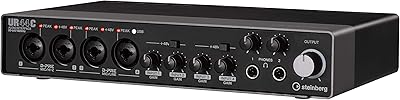
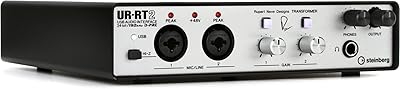
The Steinberg UR-RT4 USB Audio Interface is one of the more interesting collaborations in the home studio space — Steinberg's engineering paired with Rupert Neve Designs transformers, a name that carries serious weight in professional audio circles. This positions the UR-RT4 squarely in the mid-to-high end of the home recording market, aimed at producers who want boutique analog character without building a dedicated rack. The steel chassis feels solid on a desk, and the front panel is clean and logically laid out. It works across Windows, macOS, and iOS, and ships with Cubase AI and Cubasis LE — genuinely useful software, not stripped-down placeholders.

Features & Benefits

The headline feature is the transformer toggle switch on each preamp channel. Flipping it in engages the Rupert Neve Designs transformer, which introduces a subtle but real harmonic richness — a slight low-end weight and upper-mid presence that digitally clean preamps simply do not produce on their own. This Steinberg interface records at 24-bit/192 kHz, and while most sessions run at 48 or 96 kHz, having that ceiling matters for archival and post-production flexibility. Two front-panel Hi-Z inputs handle guitar and bass directly, no external DI box needed. The latency-free DSP monitoring — with REV-X reverb, a Channel Strip, and Guitar Amp Classics — keeps vocalists and guitarists comfortable in headphones without taxing the host computer.

Best For

This transformer-equipped audio interface suits singer-songwriters and small bands who want genuine preamp quality in a desktop unit rather than a rack full of separate gear. Guitarists benefit from the built-in amp simulation and Hi-Z inputs — record direct and monitor through realistic amp tones while tracking. Producers stepping up from budget interfaces will likely hear an immediate difference when the transformer is switched in, particularly on vocals and acoustic instruments. Voice-over artists and podcasters get a clean, warm signal chain without outboard gear. And if you are already working in Cubase, the UR-RT4 integrates tightly with the Steinberg ecosystem, making session management straightforward from day one.

User Feedback

Owners consistently praise the transformer toggle as a genuine sonic upgrade, not a marketing flourish — even skeptical buyers report noticing added warmth and presence when it is engaged, especially on voice recordings. The steel chassis earns points for solidity, though a handful of users note it is heavier than expected for a desktop unit. Driver stability has been a point of friction for some, particularly on certain Windows configurations, though recent updates appear to have reduced those complaints. Cubase AI is regularly cited as a legitimately useful starting DAW. The recurring criticism centers on the price-to-channel ratio — four inputs at this tier means paying for quality over quantity, and that trade-off is not for everyone. iOS setup works, but requires the right adapter and some patience.

Pros

  • The switchable Rupert Neve Designs transformers deliver a real, audible improvement in warmth and harmonic presence on vocals and acoustic sources.
  • Four Class-A D-PRE preamps provide clean, low-noise gain that holds up well against interfaces at a higher price tier.
  • Latency-free DSP monitoring with built-in reverb and channel strip makes tracking sessions much more comfortable for performers.
  • The steel chassis feels genuinely solid and has the kind of build quality that suggests it will survive years of daily studio use.
  • Cubase AI is a real, fully functional DAW — not a crippled demo — which adds substantial value for anyone starting fresh.
  • Front-panel Hi-Z inputs let guitarists and bassists plug in directly without any additional gear or DI box.
  • Cross-platform support across Windows, macOS, and iOS gives flexibility for producers who work across multiple devices.
  • The dspMixFx software gives precise, visual control over monitor mixing without adding any latency to the signal chain.
  • MIDI I/O keeps hybrid analog-digital setups connected without needing a separate MIDI interface.
  • 24-bit/192 kHz resolution provides a solid recording ceiling for archival work and high-fidelity post-production.

Cons

  • Only four mic preamp inputs limits simultaneous microphone recording, which frustrates multi-source or band tracking sessions.
  • Driver stability on certain Windows configurations has been a recurring complaint, and some users report needing to troubleshoot after OS updates.
  • The unit weighs over five pounds and has a large desktop footprint — it is not practical for mobile or travel recording.
  • iOS connectivity requires a specific Apple adapter and some manual setup steps, making it less plug-and-play than the marketing implies.
  • At this price point, competing interfaces often offer more input channels, making the value case harder to justify on quantity alone.
  • The transformer toggle, while effective, has no intermediate setting — it is fully in or fully out, offering no blend or gradual character control.
  • No standalone or direct monitoring mode without a connected computer limits its use in live or hardware-only performance contexts.

Ratings

Our AI rating system analyzed verified global user reviews for the Steinberg UR-RT4 USB Audio Interface, actively filtering out incentivized, bot-generated, and spam submissions to surface what real home studio producers and semi-professional engineers actually experience. Scores reflect both the strengths that make this transformer-equipped interface a compelling upgrade choice and the friction points that have frustrated a meaningful segment of buyers. Nothing has been glossed over — the ratings below represent an honest, synthesized picture of long-term ownership.

Preamp Quality
93%
The Class-A D-PRE preamps consistently earn high praise for their low noise floor and clean gain structure, and users who record vocals or acoustic instruments describe the results as noticeably more refined than what entry-level interfaces produce. The preamps hold up well even at higher gain settings, which matters when working with dynamic microphones that need more drive.
A small number of users coming from dedicated outboard preamps feel the D-PRE, while excellent for an interface, still lacks the depth and three-dimensionality of a standalone high-end unit. At very high gain levels a few users report a slight hardness creeping into the tone, though this is rarely encountered in typical home studio use.
Transformer Character
91%
The switchable Rupert Neve Designs transformers are the single most discussed feature across user reviews, and the consensus is that the effect is genuinely audible and musically pleasing — not a subtle gimmick. Vocalists and acoustic guitarists in particular describe a warmth and presence that makes raw recordings feel more finished before any mixing even begins.
The toggle is all-or-nothing with no blend control, which limits creative flexibility for users who want a lighter touch of transformer coloration. A handful of producers working in genres that favor clinical, hyper-transparent sound find themselves leaving the transformer bypassed most of the time, questioning whether the premium was worth it for their specific workflow.
Build Quality
88%
The steel chassis is a clear point of confidence for users who have owned plastic-bodied interfaces before — it feels like a piece of gear that can sit on a desk for years without developing rattles, loose knobs, or chassis flex. Controls are firm and well-damped, and the overall fit and finish is consistent with what you would expect at this price tier.
The weight, a direct consequence of the steel body and internal transformers, surprises some buyers who were expecting something more portable. At over five pounds it is not heavy by rack gear standards, but for a desktop USB interface it is noticeably more substantial than most competitors, which a few users found inconvenient when rearranging their workspace.
Driver Stability
62%
38%
On macOS, the majority of users report a relatively smooth experience once the latest drivers are installed, and recent driver updates have addressed several previously documented issues on both Ventura and Sonoma. Users who perform clean installs and stay current with Steinberg's driver releases tend to have stable, trouble-free setups over long periods.
Windows users have a notably more mixed experience, with recurring reports of dropouts, ASIO conflicts, and driver failures following OS updates — particularly around Windows 10 to Windows 11 transitions. This is the most common source of one-star reviews for the UR-RT4 and represents a real risk for buyers in Windows-heavy studio environments who need a set-it-and-forget-it solution.
DSP Monitoring
84%
The latency-free DSP monitoring is genuinely useful during tracking sessions — vocalists who need reverb in their headphones and guitarists monitoring through the amp simulation both benefit from hearing a polished, processed signal without any perceivable delay. The REV-X reverb in particular sounds musical and not cheaply digital compared to software-only monitoring chains.
The Guitar Amp Classics selection, while functional, is limited in variety and does not rival dedicated amp simulation software in terms of realism or tone depth. Users who want to track with complex amp tones often end up routing through external plugins anyway, which reintroduces latency and somewhat undermines the hardware DSP advantage.
Value for Money
67%
33%
For buyers whose primary need is two to four high-quality microphone inputs with genuine analog character, the price is defensible — you are effectively getting boutique transformer-coupled preamps in a self-contained desktop unit, which would cost significantly more to replicate with separate gear. The included Cubase AI software adds meaningful value that competing bundles rarely match.
The per-channel cost is high when stacked against competitors that offer six or eight preamps at a similar or lower price, and buyers who need more inputs quickly realize they are paying a significant premium for transformer quality at the expense of scale. For producers who track full bands or large sessions, the value equation becomes difficult to justify.
Software Bundle
82%
18%
Cubase AI is consistently praised as a legitimate, capable DAW rather than a stripped-down demo, and users new to recording appreciate being able to start a full session workflow without spending anything extra on software. Cubasis LE extends this value to iPad users, which is a genuine differentiator in the bundled software category.
The bundled version of Cubase AI requires a Steinberg activation account and an internet connection to register, which some buyers find friction-heavy compared to competitors with simpler onboarding. Users who already own a DAW find the bundle less valuable, and a few report that the activation process added unexpected complexity to their first setup session.
iOS Compatibility
71%
29%
Users who specifically want to record on an iPad find the UR-RT4 performs reliably once the correct adapter is in place, with full preamp and DSP functionality available in compatible iOS apps. For mobile recording sessions in acoustic environments, the combination of the UR-RT4 and a supported iPad app delivers a surprisingly capable portable studio.
The setup requires a specific Apple Lightning to USB Camera Adapter and is not straightforward enough to be called plug-and-play, which frustrates users expecting the same ease they get on desktop. Powering the interface reliably from an iPad can also require a powered USB hub in some configurations, adding cost and complexity that was not clearly communicated at the point of purchase.
Ease of Setup
76%
24%
On macOS in particular, most users report a relatively fast path from unboxing to first recording session once drivers are downloaded from Steinberg's website. The front-panel layout is logical and well-labeled, and experienced interface users will feel oriented immediately without consulting the manual.
Windows users frequently report a longer and more uncertain setup experience, especially on machines with existing audio drivers that may conflict. New users unfamiliar with ASIO configuration occasionally struggle with the initial driver setup, and the manual provides less hand-holding than some competing brands offer in their onboarding documentation.
Headphone Output
79%
21%
The dedicated front-panel headphone output with its own level control gives performers a clean, adequately powered monitoring path during tracking, and most users report the headphone amp is loud enough for common studio headphones including higher-impedance models in the 150 to 250 ohm range.
Users with demanding high-impedance headphones above 250 ohms sometimes find the output level marginal at the top of the range. A small number of buyers also note that a second headphone output would have been welcome for two-performer tracking sessions, which is a gap that some competing interfaces at this price tier address.
Latency Performance
83%
With the DSP monitoring path active, tracking latency is genuinely imperceptible, which is the main use case and it delivers well. For users who monitor purely through the hardware with no software processing, round-trip latency is competitive at standard 48 kHz sample rates with buffer sizes that most DAWs handle comfortably.
At higher sample rates or with larger buffer sizes necessitated by CPU-heavy sessions, some Windows users report latency figures that creep into the noticeable range. The issue is less about the hardware itself and more about driver efficiency on Windows, which circles back to the driver stability concern that affects multiple aspects of the Windows user experience.
MIDI Functionality
77%
23%
Having dedicated MIDI in and out on the rear panel is a practical inclusion that saves users from needing a separate MIDI interface when connecting hardware synthesizers, drum machines, or external MIDI controllers. It works reliably for basic MIDI routing tasks without any notable complaints in user feedback.
The MIDI implementation is straightforward but offers no additional features like MIDI routing or merge capabilities — it is a single in, single out pair and nothing more. Users with complex MIDI setups involving multiple hardware devices will still need an external MIDI hub or patchbay, which limits the utility for more advanced hybrid studio configurations.
Channel Count
54%
46%
Four microphone preamp inputs is sufficient for typical singer-songwriter home sessions or small ensemble overdubs, and the additional line and instrument inputs bring the total analog input count to six for more flexible source combinations. For the target buyer doing two to four simultaneous microphone recordings, the channel count covers common use cases without issue.
At this price point, four mic preamp inputs represents the most common point of friction in user reviews — competing interfaces at comparable or lower prices routinely offer six to eight preamp channels, and buyers who discover this limitation after purchase often feel the trade-off was not clearly understood before buying. Producers who eventually grow into recording full bands will outgrow this interface faster than they might expect.
Compatibility Breadth
86%
Supporting Windows, macOS, and iOS from a single unit gives this Steinberg interface a flexibility advantage over some hardware-focused competitors that treat mobile compatibility as an afterthought. Users who switch between desktop and tablet-based recording workflows appreciate not needing separate hardware for each environment.
Linux is not officially supported, which affects a small but vocal segment of the production community. iOS compatibility, while functional, involves adapter dependencies and occasional power limitations that mean the cross-platform experience is not uniform across all supported platforms — desktop remains the clearly preferred environment.

Suitable for:

The Steinberg UR-RT4 USB Audio Interface is purpose-built for serious home studio producers and semi-professional recording engineers who have outgrown budget interfaces and want genuine analog character in a desktop unit. Singer-songwriters who track vocals, acoustic guitar, and instruments simultaneously will get the most from the four transformer-equipped preamps, each capable of delivering that warm, harmonically rich tone that transformer-coupled circuitry is known for. Guitarists benefit meaningfully from the front-panel Hi-Z inputs and built-in Guitar Amp Classics DSP, making it possible to record direct while monitoring through realistic amp tones — no extra hardware required. Voice-over artists and podcasters who have a quality microphone and want a clean, warm signal chain without investing in outboard preamps will also find this a strong match. Existing Cubase users are particularly well-served, since the UR-RT4 integrates tightly with Steinberg software and ships with Cubase AI, giving them a cohesive, low-friction workflow from day one.

Not suitable for:

The Steinberg UR-RT4 USB Audio Interface is a deliberate quality-over-quantity proposition, and buyers who need more than four simultaneous microphone inputs will quickly hit its ceiling. Podcasters running roundtable sessions, live streamers with complex multi-source setups, or small venue recording engineers who need eight or more channels should look elsewhere — the six-input total includes instrument and line-level sources, so the four mic preamps are the realistic limit for microphone recording. Budget-conscious buyers stepping up from a first interface may find the price hard to justify when competing interfaces at a lower tier offer more I/O, even if the preamp quality cannot match the transformer-equipped D-PREs. Users who rely heavily on Windows and have experienced driver instability with Steinberg products in the past should check current driver documentation before committing, as this has been a recurring friction point in the user community. Anyone hoping to use this as a portable, bag-friendly field recorder will also be disappointed — at over five pounds and with a footprint designed for a desk, it is not built to travel.

Specifications

  • Connectivity: The interface connects to computers via USB 2.0, which provides stable, low-latency data transfer compatible with both older and modern USB 3.0 ports through backward compatibility.
  • Resolution: Recording and playback runs at up to 24-bit/192 kHz, supporting high-fidelity audio capture suitable for professional archival and post-production work.
  • Mic Preamps: Four Class-A D-PRE microphone preamps are built in, each with individually switchable Rupert Neve Designs transformers for analog harmonic coloration.
  • Analog I/O: The unit provides 6 analog inputs and 4 analog outputs, supporting simultaneous multi-source recording and flexible monitor or outboard routing.
  • Instrument Inputs: Two front-panel Hi-Z inputs accept high-impedance signals from electric guitar or bass directly, eliminating the need for an external DI box.
  • Phantom Power: All four microphone preamp channels supply switchable +48V phantom power, making them compatible with any standard condenser microphone.
  • MIDI I/O: One MIDI input and one MIDI output are included on the rear panel, enabling connection to synthesizers, controllers, and other MIDI-enabled hardware.
  • DSP Effects: Onboard DSP processing delivers latency-free REV-X reverb, a Channel Strip, and Guitar Amp Classics effects for real-time monitoring without any CPU load on the host computer.
  • Platform Support: The UR-RT4 is compatible with Windows, macOS, and iOS, with iOS connectivity supported via the Apple Lightning to USB Camera Adapter or Lightning to USB 3 Camera Adapter.
  • Bundled Software: Cubase AI for desktop and Cubasis LE for iOS are included, providing fully functional DAW environments for recording, editing, and mixing without additional software purchases.
  • Monitor Mixing: The dspMixFx application runs on the host computer and provides visual, zero-latency control over the onboard DSP monitor mix with per-channel routing.
  • Chassis Material: The outer shell is constructed from steel, contributing to the unit's durability and resistance to the physical wear typical of daily studio use.
  • Weight: The unit weighs 5.28 pounds, reflecting its steel construction and internal transformer components rather than the lighter plastic builds common in budget interfaces.
  • Dimensions: Physical dimensions measure 15.48 x 10.55 x 4.13 inches, sized for stable desktop placement rather than rack or portable field use.
  • Transformer Design: Each preamp channel features a discrete Rupert Neve Designs transformer that can be toggled in or out per channel, allowing the user to choose between clean transparent gain or transformer-colored analog character on a per-source basis.
  • Manufacturer: The UR-RT4 is manufactured by Steinberg, a German audio software and hardware company, and developed in collaboration with Rupert Neve Designs of Texas.
  • Model Number: The official model designation is UR-RT4, distinguishing it from the two-preamp UR-RT2 in the same transformer-equipped product line.
  • Date Released: The product was first made available in April 2018 and remains in active production as of the latest manufacturer listings.

Related Reviews
Steinberg UR44C
Steinberg UR44C
87%
94%
Build Quality
92%
Audio Resolution
89%
Driver Stability
87%
Microphone Preamps
83%
iOS Integration
More
Steinberg UR12
Steinberg UR12
86%
94%
Build Quality
91%
Preamplifier Transparency
88%
Portability
87%
Value for Money
82%
iPad Integration
More
Steinberg UR242 4-Channel USB Audio Interface
82%
88%
Build Quality
91%
Sound Clarity
85%
Ease of Setup
80%
Connectivity
82%
Software Integration (Cubase AI)
More
Steinberg UR22C
Steinberg UR22C
87%
96%
Build Quality
93%
Audio Resolution
89%
Preamp Transparency
91%
Monitoring Latency
84%
Driver Stability
More
Yamaha Steinberg UR22MKII 2-Channel USB Audio Interface
84%
91%
Sound Quality
89%
Portability
86%
Ease of Use
88%
Software Integration
83%
Build Quality
More
Steinberg UR816C 16x16 USB 3.0 Audio Interface
87%
92%
Audio Quality
89%
Latency Performance
90%
Build Quality
85%
Setup & Installation
88%
Connectivity
More
Steinberg UR-RT2
Steinberg UR-RT2
89%
94%
Build Quality
91%
Preamp Character
89%
Latency & Monitoring
92%
Driver Reliability
96%
Desktop Stability
More
Steinberg AXR4U USB 3.0 Audio Interface with Rupert Neve Designs SILK Emulation
87%
93%
Sound Quality
90%
Latency-Free Monitoring
87%
Build Quality
89%
Ease of Setup
85%
Software Integration (Cubase AI)
More
Black Lion Audio Revolution 2x2 USB Audio Interface
84%
89%
Sound Quality
76%
Ease of Setup
92%
Build Quality
87%
Latency Performance
80%
Compatibility with DAWs
More
M-Audio M-Track 2X2 USB Audio Interface
85%
91%
Sound Quality
88%
Ease of Use
85%
Build Quality
92%
Latency and Monitoring
87%
Connectivity Options
More

FAQ

Most users say yes, and it is not subtle once you know what to listen for. The Rupert Neve transformer adds a slight weight to the low end and a presence lift in the upper mids that makes vocals and acoustic instruments sound more three-dimensional. It is not a dramatic effect, but compared to the bypass position, most people describe it as the signal sounding more alive. That said, for sources like a clean electric guitar or a bright room, bypassing the transformer and keeping the signal neutral can sometimes be the better call.

Steinberg has released Apple Silicon-native drivers, so the UR-RT4 works on M1 and M2 Macs without needing Rosetta emulation. It is worth downloading the latest driver package from Steinberg's website before your first setup rather than relying on whatever shipped in the box, since driver updates since the original release have improved stability significantly on newer macOS versions.

Not quite plug-and-play on iOS, but it does work reliably once configured. You need Apple's Lightning to USB Camera Adapter or the Lightning to USB 3 Camera Adapter — the standard charging cable will not work. Once connected, the UR-RT4 shows up as an audio input device in compatible iOS apps. Some users also report needing a powered USB hub when running it from an iPad to ensure the interface gets enough power.

Driver stability on Windows has been the most commonly cited frustration in user reviews, and it is fair to acknowledge that. Earlier driver versions caused issues for some users on Windows 10, and the transition to Windows 11 introduced additional hiccups for a subset of buyers. Steinberg has pushed several updates since then, and the current driver version is generally considered stable. The advice from the user community is to always do a clean driver install and avoid running the interface through a USB hub on Windows if you can plug directly into the motherboard.

Yes, all four mic preamp channels can record simultaneously. Each one has its own gain control and phantom power, so you can run four condenser or dynamic microphones at once without any workarounds. Just keep in mind the total analog input count is six, with the remaining two inputs being line-level or Hi-Z instrument sources on the front panel.

Cubase AI is a genuine, fully functional version of Cubase with a reduced but still substantial feature set. It is not a time-limited trial. You get multi-track recording, MIDI editing, a solid plugin library, and VST support. The main limitations compared to the full Cubase versions are track count caps and the absence of some advanced production features, but for songwriting and home recording it is more than capable. Cubasis LE covers the same ground on iOS.

No. The two front-panel Hi-Z inputs are designed specifically for high-impedance sources like electric guitar and bass. You plug straight in with a standard instrument cable, and the Guitar Amp Classics DSP lets you monitor through amp simulations in real time with no latency. If you want to use external amp simulators or pedals, those work just as well feeding into the line inputs.

Honestly, four mic preamps at this tier is on the lower end for the price. Competing interfaces from Focusrite, PreSonus, and Universal Audio often offer six to eight preamps at comparable cost. The UR-RT4 is a deliberate quality-over-quantity trade-off — you are paying for the Rupert Neve transformer integration and the D-PRE preamp design, not for raw channel count. If you need more than four simultaneous mic inputs, this Steinberg interface is probably not the right fit regardless of how good the preamps are.

Yes, there is a dedicated headphone output on the front panel with its own level control, which is convenient for silent tracking sessions. The stereo output on the rear is designed to feed powered studio monitors. The UR-RT4 does not include a built-in speaker amplifier, so you will need powered monitors or a separate amplifier for passive speakers in your main monitor chain.

Steinberg updates dspMixFx alongside its driver releases, and the current version supports recent macOS versions including Ventura and Sonoma. As with the drivers, it is best to download the latest version directly from Steinberg's support page rather than using the disc or download code included in the box, as the bundled version will almost certainly be outdated at this point.