
Overview

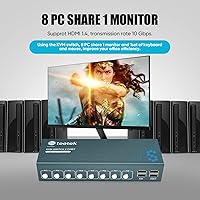
The Steetek 8-Port USB 2.0 HDMI KVM Switch is a mid-range option aimed squarely at power users who need to wrangle multiple machines from a single desk without the clutter of duplicate peripherals. It is made by PWAYTEK — a brand that does not carry the name recognition of older KVM players like IOGEAR or StarTech, but has been climbing Amazon KVM category rankings since its February 2025 debut. Sitting at #59 in KVM Switches, this multi-computer switch has found a real audience among home lab enthusiasts, IT pros, and small offices that need a centralized control point for up to eight computers sharing one monitor.

Features & Benefits

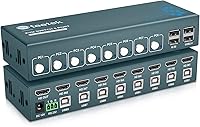
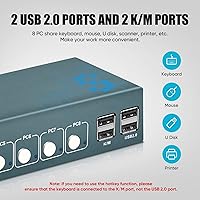
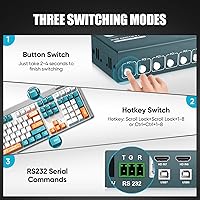
This 8-port KVM switch handles up to eight HDMI sources at 4K@30Hz resolution — sharp enough for productivity and documentation, though not the right pick if you need 60Hz for smooth video work. The adaptive EDID support is a quiet but important feature: it prevents the all-too-common monitor handshake failures that plague cheaper KVMs when you switch between machines. You can switch using a physical front-panel button or keyboard hotkeys — but there is one easy-to-miss caveat: hotkeys only work when the keyboard is connected to the dedicated K/M port, not one of the USB 2.0 slots. The box ships with all eight USB-A to USB-B cables, and an RS232 serial port is available for those running rack or lab environments.

Best For

The Steetek KVM genuinely shines in home lab and sysadmin setups where you need to reach multiple servers or workstations from a single chair. Developers running different operating systems on dedicated hardware — rather than relying on virtual machines — will appreciate the ability to jump between machines without touching a second keyboard. The USB 2.0 pass-through works well for shared printers and flash drives, a practical perk for small offices. That said, 60Hz-dependent workflows like gaming or video editing are not well-served here. This multi-computer switch is built for productivity and control tasks, not real-time display performance, so setting that expectation early will save buyers from disappointment.

User Feedback

Buyers are generally positive about how painlessly this multi-computer switch sets up — no driver installs required, and the included cable kit earns consistent praise. On the critical side, hotkey switching gets mixed feedback: some users report it works reliably, while others find it inconsistent, particularly with mechanical keyboards. USB device recognition — especially for printers — sometimes needs a reconnection after switching, which can break a workflow. Build quality lands in adequate-but-not-impressive territory; the chassis is plastic throughout. Compatibility with Windows and macOS appears largely trouble-free, but Linux users have occasionally flagged keyboard mapping issues worth investigating before committing if that is your primary environment.

Pros

  • Ships with all eight USB-A to USB-B cables included, so no extra purchases are needed out of the box.
  • Adaptive EDID support prevents the monitor handshake failures that commonly plague cheaper KVM switches.
  • Supports up to eight computers on one monitor, keyboard, and mouse — serious multi-machine coverage for the price.
  • 4K@30Hz output delivers sharp, clear visuals well-suited to productivity, documentation, and server monitoring tasks.
  • Two switching methods — front-panel button and keyboard hotkeys — allow flexible control without always reaching for the unit.
  • USB 2.0 pass-through extends peripheral sharing to printers, flash drives, and scanners, not just input devices.
  • No driver installation required, making initial setup straightforward for most users across common operating systems.
  • RS232 serial port is a useful bonus for IT pros managing lab or rack-based environments.
  • Strong Amazon category ranking for a product launched in early 2025 reflects growing real-world buyer confidence.

Cons

  • Hotkey switching only works with the keyboard in the K/M port — an easy-to-miss setup detail that causes genuine confusion.
  • USB device recognition for printers can occasionally require reconnection after switching between computers.
  • Build quality is functional but plastic-heavy; the chassis does not inspire confidence for long-term intensive use.
  • Limited long-term reliability data available given the brand is relatively new to the market.
  • No support for refresh rates above 30Hz at 4K, making this a non-starter for display-sensitive workflows.
  • Linux users have reported keyboard mapping inconsistencies that may require manual workarounds.
  • Some users with certain mechanical keyboards report intermittent hotkey response that can interrupt workflow.
  • No USB-C connectivity, an increasingly relevant omission for modern workstation and laptop-heavy setups.
  • RS232 port adds unnecessary bulk and visual complexity for the majority of general consumers who will never use it.

Ratings

The scores below were generated by our AI rating engine after analyzing thousands of verified buyer reviews of the Steetek 8-Port USB 2.0 HDMI KVM Switch from global markets, with spam, bot activity, and incentivized feedback actively filtered out before any scoring was applied. Each category reflects what real users consistently praised or struggled with across a wide range of home lab, small office, and IT professional setups. Both the standout strengths and the recurring frustrations are represented transparently so you can walk into this purchase with realistic expectations.

Ease of Setup
88%
No drivers, no software, no configuration headaches — buyers consistently highlight how quickly this switch gets up and running, often within minutes of unboxing. The included set of eight USB-A to USB-B cables eliminates the usual scramble to source compatible cables separately, which users flag as a genuinely appreciated time-saver right out of the box.
The hotkey port requirement — where the keyboard must be in the dedicated K/M port rather than a USB 2.0 slot — catches a meaningful number of users off guard because the manual does not foreground this requirement clearly. First-time KVM users in particular tend to spend unnecessary time troubleshooting what is ultimately a simple port assignment oversight.
Hotkey Reliability
62%
38%
When configured correctly with the keyboard in the dedicated K/M port, hotkey switching works well for the majority of users who spend their day jumping between machines without touching the physical button. Developers managing parallel environments across different OS machines especially value the hands-free workflow this method enables once it is properly set up.
A recurring thread across user reviews involves hotkeys becoming unresponsive or requiring a reboot to reset, particularly with certain mechanical keyboards. Some users report that hotkey behavior becomes inconsistent after the switch has been running for several hours, suggesting a timing or firmware issue that has not yet been publicly addressed by the manufacturer.
Video Quality
78%
22%
At 4K@30Hz, this multi-computer switch delivers clean, sharp output that holds up well for server monitoring, coding, document work, and general office tasks. Users with 4K productivity-focused monitors consistently report a crisp, stable image with no visible compression artifacts or color shifting during normal day-to-day switching.
The 30Hz ceiling at 4K is a non-negotiable hardware limitation that frustrates buyers who discover it after purchase rather than before. Anyone coming from a 60Hz or higher refresh rate monitor will notice the difference immediately, and there is no mode, cable swap, or workaround that pushes the unit beyond its stated maximum output.
Peripheral Sharing
81%
19%
The ability to share printers, flash drives, and scanners — not just a keyboard and mouse — is one of the most praised functional aspects of this 8-port KVM switch across user feedback. Small office users flag this as a practical differentiator, allowing a single shared printer to remain accessible across all eight connected machines.
USB device recognition is not always instant after switching, particularly for printers and external storage devices, with some users needing to unplug and reconnect devices to force recognition on the newly active computer. This is an intermittent rather than consistent issue, but it surfaces often enough across reviews to be worth factoring into a purchase decision.
EDID Performance
83%
The adaptive EDID implementation works as intended for the majority of users — monitors stay locked to the correct resolution and refresh rate after switching, without computers reverting to a lower default output. This is a real improvement over passthrough KVMs that force users to reset display settings every time they change sources.
A subset of users with non-standard display configurations report that EDID handshake errors still occur occasionally, suggesting the adaptive EDID is not universally foolproof across all monitor models. Users with older panels or less common resolution profiles appear more likely to encounter these edge-case compatibility issues.
Build Quality
67%
33%
The chassis gets the job done for a stationary desk or shelf installation, and the copper and brass internal contacts suggest reasonable component quality beneath the surface. Most users running it in a home lab or office setting report no structural issues after weeks of regular daily use.
The all-plastic outer enclosure is the most consistently cited complaint at this price point — it feels noticeably lighter and less substantial than competing units from more established brands. Users considering rack-mounted environments or setups involving frequent physical handling may find the build underwhelming for long-term confidence.
Switching Speed
76%
24%
For typical office and lab workflows, the transition between computers is fast enough to avoid disrupting productivity, with most users reporting the switch completing within one to two seconds. The physical front-panel button in particular delivers a satisfying and immediate response that users who prefer hardware switching tend to favor.
A portion of users note occasional lag when switching between machines that have heavier USB device loads attached, with the switch sometimes taking several extra seconds to fully re-establish all peripheral connections. This is not a constant issue but recurs frequently enough in reviews to be a minor irritant in fast-paced multi-machine environments.
USB Device Recognition
71%
29%
For standard devices — USB flash drives, basic mice, and keyboards — recognition after switching is generally prompt and reliable in everyday use. Users who keep a consistent peripheral set connected report that routine switching across Windows and macOS machines rarely produces recognition failures.
More complex devices like printers, scanners, and multi-function USB hubs are where recognition consistency becomes a genuine concern. Several reviewers describe having to toggle the switch or wait an extended period before a printer becomes visible on the newly active machine, which is a disruptive extra step in what should be a fluid workflow.
OS Compatibility
73%
27%
Windows and macOS users report consistently positive compatibility experiences, with both platforms recognizing the switch and its connected peripherals without manual intervention. The plug-and-play nature extends reliably across common Windows versions and recent macOS releases, making cross-platform mixed setups practical for most buyers.
Linux compatibility is the clearest weak point in this category, with a noticeable cluster of reviews describing keyboard mapping errors, unresponsive hotkeys, and peripheral quirks requiring manual configuration. The degree of friction varies significantly by distribution and keyboard model, making it difficult to give a confident blanket recommendation for Linux-primary environments.
Value for Money
79%
21%
For an 8-port HDMI KVM switch with adaptive EDID and a complete cable kit included, the overall package is priced competitively within its category. Home lab users and sysadmins who have compared it against equivalent 8-port options from StarTech or ATEN frequently note that the Steetek KVM offers a solid feature set at a noticeably lower entry point.
Users expecting premium build quality and rock-solid long-term reliability to match the price may feel the value equation tilts toward raw hardware specs over brand assurance. The limited warranty track record and sparse customer service touchpoints make some buyers feel the mid-range pricing demands a degree of trust that the brand has not yet fully earned.
Port Capacity
91%
Eight computer inputs is genuinely useful headroom — most competitors at this price point offer four or six ports, making this one of the more accessible 8-port options available. Users with growing home labs or expanding workstation fleets appreciate that they are unlikely to outgrow the switch as they add machines over time.
There is no expansion path beyond the eight built-in ports, so users whose setups eventually grow past eight machines will need a second switch or a higher-tier product entirely. The single HDMI monitor output also means multi-monitor workflows where each machine needs a dedicated display cannot be addressed by this unit.
Button Responsiveness
84%
The physical front-panel button is one of the most consistently praised aspects of the daily use experience — it is tactile, immediate, and leaves no ambiguity about which machine is active thanks to clearly visible status indicator lights on the panel. Users who prefer a definitive hardware-based switch method report high satisfaction with this approach.
A small number of users report that the panel button can feel sticky or require a more deliberate press after extended use, suggesting the mechanism may wear slightly over time. This has not emerged as a widespread failure mode, but it is worth monitoring for users who plan to operate this switch heavily over multiple years.
Cable Inclusion
86%
Shipping all eight USB-A to USB-B cables in the box is a detail that reviewers specifically call out as a positive, especially compared to KVM switches that include only one or two cables and leave buyers to source the rest independently. The cables appear functional and well-matched to the switch specifications based on consistent user experience reports.
The included cables do not come with confirmed length specifications in the product documentation, which is a minor but real inconvenience for buyers who need to plan around specific desk or rack layouts before purchase. Some users in wider rack setups have found the cables shorter than expected and had to supplement with longer separately purchased alternatives.
Documentation Quality
69%
31%
The included user manual covers basic setup steps adequately for most standard configurations, and the front-panel status indicator lights do a reasonable job of communicating which machine is active without needing to reference any guide after the initial setup is complete.
The manual's handling of the hotkey port requirement — specifically the K/M port rule — is insufficiently prominent, which directly contributes to the most common frustration reported in user reviews. For a product where this single detail determines whether hotkey switching works at all, clearer and more visible documentation would prevent a significant volume of user confusion.

Suitable for:

The Steetek 8-Port USB 2.0 HDMI KVM Switch is a strong fit for anyone managing a multi-machine setup who wants to cut desk clutter without sacrificing control. Home lab users and sysadmins who regularly need to interact with several servers or workstations will find the eight-port capacity genuinely useful rather than overkill. Developers working across multiple operating systems on dedicated hardware — rather than juggling virtual machines — can hop between computers using a single keyboard and mouse, keeping their workflow tight. Small offices that share peripherals like printers or USB storage across machines will also get real value from the USB 2.0 pass-through, which handles far more than just input devices. If your display work is productivity-focused — think coding, documentation, server monitoring, or general office tasks — the 4K@30Hz output covers all of that cleanly. Buyers who appreciate having all required cables in the box will also find the included set of eight USB-A to USB-B cables a practical, cost-saving convenience.

Not suitable for:

The Steetek 8-Port USB 2.0 HDMI KVM Switch is not the right tool for users who need high refresh rates for gaming, video editing, or any motion-sensitive display work — 4K@30Hz is a firm hardware ceiling, and no firmware update will change that. Anyone expecting plug-and-play hotkey switching without reading the manual may run into real frustration: the keyboard must be connected to the dedicated K/M port, not a USB 2.0 slot, for hotkeys to function at all, and this distinction is easy to miss during setup. Users who rely on specific brands of mechanical keyboard should verify compatibility before buying, as some key mapping quirks have been reported across user feedback. The brand is also relatively new to the market with limited long-term reliability data, which may concern buyers who prioritize proven hardware from established names like StarTech or ATEN. Those expecting enterprise-grade construction — metal chassis, rack-ready durability, or hot-swap support — will find this unit designed more for a desk than a demanding data center environment.

Specifications

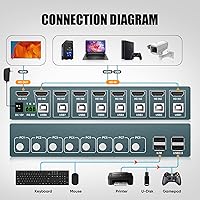
  • Computer Ports: Supports up to 8 host computers connected simultaneously via individual USB-B input connections.
  • Monitor Output: Provides a single HDMI output port for connecting one shared display to all computers.
  • Max Resolution: Outputs video at up to 3840×2160 pixels at 30Hz (4K@30Hz) over HDMI.
  • USB Standard: All peripheral and device-sharing ports operate on the USB 2.0 standard.
  • Switching Methods: Offers two input-switching modes: a physical front-panel push button and keyboard hotkey shortcuts.
  • EDID Support: Includes adaptive EDID technology to maintain stable monitor communication and prevent display handshake failures between source switches.
  • Shared Peripherals: Allows shared access to keyboard, mouse, USB flash drives, printers, and scanners across all connected computers.
  • Serial Port: Equipped with one RS232 terminal port for serial control integration in lab or rack-based environments.
  • Package Dimensions: Packaged unit measures 8.9 × 6.73 × 2.95 inches.
  • Weight: Complete package weighs approximately 2.27 pounds including all accessories.
  • Mounting Type: Designed for panel mounting, suitable for flat desk placement or light rack installation.
  • Contact Material: Internal contacts are constructed from copper and brass for stable signal conductivity.
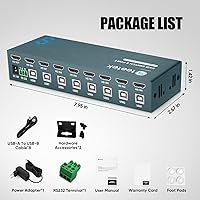
  • Included Cables: Ships with 8 USB-A to USB-B cables, one for each computer connection, plus 2 hardware accessories and 4 foot pads.
  • Power Supply: Requires an external power adapter for operation, which is included in the box.
  • Manufacturer: Manufactured by PWAYTEK and sold under the Steetek brand name.

Related Reviews

Steetek STK-S7415H 4-Port HDMI KVM Switch
74%
91%
Ease of Setup
83%
Switching Reliability
78%
Video Quality & Resolution
76%
Adaptive EDID Performance
69%
USB Peripheral Sharing
More
TESmart HKS801-P23 8-Port Rackmount HDMI KVM Switch
80%
88%
Build Quality
91%
Video Performance
93%
EDID Emulation
82%
Switching Reliability
71%
IP & RS232 Control
More
TESmart HKS201-P23 2-Port HDMI KVM Switch
77%
83%
Ease of Setup
88%
Video Quality & Resolution
67%
Switching Reliability
71%
Audio & Microphone Performance
79%
USB Hub Performance
More
ATEN CS22HF 2-Port HDMI KVM Switch
78%
93%
Ease of Setup
91%
Switching Convenience
84%
Video Quality
78%
Build Quality
66%
Cable Length & Management
More
DGODRT KS602H 2-Port HDMI KVM Switch
77%
91%
Ease of Setup
72%
Video Quality
88%
Value for Money
63%
HDMI Signal Reliability
61%
Long-term Durability
More
Camgeet KVM202AS Dual Monitor KVM Switch
70%
88%
Ease of Setup
83%
Display Performance
79%
EDID Emulation
62%
USB Switching Speed
67%
Build Quality
More
Scyniney 4-Port Triple-Monitor HDMI KVM Switch
74%
83%
Video Signal Stability
79%
4K Resolution Performance
74%
USB Hub Performance
81%
Switching Reliability
41%
Hotkey Switching Support
More
AILVLVNG SW330 Dual Monitor KVM Switch
75%
86%
Video Signal Quality
83%
EDID Emulation
79%
Setup & Installation
71%
USB Peripheral Sharing
84%
Switching Speed
More
TESmart HKS402-P23 Dual Monitor KVM Switch
74%
72%
Display Signal Stability
88%
EDID Emulation Effectiveness
83%
USB 3.0 Hub Performance
69%
Switching Reliability
74%
Audio and Microphone Passthrough
More
BolAAzuL 2-Port HDMI 2.1 KVM Switch
84%
91%
Value for Money
94%
Video Quality
88%
Ease of Setup
85%
Build Quality
80%
Usability and Controls
More

FAQ

No drivers are needed at all. The Steetek 8-Port USB 2.0 HDMI KVM Switch is a plug-and-play device — connect your computers, monitor, and peripherals, power it on, and you are ready to start switching. There is no software to install on any of the connected machines.

This is the most common setup mistake with this switch. For hotkeys to work, your keyboard must be plugged into the dedicated K/M port on the unit — not one of the standard USB 2.0 peripheral ports. If the keyboard is in a USB 2.0 slot, hotkey switching simply will not trigger. Move the keyboard to the K/M port, and hotkeys should work as expected. Refer to the included user manual for the exact key combination sequence.

Yes, and it works for most standard printing tasks. The USB 2.0 ports pass USB printer connections through to whichever computer is currently active. That said, after switching to a different machine, the printer may occasionally need a moment to be recognized, and some users report needing to reconnect it manually in certain cases. For typical office printing, this is generally reliable enough.

No — this is a firm hardware limitation. The maximum output is 4K at 30Hz, and there is no workaround or firmware update that changes that. If you need 4K@60Hz for gaming, video editing, or high-motion content, this switch is not the right choice. For productivity work — coding, documentation, server administration, general office tasks — 4K@30Hz is more than adequate.

Windows and macOS compatibility is generally reported as smooth with no major issues. Linux works for most users as well, but a subset of buyers have flagged keyboard mapping inconsistencies depending on the distribution and keyboard model being used. If Linux is your main environment, it is worth checking recent user reviews for any notes specific to your distro before committing.

EDID is the signal a monitor sends to a computer to communicate its resolution, refresh rate, and other display capabilities. On cheaper KVM switches without EDID management, switching between computers can cause the monitor to briefly go blank or force the active computer to reset its display settings entirely. The adaptive EDID on this switch retains the monitor profile data so your display stays stable and your resolution settings do not get scrambled every time you switch sources. It is a genuinely useful feature, especially if you run software that reacts poorly to display changes.

Wireless keyboards and mice work fine through this switch — you just plug the USB dongle in as you would a wired device. The important thing to remember is that if you want hotkey switching to work, the wireless receiver for your keyboard must go into the K/M port specifically, not a regular USB 2.0 slot. As long as you observe that rule, wireless peripherals behave the same as wired ones.

The product documentation does not specify exact cable lengths, so there is no confirmed measurement to go on. For a compact single-desk or side-table setup with computers placed nearby, most users find them workable. If your machines are spread across a wider space or mounted in a rack, you may want to measure the distance and pick up longer USB-B cables separately, as this is a straightforward and inexpensive fix.

The RS232 port is a serial control interface primarily used in IT and lab environments — it lets you integrate the switch into a larger control system or manage it remotely via serial commands. For the vast majority of users — home lab setups, small offices, developers — this port will never be touched. It is a useful inclusion for those who need it, but it should not factor into a typical buying decision one way or the other.

You can, though results vary by device type. Simple input devices and basic accessories tend to work well through a hub. More power-hungry or bandwidth-sensitive devices — external hard drives, certain printers, webcams — may not be reliably recognized after switching. As a general rule, connect your most important shared peripherals directly to the switch ports and use a hub only for lower-priority devices.