Overview

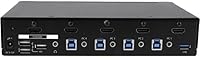
The StarTech SV431HDU3A2 4-Port HDMI KVM Switch is a mid-to-high-end desktop switching hub that has been quietly earning its place on IT desks and home offices since 2016. If you are new to the category: a KVM lets you control multiple computers from a single keyboard, monitor, and mouse — no chair-rolling required. StarTech has long been a go-to brand for connectivity hardware, and this particular unit carries TAA compliance, which matters if you are buying for a government agency or enterprise environment where federal procurement rules apply. It is not flashy, but it is built for people who need something that just works.
Features & Benefits

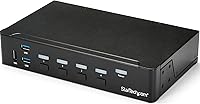
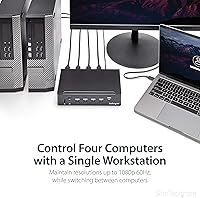
The headline capability is four-port HDMI switching at up to 1080p Full HD — worth flagging upfront that this is not a 4K device, so if your monitor runs at higher resolution, look elsewhere. Beyond the video switching itself, the built-in USB 3.0 hub is genuinely useful: your external drives or webcam stay accessible from whichever machine is active without needing a separate hub cluttering the desk. Audio gets proper treatment too, with dedicated 3.5mm jacks per port so sound switches alongside the picture. Independent HID ports handle keyboard and mouse compatibility broadly, and the whole thing is plug-and-play — no driver hunting, no software installation required.

Best For

This HDMI KVM switch hits a specific sweet spot for a few distinct buyer types. IT admins managing a handful of workstations from one desk will appreciate how much clutter it removes. Home office workers juggling a personal machine and a company laptop get clean switching without a second monitor eating up space. The TAA-compliant design makes it a straightforward procurement choice for public sector teams who cannot buy just anything off the shelf. If you have been running a KVM alongside a separate USB hub, the integrated USB 3.0 ports consolidate that into one box. Anyone doing audio work or video calls across machines will also value the per-port audio switching.

User Feedback

With a 3.5-star average across more than a hundred ratings, the StarTech 4-port KVM earns qualified praise rather than enthusiasm. Buyers who have used it long-term tend to highlight the reliable build quality and how well it works out of the box, particularly in straightforward dual-PC setups. The friction points are worth knowing, though. Some users report USB hub instability under heavier peripheral load, and a handful mention inconsistent hotkey switching response. The 1080p ceiling is the most common dealbreaker in recent reviews, with users who have moved to higher-resolution monitors finding themselves back at square one. Capable for its era, but the spec set is starting to show its age for more demanding workflows.

Pros

  • Plug-and-play setup requires zero driver installation — just cable up and switch.
  • Per-port 3.5mm audio jacks mean your headset switches machines automatically, no manual reconnection needed.
  • Independent HID ports deliver broad keyboard and mouse compatibility across a wide range of peripherals.
  • TAA compliance makes this HDMI KVM switch a viable procurement option for government and federal contractors.
  • The built-in USB 3.0 hub eliminates the need for a separate hub on most standard desk setups.
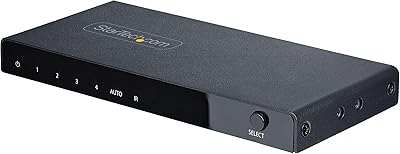
  • Physical front-panel button switching is consistently reliable, even when hotkeys are not.
  • Compact footprint fits easily beside a monitor stand without dominating the workspace.
  • StarTech's track record means replacement support and documentation are readily available.
  • Long-term users report durable hardware with no significant degradation under daily switching use.

Cons

  • Hard 1080p resolution cap is a dealbreaker for anyone already using a higher-resolution display.
  • Hotkey switching reliability is inconsistent enough that some users abandon it entirely for manual buttons.
  • USB hub stability can falter under heavier peripheral loads, particularly with multiple storage devices connected.
  • The hardware design dates back to 2016 and has not been updated to reflect modern display or connectivity standards.
  • The StarTech 4-port KVM carries a price premium that is difficult to justify for buyers without a TAA compliance requirement.
  • No support for USB audio devices through the hub path limits flexibility for users with modern headsets or DACs.
  • Four ports is a fixed ceiling — there is no expansion path if your setup grows beyond four machines.
  • Sparse documentation makes initial configuration less straightforward than the plug-and-play marketing suggests for complex setups.
  • Isolated reports of USB hub ports losing function over time raise questions about component longevity in older units.

Ratings

The StarTech SV431HDU3A2 4-Port HDMI KVM Switch scores below are generated by AI after analyzing verified buyer reviews from multiple global sources, with spam, bot activity, and incentivized feedback actively filtered out. The result is a balanced picture that gives equal weight to what users genuinely appreciated and where the hardware left them frustrated. Both the strengths and the real-world pain points are reflected transparently so you can make a confident purchase decision.
Switching Reliability
74%
26%
For straightforward two- or three-PC setups, most users report that port switching works consistently once the system is properly initialized. IT admins who use it for routine workstation management tend to find the physical button switching more dependable than hotkey sequences.
Hotkey-triggered switching is a recurring friction point — some users report noticeable lag or missed inputs, particularly after the connected machines have been idle. A small but vocal group experienced switching failures that required a full power cycle to resolve.
Video Quality
69%
31%
At 1080p on a correctly matched display, the picture comes through cleanly with no visible degradation or signal noise. Users running standard office monitors or older Full HD screens report a stable, artifact-free image that holds up well during long work sessions.
The hard ceiling of 1080p is the single biggest complaint in recent reviews. Anyone who has upgraded to a 1440p or 4K display will find this desktop switching hub immediately incompatible with their current monitor, and there is no workaround short of downscaling.
USB 3.0 Hub Performance
66%
34%
Having USB 3.0 ports built directly into the KVM is a practical desk-space win — users who previously ran a separate hub appreciate consolidating devices like external drives and dongles into one box. Transfer speeds on compatible drives perform as expected under normal load.
Under heavier peripheral configurations, particularly with multiple high-draw USB devices connected simultaneously, some users report intermittent disconnections or devices failing to be recognized after a port switch. This tends to affect users who rely on the hub for storage rather than just input devices.
Audio Switching
71%
29%
The per-port 3.5mm audio jacks are a meaningful inclusion that many competing KVMs skip entirely. Users on video calls across two machines — say, a work laptop and a personal PC — value that their headset switches alongside the video without any manual reconnection.
Audio switching is not always instantaneous, and a few users describe a brief dropout between machines that is noticeable if you are mid-call when you switch. The analog implementation also means no support for USB audio devices through the hub path.
Setup & Installation
83%
The plug-and-play nature of this HDMI KVM switch is one of its most consistently praised qualities. Non-technical users and IT generalists alike appreciate not having to hunt for drivers or configure software — you cable it up, power it on, and it is ready.
Cable management around the unit can get unwieldy quickly with four machines connected, and the included documentation is sparse. A small number of users needed to experiment with cable quality and port order before achieving stable recognition across all four inputs.
Build Quality
77%
23%
The chassis feels appropriately solid for a unit intended to sit on a desk indefinitely. The push-button actuators have a tactile, deliberate feel, and the overall construction communicates that this is professional-grade hardware rather than a consumer-tier throwaway.
Some users note that the casing shows fingerprints and scuffs easily given its matte black plastic finish, and the unit can shift around on a smooth desk surface without a non-slip pad. Nothing structurally concerning, but the physical fit and finish does not fully justify the price point for everyone.
Keyboard & Mouse Compatibility
79%
21%
The independent HID ports handle a wide range of keyboards and mice without any driver negotiation, which is exactly what you want from a KVM. Users with mechanical keyboards, wireless dongles, and various gaming peripherals generally report clean recognition across port switches.
A handful of users running specialized input devices — programmable macro keyboards or certain wireless adapters — encountered compatibility hiccups where the device was not reliably handed off during a switch. It is not a common issue, but worth testing early if your setup is non-standard.
TAA Compliance & Enterprise Fit
86%
For government buyers or contractors navigating federal IT procurement requirements, TAA compliance is a hard gate, not a nice-to-have. This desktop switching hub clears that bar cleanly, which explains why it maintains a presence on government supply lists years after its initial release.
For private-sector or consumer buyers, TAA compliance adds nothing practical to the experience and may be a reason the pricing sits higher than non-TAA competitors with comparable or better specs. If procurement compliance is not relevant to your purchase, this feature is invisible.
Value for Money
57%
43%
For buyers with a specific TAA requirement or a genuine need for integrated USB 3.0 hub functionality in a single unit, the price premium can be justified on paper. IT departments procuring a small batch often find the all-in-one nature reduces total accessory spend.
At its price tier, the 1080p resolution cap is increasingly difficult to rationalize for individual buyers. Competing KVMs at lower price points now offer 4K support, and this StarTech 4-port KVM has not been updated since 2016 — the spec-to-price ratio has eroded significantly over time.
Port Density & Scalability
72%
28%
Four ports cover the majority of real-world multi-PC scenarios without overcomplicating the hardware. For a sysadmin with a primary workstation, a test machine, a server console, and a personal laptop, four inputs is a natural fit that does not require daisy-chaining.
There is no expansion path if your setup grows beyond four machines — you would need an entirely different unit. Users in environments that occasionally need a fifth or sixth input find this a hard limitation with no elegant workaround.
Hotkey Control
58%
42%
When hotkey switching works cleanly, it is genuinely convenient for users who switch between machines frequently throughout the day without wanting to reach for a physical button each time. Basic sequences are straightforward once memorized.
Reliability varies enough between setups that several users simply stopped using hotkey switching and reverted to the front-panel buttons. Some report that hotkey sequences fail to register after periods of inactivity, requiring either a wake input or a manual switch to reset the state.
Physical Footprint
81%
19%
At 8.7 x 5.1 x 1.7 inches and just over two pounds, the unit is compact enough to tuck beside a monitor stand or mount with optional hardware. The low profile means it does not dominate the desk even when all ports are in use.
With four sets of HDMI and USB cables running into the back, the real-world footprint is considerably larger than the unit dimensions suggest. Users with constrained desk space find the cable spread behind the unit more disruptive than the box itself.
Long-Term Durability
73%
27%
A meaningful number of reviewers have been running this HDMI KVM switch for several years without hardware failures, which speaks to the brand reliability StarTech has cultivated in the peripheral market. The unit does not degrade noticeably under daily switching use.
There are isolated reports of USB hub ports losing functionality over time without any physical damage, suggesting some internal component degradation in older units. Given the product age, newer buyers should weigh whether the hardware generation is still a sound long-term investment.

Suitable for:

The StarTech SV431HDU3A2 4-Port HDMI KVM Switch is a strong fit for IT administrators and sysadmins who need to manage several workstations from a single desk without the chaos of duplicate peripherals. Home office workers running a personal machine alongside a company-issued laptop will find the audio switching alone worth the investment — no more unplugging headsets between calls. Government and public sector buyers will appreciate the TAA compliance, which removes procurement headaches that non-compliant hardware creates in federal purchasing workflows. If you are currently running a separate USB hub alongside an older KVM, the integrated USB 3.0 ports offer a genuine consolidation benefit that reduces both cable clutter and desk real estate. Anyone still running a 1080p monitor as their primary display gets a plug-and-play solution that requires no software configuration and works reliably from day one.
Not suitable for:

If your monitor runs at 1440p or 4K, the StarTech SV431HDU3A2 4-Port HDMI KVM Switch is simply the wrong tool — there is no resolution scaling or compatibility mode that bridges that gap, and you will be downgrading your display quality to use it. Creative professionals, video editors, or anyone whose workflow depends on high-resolution output should look at newer KVM options designed with modern display standards in mind. Users who rely heavily on hotkey switching for rapid context changes between machines may also find the experience inconsistent enough to be genuinely disruptive, particularly in setups involving more than two active machines. If your peripheral load includes multiple high-draw USB devices connected simultaneously, the hub's stability under that kind of demand is not guaranteed based on user reports. Budget-conscious buyers comparing on specs alone will find competing units at lower price points that close the feature gap — the price premium here is largely justified by TAA compliance and brand reliability, not by cutting-edge hardware.
Specifications

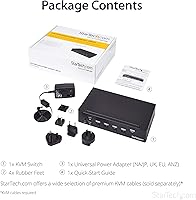
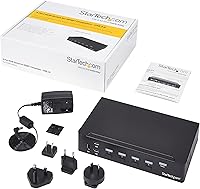
  • Model Number: The unit is manufactured by StarTech.com and carries the model designation SV431HDU3A2.
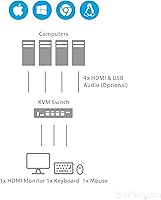
  • Number of Ports: This KVM supports up to four computers connected simultaneously via four dedicated HDMI input ports.
  • Video Standard: Video output runs over HDMI with a maximum supported resolution of 1080p Full HD.
  • USB Hub: A built-in USB 3.0 hub is integrated directly into the unit for peripheral sharing across connected computers.
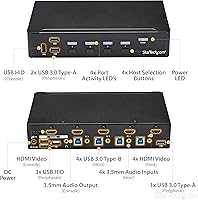
  • Audio Support: Each computer port has a dedicated 3.5mm auxiliary jack, allowing full audio switching alongside video and USB peripherals.
  • Input Devices: Keyboard and mouse are connected via independent HID USB ports, ensuring broad compatibility without requiring drivers.
  • Driver Requirement: No software installation or drivers are required — the unit operates as a fully plug-and-play device on all supported operating systems.
  • TAA Compliance: The unit is Trade Agreements Act compliant, making it eligible for U.S. federal government and public sector procurement.
  • Dimensions: The chassis measures 8.7 x 5.1 x 1.7 inches, offering a compact low-profile footprint suitable for placement on or beside a desk.
  • Weight: The unit weighs 2.35 pounds, light enough to reposition easily but substantial enough to stay stable during daily use.
  • Power Consumption: The device draws 18W of power and operates at a rated voltage of 12V DC.
  • Current Rating: The unit is rated at 1.5 amps under normal operating conditions.
  • Operating Temp: The upper temperature rating for safe operation is 43 degrees Celsius, suitable for standard indoor office environments.
  • Color & Finish: The unit ships in a matte black finish with a plastic chassis construction.
  • Switching Method: Computers can be selected using front-panel push-button controls or keyboard hotkey sequences.
  • Protection Rating: The unit carries an IP00 rating, indicating it is designed for use in dry, controlled indoor environments only.
  • Power Source: The unit requires one AAAA battery for certain functions; verify the included accessories at time of purchase.
  • Availability: The product was first made available in May 2016 and has not been discontinued by the manufacturer as of the latest data.

Related Reviews

StarTech 4-Port 8K HDMI 2.1 Switch
84%
91%
Signal Integrity
88%
Build Quality
93%
4K 120Hz Performance
74%
Auto-Switching Reliability
89%
Gaming Feature Passthrough
More
DGODRT KS604H 4-Port HDMI KVM Switch
80%
91%
Ease of Setup
74%
Switching Reliability
78%
Video Quality
79%
USB Peripheral Sharing
84%
Wired Remote Control
More
ANXQQ ANQ-8401B 4-Port HDMI KVM Switch
77%
91%
Ease of Setup
88%
Display Switching Reliability
86%
EDID Performance
67%
USB Device Recognition
61%
8K Resolution Capability
More
GREATHTEK 4-Port HDMI KVM Switch
66%
89%
Video Signal Quality
74%
Switching Performance
83%
USB Peripheral Sharing
92%
Setup Experience
71%
Build Quality
More
StarTech SV411KUSB 4-Port USB KVM Switch
72%
88%
Ease of Setup
61%
Video Quality
58%
Build Quality
67%
USB Switching Reliability
63%
Audio Passthrough
More
JideTech 64H2UA 4-Port HDMI KVM Switch
73%
84%
Video Output Quality
79%
EDID Emulation Reliability
81%
Switching Methods & Flexibility
62%
USB Hub Performance
77%
Audio Switching
More
Steetek STK-S7415H 4-Port HDMI KVM Switch
74%
91%
Ease of Setup
83%
Switching Reliability
78%
Video Quality & Resolution
76%
Adaptive EDID Performance
69%
USB Peripheral Sharing
More
TESmart HKS403-P23 4-Port Triple Monitor KVM Switch
69%
78%
Display Performance
72%
EDID Emulation Reliability
74%
Switching Speed & Reliability
58%
USB Hub Performance
69%
Network Sharing
More
Scyniney 4-Port Triple-Monitor HDMI KVM Switch
74%
83%
Video Signal Stability
79%
4K Resolution Performance
74%
USB Hub Performance
81%
Switching Reliability
41%
Hotkey Switching Support
More
KAGO 4-Port VGA KVM Switch
84%
92%
Value for Money
96%
Ease of Setup
85%
Performance
78%
Build Quality
87%
Display Quality
More

FAQ

No, it does not. The maximum supported resolution is 1080p Full HD. If your monitor runs at 1440p or 4K, this unit will not display at its native resolution, and in most cases the monitor will either downscale or refuse to sync. If 4K support matters to you, you will need to look at a different KVM entirely.

Not at all. The StarTech SV431HDU3A2 4-Port HDMI KVM Switch is fully plug-and-play. You connect your monitor, keyboard, mouse, and computers, power it on, and it is ready to go. This makes it particularly convenient in managed IT environments where installing third-party software on workstations is restricted.
Both methods work. You can use the front-panel push buttons for reliable manual switching, or you can use hotkey sequences to switch without leaving your keyboard. That said, some users report that hotkey switching can be inconsistent — particularly after machines have been idle for a while — so if reliable rapid switching is critical to your workflow, the physical buttons are the safer default.

Yes. Each computer port has its own dedicated 3.5mm audio jack, so your headset or speakers switch alongside the video and USB connections when you change inputs. There can be a brief audio dropout during the transition, but for most use cases it is barely noticeable.

The USB 3.0 hub provides shared USB ports that transfer to whichever computer is currently active. It handles standard peripherals like flash drives, card readers, and webcams reliably under typical loads. Where it gets a bit shaky is when multiple high-power USB devices are connected simultaneously — some users have reported intermittent disconnections in those scenarios, so it is best suited for lighter peripheral setups rather than a full external drive array.

Generally yes, since the unit uses standard HID USB protocols for keyboard and mouse, which are natively supported by both Windows and macOS. Video output over HDMI is also broadly compatible. That said, some users have noted occasional quirks with Mac systems, particularly around hotkey recognition, so it is worth testing your specific configuration early if you are running a mixed-OS setup.

TAA stands for the Trade Agreements Act, a U.S. federal law that restricts which countries products procured with government funds can be manufactured in. If you are buying hardware for a federal agency, a government contractor, or a public institution with similar procurement rules, TAA compliance is often a hard requirement — non-compliant hardware simply cannot be purchased regardless of how good it is. For everyone else, it has no practical impact on how the unit performs.

You can connect all four computers simultaneously and switch between any of them freely using either the front-panel buttons or hotkeys. All four computers remain powered and running in the background — only the active one is displayed on your monitor. There is no catch beyond the 1080p resolution limit and the fact that the USB hub only passes through to the currently selected computer.

Out of the box, the front-panel buttons correspond directly to each of the four input ports, so no configuration is needed for basic switching. For hotkey switching, the default sequences follow StarTech's standard scheme, which is documented in the product manual. Most users are up and running without touching any settings at all.

It depends heavily on your situation. For 1080p setups with a TAA compliance requirement or a need for integrated USB 3.0 hub functionality, the StarTech 4-port KVM still holds up as a competent, reliable choice. However, if you are a consumer buyer without those specific requirements, the spec-to-price ratio has aged noticeably — newer competitors now offer 4K support and updated connectivity at competitive prices, making this unit harder to recommend at full price for a general audience.

Where to Buy