Overview

The JideTech 64H2UA 4-Port HDMI KVM Switch entered a crowded market in April 2024 with a straightforward pitch: one keyboard, mouse, and monitor controlling up to four computers without the cable chaos. JideTech is a smaller peripheral brand without the name recognition of ATEN or IOGEAR, but it climbed to a strong ranking in the KVM category fairly quickly. That momentum suggests buyers are finding value here — though the 3.9-star community rating hints that the experience is not universally smooth. Think of this HDMI KVM as a capable mid-range option: plenty of features on paper, with a few real-world wrinkles worth knowing before you buy.
Features & Benefits

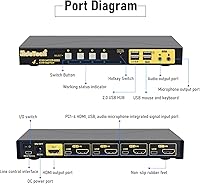
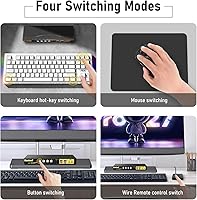
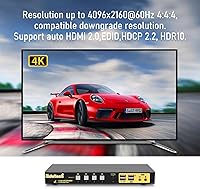
What separates this KVM switch from cheaper alternatives starts with its video credentials. Running HDMI 2.0, it handles 4K at 60Hz with HDR10 support — so if you have a high-res monitor, you are not sacrificing picture fidelity between machines. A particularly useful inclusion is EDID emulation, which tells each connected computer what the monitor supports even when it is not the active source, preventing the resolution resets or black screens that plague cheaper KVMs. You get four ways to switch: a front-panel button, a keyboard hotkey, a mouse-scroll trigger, or a wired remote — handy when the box is out of arm's reach. Built-in 3.5mm audio ports and dual USB hub slots round out a surprisingly complete package.

Best For

This KVM switch works best for people juggling multiple machines at a single desk without wanting to replicate peripherals for each one. A home office worker alternating between a personal desktop and a company-issued laptop is the obvious sweet spot. Developers managing a Linux build server alongside a Windows workstation will find the broad OS support genuinely useful rather than just a marketing checkbox. Gamers running a dedicated streaming or editing PC alongside their main rig get solid value here too, especially with audio sharing handled in one box. Where it falls short: anyone needing USB 3.0 throughput for large storage transfers, or users who need to drive two monitors simultaneously.

User Feedback

Community reception for the JideTech 4-port switch is genuinely split, and it is worth knowing why before committing. On the upside, most buyers get it running quickly, hotkey switching works reliably in clean setups, and 4K picture quality draws consistent praise. The friction starts once you push beyond the basics. USB device drop-outs during switching are a recurring complaint — particularly affecting drives and dongles mid-transfer. Hotkey conflicts surface on mechanical keyboards with custom firmware, and the wired remote is the pragmatic fix for that, though it adds a cable to manage. Apple Magic peripherals have caused compatibility headaches for some users, so treat Mac support as workable rather than guaranteed.

Pros

  • Plug-and-play setup on Windows and Linux — no drivers, no configuration headaches, just cable in and go.
  • 4K at 60Hz output is stable and sharp, with HDR10 support that holds up on compatible high-res monitors.
  • EDID emulation keeps all connected PCs calibrated to the correct resolution even when they are not the active source.
  • Four distinct switching methods give you real flexibility — hotkey, mouse scroll, front button, or wired remote.
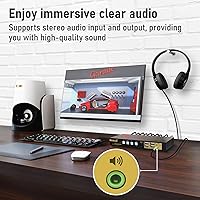
  • Built-in 3.5mm audio ports let you share a headset or speakers across all machines, which most rivals skip at this price.
  • Dual USB hub ports handle light peripheral sharing like printers and flash drives without needing a separate switch.
  • Auto-scan mode cycles through connected inputs automatically, useful for monitoring multiple machines hands-free.
  • Broad OS support covers Windows, Linux, Raspberry Pi, and macOS with wired peripherals without extra configuration.
  • The wired remote is a practical lifesaver when the unit is mounted out of reach or hotkeys conflict with your keyboard.

Cons

  • USB devices can briefly drop out during switching, which is a real problem if a file transfer is running.
  • Hotkey switching misfires on mechanical keyboards with custom firmware, forcing users onto alternative switching methods.
  • Apple Magic Keyboard and Magic Mouse pairing does not carry across switch cycles reliably on macOS.
  • USB 2.0 hub speeds are a meaningful ceiling for anyone sharing external SSDs or large-capacity storage devices.
  • The 3.5mm audio port develops intermittent crackling in some units after months of daily use.
  • No rubber feet included, so the unit tends to shift or creep on smooth desk surfaces during cable pulls.
  • Hotkey customization and auto-scan interval adjustment are more confusing than they should be to configure.
  • The front-panel button feels shallow and cheap relative to the otherwise functional build.
  • Zero cable management included in the box — four HDMI cables plus power and USB peripherals create real desk clutter.

Ratings

The JideTech 64H2UA 4-Port HDMI KVM Switch scores below are generated by AI after systematically analyzing verified buyer reviews from multiple global markets, with spam, incentivized, and bot-flagged submissions filtered out before scoring. The result is an honest snapshot of real-world performance — where this HDMI KVM genuinely delivers and where it falls short. Both the wins and the frustrations are reflected without sugarcoating.
Video Output Quality
84%
Most users running 4K monitors at 60Hz report clean, stable output with no visible degradation between switching cycles. HDR10 support holds up well on compatible displays, and reviewers working in photo editing or content creation noted that color accuracy felt consistent across connected machines.
A smaller subset of users — particularly those using older 4K panels — reported occasional flickering during the first second after switching sources. The issue resolves itself quickly but can be disruptive during video calls or presentations where every second counts.
EDID Emulation Reliability
79%
21%
EDID emulation is one of the standout practical features here. Users who previously dealt with their inactive PCs reverting to a low resolution or forgetting monitor settings between switches found this largely resolved the problem, keeping all four connected machines calibrated without manual intervention.
It does not work perfectly in every configuration. A handful of users with multi-monitor setups routed through adapters or docks reported that EDID data was not always passed correctly, leading to occasional resolution mismatches that required a display settings reset on the affected machine.
Switching Methods & Flexibility
81%
19%
Having four distinct ways to change inputs — front button, hotkey combo, mouse scroll, and a wired remote — is genuinely practical. The wired remote in particular earns praise from users who mount or tuck the unit out of reach, and the mouse-scroll trigger feels natural once you get used to it.
Hotkey switching is where things get inconsistent. Users with mechanical keyboards running custom firmware or QMK configurations sometimes find the key combination either misfires or conflicts with existing shortcuts, requiring them to fall back on the remote or front button as a workaround.
USB Hub Performance
62%
38%
For light peripheral sharing — a printer, a scanner, or a USB flash drive — the dual USB 2.0 hub ports do their job without complaint. Home office users sharing a single printer across a work and personal machine appreciated not needing a separate USB switch for that task.
USB 2.0 speeds are a real ceiling for anyone hoping to share external SSDs or large-capacity drives with meaningful throughput. Drop-outs during switching are the bigger frustration though — several users reported connected drives briefly disconnecting mid-switch, which is a problem if a transfer is in progress.
Audio Switching
77%
23%
Built-in 3.5mm mic and speaker ports are not a given at this price point, and users who needed to share a headset or desktop speakers across machines without a separate audio switch found this a welcome inclusion. Audio follows the active computer automatically, which is exactly what you want.
Audio quality is functional rather than audiophile-grade. Users with higher-end headsets noticed a slight but perceptible background hiss compared to a direct connection, and a few reported that the audio port on their unit developed intermittent crackling after several months of daily use.
Compatibility — Windows & Linux
86%
On Windows 10 and 11, setup is genuinely plug-and-play — no drivers needed, no configuration menus to navigate. Linux users running Ubuntu and Fedora had similarly smooth experiences, with the switch recognized immediately and all switching methods working out of the box.
Compatibility is less consistent on older Windows versions and niche Linux distributions. Users on Debian-based systems with custom kernel builds flagged occasional USB enumeration delays after switching, though rebooting the switch typically cleared the issue without requiring a full system restart.
Compatibility — macOS & Apple Peripherals
58%
42%
Standard wired USB keyboards and mice work fine with macOS in most reported configurations, and users running Apple Silicon Macs with a wired setup managed to get hotkey switching operational after remapping the key combination to avoid system-level conflicts.
Apple Magic Keyboard and Magic Mouse users hit compatibility walls more often than not. Wireless pairing behavior does not carry across the switch reliably, and several macOS users found they had to re-pair Bluetooth peripherals after each switch cycle — effectively defeating the purpose of the KVM.
Build Quality & Form Factor
71%
29%
The chassis feels solid enough for a desktop peripheral at this price tier. The slim, elongated form factor keeps it from dominating desk space, and port labeling is clear enough that initial cabling is intuitive even without reading the manual.
The plastic housing feels noticeably lightweight — not flimsy, but not confidence-inspiring either. The front button has a soft, shallow travel that a few users described as feeling cheap compared to the rest of the feature set, and the unit does not include any rubber feet to prevent desk creep.
Setup & Initial Configuration
83%
The out-of-box experience is one of this KVM switch's strongest points. Cable in, power on, and it works — most reviewers had all four machines recognized and switching within ten minutes. No software installs, no driver hunting, and the manual is actually readable for once.
Users who wanted to customize hotkeys or adjust auto-scan intervals found the configuration process less intuitive, with instructions that assume familiarity with KVM terminology. The hotkey change procedure in particular requires a specific sequence that is easy to get wrong on the first attempt.
Auto-Scan Feature
66%
34%
Auto-scan mode — which cycles through all connected inputs at a configurable interval — is useful for monitoring multiple machines without touching any controls. Server room users and home lab enthusiasts running light monitoring tasks on secondary machines found this a practical time-saver.
The interval adjustment is coarse rather than granular, limiting how precisely you can tune the dwell time per source. A few users also noted that auto-scan occasionally skips a port if a connected machine is in sleep or hibernation mode, which reduces its utility in mixed always-on and sleep setups.
Cable Management & Port Layout
68%
32%
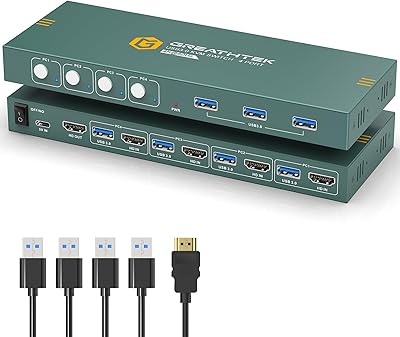
All input ports are grouped on one side of the unit, which keeps cabling reasonably organized behind a desk. The output and USB hub ports on the opposite side reduce the risk of crossing cables, and the overall layout makes it clear which port does what at a glance.
Four HDMI cables plus a power input and USB peripherals still create a meaningful cable mass behind the unit, and the included cable management is nonexistent — no velcro ties or routing guides in the box. For cleaner setups, third-party cable management is essentially mandatory.
Value for Money
74%
26%
Stacking up the feature list — 4K 60Hz, EDID emulation, four switching methods, audio ports, and USB hub sharing — against the asking price puts this KVM switch in a competitive position for its tier. For users whose needs align with what it does well, the cost per feature is genuinely reasonable.
The USB drop-out issues and conditional Mac compatibility chip away at the value proposition for anyone whose workflow depends on those specific features. If you need reliable high-speed USB sharing or a polished Apple ecosystem experience, paying more for an established brand starts to make financial sense.
Long-Term Reliability
63%
37%
Many users who have run this HDMI KVM daily for six or more months report no hardware failures — the core switching function continues working reliably, and video quality has not degraded over time in the majority of reported cases.
The 3.5mm audio port appears to be the weakest physical component over time, with intermittent crackling appearing in a notable share of longer-term reviews. There are also scattered reports of the front-panel button becoming less responsive after heavy use, which is worth factoring in for high-frequency switching environments.

Suitable for:

The JideTech 64H2UA 4-Port HDMI KVM Switch is a practical fit for anyone managing two to four computers from a single desk without wanting to duplicate peripherals across each machine. Home office workers who alternate between a personal desktop and a company laptop will get the most out of it — one keyboard, one mouse, one monitor, and a straightforward way to hop between them. Developers and sysadmins running a mix of Windows and Linux machines will appreciate the broad OS compatibility and the fact that nothing needs to be installed to get it working. Gamers with a dedicated streaming or editing rig alongside their main gaming PC will find the 4K 60Hz output and flexible switching methods well-suited to their workflow. The built-in audio ports also make this a smart pick for anyone who wants to share a headset or desktop speakers across machines without buying a separate audio switch — that combination at this price tier is genuinely uncommon.
Not suitable for:

The JideTech 64H2UA 4-Port HDMI KVM Switch is a harder sell for users whose workflows depend on fast, uninterrupted USB data transfers, since the USB 2.0 hub ports cap throughput and occasional device drop-outs during switching can interrupt active transfers. Apple-first users should approach with caution — while wired USB peripherals on macOS generally work, wireless Apple Magic peripherals have caused consistent pairing headaches that undercut the convenience the switch is supposed to provide. Anyone needing to drive two monitors simultaneously from a single KVM will need to look elsewhere, as this is strictly a single-display solution. Power users who rely heavily on custom keyboard firmware or complex hotkey configurations may find the switching behavior conflicts with their existing shortcuts, adding friction rather than reducing it. If long-term hardware reliability is a top priority, the mixed feedback on audio port durability and button feel over extended daily use gives reasonable cause for pause.
Specifications

  • Brand & Model: Manufactured by JideTech under the model number 64H2UA, released to market in April 2024.
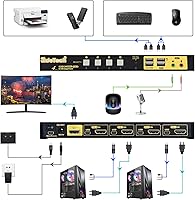
  • HDMI Inputs: Accepts up to 4 HDMI source inputs, allowing four separate computers or devices to be connected simultaneously.
  • HDMI Output: Provides a single HDMI output to connect one monitor, display, or projector.
  • Max Resolution: Supports video output up to 4096x2160 (4K) at 60Hz via HDMI 2.0, with additional compatibility down to 480i.
  • HDR & HDCP: Certified for HDR10 wide color output and HDCP 2.2 content protection, ensuring compatibility with protected media sources.
  • EDID Emulation: Built-in EDID emulation keeps all connected computers informed of the monitor's capabilities, preventing resolution resets on inactive sources.
  • USB Hub Ports: Includes 2 USB 2.0 Type-A hub ports for sharing peripherals such as printers, scanners, or flash drives across all connected machines.
  • Audio Ports: Equipped with a 3.5mm microphone input and a separate 3.5mm speaker output for shared audio across switching sessions.
  • Switching Methods: Supports four input-switching methods: front-panel push button, keyboard hotkey combo, mouse-scroll trigger, and a wired remote push button.
  • Auto-Scan: Includes an auto-scan mode that cycles through active input ports at a user-adjustable time interval.
  • OS Compatibility: Driver-free operation confirmed on Windows 10, Windows 7, Windows XP, Windows Vista, macOS, Linux, Debian, Ubuntu, Fedora, and Raspberry Pi OS.
  • Power Requirements: Operates at 5 volts DC with a maximum current draw of 2 amps, powered via an included external adapter.
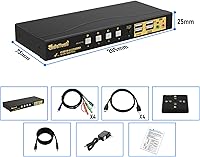
  • Dimensions: The unit measures 8.07 inches long by 2.95 inches wide by 0.97 inches tall, making it slim enough to tuck behind most monitors.
  • Weight: The switch weighs 2.93 pounds, which includes the unit chassis and attached cabling provisions.
  • Hotkey Customization: The default hotkey sequence can be changed to an alternative combination to reduce conflicts with other keyboard shortcuts or operating systems.
  • Apple Keyboard Support: Advertised as compatible with Apple keyboards including wired models, though Apple wireless peripheral compatibility is conditional and not guaranteed.
  • Connector Type: All video connections use standard full-size HDMI connectors; no proprietary or DisplayPort adapters are required for basic operation.
  • Circuit Configuration: Uses a 4-way switching circuit with normally-open contact type and a plug-in connector interface for signal routing.

Related Reviews

DGODRT KS604H 4-Port HDMI KVM Switch
80%
91%
Ease of Setup
74%
Switching Reliability
78%
Video Quality
79%
USB Peripheral Sharing
84%
Wired Remote Control
More
StarTech SV431HDU3A2 4-Port HDMI KVM Switch
73%
74%
Switching Reliability
69%
Video Quality
66%
USB 3.0 Hub Performance
71%
Audio Switching
83%
Setup & Installation
More
ANXQQ ANQ-8401B 4-Port HDMI KVM Switch
77%
91%
Ease of Setup
88%
Display Switching Reliability
86%
EDID Performance
67%
USB Device Recognition
61%
8K Resolution Capability
More
GREATHTEK 4-Port HDMI KVM Switch
66%
89%
Video Signal Quality
74%
Switching Performance
83%
USB Peripheral Sharing
92%
Setup Experience
71%
Build Quality
More
Steetek STK-S7415H 4-Port HDMI KVM Switch
74%
91%
Ease of Setup
83%
Switching Reliability
78%
Video Quality & Resolution
76%
Adaptive EDID Performance
69%
USB Peripheral Sharing
More
JideTech JD-41UA 4-Port VGA KVM Switch
71%
83%
Value for Money
88%
Ease of Setup
71%
Switching Reliability
67%
Audio Switching
79%
Video Quality
More
TESmart HKS403-P23 4-Port Triple Monitor KVM Switch
69%
78%
Display Performance
72%
EDID Emulation Reliability
74%
Switching Speed & Reliability
58%
USB Hub Performance
69%
Network Sharing
More
Scyniney 4-Port Triple-Monitor HDMI KVM Switch
74%
83%
Video Signal Stability
79%
4K Resolution Performance
74%
USB Hub Performance
81%
Switching Reliability
41%
Hotkey Switching Support
More
DiamondTiger KS304DL 4-Port DisplayPort KVM Switch
74%
88%
Ease of Setup
92%
Video Quality
74%
Switching Reliability
63%
Build Quality
86%
Value for Money
More
TCNEWCL KS-801 8-Port HDMI KVM Switch
78%
88%
Ease of Setup
91%
Port Capacity & Scalability
74%
Video Quality & Resolution
69%
Switching Speed & Reliability
83%
IR Remote Control
More

FAQ

No, the JideTech 64H2UA 4-Port HDMI KVM Switch is fully plug-and-play on Windows, Linux, and macOS with wired peripherals. Just connect your computers and monitor, plug in the USB cables for your keyboard and mouse, and you are ready to switch. No driver discs, no software downloads required.
This is where you need to be careful. Standard wired USB Apple keyboards generally work fine, but Apple Magic peripherals — which rely on Bluetooth — do not pair reliably through the switch. Several users have reported having to re-pair their Magic Mouse or Keyboard after every input change, which largely defeats the convenience of having a KVM. If you are an Apple wireless peripheral user, this is a genuine compatibility concern.

This is exactly what EDID emulation is designed to prevent. The switch stores your monitor's capabilities and communicates them to all four connected computers, even when those computers are not the active display source. In practice, this means your inactive PCs should not revert to a low-resolution fallback mode — a common frustration with cheaper KVMs that skip this feature.

You can switch using the front-panel button on the unit itself, a keyboard hotkey combination, a mouse-scroll shortcut, or the included wired remote push button. For most setups, the hotkey method is the most convenient once you are used to it. However, if you use a mechanical keyboard with custom firmware, hotkeys can conflict — in that case, the wired remote is the most reliable fallback, especially if the unit is positioned out of easy reach.

Yes, the two built-in USB 2.0 hub ports are designed exactly for this. Plug your printer into one of the hub ports and whichever computer is the active source will have access to it. Keep in mind these are USB 2.0 ports, so they work well for printers, scanners, and flash drives, but are not ideal for sharing external SSDs where transfer speed matters.

Audio follows the active input automatically. When you switch to a different computer, the 3.5mm speaker and microphone ports route to that machine without any extra steps. This makes it straightforward to share a single headset or desktop speaker setup across all connected computers.

It is best to avoid it. Users have reported that USB devices connected through the hub ports can briefly drop out during an input switch, which can interrupt or corrupt an active file transfer. Finish any transfers before switching sources, just to be safe.

Yes, and this is one of the stronger points of this HDMI KVM. Ubuntu, Fedora, Debian, and Raspberry Pi OS users have all reported clean, driver-free operation. The switch is recognized as standard HID hardware, so there are no kernel module headaches to deal with in typical configurations.

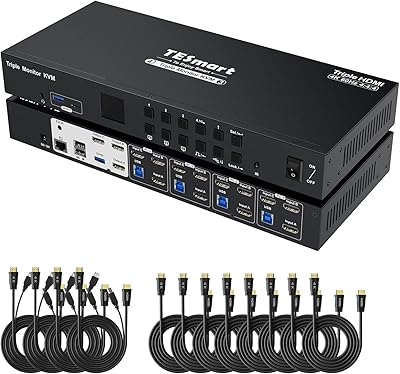
No, this is a single-monitor KVM. It has one HDMI output, so you can only drive one display at a time. If you need to control multiple computers across a dual-monitor setup, you would need a different class of KVM entirely — typically labeled as a dual-monitor or multi-display KVM, which sits in a higher price bracket.

Auto-scan cycles through each connected input in sequence, pausing on each one for a set amount of time before moving to the next. It is genuinely useful if you are lightly monitoring multiple machines — for example, a home lab user keeping an eye on a build server and a NAS alongside their main workstation. The downside is that the interval adjustment is fairly coarse, and the feature skips any port where the connected machine is in sleep mode, which limits its usefulness in mixed sleep and always-on setups.