Overview

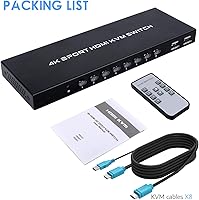
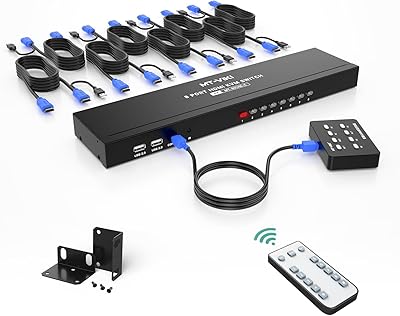
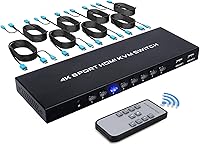
The TCNEWCL KS-801 8-Port HDMI KVM Switch is a mid-range desktop solution for anyone tired of juggling multiple computers across a cluttered workspace. It lets you run up to eight machines through a single monitor — handy whether you're managing servers, running test environments, or just keeping a personal and work PC side by side. The unit is slim and unobtrusive, fits neatly on a desk or in a shallow rack, and requires no driver installation whatsoever. Eight combo HDMI and USB cables come bundled in the box, which is a genuine convenience. One honest caveat: the 4K output tops out at 30Hz, so productivity tasks look sharp, but this isn't a setup built for high-refresh-rate workflows.
Features & Benefits

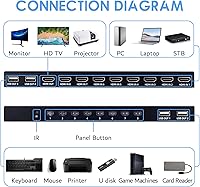
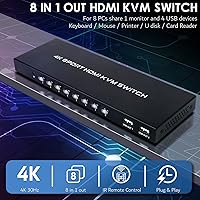
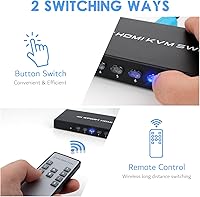
This 8-port KVM switch handles up to eight HDMI sources and funnels them to one output at resolutions up to 4K at 30Hz, with full backward compatibility down to 1080p. Four USB 2.0 ports let you share a keyboard, mouse, printer, or flash drive across every connected machine — USB 2.0 bandwidth is perfectly adequate for input devices, though it won't win any speed contests for large file transfers. Switching between computers is quick via the front-panel buttons, and the included IR remote control is a small but practical touch when the switch sits across the room. A blue LED indicator shows which port is active without any ambiguity. Works with Windows, macOS, Unix, and DOS out of the box.

Best For

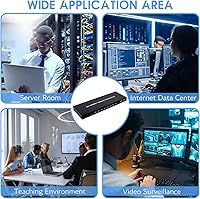
This desktop KVM earns its place in a home lab or small IT environment where managing several workstations from a single desk is a daily reality. Developers toggling between build machines, QA testers comparing outputs across different operating systems, or sysadmins with a rack of servers will all find the eight-port capacity genuinely useful rather than excessive. It's also a practical pick for small offices or conference rooms where a shared monitor and peripherals rotate among staff. If you're coming from an older VGA or 4-port HDMI switch and want expanded capacity without a bulky footprint, this fits the bill. The IR remote makes it especially convenient when the unit is mounted away from arm's reach.

User Feedback

The TCNEWCL switch sits at a solid 4.1-star average from nearly 300 reviews, and the most common praise centers on easy out-of-box setup and the value of having all eight cables included — buyers appreciate not having to source them separately. The IR remote gets specific callouts as a differentiator against button-only alternatives. On the critical side, a handful of users have noted occasional lag when switching ports or inconsistent behavior with USB hot-swap, particularly with certain peripherals. A few buyers expecting true 4K at high refresh rates were caught off guard by the 30Hz cap. Long-term reliability draws mixed signals in lower-star reviews, though outright failures appear to be the minority.

Pros

  • All eight combo KVM cables are included in the box, saving a meaningful upfront cost.
  • No drivers or software needed — most users are up and running within ten minutes.
  • The IR remote is a practical touch that makes switching inputs from across the room genuinely easy.
  • Eight HDMI inputs in this form factor is rare and hard to find at a comparable price point.
  • Works across Windows, macOS, Linux, and Unix environments without any configuration changes.
  • A bright LED indicator shows the active port instantly, removing any guesswork.
  • The slim, lightweight chassis fits easily on a desk shelf or in a shallow rack without dominating the space.
  • Passive cooling keeps the unit completely silent during operation.
  • Compatible with 1080p displays as well as 4K monitors, making it flexible for mixed monitor setups.

Cons

  • The 30Hz cap at 4K makes the output feel laggy for any fast-moving content or video work.
  • USB hot-swap behavior is inconsistent — some peripherals drop out briefly when switching between ports.
  • No keyboard hotkey switching support, which frustrates users who prefer hands-free navigation.
  • The front-panel buttons have a mushy, imprecise feel that wears on you over months of daily use.
  • Some bundled cables showed signal inconsistencies within the first few months of use.
  • Long-term durability is a question mark, with a pattern of unit failures surfacing in lower-star reviews after roughly six to twelve months.
  • The IR remote requires a fairly direct line of sight to register reliably.
  • USB 2.0 ports make sharing fast external drives or high-bandwidth devices essentially pointless.

Ratings

The TCNEWCL KS-801 8-Port HDMI KVM Switch has been scored by our AI system after parsing hundreds of verified buyer reviews from global marketplaces, with spam, incentivized posts, and bot-generated feedback actively filtered out. The scores below reflect a balanced picture — what real users genuinely value and where the switch falls short in everyday use. Strengths and frustrations are weighted equally so you can make an informed decision before buying.
Ease of Setup
88%
Most buyers had all eight machines connected and switching within minutes of unboxing — no software, no drivers, just plug the cables in and go. The included combo KVM cables mean you're not hunting for compatible accessories on day one, which reviewers consistently called out as a time-saver.
A small number of users found the cable labeling unclear, leading to initial confusion about which port corresponds to which machine. Those with tightly packed desk setups also noted that routing eight cables simultaneously gets messy fast.
Port Capacity & Scalability
91%
Eight HDMI inputs is genuinely rare at this price tier, and IT professionals managing server racks or home lab enthusiasts running multiple OSes called it the primary reason they chose this switch over cheaper 4-port alternatives. The expanded capacity removes the need to daisy-chain multiple switches.
There is no option to expand beyond eight inputs, so users with growing setups will eventually hit a ceiling. A couple of reviewers also noted they would have preferred at least one USB 3.0 port among the four USB slots for faster peripheral throughput.
Video Quality & Resolution
74%
26%
For spreadsheets, coding environments, terminal windows, and general office work, the output at full 4K looks clean and sharp. Users on 1080p monitors reported crisp, stable images with no noticeable signal degradation, even with all eight sources connected.
The 30Hz ceiling at 4K is a real limitation that caught some buyers off guard. Anyone expecting smooth 4K video playback or a higher-refresh-rate workflow will find the output feels sluggish — this is strictly a productivity-grade resolution cap, not a multimedia one.
Switching Speed & Reliability
69%
31%
Button-based switching is fast enough for most users — typically under two seconds between sources. Those toggling frequently throughout a workday, such as developers jumping between a build server and a local machine, found the response time acceptable for their rhythm.
A recurring complaint involves occasional lag or a momentary black screen when switching, particularly after the switch has been running for several hours. USB re-enumeration on switching is inconsistent for some peripheral types, with mice and keyboards sometimes needing a few seconds to re-register.
IR Remote Control
83%
The remote is a practical addition that sets this unit apart from many competitors in its class. Users who mount the switch under a desk or inside a shallow rack especially appreciated being able to change inputs without leaning over or reaching behind equipment.
The IR sensor range is adequate but not generous — reviewers noted it works reliably only when pointed within a fairly direct line of sight. A few buyers also mentioned the remote feels lightweight and plasticky, which raises questions about how it holds up over years of daily use.
Build Quality & Durability
66%
34%
The chassis is compact and light, which makes placement flexible — it sits flat on a desk without taking up much footprint and the ports feel solidly seated when cables are inserted. For day-to-day stationary use, the construction gets the job done.
The overall feel is firmly budget-adjacent: the shell has some flex when pressed, and the front buttons have a slightly mushy click that does not inspire confidence over a long service life. Several lower-star reviews flagged unit failures appearing after six to twelve months of regular use.
Included Cable Quality
71%
29%
Bundling eight KVM cables is a legitimately generous inclusion that saves buyers a noticeable upfront cost. The cables are long enough at 1.5 meters to reach across most standard desk configurations without forcing computers uncomfortably close together.
The cables themselves feel adequate rather than robust — the insulation is on the thinner side and the connectors lack the reinforced strain relief you'd find on premium aftermarket cables. A handful of users reported one or two cables from their bundle showing intermittent signal issues within a few months.
USB Peripheral Sharing
72%
28%
Sharing a keyboard, mouse, and a low-demand device like a label printer across eight machines works reliably for the majority of users. The four available USB slots cover the essential peripheral combination for most office or lab setups without needing a separate hub.
USB 2.0 bandwidth is the real constraint here — anyone hoping to share an external SSD or run fast file transfers through the switch will find it frustratingly slow. Hot-swap behavior is also inconsistent, with some users reporting that plugging or unplugging peripherals mid-session disrupts the active connection.
Compatibility
86%
The switch handled mixed-OS environments without issues in the majority of user reports — Windows, macOS, and Linux machines coexisting on the same unit is a practical reality for home lab users and developers, and it works without any configuration changes.
A small number of macOS users noted that the system occasionally failed to recognize the KVM as a trusted input device after waking from sleep, requiring a manual port toggle to restore the connection. Compatibility with older DOS or Unix systems, while listed, received little real-world validation in reviews.
LED Indicator Clarity
84%
The blue LED system is simple and effective — at a glance, you always know which machine has control, which matters when you have eight ports and no visible labels on connected cables. Users working in dimly lit server rooms mentioned the LED is bright enough to read without being distracting.
The LEDs are only visible from the front, so if the switch is mounted sideways or at an angle in a rack, readability drops. There is also no way to dim them, which a small number of users found bothersome in dark home office environments.
Value for Money
79%
21%
Compared to the sparse field of 8-port HDMI KVM switches, the overall package — unit plus eight cables plus remote — lands at a price that most buyers considered fair for what they received. Reviewers upgrading from older VGA-based switches felt the jump to HDMI at this scale was worth every dollar.
A few buyers felt the pricing sits uncomfortably close to more established brands that offer better long-term reliability and stronger USB performance. If the switch requires replacement within a year, the value calculation shifts significantly in the wrong direction.
Front Panel Usability
77%
23%
The physical buttons are straightforward — one press per port, numbered clearly, and the active state is always confirmed by the LED. For users who prefer tactile control over fiddling with a remote, the front panel handles daily switching without any complaints in most reviews.
The buttons have a shallow, imprecise feel that makes rapid switching slightly frustrating when you need to move quickly between sources. There is also no hotkey support, so users who prefer keyboard shortcuts to switch inputs will find this unit lacks that option entirely.
Thermal Performance & Noise
89%
No fan, no noise — the switch runs passively and stays cool under typical multi-hour use. Users who are sensitive to ambient sound in their workspace, such as those recording audio or working in quiet offices, appreciated not having yet another humming device on the desk.
Passive cooling means there is a modest warmth to the chassis after extended sessions with all eight ports active, though no reviewer reported it reaching temperatures that felt unsafe or caused throttling. This is largely a non-issue for standard use.
Documentation & Support
61%
39%
The user manual covers the basics clearly enough that most buyers got through setup without it. TCNEWCL does respond to product questions submitted through the Amazon listing, which a handful of reviewers mentioned positively when troubleshooting minor issues.
The manual is thin and the troubleshooting section is minimal — users encountering the USB hot-swap inconsistency or the macOS sleep-wake issue had nowhere to turn in the documentation. Support response times and resolution quality drew mixed feedback in lower-star reviews.

Suitable for:

The TCNEWCL KS-801 8-Port HDMI KVM Switch was built for people who genuinely need to manage a lot of machines from a single workstation — not just two or three, but a full stack. IT professionals overseeing a server room, home lab enthusiasts running different operating systems in parallel, or developers who need to switch between a build machine, a test box, and a personal computer throughout the day will find the eight-port capacity immediately useful. Small offices and shared conference rooms are another strong fit: when multiple staff members take turns at the same monitor and peripheral set, having a single tidy switch replaces a tangle of cables and separate input devices. The plug-and-play setup means even non-technical users can get it working quickly, and the bundled cables remove a common friction point. If your workflow is productivity-focused — writing, coding, server administration, document work — the 4K output will look great without any compromise.
Not suitable for:

The TCNEWCL KS-801 8-Port HDMI KVM Switch is not the right tool for anyone who needs smooth, high-refresh-rate visuals. The 4K output is capped at 30Hz, which is perfectly fine for static productivity work but will feel noticeably sluggish for video editing previews, fast-moving media, or any kind of gaming. Users who rely heavily on fast external storage should also know that the USB ports run at USB 2.0 speeds — plugging in a fast SSD through this switch defeats the purpose of having one. If long-term hardware reliability is a top priority, the build quality and some reported failure patterns in buyer reviews suggest this is not a heavy-duty professional appliance built to last five or more years under constant load. And if you need hotkey switching from the keyboard rather than reaching for a button or remote, this switch simply does not support it.
Specifications

  • Model Number: The unit is officially designated as the KS-801, manufactured by TCNEWCL.
  • Input Ports: The switch accepts up to eight HDMI sources, allowing eight separate computers to connect simultaneously.
  • Output Port: A single HDMI output connects to one monitor, consolidating all eight inputs into a unified display.
  • USB Ports: Four USB 2.0 ports are available for sharing peripherals such as a keyboard, mouse, printer, or flash drive across connected computers.
  • Max Resolution: The switch supports video output up to 4K at 30Hz (3840×2160), and is backward compatible with 1080p and 3D video signals.
  • Switching Methods: Users can switch between input sources using front-panel push buttons or the included IR remote control.
  • Included Cables: Eight combo HDMI and USB KVM cables, each 1.5 meters (approximately 59 inches) long, are included in the package.
  • Remote Control: An IR remote control is included and allows input switching without physical contact with the unit.
  • Active Indicator: A blue LED on the front panel illuminates to indicate which of the eight ports is currently active.
  • Dimensions: The unit measures 9.33 × 3.07 × 0.79 inches, making it slim enough for desktop placement or shallow rack mounting.
  • Weight: The switch weighs approximately 1 pound, keeping the overall package light and easy to reposition.
  • Operating Voltage: The switch operates at 5 volts and draws up to 1 amp, consistent with USB bus-powered or low-draw adapter setups.
  • Mounting Type: The unit is designed for plug-in mount installation, suitable for flat desk surfaces or standard rack environments.
  • OS Compatibility: The switch works with Windows, macOS, Unix, and DOS operating systems without requiring any additional drivers or software.
  • Connector Type: All connections use a plug-in connector format; no soldering or permanent installation is required for setup.
  • Video Standards: In addition to standard 4K and 1080p, the switch supports 3D video pass-through for compatible source and display combinations.
  • Driver Requirement: No drivers or software installation are needed; the switch is fully plug-and-play across all supported operating systems.
  • Cooling Method: The unit uses passive cooling with no internal fan, resulting in completely silent operation during normal use.

Related Reviews

MT-VIKI MT-801HK-C 8-Port HDMI KVM Switch
78%
83%
Value for Money
88%
Ease of Setup
76%
Build Quality
69%
Switching Performance
71%
Display Quality
More
GREATHTEK 8-Port HDMI KVM Switch
71%
91%
Ease of Setup
78%
Switching Reliability
74%
Video Quality
63%
Build Quality
67%
USB Peripheral Sharing
More
Steetek USB 2.0 HDMI KVM Switch 8 Port
84%
91%
Ease of Switching
87%
4K Video Quality
84%
Build Quality
93%
Setup and Installation
65%
Hotkey Functionality
More
TESmart HKS801-P23 USB 3.0 HDMI KVM Switch 8 Port 4K@60Hz
87%
91%
Ease of Setup
95%
Video Quality
88%
Switching Reliability
85%
Build Quality
92%
Value for Money
More
MLEEDA 8-Port DisplayPort KVM Switch
86%
88%
Performance
85%
Video Quality (4K Support)
90%
USB 3.0 Data Transfer
92%
Ease of Installation
80%
Switching Modes (Panel/Remote/RS232)
More
DiamondTiger 4K801 8-Port HDMI Switch
72%
93%
Ease of Setup
88%
Remote Control Usability
79%
Build Quality
67%
Video Resolution Performance
41%
PS5 Compatibility
More
ANXQQ ANQ-8401B 4-Port HDMI KVM Switch
77%
91%
Ease of Setup
88%
Display Switching Reliability
86%
EDID Performance
67%
USB Device Recognition
61%
8K Resolution Capability
More
IOGEAR GCS32HU 2-Port HDMI KVM Switch
72%
93%
Ease of Setup
88%
Switching Reliability
91%
Value for Money
74%
Build Quality
67%
Cable Length & Reach
More
DGODRT KS604H 4-Port HDMI KVM Switch
80%
91%
Ease of Setup
74%
Switching Reliability
78%
Video Quality
79%
USB Peripheral Sharing
84%
Wired Remote Control
More
StarTech SV431HDU3A2 4-Port HDMI KVM Switch
73%
74%
Switching Reliability
69%
Video Quality
66%
USB 3.0 Hub Performance
71%
Audio Switching
83%
Setup & Installation
More

FAQ

No, nothing to install. The switch is fully plug-and-play — connect your computers and monitor with the included cables, plug in power, and it works immediately. Windows, macOS, Unix, and DOS are all supported out of the box.

All eight computers stay physically connected at all times. The switch simply controls which one has active access to the monitor and USB peripherals at any given moment. You switch between them using the front buttons or the IR remote — no plugging or unplugging required.

For productivity work — coding, writing, spreadsheets, server management — 4K at 30Hz looks sharp and is perfectly comfortable. Where it falls short is anything involving motion: fast video playback, gaming, or high-refresh workflows will feel noticeably sluggish at 30Hz. If you need 60Hz or above at 4K, this switch is not the right fit.

The USB ports work well for keyboards, mice, printers, and low-demand flash drives. However, they run at USB 2.0 speeds, so a fast external SSD will be severely bottlenecked — you would not get anywhere near its rated performance. For peripheral sharing, it is great; for fast storage, look elsewhere.

The remote lets you switch between any of the eight inputs without touching the unit, which is handy if the switch is mounted under a desk or inside a rack. The range is decent for close-quarters use, but the sensor requires a reasonably direct line of sight — pointing it at an odd angle or from across a large room can make it less responsive.

Yes, mixed OS environments are a common use case and it handles them without any issues. The TCNEWCL KS-801 8-Port HDMI KVM Switch does not care what OS is running on each connected machine — you can have Windows, macOS, and Linux all connected simultaneously and switch between them freely.
The bundled cables are a genuine convenience and work fine for most users right out of the box. That said, they are not premium quality — the insulation is thinner than aftermarket options and a small number of buyers reported intermittent signal issues with one or two cables after a few months. If you need maximum reliability, it is worth keeping a spare cable on hand.

Unfortunately, hotkey switching is not supported on this switch. Your only options are the front-panel push buttons and the IR remote. If keyboard-based switching is important to your workflow, that is a meaningful limitation to factor in before buying.

Most of the time it works fine, but it is not perfectly consistent. Some users report a brief delay — a second or two — before a keyboard or mouse re-registers after switching ports. In occasional cases, a peripheral needs a few seconds to reconnect, particularly if the switch has been running for a long time. It is not a dealbreaker, but it is worth knowing.

It is completely silent. The unit has no internal fan and runs on passive cooling, so there are no moving parts and no noise whatsoever. The chassis does get mildly warm after extended use with all ports active, but nothing that would be a concern under normal conditions.