Overview

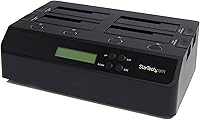
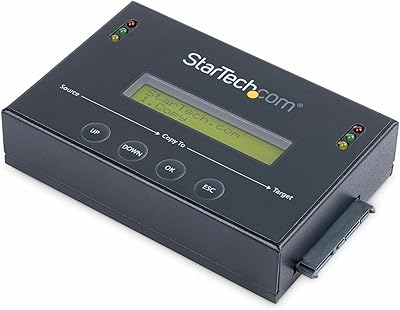
The StarTech SATDOCK4U3RE 4-Bay Hard Drive Duplicator is built squarely for IT professionals, not home users chasing a weekend project. It's been on the market since 2012 — a long run that speaks to its staying power in professional environments. The core appeal is standalone operation: load up to four drives, navigate the LCD menu, and clone or wipe without a connected computer anywhere in the picture. At a premium price point, this is unambiguously an enterprise-tier investment. If you're expecting something plug-and-play, recalibrate. This is a workhorse — deliberately engineered for technicians who run dozens of drives through a workflow, not casual users.
Features & Benefits

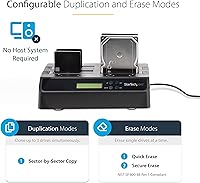
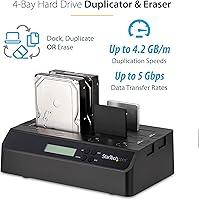
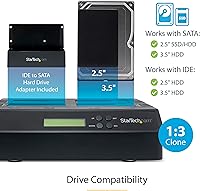
The headline capability here is 1:3 standalone cloning at up to 4.2 GB/min — respectable throughput for batch jobs, though buyers evaluating newer hardware should note that some competing units have pushed that ceiling higher. More distinguishing is the secure erase functionality: both Quick Erase and Secure Erase modes meet NIST SP 800-88 Rev 1 Purge standards, which matters enormously for organizations with data disposal compliance obligations. Drive compatibility is broad — 2.5″ and 3.5″ SATA natively, with IDE support via the included adapters, making it useful for environments still cycling through legacy inventory. The LCD menu keeps operation straightforward, and per-bay status LEDs mean you're not guessing what's happening across four active drives.

Best For

This drive sanitizer and copier makes the most sense for IT departments handling regular hardware refresh cycles — the kind of operation where drives are constantly being imaged for deployment or wiped before disposal. Data recovery technicians will also appreciate the sector-by-sector cloning approach, which doesn't rely on OS-level software that can introduce variables. Compliance-conscious organizations are another natural fit; NIST-certified erase modes are not a common feature at lower price points. MSPs and system integrators juggling multiple clients benefit from the IDE adapter compatibility too, since legacy drives still show up in the field more than most expect. For individual home users, the value proposition is harder to justify.

User Feedback

Across more than a thousand ratings, the StarTech docking station and cloner holds a 4.4-out-of-5 average — a figure that has remained stable over years, which is more meaningful than a short spike after launch. Buyers in professional settings consistently highlight build quality and reliability as the standout strengths, particularly for high-volume cloning environments. Where sentiment gets mixed is around speed — a handful of reviewers note that newer units from competing brands offer faster throughput. The LCD navigation also draws occasional criticism for a learning curve on first use. On the support side, lifetime technical assistance and a two-year warranty are frequently mentioned as genuine differentiators that reduce the risk of a premium purchase.

Pros

  • Fully standalone operation means no host PC, no software installs, and no OS compatibility headaches.
  • NIST SP 800-88 Rev 1 secure erase compliance is a genuine differentiator for regulated industries and government work.
  • IDE adapter support extends usefulness to legacy drive inventories that other modern duplicators ignore.
  • Per-bay status LEDs make it easy to monitor four simultaneous operations without hovering over the unit.
  • The LCD push-button interface keeps the workflow self-contained and repeatable once you learn the menu.
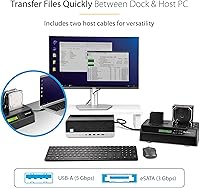
  • Dual host connection options — USB 3.2 Gen 1 and eSATA — offer flexibility for different workstation setups.
  • StarTech backs this 4-bay duplicator with a 2-year warranty and free lifetime multilingual technical support.
  • Over a decade on the market with a stable rating across 1,000-plus reviews signals consistent, reliable performance.
  • Top-loading bays with eject buttons speed up drive swaps during high-volume batch operations.
  • OS-independent design makes it deployable in mixed-environment IT shops without compatibility concerns.

Cons

  • Cloning speed of 4.2 GB/min, while functional, trails some newer competing units in the same price range.
  • The LCD menu navigation carries a learning curve that can slow down infrequent or first-time users.
  • No support for NVMe or M.2 drives limits usefulness in environments already transitioning away from SATA.
  • The premium price point is hard to justify for buyers who clone or wipe drives only occasionally.
  • Target drive must be equal to or larger than the source, which can create complications when swapping to smaller SSDs.
  • At 11.2 x 6.8 x 3.8 inches, it occupies meaningful bench space in a crowded IT workstation setup.
  • eSATA host connection tops out at 3 Gbps, which can bottleneck throughput compared to the USB 3.2 option.
  • No built-in verification reporting or audit log output, which some compliance workflows may require separately.

Ratings

The scores below for the StarTech SATDOCK4U3RE 4-Bay Hard Drive Duplicator were generated by our AI review engine after analyzing verified global buyer feedback, actively filtering out incentivized, bot-generated, and outlier submissions to surface what real IT professionals and technicians actually experienced. Both the strengths that make this a long-running professional staple and the friction points that frustrate buyers are reflected transparently in every category score.
Standalone Reliability
91%
Technicians running large decommissioning batches consistently praise the unit for completing jobs without mid-process failures or requiring a connected host system. In environments where a PC cannot be tied up for hours, that independence is not a convenience — it is a workflow requirement that this 4-bay duplicator consistently meets.
A small subset of users reported occasional job interruptions when working with degraded or borderline-faulty source drives, which the unit sometimes struggles to handle gracefully. These cases are edge scenarios, but they are worth factoring in for data recovery workflows where damaged media is the norm.
Cloning Speed
72%
28%
At up to 4.2 GB/min in standalone mode, throughput is genuinely workable for most batch deployment and hardware refresh cycles. IT teams cloning standard-capacity drives for employee setups find the pace acceptable, particularly when running three targets simultaneously off a single source.
Buyers who have used newer competing units note that the speed ceiling has moved in recent years, and this drive sanitizer and copier no longer leads the pack. When cloning 2 TB or larger drives, the time investment becomes noticeable, and high-throughput shops may find themselves looking at alternatives.
Secure Erase Compliance
94%
Meeting NIST SP 800-88 Rev 1 Purge standards is a hard requirement for many regulated industries, and the fact that this unit satisfies that benchmark in hardware — without relying on third-party software — is a significant operational advantage. Compliance officers and IT managers consistently single out this capability as a primary purchase driver.
The unit does not generate a printed or exportable erase certificate automatically, which means organizations that need documented proof of sanitization for audit purposes have to maintain their own logs manually. For some compliance frameworks, this gap introduces an extra administrative step that software-based solutions sometimes handle natively.
Drive Compatibility
88%
Support for both 2.5″ and 3.5″ SATA drives combined with the included IDE adapters gives this unit a broader compatibility range than most competitors at any price point. MSPs and system integrators who still encounter legacy IDE drives in client environments frequently cite this as a deciding factor in their purchase.
The compatibility story ends firmly at SATA and IDE — there is no NVMe or M.2 support whatsoever. As enterprise environments continue migrating to faster storage interfaces, this limitation will increasingly narrow the unit's relevance for shops running modern hardware exclusively.
Build Quality
83%
The enclosure feels appropriately solid for a professional bench tool, and the top-loading bays with individual eject buttons operate smoothly even after extended daily use in high-volume IT environments. Users who have owned the unit for several years report no mechanical degradation in the bay mechanisms or button responsiveness.
The exterior finish attracts scratches and scuffs relatively easily, which is cosmetically minor but can feel inconsistent with the premium pricing. A handful of users also noted that the drive door covers, while functional, feel less robust than the rest of the chassis.
LCD Interface & Usability
67%
33%
Once a technician has worked through the LCD menu system a few times, the push-button navigation becomes second nature for routine cloning and erase operations. For teams running the same workflow repeatedly, the interface is efficient enough to not slow down daily operations.
The initial learning curve is the most common complaint in user reviews, with several buyers noting that the menu hierarchy is not immediately intuitive without consulting the manual. Infrequent users — those who pick up the unit a few times a year — often report having to relearn the workflow each time.
Status Visibility
81%
19%
The per-bay multi-function LEDs are genuinely useful during active operations, allowing a technician to monitor progress across all four drives at a glance without hovering over the LCD display. In busy IT workrooms where the unit might be running in the background, this passive monitoring capability is practically valuable.
Some users found the LED color differentiation between certain states — particularly between active cloning and a completed job — less distinct than expected, requiring a closer look at the LCD to confirm status. Better LED contrast or a dedicated completion indicator would reduce ambiguity in noisy visual environments.
Host Connectivity
76%
24%
Having both USB 3.2 Gen 1 and eSATA host connection options gives this unit flexibility that single-interface docking stations simply cannot match, and both cables are included in the box. For workstations without a USB 3.0 port, the eSATA fallback keeps the unit usable rather than obsolete.
The eSATA connection caps at 3 Gbps, which is a noticeable bottleneck compared to the USB option when doing live file transfers in docking mode. USB-C support is absent entirely, which is increasingly relevant as newer workstations phase out USB-A ports in favor of USB-C only configurations.
Value for Money
69%
31%
For IT departments, MSPs, or compliance-driven organizations that use this unit regularly, the combination of standalone operation, certified erase modes, and legacy drive compatibility delivers genuine return on investment over time. The free lifetime technical support and two-year warranty add measurable long-term value that competitors at lower price points rarely offer.
For buyers who only occasionally clone or wipe drives, the premium cost is genuinely difficult to justify when single-bay or dual-bay alternatives exist at a fraction of the price. The value equation only works when the volume of use is high enough to amortize the investment meaningfully.
Setup & Out-of-Box Experience
71%
29%
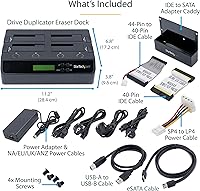
The included accessory kit — USB-A cable, eSATA cable, IDE adapters, and universal power adapter — means most users can get operational quickly without hunting for additional hardware. The physical setup of inserting drives into the top-loading bays is straightforward and requires no tools.
The initial configuration of the operating mode via the LCD menu is where out-of-box friction surfaces, particularly for users new to hardware duplicators. Documentation is adequate but not exceptional, and some buyers felt that a quick-start guide with visual step-by-step instructions would significantly reduce the initial setup friction.
Warranty & Support
89%
StarTech's free lifetime 24/5 multilingual technical support is consistently mentioned in positive reviews as a standout differentiator, particularly for international teams or MSPs operating across time zones. The two-year hardware warranty provides a meaningful safety net for an enterprise-tier purchase.
A few users reported that reaching support during peak periods required more patience than the 24/5 availability promise might suggest. Response quality is generally rated positively, but resolution speed for complex hardware issues occasionally fell short of expectations for professional-environment urgency.
Docking Station Functionality
78%
22%
The ability to switch into a standard docking mode for direct drive access, backup, or file recovery makes the StarTech docking station and cloner a genuinely multi-purpose bench tool rather than a single-function appliance. IT technicians who use it for both regular data access and periodic cloning jobs extract significantly more utility per dollar from the unit.
In docking mode over eSATA, transfer speeds are limited compared to what a dedicated USB 3.2 Gen 2 dock would offer, which can become a real-time cost when moving large volumes of data. The docking mode is a solid secondary function but is not competitive enough to replace a purpose-built docking station for users who prioritize file transfer speed above all else.
Longevity & Durability
86%
Having been on the market since 2012 with sustained positive ratings across over a thousand reviews is a credible signal of long-term durability that few IT accessories can claim. Multiple reviewers noted units that have been in active professional use for five or more years without mechanical failure.
As a product that has not had a major hardware revision in several years, some long-term owners note that the internal components are showing their age relative to what newer competing designs offer. The reliability is real, but the technology inside is not keeping pace with the latest storage interface developments.
Noise & Thermal Performance
74%
26%
Under normal cloning and docking operation, the unit runs quietly enough that it is not disruptive in shared office or lab environments. Thermal management during multi-hour cloning sessions is generally well-handled, with the chassis staying warm but not uncomfortably hot to the touch.
Under sustained heavy use — such as multiple back-to-back full-disk clone jobs — a small number of users reported that the unit ran warmer than expected, raising mild concerns about long-term thermal stress in poorly ventilated workspaces. Adequate bench clearance and airflow are advisable for high-volume deployment environments.

Suitable for:

The StarTech SATDOCK4U3RE 4-Bay Hard Drive Duplicator is purpose-built for IT professionals who regularly clone, image, or decommission drives in bulk — think system administrators handling quarterly hardware refreshes, MSPs imaging drives for multiple client deployments, or data recovery technicians who need sector-by-sector accuracy without introducing software variables. Organizations bound by data disposal regulations will find the NIST SP 800-88 Rev 1-compliant secure erase modes particularly valuable, since meeting those standards with a software-only solution often requires more effort and documentation. The IDE adapter support is a genuine practical benefit for anyone still cycling through older hardware inventories, which remain common in enterprise and government environments. If your workflow involves duplicating or sanitizing drives on a recurring, high-volume basis, this 4-bay duplicator is the kind of tool that pays for itself in saved time and reduced operational risk.
Not suitable for:

Home users or small-office buyers who only occasionally need to copy or wipe a drive will find it very difficult to justify the premium cost of this drive sanitizer and copier against far more affordable single-bay or two-bay alternatives. The setup and LCD menu navigation have a noticeable learning curve, which is manageable for a technician who uses it weekly but frustrating for someone who picks it up twice a year. Cloning speed, while solid, is not class-leading — buyers whose primary concern is maximum throughput should evaluate newer units before committing, as some competitors have pushed well past the 4.2 GB/min mark. The StarTech SATDOCK4U3RE 4-Bay Hard Drive Duplicator is also not the right call for users who primarily work with NVMe or M.2 drives, since compatibility is limited to SATA and IDE form factors. If your use case is occasional and your budget is limited, the value proposition here simply does not align.
Specifications

  • Model Number: This unit is manufactured by StarTech.com under model number SATDOCK4U3RE.
  • Number of Bays: The docking station accommodates up to 4 drives simultaneously across its top-loading bays.
  • Cloning Speed: Standalone duplication operates at up to 4.2 GB/min using sector-by-sector copy mode.
  • Cloning Mode: All duplication is performed standalone and sector-by-sector, requiring no host computer or software during operation.
  • Erase Standards: Supports both Quick Erase and Secure Erase modes, with Secure Erase meeting NIST SP 800-88 Rev 1 Purge compliance requirements.
  • Drive Compatibility: Natively supports 2.5″ and 3.5″ SATA HDDs and SSDs of any capacity, with IDE support enabled via the included 40-pin and 44-pin cable adapters.
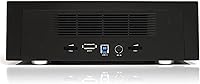
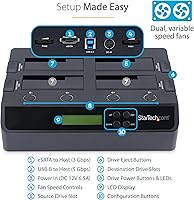
  • Host Connection: Connects to a host system via USB 3.2 Gen 1 at up to 5 Gbps or eSATA at up to 3 Gbps, with both cables included.
  • Display: An onboard LCD panel with push-button navigation provides menu-driven control for selecting duplication and erase modes without a connected PC.
  • Status Indicators: Each bay features dedicated multi-function LEDs that provide real-time visual status during cloning, erasing, and docking operations.
  • Loading Style: Drives are inserted top-down into open bays, with individual eject buttons for clean, damage-free drive removal.
  • Dimensions: The unit measures 11.2 x 6.8 x 3.8 inches, making it compact enough for a workbench but substantial enough to hold four drives securely.
  • Weight: The device weighs 2.39 pounds without drives installed.
  • OS Compatibility: Fully OS-independent for standalone duplication and erase operations; no drivers or software installation required on any platform.
  • Included Accessories: Package includes a USB-A cable, eSATA cable, 40-pin IDE adapter, 44-pin IDE adapter, and a universal power adapter.
  • Warranty: Backed by a 2-year manufacturer warranty and free lifetime 24/5 multilingual technical support from StarTech.com.
  • Power: Powered via the included universal power adapter, making it suitable for use across different regional power standards.
  • Brand: Designed and manufactured by StarTech.com, a brand focused on professional connectivity and IT infrastructure hardware.
  • Market Availability: This product has been commercially available since February 2012 and remains an active, non-discontinued product in StarTech's lineup.

Related Reviews
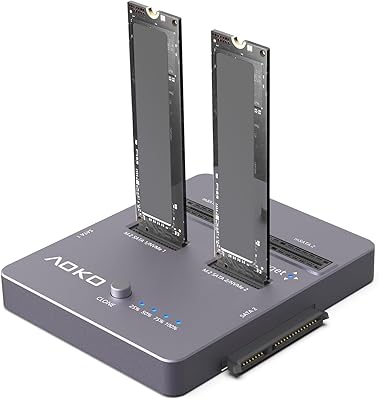
AOKO 4-in-1 M.2 NVMe Hard Drive Duplicator
76%
88%
Ease of Use
83%
Drive Compatibility
86%
Cloning Speed
74%
Offline Cloning Reliability
81%
Build Quality
More
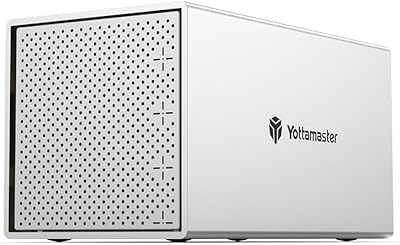
Yottamaster PS400C3 4-Bay External Hard Drive Enclosure
73%
83%
Build Quality
78%
Thermal Management
66%
Transfer Speed
88%
Drive Compatibility
63%
Ease of Setup
More
StarTech SATDUP11IMG Standalone Hard Drive Duplicator
79%
88%
Build Quality
74%
Cloning Speed
91%
Image Library Management
62%
LCD Interface & Usability
86%
Drive Compatibility
More
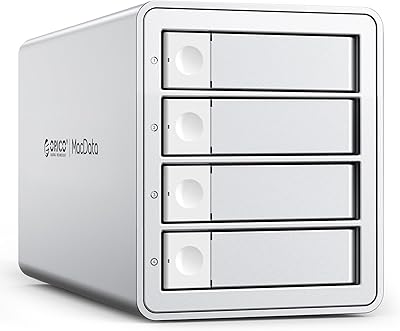
ORICO 9948C3 4-Bay 3.5-inch HDD Enclosure
76%
88%
Build Quality
84%
Transfer Speed
79%
Daisy-Chain Functionality
73%
Cooling & Thermal Management
86%
Hot-Swap Usability
More
Mediasonic HF7-SU31C 4-Bay Hard Drive Enclosure

77%
88%
Ease of Setup
74%
Transfer Speed
82%
Build Quality
71%
Thermal Management
61%
Fan Noise
More
StarTech SDOCK2U33EB Dual-Bay Hard Drive Docking Station
78%
83%
Hot-Swap Reliability
88%
Drive Compatibility
74%
Transfer Performance
76%
Build Quality
93%
Ease of Setup
More
IO CREST SY-ENC50129 8-Bay USB4 40Gbps SATA Enclosure

76%
88%
Build Quality
83%
Drive Compatibility
86%
USB4 Interface & Compatibility
71%
Real-World Transfer Speed
74%
Fan Noise & Thermal Management
More
TerraMaster D4-320
TerraMaster D4-320
80%
93%
Ease of Setup
86%
Transfer Speed
71%
Build Quality
88%
Noise Level
82%
Thermal Management
More
Systor SYS101HS-DP Hard Drive Duplicator
79%
88%
Ease of Use
74%
Copy Speed Performance
83%
Build Quality
71%
Drive Compatibility
91%
DoD Erase & Sanitization
More
Cenmate 10 Bay Hard Drive Enclosure with Cooling Fan
82%
89%
Performance
94%
Ease of Installation
78%
Cooling Efficiency
85%
Data Transfer Speed
83%
Build Quality
More

FAQ

It genuinely works standalone. You load the source drive into bay one and the target drives into the remaining bays, navigate the LCD menu to select clone mode, and press start. No PC, no software, no OS — the unit handles everything internally. This is actually one of the strongest reasons IT professionals choose this over software-based solutions.

The target drive needs to be equal to or larger than the source — it does not need to be an identical capacity match. So cloning from a 500 GB drive to a 1 TB drive works fine. Going the other direction, from a 1 TB source to a 500 GB target, is not supported even if the actual data used is smaller.

Yes, for most enterprise and government use cases. The Secure Erase mode meets NIST SP 800-88 Rev 1 Purge standards, which is the recognized benchmark for data sanitization in regulated environments. That said, always verify against your organization's specific compliance policy, since some frameworks layer additional documentation or verification requirements on top of the physical erase process.

No, it does not. Compatibility is limited to 2.5″ and 3.5″ SATA drives and, with the included adapters, older IDE drives. If your environment is predominantly NVMe or M.2, you will need a different solution entirely, as this unit has no support for those interfaces.

You can run a 1:3 duplication in a single operation — one source drive in bay one cloning to three target drives simultaneously. This is the primary efficiency benefit for high-volume workflows, since you are processing four drives in roughly the same time it would take to clone a single pair.

There is a learning curve, but it is not steep for anyone with a technical background. The push-button navigation is logical once you have run through it a couple of times. Most technicians report being comfortable with the workflow after one or two full cloning sessions. The challenge is mainly for infrequent users who pick it up months apart and have to re-orient each time.

Yes. When connected to a host computer via USB or eSATA, it functions as a standard docking station for direct drive access, file transfer, backup, or recovery work. It is not just a dedicated cloner — the docking mode is genuinely useful for day-to-day drive access tasks in an IT environment.

The unit will flag the error through the LCD display and the per-bay LED indicators, allowing you to identify which drive had the issue without ambiguity. The other bays operating on separate drives are not affected. You would need to rerun the job for the failed drive after addressing the hardware issue.

For most batch deployment and decommissioning workflows, it is functional and workable. That said, it is honest to note that some newer competing units have pushed throughput higher, so if raw speed is your top priority and you are cloning very large drives repeatedly, it is worth comparing current alternatives before committing. For mixed-use shops that also value the erase compliance features, the speed trade-off is usually acceptable.

Everything you need for typical use is in the box: a USB-A cable, an eSATA cable, IDE adapters for both 40-pin and 44-pin connections, and a universal power adapter. The only thing you supply are the drives themselves. It is a reasonably complete package for the price, and not having to source accessories separately is a practical advantage when deploying quickly in a professional environment.

Where to Buy