Overview

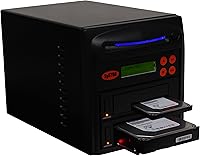
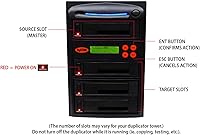
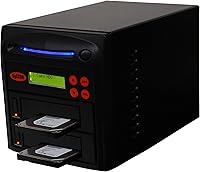
The Systor SYS101HS-DP Hard Drive Duplicator is a purpose-built, professional-grade cloning device from Systor, a brand focused squarely on duplication hardware. It handles both 3.5″ and 2.5″ SATA drives — HDDs and SSDs alike — with no adapters needed, a small but genuinely appreciated detail when you're moving fast. The metal chassis gives it a reassuring solidity, and because it operates entirely standalone, there's no laptop to lug out, no drivers to install, no software license to manage. For IT teams or power users who treat drive cloning as a regular task rather than a rare emergency, that independence matters quite a lot.
Features & Benefits

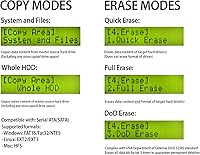
At 90MB/s, this standalone cloner can push through a 1TB drive in roughly 11 minutes — fast enough to make batch imaging genuinely practical. Two copy modes add real flexibility: System & Files mode copies only the active partitions in a format-aware way, ideal for OS migrations, while Whole HDD mode clones every single bit regardless of file system — useful when you need an exact replica. A built-in compare function checks source against target bit-by-bit after duplication, so you can confirm the job actually worked. Add in DoD 5220.22-M sanitization alongside simpler erase options, plus a warranty covering lifetime technical support, and the feature set is hard to argue with.

Best For

This drive duplicator makes the most sense for IT professionals who regularly image or decommission drives — think a sysadmin refreshing a machine fleet or an MSP wiping client hardware before disposal. The DoD-compliant erase capability is a real draw in compliance-sensitive environments where a simple format won't satisfy auditors. Home lab users migrating spinning disks to SSDs will also find it practical, since both 3.5″ and 2.5″ drives work straight out of the box. That said, it's less compelling for someone cloning a drive once or twice a year — occasional users would be better served by a simpler, more affordable option.

User Feedback

With a 3.9-star average across 65 ratings, the Systor duplicator sits in honest middle ground — appreciated but not universally loved. Buyers consistently highlight how easy it is to get started: plug in two drives, press a button, walk away. The solid metal build also earns frequent praise. On the downside, some users report inconsistent speeds on older or slower HDDs, and a handful have run into compatibility hiccups with lesser-known SSD brands. The sharpest criticism tends to target value — at a professional price, some buyers expected more ports or higher throughput. It's a solid tool, but the moderate score reflects that it doesn't fully satisfy every use case.

Pros

  • Fully standalone operation means no PC, no software, and no driver headaches — ever.
  • DoD 5220.22-M compliant erase makes secure drive decommissioning audit-ready out of the box.
  • Supports both 3.5″ and 2.5″ SATA drives natively, with no adapters required.
  • Bit-by-bit verification after cloning gives genuine confidence that the job completed accurately.
  • Two distinct copy modes — file-aware and raw bit-level — cover a wide range of real-world scenarios.
  • Metal chassis feels built for daily professional use, not occasional home tinkering.
  • Broad file system support spans Windows, Linux, and Mac environments without switching tools.
  • Lifetime technical support warranty is a meaningful commitment rarely seen at this product tier.
  • Copy speeds on modern SSDs reliably approach the rated ceiling, making SSD-to-SSD jobs fast.
  • Simple interface means trained staff can operate it consistently with minimal instruction.

Cons

  • Real-world speeds on older or partially worn HDDs fall well below the advertised 90MB/s ceiling.
  • No progress display or job logging means failed unattended runs may go unnoticed for hours.
  • Compatibility issues with lesser-known or budget SSD brands surface often enough to warrant pre-testing.
  • The 1-to-1 design limits throughput for anyone managing high-volume multi-drive duplication batches.
  • DoD erase on high-capacity drives is slow — budget extra time when sanitizing drives in bulk.
  • Selecting the wrong copy mode without understanding the difference can silently produce unusable clones.
  • At nearly 11 pounds, this is not a device you carry to a client site without planning for it.
  • No NVMe or USB drive support limits usefulness as drive technology shifts away from SATA.
  • Passive heat dissipation only — back-to-back batch jobs in warm rooms cause noticeable chassis warmth.
  • The price is difficult to justify for users who clone drives infrequently or unpredictably.

Ratings

The Systor SYS101HS-DP Hard Drive Duplicator earns a nuanced scorecard — our AI has analyzed verified buyer reviews from across the globe, actively filtering out incentivized and bot-generated feedback to surface what real users actually experience. The results reflect a product with genuine strengths in its core workflow, alongside a few friction points that matter depending on how heavily you plan to rely on it. Both sides are represented honestly here.
Ease of Use
88%
Buyers consistently praise how little setup this standalone cloner demands — plug in the drives, select your mode, and the job runs itself. For IT staff imaging machines under time pressure, that simplicity translates directly into fewer errors and faster turnarounds.
A small number of users found the mode-selection interface less intuitive than expected, particularly when trying to distinguish between copy modes without consulting the manual. First-timers occasionally had to restart a job after selecting the wrong option.
Copy Speed Performance
74%
26%
At up to 90MB/s, the Systor duplicator handles a 1TB drive in roughly 11 minutes under ideal conditions — genuinely quick for a hardware-only unit. Users cloning modern SSDs frequently report speeds close to the rated ceiling, making batch jobs feel efficient.
Real-world speeds drop noticeably with older spinning HDDs or drives showing early wear, and several users reported inconsistency across jobs with identical hardware. The gap between advertised and actual throughput frustrated buyers who expected near-ceiling performance on every drive.
Build Quality
83%
The metal enclosure is one of the most consistently praised aspects of this drive duplicator across buyer reviews. It feels solid enough to live on a rack shelf or workbench without concern, and most users noted it shows no flex or rattle even after extended daily use.
At nearly 11 pounds, portability is limited — this is a stay-put unit, not something you carry to a client site easily. A few users also noted the exterior finish scratches more readily than expected for a device at this price tier.
Drive Compatibility
71%
29%
Coverage of both 3.5″ and 2.5″ SATA drives without any adapter is a practical win, and support for all the major file systems — including Linux Ext4 and Mac HFS+ — means mixed-OS environments are handled without fuss. Most mainstream HDD and SSD brands work without issue.
Edge cases with lesser-known or budget SSD brands showed up repeatedly in user feedback, with some drives failing to initialize or clone properly. Users managing diverse hardware inventories should budget time to test compatibility before relying on this cloner for a critical batch job.
DoD Erase & Sanitization
91%
The DoD 5220.22-M compliant erase capability is a standout for compliance-driven buyers — MSPs, IT asset disposers, and regulated businesses use this feature with confidence knowing it satisfies most auditor requirements. Having Quick, Full, and DoD modes in one device removes the need for a separate sanitization tool.
The DoD erase process is noticeably slower than the copy function, and users erasing high-capacity drives in bulk reported longer-than-anticipated job times. Documentation on the exact pass methodology is minimal, which left some compliance officers wanting more formal certification paperwork.
Copy Mode Flexibility
79%
21%
Having two distinct copy modes — System and Files for OS-aware partition cloning, and Whole HDD for a raw bit-level duplicate — gives this standalone cloner genuine versatility. IT professionals particularly valued being able to run smart migrations without cloning wasted empty space.
Buyers frequently confused the two modes in practice, and selecting the wrong one — especially Whole HDD on a drive with a different target capacity — caused failed or incomplete jobs. Clearer labeling or an on-device prompt would reduce this friction significantly.
Value for Money
62%
38%
For IT shops or MSPs using this drive duplicator daily, the cost amortizes quickly, and the lifetime technical support warranty adds long-term peace of mind that cheaper alternatives rarely offer. The feature set at this tier is legitimately professional.
Occasional users and small home labs will feel the price acutely — particularly given that this is a 1-to-1 unit rather than a multi-bay duplicator. Several buyers felt the price implied a higher throughput ceiling or broader multi-drive capability than the hardware actually delivers.
Bit-by-Bit Verification
84%
The built-in compare function runs a full bit-level check between source and target after duplication, giving users an extra layer of confidence without needing external verification tools. IT teams managing critical data migrations cited this as the feature that closed the deal for them.
Running a compare pass after a full clone adds meaningful time to the total job — something buyers doing high-volume batches need to factor in. There is no option to skip verification selectively on a per-job basis, which limits workflow flexibility in time-sensitive situations.
Standalone Operation
87%
Requiring no PC, no software, and no network connection is a real operational advantage in field deployments or lab environments where tying up a workstation is not viable. Users running overnight batch jobs particularly appreciated the set-and-forget reliability.
The standalone design means there is no remote monitoring, no job logging to an external system, and no email or alert notification when a job completes or fails. For unattended large-batch runs, a few buyers discovered failures only after returning to the unit hours later.
Warranty & Support
82%
18%
A warranty structure covering one year of parts, three years of labor, and lifetime technical support stands out clearly in a category where most competitors offer one to two years total. Buyers who contacted Systor support generally reported helpful and technically knowledgeable responses.
Lifetime support is only as valuable as the company behind it, and Systor is a niche brand without the service infrastructure of larger names. A handful of users reported slower-than-expected response times during high-demand periods, and parts availability for older units was occasionally cited as a concern.
File System Support
81%
19%
Covering FAT16, FAT32, exFAT, NTFS, Ext2, Ext3, Ext4, HFS, and HFS+ in System and Files mode makes this cloner genuinely useful in mixed-OS environments — something IT generalists and small MSPs working across Windows, Linux, and Mac systems will appreciate immediately.
Whole HDD mode bypasses file system awareness entirely, which is powerful but means the target drive must match or exceed source capacity precisely. Buyers cloning to drives with nominal size mismatches — even of the same labeled capacity across brands — occasionally ran into errors.
Physical Footprint & Design
67%
33%
The compact-ish form factor fits comfortably on a standard workbench or equipment shelf, and the port layout makes inserting and ejecting drives straightforward without awkward reaching or repositioning. Most users found day-to-day physical interaction with the unit unremarkable — which, for a tool, is a good thing.
The device is heavier than many buyers expected from product photos, and the styling is purely utilitarian — no activity logs, no display beyond basic status indicators, and no visual progress bar. Users accustomed to software-driven cloning tools found the feedback loop sparse and occasionally anxiety-inducing on long jobs.
Noise & Heat Management
72%
28%
Under normal single-job operation, the unit runs quietly enough to sit in an office environment without becoming a distraction. Drive activity noise is the dominant sound, not the device itself, which most users considered acceptable for a professional tool.
Extended batch sessions or back-to-back jobs caused noticeable warmth in the chassis, and a few users noted that ambient temperatures above average room conditions amplified this. No active cooling beyond passive heat dissipation is built in, which concerned users planning extended unattended operation.

Suitable for:

The Systor SYS101HS-DP Hard Drive Duplicator is built for people who clone or wipe drives as a regular part of their workflow, not as a once-a-year emergency. IT departments refreshing workstation fleets will find it particularly well-suited — no workstation needs to be tied up, and jobs can run unattended overnight. MSPs and small businesses handling client hardware decommissioning will appreciate the DoD 5220.22-M erase compliance, which satisfies most auditor and data-destruction requirements without needing separate software. Home lab enthusiasts migrating a library of spinning HDDs to SSDs will also get solid mileage here, since both drive form factors work natively without adapters. If you operate in a mixed-OS environment spanning Windows, Linux, and Mac, the broad file system support means you rarely hit a wall. Anyone who values a set-and-forget hardware approach — where the job runs and finishes without babysitting a computer — will find this standalone cloner fits naturally into a professional workflow.
Not suitable for:

The Systor SYS101HS-DP Hard Drive Duplicator is harder to justify if you only need to clone a drive once or twice a year — at this price point, the cost per use math simply does not work in your favor, and cheaper or software-based alternatives will serve casual users adequately. It is also a poor fit for anyone needing to duplicate more than one drive simultaneously, since this is strictly a 1-to-1 unit; buyers with high-volume multi-bay needs should be looking at the wider Systor lineup or competing multi-target duplicators. Users with a mixed inventory of NVMe or USB drives will find no support here — this standalone cloner is SATA-only, full stop. If real-time job monitoring, progress logging, or remote alerts matter to your operation, the lack of any network connectivity or display feedback will frustrate you. Finally, buyers expecting near-ceiling copy speeds on older or degraded HDDs may be disappointed — real-world throughput on worn spinning drives falls noticeably short of the rated 90MB/s maximum.
Specifications

  • Model Number: The unit is officially designated as the SYS101HS-DP, manufactured by Systor.
  • Copy Speed: Maximum duplication speed is rated at 90MB/s (5.4GB per minute) under optimal conditions with compatible media.
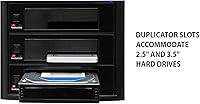
  • Interface: Accepts both 3.5″ and 2.5″ SATA hard drives and solid state drives with no adapter required.
  • Copy Modes: Offers two distinct duplication modes: System and Files (partition-aware, OS-specific) and Whole HDD (raw bit-for-bit clone of entire drive).
  • Erase Modes: Includes three sanitization options: Quick Erase, Full Erase, and DoD 5220.22-M compliant multi-pass erase for certified data destruction.
  • File Systems: System and Files mode supports FAT16, FAT32, exFAT, NTFS, Ext2, Ext3, Ext4, HFS, and HFS+ formatted drives.
  • Verification: Built-in compare function performs a full bit-by-bit accuracy check between source and target drives after duplication completes.
  • Operation Mode: Fully standalone unit requiring no computer, software installation, or network connection to operate.
  • Chassis Material: Outer enclosure is constructed from metal, contributing to both durability and heat dissipation during extended operation.
  • Dimensions: The unit measures 10.5 x 7 x 7.25 inches (L x W x H), sized for workbench or shelf placement.
  • Weight: The device weighs 10.93 pounds, making it a stationary workstation tool rather than a portable field device.
  • Drive Capacity: Compatible with all SATA drive capacity sizes with no stated upper limit on source or target drive size.
  • Duplication Ratio: This is a 1-to-1 duplicator, meaning it copies one source drive to one target drive per session.
  • Warranty: Covered by a 1-year parts warranty, 3-year labor warranty, and lifetime technical support from Systor.
  • OS Compatibility: Recognized by Windows, macOS (Macintosh), and Linux systems when connected to a host, though standalone operation requires no OS.
  • Power: Unit is mains-powered and designed for stationary use; no battery operation is supported.
  • Amazon Rating: Currently holds a 3.9 out of 5 star average based on 65 verified ratings on Amazon.
  • Category Rank: Ranked number 13 in the External Disc Duplicators category on Amazon at the time of evaluation.

Related Reviews

StarTech.com SATDOCK4U3RE 4-Bay Hard Drive Duplicator and Eraser
87%
91%
Cloning Speed
95%
Standalone Functionality
84%
Ease of Use
88%
Secure Erasure (NIST SP 800-88)
89%
Build Quality
More
StarTech SATDUP11IMG Standalone Hard Drive Duplicator
79%
88%
Build Quality
74%
Cloning Speed
91%
Image Library Management
62%
LCD Interface & Usability
86%
Drive Compatibility
More
AOKO 4-in-1 M.2 NVMe Hard Drive Duplicator
76%
88%
Ease of Use
83%
Drive Compatibility
86%
Cloning Speed
74%
Offline Cloning Reliability
81%
Build Quality
More
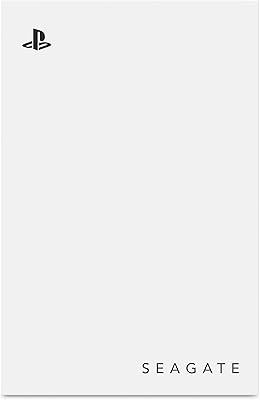
Seagate Game Drive for PlayStation 2TB
79%
94%
Ease of Setup
91%
Storage Capacity
93%
PS4 Compatibility
72%
PS5 Compatibility
74%
Transfer Speed
More
SanDisk Professional G-Drive 6TB
67%
84%
Build Quality
51%
Drive Reliability
76%
Transfer Speed
89%
Mac Compatibility
53%
Value for Money
More
SanDisk Professional 8TB G-Drive External Desktop Hard Drive
83%
92%
Performance
90%
Build Quality & Durability
89%
Data Transfer Speed
85%
Ease of Use & Setup
87%
Capacity & Storage Value
More
SanDisk Professional G-Drive 22TB External Desktop Hard Drive
84%
89%
Performance
91%
Build Quality
96%
Capacity
72%
Ease of Setup
65%
Noise Level
More
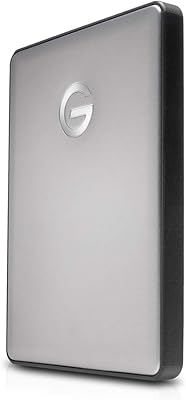
G-Technology 4TB G-DRIVE Mobile USB-C Portable External Hard Drive
88%
88%
Performance
94%
Portability
91%
Build Quality
89%
Compatibility
95%
Setup & Installation
More
G-Technology 2TB G-DRIVE Mobile USB-C Portable External Hard Drive
88%
91%
Portability
88%
Transfer Speed
89%
Build Quality
94%
Ease of Use (Plug-and-Play)
92%
Compatibility (Mac/Windows)
More
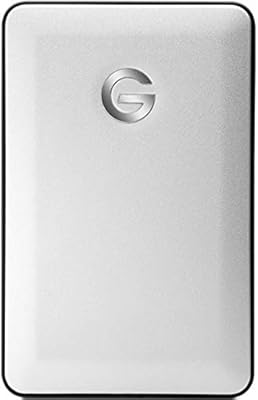
G-Technology G-DRIVE Mobile 1TB USB 3.0 Portable Hard Drive
86%
91%
Portability
87%
Data Transfer Speed
93%
Build Quality
89%
Ease of Use
60%
Windows Compatibility
More

FAQ

No — that is actually one of its core strengths. The Systor SYS101HS-DP Hard Drive Duplicator operates entirely on its own. You insert your source and target drives, select the mode using the onboard controls, and the job runs without any PC, software, or network connection involved.
This is probably the most common point of confusion. System and Files mode is file-system-aware — it copies only the active partitions and their contents, which means it works faster and the target drive does not need to be identical in size. Whole HDD mode ignores the file system entirely and copies every single bit on the drive, including empty sectors, which produces an exact low-level replica but requires the target drive to be at least as large as the source.

Only in System and Files mode, and only if the actual data on the source drive fits within the smaller target capacity. Whole HDD mode requires the target to be equal to or larger than the source, and it will not shrink partitions automatically. If you are downsizing, System and Files is the mode to use.

Under ideal conditions with modern SSDs, you are looking at roughly 11 to 12 minutes for a 1TB drive at the rated 90MB/s ceiling. Older mechanical hard drives will take considerably longer — sometimes two to three times as long — because the drive itself becomes the bottleneck, not the duplicator.

The erase function is compliant with the DoD 5220.22-M data sanitization standard, which is a recognized US Department of Defense specification for data destruction. Whether that satisfies your specific auditor or compliance requirement depends on the regulatory framework you are working under — some frameworks accept hardware-based DoD erase, while others require additional documentation or physical destruction.

No. This standalone cloner supports SATA interface drives only, covering both 3.5″ and 2.5″ form factors. NVMe drives — whether in M.2 or PCIe form — use a completely different interface and are not compatible with this unit.

The duplicator will attempt to read past bad sectors and continue the job rather than stopping outright. However, data residing in bad sectors cannot be recovered or copied, so the clone may be incomplete in those areas. Running the built-in compare function afterward is especially important when the source drive has known or suspected damage.

In Whole HDD mode, yes — the cloner copies bit-for-bit regardless of format, so the target will be an exact replica of the source including its partition scheme and file system. In System and Files mode, the cloner reads the file system natively, and it supports both HFS/HFS+ for Mac and NTFS for Windows, so cross-platform cloning is possible in that mode as well.

Not necessarily. In System and Files mode, the target just needs enough capacity to hold the actual data being copied. In Whole HDD mode, the target must be at least as large as the source drive by raw sector count — and because drive capacities vary slightly between brands even at the same labeled size, it is safer to use a target drive that is definitively larger rather than nominally equal.

After duplication finishes, the compare function reads both the source and target drives and checks that every single bit matches. It is essentially a verification pass that confirms the clone is accurate. It does add time to the overall job, but for any situation where data integrity matters — OS migrations, compliance imaging, forensic work — running it is strongly advisable. For routine bulk jobs where speed is the priority, some users skip it, though that is a tradeoff worth understanding before you decide.

Where to Buy