Overview

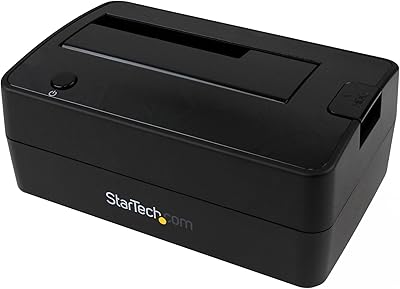
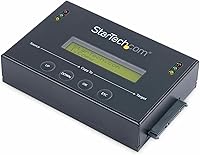
The StarTech SATDUP11IMG Standalone Hard Drive Duplicator is built squarely for IT professionals who need to clone and deploy drives repeatedly without tethering to a laptop or desktop. It handles both 2.5″ and 3.5″ SATA HDDs and SSDs, which covers the vast majority of drives you will encounter in the field. The steel enclosure feels appropriately rugged — this is not a unit you would worry about tossing in a tech bag between jobs. TAA compliance matters too, particularly for government contracts or enterprise procurement teams where sourcing rules are strict. It is a premium purchase, but it is priced and built to reflect that positioning.
Features & Benefits

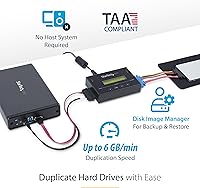
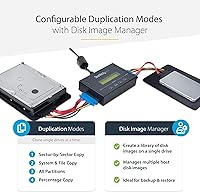
What makes this standalone duplicator genuinely useful in practice is its disk image library — a feature most budget cloners skip entirely. Instead of duplicating one drive to another in a single pass, you can store multiple OS images on one host drive and restore any of them on demand. That is a real time-saver when imaging a batch of machines for a new deployment. The four duplication modes add flexibility: clone just the system partition, copy everything sector by sector, or anything in between. Copy speed reaches 6 GB/min over SATA III, and upgradeable firmware means the unit should stay relevant as drive formats continue to evolve.

Best For

This drive imaging unit is an easy recommendation for IT administrators who regularly image machines — whether that is onboarding new staff, refreshing a computer lab, or recovering from a failed system drive. It also suits small IT shops that need a repeatable, portable workflow without dedicating a PC to the task. Technicians working on-site at client locations will appreciate not needing a laptop just to run a clone. If your organization faces federal procurement requirements, TAA compliance is not optional — and this unit handles that cleanly. PC-free HDD-to-SSD migration rounds out the list of practical, everyday wins.

User Feedback

With a 4.4-star rating across roughly 60 reviews, the StarTech cloner earns solid marks from buyers who have put it through real workloads. Speed and reliability surface most often as strengths — people appreciate that it simply works without software headaches. The LCD menu navigation, however, draws some fair criticism; a handful of users found the interface unintuitive when first configuring the image library. A few buyers also note that the copy speed, while respectable, trails some competing units at this price tier. On the positive side, long-term durability and firmware support get consistent mentions, suggesting most owners treat this as a keeper rather than a temporary fix.

Pros

  • Standalone operation means no laptop or software is needed — just drives, power, and the LCD menu.
  • The disk image library is a genuine differentiator, letting you store and restore multiple OS images from one host drive.
  • Steel enclosure holds up well in real field and lab conditions without flex or rattling.
  • Upgradeable firmware has helped long-term owners maintain compatibility with newer, higher-capacity drives.
  • Four duplication modes give you precise control over what gets copied, from system files only to a full sector-by-sector clone.
  • TAA compliance opens the door for government and enterprise procurement that rules out non-compliant alternatives.
  • A two-year warranty backed by 24/5 multilingual support is a meaningful safety net for a professional tool.
  • Compact enough at just over 12 ounces to slip into a tech bag for on-site client work.
  • Included SATA cables in two lengths reduce the need for immediate accessory purchases.
  • Long-term users consistently report reliable, repeatable performance once the initial setup learning curve is cleared.

Cons

  • The LCD menu interface is genuinely unintuitive for first-time users, with sparse documentation to bridge the gap.
  • Copy speed of 6 GB per minute trails competing units that deliver significantly faster throughput at similar price points.
  • NVMe drives are not supported natively, which is a growing blind spot as SSD standards shift.
  • Optional adapters for eSATA, mSATA, and M.2 SATA are sold separately, adding hidden cost for full compatibility.
  • No progress notifications or remote monitoring — you have to physically check the unit during unattended cloning runs.
  • The image library setup process can be confusing the first time, with no visual menu map or guided walkthrough.
  • No carrying case or protective pouch is included despite the premium positioning and field-use appeal.
  • Support quality has reportedly varied by region and language, which matters for global IT teams.
  • The unit can run warm during extended cloning sessions, raising questions about sustained duty cycles.
  • Buyers paying a premium for TAA compliance get no practical benefit from it unless procurement rules actually require it.

Ratings

The StarTech SATDUP11IMG Standalone Hard Drive Duplicator scores below are generated by our AI engine after analyzing verified global buyer reviews, actively filtering out incentivized, bot-driven, and low-credibility submissions to surface what real users actually experience. Drawing on a 4.4-star aggregate from nearly 60 reviews, these ratings reflect both the genuine strengths that keep IT professionals coming back and the friction points that occasionally give buyers pause. Nothing is glossed over — this standalone duplicator earns its praise in several areas, but the scores also capture where expectations and reality part ways.
Build Quality
88%
The steel enclosure gives this drive imaging unit a solidity that budget plastic cloners simply cannot match. IT technicians who carry it between sites report that it holds up well over time without rattling, flexing, or showing premature wear — exactly what you want from a tool that gets regular handling.
A handful of buyers felt the unit runs warmer than expected during extended cloning sessions, raising minor concerns about thermal management over very long duty cycles. The compact footprint, while portable, means heat has fewer places to go compared to larger chassis designs.
Cloning Speed
74%
26%
At 6 GB per minute over SATA III, this standalone duplicator handles typical drive sizes at a pace that keeps deployment workflows moving. For a 256 GB SSD, most users report finishing a full sector-by-sector clone in well under an hour, which is workable in a real IT environment.
Competing units at a similar or lower price point advertise significantly faster throughput — sometimes double — and buyers who researched alternatives before purchasing do notice the gap. For high-volume imaging sessions with large-capacity drives, the speed ceiling becomes a genuine bottleneck.
Image Library Management
91%
The ability to store multiple OS images on a single host drive and restore any one of them on demand is the feature that consistently earns the most enthusiasm from IT admins. Users deploying standardized workstation images across batches of machines call this the single biggest time-saver compared to traditional one-to-one cloners.
The library management workflow requires some upfront time to configure correctly, and the documentation does not always walk new users through edge cases like managing storage space when the host drive fills up. A few buyers wished for clearer on-screen prompts during the image organization process.
LCD Interface & Usability
62%
38%
Once the initial learning curve is cleared, most users find the push-button LCD menu system reliable and consistent for day-to-day operation. Experienced IT staff who use the unit regularly report that navigating between modes becomes second nature after a few sessions.
For first-time users, the menu structure feels non-intuitive — particularly when toggling between duplication modes and library management functions. Several reviewers specifically called out the lack of a quick-start guide that maps the menu tree visually, making the first setup experience more frustrating than it needs to be.
Drive Compatibility
86%
Support for both 2.5″ and 3.5″ SATA HDDs and SSDs of any capacity covers the overwhelming majority of drives encountered in real IT environments. The optional adapter support for eSATA, mSATA, and M.2 SATA extends this further, giving technicians flexibility beyond the standard bays.
Compatibility is SATA-only out of the box, which means NVMe drives are not supported natively — a limitation that is becoming more relevant as NVMe SSDs push further into mainstream deployments. Users working in environments with a mix of SATA and NVMe drives will need a separate solution for the latter.
Standalone Operation
93%
Not needing a host computer is the core pitch of this drive imaging unit, and it delivers reliably on that promise. Technicians working in server rooms, client sites, or anywhere without a dedicated imaging workstation consistently highlight this as the feature that makes the unit worth carrying.
The standalone nature does mean there is no software dashboard or remote monitoring option — everything happens through the physical LCD, which limits visibility when running unattended overnight clones. Users who want progress notifications or logging have no way to get them without physically checking the unit.
Duplication Mode Flexibility
83%
Having four distinct duplication modes — from a quick system-and-file copy to a full sector-by-sector clone — gives this standalone duplicator real versatility across different job types. IT admins appreciate being able to choose a faster partial clone for routine deployments while reserving the slower full-disk mode for forensic or archival needs.
The distinctions between modes are not always clearly communicated on the device itself, and newer users occasionally select the wrong mode for the job at hand. A brief in-menu description of what each mode actually copies would reduce trial-and-error during initial use.
Value for Money
67%
33%
For organizations that use this cloner regularly — imaging dozens of drives per month or managing a recurring deployment schedule — the image library feature and build quality provide tangible return on investment that cheaper units cannot replicate. The TAA compliance alone unlocks purchasing access for some institutional buyers who have no budget alternative.
Casual users or small shops that only need occasional one-to-one cloning will likely find the price hard to justify when simpler units accomplish the same basic task for a fraction of the cost. The premium is real, and it only pays off if you are actually using the advanced features.
TAA Compliance
89%
For government agencies, defense contractors, and procurement-conscious enterprises, TAA compliance is not optional — it is a hard requirement. This standalone duplicator checks that box cleanly, making it one of a relatively short list of cloners that procurement departments can actually approve without a waiver.
For private-sector buyers with no compliance requirements, TAA compliance adds cost with no practical benefit to their workflow. It is a meaningful differentiator in the right context, but entirely irrelevant — and potentially frustrating to pay for — if your organization does not operate under those constraints.
Firmware & Longevity
81%
19%
Upgradeable firmware is a genuine long-term advantage for a tool that many buyers expect to use for five or more years. Several long-term owners specifically noted that firmware updates resolved early compatibility issues and extended the range of drive capacities the unit could handle reliably.
The firmware update process itself is not particularly streamlined, and documentation around what each update changes is minimal. Users who are less technically confident sometimes report uncertainty about whether updating is necessary or whether a bad flash could brick the unit.
Warranty & Support
84%
A two-year warranty combined with free 24/5 multilingual technical support is a meaningful differentiator at this price tier. Buyers who have actually contacted support report knowledgeable staff and faster resolution times than typically expected from hardware vendors.
The 24/5 availability leaves a narrow window uncovered, and for operations running around-the-clock, weekend-night issues may not get an immediate response. A small number of reviewers also noted that support quality varied depending on which language and region they contacted.
Portability
78%
22%
At just over 12 ounces and roughly the size of a thick paperback, the StarTech cloner slips into a laptop bag without adding meaningful bulk. Field technicians who carry it to client sites regularly appreciate that it does not demand dedicated carrying equipment.
The unit has no carrying case or protective pouch included, which feels like an oversight at this price point. The steel enclosure protects the internals, but the external ports and LCD can pick up scratches during transport if not wrapped in something.
Setup & Initial Configuration
59%
41%
Once configured, the workflow is consistent and repeatable — which is exactly what IT pros need when running the same imaging procedure dozens of times. Users who invested time upfront to learn the menu system report smooth sailing in subsequent sessions.
The out-of-box experience is rougher than it should be for a premium product. Documentation is sparse, the quick-start card covers only the most basic cloning scenario, and setting up the image library for the first time requires either prior experience or some patience with trial and error.
Included Accessories
72%
28%
Including both a short 4″ and a longer 20″ SATA cable gives users flexibility for different physical setups without an immediate accessories purchase. The rubber HDD pads are a small but practical touch that prevents drives from sliding during operation.
The optional adapters for eSATA, mSATA, and M.2 SATA connectivity are sold separately, which means the real-world cost of a fully flexible setup is higher than the base price suggests. Buyers expecting broad out-of-box compatibility across interface types may feel the accessory situation is underserved.

Suitable for:

The StarTech SATDUP11IMG Standalone Hard Drive Duplicator is purpose-built for IT administrators and technicians who clone or deploy drives as a regular part of their workflow, not as a once-a-year task. If you manage a computer lab, onboard new employees with standardized machine images, or support a small business with a recurring backup and restore routine, this standalone duplicator earns its place in your toolkit quickly. The image library feature is particularly valuable for anyone who maintains multiple OS configurations — think a school IT department managing student versus staff machine profiles, or a managed service provider keeping restore points for several client environments. Technicians who work on-site at client locations will also appreciate being able to run a full clone or restore without hauling a laptop into the mix. Organizations operating under federal procurement rules will find TAA compliance a hard requirement that narrows the field considerably, making this drive imaging unit one of the few viable options that checks both the compliance and capability boxes simultaneously.
Not suitable for:

The StarTech SATDUP11IMG Standalone Hard Drive Duplicator is a poor fit for anyone who only needs to clone a drive occasionally — say, once or twice a year during a personal PC upgrade. At its price tier, the value proposition depends heavily on frequent, repeated use of its advanced features; casual users will find equally capable one-to-one cloners available for a fraction of the cost. NVMe users should also think carefully before buying: this standalone duplicator is strictly SATA-based, and as NVMe SSDs become increasingly standard in modern laptops and desktops, the unit's core compatibility will feel more limiting over time. The LCD-driven interface, while functional, has a real learning curve that can frustrate less technically confident users who expect plug-and-play simplicity. If cloning speed is your primary concern and you are regularly working with large-capacity drives, competing units at comparable or lower price points offer significantly faster throughput, making this drive imaging unit a tougher sell on that metric alone.
Specifications

  • Form Factor: Fully standalone operation — no host computer or software installation required at any point during cloning or image management.
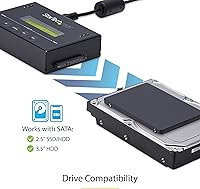
  • Drive Compatibility: Supports 2.5″ and 3.5″ SATA HDDs and SSDs of any capacity via the built-in SATA III interface.
  • Interface: SATA III running at 6 Gbps provides the physical connection between the duplicator and installed drives.
  • Duplication Speed: Maximum copy throughput is 6 GB per minute under optimal conditions with compatible SATA III drives.
  • Duplication Modes: Four selectable modes are available: System and File, All Partitions, Percentage Copy, and Sector-by-Sector (full disk).
  • Image Library: An integrated disk image library manager allows multiple drive images to be stored on and restored from a single host drive.
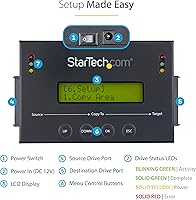
  • Display: A built-in LCD panel with push-button navigation handles all configuration, mode selection, and drive management without a connected screen or keyboard.
  • Enclosure Material: The outer housing is constructed from steel, providing structural rigidity suited for repeated professional use in lab and field environments.
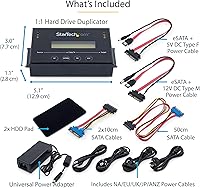
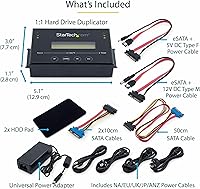
  • Dimensions: The unit measures 5.1″ in length, 3″ in width, and 1.1″ in height, making it compact enough for a standard tech carry bag.
  • Weight: The duplicator weighs 12.3 ounces, balancing portability with the solid feel expected from a steel-enclosure device.
  • Adapter Support: With optional adapters sold separately, the unit can also work with eSATA, mSATA, IDE, and M.2 SATA drives.
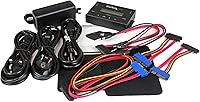
  • Included Cables: The package includes one 4″ SATA cable for close-proximity setups and one 20″ SATA cable for more flexible drive positioning.
  • Included Accessories: Rubber HDD pads are included to keep drives stable and prevent sliding on flat surfaces during operation.
  • Firmware: The firmware is field-upgradeable, allowing StarTech to push compatibility improvements and bug fixes after the initial purchase.
  • Warranty: StarTech covers this unit with a 2-year limited warranty against manufacturing defects and hardware failure.
  • Technical Support: Free multilingual technical support is available 24 hours a day, 5 days a week for the lifetime of the product.
  • TAA Compliance: The unit is Trade Agreements Act compliant, qualifying it for U.S. government and federally funded institutional procurement programs.
  • Bay Count: The duplicator features 2 drive bays, accommodating one source and one target drive simultaneously for 1:1 cloning operations.
  • Amazon Rating: The product holds a 4.4 out of 5 star rating based on approximately 59 verified buyer reviews on Amazon.
  • Model Number: The official StarTech model identifier for this unit is SATDUP11IMG, used for warranty registration, firmware downloads, and support requests.

Related Reviews

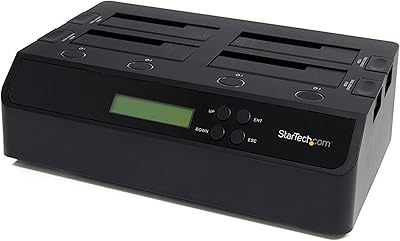
StarTech.com SATDOCK4U3RE 4-Bay Hard Drive Duplicator and Eraser
87%
91%
Cloning Speed
95%
Standalone Functionality
84%
Ease of Use
88%
Secure Erasure (NIST SP 800-88)
89%
Build Quality
More
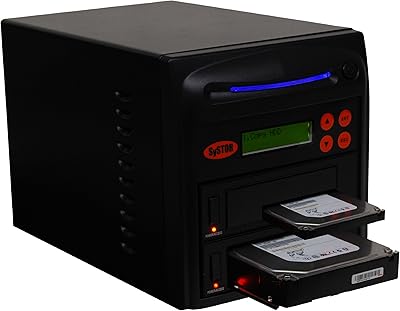
Systor SYS101HS-DP Hard Drive Duplicator
79%
88%
Ease of Use
74%
Copy Speed Performance
83%
Build Quality
71%
Drive Compatibility
91%
DoD Erase & Sanitization
More
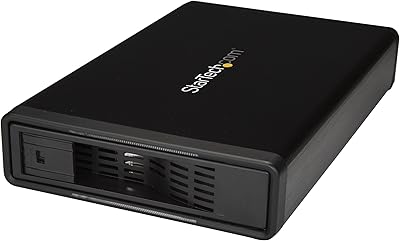
StarTech S351BMU33ET 3.5″ Hard Drive Enclosure
80%
86%
Build Quality
91%
Ease of Drive Swapping
83%
USB 3.0 Transfer Performance
74%
eSATA Connectivity
88%
Drive Compatibility
More
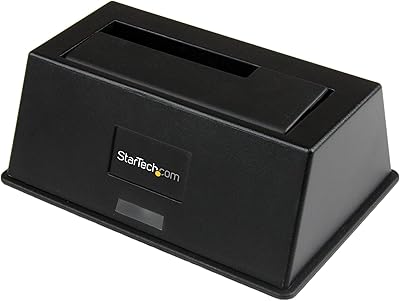
StarTech SDOCKU313 USB 3.1 Hard Drive Dock
80%
88%
Transfer Speed
83%
Drive Compatibility
79%
Build Quality
94%
Ease of Setup
62%
Value for Money
More
StarTech SDOCKU33BV USB 3.0 Hard Drive Dock
78%
93%
Ease of Setup
84%
Drive Compatibility
78%
Transfer Speed
58%
Build Quality
81%
Hot-Swap Reliability
More
StarTech SDOCK2U33EB Dual-Bay Hard Drive Docking Station
78%
83%
Hot-Swap Reliability
88%
Drive Compatibility
74%
Transfer Performance
76%
Build Quality
93%
Ease of Setup
More
AOKO 4-in-1 M.2 NVMe Hard Drive Duplicator
76%
88%
Ease of Use
83%
Drive Compatibility
86%
Cloning Speed
74%
Offline Cloning Reliability
81%
Build Quality
More
SanDisk Professional G-Drive 6TB
67%
84%
Build Quality
51%
Drive Reliability
76%
Transfer Speed
89%
Mac Compatibility
53%
Value for Money
More
Seagate Game Drive for PlayStation 2TB
79%
94%
Ease of Setup
91%
Storage Capacity
93%
PS4 Compatibility
72%
PS5 Compatibility
74%
Transfer Speed
More
SanDisk Professional G-Drive 22TB External Desktop Hard Drive
84%
89%
Performance
91%
Build Quality
96%
Capacity
72%
Ease of Setup
65%
Noise Level
More

FAQ

No, that is the whole point of this unit. The StarTech SATDUP11IMG Standalone Hard Drive Duplicator operates entirely on its own — you plug in your drives, navigate the LCD menu with the push buttons, select your mode, and start the job. No laptop, no drivers, no software required at any step.
Generally speaking, the target drive needs to have enough capacity to hold the data being copied. For a full sector-by-sector clone, the target must be at least as large as the source. If you use the System and File or Percentage Copy modes, you have a bit more flexibility, but you should always verify the target has sufficient space before starting.

Think of it like a backup library stored on one designated host drive. You can save multiple drive images to that host drive, each representing a different machine configuration or OS build. When you need to restore or deploy, you select the image you want from the LCD menu and push it out to the target drive. It is particularly useful if you manage several different machine types and need to keep their system images on hand without juggling a pile of individual clone drives.

Only SATA drives are supported natively — both 2.5″ and 3.5″ form factors, HDDs or SSDs, of any capacity. NVMe is not compatible with this standalone duplicator. If your environment is transitioning to NVMe-heavy hardware, keep that limitation in mind before purchasing.

Honestly, there is a real learning curve, and it is worth being upfront about that. The menu is functional once you know the structure, but the documentation included in the box does not do a great job of mapping it out for new users. Most IT-experienced buyers get comfortable with it after a few sessions, but if you are less technically inclined, budget some time for initial experimentation or look up the full manual on StarTech's support site before your first use.

Yes, that is one of the more common use cases for this drive imaging unit. As long as both drives are SATA and the target SSD has sufficient capacity, you can run a clone directly between them without any computer involved. The System and File mode is typically the right choice for a clean OS migration, though Sector-by-Sector works too if you want an exact bit-for-bit copy.

That scenario only works if the actual data on the source drive fits within the target capacity. The Percentage Copy mode can help by copying only a proportional slice of the source, but for a reliable OS or system migration, you really want the target to be at least as large as the used space on the source. Sector-by-Sector mode will simply fail or produce an unusable result if the target is physically smaller.

Firmware updates are delivered by StarTech and applied manually — you typically download the update file, load it onto a drive, and run the update through the unit's menu. You do not need to update constantly, but checking for updates once or twice a year is a good habit, especially if you start encountering compatibility issues with newer drives. StarTech's support page lists available firmware versions for the SATDUP11IMG model.

That depends almost entirely on how often you use it and whether you need the image library feature. For IT professionals imaging drives weekly, the library management capability alone justifies the premium — it replaces a workflow that would otherwise require a dedicated PC and cloning software. For someone who clones drives twice a year, a budget one-to-one cloner will get the job done for a fraction of the cost and the extra features will go unused.

TAA stands for Trade Agreements Act, a U.S. federal regulation that governs where products sold to the government must be manufactured or substantially transformed. If you are purchasing for a government agency, a federally funded institution, or a defense contractor, TAA compliance is often a hard procurement requirement. For private-sector buyers, it has no practical impact on how the unit performs — it simply means you are paying for a compliance certification you may not need.

Where to Buy