Overview

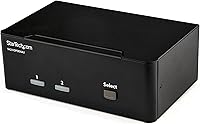
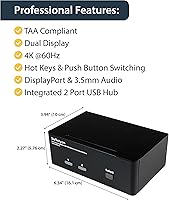
The StarTech SV231DPDDUA2 Dual-Monitor DisplayPort KVM Switch is built for professionals who need to run two computers from a single desk without sacrificing display quality or workflow continuity. Using the DP 1.2 standard, it pushes 4K at 60Hz to each of its two monitor outputs — meaningful for anyone doing color-critical or detail-heavy work. TAA compliance adds real appeal for government agencies and enterprise IT departments bound by procurement rules. Sitting in the mid-to-premium price range, it targets buyers with specific, demanding requirements rather than casual users. That said, expect a setup process that rewards patience; user experiences with this switch vary more than the spec sheet might imply.
Features & Benefits

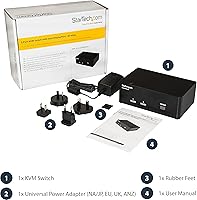
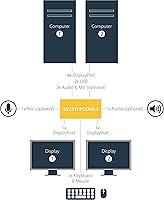
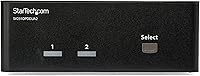
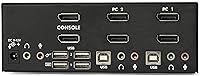
What sets this dual-monitor KVM switch apart is its ability to drive two full-resolution displays per connected computer — real 4K at 60Hz, not a compromised image. Both monitors connect directly via DisplayPort; daisy-chaining is not supported, so plan your cable runs accordingly. The built-in USB hub adds two USB 2.0 and two USB 3.0 ports, letting you share a keyboard, mouse, or external drive without constantly replugging. Audio passes through independently via 3.5mm ports, so your headset stays connected through every switch. You can trigger a computer swap using the front pushbutton or a hotkey sequence, and at under two pounds, this DP KVM switch tucks away without crowding your workspace.

Best For

This dual-monitor KVM switch makes the most sense for users with genuinely demanding setups. Graphic designers and video editors who need accurate, high-resolution output across dual screens on two machines will get the most out of it. Developers and IT admins who toggle daily between a work laptop and a personal desktop will appreciate having a single keyboard, mouse, and pair of monitors serving both. TAA compliance certification also makes this DP KVM switch a realistic option for federal procurement. If you already have DisplayPort monitors and want to avoid a web of adapters, this switch fits neatly into that infrastructure. Budget-minded home users may find better value elsewhere.

User Feedback

With a 3.3 out of 5 rating across over 200 reviews, the reception for this dual-monitor KVM switch is notably split. Users who get it working reliably tend to praise the video clarity and the convenience of switching two full 4K displays in one action. But a meaningful portion of buyers hit walls: GPU and monitor compatibility can be finicky, and some setups simply refuse to cooperate without trial and error. Hotkey switching has drawn complaints about inconsistent behavior — occasional delays or missed inputs that disrupt workflow. Documentation is frequently called thin for a product this complex. This is a niche purchase, so each review carries real weight. Go in informed, and verify your hardware compatibility before buying.

Pros

  • Drives two full 4K 60Hz displays per computer with no visible image degradation when properly configured.
  • The built-in USB hub automatically follows the active computer, so shared peripherals switch without any extra steps.
  • Both pushbutton and hotkey switching methods are available, giving users flexibility based on their desk layout.
  • TAA compliance opens government and enterprise procurement channels that most competing KVM switches cannot access.
  • Compact dimensions mean it fits under a monitor stand or behind a desk without dominating the workspace.
  • Independent 3.5mm audio ports keep headsets and speakers connected and switching alongside video inputs.
  • This DP KVM switch eliminates the need for duplicate monitors, keyboards, and mice across two machines entirely.
  • USB 3.0 ports on the hub support decent peripheral speeds for everyday external drives and accessories.

Cons

  • Compatibility with specific GPU and monitor combinations is genuinely unpredictable, and there is no official compatibility list to consult before purchasing.
  • The included documentation is widely criticized as insufficient for a product that requires precise configuration to work correctly.
  • Hotkey switching is unreliable for a portion of users, with missed inputs and delays reported across different keyboard brands.
  • No USB-C ports on the hub means users with modern peripherals may need an additional adapter or hub regardless.
  • Display switching occasionally causes a brief signal dropout or black screen before both monitors re-establish connection.
  • Setup complexity punishes first-time KVM buyers who are not already familiar with troubleshooting DisplayPort handshake issues.
  • Audio switching produces a short but noticeable dropout for some users, which is disruptive during active calls or playback.
  • Daisy-chaining DisplayPort monitors is not supported, requiring a dedicated DP cable run from the switch to each display.

Ratings

The scores below were generated by AI after analyzing verified buyer reviews for the StarTech SV231DPDDUA2 Dual-Monitor DisplayPort KVM Switch from across multiple global platforms, with spam, bot activity, and incentivized feedback actively filtered out. This dual-monitor KVM occupies a specific and demanding niche, and the ratings reflect that reality — strengths are credited where they're earned, and recurring pain points are called out without softening. If you're weighing whether this switch fits your workflow, these scores aim to give you the clearest possible picture before you commit.
Video Output Quality
83%
When properly configured, the picture quality through both DisplayPort outputs is genuinely impressive. Users running 4K at 60Hz for design work or detailed editing report clean, artifact-free images with no visible compression or color shift between the source and the display.
A subset of users experienced flickering or signal drop-outs, often traced back to specific GPU and monitor pairings rather than universal failures. Getting a stable image sometimes required swapping cables or adjusting display settings manually, which adds friction to initial setup.
Dual-Monitor Switching
78%
22%
The core promise — switching both monitors simultaneously with a single input — works reliably once the device is dialed in. Creative professionals and developers who need to hop between a work machine and a personal rig genuinely benefit from having two full 4K screens flip over at once.
Switching is not always instantaneous. Some users noted a brief black screen or a delay before both displays fully re-established signal, which becomes disruptive in fast-paced workflows. Occasional failures where only one monitor would switch added inconsistency complaints to the record.
Compatibility
54%
46%
For users running mainstream setups — a desktop with a mid-range NVIDIA or AMD card paired with common business monitors — this DP KVM switch works without major issues. TAA compliance also means it passes muster in government and regulated enterprise environments without additional vetting.
Compatibility is the single biggest source of negative reviews. Certain GPU models, particularly those with non-standard DisplayPort implementations, cause persistent issues. Some monitors simply refuse to handshake correctly, and there is no comprehensive compatibility list from StarTech to consult before buying.
Hotkey Switching Reliability
58%
42%
Having the option to switch computers via keyboard shortcut rather than physically pressing a button is a meaningful convenience, especially in cramped or cable-heavy desk setups. Users who got hotkeys working consistently found them fast and dependable during long work sessions.
Hotkey behavior drew some of the sharpest criticism in user reviews. Missed inputs, delayed responses, and occasional complete non-function were reported across different keyboard brands. Some buyers ended up relying solely on the physical pushbutton after giving up on hotkeys entirely.
USB Hub Performance
74%
26%
The four-port USB hub — combining two USB 2.0 and two USB 3.0 ports — handles everyday peripherals without complaint. A keyboard, mouse, and occasional external drive transfer all coexist comfortably, and the hub switches alongside the KVM so peripherals follow the active computer automatically.
Users who pushed the hub harder — running high-bandwidth devices or multiple USB 3.0 accessories simultaneously — occasionally reported speed inconsistencies. The hub is a convenience addition rather than a dedicated USB solution, and it performs accordingly under heavier loads.
Audio Passthrough
71%
29%
The independent 3.5mm audio ports mean a headset or desktop speakers can stay plugged in and switch with the active computer. For users who do video calls or media review on both machines, this removes the hassle of replugging audio gear every time they change inputs.
Audio switching is not completely transparent. A brief audio dropout during the switch was noted by a portion of users, and the audio circuitry is basic — audiophiles or users with studio-grade headphones may notice a slight quality ceiling compared to a dedicated audio interface.
Setup & Installation
49%
51%
The physical installation is straightforward — connect two DisplayPort cables per computer, run USB upstream cables, and plug in peripherals. Users with prior KVM experience can get the hardware connected in under thirty minutes with no special tools required.
Software and configuration is where setup breaks down. The included documentation is widely criticized as thin and unclear, particularly around hotkey configuration and troubleshooting display handshake issues. First-time KVM buyers described real frustration getting everything stable without community forums or third-party guides.
Build Quality
76%
24%
The chassis feels appropriately solid for a business-oriented device. At just over 1.6 pounds and a compact footprint, it does not feel cheap or hollow, and the port connections hold cables firmly without wiggle that could cause intermittent signal issues.
The aesthetic is purely utilitarian — matte black plastic with no premium touches. A few users reported that the pushbutton switch felt slightly mushy over time, and the lack of any status LED feedback beyond basic indicator lights leaves users guessing during troubleshooting.
Value for Money
61%
39%
For buyers who need exactly this combination — dual DisplayPort, dual monitors, USB hub, audio, TAA compliance — there are very few direct alternatives at any price. If this switch works in your specific setup, the per-feature cost is reasonable given the specialized hardware involved.
At this price point, the mixed reliability record is harder to forgive. Buyers who encounter compatibility issues feel the pain of a significant outlay on a product that did not deliver, and the lack of robust documentation or responsive support compounds that frustration.
Peripheral Sharing
79%
21%
Sharing a keyboard and mouse across two computers without any additional software is the fundamental KVM value, and this switch delivers on it cleanly. Users appreciated that peripheral switching was generally smoother and faster than display switching, with minimal lag or missed inputs.
The USB hub ports are USB 2.0 and USB 3.0 only — there is no USB-C connectivity, which increasingly matters as modern peripherals and laptops lean toward that standard. Users with newer accessories may find themselves reaching for an extra hub or adapter regardless.
Hotkey Customization
52%
48%
The ability to define custom hotkey sequences gives technically inclined users some flexibility to fit the switch into existing keyboard shortcuts without conflicts. Power users who took time to configure this properly found it a useful feature in daily switching routines.
The configuration process is poorly documented, and the default hotkey sequence is not intuitive. Several buyers reported accidentally triggering switches mid-task before learning the sequence, and resetting or reprogramming hotkeys required hunting through online resources rather than the manual.
TAA Compliance
88%
TAA compliance is a concrete, verifiable advantage for procurement officers in U.S. federal agencies, defense contractors, and regulated industries. This DP KVM switch can be purchased through GSA-approved channels, which opens doors that non-compliant alternatives simply cannot enter.
TAA compliance adds essentially nothing for the private-sector or home-office buyer, and it does not indicate any additional quality assurance beyond regulatory sourcing standards. Buyers outside government or enterprise contexts are paying for a certification that offers them no practical benefit.
Documentation & Support
41%
59%
StarTech does maintain an online knowledge base and some product-specific resources that go beyond what ships in the box. Users who reached out to support directly reported reasonable response times and technically knowledgeable staff when issues were escalated properly.
The in-box documentation is genuinely insufficient for a product this complex. Troubleshooting display handshake failures, reconfiguring hotkeys, or resolving USB enumeration issues all but require third-party resources. This is the most consistently flagged complaint across negative reviews and pulls the overall experience down noticeably.
Physical Footprint & Placement
82%
18%
The compact dimensions make it easy to mount on the back of a desk, tuck under a monitor stand, or velcro to a cable management tray. It stays out of the way once installed, which matters in professional environments where desk real estate is already contested.
Cable management around the unit can get messy quickly given the number of DisplayPort and USB connections required. The lack of a built-in mounting bracket or included cable management accessories means users have to improvise, and the cable bulk can undermine an otherwise tidy desk setup.

Suitable for:

The StarTech SV231DPDDUA2 Dual-Monitor DisplayPort KVM Switch is built for a specific kind of power user — one who runs two computers and refuses to compromise on display quality or desk efficiency. Graphic designers and video editors are the clearest fit: if your work demands accurate color and sharp detail across two 4K monitors, and you're constantly switching between a workstation and a laptop, this switch solves a real daily problem. Developers and IT professionals who maintain a personal machine alongside a work system will also find the dual-monitor switching genuinely useful, especially paired with shared keyboard, mouse, and audio. Enterprise and government buyers benefit from TAA compliance, which clears procurement hurdles that disqualify many competing KVM switches. If your desk already runs DisplayPort monitors — note that both displays need direct DP connections; daisy-chaining is not supported — this switch slots in without forcing an adapter compromise. For anyone who has priced out alternatives in this specific niche, the feature combination here is difficult to replicate at a lower cost.
Not suitable for:

Buyers expecting a plug-and-play experience should approach this dual-monitor KVM switch with realistic expectations, because the setup process can be genuinely challenging without prior KVM experience. If your GPU or monitors fall outside the tested compatibility range — and StarTech does not publish a thorough compatibility list — you may spend hours troubleshooting signal handshake failures with limited official guidance to lean on. Home users who only need to share a keyboard and mouse between two computers, without requiring synchronized dual-monitor switching, will find this DP KVM switch overbuilt and overpriced for their actual needs. Anyone relying heavily on hotkey switching for a fast-paced workflow should be aware that hotkey reliability has been a recurring complaint, not an occasional edge case. Users with USB-C peripherals will also hit a wall, as there are no USB-C ports on the hub — an increasingly relevant gap as modern accessories shift toward that connector. And if budget is a primary concern, the mid-to-premium price is harder to justify when compatibility with your specific hardware cannot be confirmed in advance.

Specifications

  • KVM Ports: The switch supports two computers, each connected via dedicated DisplayPort and USB upstream cables.
  • Displays Supported: Each connected computer can drive two monitors simultaneously, for a total of four display outputs on the switch.
  • Video Interface: All video connections use DisplayPort 1.2, supporting resolutions up to 4K (3840x2160) at 60Hz per display.
  • Max Resolution: Each of the four DisplayPort outputs delivers a maximum resolution of 3840x2160 at 60Hz under full load.
  • PC Interface: Upstream USB connectivity uses USB 3.2 Gen 1, providing data transfer speeds up to 5Gbps per connected computer.
  • USB Hub Ports: The integrated hub provides two USB 2.0 ports and two USB 3.0 ports for sharing peripherals across both computers.
  • Audio: Two independent 3.5mm combination ports support both microphone input and headphone output, switching alongside the active computer.
  • Switching Methods: Users can switch between computers using a front-mounted pushbutton or via configurable keyboard hotkey sequences.
  • TAA Compliance: The unit is Trade Agreements Act compliant, making it eligible for U.S. federal government procurement through GSA channels.
  • Dimensions: The chassis measures 3.9 x 6.3 x 2.3 inches (L x W x H), offering a compact footprint suitable for desk or surface mounting.
  • Weight: The unit weighs 1.62 pounds, light enough to mount behind a desk or secure beneath a monitor stand.
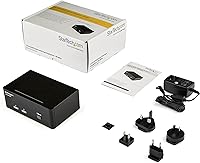
  • Power Input: The switch operates at 12V DC with a current rating of 1 amp, powered via an included external power adapter.
  • Color & Finish: The enclosure is finished in matte black and constructed from hard plastic with a surface-mount-ready base.
  • Manufacturer: Designed and sold by StarTech.com, a Canadian manufacturer specializing in professional connectivity and IT infrastructure hardware.
  • Model Number: The official model designation is SV231DPDDUA2, used for warranty registration, support requests, and procurement documentation.
  • Availability: The product was first made available in March 2017 and remains an active, non-discontinued SKU in StarTech's lineup.

Related Reviews

TRENDnet TK-440DP 4-Port Dual Monitor DisplayPort KVM Switch
85%
92%
Video Quality
85%
Ease of Use
90%
Compatibility
88%
Build Quality
87%
USB Hub Functionality
More
TRENDnet TK-240DP Dual Monitor DisplayPort KVM Switch
79%
88%
4K Signal Stability
84%
Dual Monitor Switching
71%
Value for Money
63%
Audio Switching Reliability
79%
USB Hub Functionality
More
MLEEDA 8K Dual Monitor KVM Switch
86%
92%
Visual Performance
88%
Ease of Setup
85%
Build Quality
90%
USB Connectivity
75%
Switching Reliability
More
DXchip 8K Dual Monitor KVM Switch
85%
88%
Performance
91%
Ease of Use
94%
Visual Quality (Resolution & Clarity)
87%
USB Transfer Speed
83%
Build Quality
More
AV Access iDock C10 KVM Docking Station
77%
93%
Build Quality
88%
Video Performance
81%
KVM Switching
89%
EDID Emulation
84%
Ethernet Reliability
More
MLEEDA Displayport KVM Switch 2 Computers 1 Monitor
84%
88%
Performance
92%
Ease of Setup
90%
Resolution Support
85%
USB Port Functionality
82%
Build Quality
More
AV Access 4KSW21-DM Dual Monitor KVM Switch
77%
83%
Switching Speed & Reliability
86%
EDID Emulation Performance
88%
Video Quality at 4K
74%
Dual Operating Modes (KVM vs USB Mode)
71%
USB 3.0 Hub Performance
More
Minisopuru MK808M-US Dual Monitor KVM Switch Docking Station
84%
94%
Dual Monitor Performance
91%
USB Peripheral Compatibility
88%
Switching Convenience
90%
Build Quality
82%
Setup & Installation
More
KCEVE 2-Monitor 4-Computer KVM Switch
81%
91%
Ease of Setup
83%
Switching Reliability
86%
Dual-Monitor Configuration
82%
USB 3.0 Performance
88%
Wired Remote Control
More
TJCXELE 4K@144Hz Dual-Monitor DisplayPort KVM Switch
75%
88%
Video Output Quality
63%
Setup & Installation
82%
Switching Reliability
84%
Desktop Controller Usability
67%
USB Device Recognition
More

FAQ

No, daisy-chaining is not supported. Each monitor must have its own dedicated DisplayPort cable running directly to the switch. If you only have one DP cable per monitor and were planning to chain them, you will need additional cables before this setup will work.

Yes, the 3.5mm audio ports switch alongside the video and USB inputs when you change the active computer. There is a brief audio dropout during the transition, but your headset or speakers do not need to be replugged.

It should work with most mainstream NVIDIA cards, but compatibility is not guaranteed across the board. Some GPU and monitor combinations have caused persistent handshake issues for a portion of buyers. If possible, verify your specific hardware against StarTech's support resources before purchasing, and keep your return window open during initial setup.

The KVM function switches keyboard, mouse, video, and audio all at once between your two computers. The USB hub is an additional feature that gives you extra ports for peripherals like external drives or USB dongles — those hub-connected devices switch along with everything else, but the hub itself does not replace a dedicated USB dock.

The default hotkey sequence involves pressing the Scroll Lock key twice followed by a number key, but the exact sequence can be customized. Some users find the defaults conflict with other software shortcuts, so it is worth reviewing StarTech's online documentation to configure a sequence that fits your workflow.

Yes, you can connect a Mac to one port and a Windows PC to the other without any issues. The switch is OS-agnostic at the hardware level, so the keyboard, mouse, and displays work normally on both platforms. Just make sure both machines have native DisplayPort outputs or reliable active adapters.

No drivers or software are required for basic operation. The switch is hardware-based and works through plug-and-play connectivity. Hotkey customization may require consulting StarTech's configuration guide, but there is no software installation involved.

This is usually a DisplayPort signal handshake issue, where the monitor and GPU take a moment to re-negotiate the connection. It can also be triggered by certain cable quality levels or GPU firmware. Trying a different high-quality DisplayPort cable and ensuring your GPU drivers are up to date resolves this for many users.

The switch is rated for 4K at 60Hz per port, so ultra-high refresh rates beyond 60Hz are not supported. Ultrawide monitors at 3440x1440 resolution fall within the bandwidth limits of DP 1.2 and should work, but verify your specific monitor's DP version requirements before assuming full compatibility.

The USB hub ports are switched — meaning the connected peripherals are only active on whichever computer is currently selected. When you switch computers, the hub-connected devices follow automatically. If you need a device to stay accessible on both computers simultaneously, you would need a separate, non-switched USB hub.

Where to Buy