SQMD Retro Typewriter Wireless Keyboard Mouse Combo
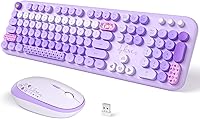
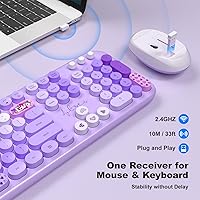
SQMD Retro Typewriter Wireless Keyboard Mouse Combo — image 1
SQMD Retro Typewriter Wireless Keyboard Mouse Combo — image 2
SQMD Retro Typewriter Wireless Keyboard Mouse Combo — image 3

SQMD Retro Typewriter Wireless Keyboard Mouse Combo — image 4
SQMD Retro Typewriter Wireless Keyboard Mouse Combo — image 5
SQMD Retro Typewriter Wireless Keyboard Mouse Combo — image 6

SQMD Retro Typewriter Wireless Keyboard Mouse Combo — image 7
SQMD Retro Typewriter Wireless Keyboard Mouse Combo — image 8
76%
24%

Overview

The SQMD Retro Typewriter Wireless Keyboard Mouse Combo is part of a growing wave of peripherals that trade sterile, all-black designs for something with a bit more character. This one lands squarely in the budget-friendly tier — worth stating upfront, because it shapes everything from build quality to typing feel. What you get is a full-size keyboard paired with a coordinating patterned mouse, both connecting through a single Nano USB receiver. It works on Windows and Mac without any software fuss, making setup genuinely painless. Expect it to handle light to moderate daily use comfortably, but don't bring it into a demanding workstation expecting premium performance.

Features & Benefits

The round vintage keycaps are the first thing you notice — they have a satisfying, slightly raised profile that looks exactly like the product photos suggest. Typing feel is soft, membrane-based, and on the quieter side for a retro-style key, which is worth knowing if you share an office. The single Nano receiver handles both devices simultaneously, and you genuinely just plug it in and go — no drivers, no account setup. The mouse covers three DPI levels suited for browsing and document work, though graphic designers may find the ceiling limiting. Both devices include auto sleep mode and a low-battery warning light, which is a small but practical touch.

Best For

This retro keyboard combo makes the most sense for home office setups, student desks, or anyone who wants their workspace to reflect a bit of personality without a large investment. It suits Mac and Windows users alike — particularly those who move between systems and don't want to juggle multiple receivers. Casual typists, writers, and remote workers handling moderate daily typing will get along with it well. It also makes a thoughtful gift option for teens or college students building their first real desk setup, where visual appeal carries genuine weight alongside function. Heavy daily typists or anyone doing precision-heavy creative work would be better served elsewhere.

User Feedback

Buyers of this vintage-style keyboard and mouse consistently lead with the same observation: it photographs well, but looks even better on an actual desk. The colorful keycap design earns consistent praise, and most users find the typing experience more than adequate for everyday tasks. A recurring note, though: keys can feel slightly stiffer than a standard membrane board during the first few days of use. Wireless reliability generally gets solid marks, with few reported dropouts at typical home office distances. The mouse collects more mixed reactions — users with larger hands find it a bit compact for long sessions. Battery life earns mostly positive mentions, though usage habits seem to affect longevity noticeably.

Pros

  • The round vintage keycap design immediately gives any desk a distinctive, retro-inspired look that stands apart from generic peripherals.
  • A single Nano USB receiver connects both keyboard and mouse simultaneously with zero driver installation needed.
  • Full compatibility with both Windows and Mac makes this wireless typewriter set genuinely flexible for mixed-system households.
  • The 2.4GHz wireless connection holds up reliably across typical home office distances without notable dropouts.
  • Auto sleep mode on both devices conserves battery life passively, requiring no manual effort from the user.
  • A low-battery indicator on both the keyboard and mouse prevents the frustration of unexpected mid-session power failures.
  • The full-size layout keeps the number pad and all standard keys intact, covering everyday productivity without compromise.
  • The matching patterned mouse completes the desk aesthetic cohesively rather than looking like a mismatched afterthought.
  • Broad OS compatibility and plug-and-play setup mean most users are fully operational in under a minute.
  • For its price tier, the overall visual quality and cohesive design punch noticeably above many comparable budget combos.

Cons

  • Membrane construction means the typing feel lacks the crisp, tactile feedback that mechanical keyboard users will miss.
  • The mouse is compact enough that users with larger hands may find extended sessions genuinely uncomfortable.
  • Round keycaps produce slightly more noise than flat membrane boards, which can be distracting in quiet shared spaces.
  • Topping out at 1600 DPI limits the mouse for anyone doing precision-heavy design, editing, or detailed creative work.
  • Neither device is rechargeable — both run on replaceable batteries, adding a small but ongoing maintenance cost.
  • No backlighting means low-light or late-night use becomes noticeably less comfortable without a separate desk lamp.
  • The all-plastic construction feels lightweight, and some users may find it less reassuring to handle than sturdier builds.
  • There is no accompanying software, so key remapping and custom mouse behavior adjustments are simply off the table.
  • Battery life can vary considerably depending on usage patterns and how consistently the auto sleep feature kicks in.

Ratings

The scores below for the SQMD Retro Typewriter Wireless Keyboard Mouse Combo were generated by our AI system after analyzing verified buyer reviews across multiple global markets, with spam, bot submissions, and incentivized feedback actively filtered out. Each category reflects the full spectrum of real user experiences — not just the positives — so both consistent strengths and recurring pain points are represented honestly. Whether this wireless typewriter set fits your desk and workflow comes down to a few meaningful trade-offs, and the ratings below are designed to make those clear.

Design & Aesthetics
91%
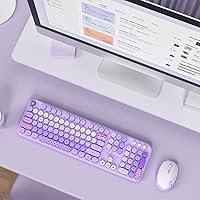
The colorful round keycaps consistently catch buyers off guard in a positive way — users repeatedly note that the combo looks even better on an actual desk than in the listing photos. The coordinating patterned mouse completes the visual without feeling forced, making this one of the more cohesive budget desk setups available at any price.
A portion of users find the vibrant colorway polarizing — in more professional or neutral office environments, the bold aesthetic can feel out of place. Some buyers also report that keycap legends begin showing visible wear after several months of regular use, which gradually diminishes the first impression.
Typing Feel
67%
33%
For casual daily use — emails, documents, and light data entry — most users find the membrane keys comfortable enough and appreciate the slightly cushioned quality of the round keycaps. Buyers upgrading from a well-worn basic keyboard often note the improvement in feel, even within the same membrane category.
Heavier typists and anyone accustomed to mechanical keyboards consistently flag the key resistance as stiffer than expected, particularly during the first week of use. There is no tactile click feedback, so touch typists who rely on physical confirmation may find extended sessions on this board less satisfying than they anticipated.
Wireless Reliability
78%
22%
The vast majority of users report stable, uninterrupted connections throughout normal home office or study sessions. The single-receiver setup eliminates pairing headaches entirely, and the 2.4GHz signal holds comfortably across typical living room and bedroom distances without requiring direct line-of-sight to the USB port.
A smaller but notable segment of buyers reports occasional cursor stuttering or brief input lag, typically when the receiver is far from the user or surrounded by other wireless electronics. These dropouts are infrequent but appear often enough to suggest the connection can be sensitive to interference in crowded wireless environments.
Mouse Performance
58%
42%
For general browsing, video calls, and document navigation, the mouse handles the job without fuss. Most users settle comfortably on the 1200 DPI mid-setting for everyday desktop use on standard monitors, and the three-step adjustment gives at least a basic degree of flexibility for different task types.
The mouse is where this retro keyboard combo draws the most criticism — it is noticeably compact in the hand, and users with medium to large hands frequently report discomfort within an hour of continuous use. The 1600 DPI ceiling also disqualifies it for photo editing, illustration, or any workflow that requires fine cursor precision.
Value for Money
83%
Buyers broadly agree that the visual payoff at this price point is difficult to match — a full coordinated desk set with a genuinely distinctive aesthetic that would cost considerably more from a design-focused peripheral brand. For students and first-time desk builders, the price-to-looks ratio stands as one of its strongest selling points.
Some buyers feel the lightweight plastic construction and membrane typing experience fall slightly below expectations once the novelty fades, especially compared to budget combos with a more substantial build feel. The absence of any rechargeable battery option also creates a quiet ongoing cost that is easy to overlook at the moment of purchase.
Ease of Setup
94%
Users across all technical skill levels praise how fast and painless the initial setup is — plug the Nano receiver into a USB port and both devices are operational within seconds. This is especially valued by buyers who purchased the set as a gift for less tech-savvy family members or younger first-time users.
There is very little to fault here, though a small number of users report the receiver occasionally needs re-seating in a different USB port if it fails to register on first insertion. Based on user frequency, this appears to be an edge case rather than a systemic reliability problem.
Key Noise Level
61%
39%
For solo home workers or students typing in their own room, the key noise is not a meaningful concern and many users actively enjoy the slightly clicky, nostalgic rhythm the round keycaps produce. Several buyers describe it as a feature that makes the typing experience feel noticeably different from a generic flat-key board.
In shared environments — open-plan offices, libraries, or shared apartments — the elevated keystroke sound becomes a recurring complaint in user feedback. Multiple buyers have specifically mentioned housemates or colleagues reacting negatively to the noise during video calls or quiet focus periods, making this a legitimate consideration for anyone in close proximity to others.
Battery Life
72%
28%
Most users report that batteries in both devices last a reasonable amount of time under normal daily use, with the auto sleep feature visibly extending that further in practice. The low-battery warning light is consistently praised for providing enough advance notice to source replacements without any unexpected mid-session shutdowns.
Longevity varies more than users would like — heavy daily users report needing replacements noticeably sooner than light users, making general estimates unreliable. Neither device supports USB charging, meaning there is an ongoing cost and effort to battery replacement that a built-in rechargeable cell would have made unnecessary.
Build Quality
64%
36%
At this price tier, the construction is adequate for the intended purpose — light to moderate daily use without heavy wear. The assembly feels solid enough out of the box, with no rattling or looseness, and the keycap finish holds up reasonably well in the short term under normal handling.
The all-plastic build feels noticeably lightweight, which results in less desk stability during fast or forceful typing sessions. Long-term durability is a concern — several users note that key legends begin fading and the keyboard body develops a slight flex after several months of consistent daily use.
OS Compatibility
88%
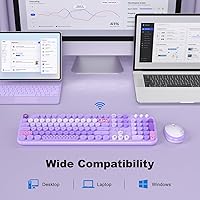
Both Windows and Mac users report smooth, trouble-free operation from the moment the receiver is plugged in, with no driver installation at any point. This broad out-of-the-box compatibility makes the vintage-style keyboard and mouse a sensible choice for households or desks where multiple operating systems are in regular rotation.
A small number of Mac users note that certain multimedia shortcut keys do not map intuitively to standard Mac functions, requiring some manual trial and error to reconfigure. Chromebook compatibility also appears inconsistent across user reports — basic input functions seem to work, but full multimedia key support on that platform is unreliable.
Ergonomics & Comfort
63%
37%
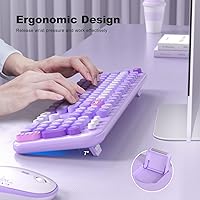
For shorter sessions — a few hours of email, browsing, or light writing — most users find both devices comfortable enough to use without issue. The keyboard's low, flat profile suits users who prefer a minimal wrist angle and do not require an elevated typing position.
Extended sessions reveal real limitations — there is no included wrist rest and no keyboard tilt adjustment, which becomes noticeable after two or more consecutive hours of use. The mouse's compact form factor disadvantages users with medium or larger hands most acutely, with several reporting wrist fatigue during longer work sessions.
Full-Size Layout
86%
Retaining a full key count — including the numeric keypad — is a genuine practical advantage that many budget wireless keyboards sacrifice for portability. Users who regularly handle numbers, data entry, or accounting tasks find the numpad alone a compelling enough reason to choose this wireless typewriter set over a compact alternative.
The full-size footprint occupies considerably more desk real estate than a tenkeyless or compact layout, which is a real drawback for users with smaller desks or tightly organized workspaces. A few users also find the multimedia shortcut keys less responsive and less precisely defined than dedicated function keys on higher-end boards.
Power Management
79%
21%
The auto sleep mode works reliably in practice — most users confirm both devices wake quickly with a single keypress or mouse click, with no noticeable delay before they are fully usable again. The low-battery indicator also earns consistent positive mentions for appearing with enough lead time to be genuinely useful.
Some users find the sleep timer activates too quickly during brief natural pauses in work, requiring a wake input more often than expected throughout the day. There is no way to adjust the idle-to-sleep threshold, so users who prefer a longer grace period before the devices power down have no recourse.

Suitable for:

The SQMD Retro Typewriter Wireless Keyboard Mouse Combo is a natural fit for anyone who wants their desk to express some personality without a significant financial commitment. Students furnishing a dorm room or first apartment workspace will appreciate the visual punch it delivers at an accessible price point. Remote workers and casual home office users who spend their days on documents, emails, and video calls will find the full-size layout and wire-free setup covers everything they need without friction. It works equally well on Windows and Mac, so mixed-system households or users who switch between platforms do not have to think twice about compatibility. The straightforward plug-and-play setup also makes it a genuinely practical gift for teens or college students — no technical knowledge required to get started, and the aesthetic is immediately appealing.

Not suitable for:

Anyone logging six or more hours of heavy daily typing should look elsewhere — the membrane construction and key resistance of this retro keyboard combo are simply not built for that level of sustained, repetitive use. Graphic designers, video editors, or gamers who depend on precise cursor control will find the three-step DPI range of the mouse too restrictive for their workflow. Users with larger hands may also find the mouse compact enough to cause real discomfort over longer sessions. The SQMD Retro Typewriter Wireless Keyboard Mouse Combo is not the right pick for quiet open-plan offices either, as the raised round keycaps carry more sound than a flat chiclet board in a shared environment. Finally, anyone expecting backlighting, programmable keys, or any form of software customization will need to explore a different product category entirely.

Specifications

  • Brand: This keyboard and mouse combo is manufactured by SQMD, a peripheral brand focused on stylized desktop accessories.
  • Connectivity: Both devices connect wirelessly via a single compact Nano USB receiver operating on a 2.4GHz radio frequency.
  • Wireless Range: The 2.4GHz connection supports a maximum operating range of up to 32 feet from the USB receiver.
  • Keyboard Layout: The keyboard uses a full-size layout that includes a dedicated numeric keypad and multimedia shortcut keys.
  • Keycap Style: Keys feature round, raised vintage typewriter-inspired keycaps built on a membrane switch mechanism.
  • Mouse DPI: The mouse offers three selectable sensitivity levels — 800, 1200, and 1600 DPI — cycled via a dedicated button on the mouse body.
  • OS Support: Both devices are compatible with Windows and Mac OS operating systems without requiring additional drivers or software.
  • Power Saving: An automatic sleep mode activates on both the keyboard and mouse after a period of inactivity to reduce battery drain.
  • Battery Alert: A low-battery indicator light on both devices activates when power is running low, providing advance warning before shutdown.
  • Driver Required: No drivers or companion software are required; both devices operate as true plug-and-play peripherals on all supported systems.
  • Power Source: Both the keyboard and mouse are powered by replaceable standard batteries rather than built-in rechargeable cells.
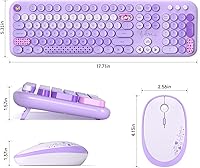
  • Package Size: The retail package measures 17.87 x 5.63 x 2.8 inches, sized to contain both the keyboard and mouse together.
  • Item Weight: The total packaged weight of the combo is 1.98 pounds, consistent with lightweight plastic construction across both devices.
  • Market Rank: This combo holds a ranking of #276 in the Amazon Computer Keyboard and Mouse Combos category based on available sales data.
  • Release Date: The product was first made available for purchase in May 2024.

Related Reviews
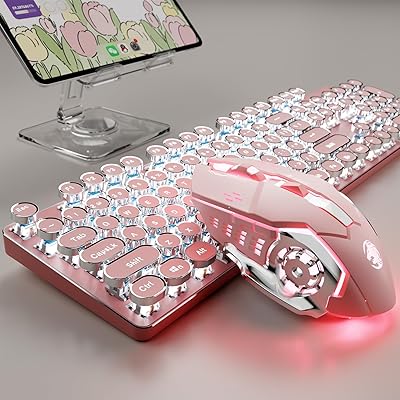
SEUNKWANG TK950 Wireless Typewriter Keyboard and Mouse Combo

78%
83%
Build Quality
88%
Typing Experience
79%
Wireless Connectivity
93%
Aesthetic & Design
76%
Backlighting
More
Arteck HW192 Wireless Keyboard and Mouse Combo
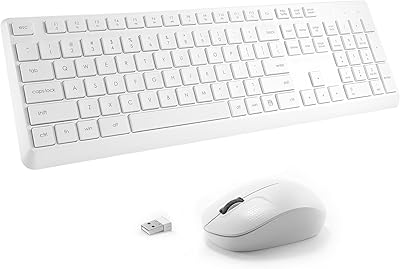
78%
78%
Build Quality
72%
Typing Experience
63%
Mouse Comfort & Ergonomics
81%
Battery Life
69%
Wireless Connectivity
More
Kootop Wireless Keyboard Mouse Combo
87%
89%
Ergonomics and Comfort
91%
Typing Experience
85%
Wireless Connectivity
87%
Design and Aesthetics
83%
Battery Life
More
TopMate Wireless Keyboard and Mouse Combo
77%
91%
Value for Money
78%
Typing Experience
68%
Mouse Performance
63%
Build Quality
83%
Wireless Reliability
More
MOFII Wireless Keyboard and Mouse Combo
77%
88%
Value for Money
93%
Ease of Setup
71%
Keyboard Typing Feel
58%
Mouse Performance
89%
Design & Aesthetics
More
seenda Wireless Keyboard and Mouse Combo
76%
88%
Value for Money
91%
Design & Aesthetics
93%
Ease of Setup
74%
Typing Comfort
61%
Mouse Performance
More
Arcwares Wireless Keyboard and Mouse Combo
78%
88%
Value for Money
91%
Aesthetic Design
76%
Keyboard Typing Experience
67%
Mouse Performance
84%
Wireless Connectivity
More
Hayyiesh KG659-01 Wireless Keyboard and Mouse Combo
75%
88%
Value for Money
79%
Keyboard Comfort & Ergonomics
74%
Key Feel & Typing Experience
58%
Mouse Build Quality
86%
Noise Level
More
Atelus Wireless Keyboard and Mouse Combo
83%
94%
Ease of Setup
88%
Ergonomics & Comfort
90%
Design & Aesthetics
80%
Mouse Performance
86%
Keyboard Performance
More
VEILZOR UK418 Wireless Keyboard and Mouse Combo

81%
91%
Value for Money
84%
Typing Comfort
89%
Noise Level
82%
Wireless Reliability
76%
Mouse Ergonomics
More
Mobifice Retro Wireless Keyboard and Mouse Combo
78%
83%
Value for Money
89%
Design & Aesthetics
78%
Typing Experience
61%
Mouse Performance
69%
Build Quality
More

FAQ

It works with both. The wireless typewriter set is plug-and-play compatible with Mac OS and Windows, so no reconfiguration or driver installation is needed when switching between the two.

No software needed at all. Just plug the Nano USB receiver into an open USB port and both the keyboard and mouse connect automatically, usually within a few seconds.

Typewriter-style round keycaps do tend to be a little noisier than flat chiclet keys — not loud in the way mechanical switches can be, but noticeably more so than a standard membrane board. If you are working in a very quiet shared space, it is worth keeping that in mind before buying.

They are sold and designed as a combo, but both devices connect through the same single receiver and operate independently. In practice, you can use just one of them if that is all you need in a given moment.

Not really. The mouse tops out at 1600 DPI and lacks the polling rate or precision that gaming typically demands, and the keyboard has no anti-ghosting or programmable key features. It is much better suited to everyday productivity and general home office use.

There is a dedicated DPI button on the mouse body that cycles through the three sensitivity levels — 800, 1200, and 1600. There is no on-screen indicator, but you will immediately notice the change in cursor speed as confirmation that it switched.

The product listing does not specify the exact battery type, but peripherals in this category typically use standard AA or AAA alkaline batteries. Check the documentation that comes in the box before your first use to confirm the correct size for each device.

Both the keyboard and mouse have a built-in low-battery indicator light that turns on when power is getting low. It gives you enough warning to grab replacement batteries before either device cuts out unexpectedly.

It is a full-size keyboard, so yes — the numeric keypad is included on the right side. You get the complete key count you would expect from a standard desktop keyboard, nothing removed.

The stated range is up to 32 feet, which handles most home office and living room distances without issue. For the most stable experience, keeping the receiver within 15 to 20 feet with minimal obstructions between you and the USB port works best. Most users report very few dropouts under normal conditions.