Overview

The CHESONA Multi-Device Wireless Keyboard and Mouse Combo sits squarely in the mid-range wireless market, targeting anyone who regularly bounces between two or three screens throughout the day. It connects via Bluetooth 5.0, Bluetooth 3.0, or a 2.4G USB receiver, covering Mac, Windows, iOS, and Android without much fuss. Unlike most budget combos that still rely on AA batteries, this rechargeable multi-device pair runs on a built-in lithium-ion cell — a genuinely practical difference if you are tired of hunting for replacements. That said, keep expectations calibrated: this is a solid, capable set for everyday use, not a high-performance board built for power users.

Features & Benefits

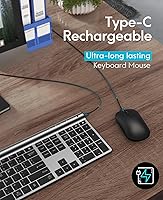
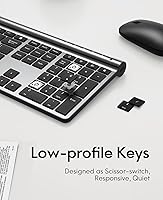
The real selling point here is three-device switching via dedicated hotkeys — tap BT1, BT2, or the 2.4G key and you are instantly on a different machine, which works better in daily use than it sounds on paper. The keyboard uses scissor-switch low-profile keys, striking a good balance between travel distance and quiet actuation — noticeably quieter than a standard membrane board. A full-size layout with a numeric keypad is surprisingly rare at this size and price point, so number-heavy workers will appreciate it. Battery life is a genuine strength at roughly 50 hours active, with auto-sleep extending that further. The included USB-C charging cable is a small but welcome practical touch.

Best For

This wireless combo makes the most sense for remote workers and students who need to flip between, say, a Mac for creative work, a Windows PC for office tasks, and a phone for quick messages — all without touching a wire. Desk minimalists will appreciate the slim profile and the absence of a battery drawer to manage. Quiet typists sharing a home office or library space will find the key noise perfectly inoffensive. If your budget does not stretch to a premium alternative but you still want cross-device flexibility, this rechargeable multi-device pair covers the basics well. Competitive gamers or high-speed typists should look elsewhere — there is no N-key rollover and the tactile feedback will not satisfy demanding users.

User Feedback

With over 1,100 ratings and a 4.3-star average, the CHESONA keyboard-and-mouse set earns its bestseller ranking for good reason. Buyers consistently praise how painless the initial pairing is and find the key feel surprisingly satisfying for the price. Battery life holds up well in practice, which reviewers frequently confirm. Where things get more mixed is the mouse — the scroll wheel feels loose to some users, and a handful report Bluetooth hiccups near heavy 2.4G interference; switching to the USB dongle usually resolves it. Worth flagging clearly: the keyboard card slot only fits phones, not tablets, despite tablet-friendly marketing. Long-term durability past six months remains an open question in the reviews.

Pros

  • Switches between three devices instantly using dedicated hotkeys — no re-pairing required.
  • Built-in USB-C rechargeable battery means no disposable batteries to buy or replace.
  • Full-size layout with a numeric keypad is a genuine rarity in slim wireless combos at this price.
  • Scissor-switch keys are noticeably quieter than standard membrane boards — great for shared spaces.
  • Compatible with Mac, Windows, iOS, and Android without any driver installation.
  • Auto-sleep kicks in after 30 minutes and wakes instantly on the first keypress.
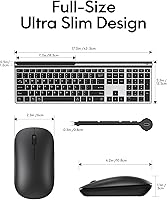
  • At just over 1.3 pounds and under 0.31 inches thick, the set sits lightly on any desk.
  • The 2.4G USB dongle stores neatly in the keyboard base, so it is hard to misplace.
  • Battery life holds up to real-world use, with active runtime hovering near the claimed 50 hours.
  • Clean, minimal aesthetic works well across both professional and home office setups.

Cons

  • The mouse scroll wheel feels loose and imprecise to a noticeable share of buyers.
  • Bluetooth connection can drop intermittently in Wi-Fi-heavy environments — the dongle is more reliable.
  • Long-term durability past six months is uncertain; wear patterns are not well-documented in reviews.
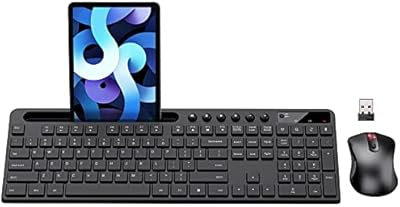
  • The keyboard card slot fits phones only, not tablets, despite multi-device marketing claims.
  • The mouse is the weakest link — users with higher pointer precision needs may want an upgrade.
  • No tactile or clicky key option available for those who prefer stronger typing feedback.
  • 280mAh battery capacity is modest; heavy daily users may need to charge more frequently than expected.
  • No backlit keys, which limits usability in dim or low-light environments.

Ratings

The scores below reflect our AI-powered analysis of verified global buyer reviews for the CHESONA Multi-Device Wireless Keyboard and Mouse Combo, with spam, incentivized, and bot-flagged submissions actively filtered out before scoring. Each category is rated based on real patterns from over a thousand independent users across Mac, Windows, and mobile workflows. Both the genuine strengths and the recurring frustrations are represented honestly — nothing is inflated to make the product look better than it actually performs.

Multi-Device Switching
88%
Users who juggle a laptop, desktop, and phone throughout the day consistently highlight how fast and friction-free the hotkey switching is — no re-pairing, no menus, just a single keypress. For anyone managing a hybrid work setup, this feature alone justifies the purchase for many buyers.
A small but recurring group of reviewers note that Bluetooth switching can occasionally lag or fail to register in environments dense with competing wireless signals, requiring a manual re-pair. The 2.4G dongle mode does not share this problem, but it only counts as one of the three slots.
Keyboard Typing Feel
81%
19%
The scissor-switch low-profile keys draw frequent praise from home-office users who find them noticeably more responsive and quieter than the membrane keyboards typically found at this price point. Several buyers mention switching from noisy desktop keyboards and appreciating the calmer, laptop-style actuation during long writing sessions.
Enthusiast typists and anyone accustomed to mechanical key feedback find the travel too shallow and the tactile response underwhelming for extended, high-volume typing. A few users also note that the keycaps develop a slight shine with heavy use after a few months.
Mouse Quality
61%
39%
For light browsing, document navigation, and casual daily use, the mouse performs adequately and feels comfortable enough in hand during normal-length work sessions. Its wireless connectivity is reliable when paired with the 2.4G dongle, and buyers focused primarily on the keyboard rarely feel let down at this task level.
The scroll wheel is the most criticized component in the entire set — multiple reviewers describe it as loose, rattly, or imprecise compared to even budget standalone mice. Users doing detailed spreadsheet work or creative tasks find the scroll behavior frustrating enough that some opt to replace the mouse while keeping the keyboard.
Battery Life
84%
Real-world feedback largely confirms the advertised runtime, with many users reporting a week or more between charges under typical office use patterns. The auto-sleep function earns specific praise from users who forget to switch the device off manually, as it quietly protects the battery without any intervention.
The 280mAh battery capacity is on the modest side, and heavy users who keep the keyboard active for eight or more hours daily may find themselves charging more frequently than the headline figures suggest. A small number of buyers also report that battery degradation becomes noticeable after roughly six to eight months of regular use.
Wireless Connectivity Stability
74%
26%
In clean wireless environments — home offices, smaller apartments, or desks away from router clusters — the Bluetooth connection holds steady for most users throughout the day. The 2.4G dongle mode is universally regarded as rock-solid, with essentially no reported dropouts when used in this configuration.
Open-plan offices or dense apartment buildings generate enough wireless interference to cause occasional Bluetooth stutters that several reviewers find mildly irritating. The gap in reliability between Bluetooth and 2.4G mode is wide enough that some users end up defaulting to the dongle exclusively, which limits the three-device flexibility.
Build Quality
69%
31%
The slim ABS and PC construction feels clean and professional on the desk, and the keyboard frame does not flex noticeably during normal typing. For a mid-range wireless set, the overall fit and finish is above average and holds up well in the short term.
Long-term durability is a genuine question mark — reviewer feedback beyond six months thins out, and those who do report back mention that the paint finish can show wear around the most-used keys. The mouse housing feels slightly hollow when tapped, which gives some buyers a less-than-premium first impression.
Cross-Platform Compatibility
86%
Buyers using this wireless combo across Mac and Windows environments confirm that key mappings work correctly without any manual remapping for the vast majority of everyday tasks. Android and iOS pairing is similarly straightforward, which users managing both a phone and a computer at the same workstation appreciate.
A handful of Mac users note that a few function-row shortcuts behave slightly differently than expected until they adjust system keyboard preferences. There is no dedicated companion app to customize key behavior, so users with niche workflow requirements may hit minor friction.
Setup & Ease of Use
91%
First-time setup earns some of the most consistent praise in the entire review pool — buyers across all tech experience levels describe pairing as quick and intuitive, with the 2.4G dongle working within seconds of being plugged in. The zero-driver requirement removes a common friction point that frustrates users of competing budget combos.
A small number of reviewers encountered Bluetooth pairing confusion when trying to switch the set between two computers that had both previously been paired, requiring them to clear the pairing and start fresh. The instruction sheet is minimal and could benefit from clearer guidance for multi-device setup sequences.
Value for Money
83%
The combination of multi-device support, USB-C recharging, and a full-size layout with a number pad at this price tier is hard to beat for everyday users who do not need professional-grade hardware. Many reviewers explicitly state they did not expect this level of feature completeness and were positively surprised.
The mouse quality relative to the keyboard creates a slight imbalance in the value equation — buyers who care equally about both components may feel the mouse does not fully earn its share of the price. Anyone comparing this set to slightly pricier alternatives from more established brands will find the gap in long-term durability noticeable.
Design & Aesthetics
78%
22%
The slim, low-profile silhouette and dark gray finish are consistently described as clean and professional, fitting well into both home and corporate desk setups without looking out of place. Buyers frequently mention that the combo photographs well and contributes to a tidier, more minimal workspace.
Color options are limited compared to some competitors, and the dark finish is a fingerprint magnet that requires regular wiping to maintain its look. A few buyers expected a more premium texture on the keyboard surface and found the painted plastic feel a little ordinary up close.
Noise Level
82%
18%
Quiet typing is one of the more consistently praised aspects of the CHESONA keyboard-and-mouse set, particularly from buyers working in shared rooms or on video calls where keyboard noise bleeds into microphones. The scissor mechanism keeps actuation sound low without sacrificing key responsiveness.
The mouse clicks are slightly louder than the keyboard keys, which creates a minor mismatch in the overall sound profile that some noise-sensitive users notice. It is not loud by any standard measure, but those expecting near-silent mouse clicks alongside the quiet keys may need to adjust expectations.
Portability
76%
24%
At just over 1.3 pounds for the full set and with the USB nano-receiver tucked into the keyboard base, this rechargeable multi-device pair packs up neatly for users who move between rooms or carry it to a coworking space. The slim profile fits easily into a laptop bag without adding noticeable bulk.
The full-size layout with a number pad, while useful at a desk, makes it wider than compact or tenkeyless alternatives that are genuinely designed for travel. Users who primarily want a keyboard for coffee shop or commute use may find the footprint a bit unwieldy in tight spaces.
Charging Convenience
79%
21%
The shift to USB-C for both the keyboard and mouse is a practical improvement over competitors that still rely on Micro-USB or proprietary cables, and buyers frequently note that they already have USB-C cables on their desk. Charging while working ensures that a low battery never becomes a productivity blocker.
The two components charge separately rather than through a shared dock or single cable, which means two charging events to manage rather than one. The cable included in the box is functional but short, which can limit positioning flexibility on larger or multi-monitor desks.

Suitable for:

The CHESONA Multi-Device Wireless Keyboard and Mouse Combo is a natural fit for anyone whose workday spans more than one device — think a remote worker who writes reports on a Windows desktop, reviews documents on a MacBook, and fires off quick replies from an Android phone, all at the same desk. Students in hybrid learning environments will find the cross-platform flexibility genuinely useful, especially since the setup requires no driver installs and pairs quickly. The rechargeable battery removes the recurring hassle of disposable AAs, making this wireless combo a low-maintenance daily driver for casual to moderate typists. Shared home offices or library regulars will appreciate how quietly the scissor-switch keys operate without drawing attention. If your priority is a clean, clutter-free desk with reliable multi-device access at a practical price point, this rechargeable multi-device pair covers that ground confidently.
Not suitable for:

The CHESONA Multi-Device Wireless Keyboard and Mouse Combo is not the right choice for anyone who demands serious typing performance or gaming-grade input. There is no N-key rollover, no tactile click feedback, and the scissor-switch feel — while pleasant for casual use — will frustrate touch typists who rely on deep key travel and firm actuation. The mouse is the weaker component of the set; users who spend long hours doing precise creative work or who simply prefer a high-quality scroll wheel will likely want to pair this keyboard with a separate mouse instead. Bluetooth connectivity, while functional for most users, can show occasional instability in environments crowded with wireless signals — the 2.4G dongle mode is the more dependable option if rock-solid connection matters to you. Tablet users should also be aware that the keyboard card slot only accommodates phones, not full-sized tablets, despite the broadly multi-device marketing.
Specifications

  • Connectivity: Connects via Bluetooth 5.0, Bluetooth 3.0, or a 2.4G USB receiver, giving you three independent wireless options in one set.
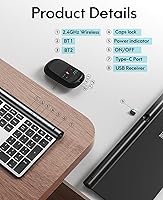
  • Device Switching: Supports simultaneous pairing with up to three devices, switchable through dedicated BT1, BT2, and 2.4G hotkeys.
  • Battery Capacity: Both the keyboard and mouse use built-in 280mAh lithium-ion cells charged via an included USB-C cable.
  • Active Battery Life: The keyboard delivers approximately 50 hours of continuous active use on a full charge.
  • Standby Battery Life: In standby mode, battery life extends to approximately 200 hours before requiring a recharge.
  • Key Mechanism: Low-profile scissor-switch keys provide quieter actuation and faster rebound compared to standard membrane keyboards.
  • Layout: Full-size keyboard layout includes a dedicated numeric keypad on the right side for efficient data entry.
  • Dimensions: The keyboard measures 16.93 x 5.31 x 0.31 inches, keeping desk footprint minimal despite the full-size layout.
  • Weight: The combined keyboard and mouse set weighs approximately 1.31 pounds, making it easy to move between workspaces.
  • Materials: Constructed from ABS and PC plastics with a dark gray painted finish that resists minor surface scuffs.
  • OS Compatibility: Works with Mac OS and iOS 10.12 or above, Windows 8 and 10 or above, and Android 4.3 or above.
  • Auto-Sleep: The keyboard automatically enters sleep mode after 30 minutes of inactivity and wakes instantly on any keypress.
  • USB Receiver Storage: The 2.4G USB nano-receiver stores in a dedicated slot on the underside of the keyboard when not in use.
  • Charging Port: Both the keyboard and mouse charge via USB-C, and the cable is included in the box.
  • Driver Requirement: No software or driver installation is needed; the set is plug-and-play out of the box on all supported platforms.
  • Card Slot: The keyboard features a built-in card slot sized to hold a phone for reference or video calls, but it does not fit full-sized tablets.

Related Reviews

Rapoo 9050S Multi-Device Wireless Keyboard and Mouse Combo
87%
94%
Ease of Device Switching
89%
Typing Experience
91%
Battery Life
85%
Comfort and Ergonomics
90%
Multi-Device Compatibility
More
Rapoo 9010M Wireless Keyboard and Mouse Combo
80%
88%
Multi-Device Switching
82%
Typing Experience
91%
Silent Operation
79%
Wireless Connectivity Reliability
93%
Value for Money
More
Arteck HW192 Wireless Keyboard and Mouse Combo
78%
78%
Build Quality
72%
Typing Experience
63%
Mouse Comfort & Ergonomics
81%
Battery Life
69%
Wireless Connectivity
More
Cimetech Wireless Keyboard and Mouse Combo
88%
91%
Value for Money
88%
Ease of Use
83%
Connectivity
94%
Portability
85%
Ergonomics
More
Tayderley Wireless Keyboard and Mouse Combo
86%
88%
Typing Comfort
85%
Mouse Performance
94%
Battery Life
83%
Build Quality
92%
Ease of Setup
More
MARVO Wireless Keyboard and Mouse Combo
76%
91%
Value for Money
88%
Wireless Connectivity
79%
Mouse Performance
63%
Keyboard Typing Feel
67%
Ergonomics & Comfort
More
TKVPJYYI Wireless Retro Typewriter Keyboard and Mouse Combo
76%
88%
Design & Aesthetics
71%
Typing Experience
62%
Mouse Performance
58%
Build Quality
83%
Wireless Connectivity
More
Letton Wireless Keyboard and Mouse Combo
83%
89%
Design & Aesthetics
81%
Ergonomics & Comfort
75%
Wireless Connectivity
90%
Battery Life
92%
Value for Money
More
Vssoplor Wireless Keyboard and Mouse Combo
82%
91%
Value for Money
84%
Keyboard Typing Experience
61%
Mouse Ergonomics
88%
Wireless Connectivity & Stability
72%
Battery Life
More
HP 18H24AA Wireless Keyboard and Mouse Combo
79%
91%
Value for Money
93%
Ease of Setup
74%
Keyboard Typing Experience
63%
Mouse Comfort & Ergonomics
86%
Wireless Reliability
More

FAQ

Yes, that is exactly what the CHESONA Multi-Device Wireless Keyboard and Mouse Combo is designed for. You pair each device to one of the three connection slots — BT1, BT2, or 2.4G — and switch between them by pressing the corresponding hotkey. It takes under a second and you do not need to re-pair every time.
Bluetooth performance is solid in most home and office environments, but it can occasionally hiccup in spaces with heavy wireless congestion — think open-plan offices full of routers and devices. If you notice any instability, switching to the 2.4G USB dongle mode is the most reliable option and typically resolves the issue completely.

Charging time is typically around two hours from empty to full using the included USB-C cable. You can continue using the keyboard while it charges, so there is no real downtime even if you forgot to plug it in overnight.

The keyboard pairs and works perfectly fine with an iPad — Bluetooth connection to iPadOS is fully supported. However, the physical card slot built into the keyboard frame is only wide enough to hold a phone upright; it will not fit a tablet. So you can type on your iPad without any issue, you just cannot prop it in the slot.

The scissor-switch keys are genuinely quiet for a wireless keyboard at this price. They are not silent in the way a dedicated quiet mechanical keyboard might be, but the sound level is low enough that coworkers or family members nearby are unlikely to find it disruptive during normal typing.

No installation needed. For the 2.4G mode, plug the USB receiver into your computer and it works immediately. For Bluetooth, you pair it through your device settings just as you would any other Bluetooth peripheral — no companion app or driver download required on any supported platform.

Honestly, the keyboard is the stronger half of this set. The mouse is functional and comfortable enough for everyday browsing and document work, but the scroll wheel has a looser, less precise feel that some users find underwhelming. If you do a lot of detailed design work or just prefer a higher-quality mouse, it might be worth pairing the keyboard with a separate mouse you already own.

You can plug in the USB-C cable and keep working while the battery tops up, so a dead battery does not mean a full stop. Given the roughly 50-hour active runtime, most users will only need to charge once every week or two under normal use — and the auto-sleep feature helps stretch that further.

For casual to moderate typing volumes it works well. The low-profile scissor keys have a comfortable, laptop-like feel and the full-size layout with a number pad is practical for data entry. That said, if you type heavily for six or more hours a day and prefer a more tactile or springy key feel, you would likely want a dedicated mechanical keyboard instead.

The officially supported range starts at Windows 8 and Mac OS 10.12. If you are running something older than that, compatibility is not guaranteed and you may run into missing key mappings or pairing issues. Most users on current operating systems will have no problems at all.