



Overview

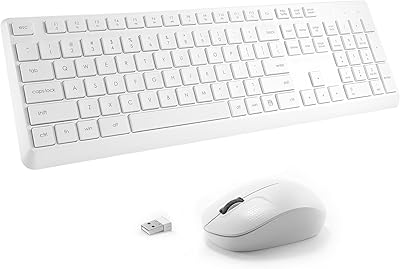
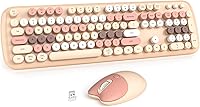
The MOWUX Wireless Keyboard and Mouse Combo enters a crowded budget peripheral space with a clear point of view: style first. The retro typewriter aesthetic — round, floating keycaps in a warm milk tea colorway — immediately sets it apart from the sea of matte-black office keyboards. That design sensibility is deliberate. This isn't a combo for power users chasing input precision or mechanical-switch depth; it's for people who want their workspace to feel intentional without spending a lot to get there. Broad plug-and-play compatibility across Windows, Mac, and Chromebook keeps things practical, which means the looks don't come at the expense of usability.

Features & Benefits

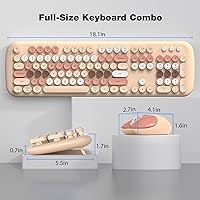
The full 104-key layout means you keep your numpad and function row — no compromises for the compact-keyboard crowd. The round floating keycaps have a springy, tactile feel that's genuinely satisfying for everyday typing, and they pop off easily for cleaning, which is a small but appreciated detail. The 2.4GHz wireless holds steady across a room, and the nano-receiver stores inside the mouse body so it's never misplaced. The cat-themed mouse offers three DPI levels — 800, 1200, and 1600 — covering web browsing and document editing without fuss. Eight dedicated multimedia shortcuts let you adjust volume or skip tracks without reaching for the trackpad.

Best For

This retro wireless combo makes the most sense for students, remote workers, and casual home-office users who want a setup that reflects their taste without a major investment. If you've been living with a generic membrane keyboard and want an immediate visual and tactile upgrade, the MOWUX set delivers that shift in a satisfying way. It's also a strong choice for Chromebook and Mac users who need something that works the moment they plug it in — no software, no configuration. And if you're shopping for a gift for someone who appreciates design but isn't obsessed with specs, this keyboard-mouse combo is a practical and personality-forward pick.

User Feedback

Buyers consistently highlight the visual appeal and are often pleasantly surprised by how satisfying the keys feel at this price point — that tactile roundness tends to win people over quickly. The cat mouse generates the most divided opinions: plenty of users find it genuinely charming on the desk, while others feel it leans more gimmick than utility. On the critical side, the mouse scroll wheel and lighter overall build are the most common complaints — functional, but not particularly refined. Battery life in day-to-day use appears to hold up well, and the auto-sleep and wake cycle is reported as smooth. Occasional connectivity dropouts do surface in reviews, though they seem to be the exception rather than the rule.

Pros

  • The round, floating keycaps have a tactile, springy feel that punches well above the price tier.
  • Removable keycaps make cleaning quick and straightforward — a feature most budget keyboards skip entirely.
  • The nano-receiver stores inside the mouse body, so it's never lost in a bag or desk drawer.
  • Broad OS compatibility means plug it in and get to work, no matter which system you're on.
  • The milk tea colorway is genuinely distinctive and brings real personality to an otherwise predictable product category.
  • Eight multimedia shortcut keys handle volume, playback, and common tasks without touching the trackpad.
  • Auto-sleep kicks in during breaks and wakes instantly, so battery management is essentially hands-off.
  • At its price, the full 104-key layout with a numpad is a better value proposition than most compact competitors.
  • The wireless range holds steady across a typical room without stuttering or lag in normal use.

Cons

  • The mouse scroll wheel feels noticeably cheap and is the most common point of wear mentioned by users.
  • Mouse build quality is basic — functional, but light in the hand in a way that some users find less satisfying.
  • Occasional connectivity dropouts have been reported, particularly in wireless-heavy environments.
  • The cat mouse design is polarizing — what reads as charming to one buyer feels gimmicky to another.
  • Keycap legends may show wear over time with heavy daily use, especially on frequently pressed keys.
  • No backlighting means this combo isn't practical in dim or low-light working environments.
  • The 1600 DPI ceiling on the mouse limits usefulness on high-resolution or large external displays.
  • There is no software or app support, so DPI switching is the only available customization on the mouse.
  • Battery life depends heavily on usage habits — users who leave it idle infrequently may drain cells faster than expected.

Ratings

The MOWUX Wireless Keyboard and Mouse Combo has been scored by our AI system after analyzing thousands of verified global buyer reviews, with spam, bot activity, and incentivized feedback actively filtered out to ensure the ratings reflect genuine user experience. Scores capture the full picture — where this retro wireless combo genuinely earns its place on a desk, and where its budget-tier origins start to show. Both the highs and the friction points are reflected transparently across every category below.

Visual Design
91%
The milk tea colorway and round floating keycaps consistently generate strong positive reactions, particularly from buyers who want a desk setup that feels curated rather than generic. Users frequently mention that photos don't do the color palette full justice — it lands warmer and more cohesive in person.
The cat mouse design splits opinion more than the keyboard does, with a vocal minority finding it too themed for a professional setting. A few users also note that the retro aesthetic can feel slightly toy-like up close depending on lighting conditions.
Typing Experience
83%
The round keycaps deliver a springy, satisfying tactile response that routinely surprises buyers given the price point. Writers and students doing long document sessions report that the key travel feels more deliberate than typical membrane boards in this range.
The keyboard isn't particularly quiet — the keycaps produce a noticeable click that some office-sharing users find disruptive. There is also no wrist rest included, which becomes a mild comfort issue during extended typing sessions.
Mouse Performance
61%
39%
For everyday tasks like web browsing, spreadsheet navigation, and document editing, the mouse performs adequately without any major hesitation. The three DPI settings give enough range to adjust tracking speed to the surface and screen size in use.
The scroll wheel is the weakest link — it feels cheap under repeated use and shows wear faster than the keyboard. Users with larger hands also find the mouse body noticeably small, reducing comfort during longer work sessions.
Wireless Reliability
74%
26%
In standard home and office environments, the 2.4GHz connection stays stable throughout the advertised range, and the plug-and-play setup means most users are connected in under a minute. The single-receiver design that handles both devices is consistently appreciated for its simplicity.
A recurring complaint involves intermittent dropouts in environments with dense wireless activity, such as open-plan offices or co-working spaces. The issue appears device-specific rather than universal, but it surfaces often enough across reviews to be a real consideration.
Build Quality
58%
42%
The keyboard chassis feels reasonably solid for its price tier, and the keycap mechanism holds up well under daily use without wobble or registration issues. Most users report no structural problems with the keyboard body over several months of light to moderate use.
The mouse body is where the build quality gap becomes apparent — the plastic feels noticeably thin, and the click buttons develop a slightly mushy response over time. Overall, the combo feels like it was designed to impress on first contact rather than endure heavy long-term use.
Keycap Removability
88%
Being able to pop the keycaps off without tools is a genuinely useful feature at this price tier, and users who clean their peripherals regularly highlight it as a standout practical benefit. The keycaps snap back on firmly without any alignment issues.
The non-standard round profile means you can't swap in aftermarket keycaps for customization, which limits the combo's appeal to users who like to mod or personalize their setups beyond the included colorway.
Battery Life
76%
24%
Users who take regular breaks report very satisfying battery longevity, with the auto-sleep function doing a lot of heavy lifting in the background. Those who use the set for a few hours a day typically go weeks without needing a battery swap.
Heavy users who rarely step away from their desk see battery drain faster than the spec sheet implies, since the sleep timer only activates after sustained inactivity. There is no battery level indicator on either device, so low battery is only discovered when performance degrades.
Sleep & Wake Behavior
82%
18%
The wake response is instant in practice — pressing a key or nudging the mouse brings both devices back to life with no perceptible lag, which is something users specifically call out as better than expected. The transition feels transparent during normal workflow.
The 8-minute sleep timer can feel slightly aggressive for users who pause frequently to think or read, triggering the odd moment where the keyboard doesn't register the first keystroke after a long pause. There is no way to adjust the sleep timer threshold.
Setup & Compatibility
93%
Plug-and-play works exactly as advertised across every reported operating system — Windows, Mac, Chromebook, and Linux users all confirm zero-driver setup with no configuration steps needed. Chromebook users in particular highlight this as one of the smoothest peripheral connections they have experienced.
While Mac compatibility is solid for basic use, a handful of multimedia shortcut keys don't translate natively to Mac OS functions, which requires manual remapping or simply going unused. This isn't a dealbreaker but it's worth knowing before purchase.
Portability
79%
21%
The nano-receiver stowing inside the mouse body is a small but genuinely thoughtful detail that frequent travelers and bag-packers appreciate — no more hunting for a tiny USB stick at the bottom of a backpack. The overall package weight is light enough to carry without adding noticeable bulk.
The keyboard is full-sized at 104 keys, which means it's not compact by design and takes up meaningful space in a bag or on a shared desk. Users who prioritize portability above all else may find a tenkeyless or 75-percent layout serves them better.
Value for Money
84%
Relative to what this keyboard-mouse combo delivers visually and functionally, most buyers feel it represents fair value — particularly those who were previously using a basic no-name membrane keyboard. The design differentiation alone tends to justify the spend for style-conscious buyers.
Users who prioritize mouse durability and precision over aesthetics often feel the mouse portion of the combo doesn't pull its weight in the overall value equation. If the mouse were slightly more refined, the value perception across the board would be meaningfully stronger.
Noise Level
63%
37%
The keystroke sound has a distinct, retro-appropriate clack that many users actually enjoy — particularly those working from home alone who find it satisfying and characterful during long writing sessions.
In shared environments like open offices, libraries, or dorm rooms, the click volume draws enough attention to be a recurring complaint. Users who need near-silent input would be better served by a keyboard with dampened or low-profile switches.
Multimedia Shortcuts
77%
23%
Having dedicated keys for volume, mute, and media playback proves more useful day-to-day than most buyers expect going in, especially for users who stream music or video while working. The keys are well-positioned and register cleanly.
The shortcut layer is fixed and non-programmable, so there's no way to reassign functions to match individual workflows or software environments. Power users who rely on custom macros will find this limitation frustrating almost immediately.

Suitable for:

The MOWUX Wireless Keyboard and Mouse Combo is a natural fit for students, remote workers, and anyone who wants their desk setup to feel a little more personal without spending a lot to get there. If you've been typing on a forgettable black slab and want something that actually catches your eye every time you sit down, this retro wireless combo delivers that shift immediately. It's also a strong pick for people who hop between devices or operating systems — the plug-and-play setup works across Windows, Mac, Chromebook, and Linux without any driver installation or configuration headaches. Casual users who type documents, browse, stream, or manage emails will find the full 104-key layout and multimedia shortcuts genuinely useful day to day. And for gift-givers shopping for a tech-casual friend or family member who appreciates design, this keyboard-mouse combo strikes a rare balance between being practical and visually thoughtful.

Not suitable for:

The MOWUX Wireless Keyboard and Mouse Combo isn't the right call if you need a peripheral setup built for performance, precision, or heavy daily workload. Gamers should look elsewhere entirely — the mouse tops out at 1600 DPI and the keyboard offers no anti-ghosting, macro support, or the kind of consistent actuation that fast-paced gaming demands. Writers or coders putting in long hours every day may eventually notice the limits of the mouse build quality, particularly around the scroll wheel, which doesn't feel engineered for heavy use. If you're drawn to the aesthetic but were hoping for hot-swap switches, per-key lighting, or programmable layers, this retro wireless combo operates in a completely different category. Anyone prioritizing longevity and durability over style at an accessible price point will likely find themselves wanting something with a more substantial build.

Specifications

  • Keyboard Layout: Full-size 104-key layout with a dedicated numpad, function row, and navigation cluster.
  • Key Style: Round, floating keycaps with a typewriter-inspired profile that provide tactile feedback on each press.
  • Keycap Feature: Keycaps are removable without tools, making routine cleaning straightforward and accessible.
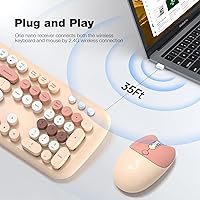
  • Wireless Protocol: 2.4GHz wireless connection via a USB nano-receiver for stable, interference-resistant operation.
  • Wireless Range: Operates reliably at distances up to 10 meters (33 ft) from the connected device.
  • Receiver Storage: The USB nano-receiver stores inside the mouse body when not in use, preventing loss during travel.
  • Mouse Design: Optical mouse with a cat-themed aesthetic, designed to complement the keyboard's retro visual identity.
  • Mouse DPI: Three selectable DPI levels — 800, 1200, and 1600 — adjustable to match task and surface requirements.
  • Shortcut Keys: Eight dedicated multimedia and shortcut keys handle common functions such as volume control and media playback.
  • Auto Sleep: Both the keyboard and mouse enter power-saving sleep mode automatically after 8 minutes without input.
  • Wake Function: Any keypress or mouse movement instantly wakes the devices from sleep with no perceptible delay.
  • Compatibility: Works with Windows XP through 11, Mac OS, Chromebook, and Linux operating systems out of the box.
  • Setup Method: Plug-and-play via USB receiver; no drivers, software installation, or configuration steps are required.
  • Color Variant: Available in the Milk Tea Colorful colorway, featuring warm neutral tones across both the keyboard and mouse.
  • Package Dimensions: The retail package measures 19.21 x 5.75 x 3.03 inches, suitable for standard shelf or box storage.
  • Item Weight: The complete packaged unit weighs 2.19 pounds, inclusive of both peripherals and accessories.
  • Brand: Manufactured and sold by MOWUX, a brand focused on stylized consumer peripherals.
  • Market Rank: Ranked #157 in the Computer Keyboard and Mouse Combos category on Amazon at the time of listing review.

Related Reviews

Arteck HW192 Wireless Keyboard and Mouse Combo

78%
78%
Build Quality
72%
Typing Experience
63%
Mouse Comfort & Ergonomics
81%
Battery Life
69%
Wireless Connectivity
More
ULSOU Wireless Ergonomic Keyboard and Mouse Combo
74%
88%
Value for Money
84%
Typing Comfort
86%
Key Noise Level
57%
Key Feel & Tactility
61%
Mouse Performance
More
JOYACCESS Wireless Keyboard and Mouse Combo
82%
88%
Value for Money
83%
Typing Experience
74%
Mouse Performance
86%
Backlight Quality
81%
Battery Life
More
Letton Wireless Retro Keyboard and Mouse Combo
78%
93%
Visual Design & Aesthetics
91%
Setup & Ease of Use
61%
Typing Feel & Key Travel
84%
Wireless Reliability
58%
Mouse Performance
More
KNOWSQT Wireless Keyboard and Mouse Combo
87%
89%
Wireless Performance
83%
Build Quality
86%
Ergonomics & Comfort
91%
Design & Aesthetics
76%
Battery Life
More
FOPETT Retro Wireless Keyboard and Mouse Combo
82%
93%
Design & Aesthetics
76%
Typing Experience
67%
Mouse Performance
88%
Wireless Connectivity
91%
Battery Life
More
TKVPJYYI Wireless Retro Typewriter Keyboard and Mouse Combo

76%
88%
Design & Aesthetics
71%
Typing Experience
62%
Mouse Performance
58%
Build Quality
83%
Wireless Connectivity
More
GEEZER Wireless Keyboard and Mouse Combo
72%
83%
Value for Money
91%
Aesthetic Design
94%
Ease of Setup
67%
Typing Feel
62%
Mouse Quality
More
Harburfine Wireless Keyboard and Mouse Combo
85%
88%
Ergonomics & Comfort
93%
Quietness & Noise Level
85%
Wireless Connectivity & Range
84%
Battery Life & Power Management
90%
Setup & Installation
More
cimetech Wireless Keyboard and Mouse Combo
76%
94%
Ease of Setup
91%
Typing Noise Level
89%
Portability
83%
Key Layout & Usability
62%
Mouse Performance
More

FAQ

No software needed at all. Just plug the USB receiver into an open port and both the keyboard and mouse are ready to use within seconds. It works this way on Windows, Mac, Chromebook, and Linux.

Yes, it's fully compatible with Mac OS and connects the same way as on Windows — plug in the receiver and start typing. Keep in mind that a few Windows-specific shortcut keys may not map perfectly to Mac functions, but core typing and mouse use work without any issues.

There's a dedicated DPI button on the mouse that cycles through 800, 1200, and 1600. The difference between 800 and 1600 is noticeable — lower settings suit precise, slower cursor movement, while 1600 is better for larger screens or faster navigation. For most everyday tasks, 1200 is a comfortable middle ground.

Battery life will vary depending on how intensively you use it, but users report getting several weeks of typical office use before needing a replacement. The auto-sleep feature helps considerably — if you step away for more than a few minutes, the devices power down on their own and wake up the moment you return.

The keycaps are removable, which is great for cleaning, but the round, non-standard profile means standard aftermarket keycap sets won't fit. If you're looking to customize colors or switch to a different key profile, this combo isn't designed for that kind of modification.

For most users in a standard home or office environment, the connection holds up well within the 10-meter range. A small number of users have reported occasional dropouts, which tends to happen in spaces with heavy wireless interference. Keeping the receiver in a clear line of sight to the devices helps maintain stability.

Just press any key or move the mouse — they wake up immediately. There's no significant lag or delay, and you won't lose your cursor position. The sleep function is designed to be transparent to normal use.

It's best suited for light to moderate use. The mouse is compact and reasonably comfortable for browsing, document editing, and casual tasks, but users who spend many hours a day on a mouse may find the lighter build less satisfying over time. If ergonomics are a priority for long sessions, a more substantial mouse might serve you better.

The keycaps pull off with gentle upward pressure — no tools required. Once removed, you can wipe them down with a damp cloth or rinse them carefully and let them dry completely before snapping them back on. The keyboard base can be cleaned with compressed air or a soft cloth in the meantime.

Both devices connect through a single USB nano-receiver, so you only use one port on your computer. The receiver is stored inside the mouse when packed away, which makes it easy to keep track of everything when you're on the move.