SABLUTE Wireless Backlit Keyboard and Mouse Combo
SABLUTE Wireless Backlit Keyboard and Mouse Combo — image 1
SABLUTE Wireless Backlit Keyboard and Mouse Combo — image 2
SABLUTE Wireless Backlit Keyboard and Mouse Combo — image 3
SABLUTE Wireless Backlit Keyboard and Mouse Combo — image 4
SABLUTE Wireless Backlit Keyboard and Mouse Combo — image 5
SABLUTE Wireless Backlit Keyboard and Mouse Combo — image 6
SABLUTE Wireless Backlit Keyboard and Mouse Combo — image 7
SABLUTE Wireless Backlit Keyboard and Mouse Combo — image 8
77%
23%

Overview

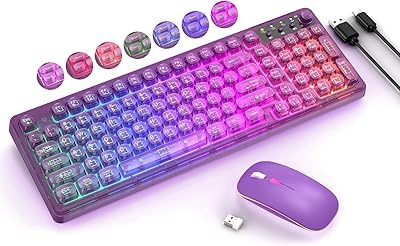
The SABLUTE Wireless Backlit Keyboard and Mouse Combo sits in a crowded budget peripheral market, but its purple LED aesthetic immediately sets it apart from the endless parade of matte-black options. Crucially, this is not a mechanical typing rig — the soft membrane keys are designed for quiet comfort, not tactile feedback, and shoppers expecting that crisp clicky snap should look elsewhere. What this wireless combo does offer is a thoughtfully practical package: built-in rechargeable batteries, dual OS compatibility, and a look that punches above its price point. Realistic expectations here lead to a genuinely satisfying experience.

Features & Benefits

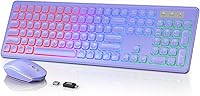
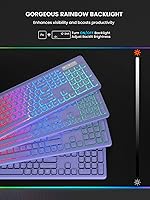
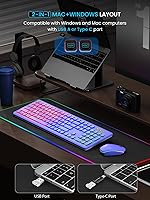
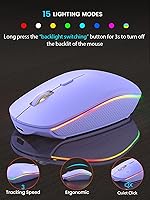
The rainbow LED backlighting is the first thing you notice. It looks vivid, and being able to dial the brightness down for late-night sessions makes it genuinely useful rather than purely decorative. The mouse is impressively quiet — not silent, but noticeably softer than a standard click, which makes a real difference in open-plan offices or shared bedrooms. Battery management is where this backlit keyboard and mouse set really earns points: the keyboard can go months between charges with the backlight off, and the auto-sleep function keeps both devices from draining unnecessarily. One USB receiver handles both, and the included USB-C adapter means it works across almost any modern machine without fuss.

Best For

This wireless combo is a natural fit for remote workers and students who type in shared spaces — a roommate sleeping nearby or a partner on a video call will barely register the keyboard or mouse noise. It also makes sense for anyone juggling a Mac and a Windows machine, since switching between systems is handled with a single key rather than re-pairing or swapping dongles. If you are ditching a wired setup for the first time and want a clean, cable-free desk without a big investment, this is a low-friction way to get there. The purple colorway is a nice touch for anyone who wants something that looks intentional rather than purely utilitarian.

User Feedback

With close to 2,800 ratings and a 4.1-star average, the SABLUTE combo has enough real-world feedback to draw meaningful conclusions. Buyers consistently praise the backlight quality and how straightforward the setup is — most report being up and running in under a minute. The quiet typing experience also gets frequent mentions, particularly from people using it near others. On the downside, some reviewers note that the plastic build feels light, which is understandable at this price but worth knowing upfront. A handful of users mention the mouse occasionally takes a beat to wake from sleep mode. Tactile typists, predictably, find the membrane feel underwhelming — an honest caveat worth carrying into your decision.

Pros

  • Setup takes under a minute — plug in the USB receiver and both devices work instantly, no software needed.
  • The rainbow backlighting looks genuinely vivid, and adjustable brightness makes it practical for dark rooms and bright desks alike.
  • Quiet enough for shared offices, dorm rooms, or late-night work without drawing complaints from nearby people.
  • Built-in rechargeable batteries mean no hunting for AA cells — the keyboard can last months per charge with backlighting off.
  • Switching between Windows and Mac is handled with a single keypress, making it practical for mixed-device households.
  • The single USB receiver covers both devices, saving a port and keeping the desk noticeably cleaner.
  • A 33-foot wireless range gives enough freedom to use this backlit keyboard and mouse set comfortably from across a room.
  • The purple colorway stands out in a market saturated with generic black peripherals, adding real visual character to a budget setup.
  • Nearly 2,800 buyer ratings at 4.1 stars offer meaningful reassurance that this is not a roll-of-the-dice purchase from an unknown brand.

Cons

  • Membrane keys feel flat and mushy compared to mechanical alternatives — a real drawback for touch-typists or heavy daily users.
  • The mouse occasionally lags briefly when waking from sleep mode, which can disrupt workflow during short breaks.
  • All-plastic construction feels lightweight in hand, and long-term durability is harder to assess given the brand's limited independent track record.
  • No numpad is included, which rules this out for spreadsheet-heavy users or anyone who relies on frequent numerical input.
  • The mouse sleep timer triggers after just 90 seconds of inactivity, which feels overly aggressive during slower-paced or reading-heavy work.
  • Keeping the backlight on continuously drains the battery significantly faster, cutting the headline standby life down to just a few weeks.
  • No dedicated media controls or programmable shortcuts are available, limiting the appeal for power users who depend on them.
  • SABLUTE carries limited brand recognition outside Amazon, making independent repair support or warranty follow-through harder to predict.

Ratings

The scores below were generated by our AI review engine after analyzing thousands of verified purchase ratings for the SABLUTE Wireless Backlit Keyboard and Mouse Combo — filtering out incentivized, duplicate, and bot-flagged submissions to surface what real buyers actually experienced. Both the genuine strengths that earned this set a strong overall consensus and the recurring pain points that honest buyers flagged are reflected transparently across each category. This breakdown is built to give you the clearest possible picture of what to expect before committing.

Value for Money
83%
At this price tier, getting a rechargeable keyboard and mouse with rainbow backlighting and dual OS support in a single package is hard to argue against. Buyers consistently note that this wireless combo delivers more than its sticker price suggests, particularly for first-time desk upgraders or secondary workstation setups.
Those who compare it directly to similarly priced but simpler combos sometimes feel the build quality lags noticeably behind the feature list. If long-term solidity and premium feel rank above all else for you, spending somewhat more elsewhere will likely feel justified within the first few months.
Typing Experience
62%
38%
For casual daily tasks — emails, browsing, light writing — the membrane keys get the job done quietly and without drama. Users who type at moderate speeds and have no strong tactile preferences generally find the feel acceptable and comfortable enough during shorter, varied sessions.
Anyone who has spent meaningful time on mechanical or even mid-range scissor-switch keyboards will find the membrane feel noticeably flat and uninspiring. Heavy typists and writers who spend hours at the keyboard report fatigue and dissatisfaction building more quickly than expected from this backlit keyboard and mouse set.
Mouse Performance
71%
29%
The mouse tracks reliably on most desk surfaces and the quieter click feel is a real-world benefit that makes a noticeable difference when working alongside others. Most buyers find it comfortable for standard browsing and office tasks throughout a full workday without complaint.
The mouse offers no adjustable DPI controls and scroll wheel feedback is average at best, limiting its appeal for users who want finer-grained cursor control. Its lightweight build can also make precise movements feel slightly less grounded compared to dedicated standalone mice at a similar price.
Wireless Connectivity
84%
The 2.4GHz connection holds up reliably across typical home and office distances, with users reporting no significant lag or dropouts during normal use sessions. The single receiver handles both devices simultaneously without issue, and setup involves nothing more involved than plugging it in.
In environments with heavy wireless congestion — dense apartment buildings or open-plan offices packed with devices — a small number of users report occasional brief signal stutters. The connection performs well for everyday tasks but is not a premium-grade implementation and should not be compared to high-end wireless receivers.
Battery Life
88%
The rechargeable setup is a genuine differentiator at this price point — users regularly report going weeks without reaching for a charging cable, and some describe the keyboard lasting close to two months with backlighting kept minimal. Eliminating the need to stock AA batteries is a consistently praised convenience.
Keeping the rainbow backlighting running at full brightness cuts the charge cycle down significantly, which catches some buyers off guard after expecting the headline standby figures. The mouse also needs charging more frequently than the keyboard, which is worth building into your workflow expectations from day one.
Backlighting
79%
21%
The rainbow LED effect looks genuinely vibrant in low-light conditions, and the ability to dial brightness down for late-night sessions adds practical value well beyond pure aesthetics. Buyers who work in dim spaces or want a more visually interesting desk setup consistently highlight this as a standout feature.
The lighting is fixed rainbow cycling rather than user-programmable, so anyone hoping to lock in a static color or customize individual lighting zones will be disappointed. In some usage scenarios the brightness level also resets after waking from sleep, requiring manual readjustment more often than buyers expect.
Build Quality
58%
42%
For the price, the keyboard and mouse are structurally functional and arrive in solid enough condition, with buyers in typical home or light office environments reporting no major failures across the first several months of regular use. The keyboard tilt legs hold their position reliably during typing.
The all-plastic construction is immediately noticeable in hand — both devices feel lightweight, and the keyboard exhibits some flex under firm typing pressure that not every buyer is comfortable with. SABLUTE is also a newer brand, making long-term reliability harder to gauge without a deeper pool of multi-year user data.
Ease of Setup
93%
Plug in the receiver, switch both devices on, and you are working — there is genuinely nothing else to do. The included USB-A to USB-C adapter means even users on newer laptops with only USB-C ports can connect immediately without hunting for a separate hub or adapter.
A small number of users on Linux distributions or older operating systems report needing extra steps to get both devices recognized, since the plug-and-play experience applies primarily to Windows and macOS. This affects a narrow slice of buyers, but it is worth confirming compatibility before purchasing for non-standard setups.
Noise Level
81%
19%
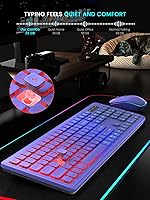
Both the keyboard and mouse produce noticeably less sound than conventional peripherals — a difference that users working in shared bedrooms, dorm rooms, or near sleeping partners specifically call out as a deciding factor in their purchase. The membrane keys and softened mouse clicks are genuinely well suited to quiet shared environments.
At higher typing speeds the keyboard is still audible in a silent room, so anyone expecting near-silent performance comparable to a butterfly-switch laptop keyboard may find it falls short of that bar. The noise reduction is real and meaningful, but this combo does not qualify as a truly silent typing solution.
OS Compatibility
86%
The one-key system switching between Windows and macOS works without re-pairing or driver changes, saving real time for buyers who move between both platforms throughout the workday. Users in mixed-device households consistently describe this as one of the more underrated practical features of the set.
The switching is limited to Windows and macOS, and users on Chrome OS, Linux, or other platforms report inconsistent results with no official support documentation to guide them through workarounds. Some Mac-specific key labeling is also imprecise, requiring a short period of trial and error during initial setup.
Ergonomics
67%
33%
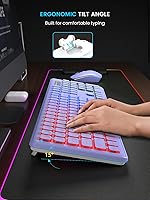
The adjustable tilt legs on the keyboard let users find a more comfortable typing angle than a flat surface allows, which buyers who type for extended stretches appreciate across longer workdays. The full-size layout also provides adequate key spacing for most hand sizes without feeling cramped.
The mouse shape is fairly generic and offers little in the way of palm support or contoured grip, which can become uncomfortable during extended sessions for users with larger hands or specific grip preferences. No wrist rest or ergonomic accessory is included in the package to address this gap.
Aesthetics
76%
24%
The purple colorway stands out immediately against competitors that default to matte black, and the rainbow backlighting gives the desk setup a cohesive visual character that buyers personalizing their workspace respond to positively. The matching finish between keyboard and mouse gives the pairing a deliberate, put-together look.
The visual appeal depends entirely on personal taste — buyers who prefer minimalist or professionally understated setups may find the rainbow LEDs and purple finish more distracting than appealing in a work context. The glossy plastic surfaces also pick up fingerprints and smudges more readily than matte-textured alternatives.
Sleep Mode
61%
39%
The auto-sleep function extends battery life between charges in a meaningful way, and the keyboard's 30-minute inactivity threshold is long enough that most users are not frequently interrupted by having to wake it mid-session. Both devices resume with a single keypress or mouse movement.
The mouse's 90-second sleep timer is the main friction point — buyers who pause to think, read, or reference notes regularly encounter the brief wake-up lag and find it genuinely disruptive when it compounds over a full workday. Several reviewers specifically flag this as an annoyance they did not anticipate before buying.
Port Efficiency
87%
Using a single USB receiver for both devices is a practical advantage that laptop users with limited ports especially appreciate, and the included USB-C adapter means most modern ultrabooks are fully covered without needing an additional hub. Setup is frictionless in this regard for the vast majority of users.
The proprietary receiver pairing means a lost dongle effectively renders both devices unusable, and replacement availability through SABLUTE's support channels is uncertain and not well-documented publicly. This risk is common across budget wireless combos, but it is a real consideration worth understanding before committing to the purchase.

Suitable for:

The SABLUTE Wireless Backlit Keyboard and Mouse Combo is a strong pick for anyone who works or studies in a shared living space and needs peripherals that simply will not disturb the people around them. The soft membrane keys and noticeably quieter mouse make it a genuinely practical choice for late-night sessions, open-plan offices, or situations where a partner or roommate is easily bothered by clatter. Students putting together a first proper desk setup will appreciate how little friction is involved — plug the receiver in and you are typing within seconds, no drivers or configuration required. People who bounce between a Mac and a Windows machine will find the one-key system switching genuinely useful, especially if they have been manually swapping peripherals until now. The built-in rechargeable battery also removes one of the more tedious parts of peripheral ownership, since most users will go months before needing to top either device up. For anyone who wants a visually distinctive setup without chasing premium price tags, the purple backlit aesthetic adds real personality to a category otherwise dominated by identical-looking black plastic.

Not suitable for:

The SABLUTE Wireless Backlit Keyboard and Mouse Combo is not the right fit for anyone who types heavily and expects a satisfying tactile response from their keys. If you have spent meaningful time on mechanical keyboards — even budget ones — the soft membrane feel here will likely register as flat and uninspiring, and no amount of colorful lighting will compensate for that. Writers, coders, or data-entry professionals who clock long daily hours at the keyboard may find the typing experience fatiguing over extended sessions. The all-plastic build, while expected at this price point, will feel noticeably lightweight to buyers accustomed to mid-range or premium peripherals, and that impression can reasonably raise questions about long-term durability. The mouse sleep mode has also drawn some criticism for being slightly slow to wake, which is a small but real annoyance for anyone who frequently steps away from the desk mid-task. And if a full numpad, dedicated media controls, or any specialized input layout is a requirement, this straightforward combo simply does not provide them.

Specifications

  • Connectivity: Both the keyboard and mouse connect via 2.4GHz USB wireless technology through a single shared receiver.
  • Wireless Range: The wireless connection supports a range of up to 33 feet under typical line-of-sight conditions.
  • USB Receiver: One USB receiver pairs with both devices simultaneously, eliminating the need for separate dongles.
  • Adapters: The package includes both a USB-A and a USB-C adapter to support a broader range of host devices.
  • Key Type: The keyboard uses soft membrane switches, which produce a quieter, cushioned keystroke compared to mechanical alternatives.
  • Backlighting: Rainbow LED backlighting is built into the keyboard with multiple adjustable brightness levels controlled directly from the keys.
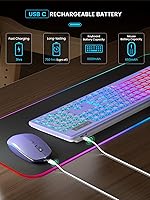
  • Keyboard Standby: With the backlight disabled, keyboard standby battery life is rated at up to 365 days.
  • Mouse Standby: The mouse is rated for up to 270 days of standby battery life under normal usage patterns.
  • Sleep Mode: The keyboard automatically sleeps after 30 minutes of inactivity, while the mouse enters sleep after 1.5 minutes.
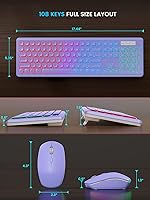
  • Keyboard Size: The keyboard measures 17.44 x 5.35 x 1.18 inches and includes adjustable tilt legs for ergonomic positioning.
  • Combined Weight: The keyboard and mouse together weigh 1.54 pounds, keeping the overall package lightweight and easy to reposition.
  • Battery Type: Both devices are powered by built-in lithium-ion batteries that are rechargeable and come pre-included in the box.
  • OS Support: The combo is compatible with Windows and macOS, with one-key system switching that requires no re-pairing.
  • Setup: No driver installation is required; the keyboard and mouse operate as plug-and-play devices on all supported systems.
  • Power Indicator: Both devices include a low-battery indicator light that flashes when the charge level drops critically low.
  • Color Variant: The variant reviewed features a purple finish on both the keyboard and mouse with coordinated LED illumination.

Related Reviews
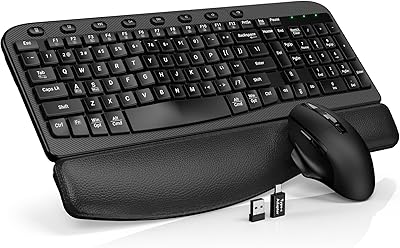
SABLUTE KC15 Wireless Ergonomic Keyboard Mouse Combo
76%
76%
Ergonomic Comfort
68%
Palm Rest Quality
82%
Mouse Silence & Click Feel
73%
Mouse DPI & Tracking
71%
Keyboard Typing Feel
More
BAIHUAFRU Wireless Backlit Keyboard and Mouse Combo
76%
88%
Visual Design & Aesthetics
84%
Lighting Customization
81%
Wireless Connectivity & Range
73%
Battery Life (Keyboard)
61%
Battery Life (Mouse)
More
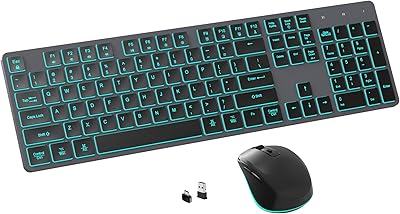
POWZAN RF425-Backlit Wireless Keyboard Mouse Combo
75%
83%
Typing Noise Level
79%
Typing Comfort
86%
Mouse Jiggler Feature
61%
Battery Life
88%
Cross-Platform Compatibility
More
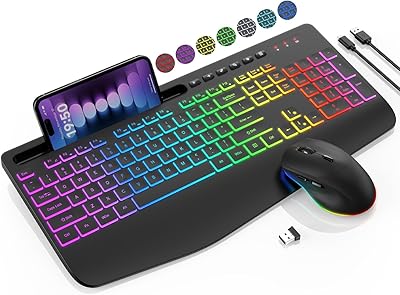
SABLUTE KL3 Pro
SABLUTE KL3 Pro
76%
91%
Value for Money
83%
Typing Comfort
88%
Key Quietness
79%
RGB Lighting Quality
67%
Mouse Performance
More
Luzarriba Large Print Backlit Wireless Keyboard and Mouse Combo
78%
91%
Key Visibility & Readability
94%
Ease of Setup
67%
Backlight Quality
83%
Wireless Reliability
61%
Mouse Comfort & Usability
More
Arteck HW192 Wireless Keyboard and Mouse Combo
78%
78%
Build Quality
72%
Typing Experience
63%
Mouse Comfort & Ergonomics
81%
Battery Life
69%
Wireless Connectivity
More
JOYACCESS Wireless Keyboard and Mouse Combo
82%
88%
Value for Money
83%
Typing Experience
74%
Mouse Performance
86%
Backlight Quality
81%
Battery Life
More
CHESONA Multi-Device Wireless Keyboard and Mouse Combo
79%
88%
Multi-Device Switching
81%
Keyboard Typing Feel
61%
Mouse Quality
84%
Battery Life
74%
Wireless Connectivity Stability
More
ULSOU Wireless Ergonomic Keyboard and Mouse Combo
74%
88%
Value for Money
84%
Typing Comfort
86%
Key Noise Level
57%
Key Feel & Tactility
61%
Mouse Performance
More
FOPETT Retro Wireless Keyboard and Mouse Combo
82%
93%
Design & Aesthetics
76%
Typing Experience
67%
Mouse Performance
88%
Wireless Connectivity
91%
Battery Life
More

FAQ

No, there is nothing to install. Plug the USB receiver into an available port on your computer, switch both devices on, and they should be recognized and ready within a few seconds. It works the same way on Windows and macOS with no configuration needed.

Yes, and this is one of the more practical features on this set. A dedicated key on the keyboard lets you toggle between macOS and Windows modes on the fly without unplugging anything or starting a fresh pairing process. Both devices adapt together with a single press, which makes the transition quick and unobtrusive.

With the backlight off, the keyboard holds up for several weeks to a couple of months of typical 9-to-5 use, which broadly matches what the manufacturer claims. The mouse will need charging more frequently, though still far less often than a disposable-battery device would need fresh cells. Running the LEDs continuously shortens those intervals noticeably, so keeping brightness low or off makes a real difference if longevity matters to you.

The difference is real. The click has a soft, muted character rather than the sharp snap of a standard office mouse, and it is unlikely to bother someone sitting nearby in a shared space. It is not completely silent at higher speeds, but the reduction in noise is noticeable enough that most users in shared households or open offices will appreciate it.

This is worth knowing upfront: the receiver is paired specifically to your keyboard and mouse, so a generic third-party dongle will not work as a substitute. If it gets lost, your best option is to contact SABLUTE directly and ask about obtaining a replacement receiver for your unit. This limitation is common across budget wireless combos and is not unique to this one, but it is a good reason to keep the dongle somewhere safe.

With the backlight off, you can realistically go weeks — and sometimes considerably longer — between keyboard charges on a normal work schedule. The mouse will need attention more frequently, though a short charge over a weekend is typically enough to last through the following week. Both devices have low-battery indicator lights that flash when it is time to plug in, so you will not be caught completely by surprise.

Yes, noticeably so. The standby figures assume the backlight is off or in sleep mode, and continuous full-brightness LED use can bring the keyboard charge cycle down from months to just a few weeks. The auto-sleep feature helps by cutting the backlight during inactivity, which keeps consumption manageable. If maximizing time between charges is a priority, running the brightness at a lower setting makes a meaningful difference.

Nothing is wrong — that brief pause is the mouse waking from its auto-sleep mode, which activates after roughly 90 seconds of inactivity. The wake-up takes only a fraction of a second, but it can feel jarring if you are not expecting it. A handful of buyers have flagged this in their reviews as a mild annoyance, and it is worth knowing about before you buy. Moving the mouse or clicking will always bring it back immediately.

The SABLUTE Wireless Backlit Keyboard and Mouse Combo is rated for up to 33 feet of wireless range, so a 20-foot distance from a couch to a TV setup should fall well within that limit under normal conditions. Interference from nearby wireless devices or USB 3.0 ports can occasionally reduce effective range, but most users in open living spaces report a stable, lag-free connection. If you notice any signal inconsistency, positioning the receiver in a clear line of sight or using a short USB extension cable can help.
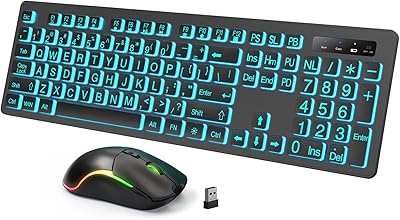
Lightweight plastic construction is standard for peripherals at this price point and does not automatically signal poor durability. Based on buyer feedback, this backlit keyboard and mouse set holds up reliably through months of everyday home and office use for most people. That said, it is not built for rough treatment, and anyone accustomed to the heft of mid-range or premium peripherals will notice the difference in feel. Treat it reasonably and it should last without issue.