Overview

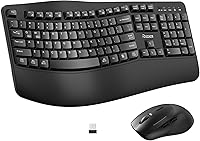
The RECCAZR Wave Keys Ergonomic Wireless Keyboard Mouse Combo enters a crowded market with a clear pitch: ergonomic comfort without a steep price. RECCAZR launched this wireless keyboard and mouse bundle in early 2025, targeting office workers and home users who spend long hours at a desk. What separates it from a standard flat combo is the wave-shaped key layout and an attached wrist rest — practical touches that similarly priced competitors often leave out. A single nano USB receiver handles both devices, which keeps cable clutter minimal. It competes directly with established options like the Logitech MK550 but at a noticeably lower price point.
Features & Benefits

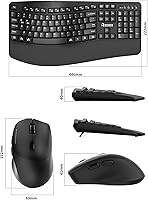
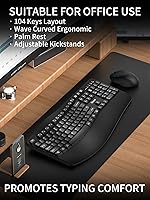
The wave-key keyboard set's most practical asset is its key geometry. The gentle curve across the rows nudges your hands into a slightly more natural angle, which may reduce wrist strain over a long workday compared to a traditional flat board. The attached cushioned wrist rest reinforces that comfort without requiring a separate purchase. The bundled mouse punches above its weight by offering genuinely quiet clicks — noticeably softer in a shared office or late-night setting. Three DPI settings (800, 1200, and 1600) give you enough range for both precise work and faster navigation. The spill-resistant keyboard with drain holes is a small but welcome safety net for clumsy moments.

Best For

This ergonomic combo is a natural fit for office workers who type through most of the day and have started noticing wrist fatigue with flat keyboards. It also works well for remote workers or students in quiet environments — the silent mouse means you are not that person clicking loudly during a video call or in a library. The full-size layout with numpad makes it genuinely useful for anyone doing spreadsheet work or data entry. Plug-and-play setup covers both Windows and Mac without any driver hunting. Just keep in mind that two AA batteries are required but not included in the box.

User Feedback

Early buyers of this wireless keyboard and mouse bundle are largely positive, with the wrist rest drawing consistent praise from people who type for hours at a stretch. The quiet mouse gets frequent shoutouts from those sharing office space or working at odd hours. That said, opinions on the mouse weight are split — some find it refreshingly light, while others wish for a bit more heft. The absence of keyboard backlighting is a genuine gap flagged by multiple reviewers who work in dim rooms. It is also worth noting that this combo only hit shelves in January 2025, so long-term durability remains an open question. The current 4.3-star average across nearly 500 ratings is encouraging, but more time is needed to judge how it holds up.

Pros

  • Wave-key layout encourages a more natural wrist angle that may reduce fatigue during long typing sessions.
  • Attached wrist rest comes built in, so there is no separate accessory to buy or position.
  • Silent mouse clicks are genuinely quiet — a practical benefit in shared offices, libraries, or late-night work.
  • One nano USB receiver powers both devices, keeping your USB ports and desk setup clean.
  • Full 104-key layout with numpad makes this ergonomic combo practical for data entry and spreadsheet work.
  • Plug-and-play on both Windows and Mac — no drivers, no software, no setup headaches.
  • Spill-resistant keyboard design with drain holes provides a real safety net for accidental desk spills.
  • Three adjustable DPI levels cover the range most office users actually need day to day.
  • At this price tier, the feature set — wrist rest, silent mouse, wireless, ergonomic keys — is genuinely competitive.
  • Forward and back navigation buttons on the mouse add useful convenience for browser-heavy workflows.

Cons

  • No backlighting at all, making this a poor choice for anyone working in dim or dark environments.
  • AA batteries are not included in the box, which catches many buyers off guard on day one.
  • Losing the nano USB receiver disables both devices simultaneously, with no backup pairing option.
  • Mouse housing feels noticeably less solid than the keyboard, with a hollow plastic quality under pressure.
  • No Bluetooth support limits flexibility for users who switch between devices or prefer dongle-free setups.
  • Mouse weight divides opinion — users accustomed to a heavier mouse may find it feels imprecise.
  • Long-term durability is still an open question given the product only launched in January 2025.
  • The wrist rest is permanently attached, which is inconvenient for users who prefer a cleaner desk footprint.
  • DPI adjustment is limited to three fixed steps with no software customization available.
  • The full-size width of over 17 inches makes it impractical for small desks or shared hot-desk setups.

Ratings

The scores below for the RECCAZR Wave Keys Ergonomic Wireless Keyboard Mouse Combo were generated by our AI engine after analyzing verified global buyer reviews, with spam, bot submissions, and incentivized feedback actively filtered out. Each category reflects real-world usage patterns drawn from hundreds of honest purchaser experiences. Both the strengths that keep buyers satisfied and the friction points that prompt complaints are transparently represented in every score.
Typing Comfort
83%
The wave-key layout genuinely shifts hand posture in a way that flat keyboards do not, and most long-session typists notice the difference within a day or two. The attached wrist rest gets consistent praise from people doing administrative work, data entry, or writing for six or more hours at a stretch.
The wrist rest is non-removable, which frustrates users who prefer a cleaner desk profile or already own a separate ergonomic pad. A small number of buyers with larger hands feel the wave curve does not go deep enough to make a meaningful difference.
Mouse Feel & Handling
67%
33%
For users who prefer a lighter mouse, this one is a pleasant surprise — it glides easily and does not tire the hand during long browsing or document review sessions. The sculpted shape fits a right-handed grip reasonably well for average hand sizes.
Opinion on the weight is genuinely divided; buyers accustomed to a heavier, more substantial mouse often find this one feels cheap or imprecise. A few users also note the mouse could benefit from a rubberized grip surface to prevent slipping during extended use.
Noise Level
91%
The silent mouse clicks are one of the most consistently praised aspects across all reviews. Office workers, night-shift remote workers, and students in library settings all highlight how much quieter this combo is compared to standard click mechanisms — a real daily-life benefit in shared spaces.
The keyboard itself is not marketed as silent, and while it is not unusually loud, it is not a whisper either. Users in very noise-sensitive environments should be aware that the quiet advantage is primarily on the mouse side.
Wireless Connectivity
86%
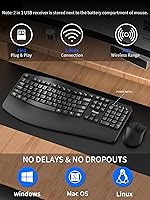
The single nano receiver handling both devices is a practical touch that most buyers appreciate — one USB port occupied, no pairing headaches, and no software to install. The 10-meter range proves more than sufficient for typical home office and desk setups.
Because both devices share one receiver, losing or damaging that tiny dongle effectively disables the entire combo. A handful of users also report occasional brief dropouts in environments with heavy 2.4GHz interference, such as crowded Wi-Fi offices.
Value for Money
88%
At this price tier, getting an ergonomic keyboard with an attached wrist rest, a silent mouse, and a shared wireless receiver in one package is genuinely competitive. Buyers frequently note they expected less and were pleasantly surprised by the overall build and feature set.
More established competitors like the Logitech MK550 carry a longer reliability track record, which some value-conscious buyers factor into their decision. The lack of included batteries is a minor but recurring annoyance that adds a small hidden cost to the first-day experience.
Build Quality
71%
29%
The keyboard chassis feels solid enough for daily office use, and the spill-resistant design with drain holes adds real peace of mind for anyone prone to desk accidents. Most buyers report no creaking or flex in the keyboard deck after weeks of use.
The mouse housing feels noticeably less premium than the keyboard, with a slightly hollow plastic feel under pressure. Given that this product only launched in early 2025, there is not yet enough long-term owner data to assess how either device holds up beyond six months of daily use.
Key Feel & Feedback
74%
26%
The keys have a light-to-moderate actuation feel that works well for fast typists and reduces finger fatigue during long documents or coding sessions. Most buyers coming from a membrane keyboard will find the feedback familiar and comfortable right away.
Enthusiasts expecting any tactile crispness will be disappointed — this is a soft membrane board, not a mechanical one. A few users mention that certain keys, particularly in the function row, feel slightly mushier than the main alphanumeric keys.
Setup & Compatibility
93%
Plug-and-play setup is genuinely hassle-free; insert the receiver, and both devices are recognized immediately on Windows and macOS without any driver downloads or configuration steps. Buyers who switch between work and personal machines appreciate how frictionless the process is.
There is no Bluetooth option, so users who rely on wireless dongles for multiple devices on a single machine may find the USB port trade-off less convenient. Chromebook compatibility is not officially confirmed, and a small number of users report inconsistent key mapping on that platform.
Ergonomic Design
78%
22%
The combination of the wave curve, the cushioned wrist rest, and the foldable tilt legs gives users several ways to tune their typing angle, which is uncommon at this price. Workers who have switched from flat keyboards report that wrist tension may noticeably decrease after an adjustment period of a few days.
It is important not to overstate the ergonomic credentials here — this is a consumer comfort product, not a clinical device. Users with existing wrist conditions like carpal tunnel should consult a professional rather than relying on this combo as a treatment solution.
Mouse DPI & Precision
69%
31%
Three switchable DPI levels cover the practical range for most office tasks, from careful spreadsheet work at 800 DPI to faster navigation at 1600. The dedicated DPI button is easy to reach without disrupting workflow.
The 1600 DPI ceiling is limiting for users who also want to use this mouse for casual gaming or high-resolution display work. The DPI steps also jump in fairly coarse increments, so there is no fine-tuning between the three preset levels.
Spill Resistance
76%
24%
The drain hole design offers a real-world safety margin for minor spills, which is a thoughtful touch in a product aimed at desk workers who keep drinks nearby. Several buyers specifically mention this as a deciding factor over competing combos that lack any liquid protection.
This is spill resistance, not waterproofing — a full cup of liquid will still cause damage if not dealt with quickly. The process of disconnecting and drying the board before resuming use is cumbersome, and there is no guidance on how long the drying period should last.
Mouse Button Layout
72%
28%
The inclusion of forward and back navigation buttons on the mouse side is a genuine workflow benefit for researchers, web developers, and anyone who spends a lot of time in a browser. These extra buttons are often missing on mice bundled at this price point.
The side buttons are positioned slightly forward on the body, which can lead to accidental presses for users with larger hands during normal grip adjustments. There is no software to remap these buttons, so their function is fixed.
Keyboard Layout & Key Coverage
84%
The full 104-key layout with a dedicated numpad is a meaningful advantage over compact or tenkeyless alternatives for anyone doing accounting, data entry, or spreadsheet-heavy work. Function keys are full-size and clearly labeled, which matters for productivity shortcuts.
There is no backlighting of any kind, which is the single most common complaint from buyers who work in dim rooms or at night. This is a hard limitation with no workaround, and it is likely to be a dealbreaker for some otherwise interested buyers.
Portability & Form Factor
61%
39%
At just under 2.6 pounds for the full package, the combo is light enough to move between a home office desk and a kitchen table without much hassle. The nano receiver tucks neatly into the mouse when not in use, reducing the risk of losing it during transport.
The full-size keyboard is genuinely large — over 17 inches wide — so it is not a practical choice for anyone working from a small desk, a laptop bag, or a shared hot-desk setup. Users who travel frequently with their peripherals will likely prefer a more compact option.
Battery Life
79%
21%
Most buyers report that the keyboard battery lasts several months under regular use before needing replacement, which aligns with typical 2.4GHz wireless keyboards in this category. The mouse battery life also draws minimal complaints in the existing reviews.
Both devices run on AA batteries that are not included in the box, which is an easy-to-miss detail when ordering. There is no low-battery indicator light or software alert, so users may only discover a dead battery mid-workday without warning.

Suitable for:

The RECCAZR Wave Keys Ergonomic Wireless Keyboard Mouse Combo is a strong pick for office workers and home users who spend the better part of their day typing and have started feeling the strain of a flat, standard keyboard. The wave-shaped key layout and built-in wrist rest may help reduce hand fatigue over long sessions, making it particularly appealing to administrative professionals, writers, and anyone doing heavy data entry or spreadsheet work where a full numpad matters. Remote workers sharing a home with others, students working in libraries, or professionals in open-plan offices will genuinely appreciate the silent mouse — it is noticeably quieter in practice, not just on paper. The plug-and-play setup over a single nano USB receiver means Windows and Mac users can be up and running in under a minute, with no drivers to hunt down or software to configure. If you are upgrading from a basic flat combo for the first time and do not want to spend a lot to find out whether an ergonomic layout suits your working style, this wireless keyboard and mouse bundle is a sensible, low-risk entry point.
Not suitable for:

The RECCAZR Wave Keys Ergonomic Wireless Keyboard Mouse Combo has clear limitations that make it the wrong choice for certain buyers, and it is worth being honest about them. Anyone who regularly works in a dim or low-light environment will hit a hard wall immediately — there is no backlighting of any kind, and that cannot be added after the fact. Users who prefer a heavier, more substantial mouse with a rubberized grip will likely find the included mouse underwhelming, and since both devices are tied to a single non-replaceable nano receiver, losing that dongle means the whole combo stops working. Mechanical keyboard enthusiasts, gamers needing DPI above 1600, or power users who want Bluetooth connectivity and multi-device pairing should look elsewhere — this ergonomic combo is built for straightforward office use, not for demanding or flexible setups. Finally, because this product only launched in early 2025, buyers who prioritize proven long-term reliability may prefer a more established alternative like the Logitech MK550, which carries years of real-world durability data behind it.
Specifications

  • Brand: Manufactured and sold by RECCAZR, a brand focused on affordable ergonomic peripherals.
  • Connection Type: Both keyboard and mouse connect wirelessly via a shared 2.4GHz nano USB receiver.
  • Wireless Range: The combo maintains a stable connection at distances of up to 10 meters (33 feet) from the receiver.
  • Keyboard Layout: Full-size 104-key layout including a dedicated numeric keypad and a complete row of function keys.
  • Key Design: Wave-shaped ergonomic key layout with a cushioned, non-detachable wrist rest and foldable tilt legs.
  • Mouse DPI: Three-level adjustable DPI with settings of 800, 1200, and 1600, switchable via a dedicated button.
  • Mouse Clicks: Silent click mechanism engineered to reduce click noise by approximately 90% compared to standard mouse buttons.
  • Spill Resistance: Keyboard features a spill-resistant construction with bottom drain holes designed to manage minor liquid spills.
  • Power Source: Requires 2 AA batteries (not included in the package) to operate both devices.
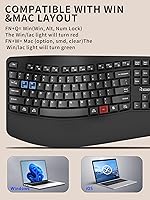
  • Compatibility: Compatible with Windows XP, Vista, 7, 8, 10, and 11, as well as macOS, with no driver installation required.
  • Package Dimensions: The full package measures 17.87 x 10.83 x 2.28 inches.
  • Item Weight: The complete package weighs 2.57 pounds including keyboard, mouse, and receiver.
  • Color: Available in Black only.
  • Receiver Sharing: Both devices share a single nano USB receiver, and each can also be used independently if needed.
  • Backlighting: No backlighting of any kind is present on the keyboard or mouse.
  • Navigation Buttons: Mouse includes dedicated forward and back navigation buttons for browser and file navigation.
  • Date Available: First made available for purchase in January 2025.
  • BSR Ranking: Ranked #92 in the Computer Keyboard and Mouse Combos category on Amazon at time of review.

Related Reviews

Lomiluskr Wireless Ergonomic Keyboard and Mouse Combo
84%
88%
Ergonomics & Comfort
79%
Wireless Performance
85%
Build Quality
75%
Mouse Sensitivity
92%
Ease of Setup
More
PEIOUS Wireless Ergonomic Keyboard and Mouse Combo
74%
78%
Ergonomic Comfort
74%
Typing Feel & Key Response
69%
Mouse Ergonomics
83%
Wireless Reliability
61%
Build Quality & Durability
More
GAMCATZ Ergonomic Wireless Keyboard and Mouse Combo
86%
90%
Ergonomics & Comfort
87%
Typing Experience
92%
Battery Life
85%
Build Quality
88%
Noise Level
More
JOYACCESS Ergonomic Wireless Keyboard and Mouse Combo
86%
88%
Ergonomics and Comfort
90%
Wireless Range and Connectivity
93%
Mouse Performance and Noise
70%
Keyboard Responsiveness
85%
Build Quality
More
E-YOOSO Ergonomic Wireless Keyboard and Mouse Combo
84%
88%
Ergonomic Comfort
91%
Wireless Connectivity
94%
Ease of Setup
82%
Design and Build Quality
85%
Mouse Performance
More
Nulea KM75
Nulea KM75
76%
83%
Ergonomic Comfort
79%
Memory Foam Palm Rest
76%
Keyboard Typing Feel
72%
Mouse Ergonomics
74%
Multi-Device Switching
More
Nulea RT08 Wave Keys Wireless Ergonomic Keyboard
89%
95%
Typing Comfort
93%
Ergonomic Design
88%
Build Quality
91%
Wireless Stability
90%
Key Response Consistency
More
ProtoArc EKM01 Plus Ergonomic Wireless Keyboard Mouse Combo
83%
88%
Ergonomics and Comfort
90%
Connectivity and Multi-device Support
85%
Battery Life and Rechargeability
82%
Build Quality and Durability
80%
Typing Experience
More
MEETION Director-D-2 Ergonomic Wireless Keyboard and Mouse Combo
85%
88%
Ergonomic Comfort
91%
Wireless Connectivity
86%
Battery Life
89%
Mouse Precision (DPI Settings)
62%
Key Quietness
More
Perixx Periduo-605 Wireless Ergonomic Split Keyboard and Vertical Mouse Combo
85%
89%
Ergonomic Comfort
94%
Ease of Setup
87%
Wireless Connectivity
85%
Build Quality
72%
Keyboard Layout
More

FAQ

No, nothing to install. Just plug the nano USB receiver into an available port and both the keyboard and mouse are recognized automatically on Windows and Mac. It is genuinely plug-and-play with no extra steps required.

No, they are not — and this catches a lot of buyers off guard. You will need 2 AA batteries before you can use the combo, so grab a pack before your order arrives if you do not have spares on hand.

They are designed to share a single nano receiver, which is what keeps the setup so clean. The good news is that each device can also function independently if needed, but both still rely on that one receiver — there is no way to pair them to two separate dongles.

It works on both. The wave-key keyboard set is compatible with macOS alongside the full range of Windows versions from XP through 11. Keep in mind that some function key shortcuts may behave differently on Mac since the layout is Windows-oriented, but general typing and mouse use work without issue.

Yes, the difference is genuinely noticeable in a shared space. The click mechanism is meaningfully softer than a standard mouse, and most users in open offices or libraries report that colleagues nearby simply do not register the sound. It is not completely silent, but it is a clear step down in noise compared to typical office mice.

The keyboard has a spill-resistant design with drain holes at the bottom to help channel liquid away from the internals. If it happens, disconnect the receiver immediately, turn the keyboard upside down to let it drain, and let it dry thoroughly before using it again. This design handles minor splashes well, but it is not waterproof — a full cup of liquid is still a risk.

No, the wrist rest is permanently attached to the keyboard body. If you already own a separate ergonomic wrist pad or simply prefer a slimmer profile on your desk, that is worth factoring into your decision before buying.

Unfortunately, yes. Both devices are paired to that single receiver from the factory, and there is no way to re-pair them to a different one. It is a small but real vulnerability — treat the receiver like you would a car key and store it carefully when not in use.

It may help with general typing fatigue thanks to the wave key layout and built-in wrist rest, but it is important to be clear: this is a comfort-oriented consumer product, not a medical device. If you have a diagnosed condition like carpal tunnel syndrome, speak with a healthcare professional about what is appropriate for your situation rather than relying solely on this combo as a solution.

Based on user reports, the keyboard battery tends to last several months under regular daily use, which is consistent with most 2.4GHz wireless keyboards in this category. The mouse battery life is also reported as reasonable. One thing to note is there is no low-battery indicator, so you will not get a warning — the device will simply stop responding when power runs out.