MARVO Wireless Keyboard and Mouse Combo



Overview
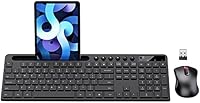
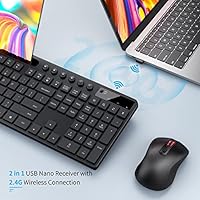
The MARVO Wireless Keyboard and Mouse Combo is a practical, no-frills wireless setup aimed squarely at home office workers and casual desktop users who want reliable daily tools without a steep outlay. It connects via a 2.4G RF USB receiver — plug it in and you are ready to go, with no Bluetooth pairing or driver installation required. The full-size keyboard includes a built-in phone and tablet holder, which keeps your desk a little tidier. It is light, compact enough for smaller workspaces, and works across both Windows and macOS. Not a powerhouse by any stretch, but that is never what it sets out to be.
Features & Benefits
The mouse is the quiet standout here — six-button layout covers back, forward, and DPI cycling alongside the standard left, right, and scroll wheel, and the clicks are genuinely hushed, which matters in shared spaces. You can toggle between 800, 1200, and 1600 DPI on the fly, covering most everyday tasks from browsing to spreadsheet work. The keyboard sits at a slight ergonomic tilt that eases wrist strain during longer sessions, though it is no substitute for a fully dedicated ergonomic board. One thing worth flagging upfront: the red LED blinks for several seconds when you first power on. That is normal, not a defect, and it also signals a low battery when it reappears later.
Best For
This budget-friendly desk combo makes the most sense for remote workers, students, or anyone ditching a tangled wired setup without wanting to overspend. If you regularly prop up a phone or tablet to reference notes, follow a tutorial, or take calls while working, the built-in holder is genuinely useful rather than just a gimmick. It also pairs cleanly with MacBooks, which is less common at this price point than you might expect. Where it falls short is for heavy typists who crave tactile key feedback or power users who need a high-precision mouse. Think of it as a solid daily driver, not a specialist tool.
User Feedback
With a 4.3-star average across more than 8,400 ratings and a top-20 rank in its category, the MARVO keyboard and mouse set clearly earns its reputation at this tier. Buyers consistently highlight the quiet mouse clicks, hassle-free setup, and the practical tablet holder as genuine wins. On the flip side, a few recurring gripes are worth knowing: the key feel will not impress anyone coming from a premium membrane or mechanical board, and batteries are not included — grab a couple of AAs before you unbox it or you will be making an immediate trip to the drawer. Long-term durability reviews are mostly positive, though a handful of users note the keys can feel softer after months of intensive daily use.
Pros
- Plug-and-play setup takes under a minute — no drivers, no pairing process, no frustration.
- Silent mouse clicks make this wireless combo genuinely comfortable to use in shared or quiet environments.
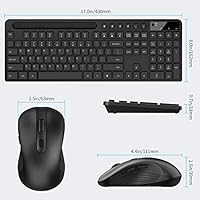
- The built-in 9.84-inch device holder keeps a phone or tablet within sight without adding another accessory to your desk.
- Three DPI levels give everyday users enough cursor speed flexibility for most common tasks.
- Works reliably across both Windows and macOS straight out of the box.
- Full-size keyboard layout means no compromises on number pad or navigation key access.
- 12-month warranty provides meaningful peace of mind at this price tier.
- Lightweight and slim enough to move between workspaces or store easily when not in use.
- The red LED battery indicator gives advance warning before the device loses power entirely.
Cons
- AA batteries are not included — you will need to have some on hand before the combo is ready to use.
- The red LED blinks for several seconds on first power-up, which many buyers initially mistake for a hardware fault.
- Key travel is shallow and mushy by most standards, which becomes fatiguing during long writing sessions.
- Mouse scroll wheel precision degrades noticeably for some users after several months of daily use.
- The device holder angle is fixed, so glare and viewing comfort depend entirely on your desk and lighting setup.
- Keyboard deck flex under firm keystrokes gives the build a noticeably budget-grade feel.
- The nano-receiver must occupy a USB port directly for best performance — USB hub connections can cause occasional dropouts.
- A handful of macOS users report that some shortcut keys do not map intuitively without manual remapping.
- Long-term durability under heavy daily use is below average, with key responsiveness declining after six to twelve months.
Ratings
The MARVO Wireless Keyboard and Mouse Combo has been scored by our AI system after analyzing thousands of verified global buyer reviews, with spam, bot activity, and incentivized feedback actively filtered out. Scores reflect real-world usage patterns across home offices, student setups, and casual desktop environments — strengths and frustrations alike are represented honestly. Where this wireless combo genuinely delivers value, the numbers show it; where it falls short of expectations, those gaps are not glossed over.
Value for Money
Wireless Connectivity
Mouse Performance
Keyboard Typing Feel
Ergonomics & Comfort
Build Quality
Device Holder Utility
Setup & Ease of Use
Battery Life & Management
Cross-Platform Compatibility
Noise Level
Size & Portability
Long-Term Durability
Suitable for:
The MARVO Wireless Keyboard and Mouse Combo is a strong match for remote workers, students, and anyone building a functional home office setup without a large budget. If your daily computing involves emails, documents, web browsing, and video calls rather than intensive design work or gaming, this wireless combo covers the bases without unnecessary complexity. It is particularly well-suited to people who keep a phone or small tablet on their desk for reference — the built-in holder is one of those small conveniences that turns out to be genuinely practical day-to-day. MacBook users who want a full-size keyboard extension will appreciate that it connects cleanly across macOS without any software fuss. It also makes a sensible emergency replacement for anyone whose wired keyboard or mouse has given out and who needs a reliable, zero-hassle solution delivered and running the same day.
Not suitable for:
The MARVO Wireless Keyboard and Mouse Combo is not the right pick for anyone who types heavily for hours at a stretch and cares about key feedback, travel depth, or long-term tactile satisfaction — the membrane keys simply cannot compete with mid-range or premium boards at sustained use. Graphic designers, photo editors, and video professionals will find the mouse tracking too imprecise for detail work, even at the highest 1600 DPI setting. Gamers should look elsewhere entirely; the mouse lacks the polling rate, sensor accuracy, and button programmability that competitive or even casual PC gaming demands. Users with existing wrist or repetitive strain concerns should not rely on the keyboard's mild ergonomic tilt as a therapeutic solution — it is a slight comfort improvement, not a medical-grade design. Finally, buyers who want a completely cable-free desk should note that the 2.4G receiver occupies a USB port, which can be a minor but real inconvenience on laptops with limited connectivity.
Specifications
- Brand: Manufactured by MARVO, a peripheral brand focused on budget-friendly input devices.
- Connection Type: 2.4G RF wireless via a USB nano-receiver that supports both the keyboard and mouse simultaneously.
- Keyboard Type: Full-size membrane keyboard with a built-in ergonomic tilt angle designed to reduce wrist strain during use.
- Device Holder: Integrated top-mounted slot measures 9.84 inches wide, accommodating most smartphones and small tablets.
- Mouse Buttons: Six-button mouse layout includes left click, right click, scroll wheel click, DPI toggle, and two side navigation buttons.
- Mouse DPI: Adjustable cursor sensitivity with three selectable DPI levels: 800, 1200, and 1600.
- Compatible OS: Supports Windows XP, Vista, 7, 8, and 10, as well as macOS operating systems.
- Compatible Devices: Works with laptops, desktop PCs, and smartphones via the USB nano-receiver.
- Power Source: Requires AA batteries for both the keyboard and mouse; batteries are not included in the package.
- Battery Indicator: Red LED light blinks for 5 to 8 seconds on initial power-up and re-activates as a low-battery warning during use.
- Package Dimensions: The retail package measures 17.18 x 8.98 x 1.85 inches, suitable for standard shelf or drawer storage.
- Item Weight: The complete combo weighs 1.68 pounds, making it lightweight and easy to reposition on a desk.
- Color: Available in a matte black finish that reduces visible fingerprints on high-contact surfaces.
- Noise Level: Both the keyboard keystrokes and mouse clicks are designed for low acoustic output, suitable for quiet shared environments.
- Setup Method: Plug-and-play via USB nano-receiver with no driver installation or software configuration required.
- Warranty: MARVO provides a 12-month worry-free warranty with customer service support included.
- Date Available: First made available for purchase on December 23, 2021.
- ASIN: The Amazon Standard Identification Number for this product is B09P33RWFJ.
Related Reviews

Arteck HW192 Wireless Keyboard and Mouse Combo

FOPETT Retro Wireless Keyboard and Mouse Combo

Harburfine Wireless Keyboard and Mouse Combo

cimetech Wireless Keyboard and Mouse Combo

GEEZER Wireless Keyboard and Mouse Combo

Letton Wireless Retro Keyboard and Mouse Combo

KNOWSQT Wireless Keyboard and Mouse Combo

MOFII Wireless Keyboard and Mouse Combo

seenda Wireless Keyboard and Mouse Combo
