Soueto WK713 Wireless RGB Keyboard
Soueto WK713 Wireless RGB Keyboard — image 1
Soueto WK713 Wireless RGB Keyboard — image 2
Soueto WK713 Wireless RGB Keyboard — image 3
Soueto WK713 Wireless RGB Keyboard — image 4
Soueto WK713 Wireless RGB Keyboard — image 5
Soueto WK713 Wireless RGB Keyboard — image 6
Soueto WK713 Wireless RGB Keyboard — image 7
Soueto WK713 Wireless RGB Keyboard — image 8
Soueto WK713 Wireless RGB Keyboard — image 9
78%
22%

Overview

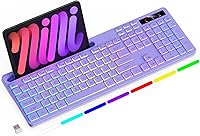
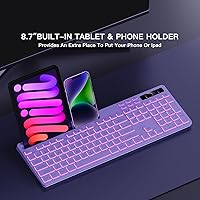
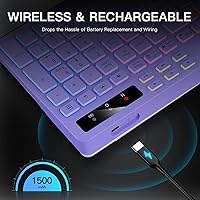
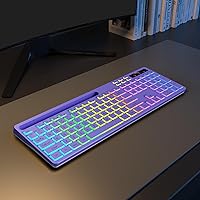
The Soueto WK713 Wireless RGB Keyboard is a full-size budget peripheral that punches above its price point in at least one obvious way: it looks good on a desk. The purple colorway and color-cycling backlight give it a personality that most keyboards in this range simply skip. What makes it stand out physically is the built-in device holder — an 8.7-inch slot that props up a phone or tablet right at your fingertips. Connectivity relies on a 2.4GHz RF dongle rather than Bluetooth, so pairing to a single machine is quick, but switching between devices is not an option. A rechargeable 1500mAh battery rounds out the practical side of the package.

Features & Benefits

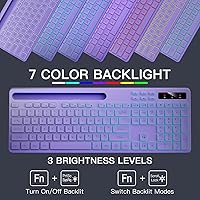
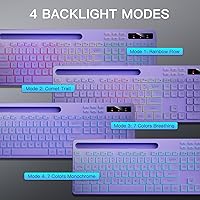
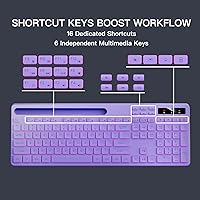
The backlight on this wireless keyboard cycles through seven colors across four distinct modes, and you can dial the brightness up or down depending on your environment — a small touch that makes a real difference in a dim room. The integrated device holder is wide enough to seat most smartphones and slim tablets upright without wobbling, which genuinely cuts down on desk clutter. Keys are membrane-based with a quiet tactile response, so they won't disturb a sleeping roommate or an open video call. The full-size layout keeps the numpad and multimedia shortcut keys intact, and setup takes about ten seconds: plug in the USB-A dongle and you're typing with no software required.

Best For

This backlit keyboard makes the most sense for students, home office workers, and casual users who want something that looks sharp on their desk without the cost of a dedicated gaming peripheral. If you regularly keep a phone or tablet propped up next to your PC for reference, the built-in stand alone is worth considering. Mac and Windows compatibility works out of the box, so there is no OS-specific hassle. That said, this is not a keyboard for competitive gamers or heavy typists who prioritize tactile feedback — the membrane keys get the job done, but they won't satisfy anyone coming from a mechanical board. It also makes a solid gift choice for younger users who appreciate the visual flair.

User Feedback

Across more than 675 ratings, the Soueto board holds a 4.2-star average — a score that suggests general satisfaction rather than a product with nothing to criticize. Buyers consistently call out the lighting quality and the convenience of the device holder as genuine highlights. On the other side, a recurring concern is that the typing feel falls short for users who have used higher-end keyboards, and a handful of buyers have flagged inconsistent battery performance over extended use. Build quality opinions are mixed — most find it acceptable for the price, but a few have noted some key wobble. Overall, it is a fair deal for what it offers, as long as expectations are calibrated accordingly.

Pros

  • The built-in device holder is a practical desk organizer that most keyboards at this price simply do not offer.
  • Seven-color backlighting with four modes gives you real customization, not just a single static color.
  • Plug-and-play USB-A dongle means no software downloads or driver headaches on either Windows or Mac.
  • A rechargeable lithium-ion battery removes the ongoing cost and waste of disposable AA batteries.
  • Quiet membrane keys are considerate in shared spaces like offices, dorms, or late-night home setups.
  • The full-size layout keeps the numpad and multimedia keys intact, which many compact budget boards sacrifice.
  • At over 675 ratings and a 4.2-star average, buyer satisfaction is genuinely strong for a budget peripheral.
  • The purple colorway and light-up keys give the desk setup a polished, intentional look without extra accessories.

Cons

  • Membrane keys lack the tactile punch of mechanical switches, which some typists will notice immediately.
  • Only one device can be connected at a time — no Bluetooth means no easy switching between a phone, tablet, or second computer.
  • Battery performance has been inconsistent for some buyers, with discharge faster than the specs might suggest under heavy use.
  • Build quality is plastic and light, and a few users have reported minor key wobble over time.
  • The USB-A dongle is easy to lose, and there is no backup or replacement included in the box.
  • No per-key lighting customization or dedicated software, so advanced RGB control is off the table.
  • At 1.54 pounds, the keyboard feels lighter than expected, which some users interpret as less durable.
  • The device holder works well for phones but may feel tight or awkward with larger tablets in protective cases.

Ratings

The scores below reflect our AI-driven analysis of verified global buyer reviews for the Soueto WK713 Wireless RGB Keyboard, with spam, bot activity, and incentivized feedback actively filtered out before scoring. Each category captures both what real users genuinely appreciated and where they ran into frustration, giving you an honest picture of where this backlit keyboard delivers and where it falls short.

Value for Money
83%
For a full-size keyboard with built-in backlighting, a rechargeable battery, and an integrated device holder, most buyers feel they are getting more than their money's worth. The combination of features at this price tier is hard to match, and first-time buyers in particular are consistently impressed by the out-of-box experience.
A small but vocal segment of buyers feels that the typing feel and build materials do not quite justify the cost when compared to similarly priced mechanical alternatives. Expectations matter here — buyers upgrading from a premium board may feel the gap more sharply.
Ease of Setup
91%
Plug the USB-A dongle in and start typing — that is genuinely all it takes. Users on both Windows and Mac report that the keyboard is recognized instantly with no driver downloads or configuration steps, which makes it a stress-free choice for less tech-savvy buyers or anyone who just wants things to work.
Because everything runs through a single dongle, users who expected Bluetooth pairing or multi-device switching were caught off guard. The setup is simple only if your workflow involves one device; otherwise, the lack of flexibility becomes an immediate friction point.
Typing Experience
61%
39%
For light everyday typing — emails, documents, browsing — the quiet membrane keys get the job done without any learning curve. Users who have never owned a mechanical keyboard tend to find the feel perfectly acceptable, and the low noise level is frequently mentioned as a genuine plus in shared environments.
Anyone coming from a mechanical board will notice the softer, mushier feedback right away. Extended typing sessions revealed fatigue for some users, and a handful reported that certain keys felt slightly inconsistent in actuation force, which is a known limitation of budget membrane designs.
Backlight Quality
84%
The seven-color cycling backlight is vivid and eye-catching, especially in dim rooms, and buyers regularly describe it as looking far more premium than the price suggests. Having four distinct modes rather than a single static color gives users real control over the ambiance at their desk.
There is no per-key customization and no companion software to fine-tune effects, which limits what enthusiasts can do with the lighting. A few users also noted that brightness uniformity across the board is slightly uneven, with edge keys appearing marginally dimmer than central ones.
Device Holder
88%
This is the feature that genuinely surprises buyers — having a stable, built-in slot to prop up a phone or tablet while working or watching a video removes the need for a separate stand entirely. Users who keep a second screen or reference device nearby during work call it one of the most practical keyboard additions they have encountered.
The holder is fixed at a single angle with no tilt adjustment, and users with larger tablets in thick protective cases find the fit uncomfortably snug. It works best with slim devices, and those with oversized phones or 11-inch-plus tablets may find the slot too narrow for daily use.
Battery Life
66%
34%
With the backlight turned off or dimmed, several users report getting through a full work week on a single charge, which is a solid result for a keyboard in this category. The rechargeable design is consistently appreciated — no scrambling for AA batteries mid-session.
When the backlight is running at full brightness, battery drain is noticeably faster, and some users found themselves recharging every two to three days rather than weekly. A handful of buyers flagged that battery performance seemed to degrade noticeably after several months of regular use.
Build Quality
62%
38%
For a budget peripheral, the keyboard feels reasonably solid during normal desk use, and the majority of buyers report no structural issues after weeks of daily typing. The keycaps have a smooth finish that holds up well to regular contact without obvious wear in the short term.
The overall chassis feels lightweight to the point of feeling fragile, and some users noted minor flex when pressing firmly on the center of the board. A recurring complaint involves slight wobble on a few individual keys, particularly in the bottom row, which can become distracting over time.
Wireless Stability
79%
21%
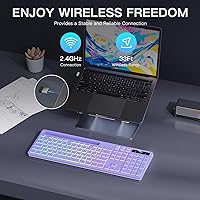
Within a normal desk setup — keyboard sitting directly in front of the connected computer — the 2.4GHz RF connection is rock-solid with no perceptible input lag or dropout. Buyers using it for everyday productivity and casual gaming consistently describe the connection as reliable and responsive.
At greater distances or in environments with significant wireless interference, a few users reported occasional stuttering or brief disconnections. The dongle also sits somewhat exposed in a USB-A port, and users who knocked it loose mid-session found the keyboard unresponsive until re-inserted.
Key Noise Level
82%
18%
The membrane construction keeps actuation sound impressively low, and users in open-plan offices, shared bedrooms, and late-night home setups specifically call out the quiet keystrokes as a reason they chose this board. It is one of the more noise-considerate options in its price bracket.
While quiet by membrane standards, the bottom-out thud is still audible in very silent environments, and it may bother extremely noise-sensitive users. It is not a silent keyboard in the strict sense — just a reasonably discreet one.
Multimedia Keys
76%
24%
Having dedicated shortcut keys for volume, media playback, and brightness adjustments directly on the board saves time during everyday workflows. Users who stream content or jump between applications appreciate not having to reach for the mouse to handle basic controls.
The function-key layer required to access some shortcuts on Mac can feel slightly non-intuitive at first, and a few users wished the key labeling was more legible at a glance. There is no remapping capability, so users with specialized workflows are stuck with the default layout.
Compatibility
86%
Broad plug-and-play support across Windows and Mac is one of this keyboard's quiet strengths — it just works, regardless of the OS version, and buyers switching between platforms report no issues. Smart TV and gaming console users who tried it via USB-A also found it functional without any extra steps.
Bluetooth-capable devices cannot use this keyboard wirelessly at all, which is a genuine limitation for tablet-first users or those with USB-C-only laptops who need an adapter. The single-device-at-a-time constraint means multi-platform users will need to manage the dongle manually.
Aesthetics
87%
The purple colorway paired with the cycling backlight makes for a desk setup that draws compliments, and buyers frequently mention gifting this keyboard specifically because of how good it looks out of the box. For users who care about a cohesive, visually intentional workspace, it punches well above its price tier.
Color preference is subjective, and buyers who wanted a more neutral or professional look may find the purple finish too stylized for a corporate or minimalist desk setup. The glossy surfaces around the keycaps also show fingerprints relatively quickly.
Portability
71%
29%
At 1.54 pounds and with a dongle that tucks away, this wireless keyboard is light enough to toss in a bag for use at a coffee shop or second location. The rechargeable battery means no hunting for power before heading out.
At over 17 inches long, it is a full-size board that takes up meaningful bag space, and the integrated device holder adds bulk that slimmer tenkeyless designs avoid. It is portable in theory, but users who travel frequently may find it less convenient than a compact alternative.

Suitable for:

The Soueto WK713 Wireless RGB Keyboard is a practical pick for students, home office workers, and casual users who want a visually appealing full-size keyboard without spending heavily. If you regularly keep a phone or tablet on your desk for reference, the built-in 8.7-inch device holder is a genuinely useful feature that removes the need for a separate stand. The quiet membrane keys make it a comfortable fit for shared spaces like dorm rooms, open offices, or bedrooms where noise matters. Because it works out of the box on both Windows and Mac via a simple USB-A dongle, it also suits buyers who want zero setup friction. Gift buyers looking for something that looks premium and feels thoughtful for a teen or young adult will find this backlit keyboard hits the right visual notes without breaking the budget.

Not suitable for:

The Soueto WK713 Wireless RGB Keyboard is not the right tool for anyone who prioritizes typing feel or relies on fast, precise keystrokes for work or competitive play. The membrane construction is functional but noticeably softer and less responsive than even entry-level mechanical boards, which may frustrate writers who type for extended hours or gamers accustomed to tactile switches. The 2.4GHz RF dongle means you are locked to one device at a time — there is no Bluetooth pairing, so anyone who regularly switches between a laptop and a desktop will find that limitation genuinely inconvenient. Battery life has also drawn mixed feedback from real buyers, so heavy daily users may find themselves recharging more often than expected. If your work demands reliability above aesthetics, this backlit keyboard is probably not your best option.

Specifications

  • Brand: Manufactured and sold under the Soueto brand, model number WK713.
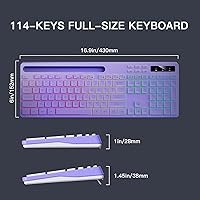
  • Layout: Full-size keyboard with a standard numpad, function row, and dedicated multimedia shortcut keys.
  • Key Type: Quiet tactile membrane keys designed to minimize noise during typing.
  • Connectivity: 2.4GHz RF wireless via a single USB-A dongle; no Bluetooth support.
  • Wireless Range: Typical 2.4GHz RF keyboards of this type operate reliably up to approximately 10 meters from the receiver.
  • Battery: Built-in 1500mAh rechargeable lithium-ion battery charged via the included USB cable.
  • Backlighting: 7-color RGB backlight with 4 lighting modes and adjustable brightness levels.
  • Device Holder: Integrated slot measuring 8.7 inches wide, designed to hold a phone or slim tablet upright.
  • Dimensions: The keyboard measures 17.2 x 6.22 x 1.42 inches (length x width x height).
  • Weight: The unit weighs 1.54 pounds without accessories.
  • OS Compatibility: Compatible with Windows and Mac operating systems out of the box without additional drivers.
  • Device Support: Works with PCs, laptops, gaming consoles, and smart TVs that support USB-A input.
  • Color Option: Available in Purple; other colorway availability may vary by retailer listing.
  • In the Box: Package includes the wireless keyboard, USB-A receiver, USB charging cable, and a user manual.
  • Power Source: Battery-powered via internal rechargeable cell; no disposable batteries required.
  • Best Sellers Rank: Ranked #23 in the Computer Keyboards category on Amazon at time of listing.
  • Date Available: First listed for sale on July 17, 2025.

Related Reviews
Soueto WS415
Soueto WS415
75%
88%
Value for Money
67%
Typing Experience
82%
RGB Backlight Quality
79%
Wireless Connectivity
73%
Wrist Rest Comfort
More
BAIHUAFRU Wireless Backlit Keyboard and Mouse Combo

76%
88%
Visual Design & Aesthetics
84%
Lighting Customization
81%
Wireless Connectivity & Range
73%
Battery Life (Keyboard)
61%
Battery Life (Mouse)
More
Arteck HW192 Wireless Keyboard and Mouse Combo
78%
78%
Build Quality
72%
Typing Experience
63%
Mouse Comfort & Ergonomics
81%
Battery Life
69%
Wireless Connectivity
More
QUASIO Wave Keys Ergonomic Wireless Keyboard with Wrist Rest
75%
83%
Ergonomic Comfort
71%
Wrist Rest Quality
67%
Typing Feel & Key Travel
86%
Wireless Reliability
81%
Mac & Windows Compatibility
More
Logitech K270 Wireless Keyboard
75%
88%
Wireless Reliability
58%
Typing Feel
94%
Setup & Ease of Use
86%
Numeric Pad Usability
72%
Build Quality
More
Merdia Triple Mode 100-Key Wireless Mechanical Keyboard
74%
88%
Value for Money
84%
Wireless Connectivity
81%
Typing Experience
83%
Hot-Swap Functionality
67%
Build Quality
More
JLab Epic Wireless Keyboard
88%
89%
Connectivity & Multi-device Support
87%
Typing Experience
93%
Battery Life
88%
Build Quality
85%
Ergonomics & Comfort
More
X9 Performance Wireless Ergonomic Split Keyboard
76%
83%
Ergonomic Comfort
58%
Key Feel & Typing Experience
86%
Wireless Performance
88%
Battery Life
62%
Build Quality
More
TECKNET TK-EKB01040BS01 Wireless Keyboard
76%
83%
Ergonomic Comfort
86%
Typing Noise Level
79%
Wireless Reliability
62%
Build Quality
88%
Value for Money
More
SHUNJINRUN KB426 Wireless Full-Size Keyboard
77%
83%
Typing Feel & Key Response
88%
Noise Level
67%
Build Quality & Materials
79%
Wireless Connectivity & Reliability
91%
Value for Money
More

FAQ

It connects through a 2.4GHz RF dongle that plugs into a USB-A port on your computer. There is no Bluetooth option, so you will need a free USB-A slot and the dongle has to stay plugged in during use. If you want to switch between two devices, you would need to physically move the dongle each time.

Battery life will vary depending on whether the backlight is on and at what brightness. With the lighting active, most users get several days of moderate use per charge. Turning the backlight off or dimming it significantly extends battery life. Recharging is done via the included USB cable, so there are no batteries to replace.

Yes, the Soueto WK713 Wireless RGB Keyboard works on Mac out of the box — just plug in the USB-A dongle and you are ready to type. No software download is needed for basic operation, though some function-key shortcuts may behave differently compared to a dedicated Mac keyboard.

The slot is rated at 8.7 inches wide, which fits most smartphones and smaller tablets comfortably. A 10-inch tablet in a thick protective case may feel tight or slightly unstable. Slim tablets without bulky cases generally sit fine, but if your tablet is on the larger side, it is worth checking the fit before relying on it daily.

You can turn the backlight off entirely using the keyboard shortcut keys, which is the most effective way to extend battery life during long work sessions. The lighting is fully optional and not tied to keyboard functionality.

The keyboard has dedicated hotkeys that cycle through the available RGB modes and adjust brightness. There is no software app involved — everything is controlled directly from the keyboard itself, which keeps setup simple.

The membrane keys are noticeably quieter than most mechanical keyboards, and the sound profile is a soft, muted thud rather than a click. For shared offices, library use, or late-night typing, the noise level is unlikely to bother people nearby. It is not completely silent, but it is well within a reasonable range for most environments.

Unfortunately, the dongle is paired to this specific keyboard, so losing it would effectively make the keyboard unusable. There is no replacement dongle included in the box and re-pairing with a generic receiver is generally not possible for 2.4GHz RF keyboards of this type. It is worth keeping the dongle in a consistent location when not in use.

It is better described as a casual everyday keyboard with a gaming-inspired look rather than a true gaming peripheral. The backlit keys and full-size layout make it enjoyable for light gaming, but the membrane switches do not offer the speed or precision that competitive gaming typically demands. If you play casually or just want a desk setup that looks good, it works well enough.

The holder is built directly into the top edge of the keyboard, so there is nothing to attach or unfold. You simply slide your phone or tablet into the slot and it stands upright at a slight angle. It is a fixed component, not an adjustable arm, so the viewing angle is set rather than customizable.

Where to Buy