Overview

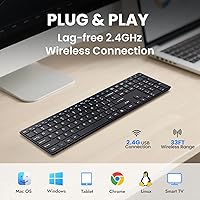
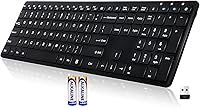
The INFINMIND K913 Wireless Keyboard arrived on the market in late 2024, and for a newcomer, it has picked up solid early traction — over 110 ratings averaging 4.4 stars within just a few months. It is a full-size, slim board with laptop-style membrane keys and a matte finish, aimed squarely at home and office typists who want quiet operation without spending a lot. One thing worth knowing upfront: this wireless keyboard connects via a 2.4GHz USB dongle, not Bluetooth, so if your device lacks a USB port or you prefer wireless pairing without a receiver, that is worth factoring in. Otherwise, setup is genuinely plug-and-play — no drivers, no software, no fuss.
Features & Benefits

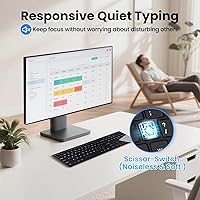
The matte keycap finish is one of those small details that actually matters day-to-day — it resists fingerprints noticeably better than the glossy keys on cheaper competitors, making the K913 a reasonable choice for shared desks. The low-profile keys have a soft, quiet action that genuinely reduces typing noise, though the 90% quieter claim should be treated as a rough benchmark rather than a lab measurement. You get 19 multimedia shortcut keys covering volume, playback, and brightness — all without software. The wireless range of up to 33 feet works well for living rooms or open offices, and the physical ON/OFF switch on the back is a thoughtful touch that most budget keyboards skip entirely.

Best For

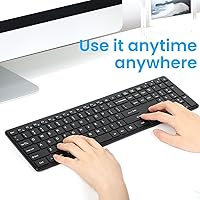
This slim keyboard is a strong pick for home office workers who type during video calls and do not want keyboard clatter bleeding into their microphone. Students and casual users will appreciate how quickly it gets going — plug in the USB receiver and you are typing within seconds. It handles Windows, Mac, Chrome OS, and Linux without issue, though Mac users should know that several of the extra shortcut keys will not function as labeled — a real limitation worth knowing upfront. Anyone setting up a media center or smart TV station will find the 33-foot range genuinely practical. It sits at a solid sweet spot for anyone upgrading from a wired or louder membrane board.

User Feedback

Buyers consistently praise the quiet key action and how straightforward setup is — most report being up and running in under a minute. The slim profile draws positive mentions too, particularly from people switching away from bulkier desktop keyboards. On the critical side, Mac users flag that certain shortcut keys simply do not respond as labeled, which is a legitimate concern for anyone on Apple hardware. A handful of reviewers note the key feel becoming slightly mushy after months of heavy use, which is fairly typical for membrane boards at this price. Battery life feedback skews positive overall, though heavy typists may see durations shorter than advertised. Build quality is described as decent — solid enough for daily use, though not engineered to absorb years of heavy punishment.

Pros

  • Genuinely quiet key action — noticeably reduces typing noise during calls and in shared spaces.
  • Plug the USB receiver in and you are typing within seconds — no software, no account, no setup steps.
  • Matte keycaps resist fingerprints and look cleaner for longer than glossy alternatives.
  • Full-size layout with number pad makes it practical for data entry and spreadsheet work.
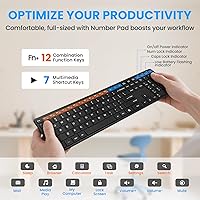
  • 19 multimedia shortcut keys work out of the box on Windows without any configuration.
  • The physical ON/OFF switch on the back actively prevents battery drain when not in use.
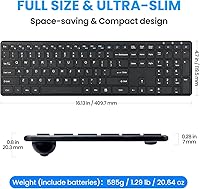
  • At 1.38 pounds and under an inch thick, it is easy to move between rooms or desks.
  • Reliable 2.4GHz connection holds steady at typical living room and open-office distances.
  • Included AAA batteries mean you can start using it straight out of the box.
  • Strong early rating from real buyers suggests consistent quality across units.

Cons

  • No Bluetooth support — useless for tablets, phones, or USB-C-only devices without an adapter.
  • Mac shortcut keys are largely non-functional, with no remapping software provided to fix this.
  • The small USB dongle has no onboard storage slot, making it easy to misplace during travel.
  • Key feel becomes noticeably mushy under heavy daily use after several months.
  • Battery life falls well short of the 12-month claim for anyone who types more than a few hours a day.
  • No tilt adjustment legs and no wrist rest, which limits comfort during long typing sessions.
  • Brand is new enough that long-term reliability and customer support quality remain largely unproven.
  • Build flex on uneven or soft surfaces reveals the limits of its budget-grade plastic frame.

Ratings

The INFINMIND K913 Wireless Keyboard scores below are generated by AI after analyzing verified global user reviews, with spam, bot-submitted, and incentivized feedback actively filtered out. The ratings reflect a transparent synthesis of real buyer experiences — strengths and frustrations alike — so you get an honest picture before committing. This slim keyboard has earned some genuine praise, but there are a few consistent pain points that certain buyers should weigh carefully.
Typing Noise Level
88%
The low-profile membrane keys are noticeably quieter than most standard desktop keyboards, which buyers working in open-plan offices or on calls regularly highlight. Several reviewers specifically mention being able to type during meetings without disturbing colleagues, which is exactly the use case this keyboard was designed for.
A few users note that while the noise reduction is real, it does not reach the near-silent feel of a dedicated silent mechanical switch. At higher typing speeds, the bottom-out sound becomes more audible than expected.
Key Feel & Typing Experience
74%
26%
The laptop-style low-profile keys have a light actuation that many casual typists find comfortable for long writing sessions. The short key travel reduces finger fatigue during standard office work, and the layout feels familiar almost immediately for anyone coming from a notebook keyboard.
Heavy typists and those who prefer tactile feedback often find the membrane feel a bit flat and imprecise after extended use. Some reviewers report the keys starting to feel slightly mushy after several months of daily use, which is a common membrane trade-off at this price tier.
Build Quality & Materials
71%
29%
For a budget-tier board, the K913 feels reasonably solid in hand — there is minimal flex across the deck during normal typing, and the overall construction does not feel hollow or cheap. The matte finish adds a premium touch that helps it look more polished than its price suggests.
The plastic housing shows its budget origins under closer inspection, and a few buyers mention the frame feeling less rigid when the keyboard is used on uneven or soft surfaces. It is not engineered for years of heavy-handed use, and long-term durability remains an open question given the brand is new.
Matte Finish & Smudge Resistance
87%
The matte keycap surface is one of the more genuinely useful design decisions here. Buyers who use the keyboard at shared workstations or in kitchens note that it stays looking clean far longer than glossy alternatives, even without regular wiping down.
The matte coating, while effective at resisting fingerprints, can attract fine dust and lint in dry environments. A couple of reviewers point out that certain keys around the frequently used areas show slight surface wear after months of daily contact.
Wireless Connectivity & Stability
83%
The 2.4GHz USB dongle connection delivers a stable, responsive link across typical desk and living room distances without any noticeable lag. Buyers using it for casual typing and media control on smart TVs specifically appreciate the reliability at distances of 20 to 30 feet.
The USB dongle connection is not Bluetooth, which is a real limitation for tablets, newer laptops with only USB-C ports, or users who manage multiple paired devices. Some buyers expected Bluetooth capability and were caught off guard — an important distinction to clarify before purchasing.
Wireless Range
81%
19%
The claimed 33-foot range holds up reasonably well in open-room environments, making this keyboard a practical option for media center setups or presentations. Buyers using it across a living room report clean, uninterrupted connections even with other wireless devices nearby.
Range performance drops noticeably when walls or dense furniture obstruct the line of sight, which is standard for 2.4GHz technology but still worth flagging. A small number of users in environments crowded with wireless signals report occasional brief disconnections.
Battery Life
78%
22%
Most casual and moderate users report getting several months of solid use from a single pair of AAA batteries, which aligns well with the product claims. The auto-sleep function activating after 15 minutes of inactivity genuinely helps stretch battery life for people who step away from their desk frequently.
The 12-month battery estimate assumes very light usage and relies heavily on consistent use of the auto-sleep and manual power switch. Heavy daily typists realistically should expect significantly shorter intervals between battery changes, and a couple of reviewers noted faster-than-expected drain with the power switch left on overnight.
Multimedia Shortcut Keys
76%
24%
Having 19 multimedia keys accessible without any software installation is a practical advantage for buyers who just want quick access to volume, playback, and brightness controls out of the box. Windows users in particular report that all the shortcuts respond reliably from day one.
Mac users face a real limitation here — several of the extra shortcut keys simply do not function as labeled under macOS, and there is no remapping software provided to fix this. This is not a minor quirk; for Mac-centric buyers it meaningfully reduces the keyboard's advertised utility.
Mac Compatibility
58%
42%
Basic typing and navigation work fine on macOS, and the keyboard connects without any driver installation. Buyers using it purely for typing on a MacBook or iMac report no issues with the core letter and number keys.
The shortcut key limitations on Mac are a recurring complaint that goes beyond minor inconvenience — several function-layer keys simply do not register correctly, and there is no workaround provided. Mac power users who rely on multimedia shortcuts would be better served by a keyboard designed with macOS in mind.
Setup & Ease of Use
93%
Plug the USB receiver in, turn the keyboard on, and you are typing — that is genuinely how simple the setup is. Buyers who are not technically inclined specifically praise how quickly the K913 gets going, with zero software installation or account registration required.
The USB receiver is small enough that losing it is a real risk, and there is no onboard storage slot to dock it when travelling. A few users mention wishing the instruction manual provided clearer OS-specific setup guidance.
Number Pad Functionality
84%
Having a dedicated number pad on a slim, compact-footprint keyboard is a genuine selling point for data entry workers and spreadsheet users who cannot sacrifice that section of the layout. The numpad keys feel consistent with the rest of the board and respond accurately during extended data input sessions.
The key spacing on the numpad is slightly tighter than on a traditional full-size keyboard, which takes a brief adjustment period for touch typists. A small number of reviewers accustomed to premium keyboards note the numpad actuation feels less precise under fast input.
Ergonomics & Comfort
69%
31%
The slim, low-profile design naturally positions the wrists at a relatively neutral angle for most users, which works well during standard writing and browsing sessions. Light users and those transitioning from laptop keyboards tend to find the layout intuitive and comfortable from the start.
There is no wrist rest included and no tilt adjustment legs, which becomes noticeable during longer typing sessions at traditional desk heights. Users who type heavily for hours at a time may find the fixed flat angle less comfortable than adjustable alternatives in this category.
Portability & Form Factor
79%
21%
At 1.38 pounds and under an inch thick, the K913 is genuinely easy to move between rooms or pack into a bag alongside a laptop. Its dimensions make it a neat fit on crowded desks without consuming the space that traditional full-size keyboards demand.
The full-size layout with number pad means it is not as compact as tenkeyless or 75% keyboards for travel-first buyers. The lack of a protective carrying case or dongle storage slot makes portability slightly less convenient than it could be.
Value for Money
86%
At its price point, this wireless keyboard delivers a feature set — wireless connectivity, full layout, multimedia keys, matte finish, and long battery life — that is hard to match from established brands. For buyers on a modest budget who need a reliable daily driver, it represents strong overall value.
The value calculation changes somewhat for Mac users or those wanting Bluetooth, since those limitations reduce the effective utility of several advertised features. Buyers who need a keyboard built for years of intensive use may find that spending a bit more on a proven brand makes better long-term financial sense.

Suitable for:

The INFINMIND K913 Wireless Keyboard is a natural fit for home office workers who type during video calls and cannot afford to have keyboard clatter bleeding into their microphone or disturbing people nearby. Students and casual users who want to plug in and start working without navigating driver installations or compatibility headaches will find the setup experience refreshingly straightforward. It also works well for anyone building out a media center or smart TV station, since the 33-foot wireless range gives genuine flexibility in how far you sit from the receiver. People who share desk space with others — in coworking setups, family offices, or classroom environments — will appreciate how the matte keycaps stay looking clean through heavy shared use. If you are coming from a loud, clunky wired keyboard and just want something quieter, slimmer, and cable-free without spending a significant amount, this slim keyboard delivers solid everyday value across Windows, Chrome OS, and Linux environments.

Not suitable for:

The INFINMIND K913 Wireless Keyboard is not the right pick for Mac power users who depend on multimedia shortcut keys, since several of the labeled function shortcuts simply do not register correctly on macOS and there is no remapping software to compensate. Buyers who manage multiple devices and want a single keyboard to switch between them will also run into a wall — this keyboard uses a USB dongle exclusively, with no Bluetooth support, meaning it cannot pair with tablets, smartphones, or newer laptops that only have USB-C ports without an adapter. Heavy typists who log six or more hours of daily keystrokes may find the membrane feel starts to wear on them after a few months, both in terms of tactile satisfaction and gradual key softness. Anyone working in a highly demanding professional environment where keyboard precision and long-term durability are non-negotiable would be better served by investing in an established brand with a proven track record. This slim keyboard is built for casual to moderate use, and treating it as a workhorse peripheral for intensive daily tasks is likely to accelerate wear beyond what its construction can comfortably sustain.
Specifications

  • Model: The keyboard is manufactured by INFINMIND under the model designation K913.
  • Dimensions: The keyboard measures 16.13 x 4.7 x 0.8 inches, keeping the full-size layout notably slim for a desktop board.
  • Weight: The unit weighs 1.38 pounds, making it light enough to reposition or travel with without much effort.
  • Connectivity: Connection is established via a 2.4GHz USB wireless receiver; Bluetooth is not supported on this model.
  • Wireless Range: The keyboard maintains a stable connection at distances of up to 33 feet from the USB receiver under open-room conditions.
  • Key Type: The board uses low-profile membrane switches with a laptop-style short-throw action designed to reduce typing noise.
  • Keycap Finish: All keycaps feature a matte surface coating engineered to resist fingerprint smudges and maintain a clean appearance during extended daily use.
  • Multimedia Keys: The layout includes 19 multimedia shortcut keys in total — 12 dedicated and 7 additional function-layer shortcuts — operable without any software installation.
  • Layout: The keyboard offers a full-size QWERTY layout with a dedicated numeric keypad and standalone arrow keys.
  • OS Compatibility: The keyboard is compatible with Windows 11, Windows 10, Mac OS, Chrome OS, and Linux operating systems.
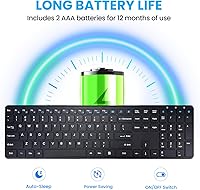
  • Battery: The keyboard is powered by 2 AAA batteries, which are included in the box, with a manufacturer-rated battery life of up to 12 months under light usage conditions.
  • Auto-Sleep: An automatic power-saving mode activates after 15 minutes of inactivity to reduce battery consumption during idle periods.
  • Power Switch: A physical ON/OFF switch located on the rear of the keyboard allows users to cut power entirely when the keyboard is not in use.
  • Noise Reduction: INFINMIND rates the key noise reduction at up to 90% compared to standard membrane keyboards, though real-world results will vary by environment.
  • In the Box: Each unit ships with the keyboard, one 2.4GHz USB receiver, two AAA batteries, and a printed instruction manual.
  • Launch Date: The K913 was first made available for purchase in October 2024, making it a recently introduced product with a growing review base.
  • Best Sellers Rank: The keyboard ranked at number 213 in the Computer Keyboards category on Amazon at the time of evaluation, reflecting strong early market traction.

Related Reviews

Arteck HW192 Wireless Keyboard and Mouse Combo
78%
78%
Build Quality
72%
Typing Experience
63%
Mouse Comfort & Ergonomics
81%
Battery Life
69%
Wireless Connectivity
More
JOYACCESS JKB888BP Wireless Keyboard
87%
93%
Typing Comfort
88%
Build Quality
95%
Key Noise
91%
Connectivity Reliability
89%
Setup Ease
More
Merdia Wireless Mechanical Keyboard
83%
90%
Connectivity Options
88%
Typing Experience
86%
RGB Customization
84%
Build Quality
91%
Battery Life
More
Arteck HW305 Wireless Keyboard
79%
91%
Value for Money
94%
Ease of Setup
74%
Typing Experience
63%
Build Quality
69%
Battery Life
More
Soueto WK713 Wireless Keyboard
86%
89%
Typing Experience
94%
RGB Lighting Customization
87%
Battery Life
75%
Build Quality
80%
Device Holder Utility
More
X9 Wireless Ergonomic Keyboard
84%
89%
Comfort & Ergonomics
92%
Wireless Connectivity
84%
Build Quality
90%
Battery Life
75%
Typing Experience
More
FENIFOX Wireless Keyboard and Mouse
86%
88%
Ergonomics
91%
Quiet Typing Experience
85%
Battery Life
89%
Wireless Connectivity
84%
Build Quality
More
QUASIO Wave Keys Ergonomic Wireless Keyboard with Wrist Rest
75%
83%
Ergonomic Comfort
71%
Wrist Rest Quality
67%
Typing Feel & Key Travel
86%
Wireless Reliability
81%
Mac & Windows Compatibility
More
Links9+ Wireless Bluetooth Keyboard
86%
89%
Typing Comfort
85%
Build Quality
78%
Connectivity Stability
90%
Battery Life
91%
Design & Aesthetics
More
JLab Epic Wireless Keyboard
88%
89%
Connectivity & Multi-device Support
87%
Typing Experience
93%
Battery Life
88%
Build Quality
85%
Ergonomics & Comfort
More

FAQ

It connects only through a small 2.4GHz USB receiver that plugs into your computer — there is no Bluetooth on this model. If your device does not have a standard USB-A port, you will need an adapter. This is worth double-checking before you buy, especially if you are using a newer laptop with only USB-C ports.

No setup software is required at all. You plug the USB receiver into your computer, turn the keyboard on using the switch on the back, and it is ready to use within a few seconds. This plug-and-play behavior works across Windows, Chrome OS, and Linux without any additional configuration.

Basic typing and navigation work fine on macOS — all the standard letter, number, and punctuation keys respond normally. The issue is with the extra shortcut keys: several of the multimedia and function-layer shortcuts simply do not register correctly under macOS, and there is no remapping software included to work around this. If you primarily use a Mac and rely on those shortcuts, this keyboard will feel limited.

The 12-month figure is based on very light usage — think a few hours a day with the auto-sleep function doing its job and the power switch turned off when you step away. In practice, moderate-to-heavy typists tend to see considerably shorter battery intervals. Treat the claim as an optimistic upper bound rather than a guarantee, and keep a spare pair of AAA batteries around.

The noise reduction is real and noticeable compared to a standard desktop membrane keyboard. It is not whisper-silent like a dedicated silent mechanical switch, but it is quiet enough that most people can type during video calls without it being disruptive. At higher typing speeds or with a heavier hand, some bottom-out sound does come through.

Yes, and it works well for that use case. As long as your TV has a USB-A port to plug the receiver into and recognizes a standard HID keyboard, the K913 will pair and function without any setup steps. The 33-foot range is particularly useful here, since you can type from the couch without worrying about staying close to the TV.

Unfortunately, no — there is no built-in storage slot for the USB receiver on this keyboard. The receiver is small enough to lose easily, so if you plan to travel with the keyboard or move it frequently, it is worth keeping the receiver in a dedicated small pouch or the original box to avoid misplacing it.

The matte surface does a genuinely good job of resisting fingerprints and smudges during normal use, which is one of its most praised qualities. Over several months, the highest-contact keys can show minor surface wear, but the overall appearance stays cleaner than a glossy keyboard for much longer. It is not a premium coating, but it performs well relative to the price point.

It depends on your setup and typing habits. The low-profile keys are comfortable for casual to moderate typing, and the short key travel reduces finger fatigue for most users. That said, the keyboard sits flat with no tilt adjustment and includes no wrist rest, so people who log many hours of intensive typing daily may find it less comfortable than an ergonomically adjustable alternative.

The most common fix is to turn the keyboard off using the physical switch on the back, wait a few seconds, and turn it back on. If it has been idle long enough to enter deep sleep, pressing any key usually wakes it within a moment. If it still does not respond, unplugging and reinserting the USB receiver typically re-establishes the connection immediately.