Overview

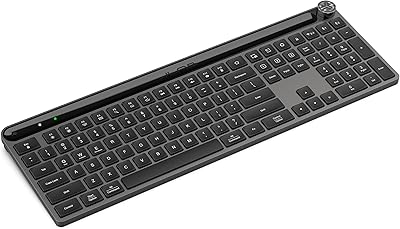
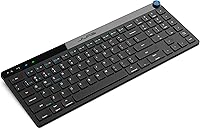
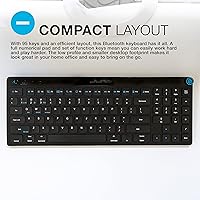
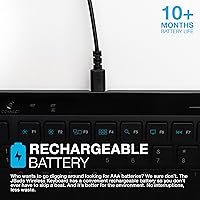
The JLab JBuds Wireless Keyboard offers a blend of functionality and portability. This wireless keyboard supports both Bluetooth 5.2 and USB 2.4GHz dongle connectivity, ensuring a seamless connection with a wide range of devices. Its compact layout includes 95 keys, featuring a full numerical pad, making it ideal for both work and play. The rechargeable battery offers an impressive battery life of up to 10 months, reducing the hassle of constant replacements. This compact keyboard delivers all the essentials without sacrificing performance, making it a great addition to any home or office setup.

Features & Benefits

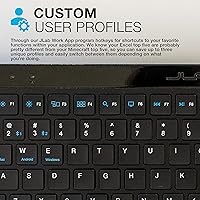
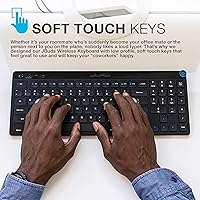
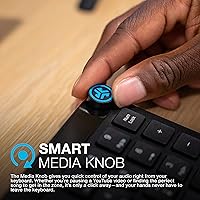
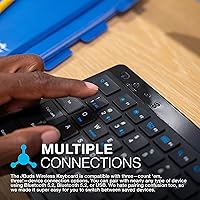
This wireless keyboard stands out with its multi-device toggle, allowing users to easily switch between connected devices, enhancing productivity for those who juggle multiple gadgets. The soft touch keys provide a comfortable, quiet typing experience, perfect for shared spaces like offices or libraries. A smart media knob offers convenient control over audio without ever needing to leave the keyboard. Additionally, users can customize their experience with profiles through the JLab Work App, giving them quick access to personalized shortcuts and settings for optimal efficiency.

Best For

The JLab JBuds Wireless Keyboard is perfect for users who need a portable design that doesn't compromise on functionality. Its compact size makes it ideal for those who work remotely or need a keyboard that can travel easily between different devices. This keyboard is especially suited for individuals who work across multiple devices, offering seamless switching between laptops, tablets, and smartphones. Additionally, it’s a great choice for those who prefer quieter typing, whether in a bustling office or while traveling on a plane.

User Feedback

Feedback for this wireless keyboard has generally been positive, with users praising the quiet typing experience, which helps reduce distractions in shared spaces. Many appreciate the multi-device switching, which adds convenience to their workflow. On the downside, some users have expressed a desire for more tactile feedback from the keys, as the soft touch may feel a bit too light for those who prefer a more responsive feel. Overall, the convenience, portability, and ease of use make it a solid choice for everyday tasks, though it might not satisfy those seeking a more traditional typing experience.

Pros

  • The multi-device toggle allows seamless switching between different gadgets, ideal for multitaskers.
  • Soft-touch, low-profile keys provide a quiet typing experience, making it suitable for shared or open spaces.
  • Compact layout includes a full numeric pad, balancing portability and functionality.
  • Rechargeable battery offers up to 10 months of use, eliminating the need for regular battery replacements.
  • Customizable user profiles via the JLab Work App allow for a tailored typing experience.
  • The keyboard's Bluetooth 5.2 connectivity ensures reliable, lag-free performance across various devices.

Cons

  • Some users find the low-profile keys lack tactile feedback, which may not suit those who prefer a more responsive feel.
  • The compact layout might feel cramped for users with larger hands, leading to discomfort during long typing sessions.
  • While the rechargeable battery lasts a long time, it may take a while to fully charge, which could be inconvenient for some.
  • The JLab Work App’s customization options may feel limited or unintuitive to advanced users.
  • The keyboard's plastic build feels lightweight, which some users feel may affect its overall durability.
  • The media knob, while convenient, can be unintentionally adjusted if the keyboard is bumped during use.

Ratings

The scores for the JLab JBuds Wireless Keyboard reflect a comprehensive analysis of verified user reviews from multiple global platforms and languages. Spam, bot-incentivized, and off-topic reviews were filtered out, ensuring that only authentic, high-quality feedback contributed to the results. Both strengths and pain points from users across various regions have been considered, providing a balanced view of the keyboard’s performance and value.

Typing Comfort
87%
Many users find the soft-touch, low-profile keys to be comfortable for long typing sessions. The quiet typing experience also makes it ideal for shared environments, such as offices or cafes, where noise reduction is appreciated. This feature is especially useful for those who type frequently and prefer a smooth, low-effort experience.
However, some users feel that the keys are too soft, lacking the tactile feedback that helps with faster typing. For users who are accustomed to more responsive or clicky keys, this can lead to a less satisfying typing experience. A few have also mentioned that the keys may feel a bit shallow during extended typing.
Multi-Device Switching
94%
The multi-device toggle feature is widely praised, as it allows users to easily switch between connected devices with minimal effort. This makes it an excellent choice for those who need to work on multiple devices at once, such as a laptop, tablet, and phone. Users appreciate how seamless the transition is, improving productivity without interruption.
On the downside, some users have pointed out that the switching process can be a bit too sensitive, sometimes causing unintended device changes. A few also mentioned that the feature requires a slight learning curve, particularly for those who are not accustomed to multi-device setups.
Build Quality
85%
The compact design and solid build quality make this keyboard a durable and reliable option for everyday use. Users have noted that despite its lightweight nature, it feels sturdy and well-constructed. Its slim profile also ensures it’s easy to carry around, making it a great portable option for both work and travel.
However, there are occasional complaints about the overall plastic feel, with some wishing for a more premium material choice. A few users feel that while it’s sturdy, it doesn't have the same high-end, premium build that some other keyboards in this price range offer.
Battery Life
92%
The rechargeable battery is one of the standout features, with many users appreciating the estimated 10-month battery life. This long-lasting performance means users don’t have to worry about frequent recharges or replacing batteries. It's a big plus for those who need a low-maintenance, reliable device for daily use, making it ideal for productivity and convenience.
Despite its impressive longevity, some users have noted that the charging time can be a bit longer than expected. Additionally, a few people have experienced occasional issues with the battery indicator not being entirely accurate, leading to sudden drops in battery power without prior warning.
Portability
90%
The compact layout, combined with the lightweight design, makes this keyboard a great option for users on the go. Its portability is highly appreciated by those who frequently travel or work remotely, as it can easily fit into most bags or backpacks without taking up too much space. The convenience of being able to use it anywhere is a major selling point.
However, a small number of users have expressed concerns that the compact layout might feel cramped for those used to full-sized keyboards with more spacing between keys. While it’s great for portability, the smaller design can take some time to get used to, especially for those with larger hands.
Connectivity
88%
Bluetooth 5.2 connectivity, paired with the USB 2.4GHz dongle, ensures fast and reliable connections with minimal interference. Most users find it easy to connect to various devices, and the wireless experience offers plenty of flexibility. The dual connectivity options help users stay connected even in environments where Bluetooth signal strength might fluctuate.
However, some users have mentioned experiencing occasional lag or disconnection when using the keyboard at a distance from the paired device. A few also reported difficulty when switching between devices, especially with older models or certain operating systems, which could require troubleshooting for smooth use.
Software/Customization
80%
20%
The ability to customize user profiles via the JLab Work App is a nice bonus for those who prefer to tailor their keyboard experience. Users appreciate the flexibility to adjust settings like key mapping, especially when switching between devices or using the keyboard for different purposes like gaming or work.
However, not all users find the app to be intuitive or user-friendly. Some have reported challenges when trying to customize settings or encountered bugs that made the app difficult to use. Additionally, the lack of advanced customization options may be a letdown for more tech-savvy users looking for deeper control over their keyboard settings.
Noise Level (Quieter Typing)
89%
The quieter typing experience is especially valued by those working in open office spaces or shared environments. Users mention that the low-profile keys make for a less disruptive experience, enabling more focus and less disturbance to others. The overall noise level is perfect for people who need to type for long hours without attracting unwanted attention.
On the downside, a small portion of users prefer a more tactile or audible feedback when typing. While the quieter keys are a plus for some, others feel that they lack the satisfying 'click' sound that certain mechanical keyboards offer, which can affect the overall typing satisfaction.
Price-to-Value Ratio
91%
Users generally feel that the JLab keyboard offers excellent value for money, given its blend of functionality and quality at an accessible price point. The features, including multi-device support, long battery life, and customizable profiles, make it a strong competitor in the market. It’s considered a solid investment for users seeking reliability without breaking the bank.
Some buyers, however, feel that the price is a bit high compared to other entry-level wireless keyboards that offer similar features. While the keyboard performs well overall, a few users believe there are alternatives that offer comparable features at a lower cost.
Ease of Setup
95%
The setup process is described as fast and straightforward, with most users able to get the keyboard up and running in just a few minutes. The dual connectivity options (Bluetooth and USB dongle) ensure a hassle-free connection to various devices, and the user-friendly interface makes it simple to start typing almost immediately after unboxing.
There are very few complaints in this area, but a handful of users have mentioned minor issues with initial pairing on specific devices, requiring them to troubleshoot or consult instructions. Some also experienced a delay when switching between devices for the first time, although this issue was quickly resolved after further use.
Long-Term Durability
84%
Overall, the keyboard is built to withstand long-term use, and many users report no issues with its durability after several months of daily typing. The keys remain responsive, and the construction holds up well under typical use, making it a dependable choice for both casual and professional settings.
That said, a few users have reported some wear on the keys or slight fading of the lettering after extended use. While this doesn’t seem to be a widespread issue, it could be a concern for those expecting a product to maintain its aesthetics and functionality for a longer period.
Ergonomics
82%
18%
The compact design and low-profile keys contribute to a comfortable typing experience for many users, particularly for those who value portability. The keyboard is designed to promote a relaxed typing posture, making it a practical option for long sessions at the desk or on the go.
However, a few users with larger hands or those used to traditional keyboards have found the layout to be less ergonomic. The smaller key spacing and flat design may lead to discomfort during extended use for those who need more wrist support or prefer a more substantial key feel.

Suitable for:

The JLab JBuds Wireless Keyboard is a solid choice for users who need a compact and versatile option for both work and leisure. Its ability to easily switch between multiple devices with the multi-device toggle makes it perfect for professionals or students who juggle different gadgets, such as laptops, tablets, and smartphones. People who work in shared or quiet spaces will also appreciate the quiet, soft-touch keys, which help reduce typing noise. Additionally, its long-lasting rechargeable battery makes it convenient for those who prefer a low-maintenance device that doesn't require frequent charging or battery replacements, making it ideal for frequent travelers or those on the go.

Not suitable for:

While the JLab JBuds Wireless Keyboard excels in portability and versatility, it may not be the best choice for users who require a more tactile typing experience. Those who type quickly or prefer a more responsive key feel might find the low-profile keys less satisfying, especially if they are used to mechanical or more tactile keyboards. Additionally, users with larger hands might find the compact layout a bit cramped for long typing sessions, potentially leading to discomfort. Finally, while the keyboard offers customizable profiles via the JLab Work App, tech-savvy users seeking advanced customization options might find the app's interface limited or unintuitive for in-depth adjustments.

Specifications

  • Connectivity: Supports Bluetooth 5.2 and a USB 2.4GHz dongle for wireless connection to devices.
  • Key Layout: Compact layout featuring 95 keys, including a full numerical keypad for efficient data entry.
  • Battery Life: Offers an estimated battery life of up to 10 months on a single charge, depending on usage.
  • Rechargeable: Equipped with a built-in rechargeable battery, eliminating the need for disposable batteries.
  • Multi-Device Switching: Allows seamless switching between multiple connected devices with a toggle button.
  • Key Type: Low-profile soft-touch keys provide a quieter and more comfortable typing experience.
  • Media Control: Includes a smart media knob for quick volume adjustments and media control without leaving the keyboard.
  • Custom Profiles: Supports customizable user profiles via the JLab Work App, enabling personalized key functions.
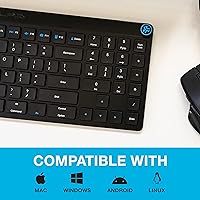
  • Compatibility: Compatible with most modern Windows, macOS, and Android devices through Bluetooth or USB dongle.
  • Portability: Compact and lightweight design makes it easy to carry and ideal for both home and travel use.
  • Dimensions: Compact dimensions allow for easy storage and space-saving on desks and workspaces.
  • Weight: Weighs approximately 0.6 kg (1.3 lbs), offering a balance between portability and stability.
  • Build Material: Constructed with durable plastic, providing a sturdy yet lightweight frame for everyday use.
  • Number Pad: Includes a full-sized numeric keypad for data entry tasks, making it suitable for work and productivity.
  • App Integration: Compatible with the JLab Work App for additional customization and profile management.
  • Key Travel: Features low travel keys for a smooth and quick typing response with reduced noise.
  • Wireless Range: Provides a wireless range of up to 33 feet (10 meters) when using Bluetooth or the USB dongle.
  • Warranty: Includes a 1-year limited warranty for quality assurance and peace of mind.
  • Price Range: Falls within a mid-range price bracket, offering solid features for its cost.

FAQ

Setting up the JLab JBuds Wireless Keyboard is simple. You can connect it via Bluetooth 5.2 or using the included USB dongle. For Bluetooth, just enable pairing mode on the keyboard and connect it to your device from the Bluetooth settings. If using the dongle, plug it into your device and the keyboard will automatically connect.

Yes, this compact keyboard supports multi-device switching. You can easily toggle between devices, such as a laptop, tablet, or phone, without needing to disconnect or re-pair each time. This makes it ideal for users who need to work across multiple devices simultaneously.

The JLab JBuds Wireless Keyboard features a rechargeable battery that can last up to 10 months on a single charge, depending on usage. This long battery life eliminates the need for regular battery replacements and is a great option for users who prefer a low-maintenance device.

You can customize the keyboard using the JLab Work App, which allows you to adjust settings like key functions and profiles. This app is available for both Windows and macOS users, and it lets you save personalized profiles, making it easy to switch between different setups based on your needs.

Yes, the keyboard features soft-touch, low-profile keys that provide a quieter typing experience. This makes it ideal for shared workspaces, libraries, or coffee shops where noise can be distracting to others.

While the keyboard is not specifically designed for gaming, it can be used with a gaming PC via Bluetooth or the USB dongle. The key response and layout are more suited for office work and casual tasks rather than fast-paced gaming.

Yes, despite its compact design, the JLab JBuds Wireless Keyboard includes a full numerical keypad, making it a versatile option for users who need a numeric input while maintaining portability.

While the keyboard is lightweight and portable, its plastic construction may not withstand heavy drops or rough handling. For everyday desk use and travel, it is durable, but it may not be the best option for users who need a highly rugged keyboard.

Yes, the keyboard includes a smart media knob that lets you adjust audio volume and other media controls without leaving your current task. This is particularly useful for quickly adjusting music or video playback while working.

Many users find the soft-touch, low-profile keys comfortable to type on, though some prefer a more tactile feel. The keyboard is quiet, which is great for shared spaces, but those who like a more responsive or clicky keypress may not find it ideal.