Overview

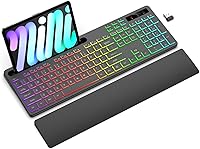
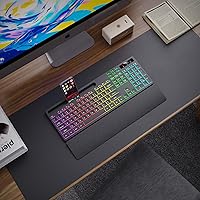
The Soueto WS415 arrived in late 2024 as a budget-friendly wireless keyboard aimed squarely at students and home office workers who want more than just a bare-bones typing tool. For the price, the package is surprisingly complete: you get the keyboard itself, a frosted silicone wrist rest, a USB-A wireless receiver, a charging cable, and an integrated phone and tablet holder. The build is plastic with silicone accents, and the whole unit weighs under two pounds, so it sits lightly on a desk. It is not trying to compete with premium peripherals — it is honest about what it is, and that clarity is part of its appeal.

Features & Benefits

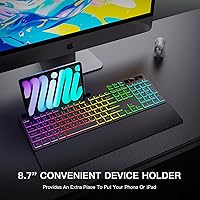
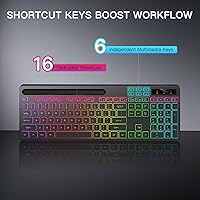
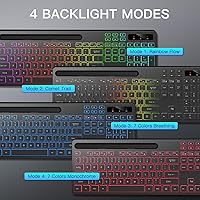
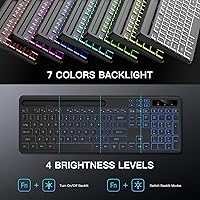
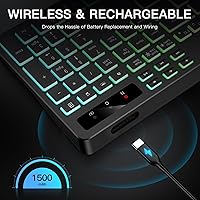
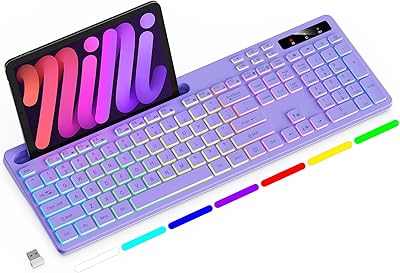
This wireless keyboard ships with a full-size layout that includes a numeric keypad and dedicated multimedia keys — practical for data entry or media control without hunting through menus. The RGB backlight offers seven colors across four lighting modes with adjustable brightness, handy for dim workspaces without feeling over-engineered. Connection runs through a single USB-A dongle over 2.4G wireless, which in practice means plug in and forget — no pairing screens or random dropouts. The built-in rechargeable battery is a quiet but real advantage over keyboards that still drain AA cells, and it charges via a standard USB cable most people already own. The 8.7-inch device holder adds a practical desk organizer benefit that similar keyboards rarely include.

Best For

This backlit keyboard set makes the most sense for students, remote workers, and anyone building a tidy desk setup on a modest budget. The device holder earns its keep — having your phone propped next to the keyboard for quick reference genuinely cuts clutter rather than just adding a gimmick. The wrist rest is similarly worthwhile for users who type for long stretches throughout the day. Broad compatibility with Windows, Mac, Smart TVs, and projectors gives it flexibility that most budget keyboards skip. That said, this wireless keyboard is a poor fit for competitive gamers or touch-typists who demand the crisp tactile response only mechanical switches can deliver.

User Feedback

With around 181 ratings and a 4.3-star average, the Soueto keyboard has had a solid early showing for a product that only launched in late 2024. Buyers regularly call out the RGB lighting and the bundled wrist rest as genuine highlights, treating them as useful additions rather than afterthoughts. The device holder also draws positive comments for keeping phones accessible without eating desk space. On the critical side, some users describe the key feel as average — predictable for membrane construction at this price point, but worth factoring in before purchase. A few lower-rated reviews mention battery longevity and dongle consistency as minor concerns. The review pool is still relatively small, so the overall picture may evolve as more buyers share long-term impressions.

Pros

  • Complete out-of-the-box package includes wrist rest, device holder, receiver, and charging cable.
  • Rechargeable built-in battery means no more hunting for AA cells mid-workday.
  • Plug-and-play USB-A dongle works instantly across Windows, Mac, Smart TVs, and projectors.
  • Full-size layout with numeric keypad is a rare practical advantage at this price tier.
  • RGB backlight with adjustable brightness is genuinely useful in low-light home office settings.
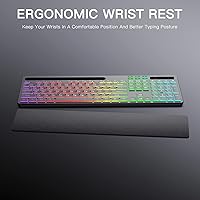
  • The frosted silicone wrist rest reduces end-of-day fatigue during long typing sessions.
  • Lightweight at under two pounds, easy to move between rooms or pack into a bag.
  • 2.4G wireless connection holds steady without dropouts in typical home or office distances.
  • The phone holder keeps your desk cleaner and your screen visible without a separate stand.
  • Early buyer ratings reflect strong satisfaction relative to what the price would typically suggest.

Cons

  • Membrane key feel is mushy and unsatisfying for fast or heavy typists used to better switches.
  • Battery life drops noticeably when RGB backlight runs at full brightness throughout the day.
  • No Bluetooth support limits use with devices that lack a USB-A port.
  • The lost USB dongle cannot be replaced separately, potentially rendering the keyboard useless.
  • Plastic build attracts fingerprints and visible scratches faster than the price implies it should.
  • Key legends show early signs of fading with heavy daily use over a few months.
  • Wrist rest height is fixed, offering limited help for users with non-standard hand positions.
  • Some RGB lighting modes cycle too fast and cannot be customized without third-party workarounds.
  • Mac shortcut keys require manual remapping for a fully native macOS experience.
  • With only around 181 reviews since launch, long-term reliability data is still limited.

Ratings

The Soueto WS415 has been evaluated using AI-assisted analysis of verified global buyer reviews, with spam, bot-generated, and incentivized submissions actively filtered out to ensure the scores reflect genuine user experiences. The ratings below cover everything from typing comfort to wireless reliability, transparently capturing both where this backlit keyboard set earns its place on a desk and where it falls short of expectations.

Value for Money
88%
Most buyers feel they are getting noticeably more than they paid for. The combination of a full-size keyboard, wrist rest, device holder, and rechargeable battery in a single affordable package genuinely surprised users who expected a bare-bones product at this price tier.
A small segment of buyers felt the accessory quality, particularly the wrist rest firmness, did not fully justify even modest expectations. Those who compared it to slightly pricier competitors noted the gap in materials becomes apparent after a few weeks of daily use.
Typing Experience
67%
33%
For everyday tasks like emails, documents, and web browsing, the membrane keys feel responsive enough to keep up without fatigue. Users switching from older or cheaper keyboards noted the keystroke feedback felt cleaner than expected for the price.
Touch-typists and anyone accustomed to mechanical switches will find the key travel shallow and the tactile feedback vague. A recurring complaint describes a slightly mushy bottom-out feel that becomes more noticeable during extended typing sessions or fast-paced data entry.
RGB Backlight Quality
82%
18%
The seven-color backlight with four modes consistently earns praise for making dim or evening workspaces far more usable. Users working at night highlight the adjustable brightness as a practical feature rather than just a visual flourish, with the lighting spread described as even across the key surface.
In well-lit office environments the backlight effect is largely invisible, limiting its functional benefit to low-light scenarios. A few buyers noted that some lighting modes cycle too quickly and the mode-switching controls are not entirely intuitive without consulting the manual.
Wireless Connectivity
79%
21%
The 2.4G USB-A dongle connection is widely reported as reliable and immediate, with users noting zero setup friction after plugging in the receiver. Working from across a desk or even from a couch-distance setup reportedly caused no dropout issues for the majority of reviewers.
A minority of users experienced intermittent disconnections, typically when the dongle was plugged into a USB hub rather than directly into a port. The single-dongle approach also means losing that small receiver could render the keyboard unusable without a replacement.
Wrist Rest Comfort
73%
27%
The frosted silicone wrist rest is one of the most frequently praised included accessories, with buyers noting it reduces fatigue during long work sessions. Its non-slip texture keeps it in place on most desk surfaces without needing to be attached to the keyboard body.
The rest sits at a fixed height, which does not suit every hand position or desk setup. Users with larger hands or those who prefer a raised wrist position found the low-profile rest offered limited relief, and a few noted the silicone collects visible dust and lint fairly quickly.
Battery Life
63%
37%
The built-in rechargeable battery removes the recurring cost and inconvenience of AA or AAA cells, which buyers with previous wireless keyboards genuinely appreciated. Charging via a standard USB cable means most users already have the right cable on hand.
With backlighting active, several reviewers reported needing to recharge more frequently than the product description implied. Users who keep the RGB modes running throughout the workday found the battery life noticeably shorter than those who left the backlight off or on minimum brightness.
Device Holder Utility
71%
29%
Buyers who use a second screen or need to reference their phone while typing found the integrated holder more useful than they initially expected. It keeps a phone or small tablet propped at a readable angle without eating into extra desk space.
The holder works well for phones and small tablets but becomes less stable with larger or heavier devices. Some users described it as a nice-to-have that they stopped using regularly after the novelty wore off, particularly if their phone has a large case that widens the fit.
Build Quality
62%
38%
For a plastic keyboard in this price range, the overall construction feels acceptably solid out of the box. The keys do not wobble individually, and the chassis does not flex noticeably during normal typing, which reassured buyers who feared a flimsier build.
The plastic housing shows fingerprints and minor scratches relatively quickly, and the overall material feel clearly signals the budget tier after extended handling. A few users reported minor key legends beginning to fade with heavy daily use over two to three months.
Ergonomic Design
68%
32%
The low-profile flat layout combined with the included wrist rest creates a setup that works well for users who type with a natural, neutral wrist position. Office workers who previously typed without any wrist support noticed less end-of-day fatigue after switching to this keyboard setup.
There is no tilt adjustment or built-in incline mechanism, which limits ergonomic customization for users who prefer a raised typing angle. People with pre-existing wrist conditions reported that while the wrist rest helps, the fixed geometry may not be sufficient as a long-term ergonomic solution.
Compatibility & Setup
86%
Plug-and-play functionality across Windows, Mac, Smart TVs, and even projectors makes initial setup genuinely effortless. Buyers who switched between a laptop and a desktop using the same keyboard appreciated that no software installation or driver configuration was required.
Mac users noted that a handful of shortcut keys require manual remapping to match expected macOS behavior. The keyboard also does not support Bluetooth, which rules it out entirely for devices that lack a USB-A port without an adapter.
Key Layout & Shortcuts
77%
23%
Having a full numeric keypad on a wireless keyboard at this size and price is a practical advantage that spreadsheet users and accountants specifically called out in reviews. The dedicated multimedia keys for volume and playback work reliably without needing function-layer combinations.
The overall layout follows a standard template without any customization options, and the keycap legends use a fairly generic font that some users found less readable than expected at mid-brightness backlight levels. There is no software to remap keys or create custom lighting profiles.
Noise Level
74%
26%
The membrane construction keeps the keyboard relatively quiet during normal typing, which office users and shared-space workers appreciated. Multiple reviewers noted they could type during video calls without the clicking noise bleeding into the microphone.
The keys produce a faint but audible thud at bottom-out that is noticeable in very quiet environments like libraries or late-night home setups. It is quieter than most mechanical keyboards but not as silent as some dedicated quiet-membrane alternatives on the market.
Portability & Weight
81%
19%
At under two pounds with a slim profile, this wireless keyboard is easy to tuck into a bag or move between rooms. Students who carry it between a dorm desk and a shared workspace called out its light weight as a meaningful daily convenience.
The full-size layout with numeric keypad does add length, making it less compact than tenkeyless options for users with very limited desk space or small bags. The wrist rest, while useful, adds a separate item to carry and is not attached to the keyboard during transport.

Suitable for:

The Soueto WS415 is a strong match for students, remote workers, and anyone building a functional home office setup without spending a lot. If your days involve long hours of document editing, spreadsheet work, or casual browsing, the full-size layout with numeric keypad and the included wrist rest make the experience noticeably more comfortable than a bare keyboard alone. The integrated phone holder is a genuine desk-tidying bonus for people who constantly reference their phone alongside a laptop or desktop, rather than letting it eat into workspace. This wireless keyboard also suits users who switch between devices or operating systems, since it works across Windows, Mac, Smart TVs, and projectors with zero driver installation. Evening workers or anyone in a dimly lit space will appreciate the adjustable RGB backlight as a practical tool rather than just an aesthetic choice. At its price point, the all-in-one package is hard to beat for buyers who want a complete, wire-free desk setup without piecing together accessories separately.

Not suitable for:

Anyone who depends on typing speed, precision, or tactile satisfaction for their workflow should look past this backlit keyboard set. The membrane keys, while adequate for occasional use, will frustrate proficient typists and writers who spend hours at the keyboard daily and know what a better switch feels like. Competitive gamers should avoid it entirely — the wireless latency and membrane construction are simply not built for the response times that fast-paced gaming demands. The Soueto WS415 also lacks Bluetooth, which makes it incompatible with tablets, phones, or modern laptops that have dropped USB-A ports without an adapter in the chain. Users seeking long-term durability or a premium build will find the plastic housing and silicone wrist rest start to show wear sooner than more expensive alternatives. If wrist ergonomics are a serious medical concern rather than a general comfort preference, the fixed-height wrist rest and non-adjustable tilt may not provide adequate support over time.

Specifications

  • Brand: Manufactured and sold by Soueto under model number WS415.
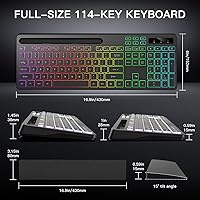
  • Dimensions: The keyboard measures 17.17 x 6.18 x 1.69 inches, making it a full-size layout suitable for standard desk setups.
  • Weight: The unit weighs 1.85 pounds, keeping it light enough to move between workspaces without effort.
  • Connectivity: Uses 2.4G wireless radio frequency via a single USB-A dongle; no Bluetooth support is included.
  • Battery: Equipped with a built-in 1500mAh rechargeable lithium-ion battery that charges via an included USB cable.
  • Key Type: Membrane tactile switches are used across the full key layout, providing quiet, low-resistance keystrokes.
  • Layout: Full-size layout includes a dedicated numeric keypad, multimedia shortcut keys, and standard function row.
  • Backlight: Supports 7 backlight colors across 4 lighting modes with adjustable brightness levels for low-light environments.
  • Wrist Rest: A separate frosted silicone wrist rest is included in the box and sits beneath the keyboard during use.
  • Device Holder: An 8.7-inch integrated slot on the keyboard frame holds a smartphone or small tablet upright during use.
  • Material: The keyboard body is constructed from plastic with silicone used for the wrist rest surface.
  • Color: Available in black only, with RGB backlighting visible through the keycaps.
  • OS Compatibility: Compatible with Windows and macOS operating systems without requiring additional driver installation.
  • Device Compatibility: Works with PCs, laptops, gaming consoles, Smart TVs, and projectors that have an available USB-A port.
  • Included Items: Package includes the wireless keyboard, separate wrist rest, USB-A receiver dongle, USB charging cable, and a user manual.
  • Backlight Colors: Supports RGB backlighting with seven selectable colors including red, blue, green, cyan, yellow, purple, and white.
  • Wireless Range: Designed for standard desktop use; the 2.4G connection is stable within typical home or office distances up to approximately 10 meters.
  • Charging Port: The keyboard charges via a USB cable connected to its onboard port, compatible with standard USB power sources.

Related Reviews
Soueto WK713 Wireless Keyboard
86%
89%
Typing Experience
94%
RGB Lighting Customization
87%
Battery Life
75%
Build Quality
80%
Device Holder Utility
More

FAQ

It is fully plug-and-play. Just insert the USB-A dongle into your computer, wait a moment, and the keyboard is ready to use. No software downloads or driver installation are required on either Windows or Mac.

Battery life varies depending on backlight usage. With the RGB lighting turned off or set to low brightness, you can expect several weeks of normal use between charges. If you run the backlight at full brightness throughout the day, expect to charge more frequently, potentially every few days with heavy use.

Since this keyboard relies on a USB-A dongle rather than Bluetooth, you would need a USB-A adapter or hub to connect it to a tablet. Most modern tablets do not have a USB-A port natively, so direct wireless pairing is not possible without an adapter.

It is a separate piece that you place in front of the keyboard on your desk. It is not magnetic or clipped on, so it can shift slightly if you move the keyboard around. Most users find it stays in place well enough on a flat desk surface during regular typing.

Unfortunately, the dongle is paired specifically to that keyboard from the factory, and a replacement is not sold separately through standard retail channels. Losing the dongle would likely render the keyboard non-functional, so it is worth keeping track of it carefully, especially if you travel with the keyboard.

Yes, as long as the TV or projector has a USB-A port and supports USB keyboard input. Many Smart TVs do support this natively, making this keyboard a convenient option for browsing or navigating streaming menus from a distance.

The lighting modes are controlled via dedicated function key combinations on the keyboard itself. The included user manual outlines the exact key shortcuts for cycling through colors and modes, as well as for adjusting brightness up or down.

Yes, the membrane construction keeps noise levels fairly low. Most users report no issues with typing sounds bleeding into microphones during calls. It is not completely silent, but it is far quieter than any mechanical keyboard and comfortable for shared environments.

The holder works well for standard-sized phones with or without slim cases. Bulkier or wider cases may fit but can feel less stable in the slot. Very large tablets beyond 8 to 9 inches in screen size may also be too wide or heavy to sit securely in the holder.

The keyboard is compatible with macOS and most standard shortcuts work as expected. However, some Mac-specific functions may require manual remapping since the key labels follow a Windows layout convention. Using the built-in macOS keyboard settings to reassign modifier keys usually resolves any inconsistencies.