Overview

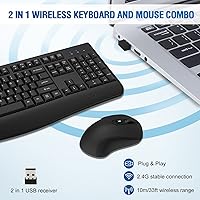
The QUASIO Wireless Keyboard and Mouse Combo sits in a crowded budget category, but a few things help it stand out. Most wireless sets at this price strip everything down to bare bones — no frills, no comfort features. This keyboard-and-mouse set takes a different approach by including an integrated palm rest, a detail you would normally pay more for. Setup could not be simpler: plug in the single nano-receiver and you are working within seconds, no drivers, no software. With over 2,600 ratings averaging 4.3 stars and a top-60 rank in its Amazon category, it has clearly found a real audience among everyday users.
Features & Benefits

The 2.4GHz wireless connection holds steady up to 33 feet, so whether you are at a traditional desk or working from the couch, lag is not something you will notice. The built-in palm rest genuinely reduces strain during long typing sessions — not dramatically, but enough to feel the difference after a few hours. The optical mouse covers three DPI levels (800, 1600, and 2400), handling everything from careful document editing to quicker cursor movement. A nice touch: the mouse is symmetrical, so left-handed users are not stuck hunting for a separate option. Both devices share one USB receiver, leaving your other ports free.

Best For

This wireless combo makes the most sense for home office workers who type for hours at a stretch and want wrist support without a big spend. Students setting up a secondary workstation will appreciate how little thinking it requires — plug it in and get to work. It is also a natural upgrade for anyone coming from a wired setup who wants desk freedom without pairing modes or software installs. Left-handed users in particular may find this set worth a serious look, since ambidextrous mice at this price point are genuinely hard to come by. Minimalists with limited USB ports will also appreciate the single shared receiver.

User Feedback

Owners of this keyboard-and-mouse set consistently call out the easy setup and palm rest as real highlights, two things that surface repeatedly in positive reviews. The typing feel gets decent marks for everyday use, though anyone switching from a mechanical keyboard will notice the shallower key travel straight away. Battery life appears solid in practice, with the auto-sleep function doing its job reliably. On the downside, some buyers flag the scroll wheel as feeling a bit flimsy, and a handful report that build quality shows wear after months of heavy daily use. For the asking price, the majority consider it a fair and honest trade-off.

Pros

  • Plug-and-play setup takes under a minute with no software or drivers needed.
  • Integrated palm rest reduces wrist fatigue during long typing sessions — rare at this price.
  • Single USB nano-receiver handles both devices, keeping your port count and desk clutter low.
  • Symmetrical mouse design means left-handed users are not an afterthought.
  • Three adjustable DPI levels make the mouse usable across different tasks and screen sizes.
  • Auto-sleep on both devices keeps battery consumption impressively low during idle periods.
  • Works across Windows, Mac, and Chromebook without any reconfiguration.
  • 12-month warranty coverage extends well beyond the standard Amazon return window.
  • Stable 2.4GHz signal holds up reliably at normal desk and living room distances.
  • Strong sales rank and thousands of verified reviews give solid confidence in real-world reliability.

Cons

  • Key travel is shallow and feedback is soft — a clear step down for mechanical keyboard users.
  • Mouse scroll wheel feels flimsy and cheap relative to the rest of the set.
  • Build quality shows noticeable wear for heavy daily users after six to twelve months.
  • Some Mac shortcut keys do not map correctly without manual remapping.
  • The nano-receiver is stored inside the mouse battery compartment, which confuses many new buyers.
  • Cursor tracking is inconsistent on very glossy or reflective desk surfaces.
  • Email support response times are uneven, with some buyers waiting several days for a reply.
  • Keyboard deck has flex under firm typing pressure, which affects the feel on fast keystrokes.
  • No backlit keys, limiting usability in low-light or nighttime environments.
  • Wireless range degrades noticeably through walls or in RF-congested spaces.

Ratings

The scores below reflect an AI-driven analysis of verified global buyer reviews for the QUASIO Wireless Keyboard and Mouse Combo, with spam, bot-generated, and incentivized feedback actively filtered out before scoring. Each category captures what real users experienced day-to-day — not just first impressions — so both the genuine strengths and the honest frustrations are reflected in every number.

Value for Money
88%
Most buyers feel the price-to-feature ratio is genuinely hard to beat at this tier. Getting a full-sized keyboard with a palm rest and an adjustable-DPI mouse under one receiver, all for roughly the cost of a lunch out, is something reviewers mention repeatedly as a pleasant surprise.
A minority of buyers who compared it directly against slightly pricier alternatives felt the gap in build quality made the savings feel less significant over time. For very heavy daily users, the value equation shifts after six to twelve months.
Setup & Ease of Use
93%
Plug-and-play performance is one of the most consistently praised aspects across all verified reviews. Users setting up a new desk, helping an elderly family member, or deploying a second workstation report being fully operational within under a minute, with zero software required.
A handful of users noted that the USB nano-receiver is stored inside the mouse battery compartment, which caught them off guard during unboxing. The placement is clever for transit, but the lack of clear labeling on the packaging led to brief confusion for some first-time users.
Typing Comfort
79%
21%
The integrated palm rest makes a noticeable difference during long document-writing or data-entry sessions. Users who work several hours a day at a keyboard consistently flag it as a comfort upgrade over flat budget keyboards, particularly for wrist positioning.
The key travel is shallow and the feedback is soft — which works fine for casual use but feels noticeably lacking to anyone coming from a mechanical keyboard. Extended typists who prefer a more tactile, deliberate keystroke will find the experience underwhelming.
Wireless Connectivity & Range
84%
The 2.4GHz connection handles everyday office and home use without dropped inputs or noticeable lag. Users operating from standard desk distances report a consistently stable signal, and the shared single-receiver design keeps the USB situation clean on machines with limited ports.
At the far end of the advertised 33-foot range, a few users reported occasional input stuttering, particularly through walls or in environments with RF interference. This is not unusual for consumer 2.4GHz devices, but worth noting for anyone planning to use it at distance.
Mouse Performance
72%
28%
The three-level DPI switch gives useful flexibility — 800 DPI works well for precise tasks like spreadsheet editing, while 2400 DPI covers fast cursor movement across larger monitors. Left-handed users specifically call out the symmetrical shape as a rare find at this price point.
The scroll wheel feel is one of the more frequently mentioned criticisms, described by multiple buyers as loose or cheap-feeling compared to the rest of the set. Cursor tracking on very glossy surfaces can also be inconsistent, which is a known limitation of entry-level optical sensors.
Build Quality & Materials
63%
37%
For light to moderate daily use, the construction holds up adequately. Users who treat it as a secondary or backup setup report no major issues within the first several months, and the keycaps resist smudging reasonably well for a matte plastic finish.
Heavy daily users start to notice flex in the keyboard deck and a loosening of some key caps after six to twelve months. The mouse shell in particular feels noticeably lightweight, and the plastic quality is clearly where the cost-cutting happened to hit the price point.
Battery Life
81%
19%
The auto-sleep feature works as advertised and users who tested it over several weeks found battery consumption to be quite modest. Buyers who leave their setups idle for parts of the day — common in home offices — report going weeks between battery changes.
A smaller segment of users found the keyboard waking up unintentionally from sleep mode, which caused unexpected battery drain when items were placed on the desk. Battery life also varies depending on usage intensity, and heavy typists may not see the same longevity as casual users.
Keyboard Layout & Key Spacing
77%
23%
The full-sized layout with a dedicated number pad is a practical advantage for users handling spreadsheets or financial data. Key spacing feels standard and familiar, making the transition from other full-size keyboards straightforward without an adjustment period.
Some users with larger hands noted that the key spacing felt slightly tighter than expected on the number pad side. The function row shortcuts, while present, are not always intuitive and a few users wished there was any kind of printed quick-start reference included.
Ergonomic Design
68%
32%
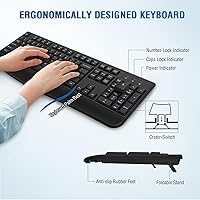
The folding tilt stand and built-in palm ledge together provide a reasonable degree of wrist alignment for a flat keyboard. Users who previously used a completely flat budget keyboard consistently describe this as a step up in day-to-day comfort.
This is not an ergonomic keyboard in any clinical sense — the palm rest is a padded ledge rather than a contoured support, and there is no split layout or negative tilt option. Users with existing wrist conditions should not expect this to replace a purpose-built ergonomic solution.
OS & Device Compatibility
86%
Broad OS support is genuinely useful here. Users switching between a Windows PC and a Mac mini, or running a Chromebook in an education setting, appreciated not having to think about driver compatibility or manual configuration — it just works across platforms.
A few Mac users noted that some media shortcut keys do not map correctly to Mac functions without manual remapping. Older Linux distributions were also flagged by a small number of technically inclined buyers as hit-or-miss, though standard Ubuntu worked fine for most.
Noise Level
74%
26%
The keystroke noise is moderate — quieter than most mechanical keyboards and tolerable in a shared space. Video call participants and open-plan office users generally report no complaints from colleagues about keyboard noise during meetings.
It is not a silent keyboard by any stretch, and a small number of users working in very quiet home environments found the key clatter distracting during late-night sessions. Those specifically seeking near-silent typing will need to look at dedicated low-noise options.
Packaging & Unboxing
71%
29%
The packaging is functional and protective — both devices arrived undamaged for the vast majority of buyers, and the box design keeps everything organized without excessive plastic waste. Most found the contents self-explanatory without needing an instruction sheet.
The hidden USB receiver inside the mouse battery compartment, while space-efficient, is not flagged clearly on the outer packaging. Several users contacted support thinking the receiver was missing, suggesting a simple printed note inside the box would prevent unnecessary confusion.
After-Sales Support
66%
34%
The 12-month warranty beyond the standard Amazon return window is a meaningful commitment for a budget product. Users who did reach out via the support email generally reported receiving a response and a resolution, which is not always guaranteed at this price tier.
Response times for email support were inconsistent according to reviewer accounts, with some waiting several days for a reply. A few buyers noted that resolution sometimes meant a replacement rather than a targeted fix, which works but suggests limited troubleshooting depth from the support team.

Suitable for:

The QUASIO Wireless Keyboard and Mouse Combo is a practical fit for home office workers who spend several hours a day typing and want a degree of wrist support without spending significantly more on a dedicated ergonomic setup. Students outfitting a dorm desk or a secondary study station will find it especially appealing — there is nothing to configure, nothing to install, and the single receiver keeps things tidy when desk space is limited. It also makes a lot of sense as a living room media PC peripheral, since the 2.4GHz connection handles couch-distance use comfortably. Left-handed users are a natural audience too, given how rarely ambidextrous mice appear at this price point. Anyone upgrading from an older wired combo who simply wants wireless convenience without a steep learning curve or a complicated setup should feel right at home with this keyboard-and-mouse set.
Not suitable for:

The QUASIO Wireless Keyboard and Mouse Combo is not the right call for anyone who types seriously and cares about key feel — the shallow, soft keystroke will frustrate fast typists or writers who have grown accustomed to mechanical switches or even better membrane boards. Competitive or even casual gamers should also look elsewhere, as the optical mouse sensor and polling rate are not built for precision fast-paced input, and the DPI ceiling of 2400 is modest by gaming standards. Users with diagnosed wrist conditions or repetitive strain injuries should not treat the palm rest as a medical solution — it provides basic comfort, not clinical support, and is no substitute for a properly contoured ergonomic keyboard. Power users who run Linux distributions beyond mainstream Ubuntu may encounter mapping inconsistencies, and anyone who replaces their keyboard every few years and keeps it in heavy daily use may find that this keyboard-and-mouse set starts showing wear before they are ready to replace it.
Specifications

  • Connectivity: Both the keyboard and mouse connect via a single shared 2.4GHz USB nano-receiver, requiring no Bluetooth pairing or additional software.
  • Wireless Range: The 2.4GHz connection supports a reliable operating range of up to 33 feet (10 meters) under typical indoor conditions.
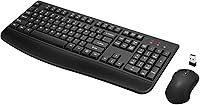
  • Keyboard Layout: Full-sized layout with a dedicated numeric keypad, standard function row, and an integrated fixed palm rest along the bottom edge.
  • Tilt Stand: A folding kickstand on the underside of the keyboard allows users to adjust the typing angle for a more comfortable wrist position.
  • Mouse Type: Optical wireless mouse with a symmetrical ambidextrous body, designed to accommodate both right-handed and left-handed users equally.
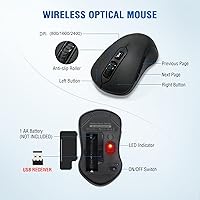
  • Mouse DPI: Three selectable DPI levels — 800, 1600, and 2400 — are accessible via a dedicated button on the top of the mouse.
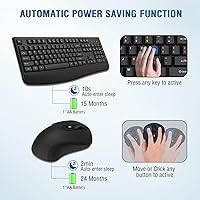
  • Auto-Sleep: The keyboard enters sleep mode after 10 seconds of inactivity, while the mouse powers down after 2 minutes, both waking instantly on use.
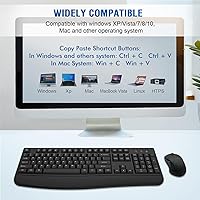
  • OS Compatibility: Compatible with Windows XP, Vista, 7, 8, and 10, Mac OS, and Chromebook; no driver installation is required on any supported platform.
  • Package Dimensions: The retail package measures 19 x 13 x 9 inches and contains the keyboard, mouse, USB nano-receiver, and a basic user guide.
  • Combined Weight: The keyboard and mouse together weigh approximately 1.7 pounds, making the set lightweight enough for easy relocation between workspaces.
  • Receiver Storage: The USB nano-receiver is stored inside the mouse battery compartment during shipping and can be retrieved by opening the battery cover.
  • Brand & Maker: Sold under the QUASIO brand and manufactured by DEYING; the product was first listed on Amazon in January 2022.
  • Warranty: A 12-month after-sales warranty is provided directly by the manufacturer via email support, extending coverage beyond the standard Amazon return window.
  • Driver Requirement: No software, driver, or application download is required; the set operates as a plug-and-play HID device on all compatible operating systems.
  • Color Option: The set is available in black, with a matte plastic finish on both the keyboard body and mouse shell.
  • Mouse Battery: The wireless mouse is powered by standard AA batteries, which are not included in the retail package.
  • Keyboard Battery: The keyboard operates on standard AAA batteries, also not included, with battery life extended significantly by the auto-sleep function.

Related Reviews

Arteck HW192 Wireless Keyboard and Mouse Combo
78%
78%
Build Quality
72%
Typing Experience
63%
Mouse Comfort & Ergonomics
81%
Battery Life
69%
Wireless Connectivity
More
Vssoplor Wireless Keyboard and Mouse Combo
82%
91%
Value for Money
84%
Keyboard Typing Experience
61%
Mouse Ergonomics
88%
Wireless Connectivity & Stability
72%
Battery Life
More
CHESONA Wireless Keyboard and Mouse Combo
86%
93%
Multi-device Connectivity
87%
Typing Experience
85%
Battery Life
91%
Design & Build Quality
78%
Ergonomics & Comfort
More
EDJO Wireless Keyboard and Mouse Combo

76%
88%
Value for Money
94%
Ease of Setup
71%
Keyboard Typing Feel
63%
Mouse Performance
86%
Wireless Connectivity & Range
More
MPTOG S801AG Wireless Keyboard and Mouse Combo

75%
88%
Aesthetic Design
93%
Ease of Setup
78%
Typing Feel
61%
Mouse Tracking Accuracy
82%
Wireless Reliability
More
Letton Wireless Keyboard and Mouse Combo
83%
89%
Design & Aesthetics
81%
Ergonomics & Comfort
75%
Wireless Connectivity
90%
Battery Life
92%
Value for Money
More
GUKJOB Wireless Keyboard and Mouse Combo
87%
88%
Typing Experience
91%
Design & Aesthetics
75%
Battery Life
95%
Ease of Setup
72%
Build Quality
More
GEEZER Wireless Keyboard and Mouse Combo
72%
83%
Value for Money
91%
Aesthetic Design
94%
Ease of Setup
67%
Typing Feel
62%
Mouse Quality
More
HP 18H24AA Wireless Keyboard and Mouse Combo
79%
91%
Value for Money
93%
Ease of Setup
74%
Keyboard Typing Experience
63%
Mouse Comfort & Ergonomics
86%
Wireless Reliability
More
Links9+ Wireless Keyboard and Mouse Combo
85%
89%
Ergonomics and Comfort
92%
Wireless Performance and Connectivity
85%
Build Quality
94%
Ease of Use and Setup
80%
Battery Life
More

FAQ

Not at all. Just plug the nano-receiver into a USB port, and both the keyboard and mouse will be recognized automatically. It works the same way on Windows, Mac, and Chromebook — no driver downloads, no setup menus to navigate.

It is tucked inside the mouse battery compartment — flip the mouse over and slide off the battery cover on the underside. The receiver sits there for safe storage during shipping, but the packaging does not always make this obvious, which catches a lot of people off guard.

Either device can be used independently. They share a single receiver, but that does not lock them together — if you only need the keyboard at a given moment, the mouse simply stays off and vice versa.

The mouse is genuinely symmetrical in shape, not just marketed that way. The button layout and side profile are mirror-balanced, so left-handed users get the same grip and thumb rest as right-handed users. It is one of the more practical features of this keyboard-and-mouse set given how few affordable ambidextrous options exist.

Battery life varies with usage intensity, but most buyers report several weeks to a couple of months before needing a swap, thanks to the auto-sleep function. The keyboard sleeps after just 10 seconds of inactivity, and the mouse after 2 minutes, which adds up to meaningful savings over time. Keep in mind that batteries are not included in the box.

It works on Mac without any setup — just plug in the receiver and start typing. Most standard keys function correctly, though a few shortcut keys in the function row may not map to Mac-native actions exactly as labeled. For everyday typing and navigation, Mac users generally have no issues.

It is a fixed, integrated ledge — it is built into the bottom edge of the keyboard frame and cannot be removed. That makes it less customizable but also more durable, since there is nothing to detach or lose.

At typical living room distances of 10 to 15 feet with a clear line of sight, it performs reliably. The rated range is up to 33 feet, but real-world performance through walls or in areas with a lot of wireless interference can fall short of that maximum. For standard couch-to-TV-PC use, it handles the job well.

The folding stand on the underside can help with angle, but the keyboard is a lightweight plastic build and will shift more easily than heavier premium boards. Placing it on a non-slip mat or desk pad can make a noticeable difference if surface friction is the issue.

The manufacturer offers a 12-month warranty and handles after-sales support via email even after the Amazon return window closes. Whether they send a replacement unit or a single component depends on the specific situation, but buyer reports suggest they are generally responsive to defect-related claims within the warranty period.