Overview

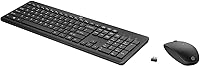
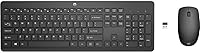
The HP 18H24AA Wireless Keyboard and Mouse Combo is a no-fuss, budget-conscious peripheral set that delivers more than you might expect from a brand-name option at this price. HP has kept things refreshingly straightforward: a full-size chiclet keyboard with a tidy 3-zone layout, a wireless mouse, and a single USB nano-receiver that handles both devices at once. Battery-powered on AA cells, with a manufacturer-claimed life of up to 16 months, it works across Windows and Mac without driver headaches. It won't wow power users, but it covers the basics with a level of polish that feels appropriate for everyday computing.
Features & Benefits

The 2.4GHz wireless connection holds up reliably for typical office tasks — long documents, browsing, spreadsheets — with no noticeable lag in everyday use. The chiclet-style keys have a low travel depth and a quiet enough click, which matters if you share a workspace with others. The mouse adjusts up to 1600 DPI, giving you enough range to comfortably switch between a small desk and a larger display setup. One nano-dongle covers both peripherals, a genuinely practical detail when your ports are already occupied. The claimed 16-month battery figure is optimistic, but buyer reports suggest real-world battery life still holds up better than most budget rivals.

Best For

This HP wireless combo suits people who want a clean, cord-free desk without a significant outlay. Home office workers, students, and anyone assembling a basic workstation will find it covers their needs comfortably. It is not aimed at gamers or heavy typists craving tactile mechanical switches — the membrane keys are competent, not exciting. Where it earns its place is in simpler scenarios: a secondary PC, a living room computer, or a guest station used occasionally. Mac users can plug it in and get started, though the layout skews Windows-oriented, so a few key labels won't perfectly align with what appears on screen.

User Feedback

Among verified buyers, this keyboard-and-mouse set holds a strong 4.4-star average across more than 200 reviews. Most positive feedback centers on effortless setup and the surprisingly comfortable typing feel for a membrane board. The mouse draws more divided opinions — some find it a touch light and hollow-feeling in hand, a reasonable trade-off at this tier. Key travel is shallower than many typists prefer, and a few buyers flag that the nano-dongle can be stubborn to remove once inserted. Long-term durability comes up occasionally, with isolated reports of wear after sustained daily use. Mac users generally report smooth basic compatibility, though advanced function-key behavior should not be assumed.

Pros

  • Single nano-receiver handles both keyboard and mouse, saving a valuable USB port.
  • Plug-in setup takes seconds with zero driver installation on Windows or Mac.
  • Chiclet keys are noticeably quieter than most entry-level alternatives, great for shared spaces.
  • Full-size layout with a logical 3-zone design reduces accidental keypresses during fast typing.
  • The 2.4GHz connection holds steady across typical room distances without dropout.
  • Battery life outlasts most budget rivals in real-world moderate use.
  • Backed by HP branding, which gives buyers more confidence than generic no-name alternatives.
  • At this price, the overall build finish looks cleaner and more professional than expected.
  • Mouse DPI range is wide enough to adapt between compact and large display setups.
  • Lightweight enough to move between rooms or toss in a bag without hassle.

Cons

  • Mouse feels hollow and lightweight in hand, which becomes uncomfortable during long desk sessions.
  • Keycap legends on frequently used keys show wear faster than the price tier justifies.
  • The nano-dongle sits flush and can be difficult to remove without a thin tool.
  • Claimed 16-month battery life is a ceiling figure; real-world heavy users see noticeably shorter cycles.
  • Mac function-key behavior requires manual remapping, which is an avoidable frustration for Apple users.
  • Mouse shell shows scuffs and minor flex under a firm grip after moderate use.
  • Shallow key travel lacks any tactile feedback, making typing feel imprecise during fast bursts.
  • Losing the nano-dongle disables the entire combo, and replacement receivers are not easy to find.
  • Key spacing around Delete and Insert feels cramped for users migrating from other full-size layouts.
  • Not suitable for precision tasks like detailed photo editing where tracking consistency matters most.

Ratings

The HP 18H24AA Wireless Keyboard and Mouse Combo has been scored below by our AI system after analyzing hundreds of verified global buyer reviews, with spam, bot-submitted, and incentivized feedback actively filtered out. The ratings reflect what real everyday users experienced — strengths and shortcomings alike — so you can make a genuinely informed decision before buying. This HP wireless combo earns solid marks in several key areas, but a few recurring pain points are worth knowing upfront.

Value for Money
91%
At its price tier, buyers consistently express pleasant surprise at getting a branded, full-size wireless combo that actually works reliably out of the box. For students and home office users on a tight budget, the cost-to-utility ratio feels genuinely strong compared to off-brand alternatives.
A small segment of buyers who pushed the combo into daily heavy use felt it aged faster than expected, making the long-term value case slightly weaker for anyone planning multi-year daily reliance on a single unit.
Ease of Setup
93%
Plug-in-and-go is about as accurate a description as you can give. Most buyers reported being up and running within seconds of inserting the nano-receiver, with no driver installation needed on either Windows or Mac. It is a genuine strength for non-technical users.
A handful of reviewers noted the nano-dongle sits quite flush once inserted and can be tricky to extract without a fingernail or a thin tool, which becomes mildly frustrating when moving between machines.
Keyboard Typing Experience
74%
26%
The chiclet-style membrane keys have a low-profile feel that many casual typists find comfortable during moderate daily use — writing emails, filling spreadsheets, light document work. The quiet keystroke is a real bonus in shared office or home environments.
Typists who prefer deeper key travel or any tactile feedback will find the shallow membrane action unsatisfying pretty quickly. Several buyers described the keys as feeling slightly mushy after extended use, especially compared to even entry-level mechanical alternatives.
Mouse Comfort & Ergonomics
63%
37%
For shorter desktop sessions — browsing, casual work, occasional document editing — the mouse is functional and tracks consistently on most surfaces up to 1600 DPI. Users with smaller hands tend to find the size more agreeable than those with larger grips.
It is one of the more commonly flagged weak points in this combo. Multiple buyers described the mouse as feeling lightweight and hollow, lacking the substance that makes prolonged use comfortable. People spending hours daily at a desk may find it tiring after a few weeks.
Wireless Reliability
86%
The 2.4GHz RF connection handles typical desk distances with no notable dropout or lag, which matters most for everyday productivity tasks. Buyers working from a couch or across a small living room also reported consistent performance without interference issues.
A small number of users noted occasional micro-stutters when operating in environments crowded with competing wireless signals, such as open-plan offices with many devices. This appears infrequent but worth noting for sensitive or precision-heavy tasks.
Battery Life
78%
22%
Real-world buyer reports are more conservative than the manufacturer's 16-month headline claim, but many users still report going several months without a battery swap under moderate daily use. For the average home user, this translates to genuinely low maintenance.
Power users who keep both devices active for long stretches daily report noticeably shorter cycles than advertised. The claimed figure should be treated as a ceiling, not a realistic expectation, particularly for the mouse which tends to drain faster than the keyboard.
Build Quality & Materials
62%
38%
For its price point, the combo presents reasonably well on a desk — clean lines, matte black finish, and a layout that looks tidier than many budget rivals. Initial impressions among buyers are generally positive, and it feels solid enough for light to moderate use.
The plastic construction becomes more apparent after prolonged use. A recurring theme in longer-term reviews involves keycap legends fading on heavily used keys, and the mouse shell showing scuff marks or slight flex when gripped firmly. It is not built to last years of heavy daily use.
Mac Compatibility
69%
31%
Mac users report no issues with basic plug-in functionality — cursor control, standard typing, and general navigation work without any configuration. For simple Mac setups running everyday applications, it functions without friction from the moment it is plugged in.
The keyboard layout is clearly optimized for Windows, and Mac-specific shortcuts do not map intuitively. Function key behavior, in particular, can require manual remapping, which frustrates Mac-primary users who expected a more thoughtful cross-platform experience.
Key Layout & Spacing
81%
19%
The 3-zone layout keeps things logically organized — the separation between the alphanumeric block, navigation cluster, and function row reduces accidental keypresses during fast typing. Most buyers adapt to the spacing quickly without a learning curve.
A few users noted the Delete and Insert key positions felt slightly cramped relative to what they were used to, particularly those migrating from a different full-size layout. This is minor but worth knowing if layout muscle memory matters to you.
Mouse Tracking Accuracy
77%
23%
Up to 1600 DPI gives this HP combo enough range to feel appropriately responsive across common surfaces — desks, fabric mouse pads, and even light wood grain. Casual users reported smooth, predictable cursor movement for document editing and web browsing.
The tracking is not suited to precision-intensive tasks like detailed photo editing or fast-paced gaming. At higher DPI settings, a few users noticed slight jitter on textured surfaces, which is unsurprising at this price but worth flagging for anyone with more demanding cursor needs.
Portability & Weight
83%
At just under 1.8 pounds total for the package, this keyboard-and-mouse set is light enough to slip into a bag for commuting or moving between rooms. The slim keyboard profile also keeps it from adding much bulk to a laptop bag or desk drawer.
The keyboard is still a full-size unit, so it is not a compact travel option by any stretch. Users looking for a portable solution for frequent travel would be better served by a tenkeyless or compact wireless alternative.
Plug-and-Play Convenience
89%
One dongle, two devices — it is the kind of practical design decision that makes daily life simpler. Users who frequently juggle USB ports on slim laptops or mini PCs especially appreciated not having to sacrifice two ports for a keyboard and mouse separately.
Because both devices share one receiver, losing or damaging the nano-dongle effectively disables the entire combo. Replacement dongles are not always easy to source, and this single point of failure concerned a handful of buyers thinking about long-term use.
Noise Level
84%
The membrane chiclet construction keeps keystroke noise noticeably lower than mechanical alternatives, something buyers in shared apartments, open offices, or late-night home setups specifically called out as a meaningful plus. The mouse click volume is similarly subdued.
It is not silent — the keys still produce an audible tap, and the mouse buttons have a crisp click that carries in a quiet room. For most environments this is perfectly acceptable, but buyers expecting near-silent operation should adjust expectations.

Suitable for:

The HP 18H24AA Wireless Keyboard and Mouse Combo is a natural fit for anyone who needs a reliable, low-maintenance peripheral setup without allocating a significant budget for it. Home office workers who spend their day on emails, documents, and video calls will find it covers every practical need — the cord-free design keeps the desk tidy, and the quiet chiclet keys avoid the kind of clatter that creeps through thin walls or microphones. Students setting up a first workstation will appreciate how little friction is involved: plug in the nano-receiver and you are working within seconds. It also makes excellent sense as a secondary setup — think a living room media PC, a spare home computer, or a guest workstation that sits idle most of the time. For Mac users handling basic tasks like browsing, writing, and light productivity work, it functions without needing any software installation, which removes a common barrier with budget peripherals.
Not suitable for:

The HP 18H24AA Wireless Keyboard and Mouse Combo is genuinely not the right tool for buyers with demanding or specialized requirements. Anyone who spends five or more hours a day typing intensively — writers, coders, data entry professionals — will likely find the shallow membrane key travel fatiguing over time, and may start eyeing mechanical alternatives within a few months. The mouse, while functional, lacks the ergonomic shaping and build solidity that long daily desk sessions demand; buyers prone to wrist fatigue or those with larger hands will feel its limitations quickly. Gamers should look elsewhere entirely — neither the mouse response nor the keyboard construction is remotely suited to fast-paced or precision gaming. Mac power users who rely on keyboard shortcuts and custom function-key behavior will find the layout frustrating, as it requires manual remapping that the average buyer should not have to deal with. Finally, anyone expecting a peripheral set that holds up to three or four years of heavy daily use is likely to be disappointed by the build quality before that timeline is up.

Specifications

  • Brand: Manufactured by Hewlett Packard (HP), a globally recognized consumer electronics and computing brand.
  • Model Number: The official HP model number for this combo is 18H24AA#ABA.
  • Wireless Technology: Both the keyboard and mouse connect via a 2.4GHz RF wireless signal for stable everyday performance.
  • USB Receiver: A single nano-USB receiver pairs and manages both devices simultaneously, requiring only one USB-A port.
  • Keyboard Style: Full-size membrane chiclet keyboard with low-profile keycaps and a quiet keystroke mechanism.
  • Key Layout: 3-zone layout separating the alphanumeric block, navigation cluster, and function row for clear visual organization.
  • Mouse Max DPI: The included mouse supports adjustable tracking sensitivity up to 1600 DPI for use across different surface sizes.
  • Battery Life: HP rates battery life at up to 16 months under typical use conditions; real-world results vary with usage intensity.
  • Power Source: Both devices are powered by AA batteries, which are required but not confirmed as included in all regional packages.
  • OS Compatibility: Compatible with Mac OS, Windows 7, and Windows 8, as well as later Windows versions through standard HID drivers.
  • Item Weight: The total package weighs approximately 1.76 pounds, making it light enough to move or store without difficulty.
  • Package Dimensions: The retail box measures 17.72 x 8.74 x 1.85 inches, sized to accommodate the full-length keyboard safely.
  • Color: Available in matte black, which suits most desk environments and resists visible smudging better than gloss finishes.
  • Connectivity Range: Typical effective wireless range is up to 10 meters (approximately 33 feet) under standard unobstructed conditions.
  • Amazon BSR: Ranked #54 in the Computer Keyboard and Mouse Combos category on Amazon at time of listing review.
  • First Available: This model was first made available for purchase on Amazon on February 14, 2023.
  • Mouse Buttons: The mouse includes standard left, right, and scroll-wheel click functions suited to general productivity use.
  • Keyboard Size: Full-size format includes a numeric keypad on the right side, maintaining a complete desktop keyboard experience.

Related Reviews
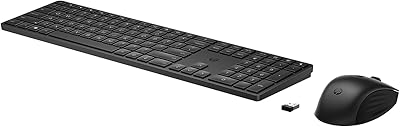
HP 650 Wireless Keyboard & Mouse Combo

82%
93%
Battery Life
88%
Wireless Stability
81%
Typing Experience
72%
Mouse Comfort & Usability
74%
Build Quality
More
Arteck HW192 Wireless Keyboard and Mouse Combo

78%
78%
Build Quality
72%
Typing Experience
63%
Mouse Comfort & Ergonomics
81%
Battery Life
69%
Wireless Connectivity
More
JOYACCESS Wireless Keyboard and Mouse Combo
82%
88%
Value for Money
83%
Typing Experience
74%
Mouse Performance
86%
Backlight Quality
81%
Battery Life
More
seenda Wireless Keyboard and Mouse Combo

88%
89%
Typing Comfort
87%
Ergonomics
82%
Wireless Connectivity
94%
Setup & Installation
88%
Key Spacing & Accuracy
More
Arcwares Wireless Keyboard and Mouse Combo
78%
88%
Value for Money
91%
Aesthetic Design
76%
Keyboard Typing Experience
67%
Mouse Performance
84%
Wireless Connectivity
More
Kootop Wireless Keyboard Mouse Combo
87%
89%
Ergonomics and Comfort
91%
Typing Experience
85%
Wireless Connectivity
87%
Design and Aesthetics
83%
Battery Life
More
Mobifice Wireless Keyboard and Mouse Combo
87%
89%
Ergonomics & Comfort
92%
Design & Aesthetics
83%
Battery Life
95%
Ease of Use & Setup
88%
Wireless Connectivity
More
ULSOU Wireless Keyboard and Mouse Combo
85%
88%
Ergonomics and Comfort
92%
Battery Life
84%
Typing Experience
87%
Wireless Connectivity
80%
Mouse Performance
More
Trueque Wireless Keyboard and Mouse Combo
78%
83%
Value for Money
81%
Typing Comfort & Ergonomics
78%
Backlight Quality
74%
Mouse Performance
88%
Noise Level
More
EDJO Wireless Keyboard and Mouse Combo
76%
88%
Value for Money
94%
Ease of Setup
71%
Keyboard Typing Feel
63%
Mouse Performance
86%
Wireless Connectivity & Range
More

FAQ

No, you do not. The HP 18H24AA Wireless Keyboard and Mouse Combo uses standard plug-and-play HID drivers that both Windows and Mac recognize automatically. Just insert the nano-receiver into a USB port and you are ready to go within seconds.

HP does not consistently confirm battery inclusion across all regional packages, so it is safest to assume you will need to supply your own AA batteries before first use. Check your specific package contents when it arrives, but having a fresh set of AAs on hand is a smart precaution.

Yes, both devices operate independently through the shared receiver, so if one needs a battery replacement or develops an issue, the other continues working normally. You do not need to replace the entire combo.

Unfortunately, losing the receiver is a real problem with this set. The nano-dongle is paired specifically to these two devices, and HP does not widely offer individual replacement receivers for retail purchase. It is worth storing the receiver carefully and noting where it is if you ever unplug it.

It depends on what you are used to. The membrane chiclet keys are quiet and adequate for moderate daily typing, but the shallow key travel can feel tiring during extended sessions compared to mechanical keyboards. If you type for several hours straight on a regular basis, you may want to consider a step up in keyboard quality.

The mouse is functional and tracks reliably across most common surfaces, but it is on the lighter and more basic side of the spectrum. Users with smaller hands tend to find it comfortable enough, while those with larger hands or those who prefer a more substantial grip often find it lacking after prolonged use.

Basic functionality works fine on a Mac without any configuration — typing, cursor movement, and standard shortcuts all work. However, the keyboard layout is designed with Windows in mind, so Mac-specific function keys and shortcut mappings may not behave as expected. Some remapping through Mac system preferences may be needed for a fully optimized experience.

Treat it as an optimistic upper limit rather than a guaranteed figure. Users who keep both devices active throughout a standard workday tend to report noticeably shorter real-world cycles, particularly for the mouse. Under lighter, intermittent use the longevity is much closer to the claimed estimate.

Yes, for typical home and office use the 2.4GHz connection is consistent and responsive. Buyers report no meaningful lag during document editing, browsing, or video calls. In very crowded wireless environments — such as dense open-plan offices with many competing signals — very occasional brief interruptions have been reported, though this is not a common complaint.

It is actually a reasonable choice for that scenario. The simple setup, quiet keys, and low price point make it easy to recommend for a student workstation or a shared home PC. The full-size layout also helps younger users who are still developing their typing habits, since they have access to a proper numeric keypad and all standard keys.