Overview

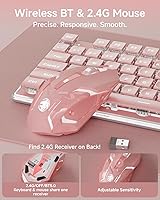
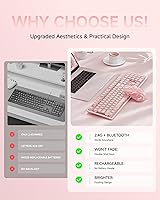
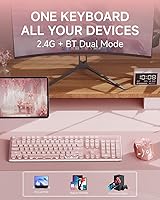
The SEUNKWANG V3 Wireless Keyboard Mouse Combo is a mid-range peripheral set that walks a clear line between aesthetics and everyday usability — something genuinely rare at this price point. Built around a pink colorway with a metal panel design, it targets students, remote workers, and anyone who takes their desk setup seriously. Dual-mode connectivity — Bluetooth 5.0 and 2.4GHz — means you can switch between devices without replugging anything, and the USB-C charging on both the keyboard and mouse removes the ongoing cost and inconvenience of disposable batteries. Launched in late 2024, it is still building its reputation, but already attracting a notably design-conscious audience.

Features & Benefits

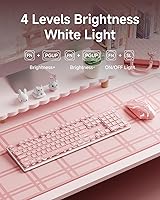
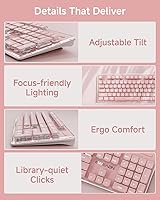
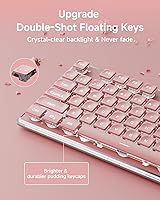
The frosted metal panel is the first thing you notice — it feels sturdier than what you would expect at this price tier, and it resists fingerprints well enough for daily desk use. The water drop pudding keycaps do a solid job dispersing the backlight evenly, though it is worth being clear: this is a single warm color, not RGB, so buyers expecting color cycling should look elsewhere. Five brightness levels give enough range from subtle to visible in low light. The silent switches genuinely cut down on noise — not completely, but noticeably. Add the 7-degree ergonomic tilt and 26-key anti-ghosting, and you have a set built for long work or light gaming sessions.

Best For

This keyboard combo suits people who care as much about how their desk looks as how it performs. Students in shared spaces — dorms, campus libraries, coffee shops — will appreciate how quiet the switches are in practice. Remote workers who bounce between a laptop and a desktop will find the dual-mode setup genuinely practical day to day. Casual gamers who do not need mechanical-grade response times but still want anti-ghosting support for occasional sessions are well served here. It also makes a natural step up for anyone running a basic membrane set and wanting something that looks and feels more considered without a steep investment.

User Feedback

With 353 ratings and a 3.9-star average, the V3 combo lands in that honest middle ground — appreciated by many, imperfect for some. Buyers consistently mention build quality and the backlight as standout positives for the price, and the aesthetic appeal draws in a lot of first-time reviewers who seem pleased with how it looks on their desks. On the downside, some users report occasional connectivity hiccups when switching between Bluetooth devices, and the mouse sensitivity gets mixed notes — a few buyers find the three DPI levels limiting. Battery life appears adequate for most. The 48-month support claim barely surfaces in reviews, likely because most buyers simply have not needed to test it yet.

Pros

  • The metal panel feels noticeably more solid than typical plastic combos in this price range.
  • USB-C charging on both the keyboard and mouse means no disposable batteries ever.
  • Silent switches make this wireless set genuinely comfortable to use in libraries, offices, or shared rooms.
  • Dual Bluetooth and 2.4GHz connectivity covers most multi-device setups without extra dongles.
  • The full-size layout retains a numpad, which many aesthetic keyboards sacrifice for looks.
  • Pudding keycaps diffuse the warm backlight evenly, giving the keyboard a polished, cohesive look.
  • A 7-degree tilt and anti-slip feet keep the combo stable and comfortable during longer typing sessions.
  • 26-key anti-ghosting handles fast typing and light gaming input without dropped keystrokes.
  • Broad OS compatibility covers Windows, Mac, Linux, and Chrome OS out of the box.
  • A 48-month brand support window is a reassuring safety net for a newer product on the market.

Cons

  • Bluetooth reconnection can be inconsistent when switching between paired devices, frustrating for multi-device users.
  • Only three DPI levels on the mouse leaves power users with limited precision control.
  • The single warm backlight cannot be customized or changed to other colors — no RGB option exists.
  • At just over two pounds, the combo is not the most travel-friendly option for commuters.
  • A 3.9-star average across 353 ratings hints at a meaningful minority of dissatisfied buyers worth researching.
  • The brand is relatively new and lacks the long-term reliability data that established peripheral makers carry.
  • Mouse battery life reports are mixed, with some users finding it drains faster than expected under heavy use.
  • The 2.4GHz receiver and Bluetooth both compete for attention during setup, which can briefly confuse new users.

Ratings

The SEUNKWANG V3 Wireless Keyboard Mouse Combo has been scored below by our AI rating engine after processing hundreds of verified global buyer reviews, actively filtering out incentivized, bot-generated, and duplicate feedback to surface what real users actually experience. Scores reflect both the strengths that keep buyers satisfied and the friction points that push others toward alternatives — nothing is glossed over.
Build Quality
83%
The frosted metal panel consistently earns praise from buyers who expected a plasticky feel at this price point and were genuinely surprised by the solidity. Day-to-day, it resists flex and fingerprints better than most competitors in the same tier, and the anti-slip base keeps it planted during use.
A few buyers note that the mouse housing feels less premium than the keyboard — the plastic body is noticeably lighter and less refined by comparison. Over extended daily use, some report minor creaking around the mouse buttons after a couple of months.
Typing Experience
78%
22%
The water drop pudding keycaps have a satisfying concave shape that fits fingertips naturally, and most buyers find the typing feel comfortable for long work sessions. The silent switches deliver a soft, cushioned press that many users describe as genuinely enjoyable compared to standard membrane boards.
Users coming from mechanical keyboards will find the feedback lacking — there is no tactile bump or audible click to confirm keypresses. A small segment of buyers find the key travel slightly shallow, which can lead to more typos during the adjustment period.
Noise Level
86%
For anyone working in a shared dorm room, open-plan office, or late-night setup, the reduced noise is one of the most consistently praised aspects of this wireless set. Buyers on late-night work calls specifically mention that colleagues cannot hear their typing in the background.
It is quieter than most membrane keyboards, but not completely inaudible — in a very quiet room like a library reading area, the softer thud is still faintly perceptible. The mouse clicks, while muted, are slightly louder than the keyboard switches, which some buyers find inconsistent.
Wireless Connectivity
67%
33%
The 2.4GHz connection via USB receiver is consistently stable and responsive for everyday typing and casual use, with minimal input lag reported for non-gaming tasks. Buyers using a single device appreciate how reliably the connection holds across a full workday without drops.
Bluetooth multi-device switching is where this combo earns its most pointed criticism — reconnection after waking from sleep or switching devices can be sluggish or require manual re-pairing. Users managing two Bluetooth devices find the transition less smooth than competing products at a similar price.
Backlight Quality
74%
26%
The warm single-color backlight looks clean and cohesive when diffused through the pudding keycaps, creating an aesthetic that many buyers describe as cozy and well-suited to low-light desk setups. Five brightness levels give enough flexibility for both daytime visibility and nighttime ambiance.
Buyers expecting RGB or color-changing capability will be disappointed — this is a fixed warm tone only, and that expectation gap drives several lower ratings. A few users also note that backlight brightness fades slightly near the top rows compared to the center keys.
Mouse Performance
61%
39%
For everyday browsing, document editing, and casual use, the mouse tracks smoothly on most surfaces and the silent clicks feel satisfying without being mushy. Buyers using it primarily for work tasks report no meaningful issues with day-to-day accuracy.
Three DPI levels with no published values make it hard to fine-tune sensitivity, and some users find the jump between settings too abrupt for comfortable adjustment. The mouse feels light and somewhat hollow, and buyers with larger hands find the compact shape becomes uncomfortable during extended sessions.
Battery Life
69%
31%
Most buyers report the keyboard holds charge well enough for several days of moderate daily use, and the USB-C charging means topping up is convenient without hunting for specific cables. The ability to type while charging removes any real anxiety about running out mid-session.
Battery performance on the mouse is less consistent — a segment of users find it drains faster than expected, particularly with the backlight active. The manufacturer does not publish rated battery hours, which makes it difficult for buyers to set realistic expectations before purchasing.
Value for Money
79%
21%
For the price tier, delivering a metal panel, silent switches, dual-mode connectivity, and USB-C charging in one package represents genuinely good value — most competitors at this level use all-plastic construction. Buyers upgrading from basic membrane combos consistently feel the jump in quality is well worth the spend.
When stacked against a few established brands offering similar aesthetics with more reliable Bluetooth and better mouse quality, the value proposition gets murkier. Buyers who encounter connectivity issues or mouse discomfort early on feel the price is harder to justify in retrospect.
Aesthetic Design
88%
The pink colorway paired with the frosted metal panel and pudding keycaps photographs beautifully and genuinely stands out among desk setup-focused buyers. It is one of the most cited purchase reasons in positive reviews, with many buyers calling it the best-looking keyboard they have owned at this price.
Color accuracy in some buyer photos suggests the pink tone can read slightly more muted in certain lighting conditions than it appears in product images. Buyers after a bolder or brighter pink may find the actual shade leans softer and more pastel than expected.
Ergonomics
73%
27%
The 7-degree adjustable tilt and sculpted keycap surface make longer typing sessions noticeably more comfortable than flat, featureless alternatives. Buyers who work at a desk for several hours report less wrist strain compared to their previous flat keyboard setups.
The wrist rest is not included, which becomes a noticeable gap during very long sessions — a few buyers feel the tilt, while helpful, is not enough on its own without additional support. Smaller-handed users also find the full-size layout stretches their reach to the numpad uncomfortably.
Setup & Ease of Use
82%
18%
Plug-and-play via the USB receiver means most buyers are up and running within minutes, with no drivers or software installation required. Bluetooth pairing follows a familiar process and works reliably on first connection across Windows, Mac, and Chrome OS devices.
The FN key shortcut system for switching between connectivity modes is not immediately intuitive, and the included documentation is thin. A handful of buyers report spending more time than expected figuring out which mode they are in when connectivity behaves unexpectedly.
Compatibility
84%
Cross-platform support across Windows, macOS, Linux, and Chrome OS is a genuine strength — this wireless set works out of the box on virtually every common computing setup without configuration headaches. Students and remote workers switching between personal and work devices across different OS platforms particularly benefit from this.
Mac users note that some key labels and shortcut behaviors are Windows-oriented, requiring a small learning curve to adapt common workflows. There is no dedicated software to remap keys, so Mac-specific adjustments must be handled through the operating system directly.
Packaging & Unboxing
76%
24%
Buyers consistently mention that the unboxing experience feels more considered than expected — the keyboard arrives well-protected and the presentation is clean enough to make it feel like a considered gift purchase. The USB-C cable is included, which is an appreciated touch that some competitors omit.
The box and printed materials are fairly sparse, and the quick-start guide leaves some buyers guessing about advanced features like mode switching. A few international buyers note that the documentation is primarily in one language, which limits accessibility.
Brand Support
63%
37%
The advertised 48-month support window is longer than most competitors offer in this category, and buyers who have contacted the team report reasonably prompt responses to basic inquiries. As a warranty signal, it provides some peace of mind when buying from a less-established brand.
Because the product launched in late 2024 and the brand is relatively new to the market, there is limited long-term data on how well that support promise holds up in practice. Buyers with complex issues report that resolution quality is inconsistent, and the support infrastructure does not yet match what established peripheral brands offer.

Suitable for:

The SEUNKWANG V3 Wireless Keyboard Mouse Combo is a strong fit for anyone who wants their workspace to look intentional without spending a lot to get there. Students are probably the most natural audience — if you are typing notes in a dorm, sitting in a campus cafe, or studying in a shared apartment, the quiet switches and rechargeable design make daily life genuinely easier. Remote workers who care about desk aesthetics but still need a full-size layout with a numpad for spreadsheets or data entry will find this wireless set hits a practical sweet spot. The dual-mode Bluetooth and 2.4GHz connectivity also makes it a smart pick for anyone juggling two devices, like a personal laptop and a work desktop, without wanting to deal with re-pairing every time. Casual gamers who value a calm, quiet setup over raw mechanical performance will also feel at home here.
Not suitable for:

The SEUNKWANG V3 Wireless Keyboard Mouse Combo is not the right call for buyers with more demanding expectations. Competitive or serious gamers will quickly hit the ceiling — the mouse offers just three DPI levels, there is no per-key RGB lighting, and the switches, while quiet, cannot match the tactile precision of a proper mechanical keyboard. If you regularly switch between three or more Bluetooth devices, the two BT slots may feel limiting, and some users have noted that Bluetooth reconnection is not always instant or rock-solid. Buyers hoping for a bold, colorful light show should also know upfront that the backlight is a single warm tone only — tasteful, but not customizable. If long-term brand reliability and established customer support matter to you, the relatively short track record of this newer product is a fair reason for caution.
Specifications

  • Connectivity: Supports Bluetooth 5.0 (two device slots) and 2.4GHz wireless via a shared USB receiver, switchable using FN key combinations.
  • Wireless Range: The 2.4GHz USB receiver maintains a stable connection at distances of up to 10 meters (approximately 33 feet).
  • Charging Port: Both the keyboard and mouse charge via USB-C, allowing use while plugged in so there is no forced downtime.
  • Battery Type: Built-in rechargeable lithium-ion batteries are included in both the keyboard and mouse — no disposable batteries required.
  • Backlight: Features a single warm-color backlight (not RGB) with 5 adjustable brightness levels, controlled directly from the keyboard.
  • Keycap Style: Suspended water drop pudding keycaps with a concave surface and high light transmittance for even backlight diffusion.
  • Panel Material: Thickened metal top panel with a frosted matte finish for added rigidity and scratch resistance during daily use.
  • Layout: Full-size keyboard layout with a dedicated numpad, standard function row, and media hotkey support.
  • Anti-Ghosting: Supports 26-key rollover, allowing up to 26 simultaneous keypresses to register without input conflicts.
  • Keyboard Tilt: Adjustable to a 7-degree typing angle using two flip-out footrests, with four anti-slip pads on the base.
  • Mouse DPI: The included wireless mouse offers three sensitivity levels, though exact DPI values per level are not specified by the manufacturer.
  • Noise Reduction: Silent switch technology is rated to reduce typing and click noise by up to 95% compared to standard membrane switches.
  • OS Compatibility: Compatible with Windows, macOS, Linux, and Chrome OS for broad cross-platform use without additional drivers.
  • Dimensions: The package measures 17.76 x 8.62 x 2.01 inches, giving a sense of the keyboard footprint as a full-size unit.
  • Weight: The combined package weight is 2.09 pounds, which reflects the metal panel construction adding some heft over all-plastic alternatives.
  • Device Pairing: Supports up to three saved device connections — one via 2.4GHz and two via Bluetooth — switchable with FN+1, FN+2, or FN+3.
  • Warranty: SEUNKWANG offers 48 months of brand support, which covers manufacturer defects and provides access to their customer service team.

Related Reviews
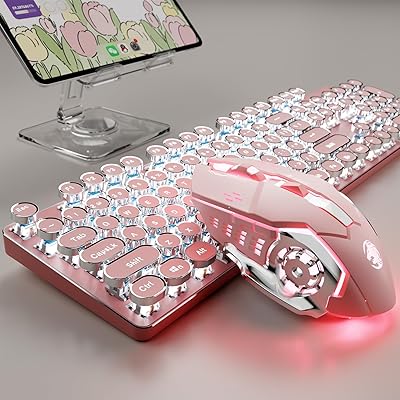
SEUNKWANG TK950 Wireless Typewriter Keyboard and Mouse Combo

78%
83%
Build Quality
88%
Typing Experience
79%
Wireless Connectivity
93%
Aesthetic & Design
76%
Backlighting
More
Arteck HW192 Wireless Keyboard and Mouse Combo

78%
78%
Build Quality
72%
Typing Experience
63%
Mouse Comfort & Ergonomics
81%
Battery Life
69%
Wireless Connectivity
More
VEILZOR UK418 Wireless Keyboard and Mouse Combo
81%
91%
Value for Money
84%
Typing Comfort
89%
Noise Level
82%
Wireless Reliability
76%
Mouse Ergonomics
More
GUKJOB iK6630 Wireless Keyboard and Mouse Combo
77%
88%
Value for Money
83%
Keyboard Typing Feel
91%
Aesthetic & Design
87%
Ease of Setup
61%
Mouse Performance
More
RECCAZR Wave Keys Ergonomic Wireless Keyboard Mouse Combo
78%
83%
Typing Comfort
67%
Mouse Feel & Handling
91%
Noise Level
86%
Wireless Connectivity
88%
Value for Money
More
Atelus Wireless Keyboard and Mouse Combo
83%
94%
Ease of Setup
88%
Ergonomics & Comfort
90%
Design & Aesthetics
80%
Mouse Performance
86%
Keyboard Performance
More
TopMate Wireless Keyboard and Mouse Combo
77%
91%
Value for Money
78%
Typing Experience
68%
Mouse Performance
63%
Build Quality
83%
Wireless Reliability
More
MARVO Wireless Keyboard and Mouse Combo
76%
91%
Value for Money
88%
Wireless Connectivity
79%
Mouse Performance
63%
Keyboard Typing Feel
67%
Ergonomics & Comfort
More
Arcwares Wireless Keyboard and Mouse Combo
78%
88%
Value for Money
91%
Aesthetic Design
76%
Keyboard Typing Experience
67%
Mouse Performance
84%
Wireless Connectivity
More
MOWUX Wireless Keyboard and Mouse Combo
88%
91%
Typing Comfort
89%
Mouse Responsiveness
94%
Wireless Connectivity
85%
Build Quality
88%
Keycap Durability
More

FAQ

It can store up to three device connections total — one through the 2.4GHz USB receiver and two via Bluetooth. You switch between them using FN+1, FN+2, or FN+3. It does not broadcast to multiple devices simultaneously, but switching is quick once everything is paired.

It is a single warm color only — there is no RGB, no color cycling, and no per-key customization. You do get five brightness levels to adjust intensity, which gives it a clean, ambient glow rather than a gaming-rig look. If color variety matters to you, this is not the right set.

Yes, both the keyboard and mouse support pass-through use while charging via USB-C, so you will not need to stop working mid-session to top them up.

Noticeably quieter than a typical membrane keyboard — think less clack, more soft thud. They are comfortable to use in a library or shared office without drawing attention. That said, they are not completely silent; you will still hear some sound in a very quiet room.

Yes, it is compatible with macOS alongside Windows, Linux, and Chrome OS. Keep in mind that some key labels are Windows-oriented, so a couple of shortcuts may need remapping depending on your workflow.

The mouse has three DPI levels, but the manufacturer does not publish the exact numbers for each setting. In practice, buyers find the range covers everyday browsing and light work well, though it may feel limited to those used to highly adjustable gaming mice.

No drivers are required — it is plug-and-play via the USB receiver, and Bluetooth pairing follows the standard process for your operating system. There is no companion software for customizing backlight colors or remapping keys.

The manufacturer does not publish a specific battery life figure, which is a common gap with this type of product. User reports vary depending on whether the backlight is on and how heavily the devices are used, but most buyers report adequate daily use between charges for typical work sessions.

The metal panel does offer some protection against light splashes compared to standard membrane keyboards, but this combo is not rated as fully waterproof. A minor spill wiped up quickly is unlikely to cause immediate damage, but it should not be used near liquids regularly.

You get the wireless keyboard, a wireless mouse, a shared USB 2.4GHz receiver, a USB-C charging cable, and documentation. The lithium-ion batteries in both devices are built-in and arrive pre-installed, so you can get started right after a short initial charge.