Overview

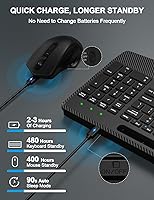
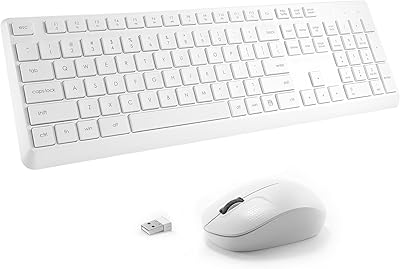
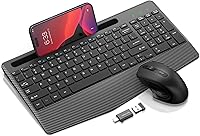
The Hayyiesh KG659-01 Wireless Keyboard and Mouse Combo arrived in late 2023 as a genuinely practical option for anyone who wants wrist-friendly typing without spending a lot. What separates it from the typical flat wireless keyboard at this price is the integrated wrist rest — a feature usually reserved for pricier setups. Both the keyboard and mouse recharge via USB, so there are no AA batteries to hunt down. A single nano-receiver handles the pair, and setup takes about ten seconds. The built-in phone holder is a small but genuinely useful addition for keeping a cluttered desk a little more organized.
Features & Benefits

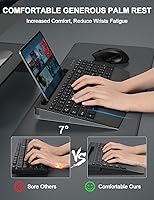
The wireless range is comfortable enough for any standard desk or room setup, and in practice that means no awkward cable management to deal with. The silent key mechanism is one of the more notable selling points — the keys have a muffled, soft feel that genuinely cuts down on click noise that tends to bother open-office neighbors. Mouse sensitivity adjusts across three DPI settings, giving you a quick way to toggle between careful document work and faster browsing. The slight keyboard tilt and padded wrist area work together to keep your hands at a more neutral angle during longer typing sessions, which does make a noticeable difference over time.

Best For

This wireless combo makes a lot of sense for students pulling long writing sessions, remote workers who share a living space, or anyone in an open-plan office where noise is a real concern. The rechargeable setup is a meaningful perk for people who hate keeping a stash of spare batteries on hand. It works across Windows and Mac without any driver fuss, which removes a common headache. Minimalists who want to reduce desk clutter will appreciate that one receiver covers both devices. If you need quiet, cable-free peripherals that do not demand much from your budget, this ergonomic combo handles everyday tasks without overcomplicating things.

User Feedback

Across roughly 640 ratings, the Hayyiesh keyboard and mouse set holds a 4.0-star average — solid for a budget combo, though the breakdown tells a more nuanced story. Many buyers specifically call out the wrist rest comfort and quiet keys as genuine highlights, particularly those who work late or in shared rooms. Battery life appears to hold up reasonably well in real-world use, which is reassuring. The mouse tends to attract the most criticism — some find the build feels lightweight and note the scroll wheel lacks refinement. The phone holder gets mixed reactions; it works for lighter phones but can feel a bit unstable with heavier tablets. Connectivity issues are occasional but worth noting.

Pros

  • Rechargeable batteries in both devices mean no more last-minute battery runs mid-workday.
  • The silent key mechanism noticeably reduces typing noise in shared or quiet environments.
  • Plug-and-play setup works immediately across Windows and Mac with zero driver installation.
  • Integrated wrist rest offers real fatigue relief for people who type for hours at a stretch.
  • The built-in phone holder keeps your desk tidier without needing a separate stand.
  • One nano-receiver handles both devices, reducing USB port clutter on your computer.
  • Broad OS compatibility makes this wireless combo easy to share between household devices.
  • Compact keyboard footprint suits smaller desks without sacrificing a full key layout.
  • Three adjustable DPI settings give basic but useful cursor speed flexibility for everyday tasks.
  • The rechargeable setup pays for itself quickly compared to ongoing disposable battery costs.

Cons

  • The mouse feels hollow and lightweight, with a scroll wheel that lacks satisfying feedback.
  • Battery life on the mouse falls short of the keyboard, requiring more frequent recharges.
  • No Bluetooth support limits compatibility with USB-C-only laptops and modern tablets.
  • The phone holder can wobble under heavier smartphones and feels unstable with tablets.
  • Occasional wireless dropouts have been reported, especially when the receiver is in a USB hub.
  • The wrist rest padding is firm and shallow, limiting comfort during very extended sessions.
  • Key resistance feels inconsistent across the layout, which disrupts fast or touch-typist workflows.
  • Plastic construction shows visible seam lines and chassis flex under moderate pressure.
  • The mouse DPI ceiling is too low for design work, photo editing, or any precision-heavy task.
  • No charging indicator light on the keyboard makes it easy to be caught off guard by a dead device.

Ratings

The scores below for the Hayyiesh KG659-01 Wireless Keyboard and Mouse Combo were generated by our AI engine after processing verified buyer reviews from multiple global markets, with spam, incentivized, and bot-flagged submissions actively filtered out. Each category reflects the honest distribution of praise and frustration found across hundreds of real-world experiences. Where buyers consistently raised concerns, those are represented just as transparently as the highlights.
Value for Money
88%
At this price tier, buyers consistently note that getting a rechargeable combo with a wrist rest and phone holder feels like a strong deal. Most reviewers compare it favorably to other budget options that offer far fewer features for similar or higher cost.
A small group of buyers felt the mouse quality alone did not justify even the modest asking price, and would have preferred paying slightly more for a better-built pointing device. The value equation depends heavily on how much you rely on the mouse versus the keyboard.
Keyboard Comfort & Ergonomics
79%
21%
The integrated wrist rest earns consistent praise from people who type for several hours at a stretch — remote workers and students especially mention reduced fatigue compared to flat keyboards they used before. The gentle tilt angle contributes meaningfully to a more relaxed hand position.
Reviewers who have used dedicated ergonomic keyboards point out that the wrist rest padding is fairly firm and shallow, which limits its effectiveness during very long sessions. It is a real improvement over nothing, but it should not be compared to purpose-built ergonomic hardware.
Key Feel & Typing Experience
74%
26%
The soft, low-profile keys have a satisfying enough travel for everyday typing tasks like emails, documents, and browsing. Buyers who switched from noisy mechanical keyboards specifically appreciate the quieter, cushioned response during late-night or office use.
Enthusiast typists find the key feedback a bit mushy and lacking the tactile precision they prefer. There are occasional mentions of keys feeling slightly uneven in resistance across the layout, which can be distracting during fast typing.
Mouse Build Quality
58%
42%
For casual use — light document navigation, web browsing, occasional spreadsheet work — the mouse gets the job done without any major functional failures in the short term. Some buyers report it held up fine over several months of moderate daily use.
This is where the product draws the most criticism. The scroll wheel feels cheap and imprecise, and the overall plastic construction feels noticeably lightweight in hand. Several reviewers report the mouse showing wear or responsiveness issues within a few months of regular use.
Noise Level
86%
The silent key mechanism is a genuine differentiator for buyers working in open offices, shared apartments, or libraries. Reviewers who tested it in quiet environments confirm the click noise is dramatically reduced compared to standard membrane keyboards, making late-night work far less disruptive.
The mouse click itself is not as quiet as the keyboard, which creates a slight imbalance for users seeking an entirely silent setup. A few buyers also note that the keyboard sound, while reduced, is still audible in very quiet rooms during sustained fast typing.
Battery Life
77%
23%
Most verified buyers report the keyboard battery holding up well across several weeks of regular use before needing a recharge, which aligns reasonably with the stated estimate. The convenience of recharging both devices via USB rather than swapping batteries is a recurring positive mention.
The mouse tends to drain faster than the keyboard in real-world use, and a handful of reviewers noted the battery life fell noticeably short of the upper end of the stated range. Heavy daily users should expect to recharge more frequently than occasional users.
Wireless Connectivity & Stability
72%
28%
For standard desk setups — computer on the desk or tucked nearby — the connection holds steady without noticeable lag during typing or cursor movement. Plug-and-play setup is consistently praised for being genuinely instant with no driver installation involved.
A recurring minority complaint involves intermittent disconnections, particularly when the receiver is plugged into a USB hub rather than directly into the computer. A small number of buyers also report the mouse occasionally losing sync and requiring a receiver re-plug to restore.
Phone & Tablet Holder
67%
33%
For users who like having their phone visible while working, the holder adds a genuinely useful organizational element to the keyboard without taking up extra desk space. Lighter smartphones sit in it securely and at a comfortable viewing angle.
Heavier phones and tablets up to the stated size limit can feel unstable, with the holder flexing under the weight. Several reviewers note it works better as a light phone stand than a reliable tablet cradle, and the grip surface could use more friction.
Setup & Compatibility
91%
Setup across Windows and Mac machines draws near-universal praise — buyers report it working immediately on plug-in across a wide range of operating systems and laptop brands without any software download. This matters a lot for less tech-savvy users.
There is no Bluetooth option, so users with devices that lack a USB-A port will need an adapter, which is occasionally mentioned as a minor inconvenience. Tablet compatibility is limited to those with full USB connectivity, ruling out many modern iPads.
Mouse DPI & Cursor Control
63%
37%
The three DPI settings give enough flexibility for switching between careful editing work and quicker general navigation. Buyers who use it for basic office tasks find the mid-range setting responsive enough for day-to-day use.
Gamers or users doing design work will find the DPI ceiling too low and the precision underwhelming. The DPI toggle button is small and awkwardly placed, and a few reviewers mention accidentally changing the setting without meaning to.
Build Quality Overall
61%
39%
The keyboard chassis feels reasonably solid for the price, and the keycaps show acceptable resistance to shine after weeks of use based on reviewer reports. At this price point, the keyboard half of the combo holds up better than expected.
The overall plastic quality is budget-grade — visible seam lines, some keyboard flex when pressed firmly in the center, and a mouse that feels hollow. Buyers who handle premium peripherals daily will likely notice the quality gap immediately.
Portability & Desk Footprint
82%
18%
The compact layout and relatively low weight make it easy to slide into a bag or reposition on a small desk. Remote workers who move between rooms or carry gear to a coffee shop appreciate that the whole combo does not take up much room.
The wrist rest, while helpful ergonomically, does add width to the keyboard's overall profile, so it takes up slightly more horizontal space than a standard tenkeyless board. Users with very cramped desks should measure before committing.
Aesthetics & Design
71%
29%
The clean matte black finish is understated and works in most home or office settings without looking out of place. Buyers setting up a tidy minimal workspace appreciate that it does not look cheap or garish at first glance.
The design is functional rather than distinctive, and up close the plastic sheen and visible parting lines give away the budget origins. Those who care about premium desk aesthetics will find it underwhelming next to higher-end alternatives.
Recharging Convenience
83%
The shift away from disposable batteries is genuinely appreciated by buyers who find battery management annoying. Being able to plug in a USB cable during a lunch break and resume use quickly is a workflow improvement that shows up frequently in positive reviews.
Neither device supports wireless charging, and the charging port type is not premium, which means cables are not universal across all setups. A few buyers also wish the keyboard had a charge indicator light to avoid being caught off guard by a dead device.

Suitable for:

The Hayyiesh KG659-01 Wireless Keyboard and Mouse Combo is a strong fit for anyone who spends several hours a day typing but does not want to spend heavily on ergonomic peripherals. Students writing essays in dorm rooms, remote workers sharing space with family, and office employees in open-plan environments will all find the quiet keys and wrist support genuinely useful in daily practice. If you have been getting by with a flat keyboard that leaves your wrists aching by mid-afternoon, the built-in rest here provides a meaningful step up without requiring a bigger investment. People who are tired of hunting for AA batteries will also appreciate that both devices recharge over USB — it removes a small but persistent annoyance from the routine. Mac and Windows users transition to it immediately without downloading anything, which makes it a reliable pick for households or small offices running mixed operating systems.
Not suitable for:

Anyone expecting a precision tool for gaming, graphic design, or intensive data work should look elsewhere — this ergonomic combo is built for comfort and quiet, not performance. The mouse in particular is the weakest link: its build feels lightweight, the scroll wheel lacks refinement, and the DPI range tops out at a level that frustrates users who need fine cursor control. Buyers who prefer Bluetooth connectivity will also run into a hard limitation, since the set relies on a USB-A nano-receiver, making it less practical for modern laptops or tablets with only USB-C ports. If you are someone who handles peripherals roughly or expects hardware to survive years of heavy daily use, the budget-grade plastics here may disappoint within a year. Those who have used dedicated ergonomic keyboards with deep cushioning and adjustable tenting will likely find the wrist rest here too modest to replace what they already rely on.

Specifications

  • Brand: Manufactured and sold by Hayyiesh under model number KG659-01.
  • Connectivity: Uses 2.4GHz USB wireless technology via a single shared nano-receiver for both keyboard and mouse.
  • Wireless Range: Maintains a stable connection at distances up to 33 feet between the receiver and devices.
  • Keyboard Battery: The keyboard contains a built-in 1000mAh rechargeable lithium battery charged via USB cable.
  • Mouse Battery: The mouse contains a built-in 500mAh rechargeable lithium battery charged via USB cable.
  • Battery Life: Both devices are rated for approximately 2 to 3 months of typical use on a single full charge.
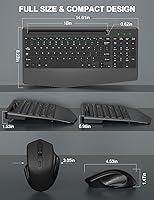
  • Keyboard Dimensions: The keyboard measures 14.61 x 8.22 x 1.53 inches including the integrated wrist rest.
  • Item Weight: The combined weight of the keyboard and mouse package is 2.25 pounds.
  • Mouse DPI: The mouse offers three selectable sensitivity levels: 800, 1200, and 1600 DPI.
  • Noise Reduction: The silent keystroke mechanism is designed to reduce typing noise by approximately 95% compared to standard keyboards.
  • Phone Holder: The keyboard includes a built-in cradle that accommodates phones and tablets measuring up to 10 inches.
  • OS Compatibility: Compatible with Windows XP, Vista, 7, 8, and 10, Mac OS desktops, and tablets with standard USB connectivity.
  • Driver Requirement: No driver installation is required; the combo is fully plug-and-play on supported operating systems.
  • Receiver Setup: A single USB nano-receiver handles the wireless pairing for both the keyboard and the mouse simultaneously.
  • Ergonomic Design: The keyboard features an integrated wrist rest and a slight upward tilt angle intended to reduce wrist strain during extended typing.
  • Key Type: Low-profile keycaps with a soft-elastic silent mechanism designed for quiet, comfortable daily typing.
  • Shortcut Keys: The keyboard includes dedicated shortcut keys for quicker access to common functions during everyday use.
  • Date Available: This product was first made available for purchase in December 2023.

Related Reviews

Arteck HW192 Wireless Keyboard and Mouse Combo
78%
78%
Build Quality
72%
Typing Experience
63%
Mouse Comfort & Ergonomics
81%
Battery Life
69%
Wireless Connectivity
More
Trueque Wireless Keyboard and Mouse Combo
78%
83%
Value for Money
81%
Typing Comfort & Ergonomics
78%
Backlight Quality
74%
Mouse Performance
88%
Noise Level
More
Mobifice Wireless Keyboard and Mouse Combo
87%
89%
Ergonomics & Comfort
92%
Design & Aesthetics
83%
Battery Life
95%
Ease of Use & Setup
88%
Wireless Connectivity
More
seenda Wireless Keyboard and Mouse Combo
88%
89%
Typing Comfort
87%
Ergonomics
82%
Wireless Connectivity
94%
Setup & Installation
88%
Key Spacing & Accuracy
More
MOFII Wireless Keyboard and Mouse Combo
84%
94%
Ease of Setup
85%
Ergonomics and Comfort
90%
Wireless Connectivity
88%
Design and Aesthetics
83%
Battery Life
More
Arcwares Wireless Keyboard and Mouse Combo
78%
88%
Value for Money
91%
Aesthetic Design
76%
Keyboard Typing Experience
67%
Mouse Performance
84%
Wireless Connectivity
More
Kootop Wireless Keyboard Mouse Combo
87%
89%
Ergonomics and Comfort
91%
Typing Experience
85%
Wireless Connectivity
87%
Design and Aesthetics
83%
Battery Life
More
Harburfine Wireless Keyboard and Mouse Combo
85%
88%
Ergonomics & Comfort
93%
Quietness & Noise Level
85%
Wireless Connectivity & Range
84%
Battery Life & Power Management
90%
Setup & Installation
More
EDJO Wireless Keyboard and Mouse Combo
76%
88%
Value for Money
94%
Ease of Setup
71%
Keyboard Typing Feel
63%
Mouse Performance
86%
Wireless Connectivity & Range
More
Letton Wireless Keyboard and Mouse Combo
83%
89%
Design & Aesthetics
81%
Ergonomics & Comfort
75%
Wireless Connectivity
90%
Battery Life
92%
Value for Money
More

FAQ

No, there is nothing to install. Just plug the nano-receiver into a USB port on your computer and both the keyboard and mouse will connect automatically within seconds. It works this way on both Windows and Mac.

Just one USB port is all you need. The single nano-receiver that comes in the box handles both devices simultaneously, which is handy if your laptop or desktop is short on available ports.

Charging time varies depending on how depleted the battery is, but most users report a full charge taking around two to three hours via USB. The keyboard can generally be used while plugged in, so a low battery does not have to interrupt your work.

It works on both without any extra steps. The Hayyiesh KG659-01 Wireless Keyboard and Mouse Combo is compatible with Mac OS and Windows right out of the box, so switching between machines is not an issue.

The wrist rest is integrated into the keyboard body and is not detachable. This keeps the overall design compact and sturdy, but it does mean you cannot remove it if you prefer typing without one.

You can use it with tablets that have a standard USB port. However, most modern iPads use USB-C or Lightning connectors and do not have a full USB-A port, so you would need a compatible adapter. iPads also do not always support USB peripherals natively depending on the model and OS version.

It should hold most standard smartphones comfortably, including larger models, as long as they are under 10 inches diagonally. That said, heavier phones may feel a little wobbly in the cradle, so if your phone is on the larger and heavier end, expect some minor instability rather than a rock-solid hold.

There is a small DPI toggle button on the mouse body that cycles through the three sensitivity levels — 800, 1200, and 1600 — with each press. There is typically a subtle indicator to show which level is active, though the button placement takes a little getting used to.

For most shared environments, yes. The silent key mechanism makes a noticeable difference compared to standard membrane or mechanical keyboards. It will not be completely inaudible in a very quiet room, but it is discreet enough for libraries, open offices, or late-night use without drawing attention.

This is a common concern with USB nano-receiver setups. Hayyiesh does not widely advertise a standalone replacement receiver program, so losing the receiver would effectively mean replacing the whole set. It is worth keeping the receiver in a safe spot or using a USB port that is not easily bumped, like one on the back of a desktop tower.