Vssoplor Wireless Keyboard and Mouse Combo
Overview
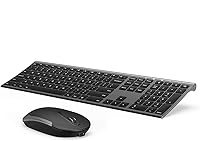
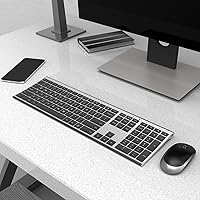
The Vssoplor Wireless Keyboard and Mouse Combo is a budget-conscious, wire-free pairing that has quietly built a loyal following among home office workers and everyday PC users since 2018. At its core, you get an ultra-slim scissor-switch keyboard and a flat rechargeable mouse, both connecting through a single nano USB receiver — plug it in and you are up and running in seconds. The dark gray finish looks clean on most desks without drawing attention to itself. For a combo sitting well below the mid-range price threshold, it punches above its weight in terms of polish and practicality.
Features & Benefits
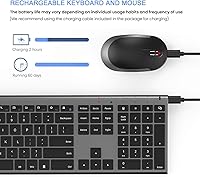
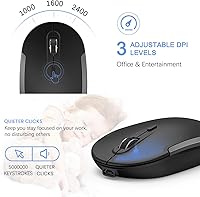
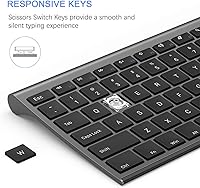
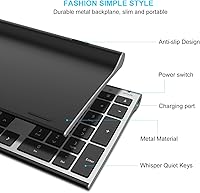
The 2.4GHz wireless connection holds steady up to about 10 meters away, which matters if your computer is tucked under a desk or across a room. The keyboard is genuinely thin — barely thicker than a few stacked credit cards — and the scissor switches keep noise to a minimum without sacrificing feedback. A full numpad sits on the right, useful for data entry or spreadsheet work. The mouse offers three DPI settings you can toggle on the fly, and both devices charge via the included cable, so there are no disposable batteries to replace. An auto-sleep function kicks in during idle periods to stretch charge life further.
Best For
This wireless combo clicks best with remote workers and students who want a clean, clutter-free desk without spending a lot. If you are currently using a wired set and want to cut the cables, this is a straightforward upgrade. Laptop users especially benefit from the full numpad, which most portable keyboards omit. The flat, low-profile design suits anyone prioritizing desk space, and the quiet keys make it a decent pick for open offices or shared living spaces. That said, if you prefer a mouse with more height and grip, the flat mouse profile here might not feel natural during longer sessions.
User Feedback
Across a large pool of reviews, consistent praise centers on how easy the setup is — most people mention being up and running within a minute of opening the box. The slim look earns repeat compliments, and quiet typing comes up often from users working near others. The most common criticism targets the mouse: people with larger hands or those used to a taller mouse find the ultra-flat profile uncomfortable over extended use. Battery life feedback is mixed — some report weeks between charges, others notice faster drain with heavy daily use. Overall sentiment leans clearly positive, but ergonomic fit is worth considering before buying.
Pros
- Both devices recharge via cable, eliminating the need to ever buy replacement batteries.
- Setup takes under a minute — plug in the nano receiver and both devices connect instantly.
- The slim keyboard profile frees up real desk space and looks clean in any neutral workspace.
- Quiet key actuation makes this wireless combo genuinely unobtrusive in shared or open-plan environments.
- The full-size numpad is a practical bonus for users doing data entry or financial work on a laptop.
- A single USB receiver handles both the keyboard and mouse, preserving a valuable port.
- Three DPI levels give enough cursor flexibility for switching between document work and general browsing.
- Auto-sleep mode helps stretch battery life noticeably during normal daily usage patterns.
- At its price tier, the overall package — layout, rechargeability, and wireless range — is hard to beat.
Cons
- The flat mouse shape is uncomfortable for users with larger hands or those who prefer a palm grip.
- Battery life is inconsistent — heavy daily users report needing to recharge far more frequently than light users.
- The charging cable is not a standard type, making it a hassle to replace if lost.
- Mouse scroll wheel and click durability have drawn complaints after several months of intensive use.
- The keyboard offers no tilt adjustment, which some users find uncomfortable during extended typing sessions.
- Wireless performance can degrade in environments with heavy signal interference or through thick walls.
- The power switch location on the keyboard is not intuitive and causes initial confusion for some buyers.
- No official Mac or Linux support limits usefulness for users outside the Windows ecosystem.
- The nano receiver is stored inside the mouse battery compartment, making it easy to misplace during setup.
Ratings
The scores below for the Vssoplor Wireless Keyboard and Mouse Combo were generated by our AI engine after analyzing thousands of verified global buyer reviews, with spam, bot-submitted, and incentivized feedback actively filtered out. Each category reflects the genuine consensus of real-world users — from daily office typists to students working in tight spaces — and both the strengths and the recurring frustrations are represented transparently.
Value for Money
Keyboard Typing Experience
Mouse Ergonomics
Wireless Connectivity & Stability
Battery Life
Build Quality & Durability
Setup & Plug-and-Play Experience
Noise Level
Slim & Aesthetic Design
DPI & Mouse Precision
Portability & Desk Footprint
Compatibility
Charging & Cable Experience
Suitable for:
The Vssoplor Wireless Keyboard and Mouse Combo is a strong match for remote workers, students, and light office users who want a clean, cable-free desk setup without committing to a high-end budget. If you spend most of your day in documents, spreadsheets, or email, the full-size layout with a dedicated numpad covers your bases comfortably. Laptop owners who find their built-in keyboard cramped for number-heavy work will appreciate having a proper numpad without hauling around a bulky peripheral. The quiet scissor-switch keys make this wireless combo particularly well-suited for shared spaces — open-plan offices, library study rooms, or apartments where noise travels. Anyone upgrading from a tangled wired set for the first time will find the single-receiver setup refreshingly simple, and the rechargeable design removes the low-level annoyance of hunting for replacement batteries.
Not suitable for:
The Vssoplor Wireless Keyboard and Mouse Combo is not the right pick for users who depend on their mouse for long, intensive sessions requiring ergonomic support. If you have large hands or prefer a palm-grip mouse with meaningful height, the ultra-flat mouse shape is likely to cause discomfort within an hour of continuous use — this is one of the most consistent complaints in the review pool, and it is worth taking seriously before buying. Power users who do graphic design, video editing, or any precision cursor work will find the sensor and DPI range too limited for their needs. Mechanical keyboard enthusiasts or anyone who genuinely enjoys deep key travel and tactile click feedback will find the low-profile scissor switches underwhelming by comparison. Mac or Linux users should also be cautious, as the combo is built and optimized around Windows, and some function keys behave unexpectedly outside that ecosystem.
Specifications
- Connectivity: Both the keyboard and mouse connect via a single 2.4GHz wireless nano USB receiver that plugs into any standard USB-A port.
- Wireless Range: The combo maintains a stable connection at distances up to 10 meters in open, unobstructed environments.
- Keyboard Layout: Full-size layout includes a dedicated numeric keypad, standard function row, and fast-access shortcut hot keys.
- Key Type: Low-profile scissor-switch keys provide short travel distance and quiet actuation suited to shared workspaces.
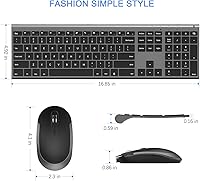
- Keyboard Thickness: The keyboard measures approximately 5.5mm thick, roughly 0.2 inches, making it one of the slimmer full-size boards in its category.
- Mouse Thickness: The mouse stands 0.86 inches tall, reflecting an intentionally flat, ultra-slim profile prioritizing desk aesthetics over height.
- DPI Settings: The mouse offers three selectable DPI levels — 1000, 1600, and 2400 — toggled directly from the mouse body.
- Rechargeability: Both the keyboard and mouse are rechargeable via the included charging cable, eliminating the need for disposable batteries.
- Auto Sleep: Both devices automatically enter a low-power sleep state during inactivity and wake instantly upon pressing any key or moving the mouse.
- Dimensions: The keyboard measures 16.8 x 4.9 x 0.6 inches overall; combined combo weight is approximately 1.5 pounds.
- OS Compatibility: Fully compatible with Windows XP, Vista, 7, 8, 10, and later versions; not officially supported on macOS or Linux.
- Receiver Storage: The nano USB receiver is stored inside the mouse battery compartment when not in use, reducing the risk of misplacement during transport.
- Color: Available in Dark Gray, a neutral finish that suits most professional and home desk environments without showing fingerprints heavily.
- Battery Included: One CR2 battery is included in the package to support initial device operation before recharging is needed.
- Package Contents: The box includes the wireless keyboard, wireless mouse, one nano USB receiver, one charging cable, and one CR2 battery.
Related Reviews

Arteck HW192 Wireless Keyboard and Mouse Combo

cimetech Wireless Keyboard and Mouse Combo

seenda Wireless Keyboard and Mouse Combo

ULSOU Wireless Ergonomic Keyboard and Mouse Combo

GEEZER Wireless Keyboard and Mouse Combo

Harburfine Wireless Keyboard and Mouse Combo

Letton Wireless Retro Keyboard and Mouse Combo

Kootop Wireless Keyboard Mouse Combo

EDJO Wireless Keyboard and Mouse Combo
