TKVPJYYI Wireless Retro Typewriter Keyboard and Mouse Combo

TKVPJYYI Wireless Retro Typewriter Keyboard and Mouse Combo — image 1

TKVPJYYI Wireless Retro Typewriter Keyboard and Mouse Combo — image 2
TKVPJYYI Wireless Retro Typewriter Keyboard and Mouse Combo — image 3
TKVPJYYI Wireless Retro Typewriter Keyboard and Mouse Combo — image 4

TKVPJYYI Wireless Retro Typewriter Keyboard and Mouse Combo — image 5
TKVPJYYI Wireless Retro Typewriter Keyboard and Mouse Combo — image 6
TKVPJYYI Wireless Retro Typewriter Keyboard and Mouse Combo — image 7
TKVPJYYI Wireless Retro Typewriter Keyboard and Mouse Combo — image 8
TKVPJYYI Wireless Retro Typewriter Keyboard and Mouse Combo — image 9
76%
24%

Overview

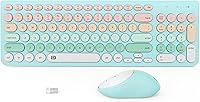
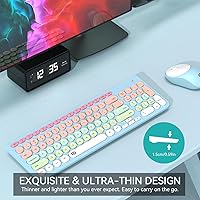
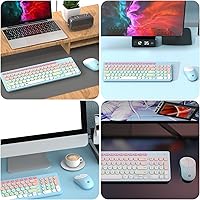
The TKVPJYYI Wireless Retro Typewriter Keyboard and Mouse Combo is one of those desk accessories that catches your eye before you even plug it in. The blue colorful round keycaps give it a vintage typewriter character that stands out in a sea of plain black peripherals. It offers a full 96-key layout — numeric keypad included — so you are not sacrificing functionality for looks. The whole setup connects through a single 2.4GHz USB receiver, keeping things simple from day one. Launched in late 2023, it has already carved a spot in the top 300 keyboard-mouse combos on Amazon, which says something for a budget-tier option.

Features & Benefits

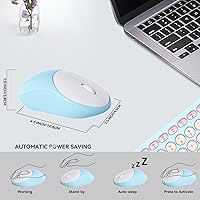
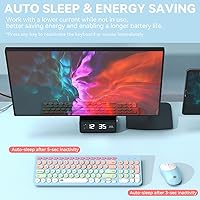
The convenience starts the moment you open the box — one USB nano-receiver handles both the keyboard and mouse simultaneously, no driver installation required. The keys are notably quiet, which matters if you share a workspace or prefer not to announce every keystroke. A built-in auto-sleep kicks in after about five minutes of inactivity, and the manufacturer estimates battery life reaching up to 16 months, though real-world use will vary depending on your habits. Twelve multimedia hotkeys sit along the top row for quick media and volume access, and the foldable tilt legs let you dial in a comfortable typing angle without much fuss.

Best For

This retro keyboard combo is a natural fit for students who want their desk to reflect their personality without overspending. Remote workers who do light daily typing — emails, documents, spreadsheets — will find the full layout practical enough for real work. If you are shopping for a birthday or holiday gift for someone who loves a vintage-inspired look, the colorful design does most of the heavy lifting. Home office setups in shared spaces benefit from the quiet keys as well. That said, heavy typists who log long hours daily may want something with more tactile feedback and sturdier build quality.

User Feedback

Buyers consistently praise the visual design, with many noting that the colors in person closely match the product photos — not always a given at this price point. The typing noise gets frequent positive mentions, with several reviewers calling it genuinely office-friendly. On the flip side, mouse sensitivity draws some criticism, particularly at lower speed settings, and a handful of users feel the plastic construction reflects the price tier more than expected. Battery life feedback is mixed; some report strong longevity while others replace batteries sooner than the manufacturer estimate suggests. Compatibility with Windows laptops and desktops is generally smooth, though Mac and TV use appears more inconsistent.

Pros

  • The colorful round keycaps deliver genuine desk personality that stands out compared to generic black combos.
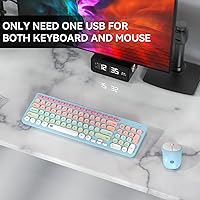
  • Single USB receiver connects both devices instantly — no drivers, no setup frustration.
  • Quiet key switches are genuinely unobtrusive during calls or in shared office environments.
  • Full numeric keypad is included, which is rare and useful at this budget level.
  • Auto-sleep mode meaningfully extends battery life during normal workday use.
  • Wireless range holds up reliably across a full room without dropout or lag.
  • Batteries for both devices are included right in the box, ready to use immediately.
  • The foldable tilt legs provide a comfortable typing angle without any accessories needed.
  • At its price point, this typewriter-style keyboard and mouse punches well above average on visual appeal.

Cons

  • Mouse sensitivity feels sluggish at lower settings, with no DPI button to adjust on the fly.
  • Plastic shell flexes under firm hand pressure, and keycaps can feel slightly loose over time.
  • Battery life estimates are optimistic — heavy daily users will replace batteries more often than expected.
  • Keyboard takes AAA batteries while the mouse takes AA, so you need to stock two different sizes.
  • Hotkeys do not map correctly on macOS, making it a frustrating experience for Mac users.
  • No Bluetooth option limits compatibility with tablets and USB-C-only devices without an adapter.
  • Key travel is shallow, which can cause mild finger fatigue during longer uninterrupted typing sessions.
  • Some buyers receive units with minor cosmetic scuffs on keycaps straight from the packaging.
  • Only one fixed tilt angle is available, which may not suit all desk heights or wrist positions.

Ratings

The TKVPJYYI Wireless Retro Typewriter Keyboard and Mouse Combo has been evaluated by our AI rating system after analyzing verified global buyer reviews, with spam, bot activity, and incentivized feedback actively filtered out. The scores below reflect both the genuine strengths that keep buyers satisfied and the real frustrations that surface after extended daily use. Nothing here is sugarcoated — the ratings are designed to help you decide whether this typewriter-style keyboard and mouse fits your actual needs.

Design & Aesthetics
88%
The round colorful keycaps genuinely turn heads, and buyers consistently report that the blue color variant looks even better in person than in the product photos. For anyone building a personality-driven desk setup, this retro combo delivers visual impact that far outpaces its price tier.
A few buyers note that the overall plastic finish feels somewhat lightweight up close, which slightly undercuts the vintage premium look it aims for. The aesthetic works best from a distance or in photos — sustained close inspection reveals the budget construction more plainly.
Typing Experience
71%
29%
The keys have a satisfying rounded feel under the fingers, and the rebound is snappy enough for comfortable everyday typing like emails, notes, and light documents. Shared-space workers especially appreciate the muted click sound, which stays genuinely unobtrusive during calls or in quiet offices.
The key travel is on the shallow side, which can feel underwhelming for users accustomed to mechanical keyboards. Those who type heavily for hours at a stretch report mild finger fatigue, suggesting this combo is tuned more for light to moderate sessions than marathon typing days.
Mouse Performance
62%
38%
For basic desktop navigation, browsing, and document work, the included mouse gets the job done without noticeable lag at mid-to-high sensitivity settings. The wireless connection stays stable within a normal desk range, and most buyers find it perfectly adequate for everyday office use.
Mouse sensitivity at lower DPI settings is a recurring complaint, with some users finding the cursor movement feels sluggish or inconsistent. There is no DPI adjustment button, which limits versatility — graphic work, gaming, or precision tasks are clearly not what this mouse was designed for.
Build Quality
58%
42%
The keyboard frame holds up reasonably well for day-to-day desk use, and the non-slip rubber pads do their job keeping the unit from sliding around. For a budget-tier combo, the construction is acceptable if you treat it as a lifestyle accessory rather than a professional workhorse.
The plastic shell flexes noticeably when pressure is applied, and several buyers report that keycaps feel slightly loose over time with regular use. At this price point some compromise is expected, but users hoping for a sturdy, long-lasting build may find the materials disappointing within a few months.
Wireless Connectivity
83%
The single USB nano-receiver pairing both devices is a genuine convenience that buyers appreciate — one port used, zero setup headaches. The 2.4GHz connection stays reliably stable up to around 8 to 10 meters, and there are very few reports of mid-session disconnections during normal desk use.
A small number of users report occasional interference when other 2.4GHz devices are nearby, such as wireless headsets or routers. There is no Bluetooth option, so users with limited USB ports or tablet setups without a standard USB-A port may run into compatibility friction.
Battery Life
67%
33%
Many buyers report going several months before needing to replace batteries, which for casual daily use is a genuinely pleasant surprise at this price. The auto-sleep feature clearly contributes, kicking in quickly during idle periods and noticeably reducing drain compared to always-on budget keyboards.
The 16-month battery estimate is a manufacturer best-case figure, and real-world results vary considerably depending on usage intensity. Heavy daily users report needing replacements far sooner, and since the keyboard takes AAA while the mouse takes AA, you end up managing two different battery types simultaneously.
Ease of Setup
91%
Plug the USB receiver in, switch the power toggle on, and both devices are ready within seconds — no software download, no driver installation, no pairing menus to navigate. Buyers who dread tech setup find this combo refreshingly immediate, especially when gifting it to less technical family members.
Occasionally a first-time connection requires unplugging and reinserting the receiver, particularly on certain TV or projector USB ports. There is no onboard channel switching, so using the combo across multiple devices is not supported without physically moving the receiver each time.
Value for Money
79%
21%
For buyers prioritizing aesthetics and wireless convenience on a tight budget, this retro keyboard combo genuinely delivers more visual character per dollar than almost anything else in its category. Students and desk decorators frequently call it a great buy, especially when snagged during a promotion.
Buyers expecting durability or performance comparable to mid-range keyboards will feel the gap. The value proposition holds firmly as long as expectations are calibrated to its budget positioning — stretch those expectations and the trade-offs in mouse quality and build finish become harder to overlook.
Ergonomics & Comfort
69%
31%
The foldable tilt legs give you two usable angles, and the non-slip pads keep the board planted firmly on smooth desks. For short to medium typing sessions, most users find the wrist positioning comfortable enough without any additional support accessories.
Extended typing sessions expose the lack of wrist rest support, which becomes noticeable after an hour or more. The tilt range is limited to essentially one raised position, so users with specific ergonomic needs or desk height mismatches may find the fixed angle insufficient over time.
Key Layout & Hotkeys
82%
18%
Having a full numeric keypad at this size and price is genuinely useful for anyone who works with numbers or data entry, and the 12 multimedia hotkeys work reliably for volume, playback, and quick email access without needing any configuration. The layout feels logically organized and familiar from day one.
Some buyers with smaller hands find the full-size layout slightly wide for comfortable all-day reach. A minority of hotkeys — particularly the email and browser shortcuts — are less useful for users who prefer custom shortcut setups, and there is no software to remap them.
Noise Level
84%
The keys are quiet enough that multiple buyers specifically mention using this combo during video calls or in open-plan offices without drawing complaints. The sound profile is a soft thud rather than a click, which is exactly what buyers in shared home or coworking spaces are looking for.
Quiet keys come with a softer tactile response, which some typists find slightly unsatisfying if they are used to a crisper keystroke feel. A handful of users also note that the spacebar and larger modifier keys are marginally louder than the alphanumeric keys, creating slight sonic inconsistency.
Compatibility
74%
26%
Windows desktop and laptop compatibility is smooth across the board, with no reported driver conflicts on Windows 10 or 11. Several buyers also confirm successful use with smart TVs and projectors for media control, which adds a practical secondary use case beyond the desk.
Mac compatibility is functional but incomplete — media hotkeys do not map correctly without workarounds, and a few buyers report the keyboard layout causing minor issues in macOS. Tablet use is limited to devices with USB-A support, leaving USB-C-only devices out unless you have an adapter on hand.
Packaging & Unboxing
76%
24%
The product arrives well-protected, and the batteries are included and pre-installed in both devices, which buyers often mention as a small but welcome touch. The unboxing experience is tidy and gift-ready enough that several reviewers mention giving it without additional wrapping.
The packaging itself is fairly minimal — no storage tray or protective carry case is included, which matters little for home use but limits its polish as a standalone gift presentation. A few buyers noted minor cosmetic scuffs on keycaps fresh out of the box, suggesting quality control is inconsistent.
Gifting Appeal
86%
The colorful retro look photographs well and appeals to a wide range of ages, making this typewriter-style keyboard and mouse a genuinely crowd-pleasing gift for students, remote workers, or anyone refreshing their home office. Buyers consistently mention receiving enthusiastic reactions from recipients.
The gifting appeal is largely aesthetic — recipients who are discerning about keyboard performance may quickly notice the limitations. It works best as a gift for someone prioritizing style and fun over technical specs, so knowing your recipient matters before choosing this as a present.

Suitable for:

The TKVPJYYI Wireless Retro Typewriter Keyboard and Mouse Combo is an excellent pick for students, remote workers, and home office users who want their desk setup to reflect a bit of personality without spending a lot. If your daily computing involves emails, documents, spreadsheets, and general browsing, the full 96-key layout covers everything you need, and the quiet keys make it easy to work alongside others without causing distraction. People sharing a home workspace or sitting in on frequent video calls will appreciate how unobtrusive the typing sound actually is in practice. Gift shoppers will find it an easy win too — the colorful retro design photographs well and tends to generate genuine enthusiasm from recipients who care about desk aesthetics. It also works surprisingly well as a secondary setup connected to a smart TV or projector, giving it more versatility than you might expect at this price point.

Not suitable for:

Buyers who rely on their keyboard for serious, sustained daily output should think carefully before committing to this retro keyboard combo — the build quality and typing depth are calibrated for lighter use, and heavy typists often notice the limitations within a few weeks. The included mouse lacks DPI adjustment, which makes it a poor fit for anyone doing design work, photo editing, or anything requiring precision cursor control. Mac users will run into hotkey mapping frustrations, and the absence of Bluetooth means anyone with a USB-C-only device needs an adapter just to get started. If long-term durability is a priority, the lightweight plastic construction may feel underwhelming after extended daily use; this is not a peripheral built to last five years of hard office work. Anyone upgrading from a mid-range or mechanical keyboard should also be prepared for a noticeable step down in tactile feedback and key consistency.

Specifications

  • Key Layout: Full-size 96-key layout includes a dedicated numeric keypad, function row, and standard alphanumeric keys for complete desktop-style input.
  • Key Style: Round retro typewriter-style keycaps provide a vintage aesthetic with a slightly raised, cylindrical profile on each key.
  • Multimedia Hotkeys: 12 dedicated multimedia hotkeys along the top row provide one-press access to volume, playback, email, and browser controls.
  • Wireless Technology: 2.4GHz wireless connection is established through a single USB nano-receiver that pairs both the keyboard and mouse simultaneously.
  • Wireless Range: Both devices operate reliably at distances of up to 10 meters (approximately 33 feet) from the USB receiver under normal conditions.
  • Keyboard Batteries: The keyboard is powered by two 1.5V AAA batteries, which are included in the box at the time of purchase.
  • Mouse Batteries: The mouse requires one 1.5V AA battery, which is also included and pre-installed for immediate use out of the box.
  • Battery Life: Manufacturer estimates battery life at up to 16 months; actual duration will vary depending on daily usage intensity and session length.
  • Auto-Sleep: Both devices enter hibernation mode automatically after 5 minutes of inactivity, helping conserve battery life during idle periods.
  • Keyboard Dimensions: The keyboard measures 15.28 inches wide by 8.15 inches deep by 1.89 inches tall, occupying a standard full-size desktop footprint.
  • Weight: The keyboard unit weighs approximately 1.48 pounds, giving it a lightweight feel that is typical for plastic-constructed budget peripherals.
  • Tilt Adjustment: Foldable tilt legs on the underside of the keyboard allow for a raised typing angle, supported by non-slip rubber pads for stability.
  • Color Variant: This listing covers the Blue Colorful variant featuring 96 keys with multicolored retro-style keycaps in a blue-dominant color scheme.
  • Compatibility: The combo is compatible with Windows-based desktop PCs, laptops, projectors, and select smart televisions via the USB nano-receiver.
  • Driver Requirement: No drivers or additional software are required; the combo operates as a plug-and-play device on all supported operating systems.
  • Receiver Type: A single shared USB nano-receiver connects both the keyboard and mouse to the host device, using only one USB-A port.
  • Noise Level: The key switches are designed with noise-dampening construction to produce a soft keystroke sound suitable for shared or quiet workspaces.
  • Release Date: This product was first made available on Amazon on November 25, 2023, under the manufacturer name TKVPJYYI.

Related Reviews
SEUNKWANG TK950 Wireless Typewriter Keyboard and Mouse Combo

78%
83%
Build Quality
88%
Typing Experience
79%
Wireless Connectivity
93%
Aesthetic & Design
76%
Backlighting
More
Arteck HW192 Wireless Keyboard and Mouse Combo

78%
78%
Build Quality
72%
Typing Experience
63%
Mouse Comfort & Ergonomics
81%
Battery Life
69%
Wireless Connectivity
More
MOWUX Wireless Keyboard and Mouse Combo
88%
91%
Typing Comfort
89%
Mouse Responsiveness
94%
Wireless Connectivity
85%
Build Quality
88%
Keycap Durability
More
MPTOG S801AG Wireless Keyboard and Mouse Combo
75%
88%
Aesthetic Design
93%
Ease of Setup
78%
Typing Feel
61%
Mouse Tracking Accuracy
82%
Wireless Reliability
More
Cimetech Wireless Keyboard and Mouse Combo
88%
91%
Value for Money
88%
Ease of Use
83%
Connectivity
94%
Portability
85%
Ergonomics
More
Tayderley Wireless Keyboard and Mouse Combo
86%
88%
Typing Comfort
85%
Mouse Performance
94%
Battery Life
83%
Build Quality
92%
Ease of Setup
More
QUASIO Wireless Keyboard and Mouse Combo

77%
88%
Value for Money
93%
Setup & Ease of Use
79%
Typing Comfort
84%
Wireless Connectivity & Range
72%
Mouse Performance
More
Hayyiesh KG659-01 Wireless Keyboard and Mouse Combo
75%
88%
Value for Money
79%
Keyboard Comfort & Ergonomics
74%
Key Feel & Typing Experience
58%
Mouse Build Quality
86%
Noise Level
More
UBOTIE Wireless Keyboard and Mouse Combo
79%
88%
Value for Money
74%
Typing Experience
83%
Keycap Design & Aesthetics
67%
Mouse Performance
81%
Wireless Connectivity & Range
More
CHESONA Wireless Keyboard and Mouse Combo
86%
93%
Multi-device Connectivity
87%
Typing Experience
85%
Battery Life
91%
Design & Build Quality
78%
Ergonomics & Comfort
More

FAQ

No, there is nothing to install. Just plug the USB nano-receiver into an available USB-A port on your computer, switch both devices on, and they connect automatically within a few seconds. It is a true plug-and-play setup.

Yes, that is exactly how it works. One receiver handles both devices simultaneously, so you are only using a single USB port for the entire combo. It is one of the more practical aspects of this retro keyboard combo for anyone with a tidy desk setup in mind.

The keyboard and mouse will function on macOS for basic typing and cursor movement, but the multimedia hotkeys do not map correctly to Mac shortcuts without manual workarounds. If you are a Mac-primary user who relies on hotkeys, it may cause some frustration in day-to-day use.

The manufacturer estimates up to 16 months, but treat that as an optimistic best-case figure based on light daily use with auto-sleep doing its job. Moderate to heavy users should expect noticeably shorter intervals between replacements. One practical note: the keyboard takes AAA batteries and the mouse takes AA, so keep both sizes on hand.

Yes, most buyers find the noise level genuinely unobtrusive. The key switches have a soft, dampened thud rather than a sharp click, which holds up well during video calls and in open-plan environments. It is not silent, but it is far less disruptive than most standard membrane keyboards.

Yes, as long as your TV or projector has a USB-A port, the receiver will connect without any configuration. It works well for media control and basic navigation in that context, and several buyers use the TKVPJYYI Wireless Retro Typewriter Keyboard and Mouse Combo specifically as a media room setup.

Unfortunately, no. There is no DPI button or sensitivity adjustment on the mouse itself, and no companion software to change it. It works fine for everyday browsing and document use, but if you need precise cursor control for design or editing work, this mouse will likely feel limiting.

Yes, there are foldable legs on the underside of the keyboard that raise the back edge for a more angled typing position. The legs are stable and the non-slip rubber pads underneath keep the unit from sliding. There is essentially one raised position available rather than multiple incremental angles.

Not directly — the receiver uses a standard USB-A connector, so you would need a USB-A to USB-C adapter to use it with modern laptops or tablets that only have USB-C ports. The adapter is not included in the box, so factor that in if your device lacks a USB-A port.

It is actually an ideal choice for that situation. The setup requires zero technical knowledge — plug in the receiver, turn on the devices, and everything works. The colorful retro design also makes it visually appealing right out of the box, and the batteries are included, so there is nothing extra to buy before using it.





