Overview

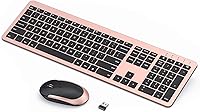
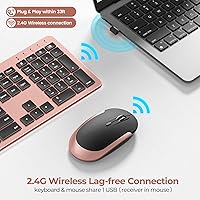
The seenda Wireless Rechargeable Keyboard Mouse Combo is a slim, cable-free desk set built for home and office users who want a tidy workspace without sacrificing a full keyboard layout. What sets it apart from most wireless options at this price is the single USB receiver — it manages both devices and tucks inside the mouse when not in use. The rose gold and black colorway is a deliberate design choice, not an afterthought; it looks noticeably more considered than the typical grey office peripheral. That said, this is an everyday productivity tool, not a peripheral aimed at power typists or anyone chasing precision gaming hardware.
Features & Benefits

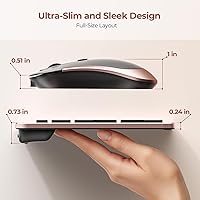
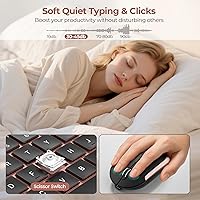
The most practical win is the built-in lithium battery in both devices — no more hunting for AA batteries at inconvenient moments. The nano-receiver stores inside the mouse body, making the whole setup genuinely portable. On the keyboard, seenda kept the full layout intact: number pad, media keys, and function row are all present. The low-profile scissor switches are noticeably quiet — softer than a standard membrane board, which matters in open-plan offices or shared rooms. Wireless range holds up reliably across a normal-sized room. The included silicone dust cover is a small but thoughtful addition that most competitors at this price simply skip.

Best For

This rechargeable combo is a natural fit for remote workers who want things to work without fuss. The plug-and-play setup — receiver in, done — suits anyone who finds software installations tedious. Travelers who need a full-size layout on the road will appreciate that the number pad is there when needed, and the lightweight build adds little to a bag. It also works well in shared spaces like libraries or co-working rooms where noisy keys are a real concern. One honest caveat: compatibility is Windows-focused, so Mac users should verify their needs before purchasing. It rewards simplicity over customization.

User Feedback

Across nearly 3,700 ratings, the seenda keyboard and mouse set holds a 4.5-star average — solid, though not without complaints. Buyers consistently praise the quiet keys and clean look, with several noting it appears more expensive than it is. The criticisms worth knowing: the mouse feels noticeably light and somewhat hollow compared to a standalone unit, which bothers some users more than others. Battery life generally tracks the stated 1–2 months for casual users, but heavier users charge more often. A smaller number of reviewers flag intermittent connection drops after prolonged use — not widespread, but worth noting. Most agree the set punches above its price for everyday office work.

Pros

  • Built-in rechargeable batteries in both devices eliminate the need for disposable batteries entirely.
  • The single nano-receiver handles keyboard and mouse together, keeping your USB ports free.
  • Plug-and-play setup works within seconds — no software downloads or driver installation required.
  • Quiet scissor-switch keys are noticeably softer than standard membrane boards, ideal for shared spaces.
  • Full-size layout retains the number pad and media keys most slim wireless keyboards quietly drop.
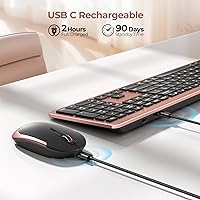
  • At under 1.5 pounds, this wireless desk set travels light without sacrificing a complete key layout.
  • The rose gold and black finish looks noticeably more considered than most peripherals in this price range.
  • The included silicone dust cover is a practical accessory that most competing sets at this price omit.
  • Wireless range holds up reliably across a normal room without perceptible lag during typical office tasks.
  • Broadly praised for offering well-above-average value relative to its accessible price point.

Cons

  • The mouse feels hollow and lightweight, with a plasticky build that underwhelms compared to standalone alternatives.
  • Scroll wheel quality on the mouse degrades for some users after several months of consistent daily use.
  • Battery life for heavy users falls noticeably short of the brand-stated one-to-two month estimate.
  • A subset of long-term users report intermittent wireless dropouts that worsen over time.
  • Media keys and function shortcuts do not work reliably on macOS or ChromeOS.
  • The keyboard keycap legends are printed rather than laser-etched, raising concerns about long-term fade.
  • Only one charging cable is included, so you cannot charge keyboard and mouse simultaneously without a spare.
  • Physical on/off switches on both devices are easy to overlook, causing unnecessary setup confusion for new users.
  • No wrist rest is included or integrated, which some users find uncomfortable during extended typing sessions.
  • The charging port standard is not the most current, meaning you will likely need the included cable specifically.

Ratings

The seenda Wireless Rechargeable Keyboard Mouse Combo has been evaluated by our AI system after processing thousands of verified global buyer reviews, with spam, incentivized feedback, and bot activity actively filtered out. Scores reflect the real distribution of user satisfaction — not a polished highlight reel — so both the genuine strengths and the recurring frustrations are captured honestly. The result is a balanced picture of where this wireless desk set earns its keep and where it falls short for certain users.
Value for Money
91%
Buyers consistently feel this rechargeable combo delivers more than its price tag suggests. Getting a full-size keyboard, a wireless mouse, a charging cable, and a dust cover in one box at this price point is a deal most users call out unprompted. It sits comfortably in the sweet spot between budget throwaway sets and pricier branded alternatives.
Users who compared it side-by-side with premium standalone mice found themselves questioning the mouse quality specifically. The perceived value holds up well overall, but buyers who need a high-precision mouse may feel they are paying for a keyboard and tolerating the mouse.
Typing Experience
83%
The low-profile scissor-switch keys strike a comfortable balance for daily office work — responsive enough to keep up with a moderate typist and flat enough to reduce wrist strain during long sessions. Many users who transitioned from older membrane keyboards described the feel as a noticeable step up in daily comfort.
Dedicated typists or anyone accustomed to mechanical keyboards will find the feedback underwhelming. The key travel is shallow, and a few users noted that extended writing sessions revealed a slight mushiness compared to higher-end scissor-switch boards.
Noise Level
89%
This is one of the standout traits that buyers mention repeatedly. In shared apartments, open-plan offices, and library settings, users report that the keystroke noise is low enough to avoid attracting attention. Several reviewers specifically switched to this set after complaints about their previous keyboard being too loud during video calls.
A small number of users found the mouse click noise slightly louder than expected given how quiet the keyboard is — the contrast between the two can feel a little inconsistent. It is still quiet by most standards, but if near-silent clicks are a priority, it may fall short.
Mouse Quality
62%
38%
For routine tasks like web browsing, document editing, and spreadsheet work, the mouse performs adequately. Tracking on standard surfaces is stable, and the ambidextrous shape accommodates both hand orientations without issue.
This is the most common source of disappointment in user reviews. The mouse feels noticeably light and hollow, and the plastic casing does not inspire confidence. Users who have used mid-range standalone mice find the build quality here underwhelming, and a subset have reported scroll wheel degradation after several months of daily use.
Battery Life
74%
26%
Casual users — those clocking four to six hours of screen time per day — generally find the stated one-to-two month battery life holds up reasonably well in practice. Not having to keep a stash of AA batteries on hand is a genuine quality-of-life improvement that many buyers highlight as a key reason they chose this set.
Heavy users, particularly those working eight or more hours daily, tend to charge more frequently than the brand estimate implies. Battery longevity for the mouse in particular has drawn criticism, with some users reporting it needs charging every two to three weeks under continuous use.
Build Quality & Materials
67%
33%
The keyboard body feels solid and flat, and the keycaps show minimal wobble. For a slim design at this price, the structural integrity of the keyboard half of this combo is genuinely respectable and has not drawn significant criticism from buyers.
The mouse is where the material quality gap becomes obvious. The lightweight plastic shell and slightly loose scroll wheel have led a number of users to describe it as feeling less durable than the keyboard. Several reviews note visible wear on high-contact areas within the first few months.
Wireless Connectivity
78%
22%
Day-to-day connectivity is reliable for the majority of users working at normal desk distances. The 2.4GHz connection handles typical office tasks without perceptible lag, and users who placed the receiver within a meter of their machine reported no noticeable interference.
A subset of buyers — most commonly those using the set for six months or longer — report intermittent dropout episodes that become more frequent over time. The issue appears linked to distance or interference from other wireless devices, and it is not universal, but it is consistent enough to be worth flagging for users in cluttered wireless environments.
Setup & Ease of Use
93%
Plug-and-play is genuinely plug-and-play here. The nano-receiver is pre-paired out of the box, and most users report full functionality within seconds of inserting it. No driver downloads, no pairing sequences — a refreshing straightforwardness that buyers upgrading from Bluetooth combos especially appreciate.
The physical on/off switches on both devices catch a surprising number of first-time users off guard. Several one-star reviews trace back to the devices simply not being switched on before use — a minor design communication issue that a clearer quick-start guide would solve.
Design & Aesthetics
86%
The rose gold and black colorway has genuine appeal and stands out from the sea of grey and black office peripherals. Multiple buyers mention that the set looks more expensive than it is, and some specifically purchased it to complement a home office aesthetic rather than purely for function.
Color preferences are personal, and the rose gold finish is not for everyone — a few buyers noted it photographs lighter than it appears in person. The slim profile, while visually clean, also means there is no wrist rest built in, which some users found fatiguing over longer sessions.
Portability & Travel Friendliness
81%
19%
At just under 1.5 pounds for the set, this wireless desk set travels light. The nano-receiver stored inside the mouse body prevents the frustrating experience of losing a dongle in a bag, and the included dust cover doubles as minor scratch protection when packing.
The keyboard is full-size, which is both a strength and a portability drawback depending on your bag. Users who want a genuinely compact travel setup will find it occupies more laptop bag real estate than a tenkeyless alternative would.
Compatibility & Device Support
69%
31%
For Windows desktop and laptop users, compatibility is essentially universal — no software installation required, and it works across Windows 7 through the latest releases without issue. Most buyers in that ecosystem report zero compatibility friction.
Mac users get basic functionality at best. Several reviewers note that media keys and some function shortcuts do not behave as expected on macOS, and the branding does not clearly communicate this limitation upfront. ChromeOS users have reported similar partial-functionality issues.
Keyboard Layout & Key Completeness
88%
Keeping a full-size layout — including the number pad, dedicated media keys, and a complete function row — in a slim form factor is a real differentiator at this price. Users who work with spreadsheets or do a lot of numeric data entry frequently call out the number pad as a deciding factor.
A few users noted that the media key labels are less intuitive than they expected, requiring a brief adjustment period. The key legends are also printed rather than laser-etched, raising some concern about long-term fade under heavy use.
Charging & Cable Convenience
77%
23%
Being able to charge both devices with an included cable removes a real recurring inconvenience. Users who previously dealt with battery disposal appreciate the sustainability angle, and the ability to use both devices while charging adds flexibility during low-battery moments.
The combo ships with a single charging cable, meaning you can only charge one device at a time unless you have a spare. A few users also noted that the charging port type is not the most current standard, requiring the included cable rather than any cable already on their desk.
Longevity & Durability
63%
37%
The keyboard component holds up reasonably well over time, with most users reporting no structural issues through the first year of regular use. The included dust cover is a practical addition that helps maintain key surface cleanliness over months of use.
Longer-term reviews raise some durability flags, particularly around the mouse. Scroll wheel degradation, increasingly frequent connection issues, and keycap shine appear in reviews from users past the one-year mark. The overall durability picture is acceptable for a budget-to-mid combo but not exceptional.

Suitable for:

The seenda Wireless Rechargeable Keyboard Mouse Combo is a strong match for Windows-based home office users who want a clean, cable-free desk without paying a premium for it. If your daily workload involves document editing, spreadsheets, email, or general browsing, this set handles all of it without complaint. The built-in rechargeable batteries make it particularly well-suited to people who find themselves constantly restocking AA batteries for cheaper peripherals — that recurring cost and inconvenience simply disappears. It also works well in shared environments: a student typing in a library, a remote worker on calls in a shared apartment, or a receptionist in a quiet front-of-house setting will all benefit from the notably subdued keystroke noise. Light travelers who need a full-size layout on the road, number pad included, will find it a practical carry given its low weight. First-time wireless keyboard buyers, or anyone graduating from a basic wired set, are likely to come away genuinely satisfied.
Not suitable for:

The seenda Wireless Rechargeable Keyboard Mouse Combo is not the right pick if mouse quality is a priority for you. Users who spend significant time in applications where precise cursor control or a satisfying click feel matters — graphic designers, CAD users, or anyone accustomed to a dedicated mid-range mouse — will likely find the included mouse underwhelming in both feel and feedback. Mac and ChromeOS users should also think twice: compatibility is centered on Windows, and media keys or function shortcuts may behave unpredictably on other operating systems. Heavy typists who prefer deep key travel and tactile feedback will find the low-profile scissor switches too shallow for extended, intensive sessions. If you work eight or more hours a day at a keyboard, battery recharge frequency may become a minor but recurring irritation. And if wireless reliability in a crowded Wi-Fi or Bluetooth environment is critical to your workflow, the occasional dropout reports from long-term users are worth factoring into your decision.
Specifications

  • Connectivity: Both keyboard and mouse connect via a single 2.4GHz USB nano-receiver for a stable, low-latency wireless link.
  • Wireless Range: The set maintains a reliable connection at distances of up to 33 feet between the devices and the USB receiver.
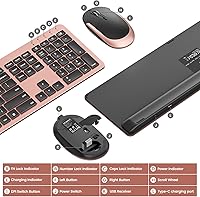
  • Receiver Storage: The nano-receiver stores inside the mouse body when not in use, preventing loss during transport.
  • Battery Type: Both the keyboard and mouse are powered by built-in, non-removable lithium-ion batteries charged via an included cable.
  • Battery Life: Seenda rates battery life at one to two months per full charge for typical use on both devices.
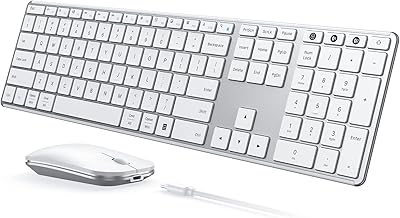
  • Keyboard Layout: Full-size layout includes a dedicated numeric keypad, media control keys, and a complete function row.
  • Key Type: Low-profile scissor-switch keys provide quiet, consistent actuation suited to office and shared environments.
  • Keyboard Switch: A physical on/off toggle switch is located on the top-right corner of the keyboard.
  • Mouse Switch: A physical on/off switch is located on the underside of the mouse for power management.
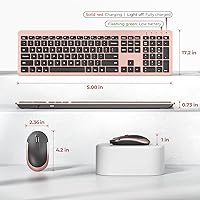
  • Dimensions: The packaged set measures 17.72 x 5.35 x 1.65 inches, accommodating the full-size keyboard and mouse together.
  • Item Weight: The combined weight of the keyboard and mouse set is 1.46 pounds.
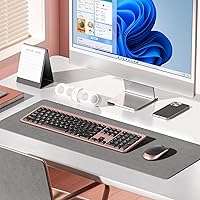
  • Color Variant: This variant is finished in Rose Gold and Black, with a slim, flat keyboard profile and matching mouse.
  • Compatibility: Designed for USB-enabled Windows devices; full media key and function key support is not guaranteed on macOS or ChromeOS.
  • Included Items: Package includes the wireless keyboard, wireless mouse, one USB nano-receiver, one charging cable, and a silicone keyboard dust cover.
  • Key Legends: Keycap legends are printed rather than laser-etched, which may be subject to wear under prolonged, heavy daily use.
  • Seller Rank: This set holds a Best Sellers Rank of #117 in the Computer Keyboard and Mouse Combos category on Amazon.
  • Ratings Volume: The product has accumulated nearly 3,700 verified ratings with an overall average of 4.5 out of 5 stars.
  • Release Date: This product was first made available for purchase on January 30, 2021.
  • Manufacturer: The keyboard and mouse set is designed and sold by Seenda, a peripheral accessories brand.
  • Battery Requirement: One lithium-ion battery is required for operation and is included with the product at the time of purchase.

Related Reviews

seenda Wireless Keyboard and Mouse Combo
88%
89%
Typing Comfort
87%
Ergonomics
82%
Wireless Connectivity
94%
Setup & Installation
88%
Key Spacing & Accuracy
More
seenda SKM64-3 Wireless Bluetooth Keyboard and Mouse Combo
87%
94%
Battery Life
90%
Connectivity and Compatibility
87%
Typing Experience
89%
Ergonomics and Comfort
85%
Design and Build Quality
More
Arteck HW192 Wireless Keyboard and Mouse Combo
78%
78%
Build Quality
72%
Typing Experience
63%
Mouse Comfort & Ergonomics
81%
Battery Life
69%
Wireless Connectivity
More
TKVPJYYI Wireless Retro Typewriter Keyboard and Mouse Combo
76%
88%
Design & Aesthetics
71%
Typing Experience
62%
Mouse Performance
58%
Build Quality
83%
Wireless Connectivity
More
MOFII Wireless Keyboard and Mouse Combo
84%
94%
Ease of Setup
85%
Ergonomics and Comfort
90%
Wireless Connectivity
88%
Design and Aesthetics
83%
Battery Life
More
Trueque Wireless Keyboard and Mouse Combo
78%
83%
Value for Money
81%
Typing Comfort & Ergonomics
78%
Backlight Quality
74%
Mouse Performance
88%
Noise Level
More
Arcwares Wireless Keyboard and Mouse Combo
78%
88%
Value for Money
91%
Aesthetic Design
76%
Keyboard Typing Experience
67%
Mouse Performance
84%
Wireless Connectivity
More
Tayderley Wireless Keyboard and Mouse Combo
86%
88%
Typing Comfort
85%
Mouse Performance
94%
Battery Life
83%
Build Quality
92%
Ease of Setup
More
Cimetech Wireless Keyboard and Mouse Combo
88%
91%
Value for Money
88%
Ease of Use
83%
Connectivity
94%
Portability
85%
Ergonomics
More
JOYACCESS Wireless Keyboard and Mouse Combo
82%
88%
Value for Money
83%
Typing Experience
74%
Mouse Performance
86%
Backlight Quality
81%
Battery Life
More

FAQ

No, there is nothing to install. Just plug the nano-receiver into a USB port on your Windows PC and both devices will be recognized automatically within a few seconds. It is true plug-and-play with no setup software required.

This is actually the most common first-use issue people run into. Both the keyboard and mouse have physical on/off switches that ship in the off position — the keyboard switch is on the top-right corner, and the mouse switch is on its underside. Flip both to the on position before expecting anything to work, and the connection should come through immediately.

A full charge typically takes around two to three hours depending on how depleted the battery is. You can use both the keyboard and mouse while they are plugged in and charging, so a low battery does not mean you have to stop working.

Basic typing and mouse movement will function on macOS and ChromeOS since it is a standard USB HID device, but expect some key mapping issues. Media keys and certain function shortcuts are designed with Windows in mind and may not behave as expected on other operating systems. If you are primarily a Mac user, it is worth checking reviews from Mac-specific buyers before committing.

That is a fair concern with nano-receivers in general. The seenda Wireless Rechargeable Keyboard Mouse Combo addresses this by storing the receiver inside the mouse body when it is not plugged in, which is one of the more practical design choices on this set. As long as you remember to tuck it back in when traveling, losing it is much less likely than with a loose dongle.
It is a brand-stated figure based on moderate use, and it holds up for casual users putting in four to six hours a day. If you are at your desk for eight or more hours daily, expect to charge more frequently — some heavy users report recharging the mouse every two to three weeks. The keyboard battery tends to last longer than the mouse battery in most reported experiences.

The low-profile scissor switches are genuinely quiet, noticeably softer than a standard membrane board and significantly more subdued than any mechanical keyboard. In practice, reviewers use this set in shared apartments, open offices, and library settings without complaints. The mouse clicks are slightly louder by comparison, but still well within acceptable range for shared spaces.

Honestly, the mouse is the weaker half of the set. It is light — some would say too light — and the plastic casing feels hollow compared to a dedicated mid-range mouse. For everyday browsing and office tasks it does the job fine, but if you have ever used a standalone mouse in the 25-to-40 dollar range, you will notice the difference immediately. It is adequate rather than impressive.

Only one charging cable is included in the box, so you would need to charge one device at a time unless you have a spare cable that fits the charging port. It is a minor but real inconvenience, especially if both devices happen to run low simultaneously.

The silicone dust cover is designed to protect the keycaps from dust and debris when the keyboard is not in use — think of it as a simple protective sleeve you place over the keyboard when you step away or pack it up. It is not meant to be used while typing. For users who leave their desk setup uncovered overnight or travel with the keyboard, it is a genuinely useful addition that most competing sets at this price skip entirely.