Overview

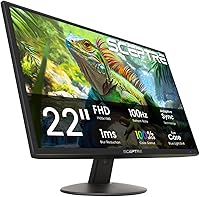
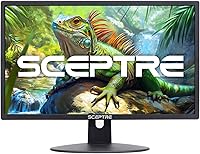
The Sceptre E225W 22-inch FHD Monitor is Sceptre's straightforward answer to a question every budget-conscious buyer eventually asks: how little do I need to spend to get a solid, everyday display? Launched in 2025, it sits firmly in the entry-level tier — a matte panel running at 1920x1080 resolution with a compact footprint that works well on a cramped dorm desk or a secondary workstation. Dual HDMI and VGA connectivity means it plays nicely with modern laptops and older desktop towers alike. Nothing flashy, but that is very much the point.

Features & Benefits

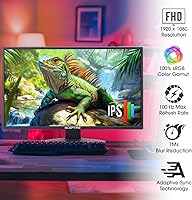
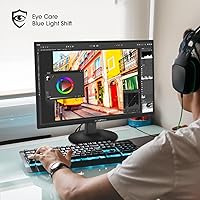
The 100Hz refresh rate is the spec that stands out most here — scrolling through documents or tracking motion in a game feels noticeably smoother than what a standard 60Hz panel delivers. The 99% sRGB coverage is solid for everyday tasks like photo browsing, video calls, and casual editing; just don't expect it to substitute for a purpose-built display in serious design work. Blue Light Shift is a practical touch for long desk sessions. The built-in speakers are predictably modest — thin-sounding at higher volumes — but genuinely useful if you need background audio without adding another device to an already busy desk.

Best For

This Sceptre display makes the most sense for students, home office workers, and anyone who needs a dependable daily driver without overspending. The 100Hz panel gives casual gamers a meaningful step up from typical budget screens, even if competitive players will eventually want something faster. The VGA port is a real convenience for anyone still working with older hardware, removing the need for a separate adapter. For a simple dual-monitor arrangement on a desk with limited real estate, the compact size and weight make the whole setup straightforward. Practicality is the pitch here, and it delivers on that honestly.

User Feedback

Buyers consistently highlight value for money as the E225W monitor's biggest strength — most note that out-of-box image quality exceeded expectations for this price tier. The matte finish gets quiet but frequent praise for cutting glare in bright rooms. On the downside, some users find the stand less sturdy than ideal, with a limited tilt range that can frustrate taller setups. The built-in speakers draw mixed reactions: handy for convenience, but underwhelming in volume for larger spaces. Assembly and packaging are broadly described as quick and secure. A handful of reviewers specifically call out the 100Hz smoothness as a welcome surprise at this price point.

Pros

  • The 100Hz refresh rate delivers noticeably smoother scrolling and motion compared to standard budget 60Hz panels.
  • Matte screen coating reduces glare effectively in bright home office or dorm environments.
  • Dual HDMI ports plus a VGA input make it easy to connect multiple devices, including older hardware.
  • Blue Light Shift technology is a practical feature for reducing eye fatigue during long work sessions.
  • Out-of-box image quality consistently surprises buyers given the entry-level price point.
  • Built-in speakers handle background audio or video calls without requiring any extra desk clutter.
  • The compact 22-inch footprint fits neatly into tight workspaces or dual-monitor arrangements.
  • FPS and RTS gaming presets allow quick display optimization without digging into manual settings.
  • Setup is fast and packaging is secure, with most buyers noting a hassle-free assembly experience.
  • The E225W monitor offers a genuine 100Hz experience at a price where many rivals still ship 60Hz panels.

Cons

  • The stand feels less sturdy than expected and offers only limited tilt with no height adjustment.
  • Built-in speaker volume is underwhelming in larger rooms or any environment with background noise.
  • No VESA mount compatibility information is clearly confirmed, limiting wall or arm-mount options.
  • At 22 inches, the screen size may feel restrictive for users accustomed to 24-inch or larger displays.
  • Color accuracy is adequate for casual use but inconsistent enough to disappoint detail-focused creative work.
  • The 1080p resolution shows its limits on a monitor this close to the desk in pixel-density comparisons.
  • Bezels are functional but noticeably thick, which looks dated next to more modern slim-bezel alternatives.
  • No USB hub or USB-C connectivity, which increasingly matters for modern laptop users.
  • Limited OSD customization options compared to monitors from more established display-focused brands.

Ratings

The Sceptre E225W 22-inch FHD Monitor has been scored by our AI rating system after processing verified buyer reviews from multiple global markets, with spam, bot-generated, and incentivized submissions actively filtered out. What you see below reflects an honest cross-section of real ownership experiences — the genuine highlights and the recurring frustrations alike — weighted by review quality and purchase verification status. Every category score is calibrated to reflect where this budget 22-inch screen actually lands relative to buyer expectations at its price tier, not against flagship monitors it was never designed to compete with.

Value for Money
91%
For buyers on a tight budget, this Sceptre display routinely surpasses expectations. The combination of a 100Hz refresh rate, matte panel, and dual HDMI connectivity at this price point is genuinely hard to argue with, and a large share of verified reviewers explicitly say they got more than they paid for.
A small group of buyers who compared it directly against slightly pricier competitors felt the gap in build and panel quality was worth stretching the budget for. Value perception also depends heavily on use case — casual users rate it higher than anyone expecting professional-grade output.
Image Quality
76%
24%
Out of the box, colors look vibrant and well-balanced for everyday tasks — web browsing, video streaming, and document work all look clean and natural. The 99% sRGB coverage means color-sensitive casual work, like editing personal photos or following design tutorials, holds up without obvious inaccuracies.
Side-by-side with IPS panels in the same price range, viewing angles show some color shift, and contrast depth is limited. Users doing any kind of professional color work — print design, video grading — report that the panel is simply not consistent enough for those demands.
Refresh Rate Performance
88%
The 100Hz refresh rate makes a genuine, perceptible difference in day-to-day use. Scrolling feels fluid, cursor movement tracks cleanly, and in casual gaming sessions, the step up from 60Hz is immediately noticeable even for buyers who were skeptical about it before purchase.
While the 100Hz panel is a strong asset at this price, competitive gamers quickly notice its ceiling. Input lag and pixel response under fast-paced, high-action game conditions are not on par with monitors built specifically for gaming, and some reviewers note frame tearing in demanding titles.
Build Quality
62%
38%
The monitor chassis itself feels acceptably solid for the price, and the matte plastic finish does not look as cheap as some competing products in the same bracket. Most buyers find it stable enough for a fixed desk setup where it will not be frequently moved or adjusted.
The stand draws consistent criticism — it feels lightweight and slightly wobbly under pressure, and the tilt range is narrow enough to cause ergonomic issues for taller users or those with non-standard desk heights. Buyers who prefer a sturdier physical experience will notice the trade-off immediately.
Ergonomics & Adjustability
44%
56%
Initial positioning out of the box is straightforward, and the basic tilt function works fine for users whose desk and chair height happen to align with the default screen angle. For a minimalist setup where the monitor rarely moves, the limitations are less likely to cause frustration.
There is no height adjustment, swivel, or pivot support on the stand, which is a real limitation for anyone who needs to fine-tune their setup for comfort over long workdays. Users who have previously owned ergonomic monitors consistently flag this as the most disappointing aspect of the E225W monitor.
Connectivity
83%
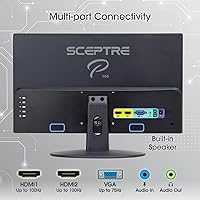
Two HDMI ports and a VGA input cover a wide range of device combinations without requiring adapters in most home setups. Buyers with a mix of older and newer hardware — a desktop with VGA and a laptop with HDMI — specifically called out this versatility as a key purchase driver.
There is no USB-C input or USB hub functionality, which increasingly matters as more laptops drop legacy ports. For users with a modern single-cable desk setup in mind, this monitor requires a separate hub or adapter to fully replace a more connectivity-rich display.
Eye Comfort
79%
21%
The Blue Light Shift feature gets quiet but consistent praise from users who spend long hours working or studying. Combined with the matte screen that cuts reflections in bright rooms, this Sceptre display is generally described as comfortable over multi-hour sessions by the majority of reviewers.
Blue Light Shift reduces but does not eliminate the fatigue associated with extended screen time, and some users note that enabling it shifts whites toward a warm yellow tone that not everyone finds natural. There is no flicker-free certification mentioned in the spec sheet, which matters to sensitive users.
Gaming Experience
68%
32%
For casual gaming — indie titles, slower-paced RPGs, strategy games, and couch-style console setups — the 100Hz panel and dedicated FPS and RTS presets provide a noticeably better experience than a basic 60Hz budget monitor. The presets are easy to toggle and make a visible difference in image contrast during gameplay.
Fast-paced competitive titles expose the limitations quickly. Response time performance in motion-heavy scenes is inconsistent with what dedicated gaming monitors offer, and the lack of adaptive sync technology means frame tearing is possible under variable frame rate conditions.
Built-in Speakers
53%
47%
Having speakers built directly into the monitor is a genuine convenience for minimalist setups, video calls, or background audio while working. Buyers who only need basic sound for meetings and casual YouTube use report that the speakers serve that purpose without any additional setup.
Volume ceiling is low and audio quality is thin, with almost no bass and noticeable distortion near maximum volume. Anyone expecting to enjoy music, movies, or immersive gaming audio through the built-in speakers will be underwhelmed — external speakers or headphones are the practical solution for anything beyond background use.
Setup & Assembly
86%
Virtually every verified buyer mentions how quick and straightforward the out-of-box experience is. The stand attaches with minimal effort, the display is plug-and-play on Windows, macOS, and ChromeOS, and the packaging is well-organized enough that nothing arrives damaged in typical shipping conditions.
The OSD (on-screen display) menu navigation is functional but not intuitive, and a few buyers report spending more time than expected locating the input-switching option. The manual is minimal, which is fine for experienced users but can cause brief confusion for first-time monitor buyers.
Matte Screen Coating
81%
19%
The anti-glare matte finish is one of the more consistently praised aspects of this budget 22-inch screen, especially among users in home offices with windows or overhead lighting. It handles reflections well without introducing the grainy texture that aggressive matte coatings sometimes produce.
The matte coating slightly softens the perceived sharpness of the image compared to a glossy panel, which some users who prefer a punchier, more vivid look find disappointing. In very dark room conditions, the coating can also make deep blacks appear less rich than a glossy alternative.
Color Accuracy
71%
29%
For casual photo browsing, social media, and everyday media consumption, colors look natural and reasonably well-balanced straight out of the box. The 99% sRGB spec holds up in practical comparisons — most general-use buyers do not notice any significant color skew in typical viewing conditions.
Users who have worked with factory-calibrated or professionally graded displays immediately notice the inconsistency at the edges and the slightly elevated color temperature. Color accuracy degrades noticeably at off-axis viewing angles, which matters in shared-screen or side-by-side work scenarios.
Packaging & Unboxing
84%
The monitor arrives well-protected, with foam inserts that adequately cushion the panel during shipping. Buyers who ordered from multiple retailers report consistent packaging quality, and very few complaints about transit damage have surfaced in verified reviews.
The accessories included are basic — the included cable selection is minimal, and some buyers note the power cable length is shorter than ideal for certain desk configurations. A longer or better-sorted cable kit would meaningfully improve the out-of-box experience without significant cost.

Suitable for:

The Sceptre E225W 22-inch FHD Monitor was clearly built with a specific type of buyer in mind, and for that buyer it delivers genuine value. Students setting up a first desk, remote workers adding a second screen to a laptop, or anyone replacing an aging monitor without wanting to spend heavily will all find it a capable fit. The matte panel handles ambient light well, making it comfortable in typical home or office lighting without a lot of glare management required. The dual HDMI ports plus VGA mean you can connect a newer laptop and an older desktop simultaneously, which is a real practical win in mixed-hardware households. Casual gamers on a budget will appreciate the 100Hz refresh rate — it is a meaningful step up from the 60Hz screens common at this price, even if it is not a substitute for a purpose-built gaming display. For anyone furnishing a dorm room, a home office corner, or a compact workstation where space and budget are both tight, this Sceptre display checks the essential boxes without unnecessary extras driving up the cost.

Not suitable for:

The Sceptre E225W 22-inch FHD Monitor has clear limitations that make it the wrong choice for certain buyers, and it is worth being honest about those. Professional photographers, video editors, and graphic designers who depend on precise, consistent color reproduction should look elsewhere — 99% sRGB is fine for casual work, but it lacks the coverage and calibration accuracy that serious creative work demands. Competitive gamers chasing fast-paced titles will also hit a ceiling quickly; the panel is not designed for the low input lag and high refresh rates that dedicated gaming monitors offer. Anyone who needs ergonomic flexibility — height adjustment, pivot, or wide swivel range — will find the stand frustrating, as it offers only basic tilt. The built-in speakers are better described as a convenience feature than an audio solution, so buyers who care about sound quality should budget for external speakers or headphones. If your workspace is large and you are expecting screen real estate to match, 22 inches at 1080p will feel limiting compared to 24-inch or 27-inch alternatives available at only slightly higher price points.

Specifications

  • Screen Size: The display measures 22 inches diagonally, providing a practical viewing area suited to single-person desktop use.
  • Resolution: Native resolution is 1920x1080 (Full HD), delivering sharp text and clear images for everyday computing tasks.
  • Refresh Rate: The panel runs at 100Hz, offering visibly smoother motion compared to standard 60Hz budget monitors.
  • Response Time: A 3ms blur reduction response time keeps fast-moving content reasonably crisp during casual gaming or video playback.
  • Color Gamut: Color coverage reaches 99% sRGB, making it suitable for general media consumption and casual creative work.
  • Screen Surface: The matte anti-glare coating reduces reflections from ambient light sources, improving comfort in well-lit rooms.
  • Aspect Ratio: A standard 16:9 widescreen aspect ratio ensures compatibility with virtually all modern video content and applications.
  • Connectivity: Two HDMI ports and one VGA input allow simultaneous connection of modern and legacy devices without adapters.
  • Audio: Integrated stereo speakers are built into the monitor chassis, providing basic audio output without external hardware.
  • Eye Care: Blue Light Shift technology reduces high-energy blue light emissions to help minimize eye strain during extended use.
  • Gaming Modes: Dedicated FPS and RTS display presets are accessible through the OSD for quick, game-type-specific image optimization.
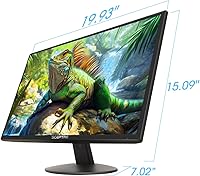
  • Dimensions: The monitor measures 7 x 19.9 x 15 inches (depth x width x height) including the attached stand.
  • Weight: Total unit weight with stand is 8 pounds, making it easy to reposition or transport between workspaces.
  • Panel Finish: The exterior is finished in Machine Black, giving the monitor a low-profile look that suits most desk setups.
  • Model Number: The official model identifier is E225W-19203R, part of Sceptre's E225W series introduced in 2025.
  • Manufacturer: The monitor is designed and distributed by e-Sceptre, a brand with a long track record in affordable consumer displays.
  • Availability Date: This model was first made available for purchase in June 2025, positioning it as a current-generation entry-level option.

Related Reviews
KOORUI P01 24-inch FHD Monitor
76%
91%
Value for Money
84%
Picture Quality
82%
Refresh Rate & Gaming
53%
Ergonomics & Adjustability
71%
Build Quality
More
SANSUI ES-22X3 22-inch IPS Monitor
77%
88%
Value for Money
83%
Image Quality
74%
Refresh Rate & Gaming
81%
Eye Comfort
76%
Build Quality
More
Samsung S33A 22-Inch FHD Monitor
75%
88%
Value for Money
91%
Display Contrast
84%
Eye Comfort
87%
Setup & Ease of Use
78%
Viewing Angles
More
HP All-in-One 22-dd0032 21.5″ Desktop
83%
96%
Space Efficiency
93%
Initial Setup
86%
Display Clarity
71%
Productivity Multitasking
87%
Connectivity & Ports
More
Xiaomi A22i 22-Inch FHD Monitor
70%
78%
Value for Money
71%
Image Quality
84%
Design & Build
52%
Stand & Ergonomics
81%
Eye Comfort
More
Samsung S30GD 22″ FHD Monitor
74%
88%
Value for Money
83%
Image Quality
86%
Eye Comfort
41%
Stand & Ergonomics
77%
Build Quality
More
ArcticPro AD24EF2 24-inch Gaming Monitor
73%
88%
Value for Money
82%
Image Quality
79%
Gaming Performance
63%
Build Quality
84%
Connectivity
More
Dell SE2422HX 24-inch Monitor
75%
83%
Image Quality
88%
Eye Comfort
76%
Build Quality
47%
Ergonomics & Adjustability
74%
Refresh Rate & Smoothness
More
Samsung S22R350FHN 22-inch IPS Monitor
76%
84%
Image Clarity
71%
Color Accuracy
88%
Viewing Angles
74%
Refresh Rate & Smoothness
86%
Eye Comfort
More
Samsung SR35 27-Inch FHD Monitor
86%
89%
Display Quality
92%
Eye Comfort Features
80%
Build Quality
94%
Ease of Setup
91%
Value for Money
More

FAQ

It runs at 100Hz natively, but you do need to make sure your HDMI cable and source device support that refresh rate. Some older HDMI cables cap out at 60Hz, so if you are not seeing 100Hz in your display settings, swapping the cable is the first thing to try.

Yes, that is one of the more useful things about this Sceptre display. With two HDMI ports and a VGA input, you can have up to three devices physically connected and switch between them through the monitor's input menu. It is not instant hot-switching, but it works well enough for most home setups.

Honestly, it is not the best choice for serious creative work. The 99% sRGB coverage is fine for casual tasks, but professional color grading and print-accurate design work really benefit from a wider color gamut and factory calibration that this monitor does not offer. For hobbyist editing or photo browsing, it is adequate.

They are perfectly fine for video calls, background music, or YouTube — nothing more. Do not expect much bass or volume headroom. If you are in a quiet room, they do the job without any extra clutter on your desk, which is really the main appeal.

Yes, as long as your device has an HDMI output or a compatible adapter. The monitor is plug-and-play on most operating systems, including macOS and ChromeOS, so there is no driver installation required.

No, unfortunately it does not. The stand supports basic tilt only, which means you are fairly limited in how you position the screen ergonomically. If height adjustment matters to you, a monitor arm is worth considering — though you will want to confirm VESA mount compatibility before purchasing one.

This is something worth checking in the latest product documentation, as the listed specs do not clearly confirm a dedicated headphone output. If audio routing is important to you, plan to use your computer's own headphone jack or an external audio solution.

More noticeable than most people expect, even outside of gaming. Scrolling through web pages and moving windows around the desktop feels smoother at 100Hz. It is not a dramatic transformation, but once you have used it for a week or two, going back to 60Hz feels sluggish by comparison.

It is genuinely one of the better fits for that scenario. The compact footprint, matte screen, and built-in speakers all make practical sense for a small desk. The 100Hz refresh rate covers both studying and casual gaming, and the price leaves room in the budget for other essentials.

Sceptre typically offers a limited manufacturer warranty on their monitors, though the exact terms can vary by region and retailer. It is worth registering the product directly with Sceptre after purchase and keeping your purchase receipt, as that simplifies any warranty claim if an issue comes up within the coverage period.

Where to Buy