Overview

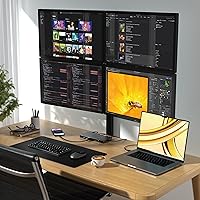
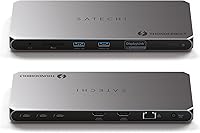
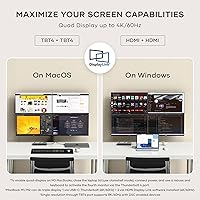
The Satechi Thunderbolt 4 Docking Station is a slim, well-built hub designed for Mac power users who want a clean desk and serious display output from a single cable. Its Space Gray aluminum body sits naturally alongside any MacBook or iMac setup without feeling out of place. Twelve ports total, a 180W AC adapter included in the box, and a premium price point all signal this is built for professionals, not casual users. One thing to flag immediately: DisplayLink drivers are required to unlock full quad-display support, so budget a few minutes for driver installation before expecting all four monitors to light up.
Features & Benefits

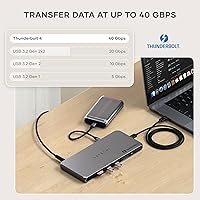
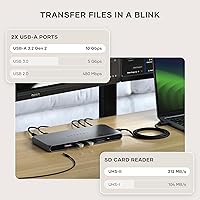
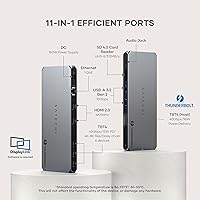
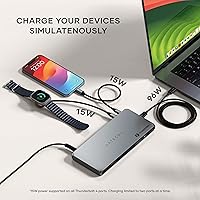
Three Thunderbolt 4 ports running at 40Gbps each form the backbone of connectivity here, paired with two USB-A 3.2 ports at 10Gbps for older peripherals. The two HDMI outputs require DisplayLink to function as extended displays, not mirrors. Charging is handled well: the host gets up to 100W, and a dedicated USB-C port adds 96W PD for a second device — though only two ports can charge simultaneously. The UHS-II SD card reader hits up to 312MB/s, which photographers and video editors will genuinely appreciate. Rounding things out, Gigabit Ethernet and daisy-chain support for up to six Thunderbolt devices make this docking station far more capable than a typical USB-C hub.

Best For

This Thunderbolt 4 dock is most at home on the desk of a Mac M3, M4, or M5 user who needs to drive multiple monitors without a cluttered cable situation. Creative professionals — photographers offloading cards, video editors moving large files — will get real value from the fast SD reader and high-bandwidth ports. It also works for Windows users with Thunderbolt 4 or USB4 laptops, so it is not Apple-exclusive. If you are still on an M1 or M2 MacBook, be aware the maximum is three external displays, not four. Anyone graduating from a basic USB-C hub to a true Thunderbolt dock will notice the difference quickly in transfer speeds and display reliability.

User Feedback

At 4.4 stars from 94 ratings, the Satechi dock has a solid early reputation, though 94 reviews is still a relatively small sample — worth keeping in mind before treating the consensus as settled. Buyers consistently highlight clean cable management and build quality that feels appropriate for the price tier. The main friction point is setup: installing DisplayLink drivers is not complicated, but it catches some buyers off-guard, and a few have noted slight display latency on DisplayLink-driven monitors under heavy load. The dock also runs warm during sustained use, which falls within the disclosed operating range but is noticeable. No significant reliability complaints have surfaced yet.

Pros

  • Drives up to four 4K/60Hz external displays on M3, M4, and M5 Macs — a rare capability at this size.
  • Three Thunderbolt 4 ports at 40Gbps each make this docking station genuinely fast for SSD transfers and daisy-chaining.
  • 100W host charging and a 96W USB-C PD port mean fewer power bricks cluttering your desk.
  • The UHS-II SD 4.0 card reader reaches up to 312MB/s, which is noticeably quicker than most competing docks.
  • Slim aluminum build fits neatly into any desk setup without looking like an afterthought.
  • Gigabit Ethernet provides stable, consistent wired speeds when Wi-Fi is not an option.
  • Compatible with Thunderbolt 5 devices, though speeds cap at 40Gbps — good future-proofing.
  • Daisy-chain support for up to six Thunderbolt devices gives the setup room to grow.
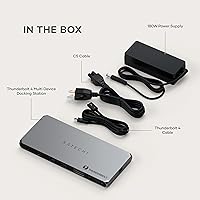
  • Includes a 1-meter Thunderbolt 4 cable and 180W AC adapter in the box — no hidden extras to buy.
  • Two-year limited warranty offers reasonable coverage for a premium-priced peripheral.

Cons

  • DisplayLink driver installation is mandatory for HDMI display output — not optional, not automatic.
  • DisplayLink-driven monitors can show subtle latency under heavy GPU load, which is noticeable in fast-moving content.
  • M1 and M2 MacBook users are limited to three external displays, not four, regardless of dock capability.
  • Only two ports can charge simultaneously, which may surprise users expecting full multi-device power across all ports.
  • The dock runs warm during sustained use — not a safety issue, but worth noting if your desk has limited airflow.
  • iPad and iPhone users get zero video output through the HDMI ports due to DisplayLink incompatibility.
  • At fewer than 100 published ratings, the long-term reliability track record is still thin.
  • The premium price is hard to justify for anyone who only needs one external display or basic USB-C connectivity.

Ratings

The scores below reflect our AI-driven analysis of verified global user reviews for the Satechi Thunderbolt 4 Docking Station, with spam, bot activity, and incentivized feedback actively filtered out before scoring. Each category captures the real-world consensus — not just the highlights — so both the genuine strengths and the friction points buyers have reported are transparently reflected. If you are trying to decide whether this docking station fits your specific setup, these ratings are the most honest starting point we can offer.

Multi-Monitor Performance
83%
On M3, M4, and M5 Macs, driving three or four external displays through a single dock is something most competing products cannot match at this form factor. Users running dual 4K monitors via Thunderbolt 4 ports report rock-solid signal stability and no dropped connections during long work sessions.
The quad-display experience is firmly gated to newer chip generations — M1 and M2 users hit a hard three-display ceiling that the dock cannot override. Several buyers admitted they did not realize this limitation before purchasing, which led to frustration that had nothing to do with the hardware itself.
DisplayLink Setup Experience
61%
39%
Once the DisplayLink drivers are installed correctly, the HDMI ports function reliably for most productivity-focused workflows, and the driver package itself is free to download. Users who followed the setup instructions carefully reported no ongoing issues after the initial configuration.
The mandatory driver installation is the single most complained-about aspect of this docking station in user reviews — many buyers expected plug-and-play behavior and were caught off guard. On top of setup friction, some users report noticeable display latency on DisplayLink-driven monitors when scrolling quickly or watching video, which is a known software-side limitation rather than a hardware flaw.
Data Transfer Speed
91%
Three full-bandwidth Thunderbolt 4 ports at 40Gbps each is a genuine differentiator — users offloading footage from Thunderbolt-based SSDs or running high-speed NVMe enclosures see transfer rates that make older USB-C hubs feel painfully slow by comparison. The two USB-A 3.2 Gen 2 ports at 10Gbps handle standard peripherals without becoming bottlenecks.
Bandwidth is shared across active ports, so simultaneously running two high-throughput Thunderbolt devices will divide the available pipeline. Power users pushing multiple external SSDs at once may notice throughput dips that would not appear on a dedicated single-device connection.
Build Quality & Design
88%
The aluminum enclosure feels premium in hand and sits flat on a desk without any flex or rattle — reviewers frequently describe it as feeling more expensive than similarly priced competitors. The slim 0.7-inch profile means it tucks neatly beside a monitor stand or under a laptop riser without dominating the desk.
The Space Gray finish, while visually appealing next to Apple hardware, shows fingerprints and minor scratches more readily than a matte or textured surface would. A few users also noted the included rubber feet could benefit from being slightly stickier, as the dock can shift position on smooth desk surfaces.
Charging Performance
79%
21%
Delivering 100W to the host laptop while simultaneously providing 96W to a second device through the USB-C PD port is genuinely useful for dual-laptop users or those who charge a tablet alongside their MacBook. Both ports maintain consistent wattage under load, which is not guaranteed on cheaper alternatives.
The two-port simultaneous charging cap catches users off-guard when they expect to power three or more devices through the dock at once. Charging output on the Thunderbolt 4 side ports is limited to 15W each, making them suitable only for accessories and small devices, not laptops.
SD Card Reader
93%
At up to 312MB/s, the UHS-II SD 4.0 reader stands out as one of the fastest built into any dock in this category — photographers dumping large RAW batches and videographers pulling 4K footage see real time savings compared to the UHS-I readers on competing products. It is the kind of spec that makes creative professionals specifically seek out this dock over otherwise comparable options.
The single SD slot means users who juggle both SD and microSD cards need a separate adapter or reader for microSD, since there is no dedicated microSD slot. This is a minor inconvenience rather than a significant flaw, but it is worth noting for hybrid camera and drone users.
Thermal Management
67%
33%
Under moderate everyday use — a couple of monitors, keyboard, mouse, and Ethernet — the dock stays warm but well within its disclosed operating range. Most users in home office environments report no discomfort or concern from the heat output during standard working hours.
Under sustained heavy load with multiple displays active, high-bandwidth storage devices running, and two charging ports in use simultaneously, the dock runs noticeably warm. The 86–131°F operating range disclosure suggests Satechi anticipated this, but users who keep the dock in enclosed desk compartments or cable management trays should ensure adequate airflow.
Port Variety & Count
74%
26%
The combination of Thunderbolt 4, USB-A, HDMI, USB-C PD, SD card, and Gigabit Ethernet in a single slim unit covers the majority of professional desk setups without requiring secondary hubs. For MacBook users who lose access to all these ports on the laptop itself, the dock restores a full-featured workstation experience.
The advertised 12-port total sounds expansive, but the practical count of independently useful, non-shared ports is more modest once you account for the upstream Thunderbolt connection and charging-limited ports. There is also no audio jack, which forces users with wired headsets or studio monitors to rely on USB or Bluetooth adapters.
Compatibility Range
77%
23%
Cross-platform support is genuine here — Windows laptops with Thunderbolt 4 or USB4 ports work without special configuration, and backward compatibility down to USB 2.0 means legacy peripherals are not immediately obsolete. Thunderbolt 5 device owners can also connect without issues, albeit at capped speeds.
iOS and iPadOS are completely locked out of HDMI video output due to DisplayLink incompatibility, which is a hard wall rather than a workaround situation. Users who expected to use the dock as a shared hub for both an iPad and a MacBook will find the iPad experience significantly limited.
Ease of Setup
64%
36%
For the Thunderbolt 4 ports and core connectivity, the setup is genuinely plug-and-play — connect the included cable, and the host laptop recognizes the dock immediately with no configuration needed. The 180W adapter and Thunderbolt cable included in the box mean you can be up and running without any additional purchases.
The DisplayLink driver requirement introduces a setup step that breaks the plug-and-play expectation, and the driver must be installed before the HDMI ports produce any output. Some users on macOS have also reported needing to grant additional screen recording or accessibility permissions for DisplayLink to function, adding unexpected steps to the initial experience.
Value for Money
72%
28%
For M4 and M5 Mac users who need quad-display output, fast card reading, and full Thunderbolt bandwidth in one slim unit, the price is defensible against alternatives that require multiple separate devices to achieve the same result. The included cable and power adapter add tangible out-of-box value.
For M1 or M2 MacBook owners or anyone who only needs one or two external displays, the pricing is harder to justify when simpler and less expensive docks cover those use cases adequately. The relatively low review count also means buyers are taking some risk, since long-term reliability data is still accumulating.
Cable Management
86%
The single-cable connection to a MacBook is what most buyers cite as the core daily benefit — one Thunderbolt 4 cable handles power, data, and display signals simultaneously, leaving the desk visibly cleaner than a multi-cable hub setup. The slim footprint reinforces the tidy desk aesthetic rather than adding visual clutter.
With up to 12 ports potentially in use, the rear and sides of the dock can accumulate a cluster of cables that partially undermines the clean setup appeal. Port placement requires some planning to keep frequently connected and infrequently connected devices from creating a tangled arrangement.
Daisy-Chain Capability
78%
22%
Support for daisy-chaining up to 6 Thunderbolt devices is a meaningful feature for users running Thunderbolt displays, audio interfaces, or high-speed storage arrays in sequence — it keeps the desk hub from becoming a dead end in a larger peripheral chain. Most users in creative studio environments appreciate this expandability.
Real-world daisy-chain performance depends heavily on the bandwidth demands of each device in the chain, and adding multiple high-throughput devices will visibly compress speeds across the board. The average home office user is unlikely to notice, but professionals pushing the Thunderbolt pipeline to its limits may hit practical ceilings.
Warranty & Support
71%
29%
A two-year limited warranty is competitive for the dock category and provides reasonable peace of mind for a premium-priced peripheral. Satechi has a generally responsive support reputation, and the product includes a user manual with setup guidance rather than relying solely on online documentation.
With a review pool of only 94 ratings at this writing, there is limited real-world data on how Satechi handles warranty claims or long-term hardware failures for this specific model. Buyers making a significant investment would benefit from more post-purchase feedback before treating the warranty coverage as thoroughly validated.

Suitable for:

The Satechi Thunderbolt 4 Docking Station is built for Mac users on M3, M4, or M5 chips who want a genuinely capable multi-monitor workstation without a tangle of cables on their desk. If your workflow revolves around driving two or more external displays, transferring large files regularly, and keeping your MacBook charged — all through a single cable connection — this docking station covers all of that in one compact unit. Creative professionals such as photographers and video editors will especially appreciate the UHS-II SD card reader, which is meaningfully faster than the readers built into most hubs at this price tier. Windows users with Thunderbolt 4 or USB4 laptops also fit the audience here; this is not a Mac-only device. Home office workers who prioritize a clean, permanent desk setup and want wired Ethernet reliability over Wi-Fi will find the combination of ports and charging output genuinely practical.
Not suitable for:

The Satechi Thunderbolt 4 Docking Station is not the right call if you are running an M1 or M2 MacBook and expecting four independent external displays — the hardware limit on those chips caps you at three, regardless of what the dock can theoretically support. Anyone who wants plug-and-play simplicity should also think twice: the two HDMI ports require DisplayLink driver installation to function as extended displays, which is a real setup step, not a checkbox. If your laptop lacks a native Thunderbolt 4 or USB4 port, you will not get the full bandwidth this dock is designed around. iPad and iPhone users are completely out — iOS and iPadOS do not support DisplayLink, so HDMI video output will not work at all. And if you are shopping for a basic hub to charge your laptop and connect a single monitor, the price tier here is hard to justify.
Specifications

  • Thunderbolt 4 Ports: Three Thunderbolt 4 ports deliver up to 40Gbps data transfer each, supporting daisy-chaining of up to 6 Thunderbolt devices.
  • USB-A Ports: Two USB-A 3.2 Gen 2 ports provide up to 10Gbps data transfer for connecting standard peripherals.
  • HDMI Ports: Two HDMI ports support 4K output at 60Hz each, but require DisplayLink driver installation to function as extended displays.
  • Display Output: Supports up to 4 external extended displays on M3, M4, and M5 Macs; M1 and M2 Macs are limited to 3 external displays.
  • Host Charging: Delivers up to 100W of power to the connected host laptop via the primary Thunderbolt 4 upstream port.
  • USB-C Charging: A dedicated USB-C Power Delivery port provides up to 96W of charging output for a second connected device.
  • SD Card Reader: UHS-II SD 4.0 card reader supports read speeds of up to 312MB/s for fast media offloading.
  • Ethernet: Gigabit Ethernet port supports wired network speeds of up to 1000Mbps for stable, low-latency connectivity.
  • Power Adapter: Includes a 180W AC power adapter and C5 power cord in the box to support the full port load.
  • Included Cable: A 1-meter Thunderbolt 4 cable is included for connecting the dock to a host laptop.
  • Dimensions: The dock measures 8.4″ long by 3.7″ wide by 0.7″ tall, keeping the footprint compact on a desk.
  • Weight: The unit weighs 1.08 pounds, making it light enough to reposition easily without anchoring to a surface.
  • Build Material: The enclosure is constructed from aluminum in a Space Gray finish designed to complement Apple hardware aesthetics.
  • Total Ports: The dock features 12 ports in total, encompassing Thunderbolt 4, USB-A, HDMI, USB-C PD, SD card reader, and Ethernet.
  • Operating Temp: The rated standard operating temperature range is 86–131°F (30–55°C), which Satechi notes does not affect functionality or hardware.
  • Compatibility: Works with Thunderbolt 4 and USB4 devices including MacBook Pro, MacBook Air, Mac Mini, iMac, Mac Studio, and Thunderbolt 4-equipped Windows laptops.
  • Backward Compat: The dock is backward compatible with Thunderbolt 3, USB-C 3.2 Gen 2/1, and USB 2.0 devices.
  • iOS Support: iOS and iPadOS devices are not compatible with DisplayLink technology, so HDMI video output will not function when connected to an iPhone or iPad.
  • Warranty: Covered by Satechi's 2-year limited warranty against defects in materials and workmanship under normal use conditions.
  • Model Number: The official model number for this unit is ST-DT4MDM-US, sold in Space Gray colorway only.

Related Reviews

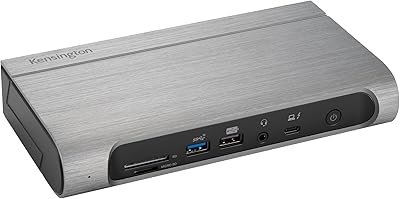
Kensington SD5800T Thunderbolt 4 Docking Station
86%
92%
Performance
90%
Display Support
88%
Charging Power
85%
Build Quality
91%
Connectivity
More
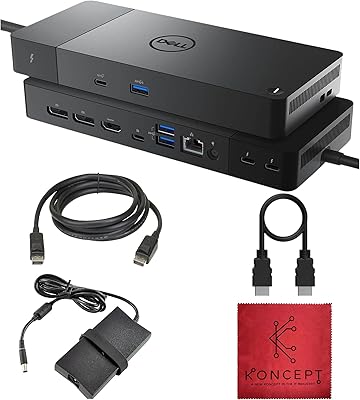
Dell WD22TB4 Thunderbolt 4 Docking Station
80%
91%
Port Density & Variety
88%
Power Delivery
93%
Multi-Monitor Support (Windows)
48%
macOS Compatibility
72%
Value for Money
More
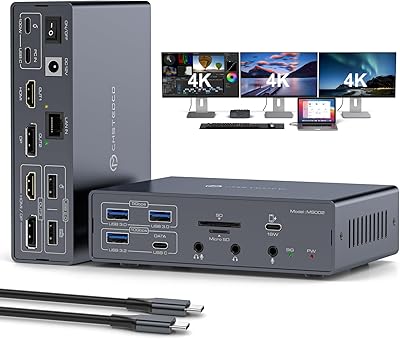
JCYMELE MS002 19-in-1 USB-C Docking Station
75%
83%
Multi-Monitor Performance
62%
Setup & Installation
91%
Port Variety & Count
71%
macOS Compatibility
77%
Value for Money
More
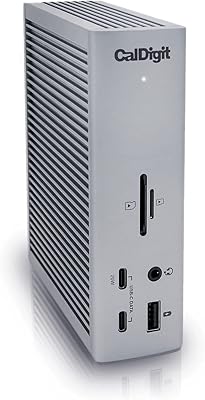
CalDigit TS4 Thunderbolt 4 Dock
82%
94%
Port Selection & Density
91%
Build Quality & Design
92%
Thunderbolt 4 Bandwidth Performance
89%
Power Delivery
86%
Display Output Quality
More
Anker 778 Thunderbolt 4 Docking Station
75%
93%
Bandwidth Performance
84%
Multi-Monitor Support
51%
Compatibility
88%
Laptop Charging
86%
Build Quality
More
Plugable TBT4-UD5 Thunderbolt 4 Dock
81%
91%
Display Output Quality
88%
Laptop Charging Performance
63%
Mac Compatibility
87%
Port Variety & Layout
89%
Data Transfer Speed
More
MAIWO M.2 NVMe 4-Bay SSD Cloner Dock
72%
88%
Offline Clone Functionality
61%
Clone Architecture Clarity
83%
Build Quality
69%
Clone Speed
81%
Compatibility Range
More
SABRENT DS-4SSD 4-Bay 2.5″ Drive Docking Station
80%
93%
Plug-and-Play Setup
71%
Drive Compatibility
67%
Transfer Performance
79%
Build Quality
84%
Cooling Effectiveness
More
Sabrent DS-SC4B 4-Bay USB 3.2 Gen 2 Docking Station
80%
88%
Build Quality
83%
Cooling Performance
86%
Hot-Swap Reliability
74%
Transfer Speed
91%
Per-Bay Power Control
More
WAVLINK UMD306B Docking Station
88%
91%
Dual Monitor Performance
88%
Data Transfer Speed
89%
Build Quality
92%
Ease of Setup
87%
Network Connectivity (Ethernet)
More

FAQ

You do need them if you plan to use either of the two HDMI ports as extended displays — there is no workaround. The Thunderbolt 4 ports work without any drivers, so if you are only connecting one or two monitors via those ports, you can skip DisplayLink entirely. But the moment you plug into an HDMI port expecting a third or fourth screen, the driver install is mandatory.

No — M1 and M2 chips have a hardware-level limit of three external displays regardless of which dock you use. With this docking station, that means one display via a Thunderbolt 4 port and two via the HDMI ports using DisplayLink. The quad-display capability is only available on M3, M4, and M5 Macs.

It works with Windows laptops that have a Thunderbolt 4 or USB4 port — so ThinkPads, Surface devices, Dell XPS models, and similar machines are all compatible. DisplayLink is also available for Windows, so multi-monitor setups function the same way. Just make sure your laptop actually has a Thunderbolt 4 port; a standard USB-C port will not give you full bandwidth.

Yes. The upstream Thunderbolt port delivers up to 100W to your host laptop, and the separate USB-C PD port can charge a second device at up to 96W simultaneously. Just keep in mind that the dock caps simultaneous charging at two ports, so you cannot power three or more devices through it at full wattage at once.

Not necessarily. Satechi rates the standard operating temperature at 86–131°F (30–55°C), so some warmth is expected and within spec. That said, make sure the dock is not enclosed in a tight space without airflow, as restricted ventilation could push temps higher. Most users report it running warm but stable during prolonged use.

Yes, the Satechi Thunderbolt 4 Docking Station is compatible with Thunderbolt 5 devices, but data speeds will be capped at 40Gbps since the dock itself maxes out at Thunderbolt 4 bandwidth. You will not see any Thunderbolt 5-exclusive speed benefits, but everything will connect and function normally.
Only partially. The Thunderbolt connection itself can work for data and charging on compatible iPad Pro models, but the HDMI video output will not function because DisplayLink is not supported on iPadOS. If you were hoping to connect an external monitor through the dock using an iPad, that is not possible with this setup.

Up to 6 Thunderbolt devices can be daisy-chained from the dock, which gives you a lot of room to build out a larger peripheral setup. Keep in mind that bandwidth is shared across the chain, so connecting multiple high-bandwidth devices like external SSDs simultaneously will divide the available 40Gbps between them.

Satechi includes a 1-meter Thunderbolt 4 cable and the 180W AC power adapter with C5 cord in the box, so you have what you need to connect a single laptop and power the dock out of the box. You will need to supply your own display cables and any additional Thunderbolt or USB peripherals, but there is no hidden required purchase to get the basic setup running.

At up to 312MB/s, the UHS-II SD 4.0 reader is well above average and fast enough to handle large RAW files and high-bitrate video footage without becoming a bottleneck. It is a genuine step up from the UHS-I readers found in many competing docks, which typically max out around 104MB/s. For most photography and video workflows, it will not be the slowest link in your chain.

Where to Buy