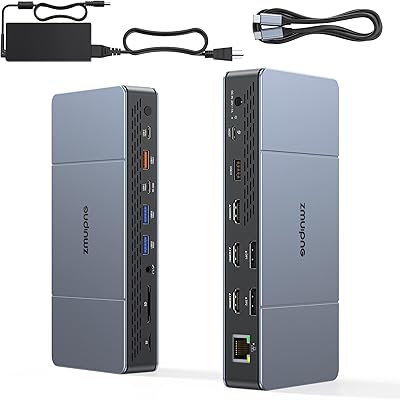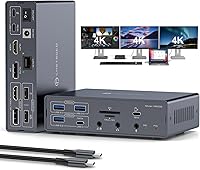
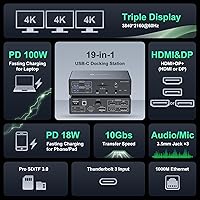

Overview

The JCYMELE MS002 19-in-1 USB-C Docking Station is built around one specific problem: getting three external monitors running simultaneously from a single MacBook or Windows laptop. The secret weapon here is a DisplayLink chip, which bypasses Apple's hardware-enforced display limits on M1 through M4 processors — something native USB-C simply cannot do. Physically, the dock is surprisingly manageable at 15×5×3 inches and under a pound, so it won't dominate your desk. Pricing lands it squarely in the mid-range tier, above bare-bones hubs but well short of certified Thunderbolt 4 stations. JCYMELE is a newer brand, which reasonably raises questions about long-term support, though early indicators are encouraging.

Features & Benefits

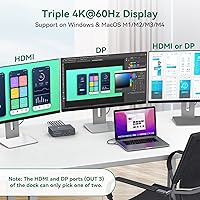
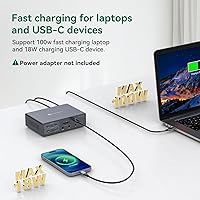
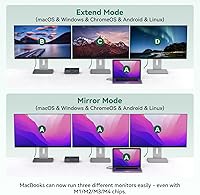
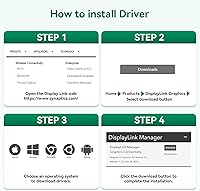
The DisplayLink chip is what makes triple-monitor extended mode work on M-series Macs — but it requires downloading and installing a driver, and that driver uses software rendering, adding a small CPU overhead during graphics-heavy tasks. Windows users get plug-and-play. Port assignment matters: monitor one gets HDMI, monitor two gets DisplayPort, and monitor three takes either, with HDMI taking priority if both are connected. Keep cable lengths under five feet for HDMI and under three and a half for DisplayPort to avoid dropouts. Two USB 3.2 ports handle fast external drives at 10 Gbps, Gigabit Ethernet stabilizes video calls, and the 100W PD passthrough charges your laptop — though you'll need to supply the PD charger separately.

Best For

This docking station is a natural fit for MacBook Pro and Air users on M1 through M4 chips who want a three-monitor setup without paying for an eGPU or Apple-branded display. It works equally well for hybrid office workers who want one cable to handle charging, data, and all their displays at once. Photographers and drone pilots will appreciate the built-in SD and microSD card slots for fast file transfers without hunting for a separate adapter. That said, buyers who expect zero-setup plug-and-play on macOS will be disappointed — the driver install is a real requirement, not optional. It also is not the right choice for anyone who needs full Thunderbolt bandwidth to chain storage devices or connect Thunderbolt-specific peripherals.

User Feedback

Early buyers — around 90 ratings as of mid-2025 — have given the JCYMELE dock a 4.5-star average, which is promising for a brand-new product but still a relatively thin data set. The most consistent praise centers on successful triple-monitor setup on M-series Macs, which is genuinely the hardest part to get right. Buyers also note the sheer variety of ports as a practical desk-decluttering win. On the critical side, several users found the driver requirement confusing or unexpected, and a handful reported mild warmth during long sessions — worth monitoring over time. A few noted CPU usage ticking up with DisplayLink active. Long-term reliability remains an open question given the limited review history, so revisit ratings in six months before committing.

Pros

  • Unlocks true triple 4K@60Hz extended mode on M1 through M4 MacBooks, something native USB-C ports cannot achieve on their own.
  • Nineteen ports in one hub eliminates the need for separate adapters, card readers, or audio dongles on a busy desk.
  • Gigabit Ethernet delivers a noticeably more stable connection than Wi-Fi for video calls and large file transfers.
  • Built-in SD and microSD card slots are a genuine time-saver for photographers and drone pilots who transfer files daily.
  • The 100W PD passthrough keeps a laptop charged without needing a separate power brick, reducing overall cable clutter.
  • At under a pound and roughly the footprint of a paperback book, the dock fits easily on crowded desks or small shelves.
  • The 18W Quick Charge port fast-charges a phone simultaneously without stealing power from the laptop passthrough.
  • A dedicated microphone port alongside the combo headset jack gives streamers and remote workers flexible audio options.
  • Windows users get a fully plug-and-play experience with no driver installation required.
  • Early user sentiment sits at 4.5 stars, with consistent praise for stable 4K output once the macOS driver is properly installed.

Cons

  • macOS users must install a DisplayLink driver before any extended display works — this is a non-negotiable setup step, not a quick fix.
  • DisplayLink's software rendering consumes CPU resources, which can slow down intensive tasks like video encoding or 3D work across multiple screens.
  • The listing uses Thunderbolt branding, but this is a USB-C hub with DisplayLink — buyers expecting certified Thunderbolt 4 performance will be misled.
  • HDMI cables must stay under roughly five feet and DisplayPort cables under three and a half feet, limiting desk layout flexibility.
  • The 100W PD charger is not included in the box — you must supply your own, adding to the real-world cost.
  • Port assignment for the third monitor is fixed and somewhat awkward: it shares a port with monitor two, governed by an HDMI-priority rule that confuses many first-time users.
  • With under 100 reviews from a mid-2025 launch, long-term durability and brand support are still largely unproven.
  • Heat build-up during extended multi-monitor sessions has been noted by a handful of early owners, raising questions about sustained performance.
  • No 2.5GbE or 10GbE networking option for users who need faster-than-gigabit wired speeds.
  • The included DC power adapter is a separate cable that must always be connected, so the single-cable dream only applies to the laptop side of the setup.

Ratings

Our AI-generated scores for the JCYMELE MS002 19-in-1 USB-C Docking Station were produced by analyzing verified buyer reviews across multiple global markets, with spam, bot-driven, and incentivized feedback actively filtered out before any score was assigned. Each category reflects the full picture — what this docking station genuinely does well and where real users have consistently run into friction. Nothing has been softened to make the product look better than the evidence supports.

Multi-Monitor Performance
83%
Running three independent 4K@60Hz desktops from a single MacBook cable is the headline achievement here, and it genuinely delivers for everyday productivity work. Video editors and designers using multi-monitor layouts for editing timelines and reference panels report stable, consistent output across all three screens throughout full workdays.
The DisplayLink software renderer introduces a noticeable ceiling for GPU-intensive tasks — users encoding 4K footage or running three-screen animation previews simultaneously have reported frame drops and lag spikes. The fixed port assignment for each monitor also confuses new users and occasionally requires re-plugging cables to get the correct display recognized.
Setup & Installation
62%
38%
Once the DisplayLink driver is properly downloaded and installed, the setup experience on macOS is reasonably smooth — most users report all three monitors coming online within a few minutes of driver activation. Windows users have an even easier time, with the dock recognized instantly on plug-in without any additional steps.
The driver requirement catches a significant number of buyers off guard, particularly those expecting plug-and-play behavior similar to a simple USB-C hub. Several reviewers reported spending considerable time troubleshooting before discovering the driver was the missing piece, and the manual has been criticized for being unclear on this point.
Port Variety & Count
91%
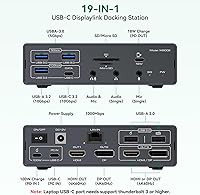
Nineteen ports covering video, USB-C, six USB-A ports across three speed tiers, SD and microSD, Ethernet, three audio jacks, and dual charging is genuinely exceptional coverage for a single hub at this price. Home-office users who previously needed three separate adapters and a card reader report a dramatically cleaner desk after switching to this dock.
The six USB-A ports are split across three different speed standards — 2.0, 3.0, and 3.2 — which means slower ports can catch users off guard if they plug a fast SSD into the wrong one. There is also no USB4 or Thunderbolt port on the downstream side, limiting options for future peripherals that require those interfaces.
macOS Compatibility
71%
29%
For M1 through M4 MacBook users, this dock solves a genuine hardware limitation that no native USB-C hub can address — three fully extended displays from a single cable connection is a meaningful productivity upgrade. Users who follow the driver installation guide and port mapping instructions report consistent, reliable daily operation.
The DisplayLink dependency makes macOS compatibility conditional — a major OS update that breaks the driver leaves users without multi-monitor output until a patch is released, a scenario that has affected DisplayLink users in previous macOS cycles. Anyone who updates their OS on launch day should treat this as a real and manageable risk.
Value for Money
77%
23%
Compared to competing DisplayLink docks with similar triple-monitor capability, the JCYMELE dock's mid-range price delivers an unusually high port count, making the per-port cost genuinely competitive. For M-series Mac users who previously paid more for less functionality, this USB-C hub represents a credible step up without a premium price tag.
The real-world cost is meaningfully higher than the sticker price once you factor in the separately required 100W PD charger. Buyers comparing this against certified Thunderbolt 4 docks will also find those alternatives offer better driver-free macOS reliability, which some users ultimately decide is worth the extra spend.
Display Image Quality
81%
19%
At 4K and 60Hz across three screens, the visual output is crisp and smooth for productivity, design work, and video playback. Users running color-graded editing workflows on 4K monitors report accurate, stable output without visible compression artifacts under normal operating conditions.
Signal quality is noticeably sensitive to cable length — exceeding the manufacturer's recommended limits causes flickering and resolution drops that are easy to mistake for a defective unit. DisplayLink's software rendering can also introduce subtle latency on cursor movement and window animations that is occasionally noticeable on high-refresh displays.
Data Transfer Speed
84%
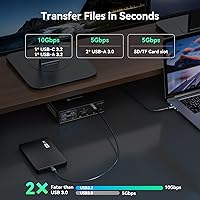
The two USB 3.2 Gen 2 ports — one USB-C and one USB-A — deliver 10 Gbps throughput that handles fast NVMe enclosures without throttling, making large file transfers practical for photographers and videographers moving drone footage or RAW image sets during a session.
The two USB-A 2.0 ports are genuinely slow by modern standards and should only serve keyboards, mice, and similar low-bandwidth devices — accidentally plugging a flash drive into one produces transfer speeds that feel glacially slow. Port labeling on the physical unit is small and can be hard to distinguish at a glance.
Power Delivery
79%
21%
The 100W PD passthrough handles full-speed laptop charging for most MacBook Pro and Air models without a separate power brick cluttering the desk, which meaningfully reduces cable count. The 18W Quick Charge port works simultaneously and reliably fast-charges compatible phones throughout a workday.
The omission of the 100W charger from the box is a genuine frustration — the dock cannot charge a laptop at all without a separately purchased PD adapter, adding real cost for buyers who do not already own one. The product listing messaging on this point has confused more than a few buyers at checkout.
Network & Audio
86%
Gigabit Ethernet is a standout for home-office users tired of Wi-Fi instability during video calls — reviewers report noticeably fewer dropped frames and audio glitches in prolonged Zoom and Teams sessions. The dedicated microphone port alongside the combo headset jack gives podcasters and streamers meaningful flexibility without a separate audio interface.
There is no 2.5GbE or faster networking option for users who need above-gigabit wired speeds, which limits utility in high-bandwidth studio or NAS-heavy environments. The audio jacks are standard 3.5mm analog — anyone needing USB audio output, optical connectivity, or higher-quality DAC performance will need a separate audio device.
Thermal Management
67%
33%
Under moderate loads — two or three monitors plus a few USB peripherals — the dock's temperature stays at a level most users describe as warm but not uncomfortable to touch. Normal open-desk ventilation is generally sufficient to keep the unit within acceptable operating conditions during standard workday use.
Extended full-load sessions with three 4K monitors, active data transfers, and simultaneous charging cause the unit to run noticeably hot, which has raised durability questions among early adopters. There are no ventilation slots or active cooling, and placing the dock in an enclosed space or under other equipment significantly worsens heat accumulation.
Build Quality
74%
26%
The Deep Grey enclosure feels solid for its price tier, with no reported flex or rattle from the chassis during normal desktop use. At under a pound, the dock balances portability with enough heft to stay in place on a desk without requiring cable anchoring.
JCYMELE is a newer brand without an established track record for long-term durability, and the review base is too small to draw firm conclusions about how the unit holds up after a year or more. The plastic shell, while acceptable, does not feel as premium as competing docks from more established manufacturers.
Cable Flexibility
58%
42%
For desks where monitors sit within three feet of the dock for DisplayPort or under five feet for HDMI, the cable restrictions cause no real-world problems, and shorter cable runs also tend to produce the most reliable signal quality at 4K resolutions.
The strict limits of roughly 3.3 ft for DisplayPort and 4.9 ft for HDMI force users to rearrange desk layouts or source specific short cables, and these restrictions are not prominently flagged in the product listing. Buyers with larger desks or extended monitor arm configurations have consistently reported this as a source of frustration and unexpected returns.
Brand Reliability
61%
39%
JCYMELE's customer support has received positive early mentions, with buyers reporting responsive replies to technical questions about driver installation and port configuration. The included user guide, while brief, covers the most critical setup steps and port assignments that would otherwise cause significant confusion.
As a brand with under 100 reviews from a mid-2025 launch, there is simply not enough long-term data to assess how the hardware holds up after a year or more of daily use, or how consistently the brand handles warranty claims and support requests at scale.

Suitable for:

The JCYMELE MS002 19-in-1 USB-C Docking Station is purpose-built for MacBook Pro and Air users on M1 through M4 chips who have been frustrated by Apple's native two-display limit and want a genuine three-monitor extended desktop without spending on an eGPU or high-end Apple display. It is equally well-suited to home-office and hybrid workers who want a single cable to consolidate charging, data, video, audio, and networking into one clean desk setup. Creative professionals — video editors, graphic designers, and photographers — will find the triple 4K@60Hz output and direct SD and microSD card slots genuinely useful for their daily workflows. Windows laptop users who simply need a dense, mid-range dock with broad peripheral coverage will also find it a practical fit. If you are comfortable installing a driver on macOS and your cable runs are short, this hub punches well above its price tier.

Not suitable for:

Buyers who expect true plug-and-play on macOS should look elsewhere — the DisplayLink technology that powers this dock's triple-monitor capability requires a dedicated software driver, and skipping that step means the extra displays simply will not work. The DisplayLink chip also uses software rendering rather than dedicated GPU hardware, which introduces a measurable CPU overhead; users running GPU-intensive applications like 3D rendering, video encoding, or high-frame-rate gaming across three monitors may notice performance hits. Despite the listing's use of the word Thunderbolt, the JCYMELE MS002 19-in-1 USB-C Docking Station is not a certified Thunderbolt 4 device, so anyone who needs full Thunderbolt bandwidth for daisy-chaining NVMe arrays or connecting Thunderbolt-specific peripherals will be underserved. Users who run long cable distances should also be cautious — signal reliability degrades beyond roughly five feet for HDMI and three and a half feet for DisplayPort. Finally, buyers who prioritize long-term brand reliability and an established support track record may want to wait for a larger body of owner feedback before committing.

Specifications

  • Dimensions: The dock measures 15×5×3 inches, giving it a slim rectangular footprint that sits flat on a desk without occupying excessive space.
  • Weight: At 13.8 oz, the unit is light enough to reposition easily but substantial enough to stay put under normal desktop cable tension.
  • Video Outputs: The dock provides 2×HDMI and 2×DisplayPort outputs, supporting up to three external displays when used according to the port assignment rules.
  • Max Resolution: Each connected monitor can run at up to 4K (3840×2160) at 60Hz, with backward compatibility down to 1080p@240Hz and 1440p@120Hz.
  • Display Technology: Triple-monitor output is powered by DisplayLink, a software-rendering technology that requires a driver installation on macOS and is plug-and-play on Windows.
  • USB Data Ports: Data connectivity includes 1×USB-C 3.2 Gen 2 (10 Gbps), 1×USB-A 3.2 Gen 2 (10 Gbps), 2×USB-A 3.0 (5 Gbps), and 2×USB-A 2.0 for a total of six data ports.
  • Card Slots: One full-size SD slot and one microSD slot are built in, allowing direct card access without a separate adapter.
  • Networking: A single RJ-45 Gigabit Ethernet port delivers wired network speeds up to 1000 Mbps for a more stable connection than Wi-Fi.
  • Audio Ports: The dock includes a 3.5mm combo headset/mic jack, a dedicated 3.5mm microphone-only input, and a separate 3.5mm audio output for speakers.
  • Power Delivery: A 100W USB-C PD passthrough port charges a connected laptop at full speed, though the 100W charger itself must be supplied separately by the user.
  • Quick Charge: A dedicated 18W Quick Charge USB-A port supports mainstream fast-charge protocols for smartphones and can operate simultaneously with the PD laptop charging.
  • Dock Power: The dock draws its own operating power from an included 12V/3A DC barrel adapter, keeping it independent from the laptop's PD input.
  • Cable Limits: For reliable 4K@60Hz output, HDMI cables must not exceed approximately 4.9 ft and DisplayPort cables must not exceed approximately 3.3 ft.
  • Compatibility: The dock is compatible with macOS systems running on Apple M1 through M4 chips and with Windows laptops that have a USB-C port.
  • Total Ports: Across video, data, audio, networking, card slots, and power, the dock offers 19 individual connection points in a single unit.
  • Model Number: The official model identifier for this unit is MS002-Gray, which corresponds to the Deep Grey colorway.

Related Reviews
NOVOO 15-in-1 USB C Docking Station
82%
88%
Performance
92%
Display Support
85%
Ease of Setup
80%
Compatibility with MacBook
94%
Connectivity (Ports)
More
HiDock H1 11-in-1 USB-C Docking Station
85%
89%
Dual Display Performance
93%
AI Voice Recorder & Transcription
90%
Charging Power & Speed
88%
Data Transfer Speed
82%
Build Quality
More
Selore&S-Global USB C Docking Station 13-in-1
86%
88%
Performance & Reliability
91%
Multi-Monitor Support
95%
Ease of Setup
89%
Compatibility with Devices
90%
Data Transfer Speed
More
ZMUIPNG 18-in-1 DisplayLink Docking Station
71%
83%
Multi-Monitor Performance
61%
Setup & Installation
91%
Port Variety & Count
86%
Charging Performance
84%
Data Transfer Speed
More
Selore&S-Global 16-in-1 USB-C Docking Station with Triple HDMI

84%
88%
Performance
91%
Multi-monitor Support
85%
Charging Capability
80%
Build Quality
87%
Data Transfer Speed
More
Plugable UD-3900Z
Plugable UD-3900Z
74%
88%
Dual Monitor Performance
79%
macOS Compatibility
93%
Wired Ethernet Reliability
82%
USB Port Availability
74%
Setup & Ease of Use
More
WAVLINK WL-ST334UA Dual-Bay USB 3.0 Hard Drive Docking Station

72%
83%
Offline Cloning Reliability
74%
Transfer Speed
79%
Build Quality
91%
Ease of Setup
38%
Mac Compatibility
More
StarTech DK31C3HDPD USB-C USB-A Docking Station
75%
83%
Multi-Display Performance
57%
Setup & Driver Experience
79%
Power Delivery
62%
Apple Silicon Compatibility
71%
Value for Money
More
UtechSmart D3903-1 USB-C Docking Station
78%
76%
Multi-Monitor Performance
67%
macOS Compatibility
88%
Windows Compatibility
91%
Ethernet Reliability
71%
Setup & Ease of Use
More
4URPC DSC05 USB-C Docking Station
74%
83%
Dual Monitor Performance
88%
Port Selection & Variety
91%
Plug-and-Play Setup
54%
USB-C Compatibility Clarity
89%
Ethernet Reliability
More

FAQ

Yes, and this is the single most important thing to know before buying. The triple-monitor capability on macOS relies on DisplayLink, which is a software-based display technology that requires a separate driver download and installation. Without it, the additional screens simply will not appear on M-series Macs. The installation itself is not difficult, but it is a mandatory step — treat it as part of setup, not a troubleshooting workaround.

Yes, that is the core purpose of this dock. Apple's M-series MacBook Air is natively limited to a single external display, but once the DisplayLink driver is installed, the dock can push three separate 4K@60Hz screens in extended mode — each acting as its own independent workspace rather than a mirror of another.

Port assignment is fixed and matters a lot. Monitor one connects to the primary HDMI output, monitor two to the DisplayPort output, and monitor three can use either the second HDMI or the second DisplayPort jack. If you have cables in both of those last two ports simultaneously, HDMI takes priority automatically. Following the labeled diagram in the included user guide will save you a lot of confusion.

No — the 100W PD charger is not in the box. You get the dock itself, a USB-C to USB-C cable, the 12V/3A DC adapter that powers the dock, and a user guide. The 100W USB-C brick to charge your laptop through the passthrough port needs to be purchased separately, so factor that into the total cost if you do not already own one.

Technically, no. The product listing uses Thunderbolt in the title, but this hub operates over USB-C with DisplayLink handling the display output — it is not a certified Thunderbolt 4 device. For most users that distinction will not matter day-to-day, but if you specifically need Thunderbolt 4 bandwidth to daisy-chain external NVMe drives or connect Thunderbolt-only peripherals, this dock will not satisfy that requirement.

The manufacturer recommends staying at or under roughly 4.9 ft for HDMI and 3.3 ft for DisplayPort to maintain a stable 4K@60Hz signal. Going longer than those lengths can introduce flickering, resolution drops, or intermittent disconnections. If your monitor is farther away than that, plan your desk layout before buying longer cables — passive cables beyond those limits are genuinely risky.

It depends on what you are doing. DisplayLink uses software rendering, meaning the CPU handles display processing rather than a dedicated GPU, and that does add overhead. For typical work — browsing, writing, Zoom calls, light photo editing — most users will not feel a significant difference. If you regularly run video encoding, 3D rendering, or other GPU-heavy tasks across three screens, you may notice some sluggishness during those specific workloads.

On the JCYMELE MS002 19-in-1 USB-C Docking Station, Windows is fully plug-and-play — connect the USB-C cable and the operating system recognizes the dock and its displays automatically, no driver download needed. The driver requirement is a macOS-only situation due to Apple's restrictions on external display output from M-series chips.

A number of early owners have reported the unit running noticeably warm after several continuous hours of triple-monitor use, which is pretty typical behavior for DisplayLink-based hubs since the chip does real processing work. It has not been described as alarmingly hot or causing shutdowns, but you should give the dock open airflow and avoid stacking things on top of it during extended sessions.

Yes. The 18W Quick Charge port for your phone and the 100W PD passthrough port for your laptop operate independently, so both can run simultaneously without competing for power. Just make sure you have connected your own 100W USB-C power adapter to the dock — without it, neither passthrough port will deliver its full charging rate.