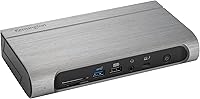
Kensington SD5800T Thunderbolt 4 Docking Station

Kensington SD5800T Thunderbolt 4 Docking Station — image 1
Kensington SD5800T Thunderbolt 4 Docking Station — image 2
Kensington SD5800T Thunderbolt 4 Docking Station — image 3
Kensington SD5800T Thunderbolt 4 Docking Station — image 4
Kensington SD5800T Thunderbolt 4 Docking Station — image 5

Kensington SD5800T Thunderbolt 4 Docking Station — image 6
Kensington SD5800T Thunderbolt 4 Docking Station — image 7
Kensington SD5800T Thunderbolt 4 Docking Station — image 8
86%

Overview

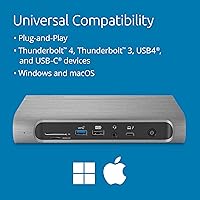
The Kensington SD5800T Thunderbolt 4 Docking Station offers an impressive array of features designed to enhance the productivity of laptop users. This high-performance docking station provides universal compatibility with both Windows and macOS devices, making it versatile for a wide range of users. Its robust Thunderbolt 4 technology supports ultra-fast data transfer and video output, offering a solution that meets the demands of modern workspaces. The docking station also delivers exceptional display support with multiple 4K displays or even 8K resolution through a single connection, creating a seamless multi-display experience.

Features & Benefits

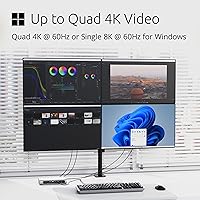
With support for Quad 4K or single 8K displays, this docking station provides an enhanced visual experience, making it ideal for graphic designers, video editors, and other professionals who need multiple monitors. The 100W charging capability is perfect for powering laptops and peripherals simultaneously, ensuring uninterrupted work. A wide range of connectivity options, including 2 HDMI, 2 DisplayPort, and 2.5Gbps Ethernet ports, gives users ample flexibility. Additionally, the built-in SD and MicroSD card readers enable fast data transfer, which is crucial for creative professionals managing large media files.

Best For

This docking station is best suited for professionals who need a powerful, multi-display setup, such as those working in finance, engineering, or content creation. Its high power delivery and broad compatibility with Thunderbolt 4 and USB-C laptops make it an excellent choice for users with modern devices who require more ports and enhanced display capabilities. Creative professionals like video editors and graphic designers will appreciate the fast data transfer speeds and ease of connecting multiple high-resolution displays. It’s also ideal for anyone looking to streamline their desk setup with minimal cables and maximum functionality.

User Feedback

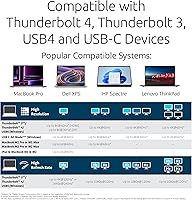
Users have generally praised the Kensington SD5800T for its stable performance and easy setup, making it a reliable addition to their workspace. Many have noted the convenience of supporting multiple displays, with some specifically highlighting its quad 4K support for enhanced productivity. However, a few users have expressed concerns about compatibility with non-Thunderbolt laptops, and some MacBook users have reported limitations with display configurations. Despite these minor issues, most users agree that the product is an excellent choice for those looking for a high-quality, all-in-one docking solution.

Pros

  • Supports up to quad 4K or single 8K display for an excellent visual experience.
  • 100W power delivery charges laptops and other connected devices simultaneously.
  • Wide range of ports, including 2 HDMI, 2 DisplayPort, and 2.5Gbps Ethernet.
  • Compatible with both Windows and macOS, offering flexibility for various users.
  • Fast data transfer with built-in SD and MicroSD card readers.
  • Easy to set up with minimal hassle, praised for its plug-and-play functionality.

Cons

  • Not compatible with older devices that lack Thunderbolt or USB-C support.
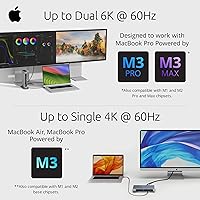
  • Some users report limited display support with certain MacBook models.
  • Larger and heavier than some competitors, reducing portability for travel.
  • Can be overkill for users needing basic docking functionality.
  • Lacks additional USB-C ports for further expansion needs.
  • Higher price point may be a concern for users with simpler setup requirements.

Ratings

The Kensington SD5800T Thunderbolt 4 Docking Station has received strong feedback across various platforms, including reviews from multiple languages and regions. After filtering out spam, bot-driven, and low-quality reviews, the results show a product that performs admirably in several key areas, with some minor caveats. Both strengths and pain points are reflected in the following scores, giving you an honest representation of the overall user experience based on authentic, verified feedback worldwide.

Performance
92%
Many users highlight the consistent, fast performance of this docking station, particularly when running multiple displays and power-hungry devices. The ability to power up laptops while providing stable connections is appreciated, especially for those working with demanding applications like video editing or gaming.
Some buyers mention occasional power delivery issues with certain laptop models, particularly those requiring more than 100W. A few users also reported that performance could be affected when all ports are heavily utilized simultaneously.
Display Support
90%
The support for quad 4K displays is widely praised, allowing users to set up multi-monitor workstations with crisp, high-quality visuals. For those with an 8K-capable setup, the single 8K output is a bonus, offering exceptional resolution for those who need it.
Not all users were happy with the performance when using MacBooks, citing limitations in display support when connected to certain macOS versions. Also, some users experienced issues with proper scaling for 4K content on dual monitors.
Charging Power
88%
The 100W charging power is a standout feature for users who need to charge their laptops while running multiple devices. Many buyers report that it efficiently powers high-end laptops, ensuring long-lasting performance throughout the workday without needing a separate power supply.
A small number of users have pointed out that while 100W is sufficient for many devices, it may struggle with more power-hungry laptops like gaming models. Some buyers have also noted that certain older laptops have trouble drawing power through this dock.
Build Quality
85%
The solid, durable construction of this device is frequently mentioned, with many users noting that it feels premium and well-made. The compact design, while sturdy, helps keep workspace clutter to a minimum.
A few users felt that the weight and size of the docking station were slightly cumbersome, especially when portability was a key consideration. While the materials feel solid, some noted that the device could have been more compact for easier travel.
Connectivity
91%
Users are generally impressed by the variety of ports on this docking station, which provide excellent connectivity options for both home and office setups. With support for HDMI, DisplayPort, USB-A, USB-C, and Ethernet, it covers most connection needs, making it very versatile.
Some users did express frustration with the lack of additional USB-C ports or the limited number of USB-A ports for those with many peripherals. Others felt that the Ethernet port could have supported higher speeds, especially for professional use in fast-paced environments.
Compatibility
82%
18%
Many users appreciate the seamless compatibility with both Windows and macOS devices, making it a versatile choice for various operating systems. The Thunderbolt 4 support ensures it works with the latest laptops and desktops.
A few users encountered issues with non-Thunderbolt devices, which didn’t function as expected, causing some frustration. Additionally, some MacBook users reported limited functionality when using macOS versions prior to Big Sur.
Setup/Installation
89%
Several users found the setup process to be quick and easy, with no drivers required on most modern operating systems. The plug-and-play functionality makes this a hassle-free choice for those looking to expand their workspace.
While the installation is generally smooth, some users had trouble getting the docking station to work with certain older devices. There were occasional reports of needing to restart systems for full functionality, which could be frustrating for time-sensitive tasks.
Port Selection
94%
The array of ports offered by this docking station is widely praised, with many users appreciating the inclusion of both HDMI and DisplayPort for greater flexibility. Additionally, the SD and MicroSD card slots provide extra convenience for photographers and videographers.
Though the port selection is impressive, a few users noted that the positioning of the ports could be improved for better cable management. Some also wished for an additional USB-C port to accommodate more modern devices.
User Support
78%
22%
When users have reached out to support, many have mentioned receiving quick and knowledgeable responses. The company has been praised for providing useful documentation and troubleshooting guides on their website.
Some buyers reported delays in customer support responses and found the troubleshooting resources lacking in some cases. A few users mentioned having to contact support multiple times before resolving their issues, which led to frustration.
Long-Term Value
80%
20%
The build quality and the overall performance have led many users to believe that this device offers good long-term value. The high-quality construction and dependable features make it a solid investment for those needing a reliable dock.
A few users have expressed concern about the price point, feeling that the dock could be more affordable given the competition in the market. The high cost may be a barrier for some buyers, especially considering the additional cost of accessories like a mounting bracket.
Size/Portability
75%
25%
The docking station is compact enough for many users who prefer a minimalistic desk setup. It doesn't take up too much space and fits neatly alongside monitors and peripherals.
For those who need a portable solution, the dock may feel a bit bulky. It's not the most travel-friendly option compared to other, more compact docks, which might be a downside for users who frequently work on the go.
Price Stability
84%
Buyers feel the dock offers a fair price considering the performance and features it provides. The reliability of the device and the 100W charging capability make it a good value proposition in the long run.
While many are satisfied with the value, others believe that the price could drop to reflect the increasing number of competing products in the market. Some buyers expressed concern that its premium price tag didn’t always align with the dock's feature set.

Suitable for:

The Kensington SD5800T Thunderbolt 4 Docking Station is an excellent choice for professionals and creatives who require a reliable, multi-display setup. Users working with high-resolution content, like graphic designers, video editors, or photographers, will benefit from its support for quad 4K or even single 8K displays. The powerful 100W charging capability ensures laptops remain powered throughout intensive tasks, making it ideal for those who need to power up their devices while working with multiple peripherals. Additionally, its versatile compatibility with both Windows and macOS devices makes this docking station a great option for tech-savvy users across different operating systems, whether in a corporate office or a home workspace.

Not suitable for:

This docking station may not be the best fit for casual users or those with non-Thunderbolt laptops, as it is optimized for Thunderbolt 4 and USB-C connections. Those using older laptops or devices without Thunderbolt support may experience limited functionality, especially when it comes to high-resolution displays or power delivery. Additionally, its larger size and lack of portability make it less suitable for users who need a compact and travel-friendly docking solution. Users seeking a more affordable, entry-level docking station for basic tasks like web browsing or office work may find the price and advanced features unnecessary for their needs.

Specifications

  • Compatibility: Works with Windows 10+ and macOS 11+ devices, offering seamless integration with a wide range of laptops and desktops.
  • Display Support: Supports up to quad 4K displays at 60Hz or a single 8K display at 60Hz for high-quality visuals.
  • Charging Power: Delivers up to 100W (98W certified) power to charge connected devices, including laptops.
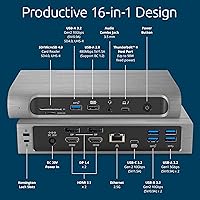
  • Ports: Equipped with 2 HDMI, 2 DisplayPort, 2 USB-A, 1 USB-C, 1 Thunderbolt host port, and 1 2.5Gbps Ethernet port.
  • Ethernet: Includes a 2.5Gbps Ethernet port for fast and stable wired internet connectivity.
  • Card Readers: Features 2 SD card slots and 2 MicroSD card slots for quick data transfer from external storage.
  • USB Ports: Offers 2 USB-A 3.2 Gen 2 ports (10Gbps) and 1 USB-C port for fast data transfer and peripheral connectivity.
  • Audio: Includes a combo audio jack for audio input and output via headphones or microphones.
  • Weight: Weighs 1.34 pounds, making it relatively portable but designed for stationary use.
  • Dimensions: Measures 7.68″L x 4.09″W x 1.42″H, offering a compact yet functional form factor.
  • Thunderbolt Support: Uses Thunderbolt 4 for high-speed data transfer and video output, ensuring optimal performance with compatible devices.
  • Mounting Option: Can be mounted using a zero-footprint solution (bracket sold separately) for a cleaner workspace.
  • Display Resolution: Supports resolutions of up to 4K at 60Hz for each display, or 8K at 60Hz for a single display.
  • USB Version: Includes USB 3.2 Gen 2 (10Gbps) ports for fast peripheral connections and data transfer.
  • Power Delivery: Supports power delivery (PD) of up to 100W to power laptops and other connected devices.
  • Brand: Manufactured by Kensington, a trusted brand known for high-quality accessories and peripherals.
  • Mounting Compatibility: Supports zero-footprint mounting for a more organized setup, with an optional mounting bracket sold separately.

FAQ

This docking station supports up to quad 4K displays at 60Hz or a single 8K display at 60Hz, providing an exceptional visual experience for multi-display setups.

Yes, this device is fully compatible with both Windows 10+ and macOS 11+ devices, offering flexible connectivity options for a wide range of users.

Setting up this Thunderbolt 4 dock is straightforward: connect the dock to your laptop or PC via the Thunderbolt cable, then connect your monitors, keyboard, mouse, and any other peripherals. It’s designed for plug-and-play use, so no additional software or drivers are required.

While the Kensington SD5800T is optimized for Thunderbolt 4 and USB-C laptops, it may not offer full functionality with older USB-A laptops. You’ll be able to connect it, but some features, such as high-speed data transfer and 4K/8K display support, may be limited.

This Thunderbolt 4 dock provides 100W of charging power, which is sufficient to charge most laptops, including those with higher power demands, while simultaneously powering connected devices.

Yes, the Kensington SD5800T supports quad 4K video output, so you can connect up to four 4K monitors, or a single 8K monitor, depending on your needs. This makes it an ideal solution for professionals with complex multi-display setups.

This docking station offers a versatile range of ports, including 2 HDMI, 2 DisplayPort, 2 USB-A, 1 USB-C, 1 Thunderbolt host port, and a 2.5Gbps Ethernet port, along with SD and MicroSD card readers for quick data access.

If your MacBook is not displaying correctly, try updating the system software and ensuring that your Mac is running macOS 11 or later. Additionally, make sure the Thunderbolt cable is properly connected. Some users have reported limitations with certain MacBook models, so check compatibility before purchase.

While the Kensington SD5800T is relatively compact for a high-performance docking station, it is still heavier and bulkier than some simpler alternatives, making it less ideal for those who prioritize portability for travel.

For video editors, the Kensington SD5800T is an excellent choice thanks to its quad 4K or 8K display support, ensuring crisp, high-definition visuals. The 100W charging and fast data transfer speeds via SD and MicroSD card readers also improve workflow efficiency, allowing quick access to large media files.