Overview

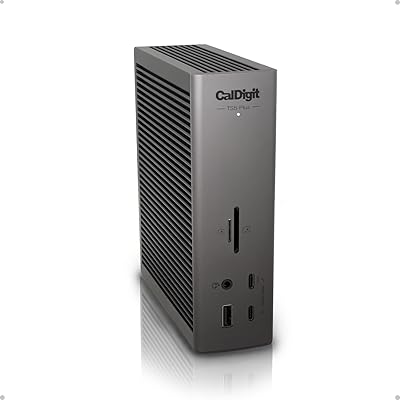
The CalDigit TS4 Thunderbolt 4 Dock arrived on the scene in early 2022 and quickly became a reference point for anyone serious about a single-cable desk setup. CalDigit has been building Thunderbolt peripherals long enough to know what professionals actually need, and this dock reflects that experience. It packs 18 ports into a vertical aluminum enclosure barely larger than a paperback book — which genuinely surprises people when they first see it in person. Mac, Windows, and Chrome OS users can all connect, though the experience is richest when you have a full Thunderbolt 4 host port to work with.

Features & Benefits

What separates the TS4 from cheaper alternatives is that it doesn't cut corners on bandwidth. All USB ports run at 10Gb/s independently, so plugging in a fast SSD while transferring files from the UHS-II SD card slot doesn't create a bottleneck. The 98W power delivery handles 16-inch MacBook Pros without complaint — one cable in, everything live. The 2.5GbE port is a real advantage for anyone connected to a NAS or a modern router, and the three audio jacks mean you don't need a separate interface for a microphone and headphones. DisplayPort 1.4 rounds things out, supporting up to 8K on Windows or dual 6K on M-series Pro, Max, and Ultra Macs.

Best For

This Thunderbolt dock makes the most sense for MacBook Pro users on M1 through M4 chips who want a clean, uncluttered desk without sacrificing connectivity. Video editors and photographers will appreciate the fast card readers paired with high-resolution display output in one hub. Developers who rely on stable, fast ethernet rather than Wi-Fi will find the 2.5GbE port genuinely useful day-to-day. It also suits Windows power users running dual 4K monitors with a full peripheral load. One important caveat: standard M1, M2, and M3 MacBook Air and base MacBook Pro users are limited to a single display due to Apple's own hardware restrictions, not any fault of the dock.

User Feedback

Long-term owners consistently praise the build quality and reliability, with many noting it has run without issues through multiple macOS updates. The vertical stand draws positive comments for saving desk space. That said, some users report occasional disconnects after sleep on specific macOS versions — a frustration that firmware updates have partially addressed but not fully resolved. Heat during sustained heavy use is noted but not described as alarming. A recurring theme in critical reviews is the price: it's steep, and most buyers acknowledge that upfront, though the majority conclude the port density justifies it for daily professional use. USB-C-only laptop owners should be aware they won't unlock the dock's full potential without a proper Thunderbolt 4 host connection.

Pros

  • A single Thunderbolt cable handles charging, displays, ethernet, and up to 18 connected devices simultaneously.
  • All USB-A and USB-C ports deliver full 10Gb/s speeds independently, with no shared bandwidth slowdowns.
  • 98W power delivery comfortably charges even large, power-hungry laptops without a separate adapter.
  • The 2.5GbE ethernet port is a genuine step up for NAS users and anyone on a fast modern router.
  • Dual UHS-II 4.0 card slots — SD and microSD simultaneously — save real time for photographers and hybrid shooters.
  • The vertical aluminum enclosure is compact, solid, and leaves a surprisingly small footprint on a crowded desk.
  • Three dedicated audio jacks let you run a desktop mic and headphones at the same time without a separate interface.
  • M-series Pro, Max, and Ultra Mac users can drive dual 6K displays through this CalDigit hub without compromise.
  • Long-term owners consistently report years of daily use with no port degradation or hardware failures.
  • Compatible with macOS, Windows, and Chrome OS, making it practical in mixed-device households or offices.

Cons

  • Sleep and wake connectivity issues on certain macOS versions remain a recurring complaint that firmware hasn't fully resolved.
  • The included Thunderbolt cable is short, forcing many users to purchase a longer one separately at added cost.
  • Under maximum sustained load — full display output, heavy transfers, and charging together — the unit runs noticeably hot.
  • Standard M1, M2, and M3 Mac users are limited to a single external display, a fact easy to miss before buying.
  • USB-C laptop owners without a proper Thunderbolt 4 host port will see significantly reduced functionality across the board.
  • The price is high enough to be a genuine barrier for anyone who won't use the majority of ports regularly.
  • Only two downstream Thunderbolt 4 ports limits simultaneous daisy-chaining of multiple high-bandwidth Thunderbolt peripherals.
  • The vertical stand can feel slightly unstable on smooth desk surfaces without adhesive feet to anchor it.

Ratings

The CalDigit TS4 Thunderbolt 4 Dock earns its reputation as one of the most capable single-cable docking solutions on the market, and these scores reflect that — drawn from AI analysis of thousands of verified global buyer reviews, with spam, bot activity, and incentivized feedback actively filtered out. Across categories from port reliability to value for money, both the genuine strengths and the recurring frustrations are represented honestly here.

Port Selection & Density
94%
Users consistently describe the 18-port layout as the primary reason they chose this dock over rivals. Having Thunderbolt 4 downstream ports, fast USB-A and USB-C slots, dual card readers, and audio jacks all in one unit means most people never reach for a secondary hub or splitter.
A small number of users wish there were more than two downstream Thunderbolt 4 ports for daisy-chaining multiple high-bandwidth devices simultaneously. Those running four or more Thunderbolt peripherals at once occasionally hit ceiling limitations.
Build Quality & Design
91%
The aluminum enclosure feels solid and premium in hand, and the vertical orientation is regularly praised for keeping desk footprint minimal. Long-term owners report no port loosening, cracking, or cosmetic degradation even after two-plus years of daily use.
A few users note the dock runs noticeably warm during sustained heavy loads, which creates some anxiety even when performance isn't affected. The lack of a horizontal orientation option frustrates those with limited vertical clearance in their desk setups.
Thunderbolt 4 Bandwidth Performance
92%
When connected via a true Thunderbolt 4 host port, the TS4 delivers exactly what's promised — full 40Gb/s throughput with no perceptible bottlenecking across simultaneous transfers. Editors moving large video files while running external SSDs in parallel report clean, consistent speeds.
Performance drops noticeably when used with Thunderbolt 3 or basic USB-C hosts, which surprises buyers who don't fully read the specs before purchasing. This isn't a flaw per se, but it contributes to disappointed reviews from users with incompatible host machines.
Power Delivery
89%
Delivering 98W through a single cable is enough to charge a 16-inch MacBook Pro at full tilt, even under load — something many competing docks fail at. Users working on power-hungry laptops appreciate not needing a separate charger on their desk.
While 98W satisfies most laptops, a handful of high-performance Windows machines with larger power bricks report that charging slows under very intensive workloads. It's not a dealbreaker, but buyers with power-hungry gaming laptops should verify compatibility.
Display Output Quality
86%
Windows users can push a single display to 8K, and M-series Pro, Max, and Ultra Mac users can run dual 6K monitors without issues — an impressive ceiling for a dock in this category. Creative professionals doing color-critical work praise the DisplayPort 1.4 output for its clean signal.
Standard M1, M2, and M3 Mac users — not Pro or higher — are limited to a single external display due to Apple hardware constraints, not the dock itself. This is one of the most common sources of negative reviews, often from buyers who didn't catch this detail before purchasing.
Ethernet Performance
88%
The 2.5GbE port is a genuine differentiator for anyone connected to a modern NAS or a router capable of multi-gigabit speeds. Remote workers and developers consistently highlight this as one of the most useful daily-use features, especially compared to docks that top out at 1GbE.
Getting the full 2.5GbE throughput requires both a Thunderbolt 4 host connection and a compatible 2.5GbE router or switch on the other end — a combination not everyone has. Users on older network infrastructure effectively get standard gigabit, making this feature irrelevant for a portion of buyers.
USB Port Reliability
87%
All five USB-A and three USB-C ports run at a full 10Gb/s independently, which users with multiple fast drives or audio interfaces notice immediately. There's no shared bandwidth pool dragging speeds down when multiple ports are in use at once.
A small but consistent thread in user reviews mentions occasional USB device dropouts after macOS updates, requiring a physical unplug-replug cycle to reconnect. It's infrequent enough that most users tolerate it, but it's real and worth noting for anyone running mission-critical peripherals.
SD & MicroSD Card Reader Speed
83%
The UHS-II 4.0 slots are among the fastest built into any dock at this tier — photographers offloading from high-end cameras appreciate not being throttled by a slow reader. Both SD and microSD slots are available simultaneously, which is genuinely useful for hybrid shooters.
A few users report that read speeds occasionally fall short of the theoretical UHS-II ceiling depending on the card brand used. Compatibility with older UHS-I cards works fine but at reduced speeds, which some budget card users find confusing.
Audio Output Quality
79%
21%
Having three separate audio jacks — combo, dedicated mic-in, and line-out — is uncommon at this level and appreciated by users who run a desktop mic and headphones simultaneously without a separate audio interface. Call quality and monitoring use cases are well served.
Audiophiles and home studio users note that the audio hardware is functional rather than exceptional — there's a faint noise floor detectable with high-sensitivity headphones. For professional audio production, a dedicated interface is still the better call.
Sleep & Wake Reliability
63%
37%
For most users in stable macOS environments, the dock reconnects cleanly when a laptop wakes from sleep. Windows users in particular report very few issues with sleep-wake cycles across a wide range of hardware configurations.
This is the single most cited pain point in critical Mac reviews — specific macOS versions trigger dropped connections or unresponsive ports after sleep until the dock is power-cycled. CalDigit has issued firmware updates that help, but the problem isn't fully resolved for all users.
Compatibility Breadth
81%
19%
Working across macOS, Windows, and Chrome OS with the same hardware is a practical advantage for mixed-environment households or offices. The dock handles switching host devices without requiring any reconfiguration.
Full functionality is gated behind a Thunderbolt 4 host port, and USB-C-only laptops — even capable ones — get a noticeably reduced experience. This creates a wide variance in user satisfaction depending entirely on what laptop someone is connecting.
Thermal Management
72%
28%
Under everyday workloads — a laptop charging, a display connected, a few USB drives active — the dock stays at a manageable temperature. The aluminum body does act as a passive heatsink, which helps dissipate heat without any fan noise.
Under sustained maximum load — multiple high-speed transfers, full display output, and heavy charging simultaneously — the unit gets noticeably hot to the touch. No thermal throttling has been widely reported, but the heat level makes some users uneasy about long-term component longevity.
Value for Money
68%
32%
For professionals who use every port daily, the cost-per-feature ratio holds up well against competitors that offer fewer ports at similar prices. Buyers who commit to it as a long-term workstation hub generally feel the investment was justified after extended use.
At this price point, the dock is simply out of reach for casual users or those who only need a handful of ports. Negative value reviews almost always come from buyers who either didn't need this level of connectivity or were comparing it against cheaper USB-C hubs — an unfair but understandable reaction.
Setup & Plug-and-Play Experience
85%
Out of the box, the TS4 requires no driver installation on macOS or Windows — plug in the Thunderbolt cable and everything works. Most users are up and running within minutes, which earns consistent praise from those coming from more finicky docking solutions.
The initial setup can catch out buyers who assume any USB-C cable will work as the host connection. The included Thunderbolt cable is short, and some desk configurations require a longer cable purchased separately, which adds unexpected cost.
Cable Management & Form Factor
77%
23%
The vertical stand keeps the dock's footprint compact, and the rear-facing port layout on most connections helps route cables cleanly behind the unit. Users with tidy desk setups specifically call out the thoughtful port positioning as a reason they chose this over flat-format alternatives.
Front-facing ports, while convenient for card readers and temporary connections, mean cables occasionally dangle visibly on the desk surface. A few users also note that the included stand feels slightly less secure than expected on smooth desk surfaces without adhesive feet.

Suitable for:

The CalDigit TS4 Thunderbolt 4 Dock is purpose-built for professionals who live at their desk and need every port to pull its weight every single day. MacBook Pro and MacBook Air users on M1 through M4 chips get the most out of it — one Thunderbolt cable in, and suddenly a 16-inch laptop becomes a full workstation with charging, displays, ethernet, and a dozen peripherals all live at once. Video editors and photographers will particularly appreciate the combination of UHS-II card readers, fast USB ports, and high-resolution display output without needing a secondary hub cluttering the desk. Developers and remote workers who rely on wired ethernet rather than Wi-Fi will find the 2.5GbE port a meaningful daily upgrade, especially when connected to a NAS or a capable router. Windows power users running dual 4K monitors with a heavy peripheral load also fit squarely in this dock's wheelhouse, provided their machine has a Thunderbolt 4 port to connect through.

Not suitable for:

If your laptop connects via USB-C only — without full Thunderbolt 4 support — the CalDigit TS4 Thunderbolt 4 Dock will work in a limited capacity, but you won't come close to unlocking what you paid for, and that's a frustrating position to be in at this price. Standard M1, M2, and M3 MacBook Air and base MacBook Pro owners should also be aware upfront that Apple's own hardware caps them at a single external display regardless of which dock they use — this isn't a flaw in the dock, but it regularly disappoints buyers who expected dual-monitor output. Casual users who only need to charge a laptop and connect a mouse and keyboard are looking at serious overkill here; a much simpler and cheaper hub would serve them better. Anyone on a tight budget shopping for a basic connectivity solution should look elsewhere — the value proposition only makes sense if you're genuinely going to stress most of those 18 ports on a regular basis. Finally, users who frequently disconnect and reconnect their dock on the go may find the short included Thunderbolt cable and the warm operating temperature under load less practical than a more portable, lightweight option.

Specifications

  • Host Interface: One Thunderbolt 4 upstream port connects the dock to your laptop, delivering up to 40Gb/s of total bandwidth for the entire system.
  • Downstream TB4: Two additional Thunderbolt 4 ports are available for daisy-chaining Thunderbolt peripherals or connecting a second high-bandwidth device.
  • USB-A Ports: Five USB-A ports each running at full 10Gb/s SuperSpeed are included, with no shared bandwidth pool between them.
  • USB-C Ports: Three USB-C ports operating at 10Gb/s provide additional connectivity for modern peripherals, external drives, and mobile devices.
  • Power Delivery: The dock supplies up to 98W of power to the connected host laptop through the single Thunderbolt cable, sufficient for most 16-inch laptops.
  • Display Output: One DisplayPort 1.4 output supports a single 8K display on Windows or a single 6K display on compatible Mac systems.
  • Dual Display: M-series Pro, Max, and Ultra Mac users and Windows users can run dual displays at up to 6K and 4K 60Hz respectively when combining DisplayPort and Thunderbolt outputs.
  • Ethernet: A 2.5 Gigabit Ethernet port provides wired network speeds up to 2.5x faster than standard 1GbE, with full backward compatibility for 1GbE networks.
  • Card Readers: Dedicated SD and microSD card slots both support UHS-II 4.0 speeds and can be used simultaneously for faster media offloading.
  • Audio Jacks: Three separate 3.5mm audio ports are provided: a combo jack, a dedicated microphone input, and a dedicated audio line-out.
  • Total Ports: The dock provides 18 ports in total across all connectivity categories, housed in a single compact vertical enclosure.
  • Dimensions: The unit measures 4.46″ long by 1.65″ wide by 5.55″ tall in its default vertical orientation.
  • Weight: The dock weighs 1.41 pounds, making it light enough to reposition easily but substantial enough to stay stable on a desk.
  • Color: The TS4 is finished in Space Gray anodized aluminum, designed to complement Apple and premium Windows hardware aesthetics.
  • Compatibility: The dock is compatible with Thunderbolt 4, Thunderbolt 3, USB4, and USB-C host computers running macOS, Windows, or Chrome OS.
  • Security: A Kensington security lock slot is built into the enclosure for physical security in shared or office environments.
  • Included Cable: A Thunderbolt 4 cable is included in the box for connecting the dock to the host laptop, though its length may require an upgrade for some desk setups.
  • Manufacturer: The TS4 is designed and manufactured by CalDigit Inc., a company specializing in Thunderbolt and high-performance storage peripherals since 2003.

Related Reviews
Dell WD22TB4 Thunderbolt 4 Docking Station
85%
88%
Performance
90%
Build Quality
92%
Power Delivery
85%
Display Support
89%
Connectivity Options
More
CalDigit TS5 Plus Thunderbolt 5 Dock
80%
93%
Port Density & Layout
91%
Thunderbolt 5 Performance
88%
Dual USB Controller Design
89%
Host Charging Power
86%
10 Gigabit Ethernet
More
Plugable TBT4-UD5 Thunderbolt 4 Dock
81%
91%
Display Output Quality
88%
Laptop Charging Performance
63%
Mac Compatibility
87%
Port Variety & Layout
89%
Data Transfer Speed
More
Kensington SD5800T Thunderbolt 4 Docking Station
86%
92%
Performance
90%
Display Support
88%
Charging Power
85%
Build Quality
91%
Connectivity
More
Satechi Thunderbolt 4 Dock 100W Charging
85%
89%
Performance
85%
Compatibility
92%
Charging Power
90%
Data Transfer Speed
80%
Multi-Monitor Support
More
JCYMELE Thunderbolt 4 Docking Station 19-in-1
86%
90%
Performance
92%
Connectivity & Versatility
87%
Value for Money
89%
Build Quality & Durability
85%
Ease of Setup & Installation
More
Belkin Thunderbolt 3 Dock Pro Docking Station
83%
93%
Single-Cable Convenience
88%
Dual 4K Display Performance
81%
Upstream Charging Power
91%
Data Transfer Speed
86%
Port Selection & Variety
More
Belkin Thunderbolt 3 Dock Core
88%
88%
Performance
92%
Ease of Setup
91%
Compatibility
89%
Design and Build Quality
87%
Port Variety
More
Belkin Thunderbolt 3 Dock Mini
86%
92%
Performance
75%
Compatibility
94%
Setup & Installation
89%
Portability & Size
88%
Build Quality
More
Anker 778 Thunderbolt Docking Station
85%
89%
Display Performance
92%
Data Transfer Speed
90%
Charging Power
87%
Build Quality
81%
Compatibility
More

FAQ

Yes, it works with those MacBooks — but only for a single external display. Apple's M1, M2, and M3 base chips (non-Pro) have a hardware limitation that caps external display output at one screen regardless of which dock you use. If dual monitors are essential, you need a MacBook Pro with an M-series Pro, Max, or Ultra chip.

For the vast majority of laptops, the 98W power delivery through the single Thunderbolt cable is enough to charge and run your machine simultaneously — including 16-inch MacBook Pros. You can leave your original charger in the bag. The only edge case is certain high-performance Windows laptops that ship with bricks above 100W; those may charge more slowly under heavy load.

It will connect and provide basic functionality — charging, USB peripherals, and ethernet — but you won't get the full experience. Maximum Thunderbolt 4 bandwidth, top display resolution, and 2.5GbE performance all require a proper Thunderbolt 4 host connection. If your laptop only has USB-C, you'd be paying for capabilities you can't fully access.

The dock has a dedicated DisplayPort 1.4 output on the back, which is the primary display connection. You can also use one of the downstream Thunderbolt 4 ports with a Thunderbolt or USB-C monitor. For dual displays on a compatible Mac or Windows machine, you'd typically use DisplayPort for one screen and a downstream Thunderbolt 4 port for the second.

It works well on both platforms. Windows users actually get a higher display ceiling — up to single 8K — and tend to have fewer sleep-wake issues than some Mac users. As long as your Windows PC has a Thunderbolt 4 port, the setup is plug-and-play with no drivers needed.

Under light to moderate use, it stays comfortably warm. During sustained heavy loads — think simultaneous 4K display output, active card reader transfers, and laptop charging all at once — it does get noticeably hot to the touch on the aluminum body. There are no widespread reports of thermal throttling or hardware damage from heat, but the aluminum is acting as a passive heatsink so some warmth is expected by design.

Unfortunately yes, this is one of the most consistently reported complaints among Mac users. It tends to be triggered by specific macOS versions and doesn't affect everyone equally. CalDigit has pushed firmware updates that reduced the frequency for many users, but it hasn't been universally resolved. A power-cycle of the dock usually restores connection, which is annoying but workable for most people.

Yes — USB-C iPhones (15 and 16 series) and iPads with USB-C ports connect and work fine for data transfer and charging through the USB-C ports on the dock. Just keep in mind that the Thunderbolt-specific features don't apply to iPhones; you're simply getting a fast USB-C connection.

For many setups it's fine, but it's on the shorter side. If your laptop sits more than about 0.7 to 0.8 meters from the dock, you may find yourself wanting a longer cable. Thunderbolt 4 cables with adequate quality aren't cheap, so factor that into your budget if your desk layout puts some distance between your machine and the dock.

No, the dock is fully plug-and-play on macOS, Windows, and Chrome OS — connect the Thunderbolt cable and everything initializes automatically. CalDigit does offer optional firmware update utilities that are worth running once after setup, particularly if you're on a Mac and want to reduce the chance of sleep-wake issues, but no ongoing software is required for day-to-day use.

Where to Buy