Overview

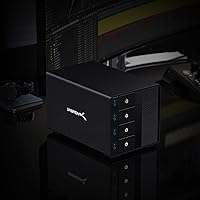
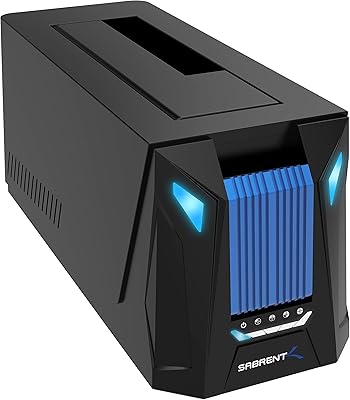
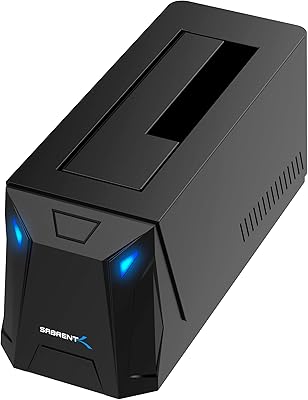
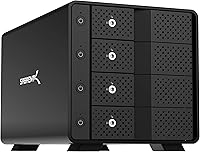
The Sabrent DS-SC4B 4-Bay USB 3.2 Gen 2 Docking Station is a direct-attached storage solution built for power users who need to manage multiple large drives without the overhead of a NAS or RAID setup. Each drive mounts independently through a single USB-C connection, giving you straightforward, flexible access across all four bays. The aluminum enclosure and built-in active cooling signal that this isn't a budget throwaway — it's designed for sustained daily use. That said, be clear on what it is: there's no network sharing, no redundancy, no parity. If you need those things, look elsewhere. This docking station is about speed, simplicity, and direct drive access.
Features & Benefits

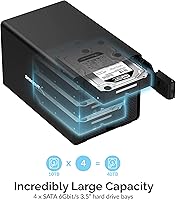
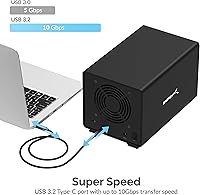
One of the most practical aspects of this SATA dock is the per-bay power switches — you can spin up or power down individual drives without touching the others. The 10Gbps interface is fast enough for serious 4K video workflows, though keep in mind that's the ceiling; spinning hard drives won't saturate that bandwidth the way SSDs might. Drive insertion is tool-free and tray-less, with a physical locking mechanism to prevent accidental ejection during operation. The 90mm variable-speed fan keeps thermals manageable across all four bays, and the dock supports up to 20TB per drive — though actual capacity recognition depends on your OS and file system, not just the hardware.

Best For

The Sabrent 4-bay dock is a strong fit for video editors and creators who rotate between multiple project drives and need fast, individual access without a complicated setup. Data recovery technicians and IT professionals will appreciate powering bays on and off independently — useful when you don't want a suspect drive spinning unnecessarily. Home archivists managing large media libraries will find it straightforward: plug in, files appear, no configuration required. It works across Windows, macOS, and Linux without driver installs. If you already have a RAID array and just need a reliable staging dock for overflow or temporary storage, this fits that role well too.

User Feedback

Across more than 3,000 ratings, this docking station holds a 4.1-star average — solid for a product that has been on the market since 2019 and ranks near the top of its category. Buyers consistently highlight build quality and cooling as standout positives, especially compared to cheaper plastic alternatives. Hot-swap reliability and individual bay switches earn repeated praise from professionals who use them daily. On the downside, fan noise is a legitimate complaint — it's not disruptive, but in a quiet home office it's noticeable enough to mention. A handful of users have run into USB-C compatibility issues on older host controllers. Long-term durability feedback is largely positive, with multiple reviewers citing years of trouble-free use.

Pros

  • Individual per-bay power switches let you spin up only the drives you need, reducing noise and unnecessary wear.
  • Tray-less hot-swap with locking keys makes drive rotation fast and secure without any tools.
  • Solid aluminum build feels premium and holds up well after years of daily professional use.
  • Works natively on Windows, macOS, and Linux with zero driver installation required.
  • The 90mm variable-speed fan keeps all four bays thermally stable during long, intensive transfers.
  • Supports up to 20TB per drive, giving the dock serious longevity as storage capacities grow.
  • Per-bay LED indicators make it easy to monitor drive activity at a glance during complex workflows.
  • 10Gbps USB-C interface delivers real speed headroom, especially when using SATA SSDs in the bays.
  • Backward compatible with USB 3.0 and 2.0, so it works with older host systems in a pinch.
  • Kensington lock slot adds a layer of physical security in shared studio or office environments.

Cons

  • The internal fan produces a constant low hum that is noticeable in quiet home office settings.
  • No companion app or firmware utility means zero options for drive monitoring, scheduling, or management.
  • Only one USB-C data port on the unit — no passthrough ports for additional peripherals.
  • Compatibility can be inconsistent with older USB-C host controllers or when connected through hubs.
  • The included USB-C cable length may not suit all desk configurations without buying a replacement.
  • Bay slot surfaces can show cosmetic scuffing over time from repeated bare-drive insertions.
  • Fan noise increases noticeably under full four-drive load, which some users found distracting long-term.
  • No software-level spin-down or automated power scheduling — all drive control is strictly manual.
  • Real-world HDD transfer speeds fall well below the 10Gbps interface ceiling, which surprises some buyers.
  • Maximum recognized drive capacity depends on host OS and file system, not just the dock hardware.

Ratings

The scores below are generated by AI after analyzing thousands of verified global user reviews for the Sabrent DS-SC4B 4-Bay USB 3.2 Gen 2 Docking Station, with active filtering applied to remove incentivized, bot-generated, and outlier feedback. The result is a balanced view that reflects both what this docking station genuinely gets right and where real buyers have run into friction. Nothing is sugarcoated.

Build Quality
88%
The aluminum chassis feels noticeably more substantial than the plastic-bodied competition at similar price points. Reviewers who have used it daily in studio and office environments report no flex, no rattling bays, and no degradation in fit after months of regular drive swapping.
A few users noted that the bay slots show minor scuff marks over time from repeated bare-drive insertions, which is expected but worth mentioning for those who care about long-term aesthetics. The overall structure holds up, but it isn't built to the same standard as enterprise-tier hardware.
Cooling Performance
83%
The 90mm variable-speed fan does a solid job keeping temperatures in check even when all four bays are loaded with high-capacity spinning drives running simultaneously. Users doing long archival transfers or extended video editing sessions noted that drives stayed within safe operating ranges throughout.
The fan is the most divisive aspect of this dock — in a quiet home office or late-night editing session, the constant low hum is noticeable. It is not loud by any measure, but users expecting near-silence will be disappointed, and there is no option to disable or manually throttle the fan speed.
Hot-Swap Reliability
86%
The tray-less design with physical locking keys strikes a practical balance — drives slide in and out quickly without tools, yet the lock mechanism prevents accidental disconnection during transfers. IT professionals and data recovery technicians specifically praised this for making drive rotation fast and mistake-proof.
A small number of users reported that the locking mechanism felt slightly inconsistent across bays on their unit, requiring a firmer push on some slots than others. This is more of a minor annoyance than a functional failure, but it does undercut the otherwise smooth hot-swap experience.
Transfer Speed
74%
26%
The 10Gbps USB 3.2 Gen 2 interface provides meaningful headroom, especially when working with SSDs or doing parallel transfers across multiple bays. For 4K video editing workflows with fast SATA drives, users reported smooth, stutter-free performance that justified the dock over slower USB 3.0 alternatives.
Real-world speeds with standard spinning HDDs fall well short of the 10Gbps ceiling — which is a hardware physics reality, not a flaw, but it catches some buyers off guard. The interface speed only becomes a tangible advantage when pairing the dock with SATA SSDs or reading across multiple bays simultaneously.
Per-Bay Power Control
91%
Individual power switches per bay are genuinely useful in professional workflows — you can keep three drives dormant while working from one, reducing noise, heat, and unnecessary drive wear. Backup-focused users particularly valued being able to power up a dedicated archive drive only when needed.
The switches are functional but feel slightly low-budget compared to the premium aluminum body — they have a plasticky click that doesn't match the overall build impression. There is also no software layer for power scheduling or automated spin-down, so control is entirely manual.
OS Compatibility
89%
The dock works natively across Windows, macOS, and Linux without requiring any driver installation, which is a genuine convenience for multi-platform users or those who switch between operating systems regularly. Several reviewers confirmed stable recognition on macOS Ventura and various Linux distributions without configuration.
A subset of users — particularly those on older motherboards or using USB-C hubs rather than direct host controller connections — reported intermittent detection issues. The dock performs best when connected directly to a USB 3.2 Gen 2 port; performance and stability can degrade through adapters or older host controllers.
USB-C Host Compatibility
67%
33%
When connected to a modern host controller with native USB 3.2 Gen 2 support, the dock operates reliably and consistently. Most buyers on current-generation laptops and desktops reported no issues whatsoever during initial setup or extended use.
This is one of the more frustrating pain points surfaced in reviews — users with older or non-standard USB-C implementations sometimes experienced dropped connections, drives not mounting, or reduced speeds. Thunderbolt ports do not universally guarantee full compatibility, and Sabrent's support documentation on this is thinner than it should be.
Drive Capacity Support
81%
19%
Support for up to 20TB per bay means the dock can theoretically handle up to 80TB of raw storage, which future-proofs it reasonably well as consumer drive capacities grow. Users running 16TB and 18TB drives confirmed stable recognition without any special configuration on modern operating systems.
Maximum recognized capacity depends significantly on the host OS and file system in use — GPT-formatted drives on modern OS versions work fine, but older MBR setups or legacy OS environments may cap out earlier. The dock itself cannot be blamed for this, but buyers should verify their own environment before assuming full capacity support.
Value for Money
77%
23%
At its price point, the combination of aluminum construction, active cooling, per-bay switches, and 10Gbps USB-C puts it well ahead of cheaper plastic docks that offer none of those features. For professionals who depend on multi-drive workflows, the investment pays off quickly in reliability and time saved.
Budget-conscious buyers comparing it to no-frills 4-bay docks will feel the price premium acutely, especially if they do not need the per-bay power control or USB-C speeds. There are cheaper options that mount drives just as reliably if your workflow does not demand the extra features this dock is built around.
Noise Level
61%
39%
Under light load with only one or two bays active, the fan noise is barely perceptible and most users in louder work environments reported no issues at all. The variable-speed design at least means it doesn't run at full blast unnecessarily when thermal load is low.
Under full load with four spinning drives, the fan ramps up to a level that is genuinely intrusive in quiet spaces. Multiple reviewers specifically flagged this as a deal-breaker for bedroom or library-adjacent setups, and a consistent hum is present even at idle that some found distracting over long sessions.
Setup & Ease of Use
92%
Plug it in, insert drives, and they appear as individual volumes — there is no software to install, no configuration menu to navigate, and no learning curve whatsoever. Even users with minimal technical experience noted that setup took under two minutes from unboxing to working drives.
The simplicity that makes setup easy also means there are zero advanced options available. Users who want drive health monitoring, automated power schedules, or any form of management interface will need to rely entirely on third-party software, as the dock provides no companion app or firmware utility.
Longevity & Durability
84%
Multi-year ownership reports are common in the review pool, with a notable number of buyers mentioning two or three years of daily use in professional environments without hardware failures. The aluminum enclosure and quality internal components appear to contribute meaningfully to long-term reliability.
Fan longevity is the wildcard — a few long-term owners reported that fan noise increased noticeably after extended use, suggesting bearing wear over time. Replacing the internal fan is not a straightforward process, and Sabrent's warranty and repair support has received mixed feedback from users who needed post-purchase assistance.
Cable & Port Design
72%
28%
The rear USB-C port placement is clean and keeps cable management tidy on a desk. The included cable is adequate for most setups, and the single-cable connection to the host system is a practical advantage over older docks that required both data and separate power USB connections.
The dock ships with only one USB-C cable, and some users found the included cable length limiting depending on their desk configuration. There is also only one data port — no additional passthrough USB ports on the unit itself — which feels like a missed opportunity at this price level.
Footprint & Desk Presence
78%
22%
The vertical orientation keeps the footprint compact relative to how much storage it houses, and the aluminum finish looks professional on a studio or office desk. At just over 6 pounds, it is sturdy enough to stay planted without being difficult to reposition when needed.
With four 3.5-inch drives loaded, the unit is not small — at roughly 9 by 6 by 6 inches, it occupies a meaningful chunk of desk real estate. Users with limited workspace noted that finding a permanent spot for it required some reorganization, particularly when pairing it with other external hardware.

Suitable for:

The Sabrent DS-SC4B 4-Bay USB 3.2 Gen 2 Docking Station is a strong fit for anyone who regularly works with multiple large SATA drives and wants fast, independent access to each one without managing a RAID array or NAS setup. Video editors and content creators dealing with 4K or 8K footage will appreciate the 10Gbps USB-C connection and the ability to keep project drives organized and individually powered. IT professionals and data recovery technicians get real mileage out of the per-bay power switches — being able to spin up a single suspect drive without energizing the rest is genuinely useful in diagnostic workflows. Home archivists managing sprawling media libraries will find the tray-less hot-swap design makes rotating drives in and out a quick, low-friction task. The dock also works well as a staging or overflow companion for users who already have a primary RAID solution and just need a reliable place to park additional drives. Cross-platform users on Windows, macOS, and Linux will appreciate that it requires zero driver installation to get running.

Not suitable for:

Buyers hoping for network-attached storage, built-in RAID, or any form of drive redundancy should look elsewhere — this docking station is strictly a direct-attached device, meaning it only works with a physically connected host computer and offers no data protection features of its own. If your priority is silent operation, this is also not the right choice; the internal fan produces a consistent low hum that becomes noticeable in quiet rooms, particularly with multiple drives active. Users on older machines with legacy USB-A ports or non-Gen-2 USB-C implementations may not get the full speed benefit and could run into intermittent compatibility issues that are frustrating to diagnose. Anyone looking for a compact, minimalist solution should factor in the unit's physical size — loaded with four 3.5-inch drives, it occupies meaningful desk space. Budget buyers who only need basic single-drive docking will find the feature set here exceeds their needs and the price reflects that premium accordingly.

Specifications

  • Interface: Connects to the host system via a single USB 3.2 Gen 2 Type-C port delivering up to 10Gbps of bandwidth.
  • Bay Count: Houses four independent 3.5″ SATA III bays, each recognizing its installed drive as a separate volume.
  • Drive Compatibility: Accepts standard 3.5″ SATA I, II, and III hard drives and SSDs with no adapters or trays required.
  • Max Capacity: Supports drives up to 20TB per bay, for a total raw storage ceiling of 80TB across all four bays.
  • Transfer Rate: Interface ceiling is 10,000 MB/s (10Gbps); actual throughput varies by drive type, host controller, and file system.
  • RAID Support: No RAID functionality is included; each drive mounts independently as a discrete volume on the host system.
  • Cooling System: A 90mm variable-speed internal fan actively regulates airflow and adjusts RPM based on thermal load.
  • Build Material: Outer enclosure is constructed from high-grade aluminum for improved heat dissipation and long-term structural durability.
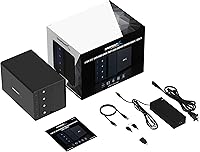
  • Power Supply: Ships with an external power adapter accepting 100–240V AC input and delivering 12V DC output.
  • Drive Design: Tray-less, tool-free bay design with individual locking keys per slot to prevent accidental drive ejection.
  • Power Switches: Each bay has its own dedicated ON/OFF switch, allowing independent power control without affecting neighboring drives.
  • LED Indicators: Per-bay LED status lights provide real-time visual feedback on drive activity and power state.
  • Hot-Swap: All four bays support hot-swapping, allowing drives to be inserted or removed while the dock remains powered.
  • OS Support: Compatible with Windows, macOS, and Linux operating systems; no driver installation is required on any platform.
  • Backward Compatibility: Fully backward compatible with USB 3.0, USB 2.0, and USB 1.1 host ports at reduced speeds.
  • Security Slot: A Kensington lock slot on the chassis allows the unit to be physically secured to a desk or workstation.
  • Dimensions: Unit measures 9.1″ long by 5.8″ wide by 5.9″ tall, occupying a moderate footprint on a desk or shelf.
  • Weight: The unit weighs 6.42 lb without drives installed; shipping weight is approximately 9 lb with packaging.
  • Model Number: Official Sabrent model designation is DS-SC4B, used for warranty registration and support identification.
  • Global Rating: Holds a 4.1 out of 5 star average rating based on more than 3,150 verified reviews, ranking #6 in its Amazon category.

Related Reviews

SABRENT 5-Bay USB 3.2 Gen 2 SATA Docking Station
82%
94%
Transfer Speed
88%
Build Quality
90%
Ease of Use
78%
Cooling Efficiency
85%
Flexibility of Drive Management
More
Sabrent 10-Bay USB 3.2 Gen 2 SATA Docking Station
85%
94%
Ease of Use
88%
Build Quality
79%
Cooling Performance
90%
Speed & Data Transfer
91%
Compatibility with Operating Systems
More
Sabrent DS-4SSD 4-Bay 2.5” SATA SSD/HDD Docking Station
88%
91%
Value for Money
96%
Ease of Setup
85%
Cooling Performance
77%
Drive Compatibility
89%
Build Quality
More
TerraMaster D4-320
TerraMaster D4-320
80%
93%
Ease of Setup
86%
Transfer Speed
71%
Build Quality
88%
Noise Level
82%
Thermal Management
More
FIDECO YPZ220C Dual Bay USB 3.2 Gen 1 Hard Drive Docking Station
79%
88%
Offline Clone Functionality
79%
Transfer Speed
92%
Drive Compatibility
91%
Plug-and-Play Setup
63%
Build Quality
More
WAVLINK WL-ST334UA Dual-Bay USB 3.0 Hard Drive Docking Station
72%
83%
Offline Cloning Reliability
74%
Transfer Speed
79%
Build Quality
91%
Ease of Setup
38%
Mac Compatibility
More
Sabrent DS-UNHC USB-C Docking Station
80%
91%
Drive Compatibility
67%
Offline Clone Reliability
84%
Transfer Speed
78%
Thermal Management
72%
Build Quality
More
Kingwin USB 3.0 to SATA EZ-Dock 2.5″/3.5″ SuperSpeed Dock
84%
91%
Ease of Use
94%
Setup Process
88%
Performance/Speed
85%
Build Quality
90%
Compatibility with Drives
More
SABRENT DS-UFNC
SABRENT DS-UFNC
80%
93%
Drive Compatibility
89%
Offline Clone Function
71%
Transfer Speed (Real-World)
94%
Ease of Setup
76%
Build Quality & Materials
More
SABRENT DS-UC1B USB-C Hard Drive Docking Station
81%
88%
Plug-and-Play Reliability
79%
Transfer Speed Performance
74%
Build Quality & Materials
86%
Hot-Swap Functionality
83%
Compatibility Range
More

FAQ

Each drive mounts completely independently — your OS sees them as four separate disks, exactly as if you had plugged each one in individually. There is no pooling, striping, or any other form of drive combining. If you want RAID or a combined volume, you would need to set that up at the OS level using software RAID, which is a separate process entirely.

Yes, Thunderbolt 3 and Thunderbolt 4 ports are physically USB-C compatible and will work with this docking station. You will get the full 10Gbps USB speed, not Thunderbolt speeds, since the dock is a USB device. Most MacBook users report plug-and-play recognition with no issues on recent macOS versions.

Honest answer: it is audible. At idle or with one or two drives active, it produces a low, steady hum that is easy to tune out in most environments. With all four bays loaded and transferring data, it ramps up noticeably. If your workspace is library-quiet, you will hear it. It is not disruptive in a typical home office with ambient noise, but it is not silent either.

The bays are designed specifically for 3.5″ SATA drives. You can physically insert a 2.5″ drive, but it will not sit securely in the tray-less slot and the locking mechanism will not hold it properly. If you want to use 2.5″ drives, you would need a 3.5″ to 2.5″ adapter bracket, which is sold separately and not included.

The Sabrent DS-SC4B 4-Bay USB 3.2 Gen 2 Docking Station is built for sustained use with its aluminum chassis and active cooling, and many professional users do run it continuously. That said, long-term 24/7 operation will put wear on both the fan bearings and the drives themselves. Using the per-bay power switches to spin down drives you are not actively using is a good practice for extending component lifespan.
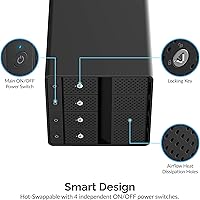
Like any directly attached storage device, yanking a drive mid-transfer without ejecting it first risks data corruption on that drive. The locking key mechanism is there to prevent accidental removal, not to replace the safe-eject process. Always eject the volume through your OS before flipping the power switch or physically removing a drive.

A USB-C cable is included in the box. Some users have found the included cable a bit short depending on their desk setup, so if your computer is positioned further away you may want a longer USB 3.2 Gen 2 rated cable. Make sure any replacement cable you buy explicitly supports 10Gbps to avoid a speed bottleneck.

You can, but you will need a USB-C to USB-A adapter or cable that supports the USB 3.x standard. Keep in mind that USB-A ports max out at USB 3.2 Gen 1 speeds (5Gbps) even if the dock is capable of more, so you will not reach the full 10Gbps potential. It will still work fine for general storage use, just not at peak performance.

Yes, it is recognized natively on Linux without any additional drivers or configuration. Users on Ubuntu, Debian, Fedora, and Arch-based distributions have all confirmed straightforward plug-and-play behavior. Just make sure your host system has a USB 3.2 Gen 2 port and a reasonably current kernel, and you should be up and running immediately.

The dock supports drives up to 20TB per bay in terms of hardware, so large-capacity drives are not a problem on the device side. The key variable is your operating system and how the drive is partitioned. Modern Windows, macOS, and Linux installations using GPT partition tables handle large drives without issue. If you are using an older OS or a drive formatted with an MBR partition table, you may hit a 2TB recognition limit — but that is an OS constraint, not a dock limitation.