
Overview

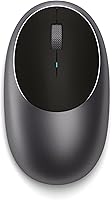
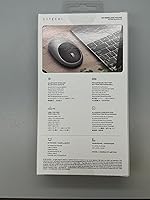
The Satechi M1 Wireless Bluetooth Mouse is a compact, aluminum-bodied pointing device that Satechi has quietly kept relevant since its 2019 launch by updating compatibility with newer Mac and iPad hardware. At just under three ounces, this Bluetooth mouse slips easily into a laptop bag without adding noticeable weight. The aluminum shell comes in Space Gray, Silver, and Blue, each finish designed to sit visually alongside Apple devices rather than clash with them. Priced in the mid-range tier for travel-friendly mice, it competes on aesthetics and portability rather than raw feature count — a deliberate trade-off that suits a specific kind of buyer well.

Features & Benefits

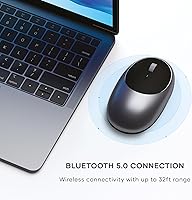
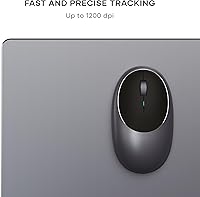
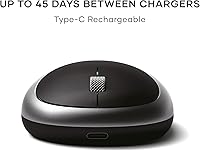
Bluetooth 5.0 handles the wireless connection reliably up to around 32 feet, which means no dongle occupying a precious USB port — a practical detail for MacBook users with limited ports. The optical sensor runs at a fixed 1200 DPI, which covers web browsing, email, and document work without issue, though it won't satisfy anyone needing adjustable sensitivity for detailed creative or technical tasks. What stands out day-to-day is the USB-C rechargeable battery; you charge it like your phone, set it aside, and forget about hunting for replacement batteries. The ambidextrous shape fits both hands reasonably well, and the two-year warranty adds a layer of confidence for a mouse at this price point.

Best For

This compact Mac mouse is an easy recommendation for MacBook owners who want a tidy, dongle-free setup without spending a lot. It travels well — light enough to toss in a bag alongside a laptop and small enough not to take up drawer space at a coffee shop. iPad users who want more control than a touchscreen offers will also find it useful for extended writing or spreadsheet sessions. Where it falls short is for power users: if you edit photos, do illustration work, or just prefer a full-sized grip, the compact form and fixed DPI will feel limiting. For straightforward productivity tasks, the Satechi M1 punches cleanly at its price.

User Feedback

Buyers consistently praise the design — the aluminum finish earns specific mention because it looks noticeably less plasticky than most mice in this category. The USB-C charging port comes up often as a practical win, especially for people already carrying a USB-C cable for their laptop. On the critical side, the scroll wheel gets called out for feeling somewhat loose or imprecise, and users with larger hands find the compact body uncomfortable over long sessions. The fixed DPI draws frustration from those who expected adjustable settings. Connection stability, however, rarely appears as a complaint — most people report pairing quickly and staying connected without interruptions.

Pros

  • Bluetooth 5.0 connects quickly and stays stable — dropout complaints are rare among long-term users.
  • USB-C charging means one less proprietary cable to carry when traveling.
  • The aluminum shell looks and feels noticeably more premium than most mice in this price range.
  • At under three ounces, this compact Mac mouse barely registers in a laptop bag.
  • No USB dongle required, which is a real benefit on MacBooks with limited ports.
  • Works with both left- and right-handed users without any awkward button layout compromises.
  • The two-year warranty is more generous than many competitors offer at this price tier.
  • Pairs visually with Apple hardware in a way that clearly matters to a lot of buyers.
  • Setup is straightforward — no software, no drivers, just pair and go.

Cons

  • The DPI is fixed at 1200 with no way to adjust it, which limits versatility for detail-oriented tasks.
  • The scroll wheel lacks tactile feedback and feels loose compared to mice in a similar price range.
  • Compact size becomes a strain during long work sessions for users with medium or large hands.
  • No side buttons means no back-and-forward browser navigation or custom shortcut support.
  • Only one device can be paired at a time, so switching between a MacBook and iPad requires manual re-pairing.
  • The built-in battery is not user-replaceable, which raises long-term durability questions after years of charge cycles.
  • No DPI indicator or battery level display makes it hard to know the charge status at a glance.

Ratings

The Satechi M1 Wireless Bluetooth Mouse scores here are generated by AI after analyzing thousands of verified global user reviews, with spam, bot-submitted, and incentivized feedback actively filtered out. This compact Mac mouse earns genuine praise in several areas but also draws consistent criticism in others — and both sides are reflected honestly in the scores below. Nothing here is averaged into false positivity; the ratings represent what real buyers actually experienced across different use cases and setups.

Build Quality
88%
The aluminum top shell is the first thing buyers comment on — it feels solid in hand and doesn't develop the creaky flex that plagues cheaper plastic mice after a few months. Several users compared the finish directly to Apple's own hardware, noting how cohesive it looks sitting next to a MacBook on a desk.
The bottom of the mouse is plastic, which creates a noticeable contrast in material quality when you pick it up. A handful of users also reported that the aluminum surface shows fingerprints more than expected, requiring occasional wiping to keep it looking clean.
Connectivity & Stability
83%
Bluetooth 5.0 pairing is quick and the connection holds up well during normal desk use — most users report zero dropout across weeks of daily sessions. The dongle-free setup is a consistent highlight for MacBook users who guard their USB-C ports carefully.
A small but vocal group of users report occasional lag or reconnection delays after the mouse wakes from sleep, which requires a click or a brief wait. Multi-device users are also frustrated that there is no button to switch between paired devices — only one connection at a time is supported.
Tracking Performance
71%
29%
At 1200 DPI, the optical sensor handles typical productivity tasks without any noticeable skipping or jitter. Browsing, document editing, and general navigation feel accurate and responsive on standard desk surfaces and mouse pads.
The fixed DPI is a real constraint for anyone who needs to shift between fine detail work and fast broad movements — there is simply no way to change it. A number of buyers who do photo editing or illustration work noted they regretted not checking this before purchasing.
Ergonomics & Comfort
62%
38%
The ambidextrous shape works genuinely well for left-handed users, which is rarer than it should be in this category. For shorter sessions — a few hours of writing or browsing — most users find it comfortable enough without complaints.
Extended daily use is where the compact size starts to hurt, literally for some users. People with medium-to-large hands report palm fatigue and an unnatural grip angle after longer sessions, and the low profile offers limited support for the arch of the hand.
Scroll Wheel
58%
42%
The scroll wheel is quiet, which appeals to users working in shared spaces like libraries or open offices. It spins smoothly and doesn't catch or skip during normal vertical scrolling on web pages or documents.
The tactile feedback is soft to the point where many users describe it as mushy — there's little resistance or click sensation when scrolling, making it hard to scroll precise line-by-line increments. For users coming from Logitech or Microsoft mice with firmer wheels, this is a frequent adjustment complaint.
Battery & Charging
84%
The USB-C charging port is a genuinely practical choice for anyone already carrying a USB-C cable for their laptop or phone — no extra accessories required. Battery life is strong enough that most users charge it every few weeks rather than every few days.
There is no battery indicator on the mouse or in macOS system menus, so the first sign of a low battery is often the mouse simply stopping mid-use. The battery is also non-replaceable, raising fair questions about longevity after years of charge cycles.
Portability
91%
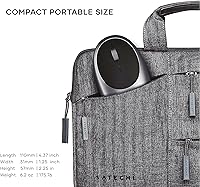
At under three ounces and with dimensions that fit easily in a jacket pocket, this is one of the most genuinely packable mice in its price range. Frequent travelers consistently rate it as their go-to recommendation for light carry setups.
The very feature that makes it portable — its compact size — is also what limits it for home or office use as a primary mouse. Users who split time between travel and desk work sometimes end up buying a second, larger mouse for stationary days.
Aesthetic Design
92%
The Space Gray aluminum finish matches Apple hardware so closely that multiple reviewers noted it looks like a first-party accessory. The clean, minimal silhouette ages well and doesn't look dated the way some accessory designs do after a couple of years.
Color options, while attractive, are limited to three choices and may not suit users with non-Apple or differently themed setups. The aluminum surface, though premium-feeling, is a fingerprint magnet in brighter lighting conditions.
Setup & Ease of Use
89%
There are no drivers to install and no companion app required — it pairs in Bluetooth settings like any standard peripheral and works immediately. Even less tech-savvy buyers describe the setup process as entirely painless.
Switching this Bluetooth mouse between two devices, such as a MacBook and an iPad, requires going into Bluetooth settings and manually re-pairing each time. For users who frequently hot-swap between devices, this friction adds up quickly.
Value for Money
74%
26%
At its price point, the combination of an aluminum build, USB-C charging, and Bluetooth 5.0 is competitive — most rivals at the same cost use plastic shells and micro-USB. The two-year warranty adds tangible value for buyers concerned about longevity.
The fixed DPI, single-device pairing limit, and soft scroll wheel are genuine functional compromises that some buyers feel aren't fully justified at this price. Competing options from Logitech in the same range offer more feature flexibility, even if they don't match the aesthetic.
Compatibility
81%
19%
Works across Mac, iPad, and Windows devices without any configuration changes — just pair and use. Satechi has kept the product listing updated to reflect compatibility with newer Mac and iPad generations, which reassures buyers who check compatibility before purchasing.
Older Mac systems from 2011 or earlier are explicitly unsupported, and a small number of users report occasional quirks with specific iPadOS versions. Windows compatibility is functional but basic — there are no advanced features or software integration on that platform.
Click Feel & Buttons
67%
33%
Left and right clicks are quiet and require a reasonable amount of actuation force — not so light that accidental clicks happen often. The quiet click profile is specifically appreciated by users in noise-sensitive environments.
The absence of side buttons is a genuine omission for productivity-focused users who rely on back-and-forward browser navigation or app switching shortcuts. There is no way to add this functionality through software since there are no extra buttons to remap.
Durability Over Time
72%
28%
The aluminum top shell holds up well to daily handling without scratching easily, and the Bluetooth connection remains consistent without degrading noticeably after extended use. Most users who have owned this for over a year report no mechanical failures.
The non-replaceable internal battery is the main long-term concern — once it degrades past a usable charge cycle, the whole mouse becomes unusable. A few users with older units report the USB-C port becoming slightly loose after heavy charging cycles.

Suitable for:

The Satechi M1 Wireless Bluetooth Mouse is best suited for MacBook and iPad users who want a tidy, cable-free desk setup without sacrificing visual cohesion with their Apple hardware. If you spend most of your day on everyday productivity tasks — writing, spreadsheets, browsing, video calls — this compact Mac mouse delivers everything you actually need without overcomplicating things. Frequent travelers will appreciate how little space it takes up and how little it weighs; it genuinely disappears in a bag. The USB-C charging also makes it a natural fit for anyone who has already standardized on USB-C cables across their devices, since you won't need to carry anything extra. Left-handed users often struggle to find mice that work without compromise, so the ambidextrous shape is a quiet but meaningful advantage for that group as well.

Not suitable for:

The Satechi M1 Wireless Bluetooth Mouse is not the right tool for anyone who needs precise, adjustable sensitivity — the DPI is fixed at 1200, which works fine for general use but becomes a real frustration for photo editors, illustrators, or anyone doing detailed creative work who routinely switches between fine and fast cursor movement. Users with larger hands will likely find the compact body uncomfortable over long sessions; this is a mouse optimized for portability, not extended ergonomic support. Gamers should look elsewhere entirely — the tracking performance and button layout simply aren't built for that use case. If you rely heavily on side buttons or customizable inputs, this Bluetooth mouse offers none of that. And if your workflow demands a more tactile, clicky scroll wheel, the one here may feel underwhelming by comparison.

Specifications

  • Connectivity: Uses Bluetooth 5.0 for a stable wireless connection without requiring a USB dongle or receiver.
  • Wireless Range: Maintains a reliable connection up to approximately 32 feet from the paired device.
  • DPI: Optical sensor runs at a fixed 1200 DPI with no adjustable sensitivity settings.
  • Sensor Type: Optical tracking sensor provides accurate cursor movement on most standard desk surfaces.
  • Battery: Built-in lithium polymer battery is rechargeable via USB-C and is not user-replaceable.
  • Charging Cable: Includes a USB-C to USB-A charging cable in the box.
  • Dimensions: Measures 4.45 x 2.33 x 1.15 inches, making it notably compact compared to full-sized office mice.
  • Weight: Weighs 2.87 oz, light enough to carry daily without adding meaningful bulk to a bag.
  • Materials: Top shell features an aluminum finish that resists minor scuffs better than standard plastic housings.
  • Handedness: Ambidextrous symmetrical shape works for both left-handed and right-handed users without adjustment.
  • Colors: Available in Space Gray, Silver, and Blue to complement a range of Apple and Windows hardware.
  • Compatibility: Pairs with any Bluetooth-enabled Mac, iPad, or Windows device; not recommended for Mac systems from 2011 or earlier.
  • Warranty: Covered by a 2-year limited warranty against defects in materials and workmanship under normal use.
  • Model Number: Officially listed under model number ST-ABTCMM by the manufacturer Satechi.
  • Button Layout: Features left-click, right-click, and a center scroll wheel with no programmable side buttons.
  • Pairing Capacity: Supports pairing with one device at a time; switching devices requires manual re-pairing via Bluetooth settings.

Related Reviews
Macally Wireless Bluetooth Mouse
86%
93%
Quiet Operation
89%
Battery Life
91%
Comfort and Ergonomics
75%
Bluetooth Connectivity
92%
Cross-Device Compatibility
More
Kovess 4-Mode Silent Wireless Mouse
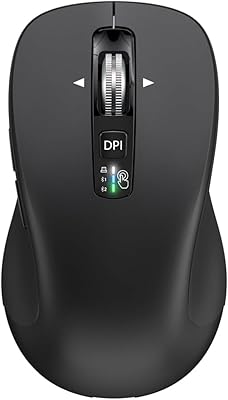
79%
91%
Multi-Device Connectivity
88%
2-in-1 Receiver Design
86%
Jiggler Mode
84%
Silent Click Mechanism
79%
Battery Life
More
XBG B15 Pro
XBG B15 Pro
80%
78%
Connectivity Reliability
88%
LED Status Display
74%
Battery Life
91%
Silent Click Mechanism
69%
Ergonomics & Comfort
More
CITLLA L360
CITLLA L360
79%
88%
Multi-Device Switching
91%
Value for Money
74%
Battery Life
86%
Silent Click Mechanism
82%
4-Way Scrolling
More
Elasto M4 Ergonomic Wireless Mouse
74%
88%
Click Comfort
81%
Ergonomic Design
83%
Wireless Connectivity
46%
Button Layout
53%
Adjustment Period
More
SANWA GMABTTB41 Bluetooth Ergonomic Trackball Mouse
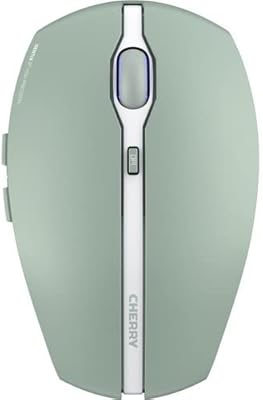
73%
82%
Ergonomic Comfort
67%
Trackball Precision
74%
Bluetooth Connectivity
89%
Noise Level
61%
Build Quality
More
Cherry GENTIX BT Wireless Mouse

78%
88%
Multi-Device Pairing
83%
Bluetooth Reliability
91%
OS Compatibility
86%
Battery Life
61%
DPI & Precision
More
Arteck MD172 Multi-Device Wireless Bluetooth Mouse
87%
88%
Performance
91%
Ergonomics
93%
Battery Life
89%
Connectivity
85%
Clicking Noise
More
Logitech MK250
Logitech MK250
75%
91%
Value for Money
78%
Bluetooth Connectivity
69%
Keyboard Typing Feel
61%
Mouse Comfort & Fit
88%
Battery Life
More
seenda SKM64-3 Wireless Bluetooth Keyboard and Mouse Combo
87%
94%
Battery Life
90%
Connectivity and Compatibility
87%
Typing Experience
89%
Ergonomics and Comfort
85%
Design and Build Quality
More

FAQ

It works fine with any Bluetooth-enabled Windows PC or laptop — the Mac-focused branding is mostly about aesthetics. Pairing works the same way you would connect any Bluetooth peripheral on Windows. The functionality is basic but solid for everyday use on either platform.

Turn the mouse on using the switch on the bottom, then open Bluetooth settings on your Mac and look for it in the device list. Select it and it should pair within a few seconds. No software or drivers are required — it works out of the box.

Yes, it pairs with iPads running iPadOS 13 or later, which introduced proper Bluetooth mouse support. Just go to Bluetooth settings on your iPad and connect it like any other device. It works well for tasks like editing documents or navigating spreadsheets where touch controls feel awkward.

Satechi does not publish a specific battery life figure for this mouse, which is a bit frustrating. In practice, most users report several weeks of normal office use between charges, though heavy daily use will shorten that. There is no battery indicator on the mouse itself, so you will not get a warning before it dies.

No — the sensor is fixed at 1200 DPI with no way to change it through software or a button on the mouse. For general browsing and document work that is perfectly adequate, but if you need to switch between precise slow movement and fast sweeping gestures, this limitation will become noticeable.

Charging time is not officially specified, but given the small battery size, most users find it reaches full charge in one to two hours. You cannot use it wirelessly while it is charging since it does not support wired operation — so plan to charge it during a break rather than mid-session.

The scroll wheel is functional but on the softer, less-defined side. If you are coming from a mouse with a firm, clicky wheel, this one will feel noticeably different. It is not broken or defective — it is just a design choice that prioritizes quiet operation over tactile feedback, which some people prefer and others do not.

Optical mice generally struggle on highly reflective surfaces like bare glass, and this one is no exception. A thin mouse pad or desk mat solves the problem immediately and is worth having regardless of which mouse you use.

Honestly, it is a better fit for average to smaller hands. The compact dimensions keep it travel-friendly, but that trade-off means users with larger palms may find extended use uncomfortable. If you plan to use a mouse for several hours a day, it is worth considering a full-sized ergonomic option instead.

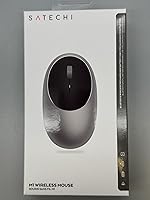
You get the mouse itself, a USB-C to USB-A charging cable, and a brief user manual. There is no USB receiver or dongle since the connection is purely Bluetooth. Satechi also backs the mouse with a two-year limited warranty, and their customer support can be reached if something goes wrong under normal use.

Where to Buy

B&H Photo-Video-Audio
In stock $24.99
Chico State Wildcat Store
In stock $29.99
bkstr.com/desmoinesccankenystore/home
In stock $29.99
Texas A&M Corpus Christi Bookstore
In stock $29.99