


Overview

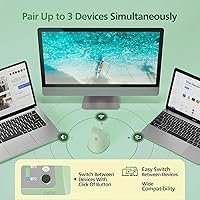
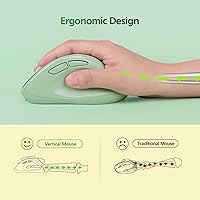
The Micropack MP-V01B Vertical Wireless Mouse takes a straightforward approach to a real problem: standard flat mice force your forearm into a rotated position that many people find increasingly uncomfortable over a full workday. This ergonomic wireless mouse holds your hand in a near-vertical, handshake-like orientation instead, taking tension off the wrist and forearm without requiring any adjustment period for most users. It connects to up to three devices simultaneously — two via Bluetooth, one through a 2.4G USB dongle — and works across Windows, macOS, Android, and iOS with no driver installation required. A built-in rechargeable battery keeps things tidy. Sized for medium-to-large hands, it launched in mid-2023 and has quietly built a strong following in its category.

Features & Benefits

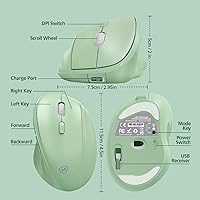
The silent click mechanism is one of this vertical mouse’s most underappreciated strengths — in a quiet office or a late-night home setup, the absence of that familiar clicking sound is genuinely noticeable. The optical sensor handles adjustable DPI levels, so users can dial in precision for spreadsheet work or loosen it up for general browsing without touching a settings panel. An LED slot indicator on the body tells you at a glance which of the three paired devices is active — no more unplugging and reconnecting to figure out what went wrong. The thumb rest is well-placed, and the front and back navigation buttons sit naturally under the thumb without any awkward stretching. Cross-platform pairing with both Apple and Windows devices in the same setup just works, which is rarer than it should be at this price point.

Best For

This ergonomic wireless mouse makes the most sense for people who juggle multiple devices daily — think a work laptop, a personal MacBook, and an Android tablet all within arm’s reach. The three-device switching is a real time-saver in that scenario. It also suits anyone whose wrists have started protesting after long days at a desk; the vertical orientation is one of the more accessible ways to change how your arm rests without spending heavily on a specialist peripheral. One important caveat: the sizing genuinely caters to medium-to-large palms. If your hand measures under 7 inches, this mouse may feel too wide and tall to control comfortably. Office workers in shared or open spaces will also appreciate the quiet click profile.

User Feedback

Most buyers who switched from a conventional flat mouse report noticeably less forearm and wrist fatigue after the first week or two — that’s the most consistent positive note the MP-V01B earns. Battery life gets favorable marks across the board, with many users going several weeks between charges under regular daily use. The honest counterpoint: the scroll wheel and buttons feel slightly plasticky, a fair trade-off at this price tier but worth knowing upfront. Bluetooth pairing across different operating systems — a Mac and a Windows machine, for instance — holds up reliably for most, though isolated reports of occasional reconnect issues do exist. Smaller-handed users consistently flag the body as oversized, underscoring that this design was built with larger grips firmly in mind.

Pros

  • Vertical grip reduces forearm rotation and wrist pressure during long workdays, as widely reported by users.
  • Three-device pairing with a clear LED slot indicator makes switching between machines quick and foolproof.
  • Silent click mechanism is genuinely quiet — a meaningful advantage in open offices or shared living spaces.
  • Built-in rechargeable battery eliminates the cost and inconvenience of replacing disposable cells.
  • Broad OS compatibility across Windows, macOS, Android, and iOS requires zero driver installation.
  • Adjustable DPI suits a range of tasks, from detailed spreadsheet navigation to casual web browsing.
  • Thumb rest and front and back navigation buttons are placed naturally, reducing unnecessary hand movement.
  • Real-world battery life consistently outlasts most users' expectations between charge cycles.

Cons

  • Plastic build quality feels lightweight and may raise durability questions with heavy daily use over time.
  • Scroll wheel feedback is soft and imprecise, lacking the tactile resistance many users prefer.
  • The bottom-panel device switch button is easy to accidentally trigger when lifting or repositioning the mouse.
  • Bluetooth connection can drop or stutter in mixed-OS multi-device configurations, requiring occasional manual reconnection.
  • Sizing genuinely excludes smaller-handed users; the wide body becomes uncomfortable rather quickly for them.
  • No visible charging indicator makes it difficult to assess remaining battery level at a glance.
  • Button click feel is noticeably mushy compared to mice positioned even slightly higher in price.
  • The 2.4G USB dongle occupies a port permanently, which is a real trade-off on laptops with limited USB-A slots.

Ratings

Our scores for the Micropack MP-V01B Vertical Wireless Mouse are generated by AI after analyzing thousands of verified global buyer reviews, with spam, bot-submitted, and incentivized feedback actively filtered out before scoring. The ratings reflect a full picture — genuine strengths earned through real daily use alongside the honest frustrations that repeatedly surfaced across mixed user groups. Whether this ergonomic wireless mouse earns a place on your desk depends on the factors that matter most to your specific setup, and we have scored accordingly.

Ergonomic Comfort
84%
Users who made the switch from a flat mouse overwhelmingly reported reduced fatigue in the forearm and wrist after a week or two of regular use. For people spending six or more hours daily at a desk, the upright handshake position genuinely changes how tired the arm feels by the end of a session.
Comfort improvements are heavily dependent on hand size — users with smaller palms often found the wide body created its own strain rather than relieving it. The learning curve for the first few days is also real, and a handful of users never fully adapted to the upright orientation.
Multi-Device Switching
78%
22%
The three-slot pairing system is a legitimate time-saver for people running a Windows desktop, a MacBook, and a tablet from the same desk. The LED indicator removes guesswork about which device is active, which sounds minor but genuinely reduces frustration during a fast-paced workday.
The switch button sits on the underside of the mouse, which makes it awkward to press without picking up the device and flipping it over. Some users also noted that switching between devices on different operating systems occasionally requires a second press before the connection registers.
Build Quality
61%
39%
For the price tier, the shell holds together solidly and does not creak or flex under normal grip pressure. Buttons are consistent in their actuation from unit to unit, with few reports of a button failing or sticking outright in the first several months of use.
The plastic construction feels noticeably lightweight and inexpensive compared to any mouse positioned higher in the market. The scroll wheel in particular draws repeated criticism for feeling hollow and imprecise, and long-term durability beyond the first year remains a genuine open question based on available feedback.
Battery Life
83%
In practice, most regular users report getting three to four weeks of daily desk use before needing to charge, which comfortably exceeds what many buyers expected from a built-in cell at this price point. The rechargeable setup also removes the recurring inconvenience of sourcing replacement batteries.
There is no battery level indicator on the mouse body, meaning the first sign of a low charge for many users is the cursor simply becoming unresponsive. Charging via cable also renders the mouse temporarily unusable, which is a minor but real inconvenience for back-to-back workday sessions.
Click Noise Level
91%
The silent click mechanism is one of the most frequently praised aspects of the MP-V01B — office users specifically noted that colleagues stopped noticing mouse activity entirely after the switch. In shared bedrooms, home offices, or meeting-adjacent desks, the difference compared to a standard click is immediately apparent.
The softer switch feel that comes with the silent mechanism leaves some users feeling like clicks lack the crisp tactile confirmation they are used to. A small number of users who prefer satisfying click feedback found the muted response less reassuring to work with over a full day.
Bluetooth Reliability
67%
33%
In single-OS setups — connecting to one Mac or one Windows machine — the Bluetooth connection is stable and reconnects quickly after the mouse wakes from sleep. Pairing for the first time is straightforward and does not require any software beyond the operating system's native Bluetooth interface.
Mixed-OS configurations are where reliability becomes inconsistent. Users pairing across a Mac and a Windows machine on the same desk reported occasional drop-outs or failed handshakes when switching slots, requiring a manual reconnection cycle that interrupts workflow more than it should.
Value for Money
81%
19%
For someone who wants to try a vertical mouse without committing to a premium price, this ergonomic wireless mouse represents a sensible entry point. The three-device pairing and cross-platform compatibility at this price point are features that would cost considerably more from established peripherals brands.
The build quality and scroll wheel feel lag behind what the feature list suggests, and buyers who expect the finish or button precision of a mid-range peripheral will feel the gap. For very light or occasional users, the price-to-quality ratio is easier to accept than it is for heavy daily users.
Hand Size Compatibility
59%
41%
Users with genuinely large hands — palms measuring 7.5 inches or more — consistently describe the sizing as a relief after years of cramped standard mice. The wide base and tall profile give larger grips the real estate they need to rest naturally without curling fingers uncomfortably.
The sizing effectively excludes a significant portion of potential buyers. Users with smaller hands do not just find it slightly large — they actively report discomfort, which makes the ergonomic premise of the design work against them. This is probably the most underreported limitation on the product page.
DPI and Tracking
69%
31%
The adjustable DPI range handles the full spectrum of everyday productivity tasks without issue — switching between a precise spreadsheet scroll and a faster browser navigation session is quick and functional. For typical desk work, the optical sensor performs reliably across common surfaces.
The exact DPI values are not published, which makes it harder to calibrate for precise creative tasks. Users doing detailed image editing or fine cursor work found the available steps did not offer enough granularity, and the sensor does not approach the performance of even mid-tier dedicated productivity mice.
Ease of Setup
88%
Getting the mouse paired and working on a new device takes under two minutes, with no software downloads or driver installations required on any supported platform. The 2.4G USB dongle is true plug-and-play, which many users appreciated for quickly deploying the mouse on a work device with restricted software installs.
First-time Bluetooth pairing can occasionally require a couple of attempts if the mouse does not immediately enter discoverable mode on the first press. The instruction sheet included in the packaging is minimal, which may leave less tech-confident buyers uncertain about how to reset a slot or re-pair a dropped device.
Scroll Wheel Feel
54%
46%
The scroll wheel handles basic page navigation and document scrolling without skipping or misfiring. For casual browsing and email, most users do not encounter problems with core scrolling function in everyday low-intensity use.
This is the most consistently criticized mechanical element on the mouse. Users describe the wheel as mushy, hollow, and lacking the defined step feel that makes scrolling through long documents or code files predictable. It is noticeably behind even similarly priced competing options in tactile quality.
Button Placement
74%
26%
The thumb rest shelf positions the hand well, and the front and back navigation buttons fall naturally under the thumb without needing to stretch or reposition the grip. For browser-heavy workflows and document navigation, having those shortcuts readily accessible without moving to the keyboard is a real comfort benefit.
The device-switching button on the underside is a recurring complaint — it requires flipping the mouse over to press, which interrupts workflow. A small number of users also accidentally triggered it when lifting the mouse to reposition it on a desk mat, causing unexpected device switches mid-task.
Cross-Platform Compatibility
77%
23%
The ability to use a single mouse across macOS, Windows, Android, and iOS without installing anything is a genuine convenience for mixed-ecosystem households or workplaces. Connecting to an iPad Pro and a Windows laptop on separate Bluetooth slots worked reliably for the majority of users who tried it.
While broad OS support is listed, some advanced gestures and modifier behaviors differ between platforms, which can cause minor but noticeable inconsistencies when switching. Android tablet performance in particular was occasionally flagged as slightly less polished compared to the desktop OS experience.

Suitable for:

The Micropack MP-V01B Vertical Wireless Mouse is a strong fit for desk workers who spend long hours at a computer and have started noticing discomfort in their wrists or forearms — the vertical orientation shifts the arm into a more natural resting position that many users find genuinely more comfortable over a full workday. It is particularly well-suited to anyone managing multiple devices from a single desk, since the three-slot pairing lets you move between a Windows PC, a MacBook, and an Android tablet without unplugging anything. People working in open offices or quiet environments will appreciate the silent click profile, which produces noticeably less noise than a standard mouse without sacrificing tactile feedback. If your hand measures roughly 7.5 inches or more, the full-size body will feel properly proportioned rather than oversized. Cross-platform households — where one person might use macOS personally and Windows professionally — get real practical value from the hassle-free compatibility here.

Not suitable for:

The Micropack MP-V01B Vertical Wireless Mouse is not the right pick for everyone, and the clearest dealbreaker is hand size — users with smaller palms, roughly under 7 inches, consistently report that the wide, tall body feels awkward and creates its own kind of fatigue, which defeats the purpose of going ergonomic in the first place. It also will not satisfy anyone who needs precision performance for gaming or detailed graphic work; the optical sensor and DPI range handle productivity tasks well but are not tuned for competitive or highly exacting use cases. The plastic construction is functional but not robust, and buyers expecting the heft or material quality of a premium peripheral will find it underwhelming. If you only ever use a single device, the multi-pairing infrastructure adds complexity that offers no benefit whatsoever. Anyone prone to Bluetooth instability issues on a crowded wireless desk should also be aware that mixed-OS switching can occasionally require manual reconnection.

Specifications

  • Brand: This mouse is manufactured and sold by Micropack Digitally Yours.
  • Model Number: The official model designation is MP-V01B.
  • Dimensions: The mouse body measures 4.6 x 3 x 2.2 inches (11.8 x 7.5 x 5.8 cm).
  • Weight: It weighs 5.6 ounces, giving it a solid presence without feeling heavy in the hand.
  • Connectivity: Connection options include two Bluetooth channels and one 2.4G wireless USB dongle, supporting a total of three paired devices.
  • Device Pairing: Up to three devices can be paired and stored simultaneously, switchable via a button on the underside of the mouse.
  • Compatible OS: The mouse works natively with Windows, macOS, Android, and iOS without requiring any driver installation.
  • Grip Orientation: The body uses a vertical ergonomic design that holds the hand in a near-upright, handshake-style position.
  • Click Mechanism: Both primary buttons use a silent optical click mechanism engineered to produce significantly less audible noise than standard switches.
  • DPI Settings: Sensitivity is adjustable across multiple DPI levels to accommodate tasks ranging from precise work to fast general navigation.
  • Battery: Power comes from a built-in rechargeable lithium-ion cell, eliminating the need for disposable batteries.
  • Target Hand Size: The full-size body is designed for medium-to-large palms, with a recommended minimum hand length of approximately 7.5 inches.
  • Thumb Controls: A dedicated thumb rest shelf is paired with front and back navigation buttons positioned for natural thumb reach without hand repositioning.
  • Slot Indicator: An LED indicator on the mouse body shows which of the three device slots is currently active.
  • Motion Sensor: Movement is tracked using an optical sensor suited to everyday productivity surfaces.
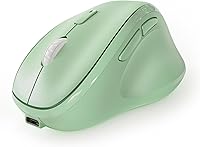
  • Color Variant: The reviewed unit is available in Green; other color options may be listed separately on the product page.
  • Launch Date: This model became available in June 2023 and achieved a top-100 ranking in the Amazon Computer Mice category.

Related Reviews

MicroPack V02 Trackball Wireless Mouse
76%
86%
Ergonomic Comfort
74%
Trackball Precision
61%
Build Quality
83%
Wireless Reliability
79%
Click Feel & Sound
More
UGREEN Vertical Wireless Ergonomic Mouse

84%
88%
Ergonomic Comfort
84%
Connectivity Performance
80%
Ease of Use
91%
Design and Build Quality
82%
Battery Life
More
DeLUX M618mini Wireless Vertical Ergonomic Mouse
74%
83%
Ergonomic Comfort
88%
Fit for Small Hands
86%
Wireless Connectivity
79%
Battery Life
81%
Silent Click Performance
More
Lekvey XC-05 Vertical Wireless Mouse
75%
83%
Ergonomic Comfort
66%
Build Quality
88%
Battery Life
54%
Sleep Mode & Wake Responsiveness
81%
Wireless Connectivity
More
Acer OMR241 Ergonomic Vertical Mouse
74%
83%
Ergonomic Comfort
67%
Build Quality
88%
Battery Life
61%
DPI and Precision
43%
Mac Compatibility
More
Logitech MX Vertical
79%
88%
Ergonomic Comfort
61%
Adjustment Period
83%
Build Quality
86%
Multi-Device Connectivity
91%
Battery Life
More
seenda Ergonomic Vertical Wireless Mouse
86%
90%
Wrist Comfort & Ergonomics
87%
Battery Life & Charging
91%
Quiet Click Performance
85%
Compatibility & Connectivity
88%
Build Quality & Durability
More
Woddlffy RAAVEE Ergonomic Vertical Wireless Mouse

75%
81%
Ergonomic Comfort
54%
Build Quality
83%
Wireless Connectivity
57%
DPI Range
63%
Button Functionality
More
SHARE SUNSHINE Ergonomic Vertical Wireless Mouse
74%
83%
Ergonomic Comfort
79%
Adjustable Tilt Angle
71%
Build Quality
74%
Palm Rest Comfort
88%
Wireless Connectivity
More
Cherry MW4500 Wireless Vertical Ergonomic Mouse
83%
89%
Ergonomics & Comfort
74%
Battery Life
81%
DPI Performance
77%
Ease of Use
85%
Build Quality
More

FAQ

Yes, it connects to iOS and iPadOS devices via Bluetooth without any adapters or apps. Just put the mouse into pairing mode, find it in your device Bluetooth settings, and it should connect like any standard Bluetooth peripheral. Navigation works well for general use, though some advanced gestures are OS-dependent.

There is a small button on the underside of the mouse that cycles through the three device slots. An LED indicator on the body lights up to show which slot is currently active, so you always know where you are without guessing. It takes some getting used to since the button is on the bottom, but most users adapt quickly.

Most users report several weeks of regular daily use before needing to recharge, which is in line with what you would expect from a built-in lithium-ion cell in this category. Actual life will vary depending on how often you use all three Bluetooth channels versus the USB dongle. One thing to note: there is no on-body battery level indicator, so it is worth charging preemptively rather than waiting for it to die mid-session.

Honestly, probably yes. The Micropack MP-V01B Vertical Wireless Mouse is sized for medium-to-large palms, and users with hands under about 7 inches consistently describe the body as too wide and tall to grip comfortably. If your hands are on the smaller side, a more compact vertical mouse would likely serve you better and actually deliver the comfort benefits the vertical form factor promises.

It really does. The click sound is significantly softer than a conventional mouse — it is more of a muted thud than a sharp click. In an open-plan office or a shared bedroom workspace, the difference is easy for those around you to notice. It is not completely silent, but it is quiet enough that most people would not find it disruptive.

Yes, both can be stored as active paired devices simultaneously across the three slots, and switching between them takes a single press of the underside button. Pairing itself is straightforward on both platforms. A small caveat: some users have reported occasional Bluetooth reconnection hiccups in mixed-OS setups, which typically resolve with a quick re-press of the switch button.

The 2.4G USB dongle will typically work plug-and-play on Chromebooks and most Linux distributions since no custom drivers are needed. Bluetooth connectivity on these platforms is generally functional as well, though Micropack does not officially list them as supported operating systems, so your experience may vary slightly depending on the specific device or distro.

No. The body is designed exclusively for right-hand use, with the vertical grip, thumb rest, and navigation buttons all oriented for right-handed operation. Left-handed users will not find this comfortable and should look specifically for an ambidextrous or left-handed vertical mouse instead.

Turn the mouse on using the power switch, then hold the pairing button for your chosen device slot until the LED starts blinking rapidly, which signals that it is in discovery mode. On your computer or tablet, go to Bluetooth settings and select the mouse from the available devices list. For the USB dongle slot, just plug the receiver into a free USB-A port and the mouse should connect automatically within a few seconds.

DPI is adjustable directly on the mouse via a dedicated button, so no software or driver download is needed. Cycling through the available sensitivity levels is quick and works across all connected operating systems. The exact DPI steps are not published by the manufacturer, but the range covers low-sensitivity precision work through higher-speed general navigation comfortably.

Where to Buy