


Overview
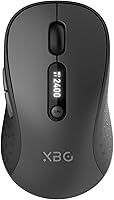
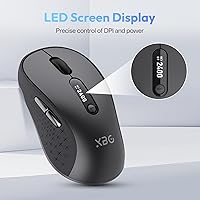
The XBG B15 Pro is a compact wireless mouse from a relatively new brand that quietly climbed to #82 in Amazon's Computer Mice category within weeks of its late 2024 launch — a strong debut for an unknown name. XBG doesn't carry the recognition of Logitech or Microsoft, but the specs here do the talking. At just 2.65 oz, this wireless mouse slips into a jacket pocket or laptop sleeve without a second thought. What genuinely sets it apart at this price range is the built-in LED screen — a small display showing real-time battery percentage, active DPI, and connection mode. That kind of visibility is rare on budget mice.
Features & Benefits
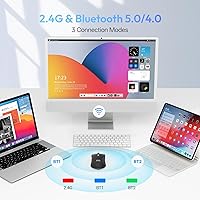
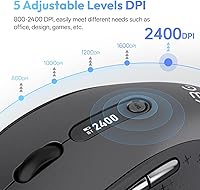
The tri-mode connectivity — Bluetooth 5.0, Bluetooth 4.0, and 2.4GHz USB — means the B15 Pro covers nearly any device you own without adapter headaches. Switching between connections takes under a second, which is quicker than most expect at this price. The LED display earns its keep every day: instead of guessing when the battery is fading, you get a live readout right on the mouse body. Five DPI steps ranging from 800 to 2400 cover both precise spreadsheet work and fast casual scrolling. Type-C charging and a built-in 500 mAh battery put an end to the AA battery routine, and auto-sleep kicks in after five idle minutes to protect that charge.
Best For
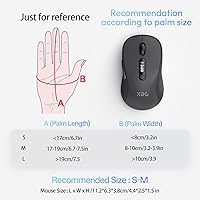
This tri-mode mouse suits people who bounce between devices throughout the day — a MacBook at home, a Windows machine at the office, a tablet on the couch. The silent click design makes it genuinely appropriate for libraries, open offices, or any shared space where noise matters. Travelers will value how easily it fits in a shirt pocket and how quickly it pairs on arrival. It also appeals to anyone done with disposable batteries — the rechargeable setup is simply more convenient and less wasteful. One honest caveat: the compact footprint works well for average to small hands, but users with larger grips may find it a snug fit over a long workday.
User Feedback
Early owners largely view the LED display as a practical daily convenience rather than a gimmick — knowing your exact battery level eliminates a small but persistent frustration. Silent clicks draw consistent praise, particularly from office and library users. On the downside, some buyers note the scroll wheel feels light and slightly hollow, which is a familiar trade-off on budget-tier mice. Battery life reports vary — moderate users often get well over a week per charge, while heavier users see less. A few people with larger hands find the compact body comfortable but just barely. Long-term durability is still an open question for such a new brand, making the one-year warranty a meaningful safety net.
Pros
- The built-in LED screen shows live battery percentage, DPI level, and connection mode — a rare feature at this price.
- Tri-mode connectivity covers Bluetooth 5.0, Bluetooth 4.0, and 2.4GHz USB without any driver installation.
- Silent clicks are genuinely quiet without feeling mushy — tactile feedback is preserved.
- Device switching takes under a second, making multi-device workflows feel smooth and uninterrupted.
- Type-C charging means one fewer cable to carry and no disposable batteries ever.
- At roughly 75 grams, this wireless mouse fits easily in a shirt pocket or any laptop sleeve.
- Broad OS compatibility — Windows, macOS, Linux, and Android — all work out of the box.
- Auto-sleep after five idle minutes conserves battery without any manual setup.
- A 30-day return window and a one-year free replacement warranty offer solid buyer protection for an unknown brand.
- Five DPI steps from 800 to 2400 handle both careful document work and faster screen navigation.
Cons
- The scroll wheel feels noticeably hollow and cheap compared to similarly priced mice from established brands.
- Bluetooth connectivity, particularly on the 4.0 mode, produces occasional dropouts on some older devices.
- No companion software means zero customization — DPI steps and button functions are fixed as shipped.
- Battery endurance for heavy users can fall well short of expectations, sometimes only lasting a few days.
- The instruction manual is sparse and small-print, making initial Bluetooth pairing unnecessarily confusing for new users.
- No charging cable is included in the box, which is a frustrating omission for a device that ships without batteries.
- Long-term build durability is unproven — XBG has no track record to assess how components hold up after year one.
- The side buttons are noticeably louder than the main clicks, breaking the quiet experience in a detectable way.
- The LED display can be hard to read in bright ambient light or at certain viewing angles.
Ratings
The XBG B15 Pro scores below are generated by AI after analyzing verified user reviews from buyers worldwide, with spam, bot activity, and incentivized feedback actively filtered out. Across thousands of real-world impressions, both the genuine strengths and the recurring frustrations are reflected without sugarcoating. This tri-mode wireless mouse punches above its weight in several areas while showing the expected limitations of an entry-level brand still building its reputation.
Connectivity Reliability
LED Status Display
Battery Life
Silent Click Mechanism
Ergonomics & Comfort
Build Quality
DPI Range & Precision
Multi-Device Switching
Portability
Charging Experience
OS Compatibility
Value for Money
Scroll Wheel Feel
Setup & Ease of Use
Aesthetics & Finish
Suitable for:
The XBG B15 Pro is a practical pick for anyone who regularly works across multiple devices and wants a single mouse that follows them everywhere without friction. Students moving between a personal laptop and a shared desktop, remote workers toggling between a home MacBook and an office PC, and frequent travelers who need a mouse that fits in a jacket pocket and pairs instantly will all find genuine daily value here. The silent click design makes it a genuinely considerate choice for open offices, libraries, co-working spaces, and anywhere noise matters to the people around you. People upgrading from a battery-powered mouse will appreciate the Type-C charging and never having to stock AA batteries again. If your hands are average to small in size and your computing needs fall into productivity, browsing, or light creative work, this tri-mode mouse is a well-rounded option that overdelivers for its price tier.
Not suitable for:
Buyers with larger hands should approach the XBG B15 Pro with caution — the compact body is built for portability, not for all-day palm comfort, and extended sessions can leave bigger hands feeling cramped and under-supported. Gamers or designers who depend on precise, high-speed sensor tracking will run into the optical sensor's ceiling quickly; this is not a performance mouse and was never designed to be one. Those who want granular software control over DPI profiles, button remapping, or per-device settings will be frustrated by the absence of any companion app. Buyers who prioritize scroll wheel quality — a common concern when coming from a mid-range Logitech or Microsoft mouse — are likely to notice the hollow, lightweight feel of the wheel almost immediately. Finally, anyone with long-term durability as their primary concern should be aware that XBG is a new brand with no established track record, and how the build holds up beyond the one-year warranty period remains genuinely unknown.
Specifications
- Connectivity: Supports three wireless modes: Bluetooth 5.0, Bluetooth 4.0, and 2.4GHz USB dongle, covering virtually all modern devices without drivers.
- Device Switching: Transitions between paired devices in approximately 0.8 seconds via a dedicated mode button.
- DPI Levels: Five selectable DPI steps — 800, 1000, 1200, 1600, and 2400 — adjustable on the fly via the DPI button.
- LED Display: A built-in status screen on the mouse body shows real-time battery percentage, active DPI setting, and current connection mode.
- Battery: Internal 500 mAh lithium polymer battery; no replaceable cells required and no AA batteries included or needed.
- Charging Port: Type-C charging port; the mouse can be used while charging, eliminating downtime during top-ups.
- Auto-Sleep: Enters low-power sleep mode automatically after 5 minutes of inactivity to preserve battery between sessions.
- Click Type: Silent optical click mechanism dampens audible noise while preserving tactile click feedback for the user.
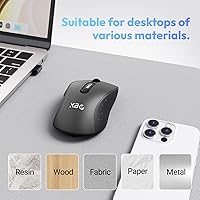
- Sensor: Optical movement detection sensor suited for standard productivity, browsing, and office use on most desk surfaces.
- Weight: Approximately 2.65 oz (75g) without a cable, making it one of the lighter options in the budget wireless category.
- Dimensions: Measures 4.55 × 2.83 inches in footprint with a low-profile arched form factor designed for portability.
- Ergonomic Features: Body includes a contoured thumb rest, arched palm support, and a textured grip zone along the right side for control during fast movements.
- Finish: Smooth matte surface on the upper shell resists fingerprint smudging and feels less slippery than glossy alternatives.
- OS Compatibility: Works natively with Windows, macOS, Linux, and Android — no driver installation or setup software required on any platform.
- Paired Devices: Stores up to three device pairings simultaneously, one per connection mode slot, accessible via the mode toggle button.
- Color Option: Available in B15 Pro-Black, a matte black colorway with no exposed RGB lighting or decorative accents.
- Warranty: Backed by a 30-day return window and a one-year free replacement guarantee offered directly by XBG.
- Battery Type: One lithium polymer battery is built into the unit and included; it is not user-replaceable.
Related Reviews

Ubiquiti UniFi Dream Machine Pro Security Gateway
DS18 PRO-DR1PK44 Compression Driver with PRO-H44/BK Horn
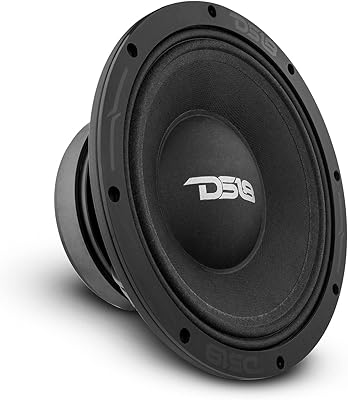
DS18 PRO-ZXI10MBASS 10-inch Mid-Bass Loudspeaker

Cinema Secrets Ultimate Corrector 5-In-1 Palette

Apple MacBook Pro 14-inch M1 Pro Laptop

Cinema Secrets Pro Cosmetics Ultimate Foundation 5-In-1 Pro Palette 500A

HP Pro Tower 290 G9 Desktop (i5-12500, 32GB RAM, 1TB SSD)
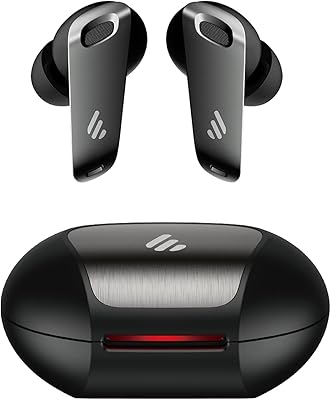
Edifier NeoBuds Pro Wireless Earbuds

UTILYZE Radiant Pro
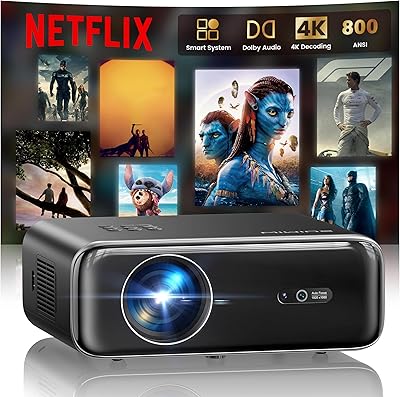
WiMiUS P62 Pro Smart Outdoor Projector