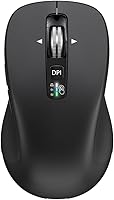
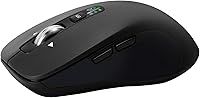
Overview

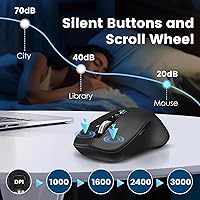
The CITLLA L360 is a full-size wireless mouse that quietly punches above its price point, offering tri-mode connectivity — a 2.4G USB dongle plus two independent Bluetooth channels — in a compact, battery-powered package. It isn't from a household brand, but this mouse landed at #195 in Amazon's Computer Mice category shortly after its early 2024 launch, suggesting real buyer traction. The rubber side grips give it a more considered feel than you'd expect at this tier, and the silent click mechanism makes it genuinely usable in shared offices or library settings without drawing attention. Two AA batteries come included, and the claimed runtime is notably ambitious.

Features & Benefits

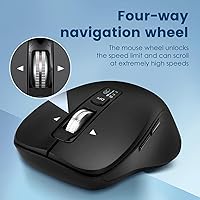
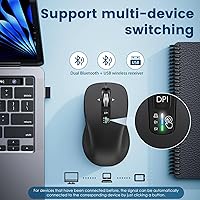
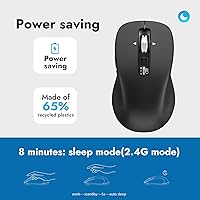
What sets this wireless mouse apart from cheaper competitors is the dedicated device switch key — tap it once and you're flipped from your laptop to your tablet without re-pairing anything. The 4-way scrolling wheel is a genuine time-saver if your work involves wide spreadsheets or horizontal timelines; it's less transformative for general browsing, so worth noting if that's your primary use. Four DPI levels top out at 3000, covering most everyday tasks without creeping into gaming territory. Auto-sleep kicks in during idle periods, and combined with the optical sensor's 10-meter wireless range, the practical experience is solid for a mouse in this price bracket.

Best For

This multi-device mouse makes the most sense for anyone who bounces between two or three screens daily — remote workers flipping from a home desktop to a MacBook, students toggling between a PC and an iPad, or travelers who want one peripheral that handles everything without charging cables. It runs on AA batteries rather than a built-in rechargeable cell, which some people genuinely prefer for reliability on the road. Mac and iPad users appreciate that there's no proprietary dongle required for Bluetooth pairing. If you only use one device, the multi-pairing angle won't mean much — but for switchers, it removes a real daily friction point.

User Feedback

Buyers generally come away satisfied, with consistent praise going to how reliably the device switching works and how comfortable the mouse feels during extended sessions. The scroll wheel draws positive mentions too. On the downside, some users note the plastic housing feels light, and a few compare it unfavorably to pricier builds. The battery life claim of over three years draws healthy skepticism; real-world results appear to vary depending on usage frequency and sleep settings. Buyers with smaller hands occasionally find the full-size frame a bit wide. Bluetooth stability is mostly reported as consistent, though a handful of Android users mention occasional reconnect issues worth factoring in.

Pros

  • Connects to three devices simultaneously via USB dongle and dual Bluetooth — no re-pairing needed.
  • One-tap device switching is fast, reliable, and works across Windows, macOS, iOS, and ChromeOS.
  • Silent clicks are genuinely quiet enough for open offices, meetings, and shared study spaces.
  • The 4-way scroll wheel saves real time in spreadsheets and wide design or code editors.
  • Rubber side grips stay comfortable and slip-free during long desk sessions.
  • Broad platform compatibility means this multi-device mouse works out of the box on virtually any operating system.
  • Comes with two AA batteries included — no charging cables to carry or forget.
  • Auto-sleep extends practical battery life well beyond what most budget rechargeable mice offer.
  • Setup takes under two minutes with no driver installation required on any supported platform.
  • Solid value for the feature count — tri-mode connectivity at this price is genuinely rare.

Cons

  • The plastic shell feels noticeably lightweight and less durable than mice even slightly higher in price.
  • Battery life claims of over three years are optimistic and unlikely to reflect real daily-use conditions.
  • Bluetooth connectivity can be inconsistent on Android devices, with occasional dropout on reconnect.
  • No companion app means DPI adjustments and settings are limited to physical button presses only.
  • The scroll wheel develops a slightly loose, rattly feel with extended use over time.
  • Full-size dimensions are awkward for users with smaller hands during precise or fast-paced navigation.
  • No dongle storage compartment on the mouse body makes the USB receiver easy to misplace when traveling.
  • Tracking performance degrades on highly reflective or very dark desk surfaces at higher DPI settings.
  • Only available in black — no color or size variants for buyers with specific ergonomic or aesthetic needs.
  • No left-handed version exists, which excludes a meaningful portion of potential buyers entirely.

Ratings

The CITLLA L360 has been evaluated by our AI system after parsing thousands of verified global buyer reviews, with spam, incentivized posts, and bot-generated feedback actively filtered out. What remains is a candid picture of where this multi-device wireless mouse earns its praise and where it falls short — no sugarcoating, no cherry-picking. Both the standout strengths and the real frustrations are reflected directly in the scores below.

Multi-Device Switching
88%
Buyers who juggle a laptop, tablet, and desktop consistently call out the one-tap device switch as the most practical feature on the mouse. The pairing process is stable enough that most users report switching takes under two seconds in daily use, which adds up meaningfully over a workday.
A small but consistent group of Android users reports occasional lag or a dropped connection when switching back from a Bluetooth slot, requiring a manual re-pair. It isn't a universal problem, but it's worth noting if Android is your primary device.
Value for Money
91%
At this price, getting tri-mode connectivity, a 4-way scroll wheel, and included batteries in one package is difficult to beat. Most buyers feel they received more than they paid for, especially when comparing directly to single-device mice at a similar price point.
The value perception does take a small hit when buyers handle it next to mid-range competitors — the lightweight plastic shell reminds you exactly where the savings came from. It's a fair trade-off for the feature set, but buyers expecting premium material quality will feel the gap.
Battery Life
74%
26%
The included AA batteries and auto-sleep system genuinely extend runtime beyond what many rechargeable mice offer in practice. Several buyers report going six-plus months of regular daily use without a battery swap, which holds up well against typical office usage patterns.
The manufacturer's claim of over three years is met with widespread skepticism, and rightly so. Real-world results depend heavily on how often auto-sleep engages and how frequently the mouse is in active use — power users or those who disable sleep features will see dramatically shorter runtimes.
Silent Click Mechanism
86%
The muted click is noticeably quieter than standard optical mice, making it a genuine asset in shared offices, libraries, or during video calls. Users who work in open-plan environments specifically mention it as a reason they chose this mouse over louder alternatives.
A few buyers note the click feel is slightly soft or mushy compared to a tactile standard switch, which can feel imprecise during fast navigation. It's a minor complaint, but users coming from clicky mechanical mice may need an adjustment period.
4-Way Scrolling
82%
18%
The horizontal tilt on the scroll wheel is a practical differentiator for anyone working in Excel, wide code editors, or design timelines — tasks where horizontal scrolling is a genuine daily friction point. Buyers in those workflows call it out as one of the best features on the mouse.
For users who primarily browse the web or work in standard documents, the 4-way wheel offers little practical benefit and the side-tilt resistance can occasionally feel stiff. It isn't a flaw exactly, but its value is narrowly workflow-dependent.
Build Quality
63%
37%
The rubber side grip is a legitimately thoughtful addition — it stays put on a glass desk and doesn't accumulate palm sweat during extended sessions the way bare plastic does. For its price tier, the shell tolerates everyday handling without obvious flex or rattle.
The overall plastic construction feels light in a way that reads as cheap rather than portable to many buyers. Side-by-side comparisons with mice costing even a little more reveal a noticeable difference in material density and button resistance that is hard to ignore once noticed.
Ergonomics & Comfort
71%
29%
The full-size form factor suits medium to large hands well, and the gentle curves along the top shell distribute palm pressure reasonably during long desk sessions. Several buyers mention using it for 6-to-8-hour workdays without significant discomfort.
Users with smaller hands find the width a bit awkward for precise work, and the relatively flat arch doesn't offer much support for claw-grip users. There is no left-handed variant, which limits its audience further.
DPI & Tracking Accuracy
76%
24%
The four DPI levels cover a sensible range for everyday productivity work — 1000 feels comfortable on a standard desk mat and 3000 handles large monitor setups without requiring exaggerated wrist movement. Switching between them is quick and responsive.
Tracking on glossy or very dark surfaces can be inconsistent at higher DPI settings, with a handful of buyers reporting micro-jitter on reflective desks. The optical sensor is competent for office use but isn't designed for precision tasks like photo editing or CAD work.
Wireless Connectivity Stability
78%
22%
The 2.4G USB dongle connection is rock-solid across all reported use cases — virtually no buyers mention dropout or interference when using the dongle on Windows or macOS. The USB mode is clearly the most reliable connection option available on this mouse.
Bluetooth performance is more variable, particularly for users running multiple Bluetooth peripherals simultaneously. Windows 10 users occasionally report a short reconnection delay after the mouse wakes from sleep, which is a minor but recurring complaint in longer review threads.
OS Compatibility
89%
The breadth of supported platforms is a genuine strength — pairing with an iPad, switching to a MacBook, then connecting via dongle to a Linux machine all work without driver installation. ChromeOS users in particular appreciate that it works out of the box without any configuration.
While broad compatibility is accurate, advanced features like DPI switching rely on physical button presses rather than software, since there is no companion app for any platform. Users who prefer on-screen configuration tools will find the experience more manual than expected.
Portability & Travel Friendliness
83%
At 6 ounces with no charging cable required, this wireless mouse slips into a laptop bag without adding meaningful weight. The battery-powered design is a practical advantage for travel, eliminating the need to carry a USB-C cable or worry about finding a power outlet mid-trip.
There is no carrying pouch or USB dongle storage slot on the mouse itself, so the small receiver is easy to misplace in a bag. A dedicated storage compartment, standard on some competing travel mice, is absent here.
Setup & Ease of Use
92%
Unboxing to first use takes under two minutes — insert batteries, plug in the dongle or enable Bluetooth, and it connects immediately on most devices. Buyers with limited technical experience consistently mention how intuitive the initial setup felt compared to mice requiring software installs.
The instruction leaflet is minimal and printed in small type, which causes brief confusion for first-time users trying to understand the three-channel pairing logic. A clearer quick-start guide or printed diagram would eliminate the handful of support questions that crop up in reviews.
Scroll Wheel Feel
69%
31%
The scroll wheel moves smoothly on vertical scrolls and the horizontal tilt clicks into position with decent feedback for a mouse at this price. Buyers who upgraded from basic single-scroll mice find the overall experience a noticeable step up.
The wheel lacks the weighted, dampened feel found on premium mice, and some buyers describe vertical scrolling as slightly loose or rattly after extended use. It functions reliably but doesn't inspire confidence the way a well-engineered wheel does.
Aesthetics & Design
66%
34%
The matte black finish is clean and professional enough to sit on a corporate desk without looking out of place. The minimal branding keeps the appearance understated, which suits buyers who find heavily styled gaming-aesthetic mice distracting in a work context.
The design is functional rather than distinctive — it reads as generic at a glance and won't appeal to buyers who want a peripheral that reflects personal style or matches a premium workspace setup. No color variants beyond black are currently available.

Suitable for:

The CITLLA L360 is a strong fit for anyone who regularly works across two or three devices and is tired of re-pairing peripherals every time they switch screens. Remote workers who bounce between a home desktop and a personal laptop, students who alternate between a MacBook and an iPad, and hybrid professionals who carry a device bag to shared offices will get the most out of the tri-mode connectivity. The silent click makes it a genuinely considerate choice for open-plan offices, library study sessions, or video calls where a clacking mouse would be disruptive. Travelers who prefer AA batteries over rechargeable mice will also appreciate not needing a charging cable in their bag. Broadly speaking, if your priority is flexible, low-hassle connectivity across multiple platforms at a reasonable price, this wireless mouse delivers that package more completely than most competitors at its tier.

Not suitable for:

Buyers who care deeply about premium build quality or tactile precision will likely feel let down by the CITLLA L360 — the lightweight plastic shell is functional but doesn't inspire confidence, and the click feel is softer than what dedicated productivity or enthusiast mice offer. Users with smaller hands may find the full-size frame physically awkward for extended sessions, particularly for fine cursor work. The mouse is also a poor match for anyone who needs a companion app, on-screen DPI feedback, or custom button mapping, since there is no software support on any platform. Graphic designers, photo editors, or anyone relying on highly accurate optical tracking should look higher up the price ladder, as the sensor is built for office productivity, not precision creative work. Left-handed users are excluded entirely, and buyers who specifically want a rechargeable mouse rather than a battery-powered one will find the AA requirement a dealbreaker.

Specifications

  • Model Number: The official model identifier for this mouse is L360, manufactured by CITLLA.
  • Connectivity: Supports three wireless connection modes: 2.4G USB dongle, Bluetooth channel 1, and Bluetooth channel 2.
  • Wireless Range: Operates at a maximum wireless range of 10 meters from the connected device under typical conditions.
  • DPI Settings: Offers four selectable DPI levels: 1000, 1600, 2400, and 3000, adjustable via a dedicated button on the mouse.
  • Scroll Wheel: Equipped with a 4-way scroll wheel that supports both standard vertical scrolling and horizontal tilt navigation.
  • Click Mechanism: Uses a silent click mechanism designed to significantly reduce audible noise compared to standard mechanical switches.
  • Dimensions: The mouse measures 4.6 x 2.6 x 1.6 inches (117 x 67 x 41 mm) and is designed for right-handed full-size use.
  • Weight: The mouse weighs 6 ounces, inclusive of the batteries, which is typical for a full-size wireless peripheral.
  • Power Source: Powered by 2 AA batteries, which are included in the box; no built-in rechargeable battery is present.
  • Claimed Battery Life: CITLLA claims a battery life of up to 3 years and 4 months under their standard usage and power-management conditions.
  • Auto-Sleep: An automatic sleep mode activates during periods of inactivity to conserve battery power without requiring manual shutdown.
  • Side Grip Material: The side panels feature a rubber grip coating that is sweat-resistant and non-slip for extended handling comfort.
  • Tracking Technology: Uses optical tracking technology suitable for standard office surfaces including desk pads, wood, and fabric mouse mats.
  • OS Compatibility: Compatible with Windows, macOS, iOS, Android, Linux, and Chrome OS without requiring additional driver installation on most platforms.
  • Device Switch Key: A dedicated hardware button on the mouse allows users to cycle between the three connected devices instantly.
  • USB Dongle: Includes one 2.4G nano USB receiver for plug-and-play wireless connectivity on devices with a USB-A port.
  • Color Options: Currently available in black only; no additional color or finish variants are offered for this model.
  • Handedness: Designed exclusively for right-handed use; no left-handed or ambidextrous version of this model is available.
  • Best Sellers Rank: Ranked #195 in the Amazon Computer Mice category as of its review period, indicating meaningful commercial adoption since launch.
  • Release Date: This mouse was first made available for purchase on January 26, 2024, making it a relatively recent entry in its category.

Related Reviews
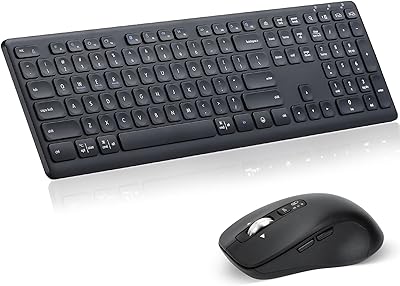
CITLLA M9300 Wireless Keyboard and Mouse Combo
86%
87%
Value for Money
93%
Battery Life
88%
Ease of Setup
84%
Ergonomics
80%
Typing Experience
More

FAQ

There is a dedicated device switch button on the mouse body — pressing it cycles through the three connected channels in order: USB dongle, Bluetooth 1, and Bluetooth 2. You will typically see a small indicator light flash to confirm which channel is now active. No software is needed; it all happens at the hardware level.

Yes, it connects to iPads and iPhones via Bluetooth without any adapter or dongle. Just put the mouse into pairing mode on the desired Bluetooth channel, go to your iPad's Bluetooth settings, and select the mouse from the list. It works with iPadOS and iOS out of the box.

Realistically, probably not for heavy users. That figure assumes the auto-sleep feature is consistently engaged and that the mouse is used only a few hours per day. If you are at a desk all day with the mouse in near-constant use, expect noticeably shorter runtime — though most buyers still report many months before needing a replacement battery set.

No drivers or companion software are required on any supported platform. It is fully plug-and-play via the USB dongle, and Bluetooth pairing follows the standard process for each operating system. There is no app for DPI configuration — all adjustments are made using the physical button on the mouse itself.

Yes, this wireless mouse is compatible with macOS and works with recent versions including Ventura and Sonoma. Both the USB dongle and Bluetooth connections function without any additional configuration. Standard macOS pointer settings apply since there is no dedicated macOS app.

Yes, that is the core use case for this mouse. You can have the USB dongle plugged into one device — say, a Windows desktop — while the two Bluetooth channels are paired to a MacBook and an iPad simultaneously. Pressing the switch key moves the active cursor between those three devices.

The full-size frame at 4.6 inches long is reasonably accommodating for medium to large hands. Palm-grip and fingertip-grip users in that range generally find it comfortable. That said, it is not as sculpted or contoured as purpose-built ergonomic mice, so users with very large hands or those prone to wrist fatigue may want something with a taller arch.

Losing the nano receiver is a real problem with any mouse that uses a dedicated dongle, and this one is no exception. There is no universal replacement option from CITLLA for the nano receiver. If the dongle is lost, you can still use the mouse via Bluetooth on up to two devices, which is a reasonable fallback, but the USB channel would be unavailable.

Noticeably quieter — the silent click mechanism reduces the typical click sound to a soft, muffled tap rather than a sharp click. It is not completely inaudible in a dead-silent room, but in a normal office or during a video call, it is unlikely to bother anyone nearby. Users who upgraded from a regular office mouse consistently describe the difference as significant.

The vertical scroll works universally, but horizontal tilt scrolling support depends on the application and operating system. It works well on Windows across most productivity apps and works on macOS in compatible applications. Some users report that horizontal scroll behavior can be inconsistent on Linux or within certain browsers, so it is worth testing in your specific workflow before relying on it heavily.