Logitech MK250






Overview
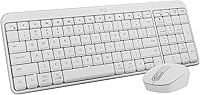
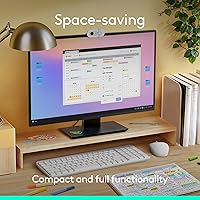
The Logitech MK250 is a straightforward Bluetooth keyboard and mouse combo aimed at everyday users who want a tidy, cable-free desk without a big outlay. Unlike most budget wireless combos that rely on a USB nano-receiver, this Bluetooth combo pairs directly to your laptop, PC, or tablet — no dongle, no occupied port. The compact keyboard still manages to fit in a number pad and F-key row, which is a genuine rarity at this price tier. It works across Windows, macOS, and Chrome OS, making machine-switching less of a headache. Logitech also used a minimum of 64–66% recycled plastic in the build — a factual plus, even if it has no bearing on daily use.
Features & Benefits
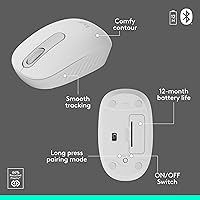
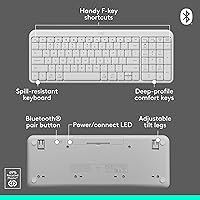
The standout quality of the MK250 keyboard and mouse set is its pure Bluetooth connectivity — there is no receiver to misplace, and on a slim laptop with limited ports, that genuinely matters. Both the keyboard and mouse are rated for up to 12 months of battery life, so you are not constantly swapping AAs. The keyboard is spill-resistant, not waterproof, but enough to handle the occasional desk accident. Keys carry a deep profile that offers a bit of cushion under each press, and the adjustable tilt leg lets you angle the board to ease wrist strain. The ambidextrous mouse is compact and symmetrical — a quiet but practical detail for left-handed users.
Best For
This wireless combo is a natural fit for home office setups where a clean desk matters and budget is a genuine constraint. Students and remote workers who carry a laptop between locations will find the mouse easy to toss in a bag. Left-handed users rarely get consideration in affordable peripherals, so the symmetrical mouse shape is a meaningful inclusion here. If you regularly switch between a Mac and a Windows machine, the broad cross-platform support means one combo handles both without fuss. The one honest caveat: if you need a backlit keyboard for dim environments or do extended heavy typing, this set is probably not the right fit.
User Feedback
Buyers have settled this combo at a solid 4.4-star average, with praise centering on quick, reliable pairing, comfortable everyday typing, and battery life that lives up to what is advertised. People describe using it at a desk, on the couch, and on the road — which says something about how adaptable the set is in practice. The criticism worth heeding: the mouse runs small, and reviewers with larger hands consistently flag discomfort during long sessions. A handful of users also report that Bluetooth stability can lag behind a traditional RF dongle connection, particularly at greater distances. The absence of a backlight is the other recurring gripe, especially from anyone working in low-light conditions.
Pros
- No USB dongle needed — Bluetooth pairing keeps your laptop ports free.
- Both the keyboard and mouse last up to 12 months on a single set of batteries.
- Cross-platform support covers Windows, macOS, and Chrome OS without extra setup.
- The compact layout retains a number pad, which is uncommon at this price point.
- Ambidextrous mouse design works equally well for left- and right-handed users.
- Spill-resistant keyboard construction adds a practical layer of everyday durability.
- Setup takes under a minute — no software, no drivers, no fuss.
- Quiet keystrokes make this wireless combo office- and shared-space-friendly.
- Adjustable tilt leg on the keyboard lets you find a comfortable typing angle.
- Built with a majority of recycled plastic — a factual, if modest, sustainability plus.
Cons
- Mouse runs noticeably small — users with large hands report discomfort within the hour.
- No backlight at all, making the keyboard difficult to use in dim or dark environments.
- Bluetooth stability can wobble in congested wireless environments, unlike RF dongle alternatives.
- Key legends show signs of fading with prolonged heavy use.
- Typing feel is flat by any standard beyond budget membrane — not suited for fast, heavy typists.
- Only two tilt positions on the keyboard; no graduated angle adjustment for wrist comfort.
- Mouse scroll wheel feels coarse compared to free-spin alternatives in the same category.
- No USB fallback — entirely dependent on a working Bluetooth connection to function.
- Some F-key shortcuts do not map correctly on macOS without manual remapping.
- Re-pairing after a device reset or OS wipe has caused connectivity headaches for some users.
Ratings
The Logitech MK250 has been evaluated by our AI system after analyzing thousands of verified global purchase reviews, with spam, bot activity, and incentivized feedback actively filtered out. Scores reflect a genuine cross-section of real buyer experiences — daily desk workers, students, and multi-device users — with both strengths and recurring frustrations weighted transparently into every category.
Value for Money
Bluetooth Connectivity
Keyboard Typing Feel
Mouse Comfort & Fit
Battery Life
Build Quality & Durability
Keyboard Layout & Key Coverage
Mouse Tracking Accuracy
Cross-Platform Compatibility
Portability
Ease of Setup
Backlighting
Noise Level
Ergonomics & Adjustability
Suitable for:
The Logitech MK250 is a practical choice for home office workers, students, and remote workers who want a clean, cable-free desk setup without committing serious money to peripherals. If your daily workload involves emails, documents, spreadsheets, or general browsing, this wireless combo covers all of it without friction. The dongle-free Bluetooth connection is especially useful for anyone on a slim laptop or tablet with limited USB ports — there is nothing to plug in and nothing to misplace. It also works well for people who regularly switch between a Mac and a Windows machine, since the cross-platform support is genuinely broad. Left-handed users in particular will appreciate the ambidextrous mouse, which is a rarity at this price tier. Anyone who values low-maintenance peripherals — the kind you set up once and forget about for months — will find the year-long battery life on both devices a quiet but consistent convenience.
Not suitable for:
The Logitech MK250 is not the right fit for anyone who types heavily and expects a responsive, tactile keyboard experience — the membrane keys are adequate but will feel flat compared to even entry-level mechanical alternatives. Users with larger hands should approach the mouse with caution; the compact, symmetrical shape draws repeated complaints from people with bigger palms during extended use. If you work in a dim environment or frequently type in low light, the complete absence of backlighting is a hard limitation that no workaround fixes. People who rely on a stable, lag-free input connection for fast-paced work or gaming should also note that Bluetooth connectivity, while generally reliable, is not as consistent as a dedicated RF dongle — particularly in crowded wireless environments. Finally, anyone looking for a USB fallback option will find none here: this combo is Bluetooth-only, which is a genuine constraint if your device has known Bluetooth reliability issues.
Specifications
- Connectivity: Connects via Bluetooth only — no USB dongle or receiver required, keeping all ports on your device free.
- Compatible OS: Works with Windows 10 and 11, macOS 12 or later, and Chrome OS out of the box.
- Compatible Devices: Designed for use with laptops, desktop PCs, and tablets that support Bluetooth connectivity.
- Keyboard Layout: Compact layout that includes a number pad, arrow keys, and F-key shortcuts in a space-saving footprint.
- Key Profile: Deep-profile cushioned keys with an adjustable tilt leg offering two incline positions for typing comfort.
- Spill Resistance: The keyboard features a spill-resistant design intended to withstand minor liquid exposure during normal desk use.
- Keyboard Battery: The keyboard is rated for up to 12 months of use on a single set of batteries under typical daily conditions.
- Mouse Shape: Symmetrical ambidextrous design sized for small-to-medium hands, suitable for both left- and right-handed users.
- Mouse Tracking: Uses smooth optical tracking technology suited for standard desk surfaces and general-purpose navigation.
- Mouse Scrolling: Equipped with a line-by-line scroll wheel for standard document and web page navigation.
- Mouse Battery: The mouse is also rated for up to 12 months of battery life under typical daily use conditions.
- Power Source: Both the keyboard and mouse are powered by AAA batteries, with two AAA batteries included in the box.
- Backlighting: No backlighting of any kind is present on either the keyboard or the mouse.
- Color: Available in White only.
- Dimensions: The combo measures 18.03 x 5.98 x 1.73 inches, with the keyboard occupying the majority of that footprint.
- Weight: The combined weight of the keyboard and mouse is approximately 1.48 pounds.
- Recycled Content: The keyboard is built with a minimum of 64% recycled plastic, and the mouse with a minimum of 66% recycled plastic.
- Brand & Series: Manufactured by Logitech under the MK250 series, with model number 920-013511.
- Warranty: Logitech provides a standard 1-year limited hardware warranty covering manufacturing defects under normal use conditions.
Related Reviews

Logitech X-530

Logitech Wireless Touchpad

Logitech Pebble M350 Wireless Mouse

Logitech ERGO K860

Logitech POP Mouse

Logitech M510
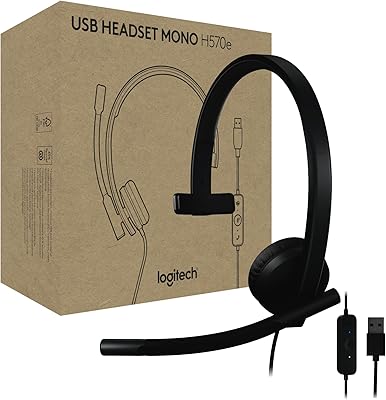
Logitech H570e Mono USB Headset
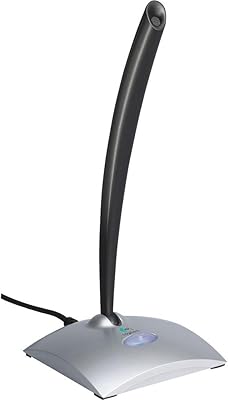
Logitech USB Desktop Gooseneck Microphone
