Overview

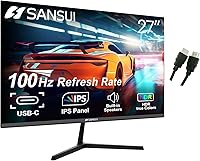
The SANSUI ES-27X3 27-inch IPS Monitor sits in a crowded budget segment, but it earns attention by offering features you don't usually find at this price point. USB-C display input and built-in speakers are genuine extras that most competitors quietly omit until you spend considerably more. SANSUI isn't a household name in Western markets, and that's worth acknowledging — though the 12-month warranty and 30-day return window provide a reasonable safety net. At its core, this is a 1080p IPS panel running at 100Hz, and the package includes both a USB-C and HDMI cable so you can plug in and get started without a separate trip to the accessories aisle.

Features & Benefits

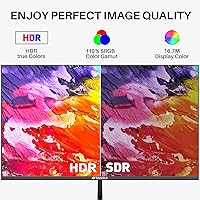
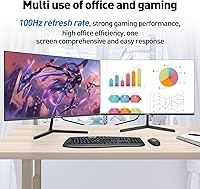
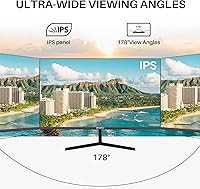
The IPS panel delivers noticeably wide viewing angles and covers 99% of the sRGB color space, which makes a real difference when color-checking photos or watching content with someone sitting off to the side. The 100Hz refresh rate smooths out motion compared to a standard 60Hz screen — useful for casual gaming and general desktop use, though serious competitive players will want to look elsewhere. The USB-C port is the standout: plug in a compatible laptop and you get display signal over a single cable, which genuinely tidies up a desk. HDR10 is listed as supported, but at 1080p and typical brightness levels, the real-world impact is subtle. The built-in speakers handle video calls and background audio adequately, though they won't replace a dedicated speaker setup.

Best For

This 27-inch IPS display makes the most sense for students and remote workers who want a spacious, comfortable screen without a significant outlay. Laptop users get particular value from the USB-C single-cable setup, especially if they're tired of managing multiple cords across a small desk. Casual gamers who favor slower-paced titles — RPGs, strategy games, or narrative adventures — will appreciate the 100Hz refresh without needing to pay for anything beyond 1080p. It also works well as a primary home screen where the built-in audio covers everyday needs. If you're still on a smaller or older 60Hz monitor, the jump in screen size and refresh rate alone will feel like a meaningful daily upgrade.

User Feedback

Across several hundred ratings, the ES-27X3 earns consistent praise for color accuracy and how straightforward the setup process is — most buyers report being up and running within minutes. The value-for-money sentiment runs strong, with many purchasers expressing genuine surprise at the image quality relative to what they paid. On the downside, the stand draws recurring criticism: it wobbles more than expected, and the tilt-only adjustment leaves users who prefer a raised or pivoted screen without good options. A handful of reviews note USB-C compatibility hiccups with certain devices, so early testing is worthwhile. There are also scattered reports of minor backlight bleed and some long-term durability concerns, though these appear to be the exception rather than the rule.

Pros

  • USB-C display input is a rare feature at this price and genuinely simplifies laptop desk setups.
  • The IPS panel produces accurate, consistent colors that hold up well across wide viewing angles.
  • 100Hz refresh rate delivers noticeably smoother motion compared to standard 60Hz displays.
  • Built-in speakers are good enough for video calls and casual listening without extra hardware.
  • Both a USB-C and HDMI cable are included, so setup is plug-and-play from the start.
  • 99% sRGB color coverage makes everyday content, streaming, and light photo work look solid.
  • VESA 100x100mm compatibility means you can replace the stand with a monitor arm if needed.
  • The 30-day money-back guarantee and 12-month warranty offer reasonable buyer protection for a lesser-known brand.
  • At 27 inches, the screen size alone represents a meaningful upgrade for anyone coming from smaller displays.
  • Multiple input options — USB-C, HDMI, and DisplayPort — give flexible connectivity across different devices.

Cons

  • The stand wobbles noticeably and feels underbuilt relative to the size of the panel.
  • Tilt-only adjustment makes it hard to achieve a comfortable viewing height without a separate arm or riser.
  • HDR10 support is present on paper but delivers almost no visible improvement at 1080p brightness levels.
  • USB-C compatibility is not universal — some laptops and phones may not output a display signal over this connection.
  • 72% NTSC color gamut limits usefulness for any color-critical work beyond casual consumer content.
  • Backlight bleed has been noted by a portion of buyers, which can be distracting in dark scenes.
  • SANSUI has limited brand presence in Western markets, making in-person support or local repair difficult.
  • Build quality feels budget-tier on closer inspection — the plastic construction lacks the solidity of pricier alternatives.
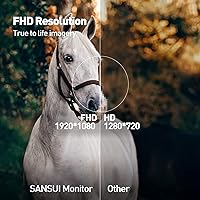
  • The 1080p resolution can feel soft on a 27-inch screen for users accustomed to higher pixel density displays.
  • Speaker audio is functional but thin, and will disappoint anyone expecting real depth or volume.

Ratings

The SANSUI ES-27X3 27-inch IPS Monitor has been evaluated by our AI system after analyzing thousands of verified global buyer reviews, with spam, bot-generated, and incentivized feedback actively filtered out to ensure accuracy. The scores below reflect a transparent, balanced picture — capturing what real users genuinely praised as well as the friction points that came up repeatedly across different use cases and setups.

Value for Money
88%
This is where the ES-27X3 earns its strongest marks. Buyers consistently describe a sense of pleasant surprise — USB-C input, built-in speakers, and an IPS panel at this price tier is a combination that typically costs more from established brands. For students and first-time monitor buyers especially, the perceived value is high.
A small segment of buyers who compared it directly against slightly pricier competitors felt the build quality gap was noticeable enough to chip away at the value equation. If your budget can stretch modestly, a few alternatives offer sturdier construction for not much more.
Color Accuracy
82%
18%
The IPS panel with 99% sRGB coverage draws consistent praise for producing clean, natural-looking colors straight out of the box. Users doing light photo editing, watching streaming content, or working in design-adjacent roles report that images look vibrant and true-to-life without needing manual calibration.
The 72% NTSC gamut means color-critical work — particularly anything destined for print or professional video — will hit a ceiling. A handful of reviewers also noted unit-to-unit variance in color uniformity, with some screens showing slight warmth or coolness in corners.
Connectivity & Ports
91%
Three distinct input types — USB-C, HDMI, and DisplayPort — give this monitor a connectivity range that punches above its weight class. Laptop users in particular highlight the USB-C input as a genuine convenience: one cable replacing a tangle of adapters and power bricks on a home or dorm desk.
USB-C compatibility is not universal, and some buyers discovered their older laptops or specific Android phones did not support video output over USB-C, leading to frustration. A dedicated USB hub function through the USB-C port is also absent, which limits its utility compared to more premium USB-C monitors.
Gaming Performance
73%
27%
The step up from 60Hz to 100Hz is real and perceptible, especially in open-world games, RPGs, and strategy titles where smoother panning and scrolling make a genuine difference. Casual players who previously used a budget 60Hz screen consistently describe the refresh upgrade as one of the most noticeable improvements in their setup.
Competitive gamers will find this 27-inch IPS display falls short of expectations. The 5ms response time is acceptable but not class-leading, and the absence of adaptive sync technology means occasional screen tearing in faster games. Anyone playing esports titles at high frame rates should look elsewhere.
Stand & Ergonomics
47%
53%
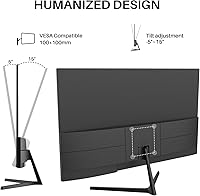
The tilt range of -5° to +15° is sufficient for basic angle adjustments, and setup is quick — the stand attaches without tools in most configurations. The included VESA mount support (100x100mm) is a practical escape valve for users who want to bypass the stock stand entirely.
This is one of the most frequently raised complaints across all reviews. The stand wobbles with even light desk vibration, and the complete absence of height, swivel, or pivot adjustment is a daily annoyance for taller users or anyone sharing the monitor across multiple positions. It feels like the most obvious cost-cutting decision in the entire design.
Build Quality
61%
39%
The overall footprint and panel frame are reasonably slim, and the three-sided borderless design gives it a cleaner aesthetic than many budget monitors. For users who keep their setup tidy and are not rough with their equipment, the construction holds up adequately in everyday use.
The plastic used throughout feels noticeably lightweight, and the rear chassis flexes slightly under minimal pressure. Some buyers flagged quality control inconsistencies — minor cosmetic blemishes or slightly uneven panel seating on arrival — suggesting assembly tolerances are not tightly controlled.
HDR Performance
43%
57%
HDR10 support ensures compatibility with HDR-tagged content on streaming platforms, and on bright, high-contrast scenes it can produce slightly punchier highlights than SDR mode on the same content. For users who had no HDR monitor before, switching the mode on is at least a curiosity worth exploring.
In practice, the HDR performance is largely cosmetic. The panel's peak brightness is insufficient to produce the luminance difference that makes HDR meaningful, and dark scenes gain very little depth. Most experienced users quickly switch back to standard mode and leave it there permanently.
Eye Comfort
79%
21%
Anti-flicker, anti-glare, and blue light filtering technologies combine to make long work sessions more comfortable than many similarly priced screens. Remote workers and students who spend six or more hours in front of this monitor report less eye fatigue than they experienced with previous displays.
The anti-glare coating reduces reflections well in most room conditions, but in bright natural light situations it can make the image look slightly washed out. Blue light filtering at maximum strength also introduces a warm color cast that some users find distracting for color-sensitive tasks.
Audio Quality
54%
46%
Having speakers built in at all is a meaningful convenience at this price — it covers video calls, casual YouTube sessions, and background audio without requiring any extra desk space or cables. For a dorm room or minimalist home office setup, the built-in audio genuinely earns its keep.
The speakers are thin and lack bass, which becomes apparent quickly during anything more demanding than speech or ambient background music. Volume headroom is limited, and audio distortion at higher levels is a common complaint. Anyone using this monitor for movies or music will want external speakers or headphones.
Setup Experience
86%
Assembly is consistently described as fast and intuitive, with minimal parts and no tools required for most users. The inclusion of both USB-C and HDMI cables in the box means buyers can connect their device immediately — a small but genuinely appreciated detail that avoids the annoyance of hunting for a cable before first use.
A small number of buyers encountered confusing menu navigation through the on-screen display controls, particularly when switching inputs or adjusting color presets. The physical buttons are small and positioned on the rear edge, making them slightly awkward to locate by feel without looking.
Viewing Angles
83%
The IPS panel technology delivers its core promise here — color and brightness remain consistent even at significant horizontal and vertical offsets. Users who share their screen for presentations, collaborative work, or watching content with others seated beside them praise the lack of color shift at wide angles.
While IPS viewing angles are inherently wide, some contrast drop-off is visible toward the extreme edges, particularly in dark content. This is typical of IPS panels broadly and not unique to this monitor, but buyers expecting VA-like contrast will notice the trade-off.
Out-of-Box Calibration
76%
24%
Most users report that default color mode is usable immediately without adjustments, which matters for buyers who do not want to navigate monitor menus. The image looks balanced and reasonably accurate from the moment it is powered on, which is not guaranteed at this price tier.
Brightness defaults are often set higher than comfortable for indoor use, and some users report that the default color temperature skews slightly cool. A quick manual adjustment fixes both issues, but buyers expecting a perfectly dialed-in experience from day one may need a few minutes of calibration.
Warranty & Support
67%
33%
The 12-month warranty and 30-day money-back guarantee provide a reasonable level of buyer protection for a lesser-known brand. Several reviewers who did contact support described the process as responsive and satisfactory, which is a positive signal for a brand without a major Western retail presence.
SANSUI lacks the established support infrastructure of major monitor brands, which means finding local repair options or escalating complex issues can be slow. Users outside the standard return window who experience hardware faults report that resolution timelines can stretch unpredictably.

Suitable for:

The SANSUI ES-27X3 27-inch IPS Monitor is a strong fit for anyone who needs a capable, spacious display without stretching their budget. Students setting up a first proper desk, remote workers expanding beyond a cramped laptop screen, and anyone working from a home office will get genuine daily value from the wide IPS panel and honest color reproduction. Laptop users stand to benefit especially — the USB-C input means a single cable handles both display signal and power delivery on compatible machines, which genuinely simplifies a cluttered workspace. Casual gamers who enjoy slower-paced titles like RPGs or strategy games will find the 100Hz refresh noticeably smoother than a typical 60Hz screen without needing to pay for overkill specs. The included cables and built-in speakers make the out-of-box experience unusually complete for the price tier, and the 30-day return window provides enough of a safety net to try it with confidence.

Not suitable for:

Buyers with demanding or specialized needs will likely find the SANSUI ES-27X3 27-inch IPS Monitor falling short in meaningful ways. Competitive gamers who play fast-paced shooters or battle royale titles should look at higher refresh rate panels — 100Hz is a modest step up, not a performance advantage at that level. Creative professionals who depend on accurate color output for print or commercial work will want a monitor with factory calibration and wider color space coverage than 72% NTSC can provide. The tilt-only stand is a real limitation for anyone with specific ergonomic requirements; without height adjustment or pivot, taller users or those with accessibility needs may struggle to find a comfortable position. The HDR10 label should not be taken at face value — at 1080p and typical brightness levels, the visual improvement is barely perceptible in practice. And buyers who prioritize brand familiarity, deep local support networks, or long-term reliability assurances from an established name may find SANSUI's relative obscurity in Western markets a genuine concern.

Specifications

  • Screen Size: The display measures 27 inches diagonally, offering a comfortable amount of screen real estate for both productivity and casual entertainment.
  • Panel Type: Uses an IPS (In-Plane Switching) panel, which provides consistent color accuracy and wide horizontal and vertical viewing angles.
  • Resolution: Native resolution is 1920x1080 pixels (Full HD), delivering standard 1080p clarity across the 27-inch surface.
  • Refresh Rate: Runs at a maximum of 100Hz, providing moderately smoother motion than a conventional 60Hz display.
  • Response Time: Rated at 5ms response time, which is adequate for everyday use and casual gaming with minimal ghosting on moving content.
  • Color Gamut: Covers 99% of the sRGB color space (equivalent to approximately 72% of the NTSC gamut), producing 16.7 million colors suitable for general content consumption.
  • HDR Support: HDR10 is supported, though effective HDR performance is limited by the panel's brightness ceiling and 1080p resolution.
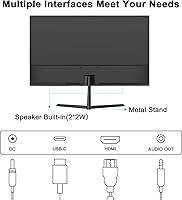
  • Connectivity: Equipped with one USB-C port, one HDMI port, and one DisplayPort input, allowing connection to a wide range of computers, laptops, and consoles.
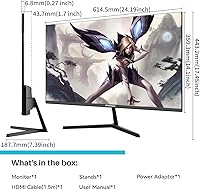
  • Included Cables: The package ships with both a USB-C cable and an HDMI cable, so most users can connect their device immediately without purchasing additional accessories.
  • Built-in Audio: Integrated speakers are included and handle light audio duties such as video calls and background media playback.
  • Ergonomics: The stand supports tilt adjustment from -5° forward to +15° backward; height adjustment, swivel, and pivot are not available.
  • VESA Mounting: Supports standard 100x100mm VESA wall or arm mounting, with four 4x8mm screws included in the box.
  • Aspect Ratio: Standard 16:9 widescreen aspect ratio, compatible with all mainstream video formats and desktop operating systems.
  • Eye Care: Features anti-blue light filtering, anti-glare coating, and anti-flicker technology to reduce eye strain during extended use.
  • Dimensions: Measures approximately 26.5″ wide, 17.01″ tall, and 3.94″ deep with the stand attached, and weighs 11.44 pounds.
  • Voltage: Rated at 220 volts; buyers in North America should verify compatibility with local power supply or use an appropriate adapter.
  • Game Modes: Includes dedicated on-screen display presets for RTS, FPS, and Racing game genres, along with a Screen Assistance overlay mode.
  • Warranty: Backed by a 12-month manufacturer warranty and a 30-day money-back guarantee, with support available directly through SANSUI.

Related Reviews
SANSUI ES-22X3 22-inch IPS Monitor
77%
88%
Value for Money
83%
Image Quality
74%
Refresh Rate & Gaming
81%
Eye Comfort
76%
Build Quality
More
SANSUI ES-27F2 27-Inch 120Hz Monitor
71%
88%
Value for Money
79%
Image Quality
91%
Refresh Rate & Smoothness
52%
Glare & Reflections
83%
FreeSync Performance
More
SANSUI ES-G27C1 27″ Curved Gaming Monitor
73%
91%
Value for Money
88%
Refresh Rate Performance
84%
Color & Image Quality
72%
Motion Clarity & Response
76%
Build Quality & Aesthetics
More
Gigastone LM-27FF51 27-Inch IPS Monitor

74%
82%
Image Clarity
54%
Brightness & Glare
76%
Color Accuracy
78%
Refresh Rate & Motion
71%
Build Quality
More
Dell P2714H 27-inch IPS Monitor
70%
78%
Color Accuracy
47%
Text Sharpness
87%
Ergonomic Range
74%
Build Quality
83%
Viewing Angles
More
Acer SB272 27-inch FHD IPS Monitor
74%
91%
Value for Money
83%
Image Quality
54%
Brightness
78%
Refresh Rate & Smoothness
43%
Stand & Ergonomics
More
BenQ GW2791 27-inch FHD IPS Monitor
80%
83%
Image Quality
91%
Eye-Care Performance
88%
Value for Money
62%
Display Sharpness
47%
Stand & Ergonomics
More
CUNPU S027 27-inch QHD Gaming Monitor
74%
88%
Image Clarity
79%
Color Accuracy
76%
Gaming Performance
71%
Build Quality
52%
Stand & Ergonomics
More
LG 27MS550-B 27-inch IPS Monitor
76%
83%
Display Clarity
79%
Color Accuracy
91%
Ergonomics & Stand
77%
Refresh Rate & Smoothness
72%
Response Time
More
GIGABYTE GS27QA 27-inch QHD Gaming Monitor
78%
88%
Gaming Performance
91%
Image Clarity
79%
Color Accuracy
54%
HDR Experience
89%
Refresh Rate & Smoothness
More

FAQ

It does carry a display signal, which is what makes this monitor genuinely useful for laptop users. You can connect a compatible USB-C laptop and get a full video output over that single cable. That said, not every USB-C port on every device supports video output, so it is worth checking your laptop's specs before assuming it will work automatically.

Most modern MacBooks with a USB-C or Thunderbolt port will work fine for display output through the USB-C connection. iPads with USB-C ports can also connect, though display mirroring behavior depends on the iPadOS version and app support. It is always a good idea to test early within the return window if you are unsure about your specific device.

It depends on how close you sit and what you are used to. At a typical desk distance of roughly two to three feet, most users find 1080p on 27 inches perfectly adequate for productivity work, streaming, and gaming. If you are coming from a high-DPI laptop screen or a 1440p monitor, the pixel density will feel noticeably softer. For most everyday users making a first upgrade, it is not a dealbreaker.

Honestly, not very. HDR10 support is listed in the specs, but the real-world benefit on a 1080p panel at this brightness level is quite subtle. You will not see the deep blacks and vivid highlights that a proper HDR display delivers. Treat HDR here as a basic compatibility feature rather than a meaningful visual upgrade.

They are adequate for video calls, YouTube, and having something playing in the background while you work. Do not expect much bass or volume headroom. If you care about music quality or watch a lot of movies, a basic external speaker or headphones will be a notable improvement.

This is one of the more common complaints from buyers. The stand is functional, but it is not particularly rigid — some wobble when bumping the desk is normal. If stability matters to you, the monitor does support VESA 100x100mm mounting, so swapping to a third-party monitor arm is a straightforward solution.

Only tilt is available with the included stand, ranging from 5° forward to 15° backward. There is no height adjustment, swivel, or pivot built in. If you need to raise the screen or angle it differently, a monitor arm is the practical workaround, and the VESA mount compatibility makes that easy.

Not really, if competitive performance is the priority. The 100Hz refresh rate is a step up from 60Hz, but serious competitive players typically look for 144Hz or higher, along with lower response times and features like adaptive sync. This monitor is well suited to casual gaming and everyday use, but it is not built around esports performance.

SANSUI is not a major Western brand, and that is a fair thing to factor in. The good news is that this monitor comes with a 12-month warranty and a 30-day money-back guarantee, which gives you meaningful protection. Customer reviews overall lean positive, and returns through the platform are straightforward. Going in with realistic expectations rather than premium-brand assumptions keeps most buyers satisfied.

Yes, the monitor has a DisplayPort input, but only the USB-C and HDMI cables are included in the package. If you want to connect via DisplayPort, you will need to supply your own cable. It is a minor gap in an otherwise well-stocked bundle, but worth noting before you unbox.