Overview

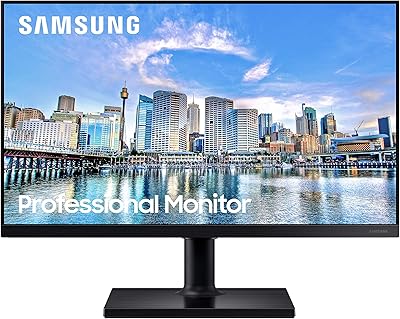
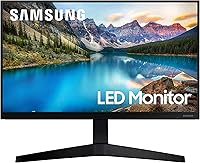
The Samsung T37F 24-inch FHD IPS Monitor is the kind of display that doesn't try to be flashy — it just does its job well. Launched in early 2021, this Samsung monitor holds its own against more recent competition in the same price bracket, largely because the fundamentals are solid. The 24-inch size fits comfortably on most desks without dominating your space, and the IPS panel is a genuine improvement over the cheaper TN screens you'll find at a similar price. Don't expect a professional color-grading tool or a high-refresh powerhouse. What you get is a dependable everyday display that covers the bases most home office users and students actually need.

Features & Benefits

The IPS panel is where this 24-inch IPS display earns the most respect. If you've ever sat at a TN monitor from a slight angle and watched the colors invert or wash out, you'll immediately appreciate how stable the image stays here — move to the side of the desk to show a colleague something, and the picture holds. The 75Hz refresh rate paired with AMD FreeSync takes the edge off everyday tasks and light gaming, smoothing out motion without needing any special hardware. Eye Saver Mode and Flicker-Free technology genuinely reduce strain during long sessions, and the HDMI plus DisplayPort inputs give you real flexibility with how you connect.

Best For

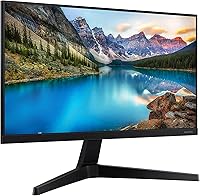
This 24-inch IPS display is a natural fit for remote workers and students who spend most of their day in front of a screen. Spreadsheets, writing, video calls, light photo editing — it handles all of that comfortably. Casual gamers who don't need 144Hz but want something smoother than a basic 60Hz panel will find the T37F a reasonable middle ground. It's also worth a look for anyone building a dual-monitor setup on a budget — the slim bezels make side-by-side screens look far tidier than the price would suggest. If you're coming from an older TN display, the color difference will be immediately noticeable.

User Feedback

With a 4.4-star average across well over a hundred ratings, the overall reception to the T37F is solidly positive. Most buyers single out the out-of-box color accuracy and slim bezels as highlights — especially those who bought two for a dual-monitor setup. Setup gets mentioned repeatedly as quick and painless. The main complaint worth flagging before you buy: the stand only tilts. There's no height adjustment, which bothers anyone who logs long hours at a desk. The fix is straightforward — the monitor is VESA-compatible, so a proper arm solves it — but it's worth knowing upfront. A handful of users also note the panel looks dim in very bright, sun-lit rooms.

Pros

  • The IPS panel delivers consistent, natural colors from almost any angle — a real step up from budget TN alternatives.
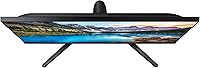
  • Slim bezels make this 24-inch IPS display an excellent candidate for a clean, near-gapless dual-monitor setup.
  • Eye Saver Mode and Flicker-Free technology noticeably reduce strain during long work or study sessions.
  • 75Hz with AMD FreeSync adds welcome smoothness for everyday use and casual gaming without a premium price.
  • Both HDMI and DisplayPort inputs give you flexibility to connect a laptop, desktop, and console without swapping cables.
  • Setup is quick and straightforward — most buyers report being up and running in under 15 minutes.
  • VESA compatibility means you can ditch the basic stand and mount it on an arm for a better ergonomic position.
  • Color accuracy out of the box is strong for this price tier — little to no calibration needed for typical office work.
  • Eco Saving Plus trims power consumption intelligently without making the image look dim or washed out.
  • Samsung's brand reliability and three-year warranty provide solid long-term peace of mind.

Cons

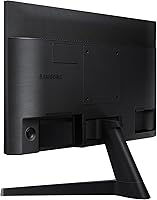
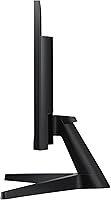
  • The stand only tilts — no height adjustment, swivel, or pivot, which limits ergonomic flexibility right out of the box.
  • Maximum brightness falls short in sun-lit rooms, making the panel look dim even at its highest setting.
  • 1080p resolution on a 24-inch screen is standard, but pixel density won't satisfy anyone used to a sharper QHD display.
  • 75Hz is a moderate refresh rate — casual enough, but a clear ceiling for anyone with competitive gaming ambitions.
  • The T37F has no built-in speakers, so you'll need external audio or a headset for any sound output.
  • Color gamut coverage is adequate for general use but falls short of what photographers or video editors need.
  • The plastic build feels utilitarian up close — it looks fine on a desk but doesn't feel particularly premium to the touch.
  • No USB hub functionality means fewer ports at your fingertips compared to some rivals in a similar price range.

Ratings

Our AI rating engine analyzed verified global buyer reviews for the Samsung T37F 24-inch FHD IPS Monitor, actively filtering out incentivized, duplicate, and bot-generated feedback to surface what real users actually experience day to day. The scores below reflect both the genuine strengths that keep buyers satisfied and the recurring pain points that surface after extended use. Nothing is glossed over — this is the full picture.

Color Accuracy
83%
For a monitor at this price tier, the IPS panel delivers colors that look honest and consistent right out of the box. Remote workers editing presentations and students watching lecture videos both note that skin tones and gradients look natural without needing manual calibration.
Color accuracy has its ceiling — photographers doing serious post-processing work will notice the gamut coverage falls short of what dedicated content creation monitors offer. Subtle color banding occasionally appears in smooth gradients, which is an IPS limitation at this resolution and price.
Viewing Angles
88%
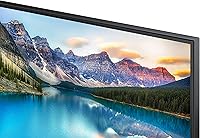
This is where the IPS panel genuinely earns its keep. Users who share their screen during video calls or work collaboratively at a shared desk consistently report that colors stay readable and accurate even when someone is viewing from the side. It removes the awkward color shift that plagues cheaper TN screens.
At very extreme angles, a slight brightness drop becomes noticeable, which is typical of IPS panels at this tier. It is not a dealbreaker in most practical scenarios, but worth knowing if your setup involves a monitor mounted unusually high or at a sharp horizontal angle.
Eye Comfort
86%
Buyers who log eight or more hours daily in front of this 24-inch IPS display report less eye fatigue compared to their previous monitors. The combination of Flicker-Free technology and Eye Saver Mode is genuinely effective — several users specifically mention being able to work later into the evening without the headache that followed them from older screens.
Eye Saver Mode shifts the color temperature noticeably warm, which some users find too yellow for color-sensitive tasks like image editing or video review. A few buyers also note that the mode cannot be fine-tuned in increments — it is essentially on or off.
Refresh Rate & Smoothness
74%
26%
The jump from 60Hz to 75Hz is more perceptible than the numbers suggest for everyday scrolling and casual gaming. Buyers upgrading from older budget monitors notice the difference almost immediately — browser scrolling feels snappier and video playback looks cleaner with AMD FreeSync active.
Anyone coming from a 144Hz panel will find 75Hz feels sluggish within minutes, and competitive gamers will hit the ceiling fast. The T37F was not designed to satisfy serious gaming demands, and treating 75Hz as a core selling point will leave that audience disappointed.
Build Quality
71%
29%
The monitor looks clean and professional on a desk — the slim bezels in particular give it a more premium appearance than the price suggests. Buyers who purchased two units for a dual-monitor setup consistently praise how sharp and intentional the matching pair looks side by side.
Up close, the plastic chassis reveals its budget-tier roots — it flexes slightly when adjusting tilt and lacks the solid feel of more expensive panels. The back panel finish also attracts fingerprints easily, which bothers users who keep a tidy workspace.
Stand & Ergonomics
46%
54%
The stand is stable and does not wobble during normal use. For buyers who work at a fixed desk height and already have their chair dialed in, the tilt adjustment is enough to get a usable screen angle without much fuss.
This is the most consistently criticized aspect of the T37F across buyer reviews. The stand offers tilt adjustment only — no height raise, no swivel, and no pivot to portrait mode. For anyone spending long hours at a desk, this is a real ergonomic limitation that often forces buyers to purchase a separate monitor arm post-delivery.
Bezel Design
87%
The virtually borderless design is a standout feature for the price. Buyers who run two units side by side in a dual-monitor configuration specifically call this out as a highlight — the gap between screens is minimal and the setup looks intentional rather than cobbled together.
The thin bezel, while visually appealing, does make the panel feel a bit delicate at the edges when handling or repositioning. A small number of buyers also note slight light bleed at the corners, which is more visible when watching dark content in a dimly lit room.
Brightness
62%
38%
In a typical home office or bedroom setup with controlled ambient light, brightness levels are sufficient for comfortable daily use. Most buyers working under standard indoor lighting conditions report no issues with visibility during the workday.
In rooms with significant natural light — particularly desks positioned near windows — buyers consistently report the panel looks dim even at maximum brightness. This is a recurring complaint that affects a real subset of users and is worth factoring in before buying if your workspace is sun-lit.
Connectivity
79%
21%
Having both HDMI and DisplayPort inputs is a practical advantage that many buyers appreciate — it means you can keep a laptop and a desktop connected simultaneously and switch between them without unplugging cables. Console users also find the HDMI port immediately useful.
There is no USB hub functionality, no audio-out jack, and no built-in speakers, which means the connectivity story ends at display inputs. Buyers expecting a more integrated experience — especially those moving from an all-in-one setup — will need to budget for external peripherals.
Setup & Installation
91%
Assembly is one of the most praised aspects in buyer reviews. The stand clicks into the panel without tools and the whole process takes under 15 minutes for most users. First-time monitor buyers specifically appreciate how little friction is involved in going from box to working display.
The included documentation is minimal, which is fine for most buyers but can leave less tech-savvy users unsure about input source selection or OSD menu navigation. Cable management options built into the stand are also limited, which can result in a slightly messy desk setup without aftermarket solutions.
Value for Money
83%
At its price point, the T37F delivers an IPS panel, AMD FreeSync, a three-year warranty, and a clean dual-monitor-ready design — a combination that buyers in this bracket consistently find hard to beat. Most reviewers express genuine satisfaction with what they received relative to what they paid.
The stand limitations, modest brightness ceiling, and lack of USB connectivity chip away at the value proposition for buyers with specific ergonomic or peripheral needs. If those factors matter, the true cost of ownership rises once you add a monitor arm and external speakers.
Gaming Performance
63%
37%
For casual gaming — indie titles, strategy games, RPGs, and console play — the T37F performs adequately and the AMD FreeSync support does reduce tearing noticeably. Buyers who game a few hours a week alongside regular productivity work find it a solid all-rounder.
Fast-twitch gaming exposes the limits quickly. The response time and 75Hz ceiling make it unsuitable for competitive first-person shooters where high refresh rates and low input lag are essential. Serious gamers will outgrow this display almost immediately.
Energy Efficiency
81%
19%
The Eco Saving Plus feature does what it promises — buyers who track their power usage notice a measurable reduction without a significant drop in perceived image quality during normal productivity tasks. It is a thoughtful inclusion for environmentally conscious users or those with electricity cost concerns.
Some users report that Eco Saving Plus causes subtle but unpredictable brightness shifts during tasks that mix dark and bright content rapidly, such as switching between a dark code editor and a bright browser tab. Turning the feature off resolves it, but defeats the purpose.
Warranty & Support
84%
A three-year manufacturer warranty from Samsung is a meaningful differentiator at this price tier, where one-year coverage is typical. Buyers express confidence knowing they have extended protection and can rely on an established brand's support infrastructure if something goes wrong.
A small number of buyers report that navigating Samsung's warranty claim process can be time-consuming, particularly for minor defects like backlight inconsistencies that require documentation and back-and-forth communication before a resolution is reached.

Suitable for:

The Samsung T37F 24-inch FHD IPS Monitor is a strong pick for anyone who spends most of their day at a desk and needs a display that's easy on the eyes without breaking the budget. Remote workers and students will appreciate the combination of accurate colors, wide viewing angles, and built-in eye care features that make multi-hour sessions far less taxing. The 24-inch footprint is practical — large enough to split-screen comfortably, small enough to fit most home office desks without rearranging your life. People building a dual-monitor setup on a budget will find the slim bezels make the pairing look far cleaner than the price tag implies. And if you're currently staring at an older 60Hz TN display, upgrading to this 24-inch IPS display will be an immediately noticeable improvement in both color fidelity and everyday smoothness.

Not suitable for:

The Samsung T37F 24-inch FHD IPS Monitor is not the right choice if ergonomics are a priority — the stand only tilts, with no height or swivel adjustment, which is a real problem for anyone who needs to dial in their setup for long-term comfort. Competitive or serious gamers should look elsewhere; 75Hz is a modest refresh rate, and the response time won't satisfy anyone used to 144Hz or higher panels. Content creators who rely on color accuracy for photo editing or video production will find 1080p limiting and may need a display with better factory calibration and wider color gamut coverage. If your workspace is flooded with natural light, the T37F's brightness ceiling may frustrate you — several users report the panel looks underwhelming in very sunny rooms. Anyone after a larger canvas for immersive media or productivity should also consider stepping up to a 27-inch display before committing here.

Specifications

  • Screen Size: The display measures 24 inches diagonally, offering a comfortable viewing area that fits most standard desks without feeling oversized.
  • Resolution: Native resolution is 1920x1080 pixels (Full HD 1080p), delivering a clear and sharp image for everyday productivity and media consumption.
  • Panel Type: An IPS (In-Plane Switching) panel is used, providing accurate color reproduction and wide viewing angles compared to TN-panel alternatives.
  • Refresh Rate: The monitor runs at a 75Hz refresh rate, producing noticeably smoother motion than a standard 60Hz display during video playback and light gaming.
  • Viewing Angle: Horizontal and vertical viewing angles reach up to 178 degrees, keeping colors stable and consistent even when viewed from well off-center.
  • Aspect Ratio: The panel uses a standard 16:9 widescreen aspect ratio, compatible with virtually all modern content formats and operating system layouts.
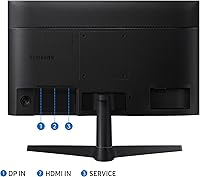
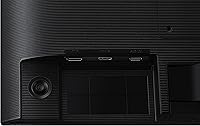
  • Ports: Connectivity includes one HDMI port and one DisplayPort input, allowing simultaneous connection of two separate sources such as a laptop and a desktop.
  • VESA Compatibility: The monitor supports VESA mount patterns, making it straightforward to attach to a third-party monitor arm or wall mount for improved ergonomic positioning.
  • AMD FreeSync: AMD FreeSync is supported, synchronizing the monitor's refresh rate with a compatible GPU to reduce screen tearing during video and gaming sessions.
  • Eye Care: Eye Saver Mode reduces blue light output and Flicker-Free technology eliminates screen flicker, both aimed at reducing eye strain during extended use.
  • Eco Saving Plus: The Eco Saving Plus feature dynamically adjusts screen brightness and RGB gain values to reduce power consumption while maintaining perceived image quality.
  • Surface Type: The screen surface is flat, which minimizes glare distortion and is better suited to controlled indoor lighting environments than curved alternatives.
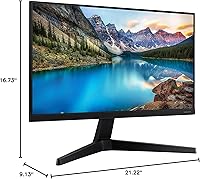
  • Dimensions: With stand attached, the monitor measures approximately 21.22″ wide, 16.73″ tall, and 9.13″ deep, fitting comfortably on most standard desks.
  • Weight: The full unit including stand weighs approximately 6.4 pounds, making it light enough to reposition or mount without requiring assistance.
  • Color Options: The T37F is available in a Blue and Black color scheme, giving the chassis a subtle two-tone look that suits most desk setups.
  • Warranty: Samsung includes a three-year manufacturer warranty, which is notably generous compared to the one- or two-year coverage common among competing monitors in this tier.

Related Reviews

Dell E2420H 24-inch FHD IPS Monitor
88%
88%
Display Quality
90%
Color Accuracy
87%
Viewing Angles
92%
Ease of Setup
91%
Energy Efficiency
More
Dell P2419H 24-Inch FHD IPS Monitor
87%
91%
Display Quality
88%
Ergonomics
78%
Build Quality
94%
Color Accuracy
89%
Flicker-Free Technology
More
Samsung FT45 24-Inch FHD IPS Monitor

80%
91%
Ergonomics & Stand
84%
Image Clarity
72%
Color Accuracy
86%
Eye Comfort
83%
Connectivity
More
ReHisk 24 Inch FHD IPS Gaming Monitor
83%
88%
Value for Money
90%
Display Quality
87%
Gaming Performance
84%
Ease of Setup
82%
Eye Care Features
More
HP 524sf 24-inch FHD IPS Monitor
85%
88%
Display Quality
91%
Value for Money
85%
Build Quality
94%
Ease of Setup
87%
Eye Care Features
More
LG 24MP400-B 24-inch IPS Monitor
71%
83%
Image Quality
91%
Value for Money
79%
Eye Comfort
64%
Gaming Performance
67%
Build Quality
More
Samsung Odyssey G3 24-Inch FHD Gaming Monitor
83%
91%
Display Quality
94%
Gaming Performance (Refresh Rate/Response Time)
88%
Ease of Setup
85%
Ergonomics & Adjustability
89%
AMD FreeSync Performance
More
LG 24BK430H-B 24-Inch FHD IPS Monitor
82%
91%
Display Quality
88%
Value for Money
94%
Eye Comfort
68%
Build Quality
87%
Ease of Setup
More
KTC H25B7 24.5-inch FHD 100Hz IPS Monitor
83%
89%
Display Quality
85%
Gaming Performance
91%
Color Accuracy
88%
Eye Care Features
78%
Build Quality
More
LG 24GN60R-B 24-inch FHD IPS Gaming Monitor
85%
93%
Gaming Performance
88%
Display Quality
91%
Response Time
85%
Color Accuracy
92%
Value for Money
More

FAQ

Typically, Samsung includes one HDMI cable in the box with the T37F, but a DisplayPort cable is usually not included. If you plan to use DisplayPort, pick up a cable separately before your monitor arrives — they are inexpensive and widely available.

The included stand only supports tilt adjustment — there is no height, swivel, or pivot functionality. This is one of the most common frustrations buyers mention after setting it up. If ergonomics matter to you, the monitor is VESA-compatible, so swapping to an aftermarket arm is a straightforward fix.

It works fine for casual gaming. The 75Hz refresh rate and AMD FreeSync combination reduces tearing and makes motion feel smoother than a standard 60Hz panel. That said, if you play fast-paced competitive titles and are used to 144Hz or higher, this monitor will feel like a step down — it was designed primarily for productivity, not gaming performance.

A handful of users flag this as a weak point. The panel's maximum brightness is adequate for normal indoor conditions but can look a bit dim in very bright, sun-lit rooms. If your desk sits directly in front of a window, you may want to consider a monitor with higher peak brightness or add a blind or curtain to manage the ambient light.

Yes — this is actually one of the strongest use cases for the T37F. The virtually borderless bezel design means the gap between two panels placed side by side is minimal, and the overall look is much cleaner than you might expect at this price point. Many buyers specifically purchased a second unit after seeing how the first looked on their desk.

No, the T37F does not include built-in speakers. You will need external speakers or a headset for audio output. This is fairly common for monitors in this category, but worth knowing before you set everything up.

Lowering brightness reduces the overall light output, but Eye Saver Mode specifically targets blue light wavelengths, which are associated with eye strain and disrupted sleep. The result is a warmer, slightly yellow-shifted image. Some people find this takes a little getting used to, but for late-night work sessions it can make a noticeable difference in how rested your eyes feel afterward.

Yes, you can connect a gaming console using the HDMI port. The monitor will display at 1080p and up to 60Hz when connected via HDMI to most current-generation consoles, which is perfectly adequate for console gaming.

Assembly is genuinely simple. The stand attaches to the panel without any tools — it clicks into place in a couple of minutes. Most buyers report being fully set up and connected within 10 to 15 minutes of opening the box. The manual is clear, and no special technical knowledge is needed.

Not in any obvious way during typical use. The feature works by adjusting brightness and RGB values based on the content on screen, so the changes are gradual and largely imperceptible. Some users prefer to turn it off for more consistent image output, but for standard office tasks most people won't notice it is running at all.