
Overview

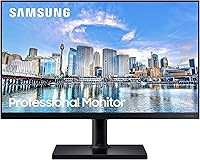
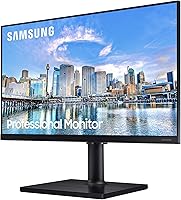
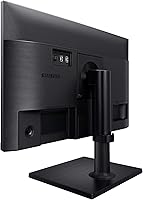
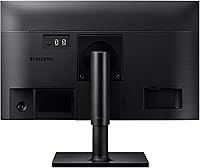
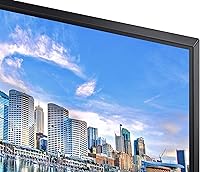
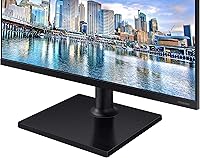
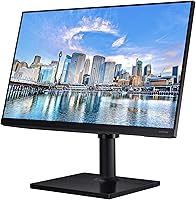
The Samsung FT45 24-Inch FHD IPS Monitor sits comfortably in the mid-range business monitor space, built for people who spend most of their day in front of a screen. At 24 inches with a 1080p IPS panel, it hits the sweet spot for desk real estate without overwhelming a standard workspace. What actually sets the FT45 apart from similarly priced alternatives is its fully adjustable stand — not a common inclusion at this tier. This is a display designed for professionals, students, and remote workers who want dependable daily performance. Don't expect pro-grade color accuracy or high-refresh gaming capability; this office display is built for productivity, plain and simple.

Features & Benefits

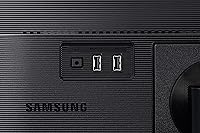
The IPS panel delivers solid color consistency across wide viewing angles — text stays crisp and colors don't shift noticeably when you reposition, which matters during long document or spreadsheet sessions. The 75Hz refresh rate won't excite anyone hunting a gaming display, but it keeps scrolling and video playback smooth. The real practical highlight is the built-in USB hub — two USB 2.0 and one USB 3.0 port on the monitor itself means keyboards, flash drives, and accessories stay plugged in without reaching behind your tower. Both HDMI and DisplayPort cables come included, and 100x100 VESA compatibility keeps wall-mount and multi-monitor arrangements straightforward.

Best For

This Samsung business monitor is a strong match for remote workers and home office users who prioritize ergonomic comfort over raw specs. Students will appreciate the no-fuss setup and clean image quality for writing, video calls, and light media. Small offices get genuine value from the USB hub when peripherals need sharing across a workstation. If you're upgrading from an older fixed-position display and dealing with neck or back strain, the stand flexibility alone justifies the switch. Anyone who values brand reliability will also appreciate that the 3-year warranty provides coverage well beyond what most competing monitors at this price tier offer.

User Feedback

Owners consistently highlight image clarity and stand flexibility as standout strengths — the height and pivot adjustments get specific praise from people who've tolerated fixed displays for years. The USB hub comes up repeatedly as a quietly useful addition that simplifies cluttered desks. On the critical side, users coming from higher-resolution screens find 1080p noticeably constraining, particularly when multitasking across multiple windows. Some reviewers also note that while color reproduction looks natural and accurate for everyday office tasks, the FT45 isn't the right call for photo or design work. Overall ratings remain strong, with most complaints targeting resolution rather than build quality or long-term reliability.

Pros

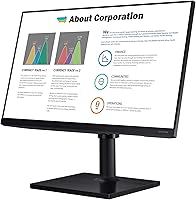
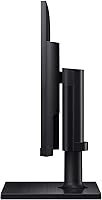
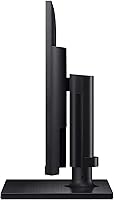
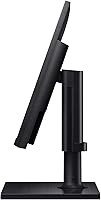
  • The fully adjustable stand — with height, tilt, swivel, and pivot — is rare at this price point and makes a real difference for posture.
  • IPS panel delivers consistent, wide-angle image quality that holds up well for text-heavy work and general productivity.
  • Built-in USB hub keeps peripherals connected through the monitor, reducing cable chaos on the desk.
  • Both HDMI and DisplayPort cables are included in the box, so setup requires no extra purchases.
  • Eye Saver Mode and flicker-free technology reduce noticeable eye fatigue during extended work sessions.
  • VESA 100x100 compatibility makes wall mounting or multi-monitor arm setups straightforward.
  • Samsung's 3-year warranty provides longer coverage than most competitors in this category.
  • At 24 inches, this office display fits comfortably on most standard desks without dominating the workspace.
  • Build quality feels solid and consistent with Samsung's broader reputation for durable, well-finished monitors.

Cons

  • 1080p resolution can feel cramped for users accustomed to higher-density displays, especially during multitasking.
  • Color accuracy is solid for office use but not reliable enough for professional photo or design work.
  • 75Hz refresh rate offers no meaningful advantage for gamers or users wanting smoother motion performance.
  • The USB hub uses USB 2.0 for two of its three ports, which limits transfer speeds for certain peripherals.
  • At nearly 9 pounds, the FT45 is not particularly lightweight if you need to move or reposition it regularly.
  • No built-in speakers means you'll need external audio solutions for video calls or media consumption.
  • The 5ms response time is acceptable but lags behind monitors specifically optimized for fast-moving content.
  • Matte screen finish reduces glare effectively but can slightly soften fine image detail compared to glossy panels.

Ratings

The scores below for the Samsung FT45 24-Inch FHD IPS Monitor were generated by our AI system after analyzing thousands of verified global user reviews, with spam, bot submissions, and incentivized feedback actively filtered out. Every category reflects the honest spread of buyer experiences — the genuine strengths and the real frustrations — so you can make a confident, well-informed decision.

Ergonomics & Stand
91%
The fully adjustable stand is consistently the most praised aspect of this office display. Users who upgraded from fixed-tilt monitors describe the height and pivot adjustments as immediately impactful on their comfort during 8-plus-hour workdays, with many noting reduced neck and shoulder strain within the first week.
A small number of reviewers found the stand's swivel range slightly narrower than expected for shared desk setups where the monitor needs to face multiple people. The stand also adds meaningful depth to the footprint, which can feel restrictive on smaller desks.
Image Clarity
84%
For everyday productivity tasks — documents, spreadsheets, video calls, and web browsing — the IPS panel produces a clean, sharp image that most users find genuinely comfortable to work with for long periods. Text rendering in particular gets consistent praise for being crisp without any noticeable fringing.
Users coming from higher-resolution displays tend to notice pixel density limitations fairly quickly, especially when working with multiple windows side by side. Fine detail in images and dense UI elements can look slightly soft compared to 1440p panels at a similar price point.
Color Accuracy
72%
28%
For general office use, colors look natural and balanced out of the box with minimal calibration needed. The wide viewing angle of the IPS panel means color consistency holds up well when colleagues glance at the screen from the side during collaborative sessions.
Professional creatives consistently flag this panel as insufficient for color-critical work — photo editing, graphic design, and video grading all expose the monitor's limitations in color gamut coverage. It is simply not built for that use case, and the scores from that user segment pull the category down noticeably.
Eye Comfort
86%
The combination of flicker-free technology and Eye Saver Mode earns genuine appreciation from users who sit in front of this display for full working days. Many reviewers specifically mention that end-of-day eye fatigue improved noticeably compared to their previous monitors, which is meaningful feedback for remote workers.
Eye Saver Mode introduces a slight warm color shift that some users find distracting during tasks that require accurate color perception. A handful of reviewers also note that the matte coating, while useful for glare reduction, can slightly dull the image under certain lighting conditions.
Connectivity
83%
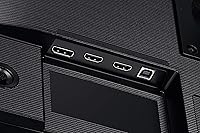
Having both HDMI and DisplayPort inputs covered — with both cables included in the box — is something buyers frequently appreciate in reviews, since most competing monitors at this tier omit one or both cables. Switching between a desktop and a laptop requires no additional hardware for most users.
The monitor only offers two input ports total, which limits flexibility for users with more complex multi-source setups. There is no USB-C input, which is an increasingly common complaint as more laptops drop traditional ports in favor of USB-C only connectivity.
Built-in USB Hub
79%
21%
The onboard USB hub is one of the FT45's most practically useful features for desk organization. Users consistently mention that routing a keyboard, mouse, and flash drive through the monitor eliminates the need to reach behind a tower PC, and the single USB 3.0 port handles flash drive transfers at reasonable speeds.
Two of the three USB ports are USB 2.0, which limits transfer speeds for external drives or high-bandwidth accessories. Power delivery through the hub is minimal, and users hoping to charge phones or tablets through these ports will be disappointed by the slow output.
Build Quality
82%
18%
The physical construction of this office display feels solid and consistent with Samsung's broader reputation. The stand mechanism operates smoothly without any wobble during height adjustments, and the overall fit and finish of the chassis looks professional in a business environment.
The back panel uses plastic throughout, which is expected at this price point but does feel noticeably less premium than some competing monitors that incorporate metal elements. A few users also report that the cable management routing in the stand is tight and difficult to use with thicker cables.
Refresh Rate & Motion
63%
37%
The 75Hz refresh rate is a meaningful step up from 60Hz panels and keeps scrolling, cursor movement, and standard video playback feeling fluid for typical office use. For users who are not coming from high-refresh displays, it feels perfectly smooth during daily productivity work.
Gamers and users accustomed to 120Hz or 144Hz monitors will find the motion performance of the FT45 immediately underwhelming. Even casual gaming reveals noticeable ghosting in fast-paced scenes, and the 5ms response time does not compensate adequately for the refresh rate ceiling.
Value for Money
76%
24%
When evaluated as a business productivity monitor with a fully adjustable stand, built-in USB hub, included cables, and a 3-year warranty, most buyers feel they received a fair deal. The stand alone would cost extra on most competing monitors, which shifts the perceived value meaningfully in the FT45's favor.
Buyers who primarily care about display resolution or panel performance — and care less about ergonomics or accessories — can find monitors with 1440p panels for comparable prices, which makes the value proposition feel weaker for that specific audience. The price-to-resolution ratio is not the strongest argument for this monitor.
Setup & Installation
88%
Assembly is straightforward and typically takes under ten minutes without tools. The stand clicks into place securely, and the included cables mean most users are up and running immediately after plugging in. Reviewers frequently describe the unboxing and setup experience as hassle-free.
A small number of users report that the stand attachment mechanism requires more force than expected on the first assembly, which can feel uncertain. The instruction manual is minimal, though in practice the design is intuitive enough that most buyers do not need it.
Resolution Adequacy
67%
33%
At 24 inches, 1080p remains a workable resolution for single-tasking, writing, browsing, and video streaming. For users who run a single primary application at a time, the display provides enough screen space to work comfortably without feeling cramped.
Users who rely on split-screen workflows or frequently reference multiple documents simultaneously find 1080p genuinely limiting. The pixel density leaves less room for content than modern 1440p panels, and this is the single most common criticism across all verified review sources.
Glare & Reflection Control
81%
19%
The matte anti-glare coating handles bright office environments well, and users near windows specifically call out that reflections do not interfere with their work the way glossy panels often do. This makes the display a practical choice for home offices where lighting conditions are variable throughout the day.
The anti-glare coating adds a slight haze to the image that is most visible on dark backgrounds or when displaying high-contrast content. Users who prefer the punchy, vivid appearance of glossy screens will find the matte finish underwhelming for media consumption purposes.
Warranty & Support
87%
The 3-year warranty stands out as a genuine differentiator in this product category, where 1 or 2 years is the norm. Buyers who prioritize long-term reliability specifically mention the coverage as a factor in their purchase decision, and Samsung's support reputation is generally viewed positively in verified feedback.
Some users report that the warranty claim process requires more documentation and back-and-forth than expected, particularly for issues that fall into grey areas between panel defects and physical damage. Response times from support can vary depending on region.
VESA & Mounting Flexibility
85%
Standard 100x100mm VESA compatibility means this display works with virtually any third-party monitor arm or wall mount on the market. Users who prefer arm-mounted setups appreciate that removing the stand is simple and that the mount points are clearly positioned and well-constructed.
For users who want to wall-mount the monitor, the cable routing from a wall position can be awkward depending on room layout. The stand must be removed to access the VESA mount, and reattaching it later is not as clean as designs that integrate mount and stand access more elegantly.

Suitable for:

The Samsung FT45 24-Inch FHD IPS Monitor was clearly designed with the everyday professional in mind, and it delivers where that audience needs it most. Remote workers and home office users who spend long hours at a desk will appreciate the fully adjustable stand — being able to dial in the exact height, tilt, and pivot for your posture is something you genuinely notice over the course of a workday. Students get a reliable, well-built display that handles coursework, video calls, and casual streaming without complaint. Small businesses outfitting shared workstations will find the built-in USB hub a quiet but consistent time-saver, keeping peripheral clutter off the desk. Anyone upgrading from an older fixed-position monitor will feel the difference almost immediately, and the 3-year warranty means you're not taking a gamble on a purchase you expect to last.

Not suitable for:

The Samsung FT45 24-Inch FHD IPS Monitor is not the right tool for every buyer, and it's worth being honest about where it falls short. If you work extensively in photo editing, video color grading, or graphic design, the IPS panel at this tier delivers natural-looking color for general use but does not meet the accuracy standards required for color-critical professional work. Power users and content creators who have grown accustomed to 1440p or 4K displays will find 1080p noticeably limiting, especially when managing multiple windows or working with dense text. Gamers chasing high refresh rates or fast response times should look elsewhere entirely — 75Hz and a 5ms response time are adequate for casual use but underwhelming compared to dedicated gaming monitors at similar price points. If your workflow demands pixel density or professional color fidelity, the FT45 is simply not built for that.

Specifications

  • Panel Type: The display uses an IPS (In-Plane Switching) panel, which provides consistent color and wide viewing angles compared to TN alternatives.
  • Screen Size: The viewable screen area measures 24 inches diagonally, making it a comfortable fit for most standard desks without feeling cramped or oversized.
  • Resolution: Native resolution is 1920x1080 (Full HD), delivering sharp text and clear images for everyday productivity and general media consumption.
  • Refresh Rate: The panel runs at 75Hz, which keeps scrolling and video playback smooth for typical office and home use scenarios.
  • Response Time: Rated at 5ms response time, suitable for general desktop work and casual video watching but not optimized for competitive gaming.
  • Connectivity: The monitor includes one HDMI port and one DisplayPort input, with both corresponding cables included in the box.
  • USB Hub: A built-in USB hub provides two USB 2.0 ports and one USB 3.0 port, accessible from the monitor body for convenient peripheral connections.
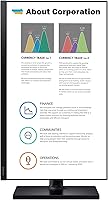
  • Stand Adjustments: The stand supports full ergonomic adjustment including tilt, swivel, height, and 90-degree pivot rotation for portrait orientation.
  • VESA Compatibility: The monitor is compatible with 100x100mm VESA mounting patterns, supporting wall mounts and multi-monitor arm configurations.
  • Eye Care Features: Eye Saver Mode reduces blue light output and the panel uses flicker-free technology to minimize eye strain during extended use.
  • Aspect Ratio: The screen uses a standard 16:9 widescreen aspect ratio, which aligns with the majority of productivity applications and media formats.
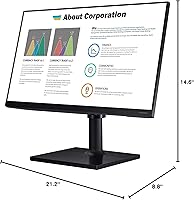
  • Dimensions: With the stand attached, the monitor measures approximately 8.8 x 21.2 x 14.6 inches (depth x width x height).
  • Weight: The complete unit including the stand weighs 8.8 pounds, which is typical for a 24-inch business monitor in this class.
  • Color: The monitor is finished in matte black, with a design aesthetic that blends into most professional office and home workspace environments.
  • Surface Finish: The screen uses a matte anti-glare surface coating that reduces reflections under bright ambient lighting conditions.
  • Warranty: Samsung covers this monitor with a 3-year limited warranty, which is notably longer than the 1-to-2-year coverage common among competing models at this price tier.
  • Model Number: The official model designation is F24T452FQN, part of Samsung's F45 Series Business Monitor lineup.
  • Power: The monitor uses an external power adapter and complies with standard energy efficiency guidelines for desktop displays in its class.

Related Reviews
Dell E2420H 24-inch FHD IPS Monitor

88%
88%
Display Quality
90%
Color Accuracy
87%
Viewing Angles
92%
Ease of Setup
91%
Energy Efficiency
More
Samsung T37F 24-inch FHD IPS Monitor
77%
83%
Color Accuracy
88%
Viewing Angles
86%
Eye Comfort
74%
Refresh Rate & Smoothness
71%
Build Quality
More
ReHisk 24 Inch FHD IPS Gaming Monitor
83%
88%
Value for Money
90%
Display Quality
87%
Gaming Performance
84%
Ease of Setup
82%
Eye Care Features
More
Dell P2419H 24-Inch FHD IPS Monitor
87%
91%
Display Quality
88%
Ergonomics
78%
Build Quality
94%
Color Accuracy
89%
Flicker-Free Technology
More
HP 524sf 24-inch FHD IPS Monitor
85%
88%
Display Quality
91%
Value for Money
85%
Build Quality
94%
Ease of Setup
87%
Eye Care Features
More
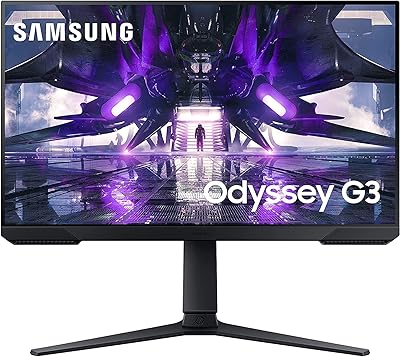
Samsung Odyssey G3 24-Inch FHD Gaming Monitor
83%
91%
Display Quality
94%
Gaming Performance (Refresh Rate/Response Time)
88%
Ease of Setup
85%
Ergonomics & Adjustability
89%
AMD FreeSync Performance
More
LG 24MP400-B 24-inch IPS Monitor
71%
83%
Image Quality
91%
Value for Money
79%
Eye Comfort
64%
Gaming Performance
67%
Build Quality
More
LG 24BK430H-B 24-Inch FHD IPS Monitor
82%
91%
Display Quality
88%
Value for Money
94%
Eye Comfort
68%
Build Quality
87%
Ease of Setup
More
KTC H25B7 24.5-inch FHD 100Hz IPS Monitor
83%
89%
Display Quality
85%
Gaming Performance
91%
Color Accuracy
88%
Eye Care Features
78%
Build Quality
More
LG 24GN60R-B 24-inch FHD IPS Gaming Monitor
85%
93%
Gaming Performance
88%
Display Quality
91%
Response Time
85%
Color Accuracy
92%
Value for Money
More

FAQ

Both an HDMI cable and a DisplayPort cable are included in the box, so you can connect it to your computer right away without any additional purchases.

Yes, the stand supports a full 90-degree pivot, so you can rotate the panel to portrait orientation. It's a genuinely useful feature for developers or anyone who spends time reading long-form content.

It's fine for casual gaming, but it was not built with gamers in mind. The 75Hz refresh rate and 5ms response time are adequate for relaxed play, but if you're competitive or used to 144Hz displays, you'll likely find it underwhelming.

The stand provides a meaningful range of height travel — enough to accommodate sitting positions at different desk heights. Combined with tilt and swivel, most users find a comfortable position without needing a monitor arm.

Yes, as long as your laptop has an HDMI or DisplayPort output (or an adapter that converts to one), the FT45 will connect without issue. It works with both Windows and macOS systems.

Absolutely. The monitor supports the standard 100x100mm VESA pattern, so it's compatible with most third-party wall mounts and adjustable monitor arms.

The USB ports are primarily designed for data connectivity — plugging in keyboards, mice, flash drives, and similar peripherals. They can provide low-level power to some devices, but this hub is not intended as a dedicated charging station.

At 24 inches, 1080p still looks reasonably sharp for text, spreadsheets, and web browsing. It's when you start doing side-by-side window comparisons or working with high-resolution images that the pixel density starts to feel limiting compared to 1440p screens.

Most users who work 8 or more hours daily notice a genuine reduction in eye fatigue with Eye Saver Mode enabled. It reduces blue light output and, combined with the flicker-free panel, makes extended sessions noticeably more comfortable. It's not a cure-all, but it does help.

Samsung covers this office display with a 3-year limited warranty, which is solid coverage for a monitor in this category. Samsung's support process is straightforward — you contact them directly, and they handle replacements or repairs depending on the issue.