
Overview

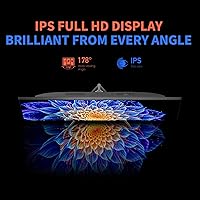
The ReHisk 241KV2 24-inch Gaming Monitor enters a crowded budget segment and holds its own by prioritizing the specs that matter most to fast-paced gamers. ReHisk isn't a recognized brand name, so expectations going in are naturally tempered — but the hardware makes a reasonable case for itself. The IPS panel is a meaningful choice at this price, delivering wider viewing angles and more consistent colors than the TN alternatives that dominated budget gaming displays for years. The borderless frame is a nice bonus for anyone running a dual-monitor setup. And yes, this is strictly a 1080p display — no 1440p aspirations here, which is exactly the right call when chasing high refresh rates on a modest GPU.

Features & Benefits

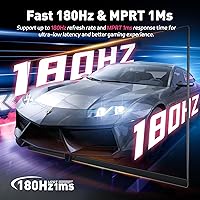
At 180Hz with 1ms response, the motion clarity is the headline spec, and it delivers where it counts — fast games feel noticeably smoother compared to standard 60Hz or even 75Hz panels. Having both AMD FreeSync Premium and NVIDIA G-Sync compatibility means you're covered regardless of which GPU brand you're running, a genuinely practical advantage. The IPS panel carries HDR10 support, but be clear-eyed about what that means at 250 nits of brightness — it's entry-level HDR that adds a touch of contrast in supported content, not the dramatic effect you'd see on a high-end display. The flicker-free backlight and blue light filter are thoughtful inclusions for long sessions, and connectivity covers HDMI, VGA, a USB port, and VESA mounting.

Best For

This ReHisk monitor is a natural fit for competitive gamers who care more about frame rate than pixel density — think CS2, Valorant, or racing sims where every millisecond matters. Students and remote workers pulling double duty will also find it capable: the IPS panel handles everyday tasks comfortably, and the eye-care features hold up over long hours at the desk. If you're assembling a multi-monitor workstation without breaking the bank, the slim bezels make side-by-side setups look clean. And if you're currently on a 60Hz display, the jump to 180Hz will feel immediately tangible — it's one of those upgrades that's difficult to go back from once you've experienced it.

User Feedback

Buyers consistently praise the smooth motion and clean image quality for a display in this price range, with setup time earning good marks as well. On the flip side, the 250-nit brightness draws the most consistent criticism — in a sun-lit room, the screen can look noticeably dim. The stand has been called adequate but not inspiring; it tilts and that's about it, so anyone wanting height or swivel adjustment will need a monitor arm. The built-in speakers work in a pinch but won't replace even a modest external setup. A few users noted the OSD menu takes some patience to navigate, and out-of-box calibration is decent without being exceptional.

Pros

  • 180Hz refresh rate delivers genuinely smooth motion that makes fast-paced games feel more responsive.
  • Compatible with both AMD FreeSync Premium and NVIDIA G-Sync, so you are covered regardless of GPU brand.
  • IPS panel provides wider viewing angles and better color consistency than cheaper TN alternatives at this price.
  • Borderless design makes it an easy choice for clean dual-monitor setups without an intrusive frame gap.
  • VESA mount support lets you swap to a monitor arm whenever you are ready, adding long-term flexibility.
  • Flicker-free backlight and blue light filter are practical for students or workers logging long hours at the desk.
  • Setup is straightforward out of the box, with minimal configuration required to get up and running.
  • The VGA port is a practical inclusion for users with older systems or legacy hardware still in rotation.
  • At this price point, landing an IPS panel with adaptive sync at 180Hz represents solid overall value.

Cons

  • At 250 nits, brightness is noticeably low in well-lit rooms and can look dim next to brighter competing monitors.
  • HDR10 support is present in name only at this brightness level; do not expect a meaningful HDR experience.
  • The stand is tilt-only, with no height, swivel, or pivot adjustment built in.
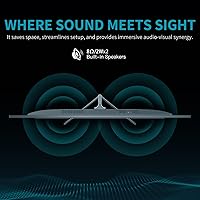
  • Built-in speakers are functional at best and will not satisfy anyone who cares about audio quality.
  • ReHisk is a lesser-known brand with limited long-term track record, which may concern reliability-minded buyers.
  • The OSD menu has been described by users as unintuitive and requires patience to navigate.
  • Out-of-box color calibration is acceptable but not precise enough for color-critical work without manual adjustment.
  • Only one USB port is included, which feels restrictive compared to monitors offering more peripheral connectivity.

Ratings

The scores below for the ReHisk 241KV2 24-inch Gaming Monitor were generated by our AI system after analyzing thousands of verified global buyer reviews, with spam, bot submissions, and incentivized feedback actively filtered out. Each category reflects what real users consistently experienced across different setups and use cases — both what impressed them and what let them down. Nothing has been smoothed over; the numbers reflect an honest picture of where this display delivers and where it falls short.

Refresh Rate Performance
91%
Users who upgraded from 60Hz or 75Hz displays consistently described the jump to 180Hz as immediately noticeable, particularly in fast-paced FPS and racing titles. Motion feels fluid and tracking fast-moving targets becomes more natural, which translated into real satisfaction for competitive players.
To actually see 180Hz in action, your GPU needs to push enough frames at 1080p, and not every buyer accounts for that before purchasing. Users with older or budget graphics cards may only experience a portion of the refresh rate ceiling in more demanding titles.
Adaptive Sync
88%
Having both AMD FreeSync Premium and NVIDIA G-Sync compatibility in a single display is a genuinely practical advantage. Buyers appreciated that they were not locked into one GPU ecosystem, and the reduction in screen tearing during fast gameplay was repeatedly called out as a standout experience.
A handful of users reported needing to manually enable adaptive sync through their GPU control panel, which was not obvious from the setup guide. On certain older AMD driver versions, a small number of users experienced occasional sync hiccups that required a driver update to resolve.
Panel & Color Quality
79%
21%
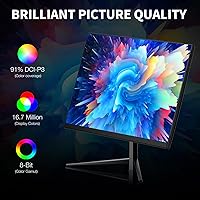
The IPS panel delivers noticeably wider viewing angles than the TN alternatives common at this price, and the 91% sRGB coverage produces colors that feel balanced and pleasant for both gaming and everyday tasks. Users watching media content noted that skin tones and gradients rendered naturally without obvious banding.
Out-of-the-box calibration leaves some room for improvement, particularly in color temperature, which skews slightly cool for some users without manual adjustment. The 91% sRGB coverage is solid for this tier but falls short of what photographers or video editors would consider acceptable for color-critical work.
Brightness & HDR
54%
46%
In a controlled or dimmer room environment, the 250-nit panel is comfortable for extended sessions and does not cause undue eye strain. The HDR10 flag does add a mild contrast lift in supported titles and streaming content that is marginally better than with HDR disabled.
This is the most consistently flagged weakness across user feedback. In bright rooms or near windows, the screen simply cannot compete with ambient light, making it look washed out. The HDR10 implementation at 250 nits is entry-level in every practical sense — buyers expecting dramatic HDR contrast will be disappointed.
Build Quality
67%
33%
For a budget-tier display, most users described the physical construction as adequate and free of obvious defects out of the box. The bezel feels reasonably solid, and the borderless design gives it a cleaner, more expensive-looking appearance than the price would suggest.
The plastic chassis does not feel particularly premium to the touch, and a few buyers noted minor flex in the panel housing when adjusting the tilt. Long-term durability is harder to assess given the brand is relatively new, and that uncertainty factors into buyer confidence.
Stand & Ergonomics
51%
49%
The stand is stable enough that it does not wobble during normal desk use, and the tilt range covers most basic ergonomic needs for users seated at a standard desk height. Setup is quick and does not require tools beyond what is included in the box.
Tilt-only adjustment is a real limitation for users who need to raise, lower, or rotate the display. Buyers who work long hours reported that the fixed height forced awkward neck positioning, and the lack of a pivot mode rules out any portrait orientation use.
Connectivity
72%
28%
The inclusion of both HDMI and VGA ports makes this a genuinely flexible option for buyers connecting older desktops, laptops, or even some older consoles without needing an adapter. VESA compatibility means transitioning to a monitor arm is straightforward and inexpensive.
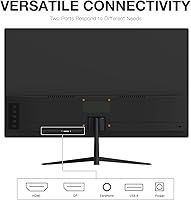
A single USB port is limiting for anyone hoping to use the monitor as a basic hub, and the absence of DisplayPort is a notable omission for users who want the most reliable high-refresh connection. The VGA port, while useful for legacy setups, does cap the signal quality for older connections.
Eye-Care Features
81%
19%
The flicker-free backlight and blue light filter received genuinely positive feedback from students and remote workers logging four to eight hours at the screen daily. Several users specifically mentioned reduced headache frequency and less eye fatigue compared to their previous displays.
The blue light filter does soften the color temperature in a way that some gamers find slightly unflattering for vibrant in-game environments, and it cannot be fine-tuned to a middle ground within the OSD without some experimentation.
OSD & Setup Experience
63%
37%
Initial physical setup is fast and uncomplicated, with most buyers reporting the display was ready to use within a few minutes of unboxing. Default settings are usable enough that casual buyers can get going without touching the OSD at all.
Users who did dive into the OSD to fine-tune brightness, color, or refresh rate settings found the menu logic counterintuitive and the button placement awkward. It is a minor but recurring complaint that points to a lack of polish in the software side of the product.
Built-in Speakers
46%
54%
The speakers are present and functional, covering basic use cases like joining a quick video call or playing low-volume background audio without requiring a separate device. For buyers in a pinch, having any audio output from the monitor itself is better than none.
Audio quality is thin and flat, with no meaningful bass response and limited volume before distortion becomes noticeable. Nearly every user who commented on the speakers recommended pairing the monitor with even a basic external speaker or headset for anything beyond incidental use.
Value for Money
86%
For buyers whose primary goal is a high-refresh-rate IPS gaming display at a tight budget, the 241KV2 delivers a spec sheet that is difficult to match at its price point. The combination of 180Hz, adaptive sync support for both GPU ecosystems, and an IPS panel represents a strong overall package.
The value calculation shifts for buyers who need strong HDR, bright output, or a well-featured stand — those users would need to spend more to actually get what they need. ReHisk's limited brand track record also means buyers are accepting a small degree of long-term reliability uncertainty.
Multi-Monitor Suitability
83%
The slim bezels on three sides create a clean visual gap between panels in a dual or triple setup, and several users specifically purchased multiple units for this reason. The borderless styling gives the combined display a more cohesive look than monitors with thicker frames.
Because the stand only tilts and cannot swivel, aligning two units to form a perfect flat or angled array requires a monitor arm for either or both displays. Buyers who want a plug-and-play dual setup using the stock stands may find the alignment options frustratingly limited.
Gaming Responsiveness
87%
The 1ms response time translates to minimal ghosting in practice, and users of competitive shooters noted that tracking moving targets felt clean without the blurring that affects slower panels. Combined with adaptive sync, the overall in-game feel received consistently strong marks from the gaming segment of buyers.
Some users noticed that the 1ms figure applies to specific overdrive settings that can introduce inverse ghosting at the highest levels, requiring a balance to be found in the monitor settings. This is a known trade-off on fast IPS panels and not unique to this monitor, but it does require some tuning.

Suitable for:

The ReHisk 241KV2 24-inch Gaming Monitor is a strong match for budget-conscious gamers who want a meaningful performance upgrade without spending heavily — particularly those coming from a 60Hz or 75Hz display who will feel the jump to 180Hz immediately. Competitive players focused on fast-paced titles like first-person shooters or racing games will appreciate the high refresh rate and adaptive sync support, which works with both AMD and NVIDIA graphics cards. Students and remote workers who also game after hours get a capable dual-purpose display: the IPS panel handles spreadsheets and reading comfortably, and the eye-care features make longer sessions more bearable. Anyone building a clean multi-monitor workstation on a tight budget will find the slim bezels genuinely useful for side-by-side arrangements. The VESA compatibility also means upgrading to a proper monitor arm later is a straightforward option.

Not suitable for:

The ReHisk 241KV2 24-inch Gaming Monitor will disappoint buyers who need strong HDR performance or work in bright, sunlit rooms — the 250-nit brightness ceiling is a real limitation that makes the display look washed out under direct ambient light. Content creators, photographers, or anyone doing color-sensitive work should look elsewhere, as 91% sRGB and entry-level HDR10 do not meet professional color accuracy standards. Gamers who have already experienced 1440p or 4K displays are likely to find the 1080p resolution a step backward, regardless of how smooth the motion feels. The stand offers tilt only, so users who need height adjustment, pivot, or swivel will need to budget for a separate monitor arm. Finally, buyers who prioritize audio from their display will find the built-in speakers underwhelming for anything beyond basic notification sounds.

Specifications

  • Panel Type: The display uses an IPS (In-Plane Switching) panel, which provides wider viewing angles and more consistent color reproduction compared to TN alternatives.
  • Screen Size: The active display area measures 24 inches diagonally, a practical size for a single-monitor gaming or work setup without occupying excessive desk space.
  • Resolution: Native resolution is 1920x1080 pixels (Full HD), delivering a crisp image at this screen size with a pixel density well-suited to the 24-inch form factor.
  • Refresh Rate: The panel supports a maximum refresh rate of 180Hz, enabling significantly smoother motion compared to standard 60Hz or 75Hz displays.
  • Response Time: Rated at 1ms response time, which helps reduce motion blur and ghosting during fast-moving scenes in competitive gaming titles.
  • Brightness: Peak brightness is rated at 250 cd/m² (nits), which is adequate for dimmer environments but may feel limited in brightly lit rooms.
  • HDR Support: HDR10 is supported, though the 250-nit brightness ceiling means the HDR effect is subtle rather than the high-contrast experience found on premium HDR displays.
  • Color Coverage: The panel covers 91% of the sRGB color space, providing reasonably accurate and vibrant colors for gaming and general everyday use.
  • Adaptive Sync: Both AMD FreeSync Premium and NVIDIA G-Sync Compatible technologies are supported, reducing screen tearing and stutter across a wide range of graphics cards.
  • Ports: Connectivity includes one HDMI port and one VGA port, covering both modern and legacy system connections for broader compatibility.
  • USB Ports: One USB port is included on the monitor, providing limited peripheral connectivity directly from the display.
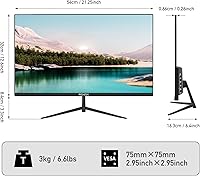
  • VESA Mount: The monitor is VESA compatible, allowing users to remove the included stand and attach a third-party monitor arm or wall mount.
  • Speakers: Built-in speakers are included for basic audio output, intended as a convenience feature rather than a primary listening solution.
  • Stand Adjustment: The included stand supports tilt adjustment only; height, swivel, and pivot adjustments are not available without a separate monitor arm.
  • Design: The display features a borderless (thin-bezel) design on three sides, making it well-suited for clean multi-monitor arrangements.
  • Eye-Care: The backlight is flicker-free and includes a blue light reduction mode, both designed to reduce eye strain during extended use.
  • Dimensions: The monitor measures 23.46 x 4.69 x 15.35 inches with the stand attached, fitting comfortably on most standard desks.
  • Weight: Total unit weight with the stand is 7.39 pounds, making it easy to reposition or mount without assistance.
  • Aspect Ratio: The display uses a standard 16:9 widescreen aspect ratio, compatible with virtually all modern games, applications, and video content.
  • Model Number: The official model identifier for this display is 241KV2, produced by the manufacturer ReHisk and first made available in November 2023.

Related Reviews
Sealan 24-Inch Curved Gaming Monitor
86%
92%
Gaming Performance
88%
Visual Quality
91%
Refresh Rate Smoothness
85%
Design & Build
87%
Eye Care Features
More
ViewSonic XG2431 24-Inch Gaming Monitor
86%
92%
Gaming Performance
88%
Display Quality
93%
Response Time
85%
Ergonomics and Comfort
89%
Visual Clarity
More
DJiEX Z24B12 24-inch Gaming Monitor
84%
92%
Value for Money
87%
Display Quality
85%
Ergonomics and Comfort
89%
Color Accuracy
80%
Connectivity Options
More
AOC 24G4 24-inch Gaming Monitor
76%
93%
Refresh Rate Performance
78%
IPS Color Quality
84%
Motion Clarity
91%
Value for Money
87%
Adaptive-Sync Implementation
More
AOC G2490VXS 24″ Gaming Monitor
80%
88%
Gaming Performance
83%
Color Quality
86%
Contrast & Black Levels
91%
Refresh Rate & Smoothness
74%
Build Quality
More
STGAubron LCD2401 24-Inch Gaming Monitor
71%
83%
Value for Money
76%
Image Quality
79%
Color Accuracy
47%
Gaming Performance
43%
Screen Glare & Reflections
More
INFIEVO 24-inch 165Hz FHD Gaming Monitor
72%
88%
Value for Money
84%
Gaming Performance
82%
Response Time
71%
Color Accuracy
41%
HDR Quality
More
CRUA CR245ZB 24.5″ Gaming Monitor
78%
83%
Gaming Performance
86%
Refresh Rate & Smoothness
74%
Color Accuracy & Vibrancy
91%
Ergonomics & Adjustability
68%
Build Quality & Materials
More
Sceptre E248W-FW100T 24-inch Gaming Monitor
76%
91%
Value for Money
74%
Image Quality
78%
Gaming Performance
82%
Refresh Rate & Sync
67%
Response Time & Motion
More
Raywego Q24B16 24-inch Curved Gaming Monitor
73%
88%
Refresh Rate Performance
84%
Contrast & Black Levels
91%
Value for Money
76%
Image Sharpness
47%
HDR Quality
More

FAQ

It genuinely runs at 180Hz, but you will need a graphics card capable of pushing that many frames in your game of choice to see the full benefit. At 1080p, most mid-range GPUs can hit 180fps in lighter competitive titles, so the spec is realistically achievable for the target audience.

Yes, the ReHisk 241KV2 24-inch Gaming Monitor carries official NVIDIA G-Sync Compatible certification, meaning adaptive sync has been verified to work with NVIDIA cards. You will need to enable G-Sync Compatible mode in the NVIDIA Control Panel, but once that is done it functions reliably.

Honestly, do not buy this monitor for HDR. At 250 nits of brightness, the HDR10 support exists but the visual difference over standard mode is subtle at best. It adds a mild contrast boost in supported content, but it is nowhere near the dramatic effect you would get from a high-brightness HDR display.

This is one of the more common complaints from buyers. At 250 nits, the display is comfortable in a controlled lighting environment, but if your desk sits near a window with direct sunlight, it can look noticeably dim. Blackout curtains or repositioning the monitor away from direct light helps significantly.

Absolutely, and the slim bezels make it a particularly good candidate for side-by-side arrangements. The gap between two of these panels is minimal, and the thin frame does not create a distracting border when spanning windows across both screens.

The included stand only tilts forward and backward; there is no height, swivel, or pivot adjustment built in. If ergonomics matter to you, a VESA monitor arm is a worthwhile addition since the monitor is fully compatible with standard VESA mounts.

They are functional for things like video calls or background audio when you do not want to reach for headphones. That said, the sound quality is basic, and for gaming or music they fall short. Most buyers treat them as a backup option rather than a primary audio source.

Yes, the VGA port is there for exactly that reason. If your desktop or older laptop only has a VGA output, you can connect it without needing an adapter. It is a practical inclusion that a portion of buyers genuinely rely on.

Out of the box, colors are decent and reasonably well-balanced for general use and gaming. It is not factory calibrated to a professional standard, so if color accuracy matters to you, spending a few minutes adjusting brightness, contrast, and color temperature in the OSD will get you to a noticeably better result.

It works, but it takes a little patience to get familiar with. Several users have noted the button layout and menu navigation are not the most intuitive at first. Once you have made your initial adjustments and saved them, you rarely need to go back in, so it is more of a one-time inconvenience than an ongoing frustration.